Gemini Researcher
Inspiration
We've all been there: you start researching a topic, and twenty minutes later, you have 50 tabs open, a headache, and scattered notes. The friction of gathering, filtering, and synthesizing information from the web is high. We wanted to build a tool that acts as an autonomous research analyst, one that doesn't just "search" but actually "reads" and "writes" for you, turning the chaos of the web into a structured, cited report.
What it does
Gemini Auto-Researcher is an autonomous intelligence agent that transforms the way you gather information. Instead of endlessly tab-switching and manually synthesizing search results, simply provide a topic, and watch as the agent:
- Plans a specific research strategy based on your query.
- Browses live Google Search results in real-time.
- Synthesizes the data into a professional, fully-cited Markdown report.
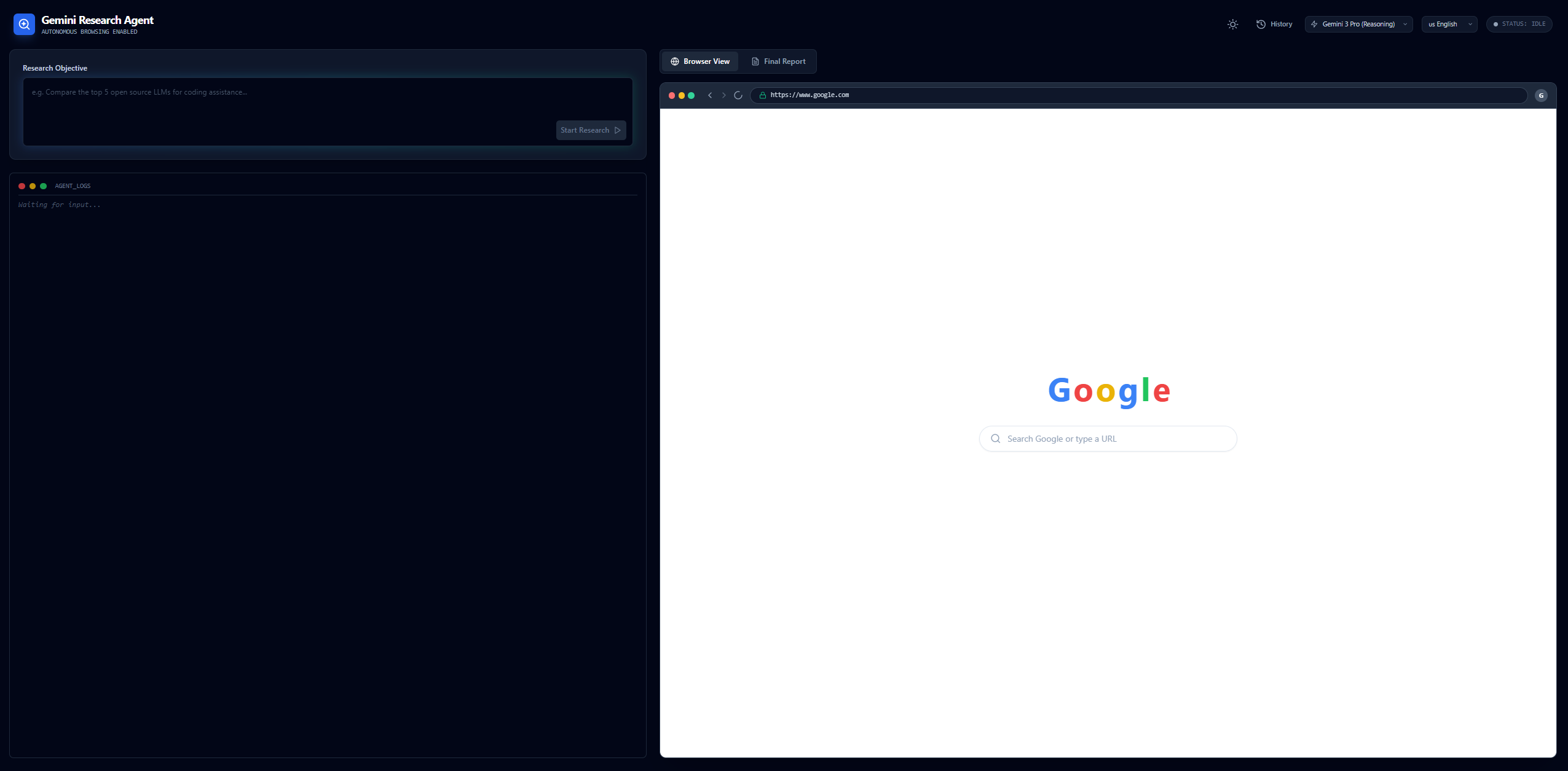
It supports multiple languages (English, Polish, Spanish, German, French, Japanese), allows you to toggle between Gemini 3 Flash (for speed) and Gemini 3 Pro (for reasoning), and visualizes the agent's "thought process" through a simulated browser interface.
How was it built
This application is built entirely around Google Gemini 3 (gemini-3-pro-preview and gemini-3-flash-preview).
The core technical implementation relies on Google Search Grounding combined with Streaming APIs. By configuring the model with tools: [{ googleSearch: {} }], the agent gains access to real-time web information. We specifically utilize generateContentStream to process responses chunk-by-chunk. This architecture allows the frontend to intercept groundingMetadata immediately as it arrives, extracting source URLs and titles to populate the "Browser View" in real-time, simulating a live browsing experience while the model concurrently summarizes the content.
The workflow executes in three distinct stages:
- Planning: We use Gemini's reasoning capabilities to decompose vague user topics into precise, language-optimized search queries.
- Browsing: The model executes the search, and we capture the grounding chunks to build a repository of verified sources.
- Writing: We feed the aggregated summaries and source URLs back into the model context. Gemini then synthesizes a structured Markdown report, ensuring every fact is backed by an inline citation linked to a real URL found during the browsing phase.
Challenges
One major challenge was synchronizing the Streaming API data with the UI state. Since groundingMetadata arrives in specific chunks separate from the text generation, we had to carefully manage the React state to ensure the "Browser View" updated smoothly without flickering while the text summary was still being generated. Another challenge was ensuring the final report used only the verified URLs found during the research phase for citations, which required precise system instructions and context management.
Accomplishments
We are particularly proud of the Browser Mock UI. It turns a backend API process into a visual story for the user. Seeing the "address bar" update and search results populate in real-time makes the AI feel tangible and agentic. We are also proud of the multi-language support, allowing users to plan, search, and report in their native language seamlessly.
What i learned
We learned that Search Grounding is not just about accuracy; it's a massive UX enabler. By exposing the sources the AI is using in real-time, we build trust with the user. We also discovered that Gemini 3's reasoning capabilities (gemini-3-pro) are significantly better at planning complex search strategies compared to smaller models, while gemini-3-flash offers incredible speed for the initial data gathering phase.
What's next for Gemini Researcher
In the future, we plan to implement:
- Deep Browsing: Allowing the agent to actually visit and scrape the content of the URLs found, rather than relying solely on search snippets.
- Multi-Agent Collaboration: A "Reviewer" agent that critiques the generated report and requests a second draft from the "Writer" agent.
- Export Integrations: Direct export options to Google Docs or PDF format.
Built With
- google-gemini-api
- react
- tailwind
- typescript


Log in or sign up for Devpost to join the conversation.