-
-
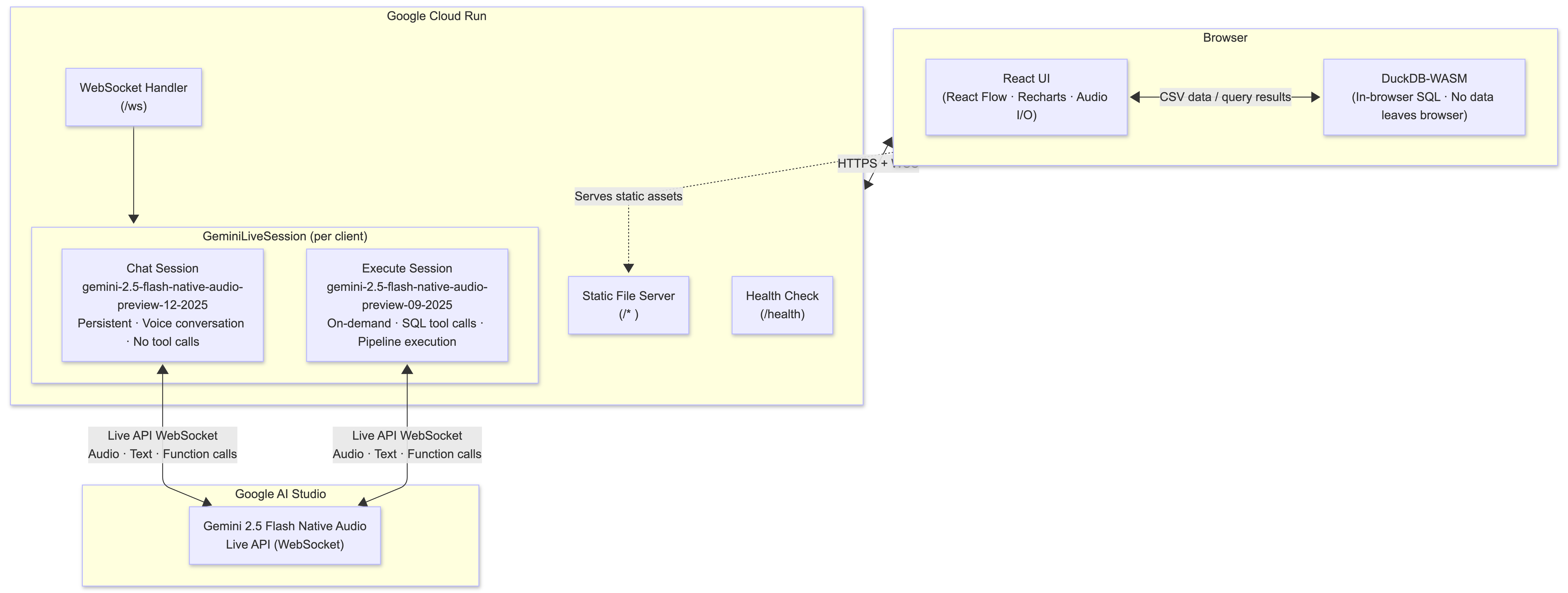
Architecture
-
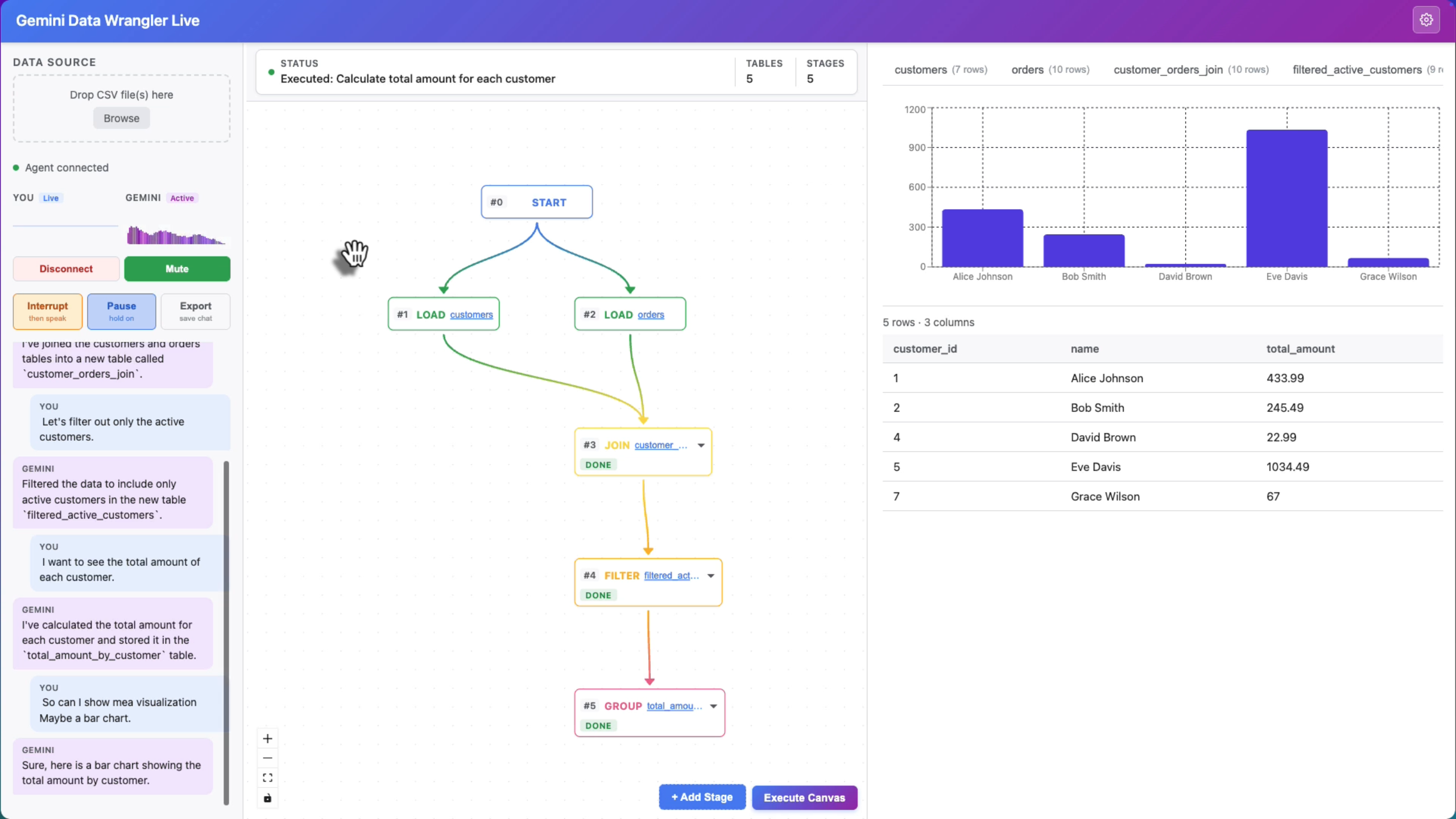
Main view, general mode
-
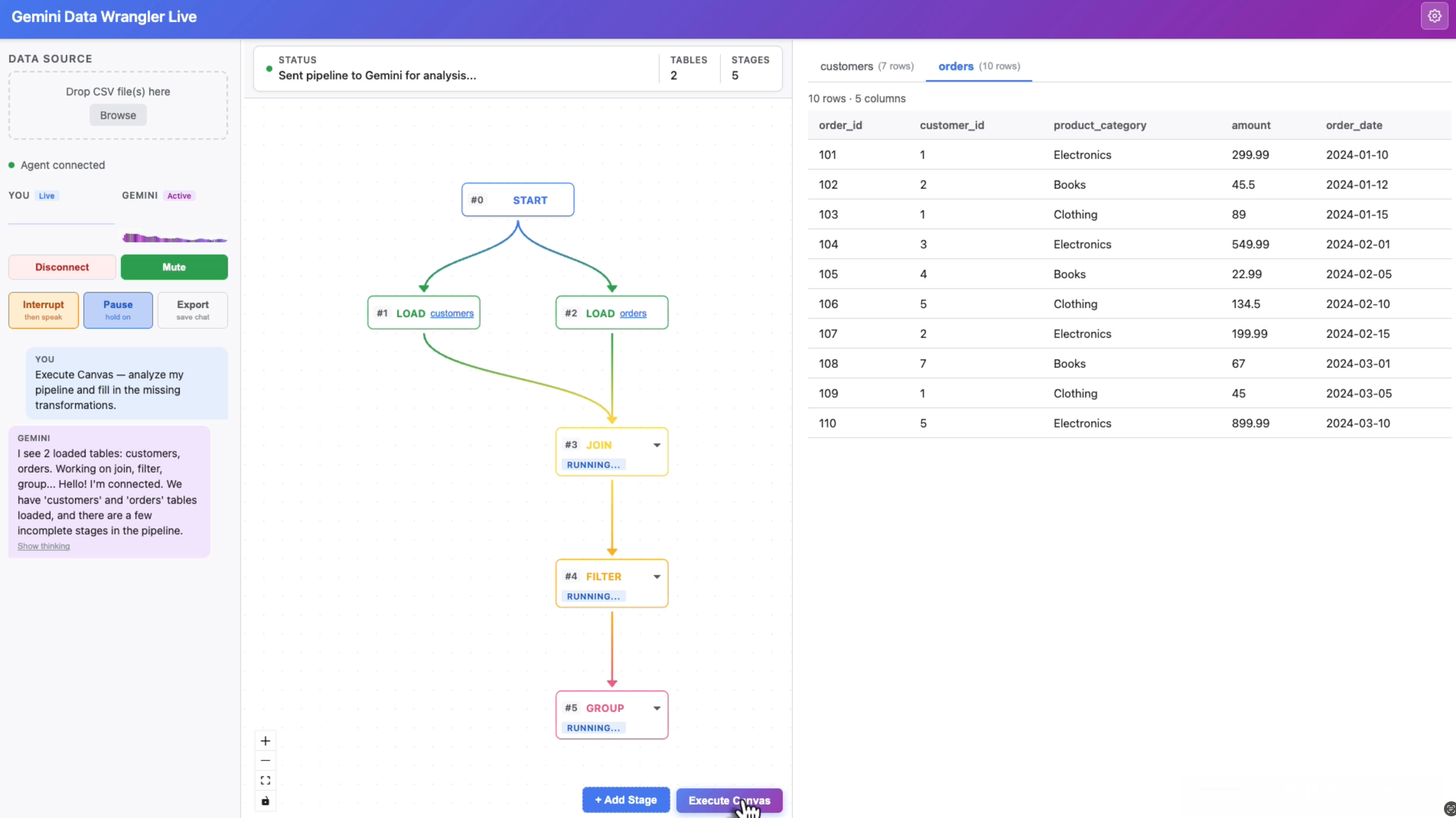
Execute mode
-
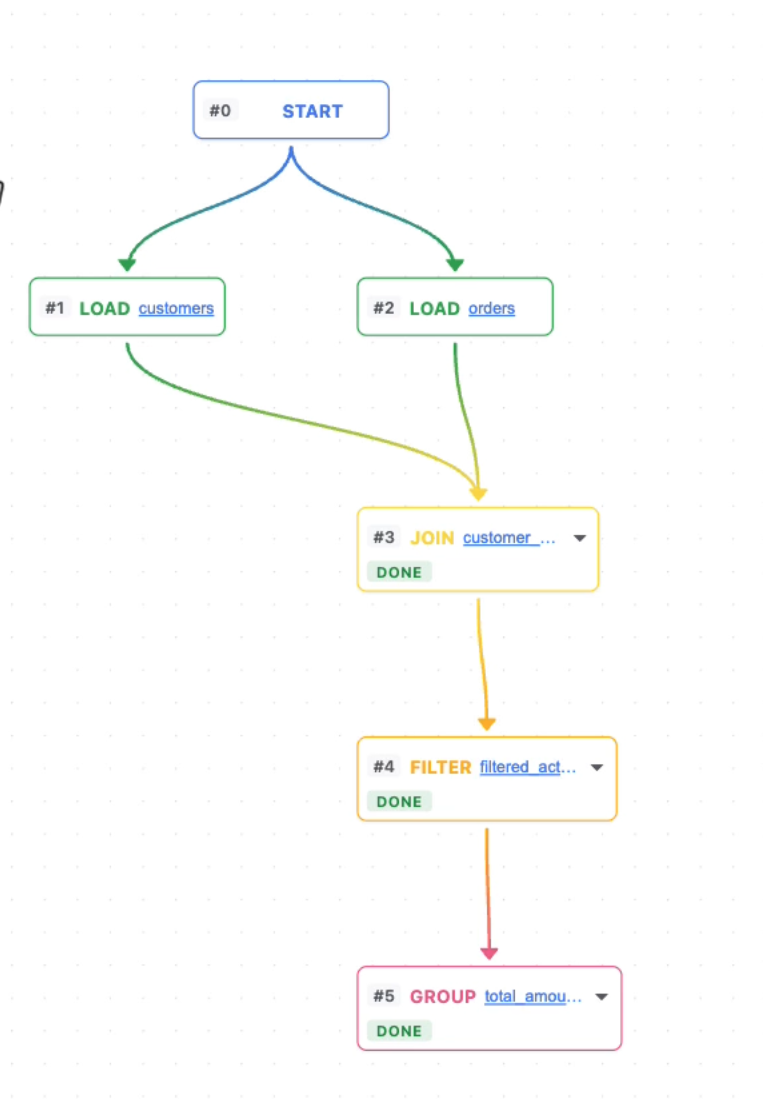
Flow view
-
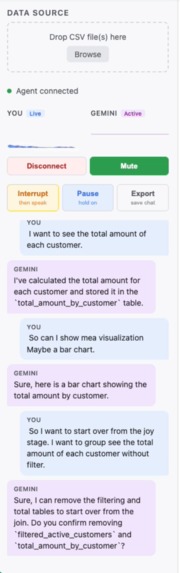
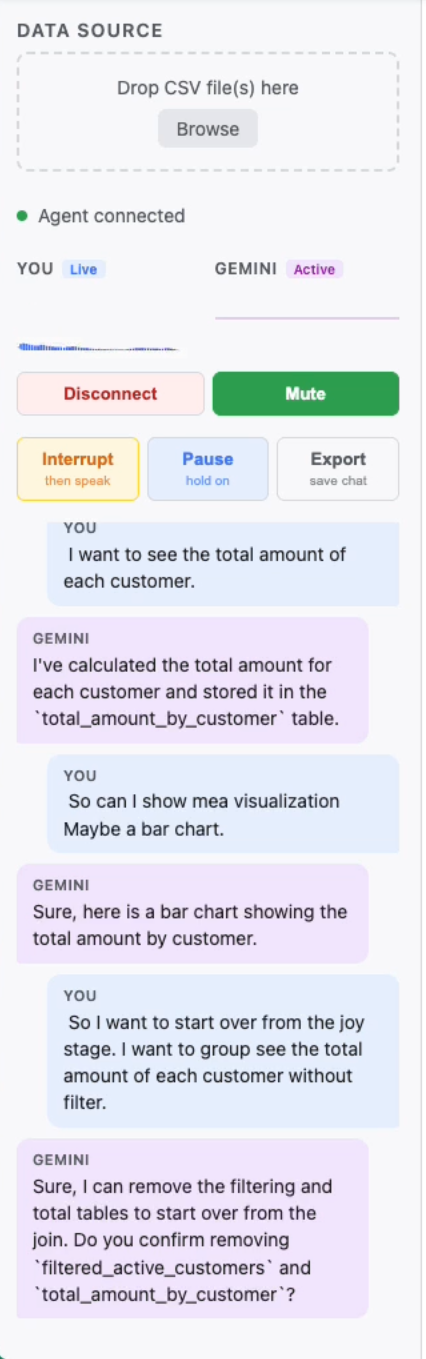
Live chat
Inspiration
Every data tool starts the same way: a text box. Type a formula, write a query, fill a form. Even AI-powered tools default to chat. When the Gemini Live API became available — real-time bidirectional audio with function calling — it opened a different door: what if you could just talk to your data the way you'd talk to a colleague? "Join these two tables on customer ID." "Filter to active users." "Show me a bar chart of sales by region." That question became this project.
What it does
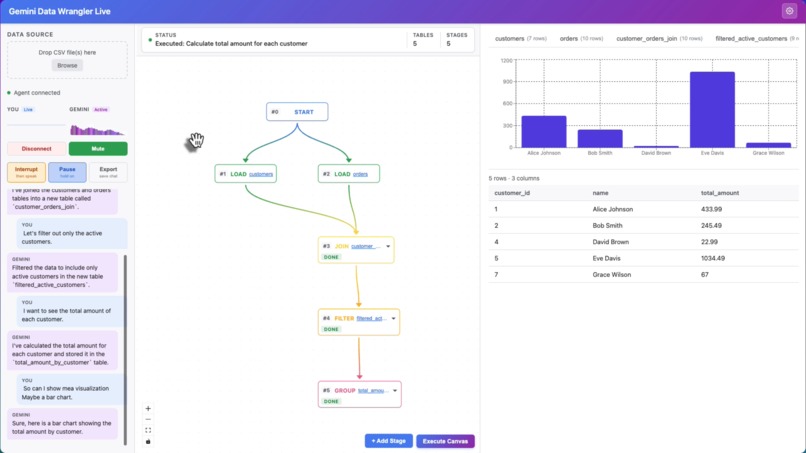
Gemini Data Wrangler Live is a voice-driven data wrangling agent. Upload CSVs, speak naturally, and watch a visual pipeline build itself in real time — no typing required. The agent understands your table schemas, writes SQL behind the scenes, and updates the pipeline graph instantly.
Key capabilities:
- Real-time voice interaction — bidirectional audio via Gemini 2.5 Flash Native Audio (Live API)
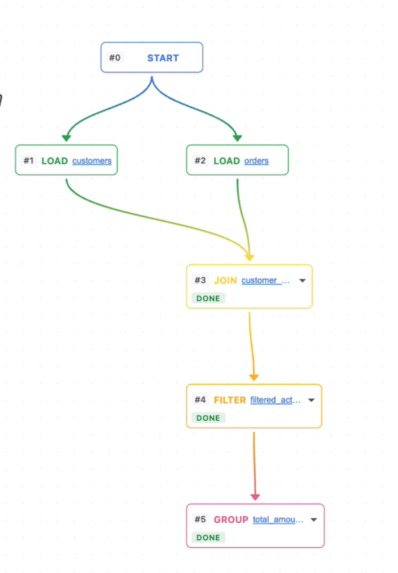
- Visual pipeline editor — React Flow graph that auto-builds as transformations are applied (JOIN, FILTER, GROUP, SORT, SELECT, UNION nodes with gradient data-lineage edges)
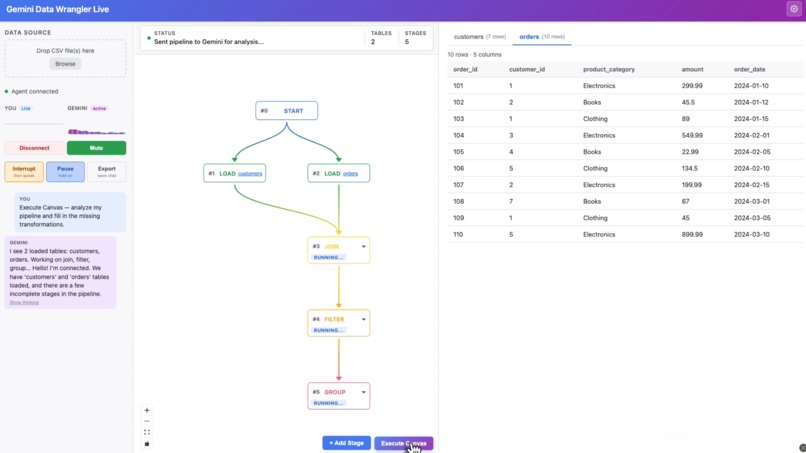
- Execute Canvas mode — click once and Gemini analyzes your entire pipeline, fills in incomplete stages in dependency order, narrates each step, and stays live for follow-up questions
- In-browser SQL engine — DuckDB-WASM runs all queries locally; no data ever leaves the browser
- Full audio control — pause mid-response, resume in sync, or interrupt cleanly with one click
How we built it
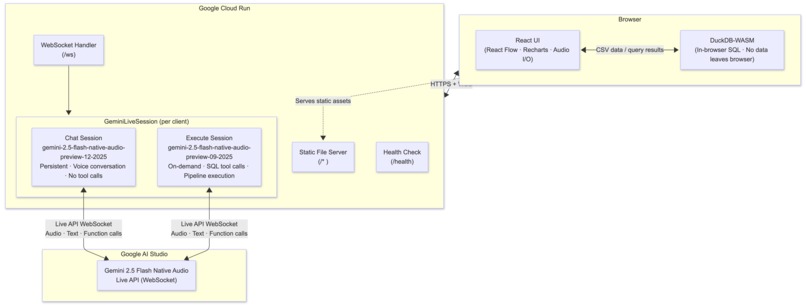
Backend: Node.js + Fastify on Google Cloud Run, handling WebSocket connections and proxying Gemini Live API sessions. Each connected browser tab gets its own dedicated server-side Gemini session. Deployed via a single deploy.sh script (build → push to Artifact Registry → deploy to Cloud Run).
Frontend: React 19 + Vite + TypeScript. React Flow for the pipeline canvas, DuckDB-WASM for in-browser SQL, Recharts for visualizations. Audio captured as 16kHz PCM via getUserMedia, streamed over WebSocket; Gemini's 24kHz PCM response streamed back and played through AudioContext.
AI: Google GenAI SDK (@google/genai) with the Live API. Two Gemini sessions run simultaneously per user:
gemini-2.5-flash-native-audio-preview-12-2025— persistent chat session, superior audio quality, voice conversation onlygemini-2.5-flash-native-audio-preview-09-2025— on-demand execute session, handles all SQL tool calls
Tool execution: SQL runs in DuckDB-WASM in the browser via deferred tool results — the server forwards the action to the frontend, the frontend executes and returns real row counts and schema, then Gemini resumes its narration.
Challenges we ran into
The 1008 tool-calling bug. gemini-2.5-flash-native-audio-preview-12-2025 disconnects with WebSocket close code 1008 the moment it attempts a function call — a server-side regression. After extensive debugging the solution was a dual-session architecture: keep the superior audio model for conversation, route all tool calls through 09-2025.
Audio interrupt timing. A fixed suppression window (Date.now() + 1000ms) wasn't enough — Gemini's stream can keep arriving for 2-3 seconds after an interrupt signal. Setting suppressUntilRef = Infinity and only clearing it when the server receives a confirmed interrupted event from Gemini made interrupts crisp and reliable.
Pause/resume audio overlap. Resetting nextStartRef to 0 on resume caused pre-pause audio chunks (still queued in AudioContext) to overlap with new chunks. Keeping nextStartRef intact so new chunks schedule after existing audio eliminated the overlap.
Column name hallucination. SQL agents routinely invent column names (date instead of order_date). Three defenses layered together solved it: exact schema injection per turn, strict rules in the system instruction, and SQL error recovery using DuckDB's "Candidate bindings" error messages to self-correct automatically.
DuckDB-WASM file sizes. The WASM bundles total ~70MB uncompressed. Without server-side compression, first-time users waited indefinitely. Adding @fastify/compress to Fastify reduced download size ~4x and made the first load usable.
Accomplishments that we're proud of
- The dual-model architecture that turns a blocking bug into a feature — better audio and reliable tool calling by running two models in concert, invisibly to the user
- Execute Canvas mode — handing Gemini an entire pipeline graph and having it reason about dependencies, fill gaps, and narrate results end-to-end feels genuinely agentic
- Deferred tool results — SQL executes in the browser (DuckDB-WASM) and real results flow back to Gemini, so the model narrates actual row counts and schema changes rather than fabricated ones
- Zero data leaves the browser — the entire SQL engine runs client-side
What we learned
The Gemini Live API + function calling is a fundamentally different programming model from chat APIs. The combination of real-time audio, mid-stream tool calls, and the model narrating its own actions makes UX that can't be replicated with a text interface.
The biggest surprise: most of the engineering effort went into audio UX, not AI logic. Interrupt, pause, and resume aren't polish — they're what makes a voice agent feel controllable rather than runaway. Voice-first means thinking in streams and events, not requests and responses.
What's next for Gemini Data Wrangler Live
- Support for database connections (PostgreSQL, BigQuery) alongside CSV upload
- Persistent pipelines — save and reload named pipeline graphs
- Multi-user collaboration — shared pipeline sessions with synchronized voice
- Richer chart types and export (PDF reports generated by Gemini narration + pipeline output)
Built With
- duckdb-wasm
- gcp
- gemini
- gen-ai-sdk
- javascript
- node.js
- react
- typescript

Log in or sign up for Devpost to join the conversation.