-
-
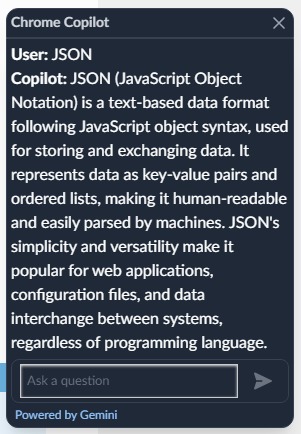
Interface
-
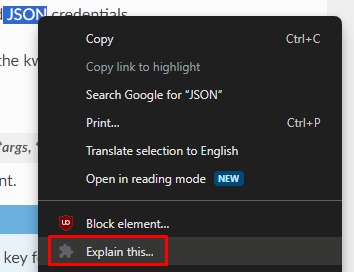
Right Click option
Inspiration
My inspiration for this project initially came from how I typically use AI when trying to understand topics as a Student. For example, when trying to understand a topic, I usually tend to like to "argue" with the AI until I understand the topic. Another way I use AI is that in some cases rather than using google when coming across a word or phrase I don't understand, I put it into a generative AI so that I am able to easily ask follow-up questions. Doing all this gets annoying, and having a big side panel with an AI chatbot like in the Edge Browser could also be annoying to some people. This all lead to me coming up with an Idea for a small out of the way chatbot that can be dragged around while I browse documentation so that I can quickly ask question and get back into reading. Despite having assignments for assignments due for the same timeframe as the hackathon I decided to go ahead and attempt the project.
What it does
What Gemini co-pilot essentially does is very simple, Its packaged as a Google Extension and toggles on and off using the extension button if you need to get it out of the way.
When toggled, a small chat box is displayed that is draggable around the page, and allows you to ask questions while scrolling the page and gives a brief concise response, that I attempted to optimize using the new System Instructions introduced in Gemini 1.5 Pro.
Another small feature is that you're able to quickly ask Gemini by highlighting text and either using a keyboard shortcut or click on "Explain this..."
How I built it
This Chrome extension chatbot project combines front-end web technologies (HTML, CSS, JavaScript) with a server-side API integration (Node.js, Express.js, Vertex AI). The extension leverages Chrome extension APIs to provide additional features like context menu integration and keyboard shortcuts.
Chrome Extension:
The project is structured as a Chrome extension, which consists of a manifest file (manifest.json), background script (background.js), content script (content.js), and additional resources like HTML, CSS, and JavaScript files. The manifest file defines the extension's permissions, background script, content scripts, and other configuration details. The background script handles the extension's background tasks, such as toggling the chatbot container and listening for context menu clicks and keyboard shortcuts. The content script is injected into the web pages and is responsible for creating the chatbot container, handling user interactions, and communicating with the background script.
Chatbot UI:
The chatbot UI is created using HTML and styled with Tailwind CSS, a utility-first CSS framework. The UI includes a header, a chat history container, an input field, and a send button. The UI is designed to be responsive and allows for vertical resizing of the chatbot container.
Chatbot Functionality:
The chatbot functionality is implemented using JavaScript in the script.js file. It includes functions for sending messages, receiving responses, storing conversation history, and updating the chat interface. The chatbot communicates with a server-side API endpoint (/api/send-message) to send user messages and receive AI-generated responses.
Server-side Integration:
The server-side component is implemented using Node.js and Express.js. It includes an API endpoint (/api/send-message) that receives user messages, processes them using the Vertex AI API, and sends back the generated responses. The server-side code integrates with the Vertex AI API to generate responses using Gemini 1.5 Pro.
Context Menu and Keyboard Shortcut:
The extension includes a context menu item that allows users to select text on a webpage and ask the chatbot to explain it. The context menu functionality is implemented in the background script using the Chrome extension APIs. A keyboard shortcut (e.g., "Ctrl+Shift+E" or "Command+Shift+E" on Mac) is also added to trigger the "Explain Text" feature without using the context menu.
Storage and State Management:
The conversation history is stored locally using the sessionStorage API, allowing the chatbot to maintain context within a single tab. The conversation history is stored as a JSON string and is retrieved and parsed when needed.
Challenges I ran into
While creating Gemini Co-pilot, I came across many challenges. I still consider myself as a beginner in JS and don't come from a coding background, so I struggled a lot to get this project to a point where it works. I used a lot of documentation and stack overflow to piece together the code and also GitHub co-pilot for help with debugging, and through perseverance I was able to get it to work.
Some of the challenges I came across that I found challenging:
Content script injection: I came across many errors trying to get the initial page injection to work as instead of being toggled it would inject and then delete when the extension button is pressed, for example, the loading gif wouldn't load properly, or the chatbot wouldn't work as intended. I looked through similar issues and tried reading through Google Extension documentation but couldn't figure it out. I eventually decided for it to just be injected once the page is loaded and then could be hidden/unhidden using the Extension button.
API Integration: I struggled initially to integrate Gemini as I haven't used the API before. I read heavily into the documentation but there were few pieces that were missing from the NodeJS documentation that I had to figure out myself. For example, there was no example or documentation for System Instructions in NodeJS so It took me a while to figure out how to implement it in my application.
State Management: This was my first time also using Chrome Extensions so I had to learn a lot about what I could and not do, and how to configure it correctly so the storage would allow me to store the chatbot history locally.
Accomplishments that I'm proud of
I'm very proud that I was able to get this project to a usable state at all, this is probably the most complex project I attempted and so I see it as a big achievement for me.
What I learned
I learned a lot about the Vertex AI API and Chrome Extension development, and I look forward to if I ever want to or need to in applying them to future projects I attempt.
What's next for Gemini Copilot Extension
Some of the features I wanted to implement if I had more time as I was busy with University assignments at the time of the Hackathon:
- A way to expand the chatbot and increase the size of text for accessibility
- Optimize it for use on different websites (there are issues on some pages)
- Implement Text to Speech and allow Image Explanation
- Different Languages
- Display History
Built With
- express.js
- html
- javascript
- node.js
- tailwind-css


Log in or sign up for Devpost to join the conversation.