-
-
Logo
-
Architecture
-
App In Action
Inspiration
While we have autonomous self-driving cars today which offer a hands-free experience, the modern desktop is still stuck in the 1980s, relying on manual clicking, scrolling and dragging for navigation. There is a massive "execution gap" between saying what you want and actually doing it on your computer. Leveraging Gemini’s Multimodal Live API can turn the desktop into a Live assistant that understands not just what you say, but what you see on your screen. This can greatly help people with disability or injury, as well as everyday computer users.
What it does
GemiNavi is an Electron-based desktop agent that allows users to control their entire workstation via natural speech. By capturing real-time audio and screen streams, it enables:
Multimodal Interaction: A seamless loop where the user speaks, Gemini thinks, and the desktop moves.
Visual Context Awareness: "Summarize this article."
System Orchestration: "Open Notepad and type 'Hope this letter finds you in good health.'"
Web Automation: "Go to Youtube, scroll down, click on that video."
How we built it
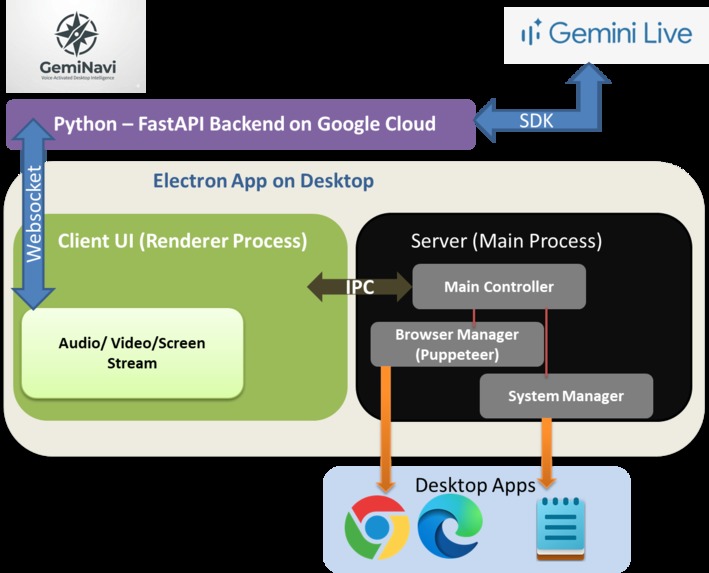
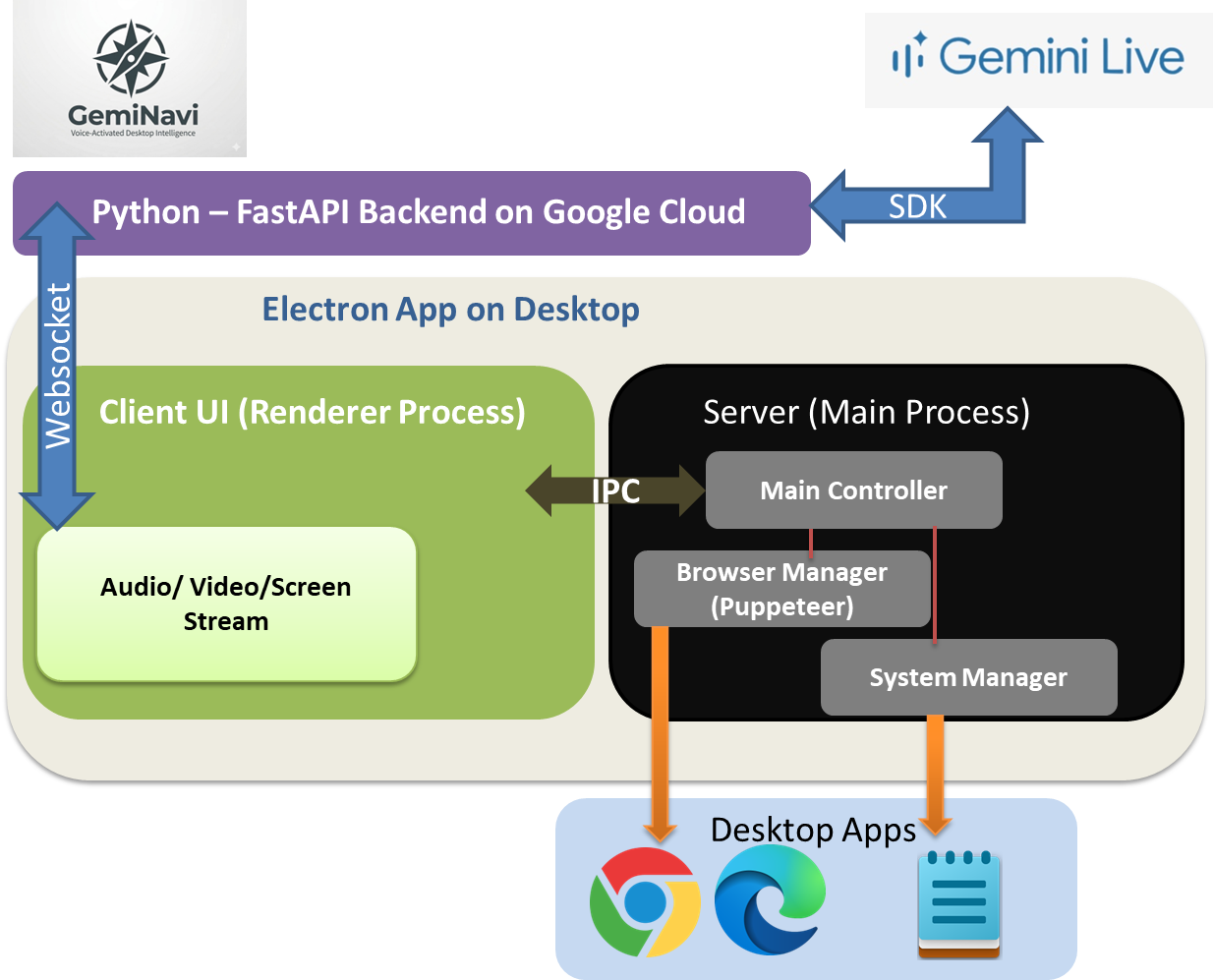
We engineered a high-performance architecture with 3 components:
The Brain (Python/FastAPI): A middleware relay using the Google GenAI SDK to manage high-speed WebSocket connections to Gemini.
The Skeleton (Electron Main Process): A Node.js core that manages system-level privileges, utilizing Puppeteer for browser automation and native OS calls for window management.
The Nervous System (Electron Renderer): A custom UI that handles media capture (Microphone/Screen) and translates Gemini’s "Tool Calls" into actionable IPC commands.
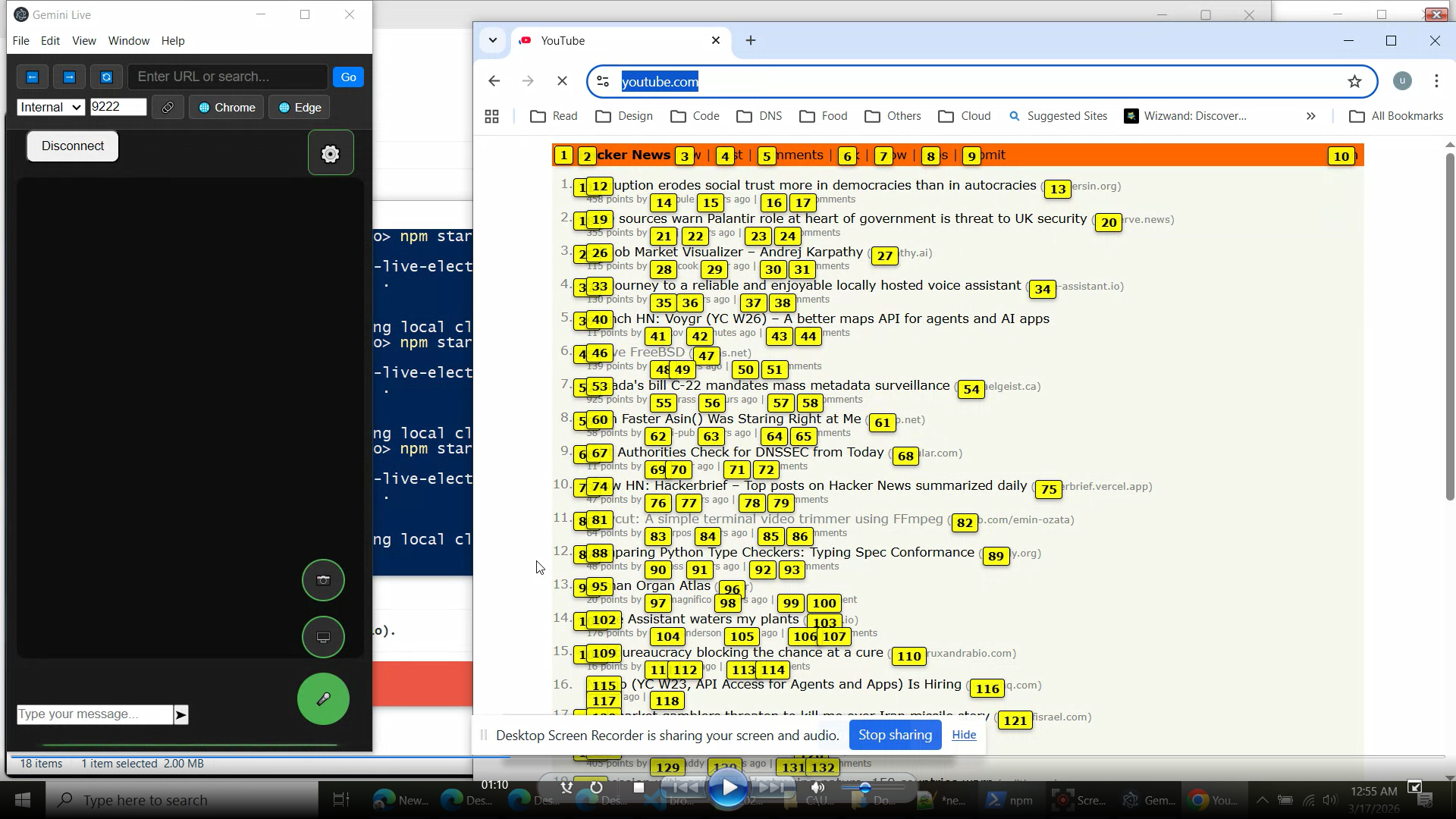
The agent "sees" the page through two primary mechanisms that work together: Visual Stream and Structural Mapping.
The Visual Stream (Screen Sharing) Every 200 milliseconds (5 times per second), the application takes a high-quality screenshot of the browser window. It uses the
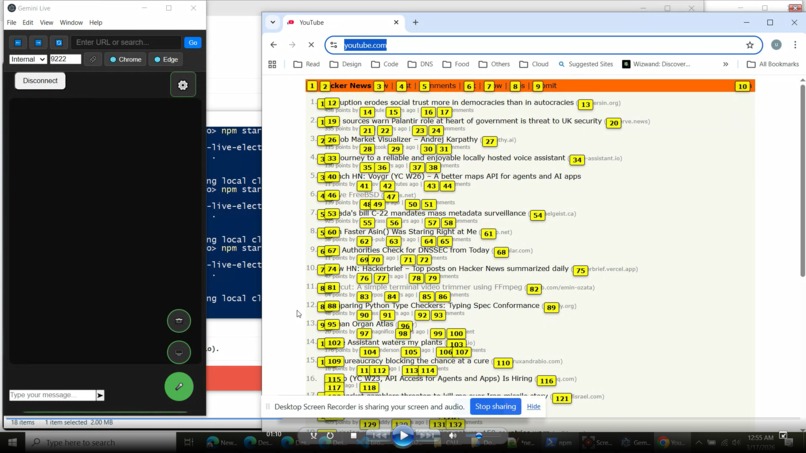
desktopCapturerAPI (the same tech used by Zoom or Discord) to grab the frame. This image is resized, compressed, and sent through the WebSocket to Gemini. Because Gemini Live is Multimodal, it doesn't just read text; its "brain" can process raw pixels. It sees the video player, the layout, and the buttons just like a human does.The Structural Mapping (Link Annotations) While Gemini can see the pixels, it's hard for an AI to precisely calculate the exact X/Y coordinate to "click" on a specific button. To solve this, we use the Annotation System we built. When Gemini calls
show_link_annotations, a script scans the webpage's code (the DOM) for everything interactive (links, buttons, inputs). It overlays a small yellow numbered box (e.g., [12]) over every one of those elements. The tool then sends a text list to Gemini: "Label 12 is a button that says 'Skip Ad". Gemini looks at the screenshot, sees the yellow [12] over the Skip button, and then sends the command:click_element(labelId: 12).
Challenges we ran into
Stream Synchronization: Balancing a real-time video feed of the desktop with a live audio stream required precise buffer management to ensure Gemini had perfect context without overwhelming the WebSocket. Managing the state between a Python backend, a Node.js main process, and a Chromium renderer required a very disciplined approach to Inter-Process Communication (IPC).
UI Non-Intrusiveness: Designing a "Headless" interface that stays out of the way while providing enough visual feedback to let the user know GemiNavi is listening.
Accomplishments that we're proud of
True Multimodality and successfully implementing a "Screen-Aware" loop where the agent can "see" a UI element and click it based on visual description rather than hardcoded coordinates.
What we learned
We discovered that the future of software is Agentic. We learned how to harness an LLM to become the logic controller for a complex suite of desktop tools. We also gained deep experience in managing the lifecycle of WebSockets across multiple languages and processes.
What's next for GemiNavi - UI Navigation at the Speed of Thought
The journey is just beginning. Our roadmap includes:
Automating Workflows: Allowing user to specify repetitive actions in custom software data interfaces, replacing manual entry.
Multi-App Orchestration: Complex "macros" that can move data between legacy desktop apps and modern web tools.
Built With
- electron
- google-cloud
- google-genai
- python

Log in or sign up for Devpost to join the conversation.