
Inspiration
Decentralized clinical trials are becoming an increasingly common way for patients to participate from home rather than drive to a research site. In fact, an industry survey found a 38% increase in trials with decentralized or virtual components from 2021 to 2022. But moving a trial home doesn't always make it easier to participate.
Imagine being at home alone with a bunch of medical supplies and gadgets, a 40-page manual, and absolutely no idea where the "on" button is. When incorrect readings could mean bad data or pose a risk to health and safety, we wanted to find a better way.
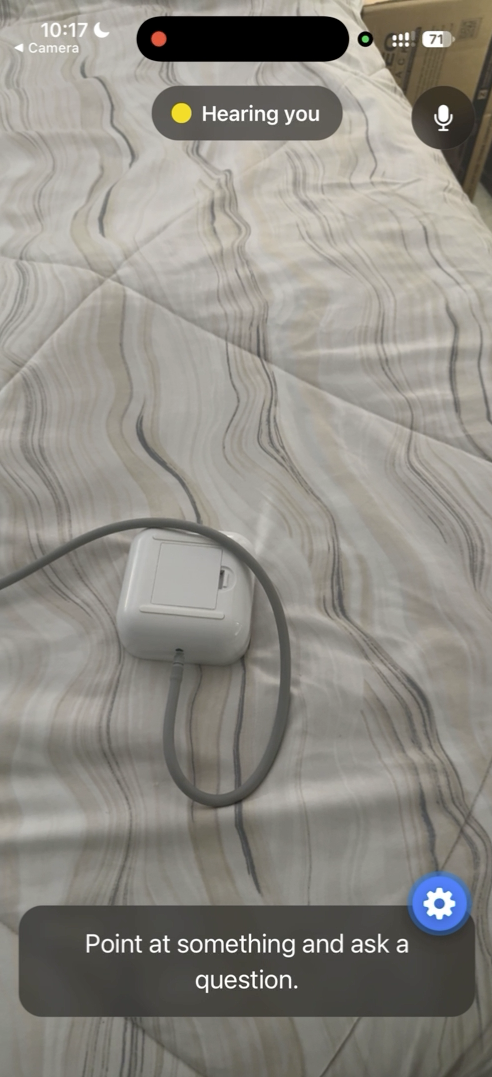
What if you could FaceTime someone who knows? Someone who can see exactly what you're looking at, listen to you, answer your questions, and circle the exact component you need.
Meet Gem.
What it does
For patients, Gem is basically a video call with someone who knows your study inside out and is always available to help.
- Just ask a question out loud, and Gem listens; there are no complex menus to navigate through.
- Point your camera at anything, and Gem identifies what you're looking at.
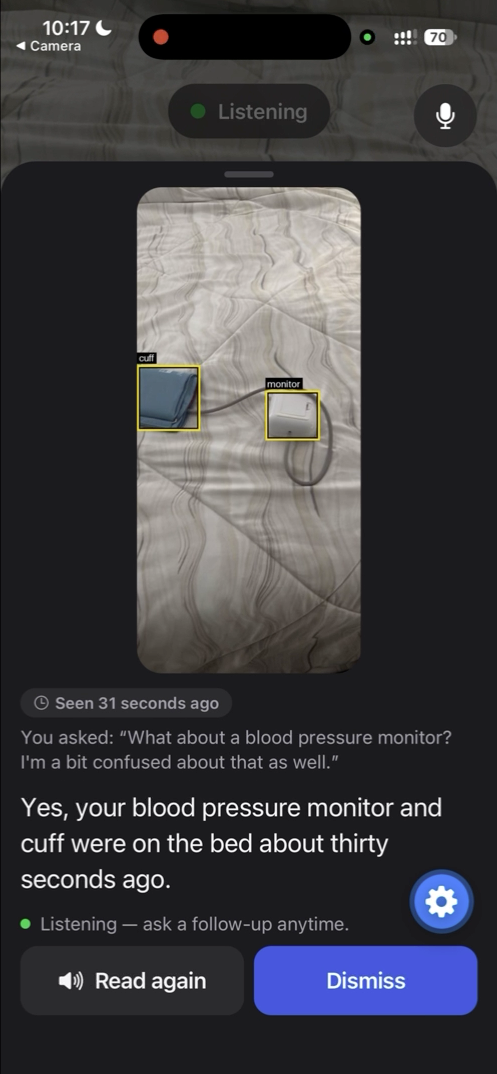
- It remembers things you may have shown it a few minutes ago. If you ask where it was, Gem can pull up the earlier frame and circle it.
- It shows and tells. Gem answers out loud and marks the answer directly on the photo, so you don't need to decipher text instructions.
- The camera pauses after inactivity, and after 10 minutes, the session memory is cleared to maintain patient privacy.
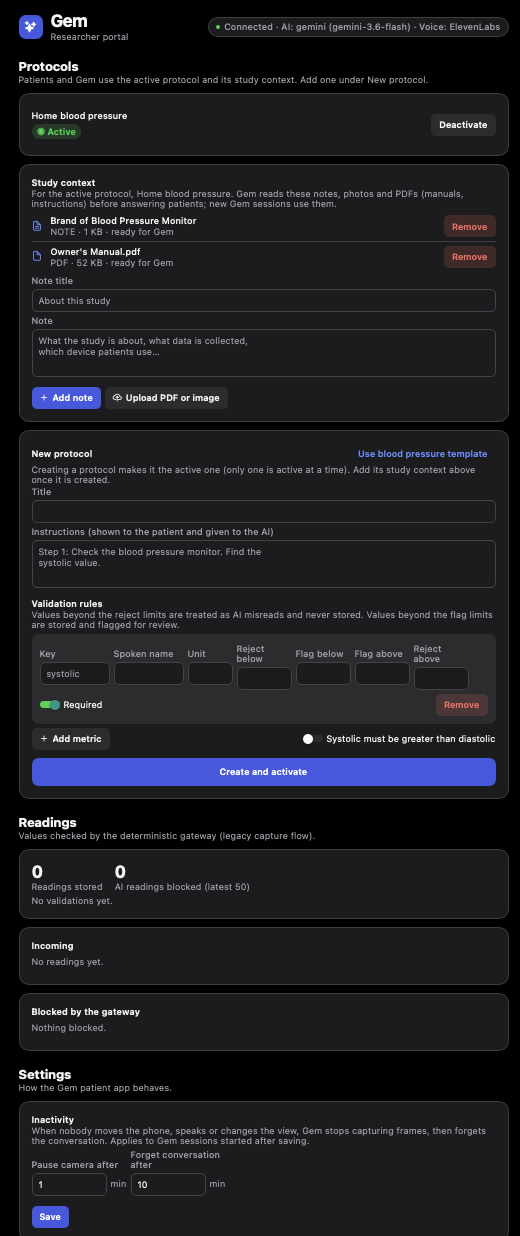
For researchers, Gem offers a web portal to manage the study behind the scenes.
- Gem can be given context by uploading manuals, photos, and study notes so it knows the specific equipment and protocols patients should be following.
- The experience can be configured by updating inactivity timers.
- Readings taken by Gem can be monitored as they come in.
- Every reading goes through a deterministic validation gateway before being stored, so if Gem were somehow to record a systolic blood pressure of 6767, for example, the gateway would reject it.
How we built it
Tech Stack
We built the patient app and researcher portal in Expo, React Native, and TypeScript, backed by a Python/FastAPI server. The server handles session memory, study documents, and API calls. API keys stay server-side.
Building Gem's Memory
Gemini doesn't have a native a "keep pushing images into a session" API.
- The Live API cannot output annotated images and caps audio + video session at about 2 minutes.
- Interactions API generates a reply for every input, so frames can't be added just to build awareness of the environment.
We wanted Gem to watch continuously without answering at every frame, so we built our own visual memory on the server.
- Frames are stored in a rolling buffer, with near-identical frames filtered out to save tokens. Older frames are sent at a lower resolution, while the two newest get a higher resolution.
- We use
Gemini 3.8 Flashto make a single request per question that handles speech transcription, visual reasoning, and the study context. - Gemini returns bounding boxes and a frame ID, and
Pillowdraws the annotations onto the original frame. This keeps the original image completely intact and reduces computation and latency. - Gem remembers its previous annotations, so if you say something like "no, the other chair," then it has context of what it got wrong.
- Gem gets study-specific knowledge by referencing the uploaded material by the researchers.
Gem's Voice
ElevenLabs' eleven_flash_v2_5 gives Gem a natural, conversational voice that brings together our vision of "FaceTiming an assistant" rather than feeling like you're talking to a device. We also built a voice activity detector in TypeScript. It listens for both volume and voiced speed rather than treating every dog barking in the background as a question. Speech starts after 200 ms and ends after one second of silence, with a minimum of 350 ms of voiced audio. We also built inactivity detection around three signals: phone movement, speech, and changes in the camera scene. Researchers can configure the inactivity timings through the portal.
Building a Clean, Accessible UI
The interface uses Reanimated and Gesture Handler for animated answer cards, swipe-to-dismiss interactions, and responsive touch feedback. We also included light and dark modes, accessible contrast, large touch targets, and support for Reduce Motion.
Challenges we ran into
Getting Gwem to Listen While It Talks
Our first problem was with iOS audio. The microphone stream would stop working after its first use, and the phone sometimes returned a successful ElevenLabs response but played absolutely nothing. We fixed the stream by starting it once and keeping it alive, and switched to downloading complete MP3s before playback, with explicit speaker routing and a watchdog for stalled audio.
We also wanted patients to be able to cut Gem off mid-answer, but the microphone also picks up Gem's own voice. We built an echo-aware voice detector that adapts to Gem's playback volume and filters transcripts that closely match its previous answer. It's not perfect as Expo Go limits our access to native echo cancellation, but interruptions work without needing a custom build.
Differentiating Speed and Background Noise
Volume alone was not enough. Someone coughing in the background could trigger the microphone, so we added an autocorrelation-based voicing check that looks for speech-like pitch in the 80-400 Hz range. Gem now requires sustained audio and voiced speech before treating something as a question, rather than assuming every noise is a patient trying to talk.
Giving Gem Visual Memory Without Constant Model Calls
Gemini's APIs didn't support the interaction we wanted: Gem needed to keep track of its surroundings without generating a response for every camera frame. We built a server-side rolling frame buffer, filtered out near-identical images, and prioritized recent frames when sending context to Gemini. We also had Gemini return bounding boxes and frame IDs, then used Pillow to draw annotations onto the original images. That lets Gem refer back to earlier frames without constantly reprocessing the entire camera feed.
Making AI Safe and Trustworthy with Study Data
We separated model interpretation from data storage with a deterministic validation gateway that checks plausibility, verifies that systolic pressure exceeds diastolic pressure, and handles duplicate submissions.
The biggest lesson was that getting a basic demo to work isn't that hard, but making it behave predictably in a real environment is the actual engineering challenge.
Accomplishments that we're proud of
We're most proud of the visual memory system we built that lets Gem keep track of its surroundings without making a model call for every camera frame. It can also retrieve earlier moments and annotate the right image when answering questions. We also had a very finicky voice experience while testing the app so we're proud of being able to successfully handle interruptions, proper speech detection, and audio caching.
What we learned
We learned that getting AI to work in a demo is one thing; getting it to work reliably on an actual phone is a whole different beast. Building Gem pushed us to think beyond model prompts and tackle visual memory, real-time audio, latency, and the limitations of mobile APIs.
What's next for Gem
- Waiting time is Gem's biggest weakness. In the future, we plan to upload each frame to the Gemini Files API once, instead of on every question, keep a sparser long-term memory, and start the voice as soon as the answer is available.
- We would like to potentially make Gemini a tool-user, so when it reads and confirms a device value, it can pass that information to the study team more effectively. We would like to build inputs for other devices beyond blood pressure monitors.

Log in or sign up for Devpost to join the conversation.