Inspiration Four images. One hidden target. A few seconds to decide whether a particular shape feels different from the others. Designed to create a telepathic communication link with machines.
GATE / MENTCOMM began with the strange intimacy of that interaction. A computer has made a choice, but will not show it yet. You look at the screen, wait for an impression, and commit. Then the machine reveals its answer. A match feels significant. A miss sends you searching for an explanation. The interface becomes a stage for attention, expectation, memory, and doubt.
The historical starting point was a 1991 Defense Intelligence Agency report describing MENTCOMM, a four-choice mental-communication training program. Its released pages contain instructions, source-code listings, target libraries, and screenshots. Rather than invent a collection of vaguely “psychic” symbols, we worked from those actual images and procedures.
The result is part media archaeology, part embedded-systems experiment, and part participatory artwork: an intelligence-lab atmosphere assembled from affordable electronics, printed plastic, browser code, and a paper notebook. What it does
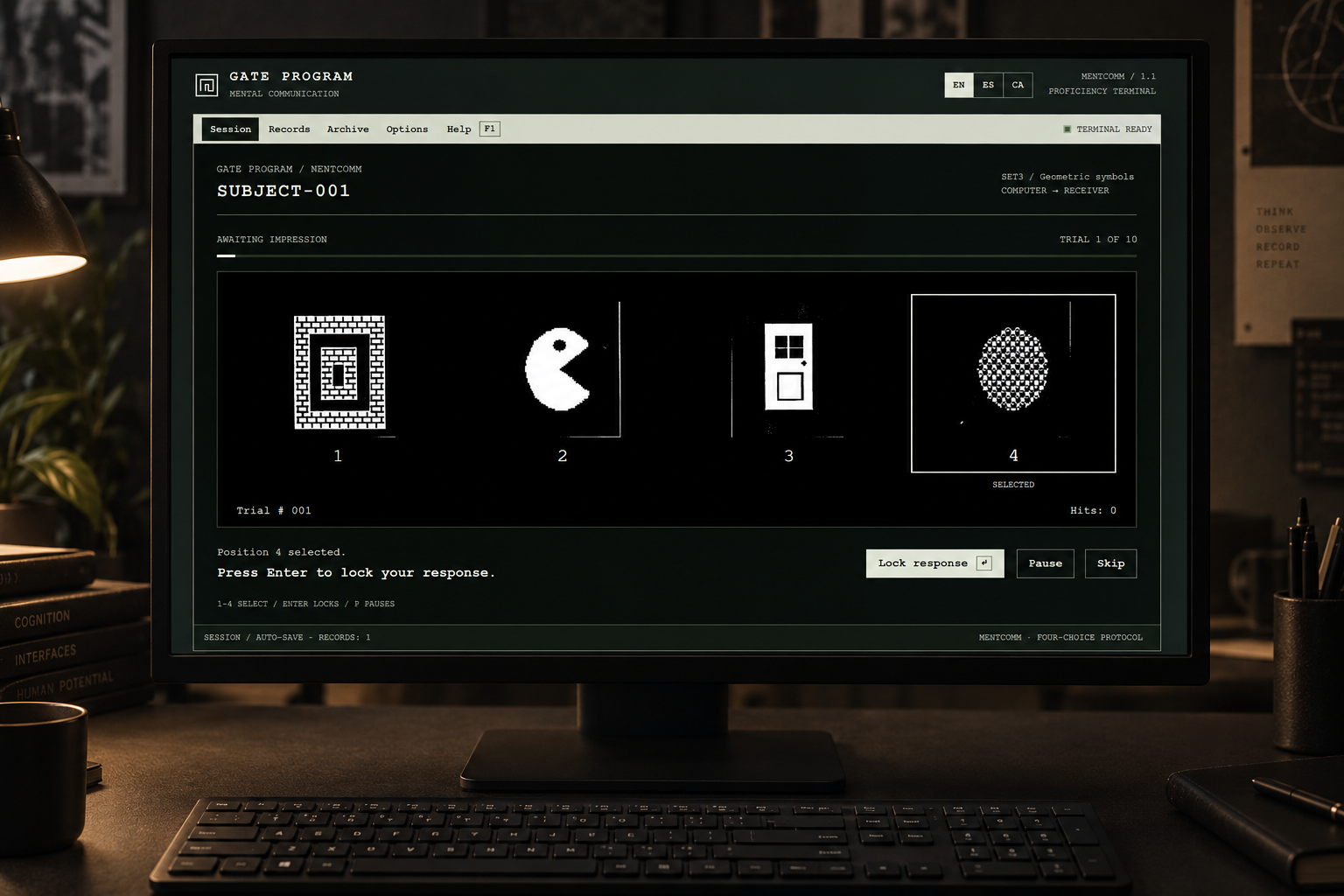
The project has two complementary forms: a physical field console and a browser laboratory. They share the same three target libraries—geometric symbols, facial expressions, and miscellaneous subjects—with 18 images in each.
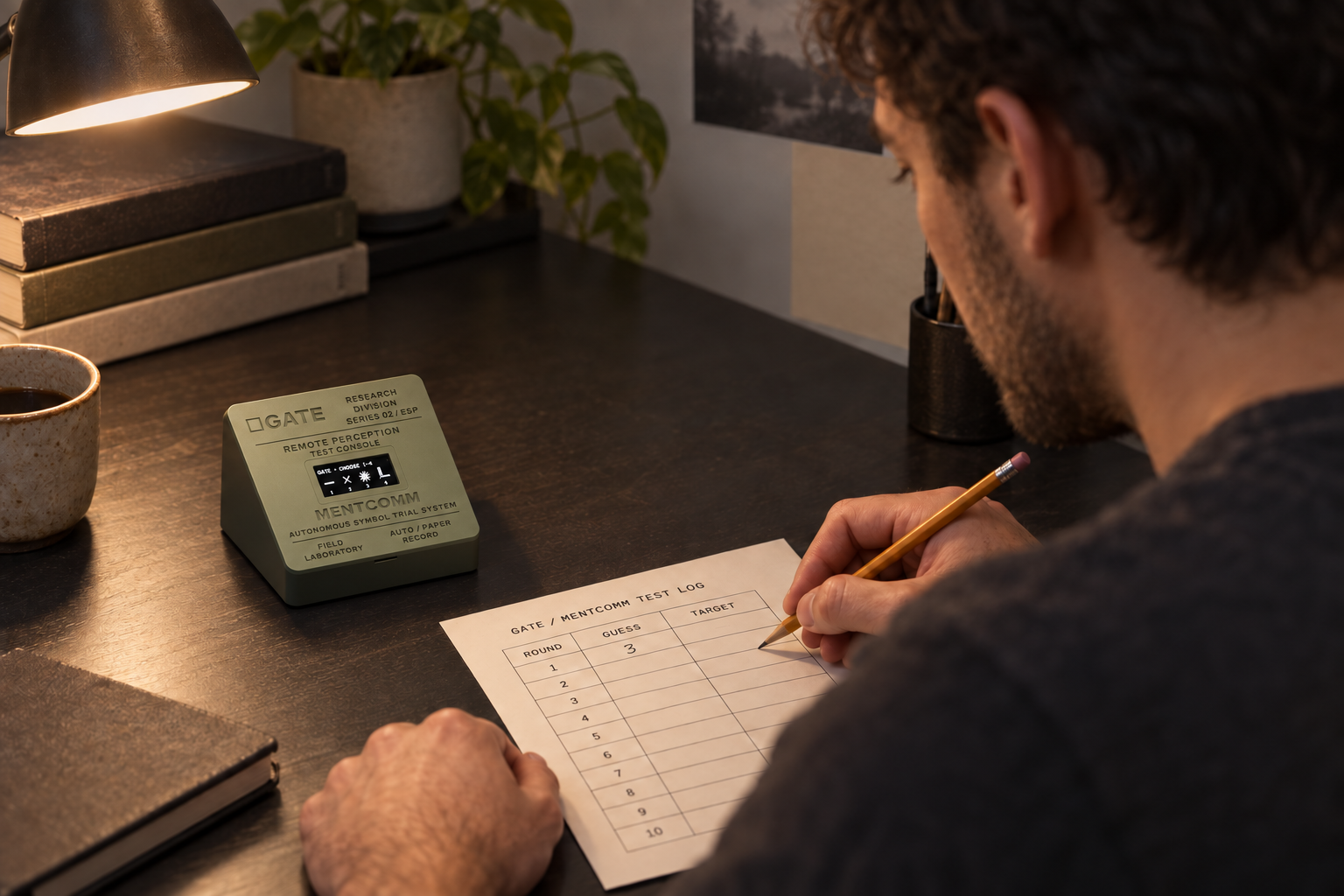
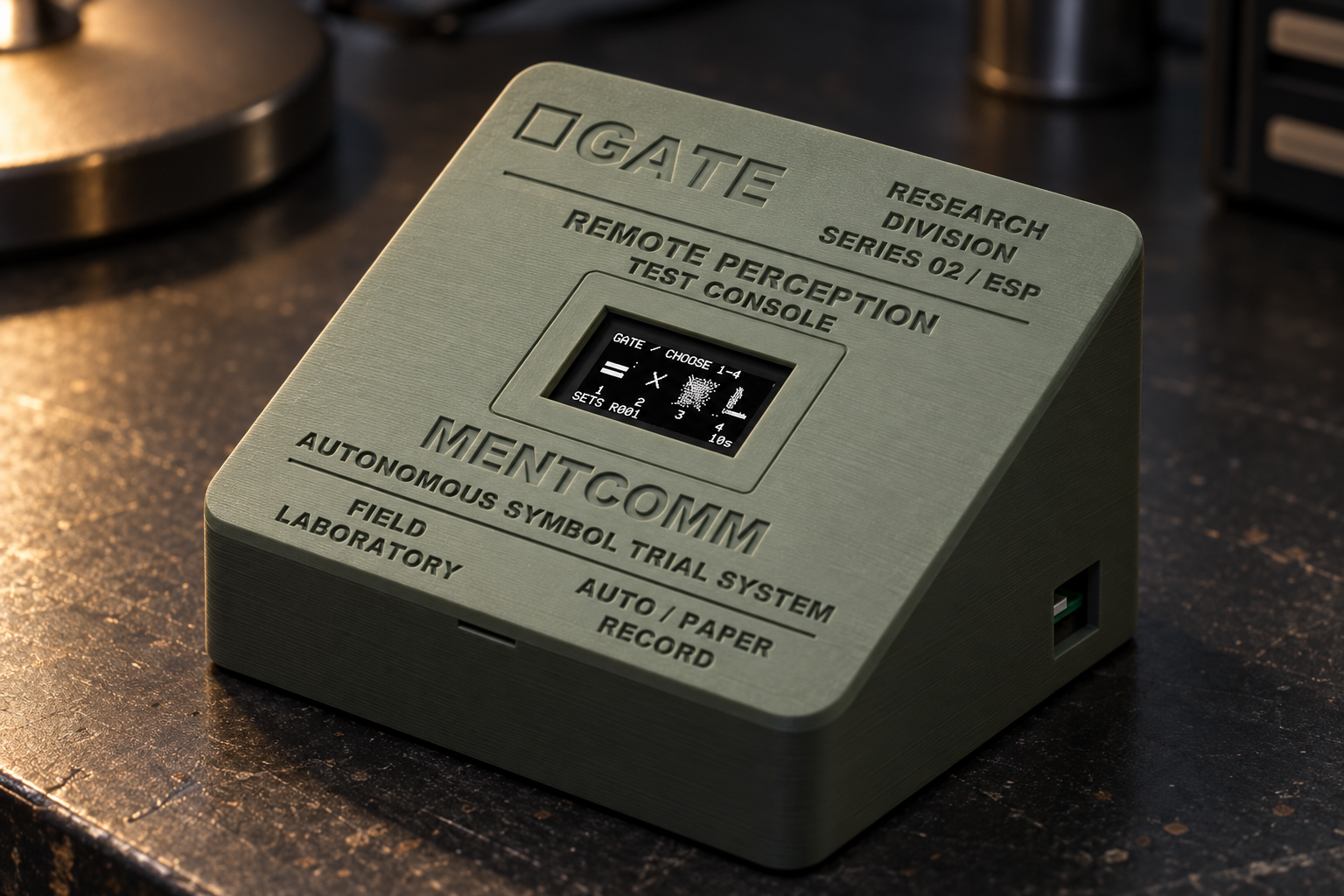
The physical console is deliberately sparse. Power it on and it begins running without a computer, account, or button. It previews a library, presents four numbered images, gives the participant ten seconds to choose, briefly blanks the display, and reveals the preselected target in its original position. After eighteen rounds, it moves to the next library.
The participant records guesses on paper before each reveal. There is no answer sensor: the hardware controls the sequence, while the notebook holds the human response. That separation is part of the piece. The screen supplies a precise rhythm; the handwritten record captures hesitation, confidence, crossings-out, and the temptation to reinterpret an impression after the fact.
The browser version expands the same encounter into a scored workstation. Participants register an identifier, choose a library and session length, and respond using number keys, mouse, or touch. It supports immediate or end-of-session feedback, pause and resume, searchable records, printable results, and CSV/JSON exports.
Paired mode adds a separate sender display: one participant studies the selected target while the receiver chooses among four images. This currently works within one browser profile, rather than across remote computers. English, Spanish, and Catalan are available throughout the interface.
How we built it The current physical prototype uses an Adafruit Feather HUZZAH ESP8266, an Inland 1.3-inch OLED, and a custom enclosure designed around a rechargeable LiPo battery. ESP32 is a possible next hardware revision; the working build described here is ESP8266-based.
Arduino-compatible C++ firmware, built with PlatformIO, runs the display sequence as a nonblocking state machine. The target assets live in flash memory, so the installation does not depend on Wi-Fi, a server, or a language model. The device can keep cycling without a serial connection.
The image pipeline starts with native crops from the released document scans. We retained their orientation, texture, and imperfections, then created one-bit derivatives for the OLED. The browser uses the higher-detail master crops. This preserves a common visual vocabulary without pretending a tiny monochrome display can reproduce every detail of a scanned page.
The browser application uses HTML, CSS, and JavaScript, with browser storage for records and a service worker for offline operation after installation. A small Node.js launcher supports local use; the public edition is deployed as a static site on Vercel. BroadcastChannel connects the receiver and sender windows.
Blender and scripted geometry produced the sloped, two-part enclosure. Its design includes a 35 × 20 mm viewing opening, an integrated OLED seat, jumper-wire clearance, retaining tabs, and micro-USB access. Physical print feedback led to larger block lettering and deeper engraving.
AI-assisted development supported code iteration, debugging, and documentation. The target artwork itself was neither generated nor redrawn.
The artistic experiment The physical object and browser are two rooms in the same imagined laboratory. One invites a private ritual; the other turns that ritual into tables, charts, and records. Their connection is currently conceptual and procedural, not live synchronization. Hardware paper logs do not automatically appear in the browser. Both versions place the participant inside the same question: what happens when intuition meets an instrument that appears to be waiting for it?
We used restrained monochrome displays, numbered trials, phosphor-inspired text, and institutional typography to build that atmosphere.
The score remains concrete: target matches, response counts, and comparison with the four-choice chance baseline. It does not certify telepathic ability. The artwork lives in the gap between what those numbers record and what the experience feels like.
Challenges we ran into
Historical fidelity turned out to require decisions, not just copying. The printed Pascal listing contains selection ranges that do not quite match the stated eighteen-card, four-choice design. We retained the intended structure while correcting those sampling biases. Timing also needed different treatment: the buttonless hardware uses a countdown and longer reveal, while browser participants can take their time before answering. The OLED introduced another constraint. Fine facial features and dense textures become difficult to distinguish at small sizes. We preserved the source images, documented the reduction process, and used the browser as the full-detail counterpart. The enclosure taught a similarly practical lesson: lettering that looks convincing in a render may barely register in a print. Enlarging the actual letter geometry mattered more than changing its colour on screen. Finally, reliable scoring required careful state handling. Switching languages, reopening a session, or pressing a key twice must not change the target or add an answer. Those edge cases became explicit tests.
Accomplishments that we're proud of
We built a working embedded object and a usable browser application around the same archival material, rather than stopping at a visual concept. All 54 master target images retain source references and checksums. Hardware verification exercised 300 accelerated rounds across the libraries. Browser testing covered complete sessions, exact scoring, target concealment, duplicate-response prevention, import/export, language changes, mobile layouts, and offline recovery. The enclosure is also reproducible: editable geometry, dimensioned configuration, STL exports, and mesh checks are retained. A revised lid can be printed without replacing the base. Most importantly, the project's two forms feel related without doing identical jobs. The physical piece creates focus and atmosphere. The browser makes the procedure inspectable and the results portable.
What we learned An interface can make uncertainty feel personal. A short pause, a numbered choice, and an authoritative-looking display can give an ordinary coincidence surprising emotional weight. Building this required both artistic commitment and engineering restraint. The experience needed enough atmosphere to draw someone in, while the implementation needed clear accounting of what was selected, answered, revealed, and saved. Neither could substitute for the other.
What's next An ESP32 revision could add physical response controls, a larger display, and a Wi-Fi connection to the browser laboratory. That would allow the object to record answers directly and share sessions with the web interface. We also want exhibition modes for paired participants, better paper-log integration, and longer-term comparisons across sessions.
Built With
- 3d-printing
- adafruit-gfx/sh110x
- arduino-c++
- blender
- github
- html/css
- javascript
- node.js
- oled
- platformio
- playwright
- python

Log in or sign up for Devpost to join the conversation.