🗺️ GarbageMap — Local Waste & Recycling Guide
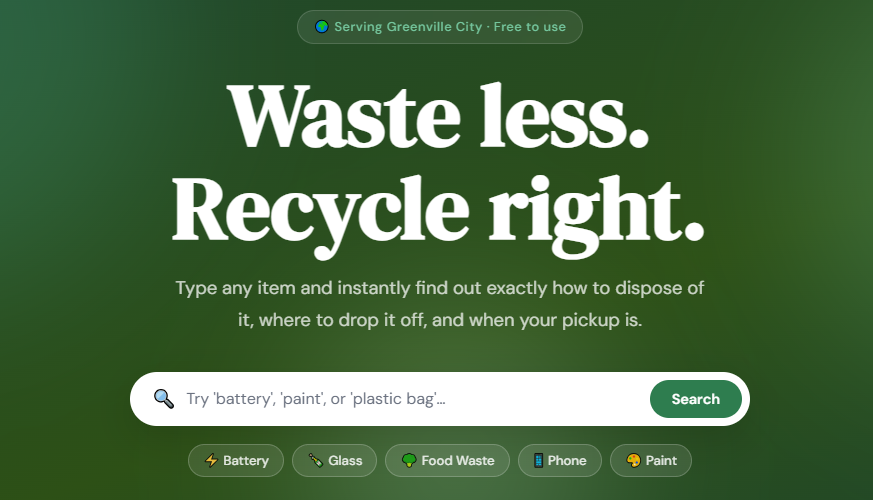
A production-ready MVP that helps residents dispose of any item correctly based on local waste rules. Built with pure HTML, CSS, and Vanilla JavaScript — no frameworks, no backend.



📋 Table of Contents
- Overview
- Features
- File Structure
- Getting Started
- How It Works
- Waste Categories
- Data Reference
- Customization Guide
- Deployment
- Tech Stack
- Contributing
- License
Overview
GarbageMap is a single-page web application designed for Greenville City residents (easily adaptable to any city). Users can look up any waste item and instantly learn:
- Which bin or facility it belongs to
- Step-by-step disposal instructions
- Hazard warnings where applicable
- Pro tips for reducing waste at source
The app also surfaces the weekly collection schedule, nearby drop-off center locations, eco-friendly living tips, and a simulated chatbot assistant — all without requiring any server, database, or API keys.
Features
🔍 Smart Item Search
- Real-time keyword matching as you type (2+ characters)
- Case-insensitive, partial-word matching
- Each item has multiple keywords (e.g. "battery", "batteries", "AA", "lithium" all resolve to the same result)
- Color-coded result cards by disposal category
- Click any card to open a full-detail modal with instructions, warnings, and tips
- Quick-tag buttons in the hero for common searches
- Category legend doubles as a filter — click any category to browse all items in it
- Graceful "not found" state with a suggestion to try the chatbot
📅 Collection Schedule
- Static weekly pickup schedule displayed as a 7-day card grid
- Today's collection day is automatically highlighted
- Shows collection type, emoji, and hover notes for each day
📍 Drop-off Locations
- 6 facility cards covering e-waste, hazardous materials, composting, donations, and textiles
- Each card shows address, opening hours, phone number, accepted items, and a free/paid badge
🌿 Eco Tips
- 6 actionable sustainability tips rendered as animated cards
- Covers plastic reduction, composting, rechargeable batteries, secondhand shopping, water conservation, and packaging choices
💬 Ask GarbageMap (Chatbot)
- Chat UI with typing indicator animation
- 12 predefined trigger-response pairs covering common waste questions
- Falls back to item database lookup if no predefined response matches
- Last-resort fallback message if nothing matches
- Suggestion buttons for common questions
- Supports newlines in responses for formatted answers
🖱️ Item Detail Modal
- Full-screen overlay with blurred backdrop
- Shows item icon, name, category badge, full instructions, warning block, and pro tip
- Close via button, clicking outside, or pressing Escape
📱 Fully Responsive
- Mobile hamburger navigation
- Fluid grid layouts (CSS Grid with
auto-fill) - Readable typography at all screen sizes
- Touch-friendly tap targets
File Structure
GarbageMap/
├── index.html      # Single-page markup — all sections, nav, modal, chat UI
├── style.css       # Complete stylesheet — design tokens, layout, components, animations
├── script.js       # All JavaScript — search, chat, rendering, modal, hamburger
└── data.json       # Content database — items, categories, schedule, dropoffs, tips, chat
All logic lives in these four files. There are no build steps, no dependencies to install, and no package managers required.
Getting Started
Option 1 — Local Server (Recommended)
A local server is needed because script.js fetches data.json via fetch(), which browsers block on file:// URLs due to CORS policy.
Using Python (built into macOS/Linux):
cd GarbageMap
python3 -m http.server 8080
Then open http://localhost:8080 in your browser.
Using Node.js:
npx serve .
Using VS Code:
Install the Live Server extension, right-click index.html, and choose Open with Live Server.
Option 2 — Open Directly
If you double-click index.html and open it as a file:// URL, the app still works. script.js includes a complete inline fallback dataset that activates automatically when data.json cannot be fetched. You'll get a slightly reduced item set (10 items) but all UI features remain functional.
How It Works
Search Engine
The search function (doSearch) normalizes the user's query to lowercase and checks it against every item's keywords array in data.json. A match occurs if:
- Any keyword contains the query string, or
- The query string contains any keyword, or
- The item's
namecontains the query string
This bidirectional partial matching means "batt" matches "battery", and "used AA batteries" also matches.
User types "battery"
  → matches keywords: ["battery", "batteries", "aa", "aaa", "alkaline", "lithium", "button cell"]
  → returns: Batteries card (category: hazardous)
Chatbot Logic
The chatbot (getChatResponse) checks the user's message against chatResponses[].triggers in the data file. If a trigger word appears anywhere in the message, the paired response is returned. If no predefined response matches, it falls back to the item database lookup. If that also fails, a generic fallback message is shown.
Dynamic Rendering
All content sections (schedule, dropoffs, tips, result cards) are rendered entirely from JavaScript by reading data.json. The HTML file contains only empty container elements. This means you can update all content by editing only data.json.
Waste Categories
| Category | Color | Description |
|---|---|---|
| ♻️ Recyclable | Green #2E7D4F |
Curbside recycling bin |
| 🌱 Compostable | Brown #795548 |
Organic / green bin |
| ⚠️ Hazardous | Red #C62828 |
Household Hazardous Waste facility |
| 🗑️ General Waste | Slate #546E7A |
Regular rubbish bin |
| 💾 E-Waste | Blue #1565C0 |
Electronics drop-off center |
| 🤝 Donate / Reuse | Orange #E65100 |
Charity shop or reuse program |
| 🔖 Special Collection | Purple #6A1B9A |
Requires a dedicated drop-off point |
Data Reference
All content is stored in data.json. The structure is:
{
  "items": [...],        // Waste item database
  "categories": {...},   // Category metadata (label, color, icon)
  "schedule": [...],     // 7-day collection schedule
  "dropoffs": [...],     // Drop-off location cards
  "tips": [...],         // Eco tip cards
  "chatResponses": [...]  // Chatbot trigger–response pairs
}
Item Object
{
  "id": 1,
  "keywords": ["battery", "batteries", "aa", "aaa"],
  "name": "Batteries",
  "category": "hazardous",
  "icon": "⚡",
  "instructions": "Take to designated battery drop-off points...",
  "warning": "Batteries contain toxic chemicals...",
  "tips": "Many supermarkets have free battery bins..."
}
warning and tips are optional — set them to null to omit from the UI.
Chat Response Object
{
  "triggers": ["glass", "bottle", "jar"],
  "response": "Glass bottles and jars are recyclable! ♻️ ..."
}
Use \n in response strings to create line breaks in the chat bubble.
Customization Guide
Change the city name
Search for Greenville City in index.html and replace with your city's name.
Add a new waste item
Open data.json and add a new object to the "items" array:
{
  "id": 34,
  "keywords": ["toothbrush", "dental", "floss"],
  "name": "Toothbrush",
  "category": "landfill",
  "icon": "🦷",
  "instructions": "Most toothbrushes are non-recyclable. Place in general waste. Look for specialist dental recycling programs.",
  "warning": null,
  "tips": "Switch to a bamboo toothbrush — it's compostable."
}
Update the collection schedule
Edit the "schedule" array in data.json. The day field must exactly match the English day name returned by new Date().toLocaleDateString('en-US', { weekday: 'long' }) for today-highlighting to work.
Add a drop-off location
Add a new object to the "dropoffs" array:
{
  "name": "North Recycling Yard",
  "type": "recycle",
  "icon": "♻️",
  "address": "100 Northside Road",
  "hours": "Mon–Sat: 8 AM – 5 PM",
  "accepts": ["Glass", "Cardboard", "Metal"],
  "phone": "+1 (555) 000-1111",
  "free": true
}
Change the color palette
All colors are CSS custom properties in :root inside style.css. Swap the --green-* values to any hue to re-theme the entire site instantly.
Add a chatbot response
Add a new object to the "chatResponses" array in data.json:
{
  "triggers": ["mattress", "bed"],
  "response": "Old mattresses require a special bulky waste collection 🛏️. Contact the council to arrange a free pickup, or donate it if it's still in good condition."
}
Deployment
Because this project is entirely static (HTML + CSS + JS + JSON), it can be deployed to any static hosting provider for free.
Netlify (drag and drop)
- Go to netlify.com and sign up.
- Drag the entire
GarbageMap/folder onto the Netlify dashboard. - Your site is live instantly with a
*.netlify.appURL.
GitHub Pages
- Push the project to a GitHub repository.
- Go to Settings → Pages → Source → Deploy from branch (main).
- Your site will be available at
https://yourusername.github.io/repository-name/.
Vercel
npm i -g vercel
cd GarbageMap
vercel
Traditional Web Hosting
Upload all four files to any web server's public directory (e.g. public_html/). No special server configuration required.
Tech Stack
| Layer | Technology | Reason |
|---|---|---|
| Markup | HTML5 | Semantic, accessible structure |
| Styling | CSS3 (custom properties, Grid, Flexbox) | No framework overhead, full control |
| Logic | Vanilla JavaScript (ES6+) | Zero dependencies, maximum portability |
| Data | JSON | Human-readable, easily editable by non-developers |
| Fonts | Google Fonts (DM Serif Display + DM Sans) | Eco-modern typographic character |
No npm, no build tools, no bundler, no runtime dependencies.
Browser Support
Works in all modern browsers. Requires ES6 support (all browsers released after 2016).
| Browser | Support |
|---|---|
| Chrome 60+ | ✅ Full |
| Firefox 55+ | ✅ Full |
| Safari 12+ | ✅ Full |
| Edge 79+ | ✅ Full |
| IE 11 | ❌ Not supported |
Contributing
Contributions are welcome. To suggest improvements or report issues:
- Fork the repository
- Create a feature branch:
git checkout -b feature/add-new-items - Commit your changes:
git commit -m 'Add 10 new waste items to database' - Push to the branch:
git push origin feature/add-new-items - Open a Pull Request
The easiest contribution is expanding data.json with more waste items or chat responses for your city.
License
MIT License — free to use, modify, and deploy for personal or commercial projects. Attribution appreciated but not required.
🌍 Built with love for a cleaner planet.


Log in or sign up for Devpost to join the conversation.