
Inspiration
I built Gander around a simple idea: when you arrive somewhere new, the most interesting thing is usually in front of you, not on your phone. I wanted to make an app that could help you explore while letting you keep your phone in your pocket.
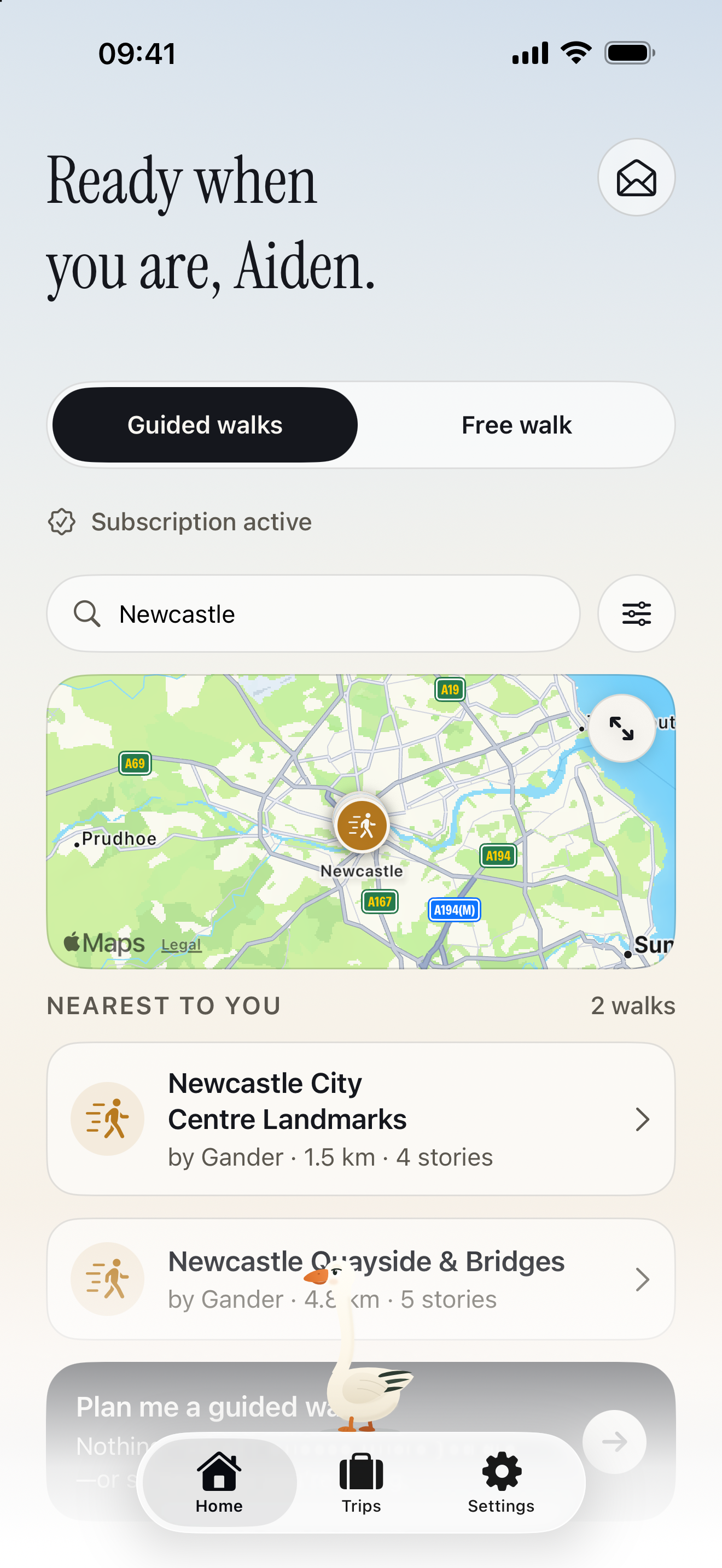
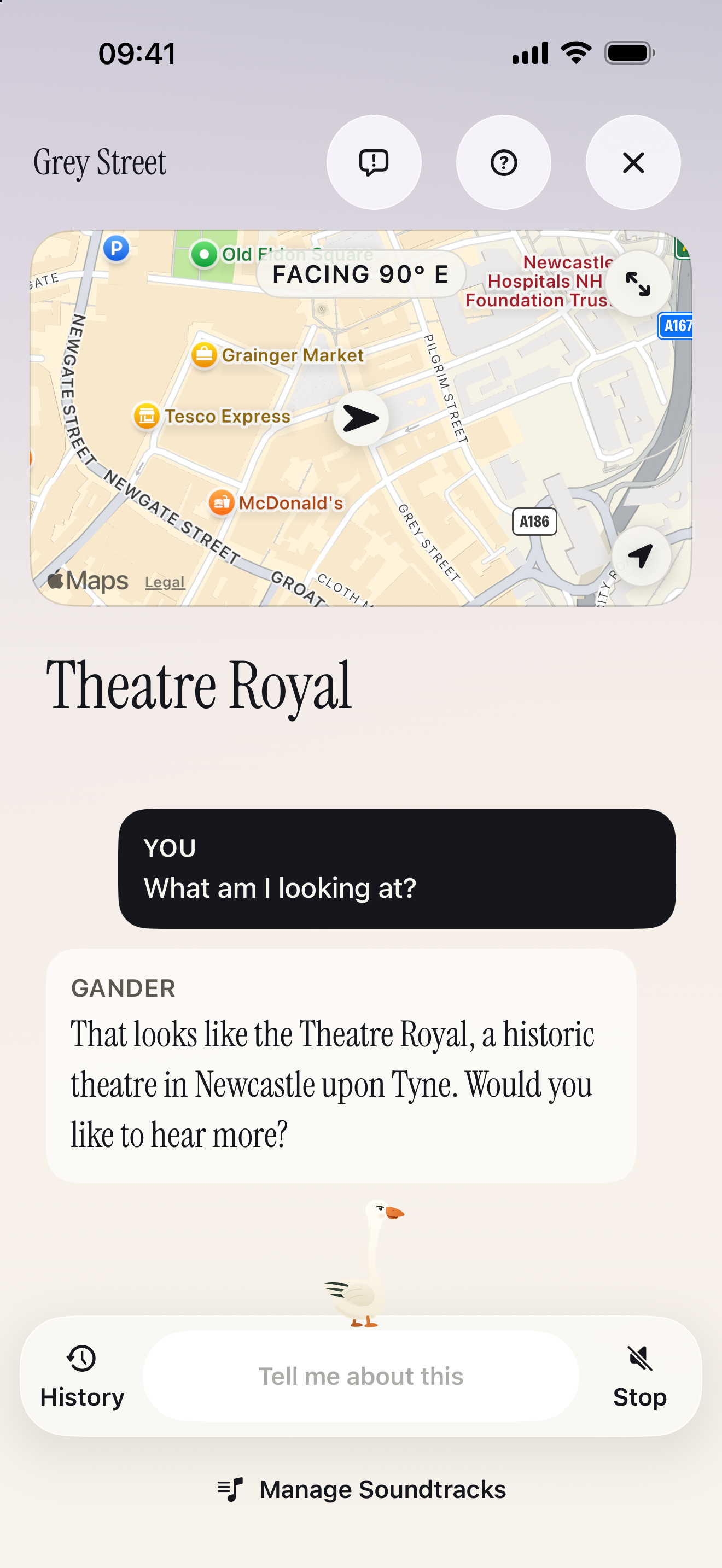
Gander uses a unique fusion of your AirPods motion data with your GPS and accelerometer and gyro data to work out what you're looking at, without using your camera. You can take a walk through any street, city, or town in any supported region, look at a building, and press your AirPods stem, and Gander will tell you more.
Last year I won the Shipaton Peace Prize, and went on an incredible trip to New York City. This was my first trip to a new place solo. I spent a lot of the time sightseeing, but because I was new to the area, I felt like I was looking at my phone a lot: googling things, asking for directions, and finding places nearby.
This is why I built Gander: you can go visit a new city, take a guided tour around it at your leisure, and ask questions about anything you're looking at. You can ask for directions to somewhere you've always wanted to try, or just learn about the place around you without having to stare at your phone and instead take in the surroundings.
In addition, in 2024 I also was invited to Apple Battersea in London. In particular, in areas like London, phone theft is quite bad. As a side effect, this is also a great way to allow tourists to explore safely without worrying about someone stealing a phone from their hand.
“Take a gander” is a familiar phrase where I’m from in the north of England. It means taking a look around, and it gave the app both its name and its character: a goose who explores alongside you, acting as your personal tour guide/expert.
What Gander does
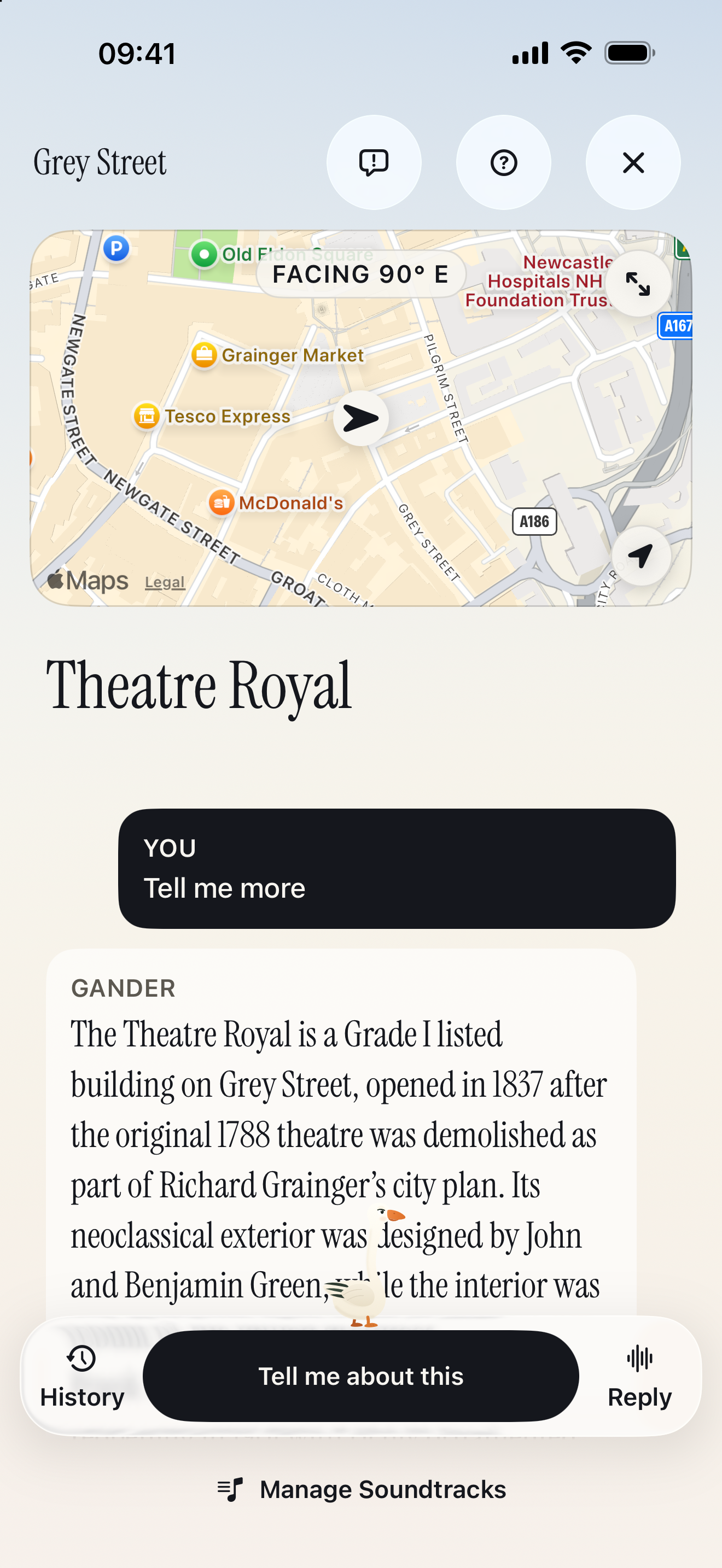
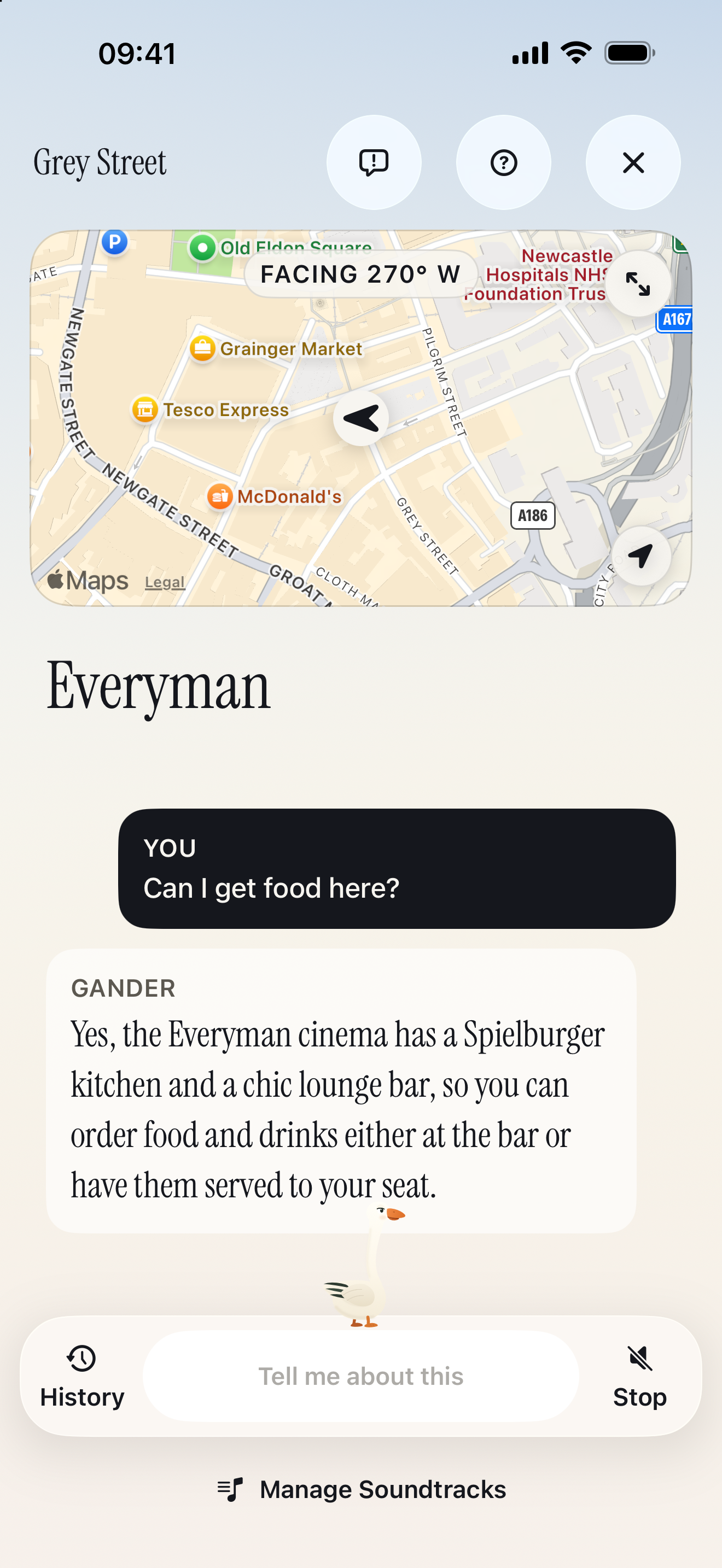
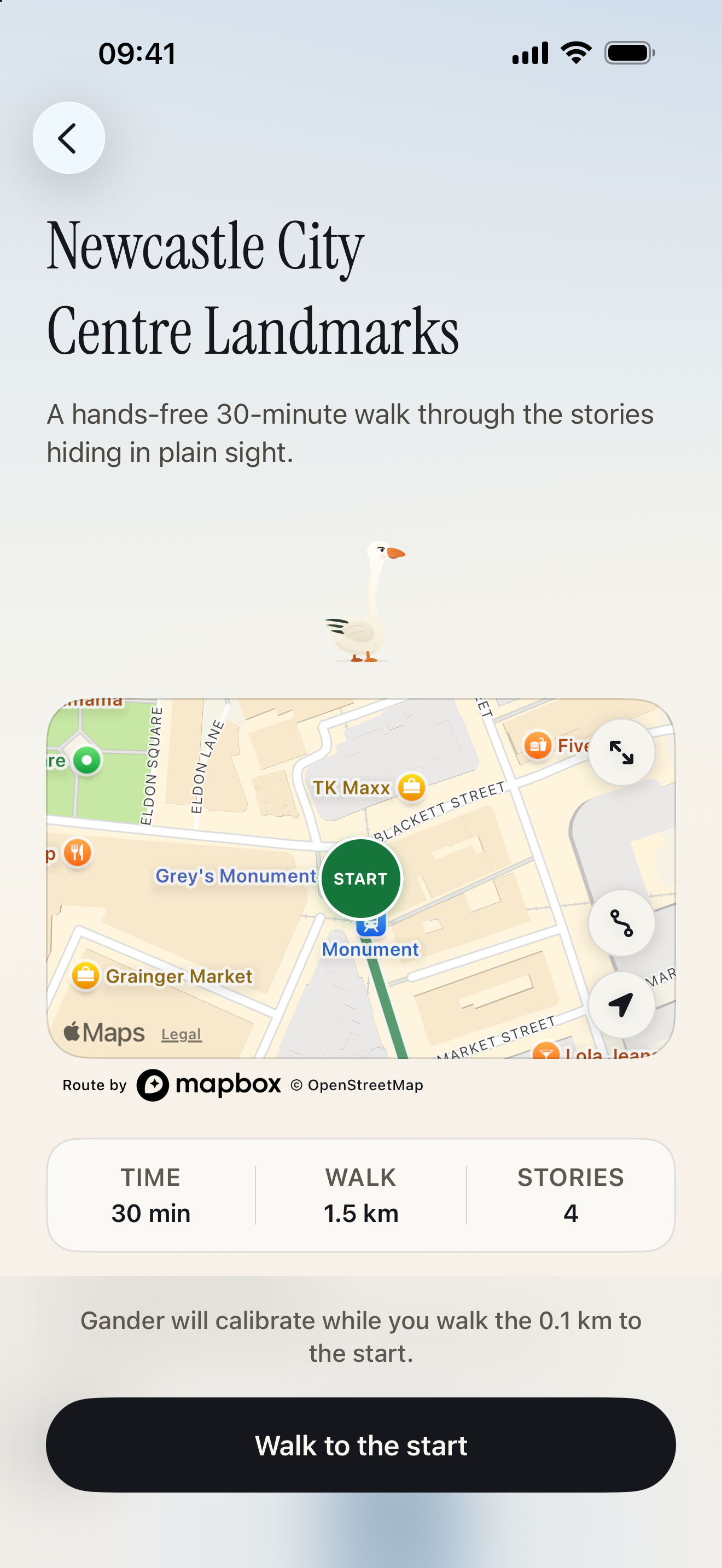
Gander is an audio walking companion. You can explore freely or follow a prepared guided walk, hear stories about nearby places, and ask questions as you go. The core innovation of Gander is not the GPS-based stories, which are available in most tour guide apps, but the unique fusion of your AirPods motion data with your GPS and accelerometer and gyro data to work out what you're looking at. Without using your camera, you can take a walk through any street, city, or town in any supported region, look at a building, shop, statue, or park, and press your AirPods stem, even in dense areas such as NYC. Gander will know what you're looking at and can provide you with interesting stories and facts about it. You can ask follow-up questions as if you are with a real expert. This is what enables the truly hands-free experience: if you wear compatible headphones, you can ask any question about anything you're looking at, without taking your phone out at all.
During my testing, I have done many walks around my home city, Newcastle upon Tyne. What has amazed me is how incredibly impressive and accurate this system is. It feels like magic.
One particular moment was when I was walking along the street and asked Gander about a church in front of me by simply clicking my AirPods. Gander told me some interesting facts about the church. But, there was a statue in front of the church, and I simply responded to Gander after it finished speaking, "What about the statue in front?" Without any cameras and without taking my phone out of my pocket, Gander was able to tell me about the statue in front of the church accurately.
Gander even works incredibly well in cities where you may have grown up or think you know really well. During my testing I remember one specific moment: I was walking around Newcastle and asked Gander about a monument in front of me. This monument is in an area called the Bigg Market, which is where all the pubs and nightclubs are in Newcastle, somewhere I've been on multiple nights out. Gander told me that this monument used to be a fountain, and the fountain has the inscription "Water is best" written on it, which was something I had never even realised. It was quite a funny detail among all of the surrounding pubs and nightclubs!
This is powered not only by the motion data the AirPods provide, but also by the AI agent within Gander. The agent can request Street View imagery to help it work out the answer and allow it to see without you ever having to take a picture. It works incredibly well and I'm very proud of how it turned out.
OneSignal
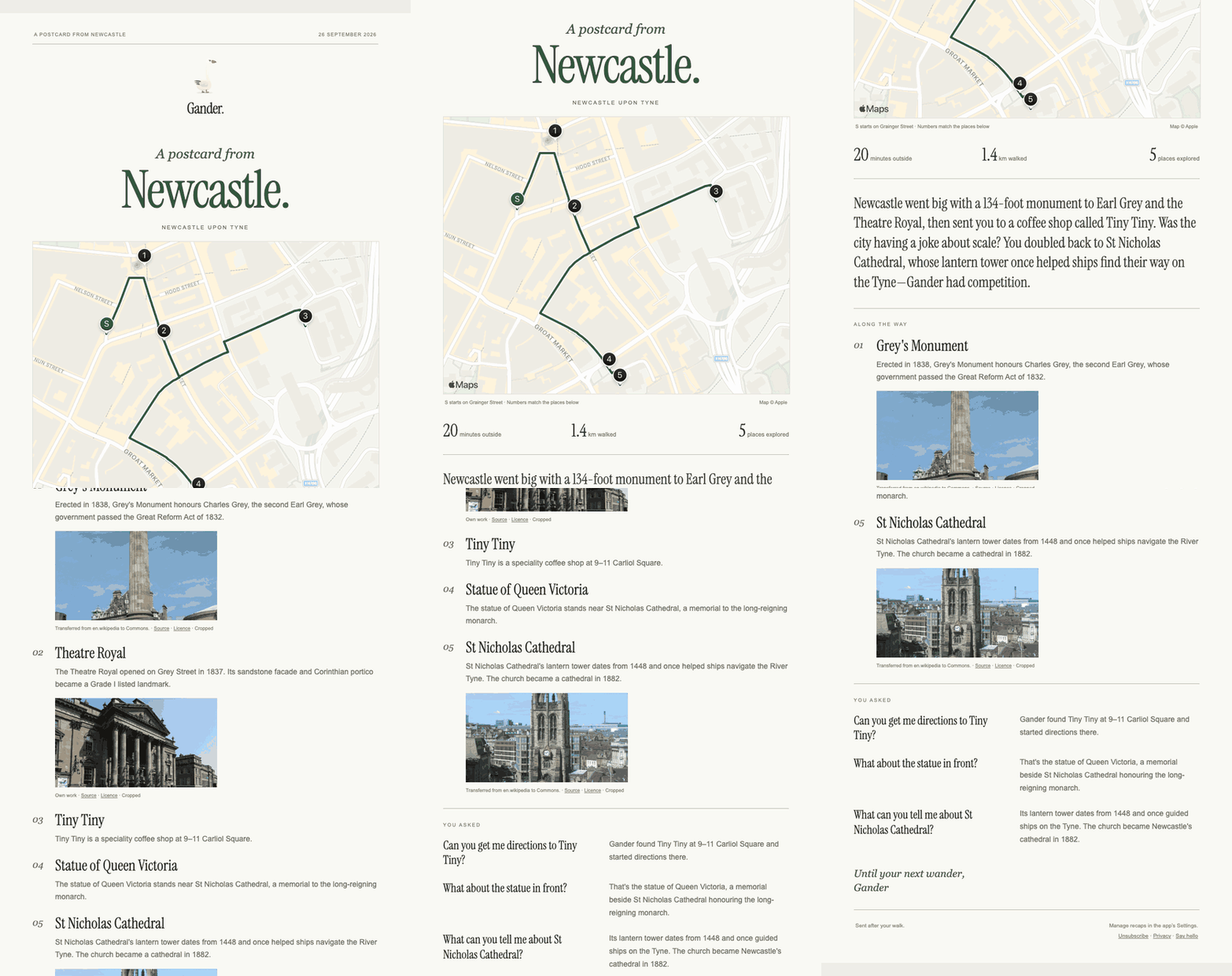
When a user finishes a walk within Gander, we use OneSignal to send an email later on as a postcard from their walk. Once the user has completed their walk, we queue a job to gather information from it, such as where they went and what questions they asked. We then generate an image of a map of where they walked, collect images of the places they asked about, generate a short paragraph using AI, and finally pick a place they might like to visit next. We then send these in a beautiful email through OneSignal to the user.
This email is designed to be a postcard from their walk and to remind them of the walk they took. They can share it with family or friends, on social media, keep it in their inbox as a memory, or even print it off! We also, at the end of the postcard, suggest somewhere where they might like to visit next based off the walk that they completed. The idea behind this feature is to keep users coming back to do different walks in different places, or to encourage other people who might see the email, or who have been forwarded it, for example, to use Gander. I can imagine a scenario where someone goes on a walk with Gander and receives this lovely postcard after their walk. They forward it on to family back home to show them what a great time they're having while they're away. This could then lead the family back at home to download Gander and use it when they go on holiday.
Personally, I often go through my emails and find things I forgot about. Wouldn't it be a lovely surprise to find a beautifully designed email from a walk you took when you're on holiday with your friends or your family? It would make you want to go again, spend more time somewhere new, and potentially take another walk with Gander.
From my feedback from testers in Gander, one of the notes I received was that these postcards remind them of e-cards that were huge in the 2000s. It felt like a full-circle moment to them and was something that was really memorable and made them want to come back. This is a real example of how OneSignal has helped retain the early users I've had.
Along with these postcards, we also use OneSignal to send anniversary postcards 3 months, 6 months, and 1 year after their walk. These act as a reminder of the walk further down the line. To me, it feels like a non-invasive way to keep users coming back without feeling like a static email campaign. These emails are incredibly personalised and can evoke emotions that were felt when they last used the app (hopefully good ones), which, from what I've seen, is a great way to keep people coming back
You can see an example of these postcards in the project gallery, or from 1m 49s in the demo video.
**To receive a post-walk postcard during testing, finish a real Free Walk or Guided Walk lasting at least five minutes and explore at least two different places. Keep “Walk recap emails” enabled in Settings and use an email address that has not unsubscribed. The email is generated after the walk ends, so it may take a little time to arrive.
The design
The goose is Gander’s guide through the app. You hatch him during onboarding and he walks between the main tabs in the correct direction that you're switching, responds to taps in anywhere the app, and accompanies you into a walk. His footsteps have gentle haptics to make the app feel alive and premium. Those details are small individually, but together they help set a slower pace before someone goes outside and create a design system I think feels fun and unique.
I tried to put a lot of thought and consideration into the identity of Gander. For example, the name has a double meaning: Gander means “to take a walk” where I'm from, and it is also a goose, which is the character in the app that speaks to you. The domain name of the app is gander.fyi, which is short for "Gander, for your information", which is a very good description of the app!
Combine this alongside all of the small visual details in the app, I think this creates the feeling that the app was built with care, thought, and consideration, and makes it feel premium, hopefully making for a memorable experience for the user so that the app will stand out.
How I built it
Gander is a native iOS app backed by main backend two services, both appropriately named, of course. Roost handles accounts, access, walks, and guide requests. Mother Goose is our ever expanding database that handles place data, research, routing, conversation, and speech. I used RevenueCat for access and subscriptions, and OneSignal for messages including the post-walk postcards.
Gander was perhaps the most technically challenging app I've ever built. While it may seem fairly simple on the surface, there are a lot of underlying moving pieces to make the app work reliably, fast, and cheap enough to run, making the subscription affordable for users.
When I first started developing Gander, I built a test suite rather than a polished application. This test suite was never meant for release and had a very technical focus in the UI, which allowed me to test the app's core mechanic: looking at something and pressing your AirPod. Anytime I went out, I would test it, and make note of whether it was right or wrong, and all of this information would then be logged, and I would share the log and my experience with my agents when I got home. This way we could continuously iterate and improve almost every day.
It took a long time to get it right so that it worked most of the time, and we made it so those few items it didn't work, you would be able to correct Gander by simply speaking to it.
We've had many iterations along the way, including expanding to use things like Street View imagery where needed, to allow the agent within Gander to request Street View to help it understand what you're looking at. This can be useful if you're somewhere new, as it allows you to simply describe what you were looking at if it got it wrong, rather than saying the real name of the place/building (which you might not know!)
We then recently expanded to use Jev, which allows Gander to quickly decide which model I should route the request to and whether any prebuilt responses we have bundled with the app would work better instead of routing to a live model (to reduce costs and make it faster for the user). This made a huge improvement to our performance, and in my testing, reduced costs by up to 21% per walk.
Another massive challenge of building Gander was ingesting reliable data that we use for places, routing, and conversation. I call this service Mother Goose, which is our database filled with place information and researched facts about those places. At it's peak, I was using Codex 24/7 to ingest as much data as possible from open-source map data and testing it at the same time. This is where I found that agents like Codex came in the most useful, because I can't physically test Gander in every location that we support. I had Codex simulate multiple walks in different places as the data was being ingested to make sure it was correct. On my peak days, I was burning 1.5 billion tokens a day in Codex, which is crazy. We've now built a reusable pipeline to allow us to expand Gander to as many regions as possible over the coming months, hopefully enabling Gander to be used in most of the world by the end of the year.
Challenges
There were many challenges within Gander. A lot of them were due to the difficulty of making an app work in the real world when it's built at a desk. This made testing extremely challenging and much harder to iterate on than with my previous apps.
To get around this I built a testing harness first and used it to try to perfect the core mechanic as much as possible before building the rest of the app around it. I also created digital testing harnesses that would simulate walks by injecting a false location into the app, controlled by me or my agents, so I could test walks without having to be physically there.
We also created a very detailed logging system within Gander so that my testers could go on a walk in the real world. They would then be able to share logs with me, and I could recreate their entire walk in my testing harness and fix any issues that came up. I could visually walk through their walk step by step and see what they saw. I could also rerun their entire walk in the current version of Gander to make sure my fixes had fixed their problem, without them having to go back out and retest. I also paired these logs with my agents so they could fix issues as they came in, which definitely helped reduce the challenges of building Gander
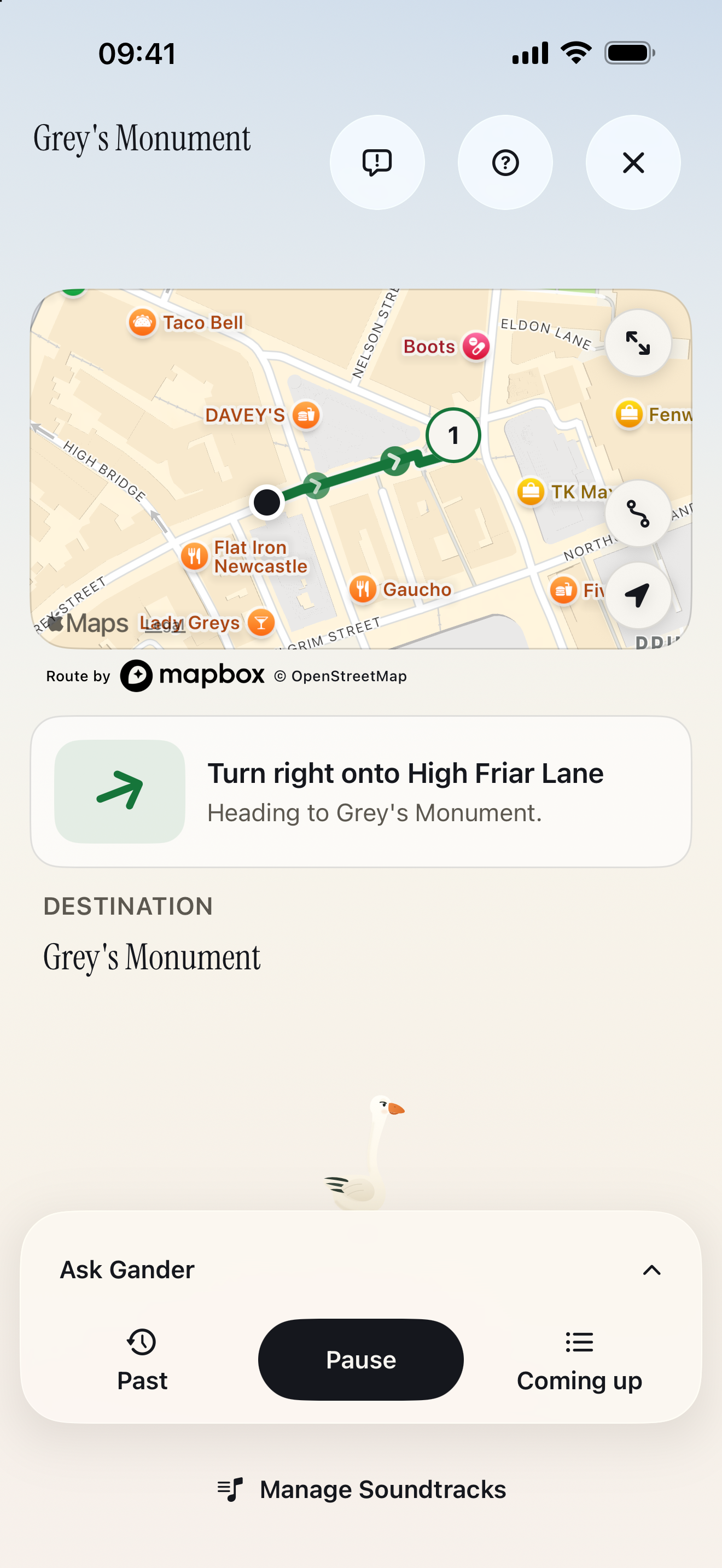
Another challenge was giving useful directions outdoors while making sure the user didn't feel like they had to open their phone. This meant that directions had to be correctly timed and make sense to the user entirely through audio queues. This was made much more powerful with Gander because we know which direction the user is actually looking in, so we can say things like "to your left," "to your right," or "behind you," which normal navigational apps can't do.
Finally, another challenge was knowing which place or person they mean, because while we can make a best guess from where they're facing, we can't truly know what they're looking at. They might be looking at something further away or closer than Gander realises. This led me to create a scoring mechanism within the app and the ability to respond and correct Gander. If it did get the place wrong, you can follow up and correct it either by saying the name of the place or simply visually describing it (thanks to Gander's in-depth database and its ability to access street imagery when needed).
What I learned
One thing I learned from a product perspective is how important it is to nail the user experience for an app like Gander. Gander is designed for your phone to not be in your hand and for it to be in your pocket. I couldn't guarantee that the user will be looking at the phone to understand how the app works. Therefore I needed to make sure Gander works purely through voice and audio, which was tricky to get right. Thanks to the help of family and friends for testing, I was able to create an experience that I am happy with so that Gander can be used while in your pocket.
Gander has also taught me a lot about agentic engineering. I would say I was a heavy Codex/Claude Code user before building Gander. That said, I have used Codex in new ways that I had not used it in previously when building Gander. For example, I had it constantly audit the data in my database to make sure the app works across all the regions we support, without me having to manually go through and test everything myself. I had it run spot checks across multiple cities and small towns alike in the U.S. and the UK to identify weak points in my pipeline. As mentioned earlier, at its peak I was burning through 1.5 billion tokens a day building Gander, which is unlike anything I've ever done before.
Where it is now
Due to the intense nature of building this app, it was only launched on 27 September, so our user count is very low at the moment.
However, from my testing, my family and friends have given very positive feedback about the app. Their top feedback is that it feels magical and impressive to use, and that the experience is unlike anything they've ever had before. That is exactly what I wanted when I first envisioned the app, and I'm very proud of how it turned out.
My goal over the next few months is to market Gander by setting up social channels and perhaps walking around local cities like Newcastle, dressed as a goose, like I did in my demo video, to get attention and advertise in person, to get users to download the app. We currently offer a 1-day free trial, which only starts on your first walk, so going somewhere like a city where there are lots of tourists, and getting users to try it out in person for that day, could potentially have very positive effects on conversion if they liked the walk they did that day.
As for feature expansions, I am currently working on the idea of group guided walks within Gander. This would allow couples and groups to experience the same walk at the same time without being in their own individual bubbles!
I also want to expand Gander into more regions over the coming months so that most of the world is supported by the end of the year.
Happy walking! :)


Log in or sign up for Devpost to join the conversation.