-
-
Title Card
-
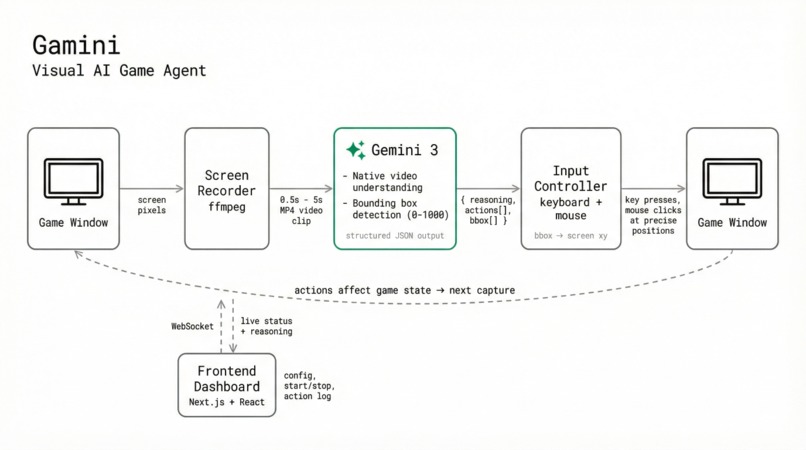
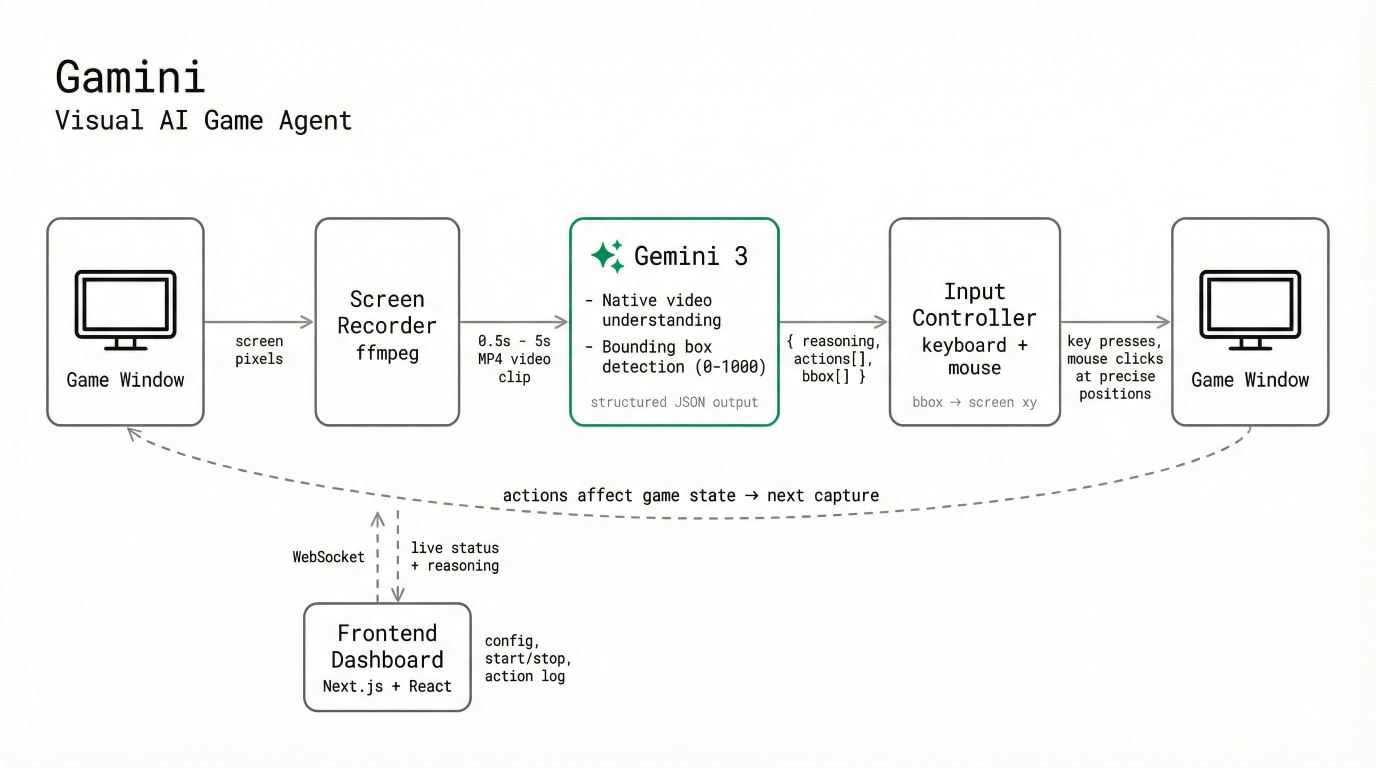
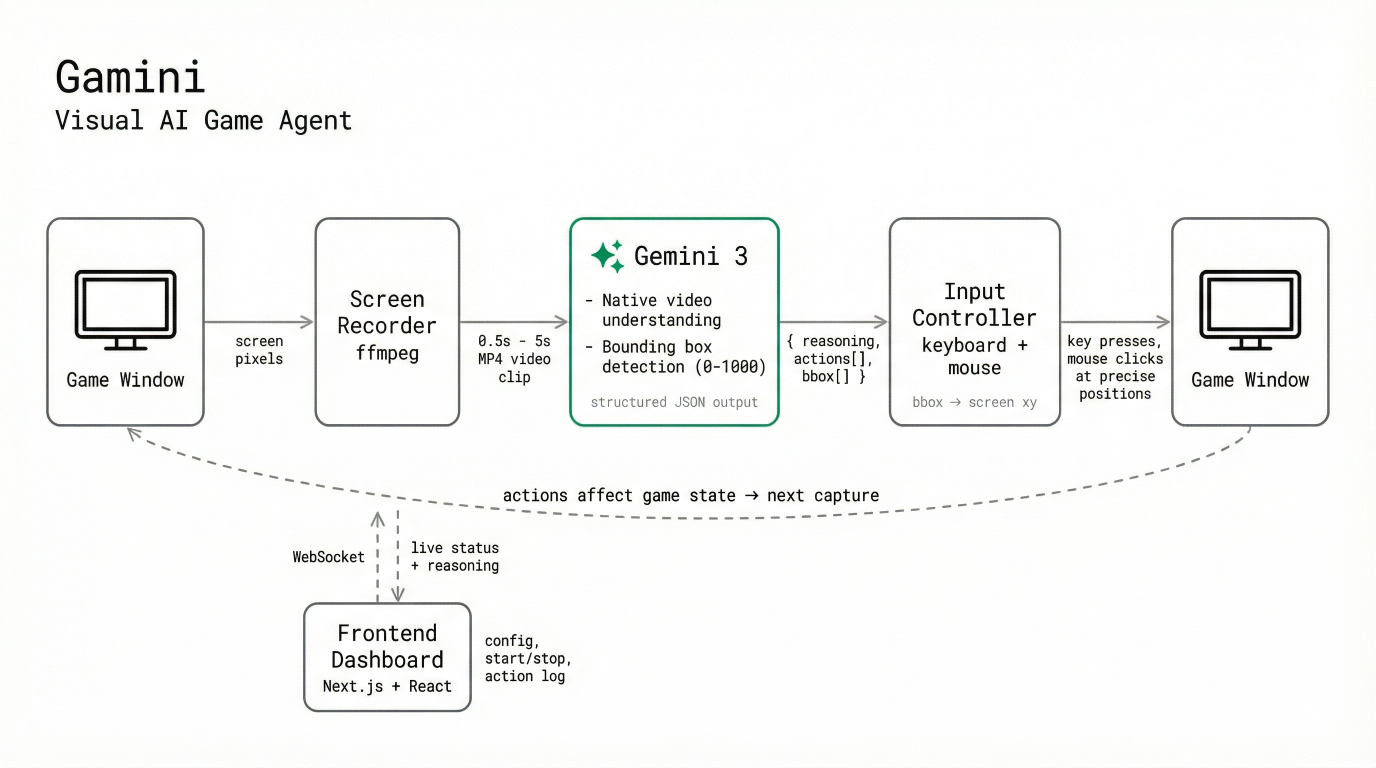
Architectural Diagram
-
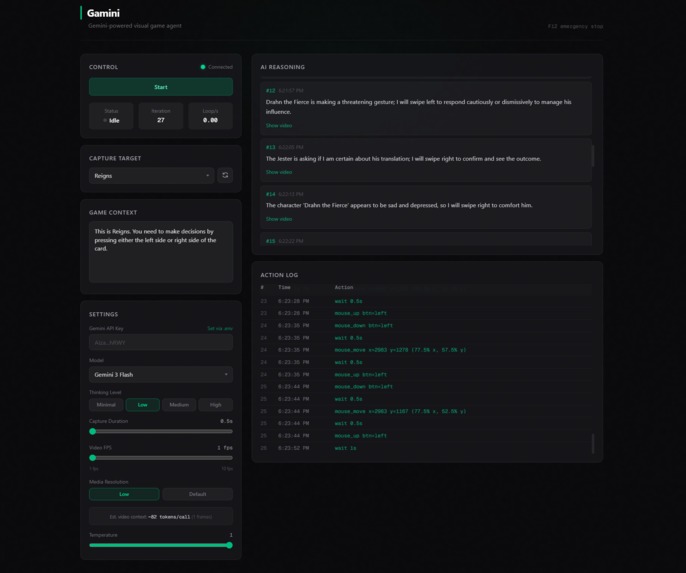
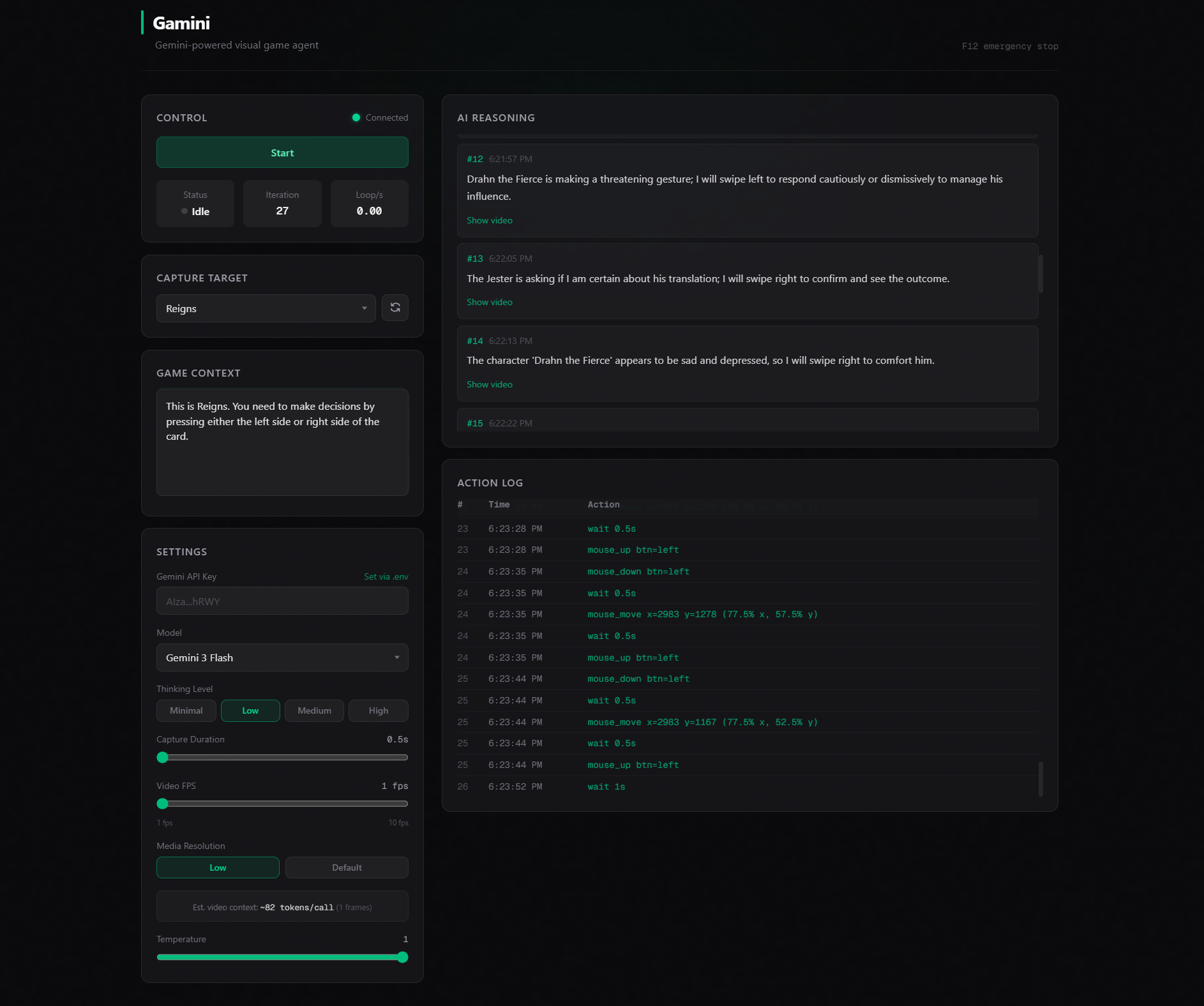
Gamini Dashboard
-
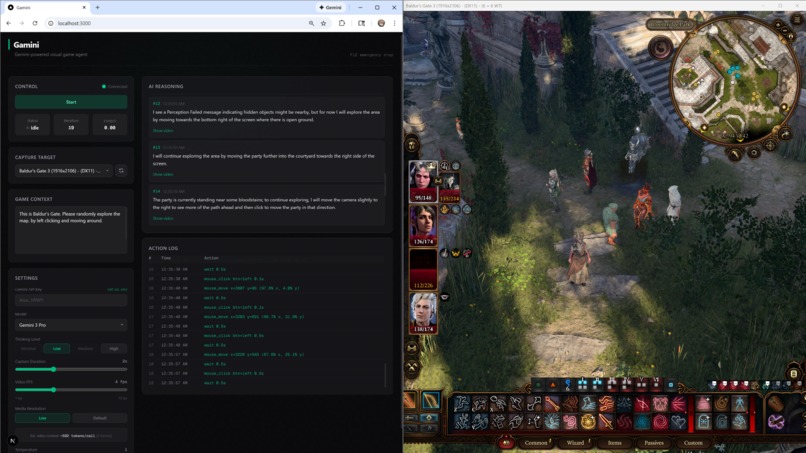
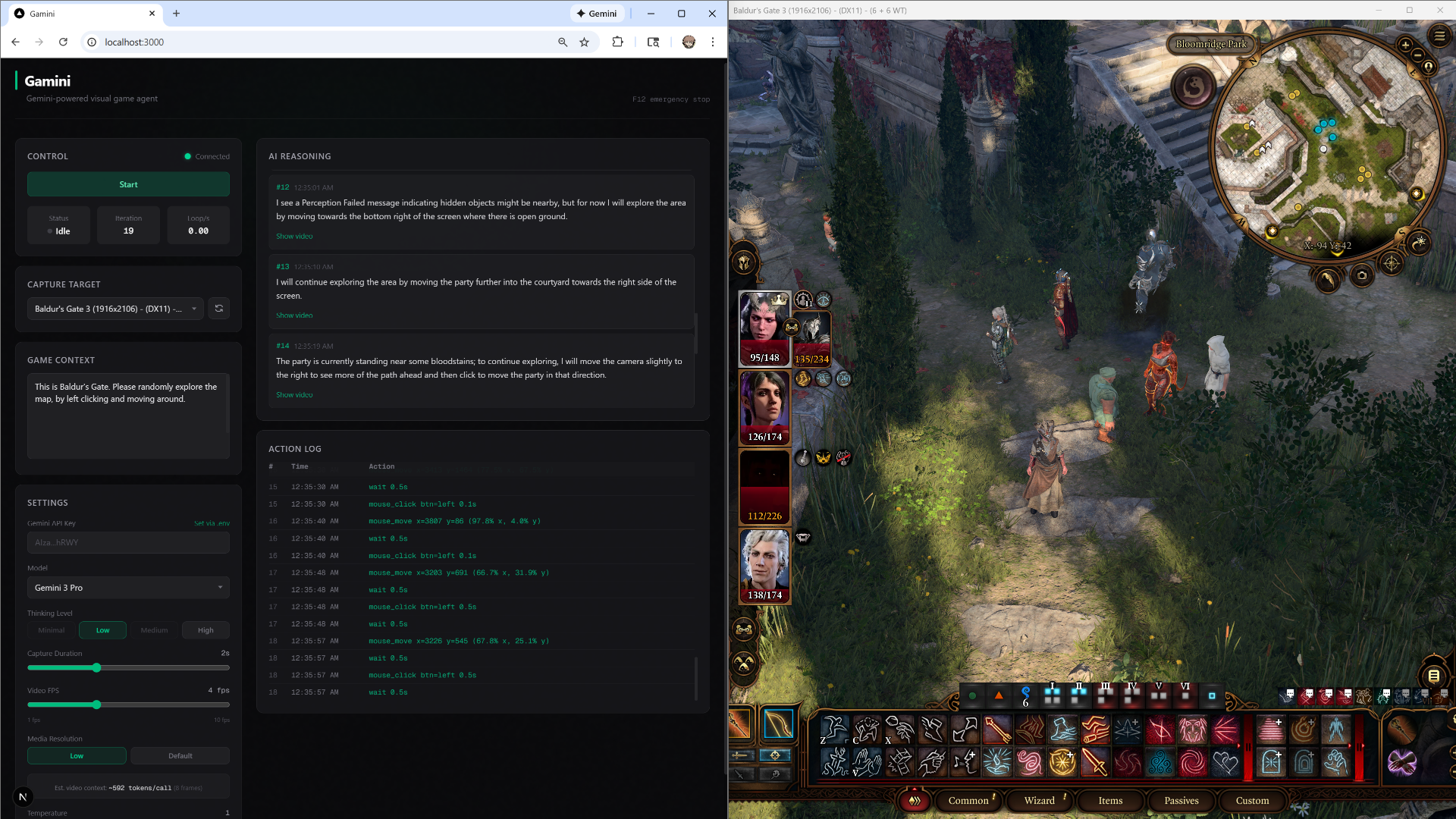
Gamini playing Baldur's Gate 3
Inspiration
Two years ago, I worked on a research project trying to build a generalized game-playing AI through reinforcement learning and computer vision. The goal was an agent that could look at any game and learn to play it. But the vision models at the time couldn't reliably understand complex game scenes. Object detection was brittle, scene understanding was shallow, and the gap between what a model could "see" and what a human player understands was too wide to bridge.
When Gemini 3 launched with native video understanding, bounding box detection, and strong reasoning capabilities, I realized the missing piece was finally here. Instead of training an agent for thousands of hours on a single game, I could build one that when given a description, can watch some gameplay footage and immediately understand what's happening.
What it does
Gamini is a visual AI agent that plays games by watching your screen. It captures a short video clip (0.5–5 seconds) of live gameplay via ffmpeg, sends it to Gemini 3, and receives back structured JSON containing the AI's reasoning and a sequence of keyboard/mouse actions to execute. Those actions are performed as real inputs through DirectInput (Windows) or Quartz events (macOS).
Gamini works across genres with zero game-specific configuration needed, aside from a short description. During testing, I tried giving it games like online chess, Cultist Simulator (card-based simulation game), Papers Please (puzzle simulation game), Reigns (strategy game), Dispatch (adventure game), Arc Raiders (third-person extraction shooter), Two Strikes (2D fighting game), Baldur's Gate 3 (role-playing game) and more. Gamini was able to play all of them with varying degrees of success.
A React/Next.js dashboard connects over WebSocket to stream the AI's reasoning, action logs, as well as the actual video clips the AI saw in real time.
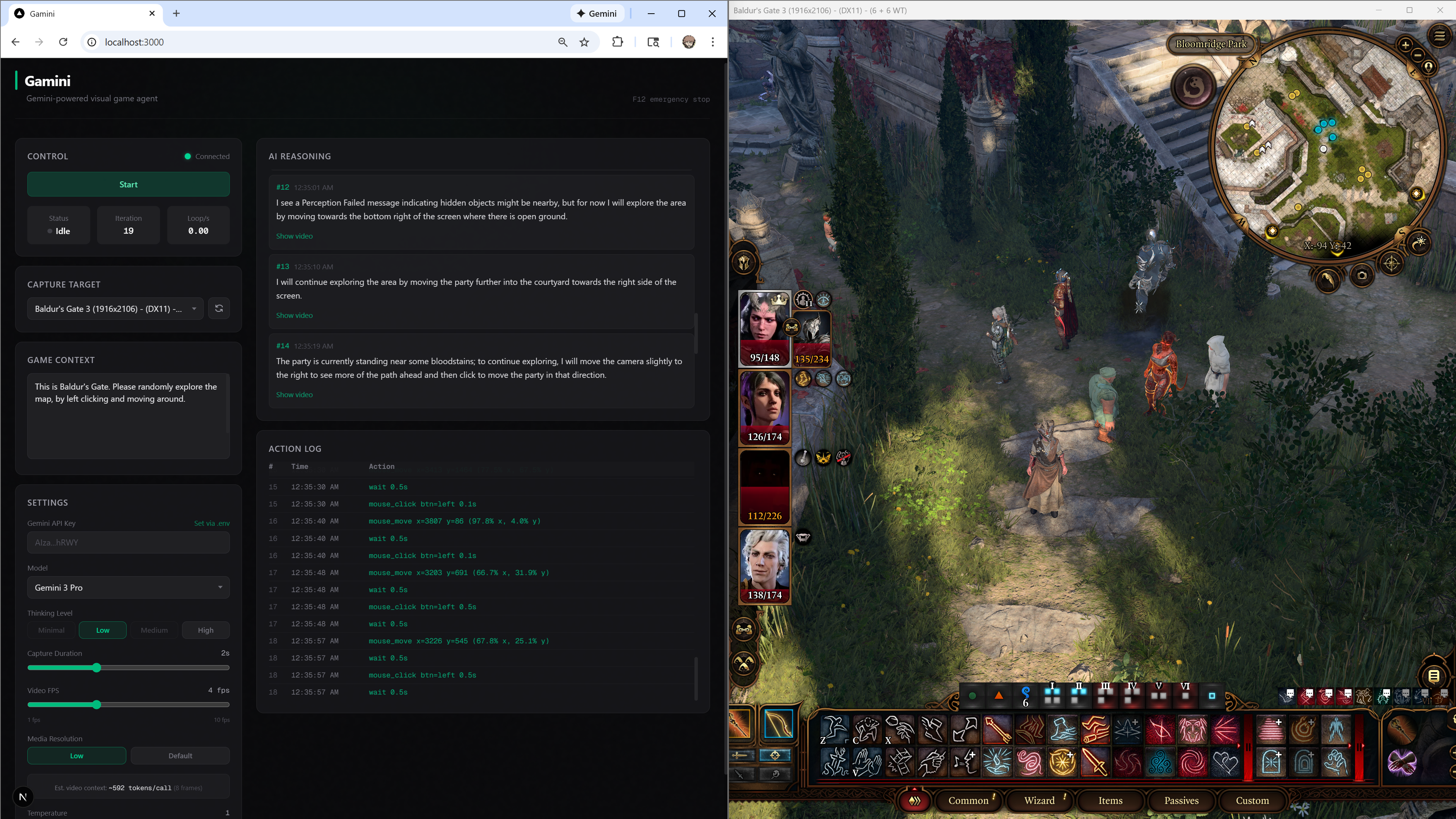 Gamini playing Baldur's Gate 3. The left panel shows the live dashboard with the AI's reasoning stream. Here, the agent notices a "Perception Failed" message popped up, decides to explore open ground, and navigates the party through a courtyard by issuing mouse clicks on the game world.
Three Gemini 3 capabilities at the core
Gamini isn't a wrapper around a language model, it depends on three specific capabilities of Gemini 3 that make the entire system possible:
1. Native video understanding. Gamini sends raw MP4 video clips directly to Gemini 3. Gemini processes actual video frames natively, which means it understands motion, animations, and causal and temporal context, such as a health bar depleting, an enemy winding up an attack, or the environment changing. These are information that could not be derived from static images alone.
2. Bounding box detection. For any action involving mouse movements, the AI needs to know where to click. Gemini 3 identifies on-screen elements (buttons, game pieces, enemies, UI components) and returns bounding box coordinates on a normalized 0–1000 scale. Gamini converts these to real screen pixel positions. In chess, for example, the AI visually identifies individual pieces and clicks precisely on the correct squares.
3. Reasoning ability. Games require many decisions: Where should I go? What is the best move given the situation? Which dialogue option advances the story? Gemini 3's reasoning ability enables the agent to generalize across completely different games without encoding game-specific logic. It reads the current situation, weighs options, and decides, the same way a human player would.
How I built it
- Backend: Python 3.13 + FastAPI + uvicorn. The core game loop is an async pipeline: ffmpeg captures the screen in a subprocess, video bytes are sent inline to Gemini 3 via the google-genai SDK with structured output (response_schema), and returned actions are executed through platform-specific input backends.
- Screen capture: ffmpeg with gdigrab (Windows) or avfoundation (macOS). Recordings use fragmented MP4 so files are always valid even if the process is killed mid-write. A pipelined architecture overlaps recording with LLM inference, while Gemini analyzes the current clip, ffmpeg is already recording the next one.
- Input execution: pydirectinput-rgx on Windows (DirectInput scan codes) and pyobjc-framework-Quartz on macOS (CGEventPost).
- Frontend: Next.js 15 + React 19 + Tailwind CSS. Connects to the backend over WebSocket for real-time status, and REST for configuration. Streams AI reasoning, action logs, and lets you play back the video clip the AI saw for any given decision.
- Structured output: Gemini 3 returns GameActionResponse objects enforced by a Pydantic schema passed as response_schema, guaranteeing valid JSON with reasoning, action types, keys, and bounding boxes every time.
Challenges
- Coordinate accuracy. Early versions asked Gemini to provide raw pixel xy-coordinates for mouse clicks, which proved extremely unreliable. The returned coordinates often drifted significantly from the intended target, sometimes appearing almost random. After researching Gemini's vision capabilities, I discovered it was specifically trained to detect bounding boxes normalized on a 0–1000 scale. I switched Gemini to this response format, and then derived the screen coordinates once response is received in Gamini's server, which ended up dramatically improving mouse targeting accuracy.
- Frame sampling. During early testing, Gemini appeared to skip over obvious gameplay cues like animations, UI transitions, and cause-effect relationships that a human player would immediately notice. After extensive troubleshooting, I realized that Gemini’s default video processing samples at 1 frame per second, rendering most gameplay footage into near-static snapshots, considering they were ususally only 1-2 seconds long to begin with. To resolve this, I added a configurable frame-rate option to Gamini’s capture and inference pipeline, allowing Gemini to process higher-FPS clips when temporal continuity and fast-moving visual details matter.
Limitations
- Not real-time. Each loop iteration takes 4–12 seconds, depending on the model and settings. The agent cannot react to split-second events like a human can. Fast-paced games that require frame-perfect inputs are beyond its current capability.
- No long-term planning. The agent currently only acts on immediate visual context, reacting to what's on screen at the moment. While it retains limited context of recently executed actions, it has no persistent memory, no long-term objectives, and no ability to form or execute multi-step plans.
Next steps
- Agentic planning. I plan to restructure the backend to an agentic framework by adding memory and planning capabilities, so that the agent can play over long-term objectives, rather than only reacting to the most recent context.
- Multi-modal feedback. I also plan to incorporate audio understanding alongside video, since many games communicate critical information through sound cues that the agent currently misses. It should further improve the accuracy of the agent's actions and expand capabilities.
Getting started
You can deploy the project locally by following the setup guide in the GitHub repo. For the smoothest experience, I recommend running Gamini on Windows with the web dashboard and your game (set to windowed mode) placed side-by-side. This allows you to watch the AI's reasoning and action log while it interacts with the game in real-time.
Since Gamini lacks agentic planning capabilities at the moment, it can occasionally get confused and perform random actions if the game context is too vague or the objective is too complex. To avoid this, use the game context field to explicitly define the keybinds available for different actions and provide the AI with more specific instructions. For example, instead of broad instructions like "play the game," try asking it to "explore the map," "attack the enemy," or "find objects to pick up."


Log in or sign up for Devpost to join the conversation.