-
-
Pipeline
Project Introduction
This project is a web-based application that allows users to explore and discover games through semantic search. Instead of relying on keyword matching, the system uses natural language understanding to return games that are contextually and semantically similar to user queries.
Users can input free-text descriptions of what they're looking for (e.g., “open-world adventure with strong storyline”), and the system returns a ranked list of games that match the intent, not just the keywords.
The project Pipeline
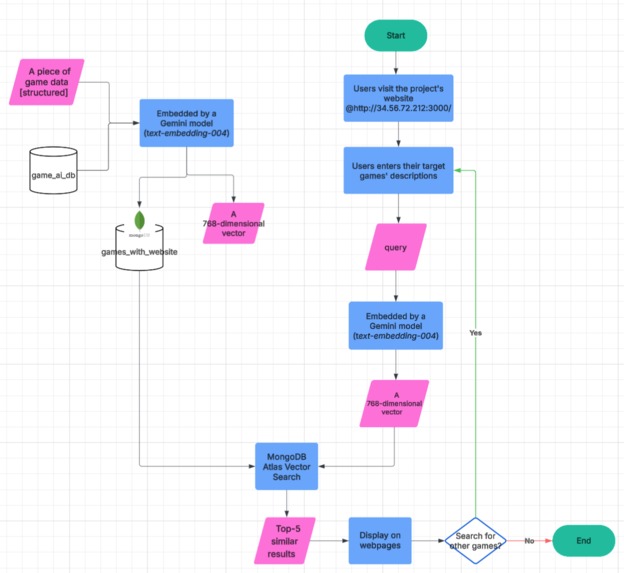
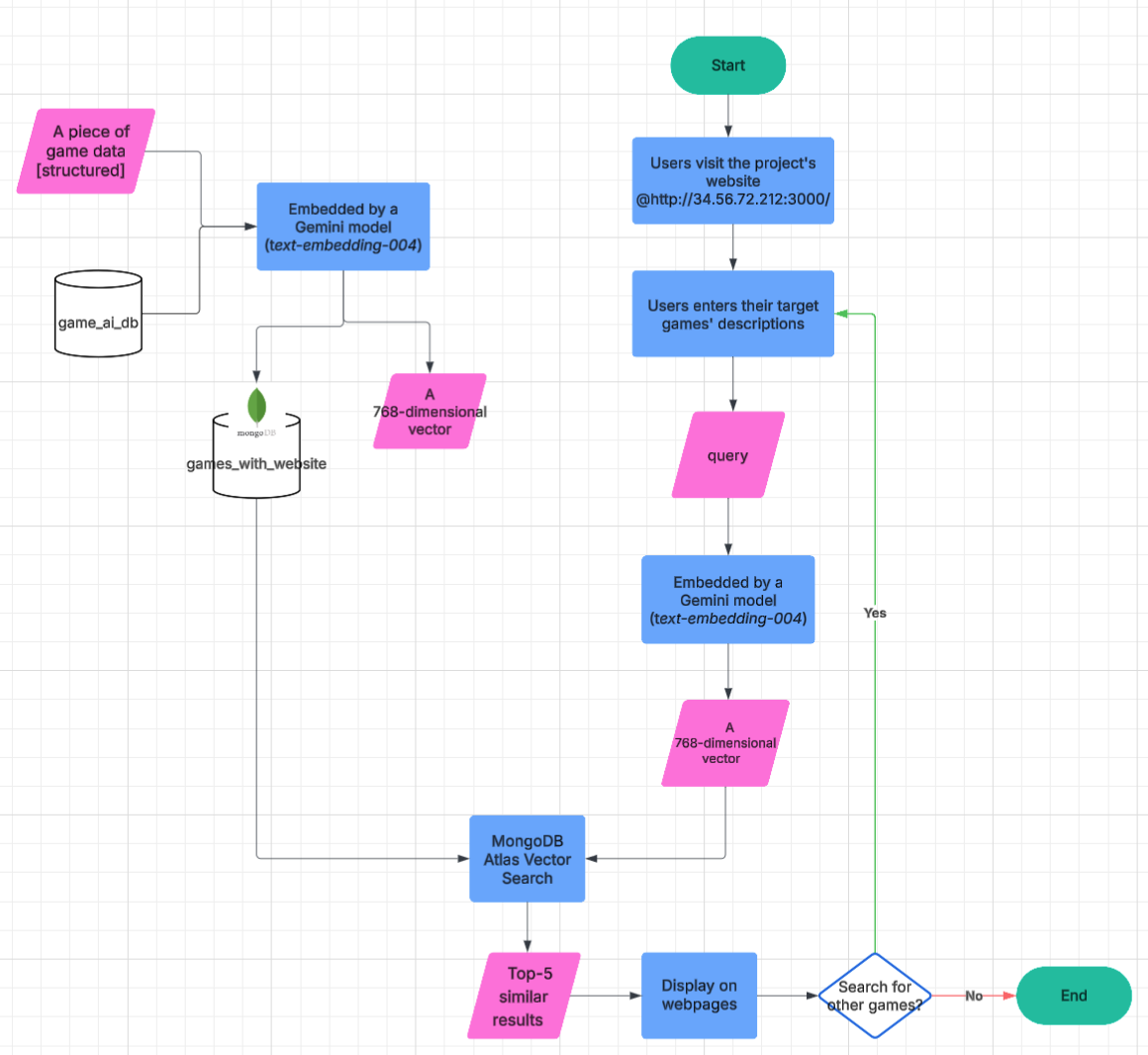
The project pipeline is shown below:
🔹 1. Dataset Selection and Acquisition
- We used a Kaggle dataset from this link:
https://www.kaggle.com/datasets/fronkongames/steam-games-dataset?select=games.json - It is a Steam game information dataset containing fields like
name,about_the_game,short_description,detailed_description,category, andgenre—providing rich semantic context for each game. - We selected 16,000 game entries from this dataset and used them in our MongoDB.
🔹 2. Data Preparation and Embedding
- A structured game dataset is stored in a database called
game_ai_db. - Games without a
detailed_descriptionor a valid website were filtered out and not stored or used in our MongoDB dataset. - The remaining game entry is passed through the Gemini model (
text-embedding-004) to generate a 768-dimensional embedding vector. - These vectors, along with game metadata (e.g., name, image, website), are stored in a new collection called
games_with_websitein MongoDB Atlas.
🔹 3. User Query and Search Flow
- The user visits the website at
http://34.56.72.212:3000/. - The user inputs a natural language description of a game they are looking for.
- This query is embedded using the Gemini model (
text-embedding-004), resulting in a 768-dimensional vector. - The query vector is used to perform a Vector Search against the stored game vectors using MongoDB Atlas Vector Search.
- The top 5 most semantically similar games are retrieved.
- The results are displayed on the frontend.
🔁 4. User Interaction Loop
- After results are shown, the user has the option to input a new query and continue "Search for other games"
🧠 Key Features
🔍 Semantic Search for games based on user descriptions
💬 Natural Language Embeddings generated from both game descriptions and user queries
🧭 Vector Space Similarity Search using k-nearest neighbor (k-NN)
⚡ Fast and Scalable Querying over a large dataset
🌐 Modern Frontend UI with interactive search and result display
🧱 Tech Stack
| Component | Technology | Purpose |
|---|---|---|
| Frontend | Next.js (React) | User interface, server-side rendering, routing |
| Backend | Node.js API routes | Request handling, embedding and DB access |
| Embedding Service | Gemini API (text-embedding-004) | Generate 768-dimension semantic embeddings |
| Database & Search | MongoDB Atlas with Vector Search | Stores game metadata and embeddings, performs similarity search |
⚙️ How It Works (Summary Flow)
A user enters a natural language query.
The query is passed to Gemini's
text-embedding-004to produce an embedding vector.This vector is used to query MongoDB Atlas Vector Search, which returns the most semantically similar game entries.
The results are returned to the frontend and displayed in a user-friendly interface.
Inclusion of Google Cloud and MongoDB products
Google Cloud Products
This project leverages Google Cloud’s Generative AI tools to generate and query semantic embeddings for game descriptions and user search inputs. These embeddings enable similarity-based search and are stored and queried from a vector-aware database, MongoDB.
The core AI functionality is powered by Vertex AI, a Google Cloud product that provides access to large language models, including those in the Gemini family. Specifically, the project uses the text-embedding-004 model to convert both dataset entries (game descriptions) and user queries into high-dimensional vector embeddings that capture semantic meaning.
Since the backend is written in JavaScript/TypeScript, the project uses the official @google/genai SDK, which simplifies interaction with Vertex AI. This SDK handles tasks such as authentication (via API key) and calling the Gemini models to generate embeddings.
By relying on Vertex AI's serverless infrastructure, the system benefits from built-in scalability, allowing it to efficiently handle a large volume of embedding requests without manual infrastructure management.
For deployment, the project is hosted on Google Cloud Compute Engine, which provides full control over the runtime environment, making it easy to serve the application backend and manage traffic to the web interface.
MongoDB Products
We used MongoDB for two major purposes in our project:
Data Storage
We used MongoDB the data storage for all game-related content in our project. We used MongoDB Atlas, specifically a free-tier cluster, to host and manage our database in the cloud, to ensure ease of access, scalability, and reliability.
Our database stored the data for each game in the following format:
name: the title of the gameheader_image: a URL to the game’s cover imagewebsite: a link to the game websiteembedding: a numerical vector representing the game's content, generated using Google Gemini’s text embedding model
Vector Search Functionality
We leverage MongoDB Atlas's Vector Search capability to enable intelligent, semantic search. When a user enters a query to search for games, we generate an embedding for the query text and use MongoDB’s $vectorSearch operator to retrieve the top 5 most relevant games based on similarity. The combination of storage and advanced vector search makes MongoDB a powerful backend solution for supporting AI-driven recommendations in our application.
📚 Findings and Learnings
As we built this project, we gained significant insights into the application of modern natural language process and vector search technologies in real-world systems. One of the most important findings was the clear advantage of semantic search over traditional keyword search. By using Gemini’s text-embedding-004 model, we were able to convert both user queries and game descriptions into high-dimensional vector embeddings. This allowed us to perform similarity search based on meaning rather than exact word matches, resulting in much more relevant and user-friendly results.
Working with MongoDB Atlas Vector Search proved to be both practical and efficient. It enabled us to store and search embeddings within the same environment as our structured metadata, using vector similarity in combination with filtering. This showed us that MongoDB is a viable alternative to dedicated vector databases like Pinecone or Weaviate for full-stack applications, especially when working with mixed data types.
We also discovered that the quality of input embeddings has a direct impact on search performance. Minor variations in phrasing could affect results, emphasizing the importance of preprocessing — such as cleaning, trimming, and standardizing descriptions — before embedding. Clean input led to more accurate and consistent similarity rankings.
From a development perspective, using Next.js allowed us to seamlessly integrate frontend and backend components within a unified framework. Its built-in server-side rendering and API routes simplified deployment and improved performance. At the same time, deploying our app on Google Cloud Compute Engine presented valuable lessons in configuring virtual machines, managing firewalls, and exposing public-facing services securely. We developed a deeper understanding of cloud networking and deployment best practices in the process.
Overall, this project deepened our understanding of how modern semantic search systems work in practice. It reinforced the importance of coordinating embedding generation, vector indexing, API orchestration, and frontend design to build a complete and responsive application. The project not only strengthened our technical skills across the stack but also gave us a clear view into how AI and search technologies can meaningfully improve user experience.

Log in or sign up for Devpost to join the conversation.