
Inspiration
Do you want to improve your language skills by reading material online in your target language, but often find the articles too long or difficult to finish? Have you tried searching for level-appropriate reading materials, only to give up because it takes too much effort? My friends faced the same challenges while learning Chinese. Whenever they tried to read or text, they found themselves juggling multiple apps — switching between translators, grammar checkers, and dictionaries. It was exhausting and constantly disrupted their focus. What if language learning could happen naturally, right where you already read, write, and communicate? Just like a bridge helps you cross a river without stopping, Crossing the Bridge helps you overcome language barriers seamlessly — turning your everyday digital life into effortless, immersive learning.
What it does
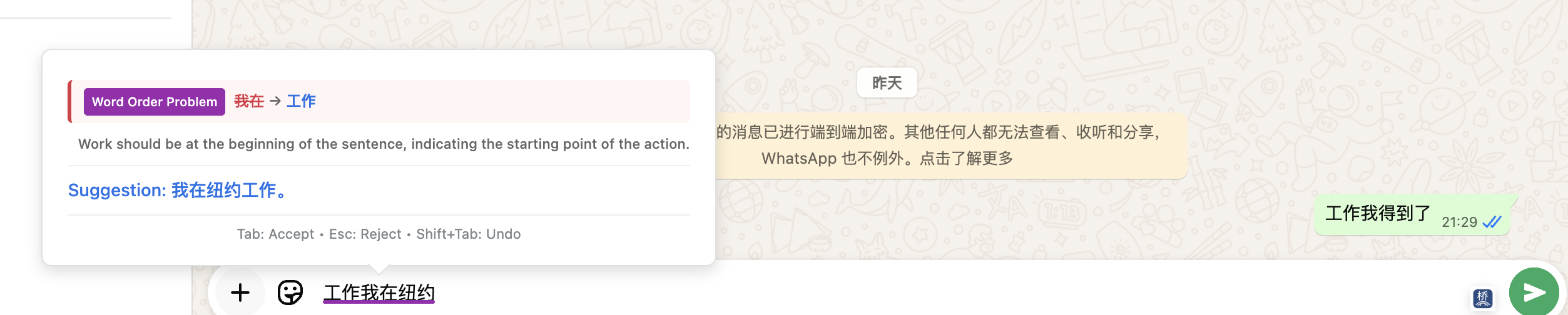
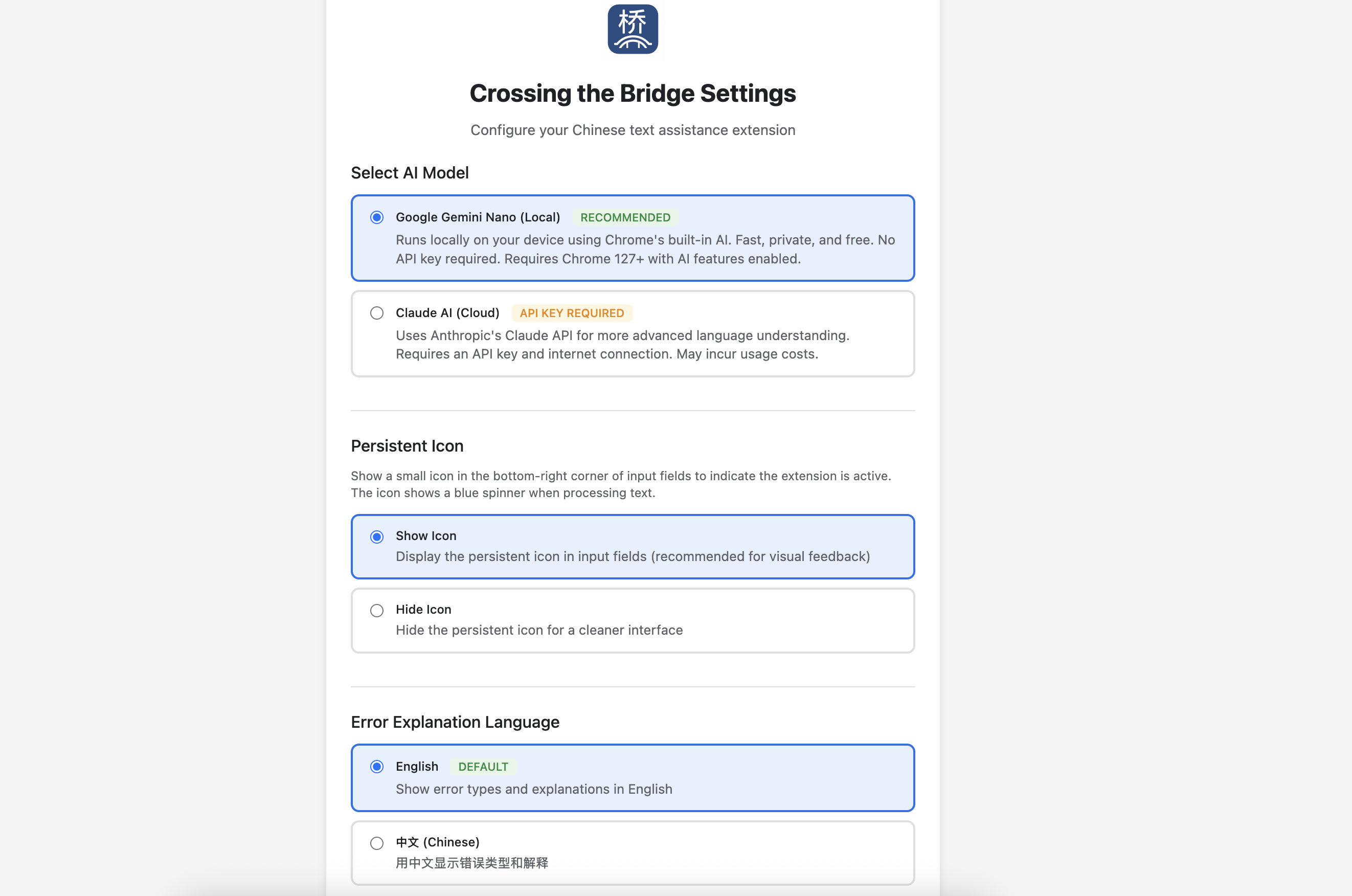
Crossing the Bridge is a Chrome extension that acts as your personal AI language tutor, helping you learn through daily reading and writing. It provides real-time proofreading for Chinese text with color-coded highlights for word, punctuation, word order, and grammar errors, along with idiomatic suggestions and bilingual explanations. The built-in HSK-Adaptive Summarizer simplifies any Chinese webpage to your proficiency level (HSK 1–6), turning difficult articles into level-appropriate summaries in a floating, resizable panel. Other features include real-time English-to-Chinese translation, Superhuman (f.k.a. Grammarly)-style feedback popups, context-aware sentence analysis, and local privacy-first AI processing using Chrome’s Gemini Nano or Claude AI.
How it's built
I built Crossing the Bridge as a Chrome extension (Manifest V3) that brings real-time Chinese language feedback directly into users’ browsing experience. It integrates Chrome’s Built-in AI APIs (Language Model, Summarizer, Translator) for local, privacy-first processing. Using few-shot learning, I trained the AI with 50+ categorized Chinese examples to detect word, grammar, and punctuation errors. A smart text pipeline handles sentence-level analysis, parallel API calls, and caching for speed. I added HSK-adaptive summarization, color-coded Grammarly-style overlays, and bilingual explanations (EN/中文). Everything runs seamlessly within Chrome for an immersive, non-intrusive learning flow.
Challenges I ran into
I faced several Chrome API changes, unreliable Proofreader results, and latency from multiple LLM calls. I overcame these by rebuilding summarization logic, designing my own proofreading model, and parallelizing tasks (50–67% faster). Handling homophones, cache mismatches, and JSON parsing errors required context-aware prompts and robust fallbacks. Balancing feedback frequency, bilingual explanations, and performance taught me how to create a fast, resilient, real-time learning tool for language learners worldwide.
Accomplishments that I'm proud of
I built a first-of-its-kind Chrome extension that integrates real-time Chinese proofreading, adaptive summarization, and idiomatic expression guidance, all in one tool. Unlike anything currently available, it truly meets my friends’ needs as Chinese learners and has already become a product they use daily. Turning a personal frustration into a working, useful product is something I'm proud of.
What I learned
I learned how to design intelligent language support that feels seamless and non-intrusive. Building the extension taught us how to balance AI feedback frequency with usability, handle multilingual inputs, and integrate Chrome’s newest AI APIs effectively. Most importantly, I learned that language learning tools can be both practical and human-centered when built around real user experience.
What's next for Crossing the Bridge
Next, I plan to add pinyin assistance to support pronunciation learning for Chinese learners. While the current version focuses on English speakers learning Chinese, I aim to expand to more language pairs to turn Crossing the Bridge into a true multilingual bridge for learners around the world.
Built With
- anthropic
- chrome
- chrome.storage.sync
- css
- extension
- gemini
- html
- javascript
- languagemodel-api
- summarizer-api
- translator-api


Log in or sign up for Devpost to join the conversation.