-
-
Use any device to take secure payments with no coding and have your brand be front and centre.
-

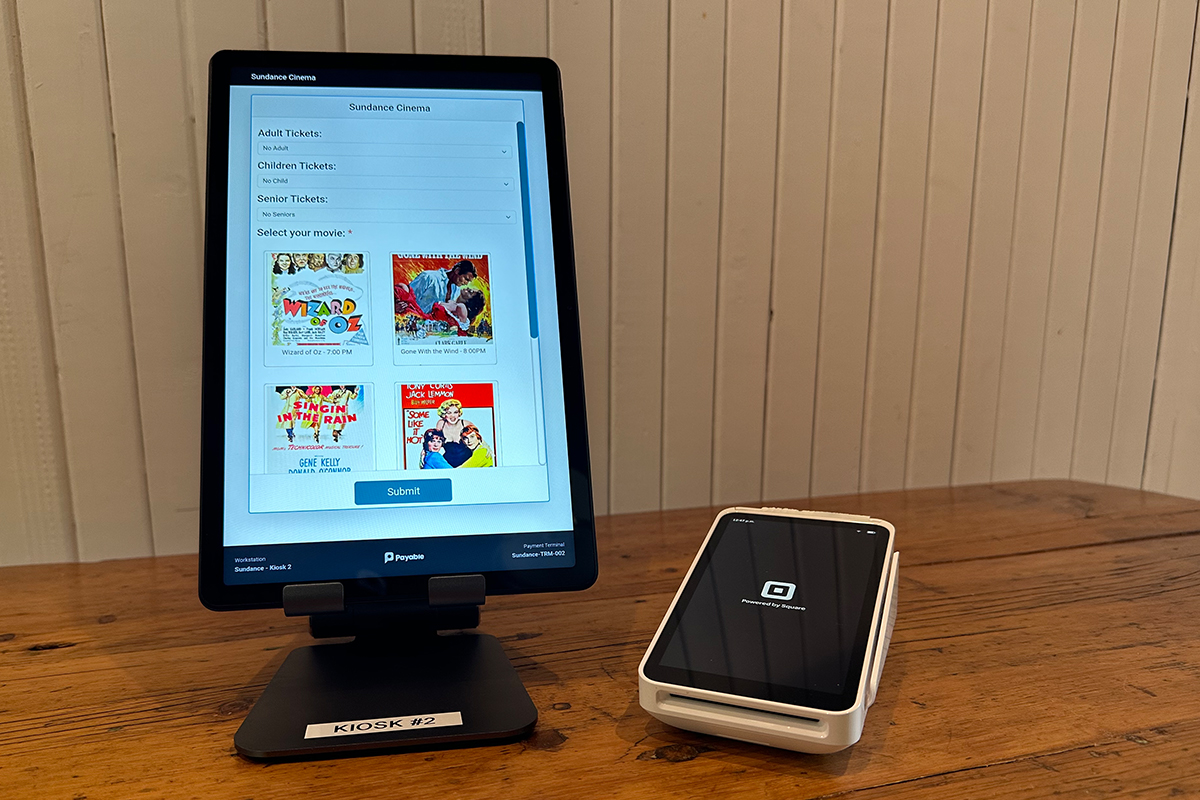
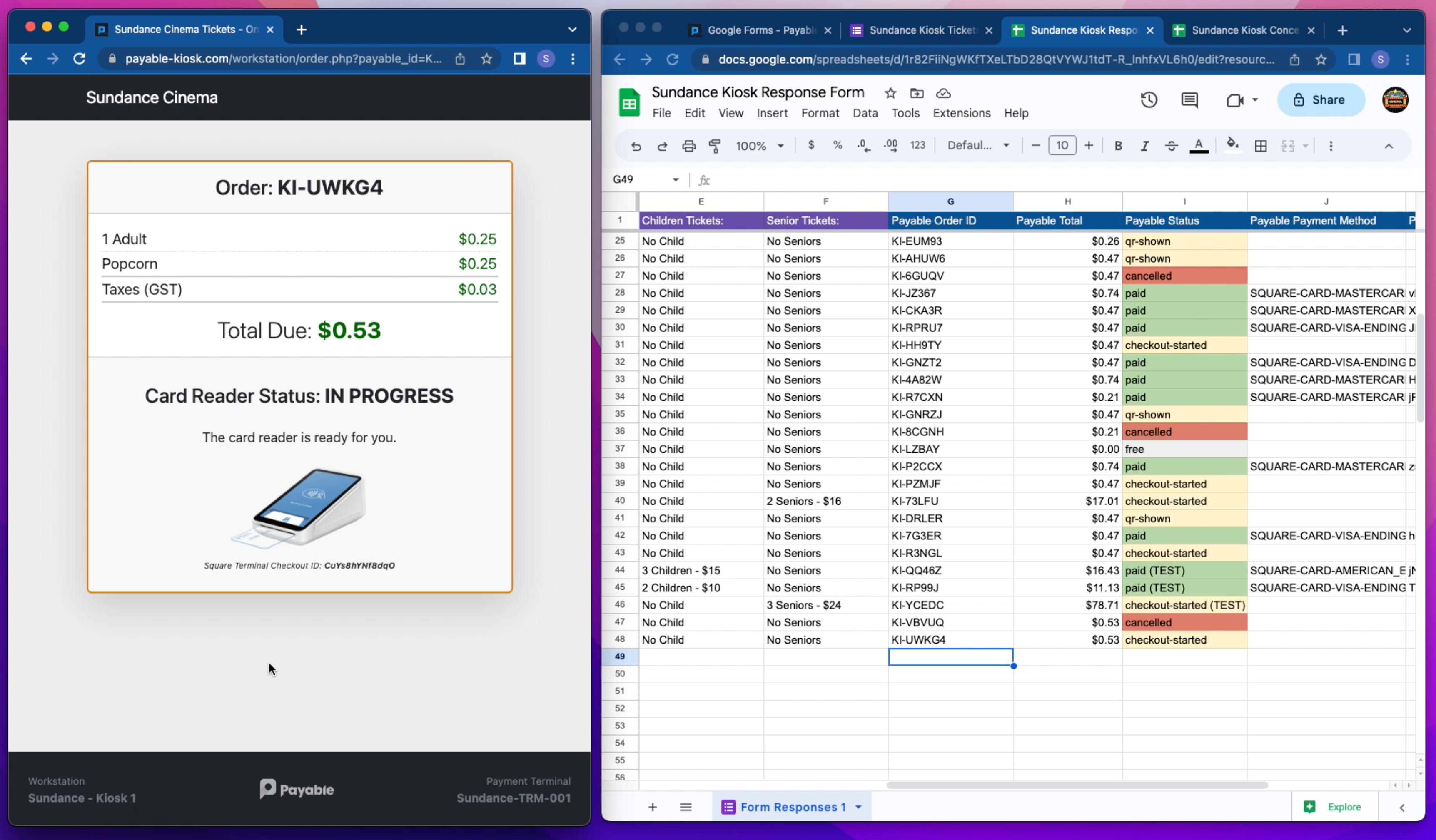
Movie theatre ticket sample kiosk connected to Square Terminal.
-
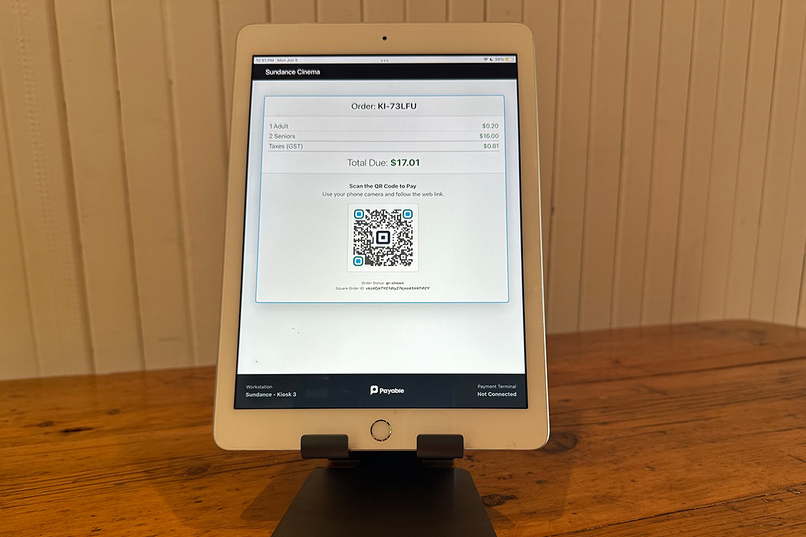
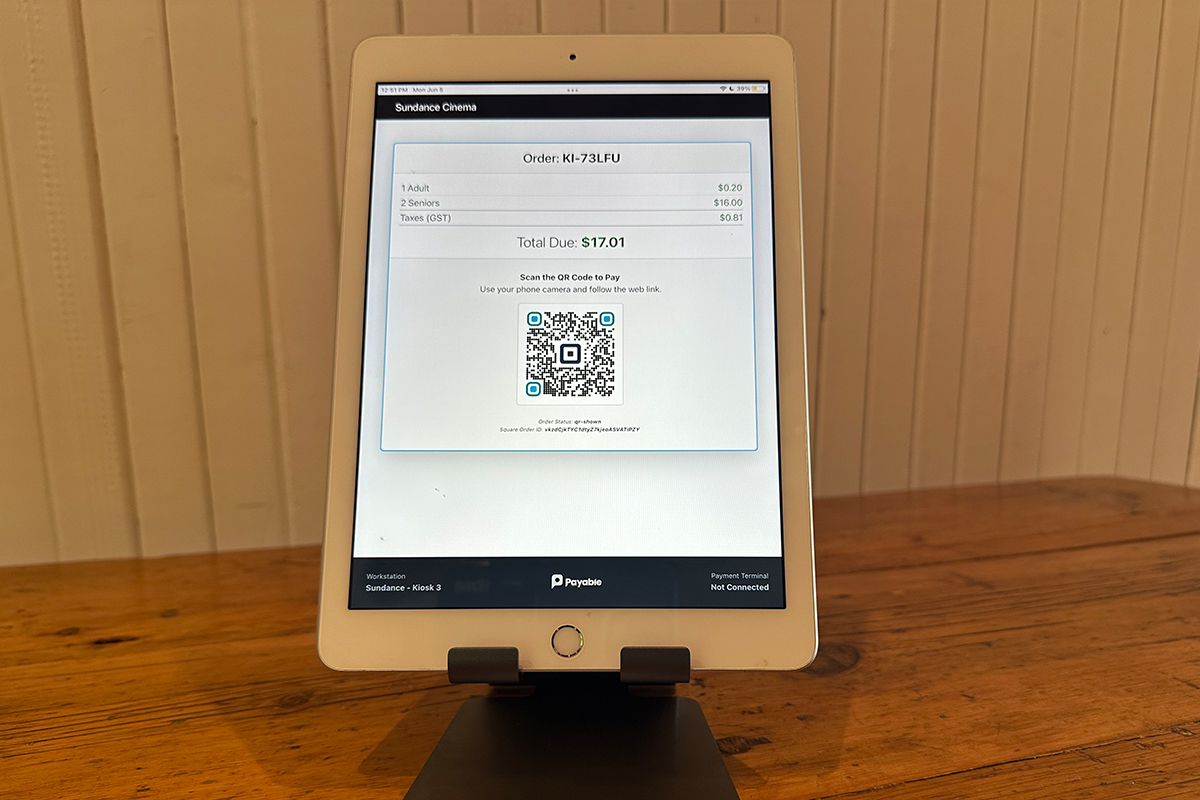
QR Code displayed if you do not have a Square Terminal.
-
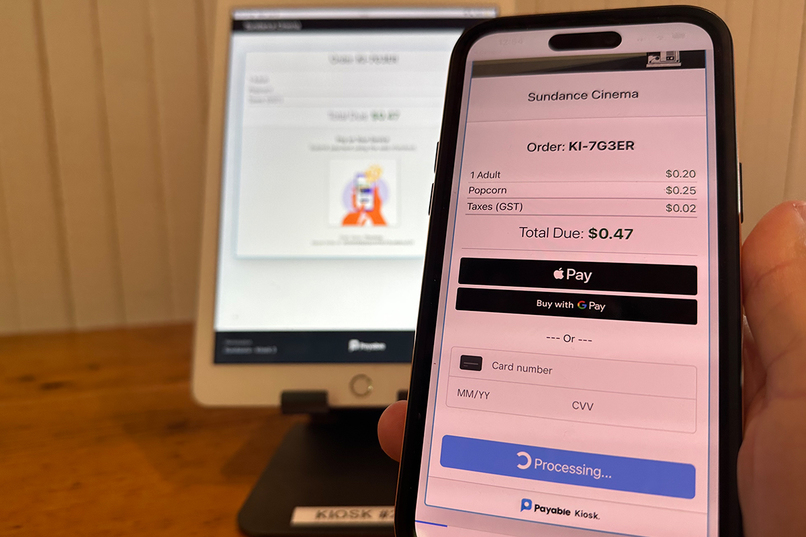
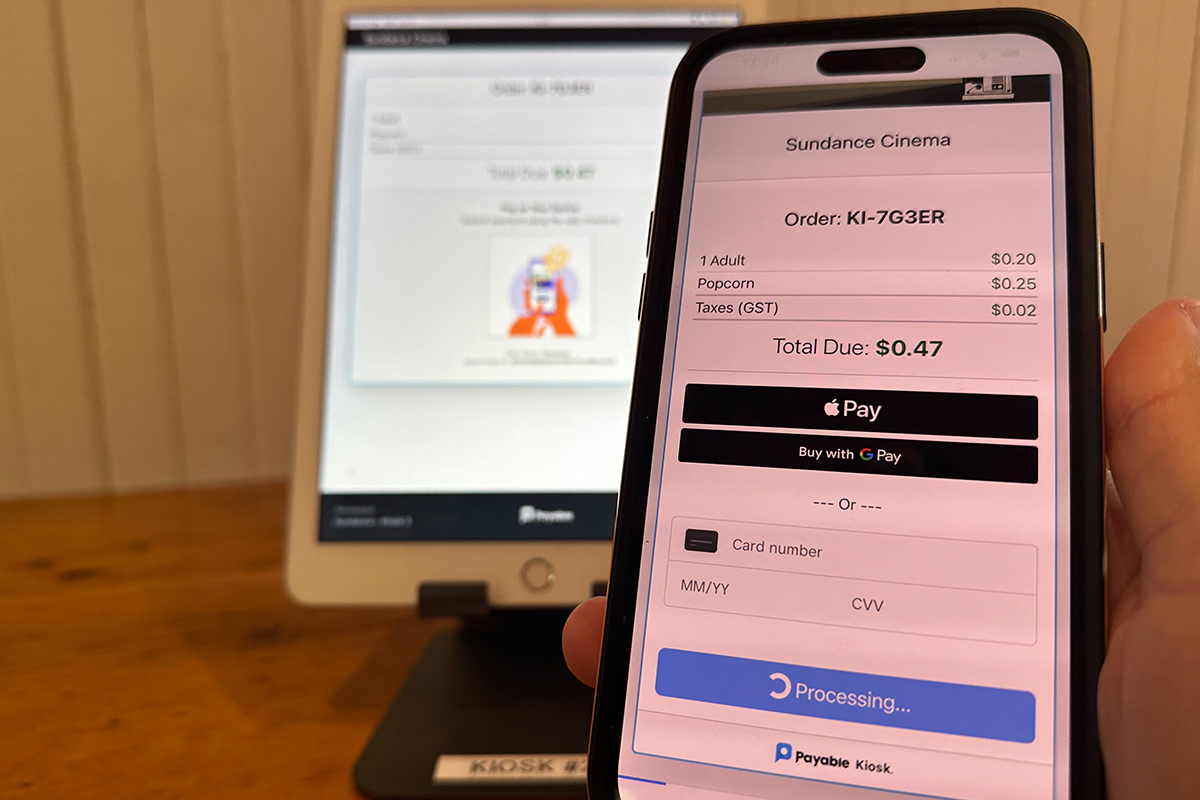
QR Code checkout flow sends transaction to customers phone for completetion.
-
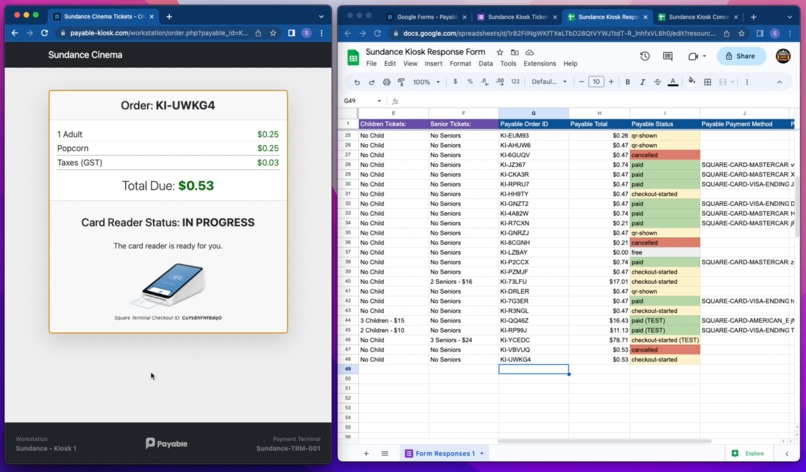
Transaction data flows into the connected Google Sheet along with the responses.
Inspiration
Kiosks provide a self-service option that allows customers to quickly access information or complete transactions without waiting in line or relying on human assistance. This convenience is especially valuable in busy environments where customers want to expedite their interactions.
Speed and Efficiency: Kiosks can often process transactions more quickly than human operators. Customers can navigate through the user interface at their own pace, without the need to wait for a human to key in information or handle multiple tasks simultaneously. This speed and efficiency can be particularly attractive when time is of the essence or during peak hours.
Privacy and Control: Some customers prefer the anonymity and privacy provided by kiosks. They may feel more comfortable entering personal information or making sensitive transactions without the potential judgment or interference of a human operator. Kiosks can offer a sense of control, allowing customers to independently manage their interactions.
Accuracy and Consistency: Kiosks are designed to follow predefined processes and workflows, minimizing the risk of human error or inconsistencies. Customers may trust the accuracy and reliability of automated systems, especially when it comes to tasks like ticket printing, ordering food, or making reservations.
Language and Accessibility: Kiosks can offer multilingual interfaces and accessibility options, catering to diverse customer needs. This feature can be particularly beneficial for individuals who have language barriers, hearing impairments, or other accessibility requirements. Kiosks enable self-service interactions without the need for translation or assistance.
Reduction of Social Interactions: Some customers may simply prefer minimizing social interactions or avoiding small talk, especially in situations where their primary focus is on completing a transaction or accessing specific information. Kiosks allow customers to bypass conversations or interactions that they perceive as unnecessary.
However, kiosk solutions today are too expensive and complex for the average small business to setup.
What it does
Payable Kiosk magically transforms any Google Form into a custom payment capable self-service kiosk.
We use the Google Apps small sellers already love and use daily, to let them design and build their own kiosks. After each submission the data and payment status is stored in a connected Google Sheet to keep sellers organize and allow for linking the data into additional workflows.
However, current kiosk solutions are too confusing and expensive for the average small business owner to consider setting up.
How we built it
We developed a brand new web application from the ground up.
We use the Google OAuth flow to allow sellers to both register and grant us permission to sync data to their Google Forms and Sheets.
We use the Square OAuth flow to quickly allow any seller to connect payment acceptance capabilities.
We use the Google Drive API, Google Forms API, and the Google Sheets API to recreate a custom Kiosk User Interface based on a users Google Form and sync payment data to a connected Google Sheet.
We use the Square Terminal API to let customer pair Square Terminals and handle all states of the payment lifecycle.
We also built out a custom QR Code flow that let's users without a Square Terminal transfer the checkout experience to the customers phone. On the web checkout we used the Square Web Payments SDK, and support Card, Apple Pay and Google Pay.
Challenges we ran into
The Google Forms API is missing some key capabilities (eg. Creating a Form Response, or Getting Form Styles) which we had to develop creative workarounds for to make seamless to the user.
Square Terminal API has some features that are limited to US based sellers (eg. Ability to pass in an Order, Line Item Display, App Fee) and since we are in Canada it was difficult / impossible to test some of these features.
Square Terminal API in sandbox required a special scope
PAYMENTS_WRITE_IN_PERSONto get the checkout process to createpayment_idsin the response. The Square Slack channel got us sorted out 👍.
Accomplishments that we're proud of
This was our first end-to-end app built together as a team with @Yemi, @David, @Betsy and @Terry. It was great team building and it was cool to have the freedom to work on a completely new product.
It is very flexible. We love giving other people tools and seeing how they will use them. With all the different combinations, we cant wait to see how people use it.
What we learned
This is the firs time our team has worked in detail with the Square Terminal API and developing a pairing flow.
This is the first time we have worked with Google Forms, Sheets API (as opposed to Google Apps Script) for our data syncing. This seems to be a much more reliable way to read and write data although still missing some key attributes and capabilities when it comes to Google Forms.
What's next for Google Forms - Payable Kiosk
Kiosk Custom Questions: We are going to make several special questions common on a kiosk (Take a Selfie, Collect a Signature, and Scan a Bar/QR Code) which will send all the data and images into your spreadsheet. 😎.
First Customer: We have a potential live merchant to use our application with. We hope to refine some of the functionality and use it in a real setting this June at a conference.
Square App-Marketplace: We would love to work with Square partnership team to do extensive QA and offer Payable Kiosk in the app marketplace.


Log in or sign up for Devpost to join the conversation.