-
-
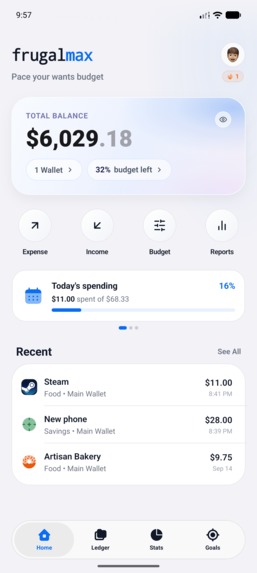
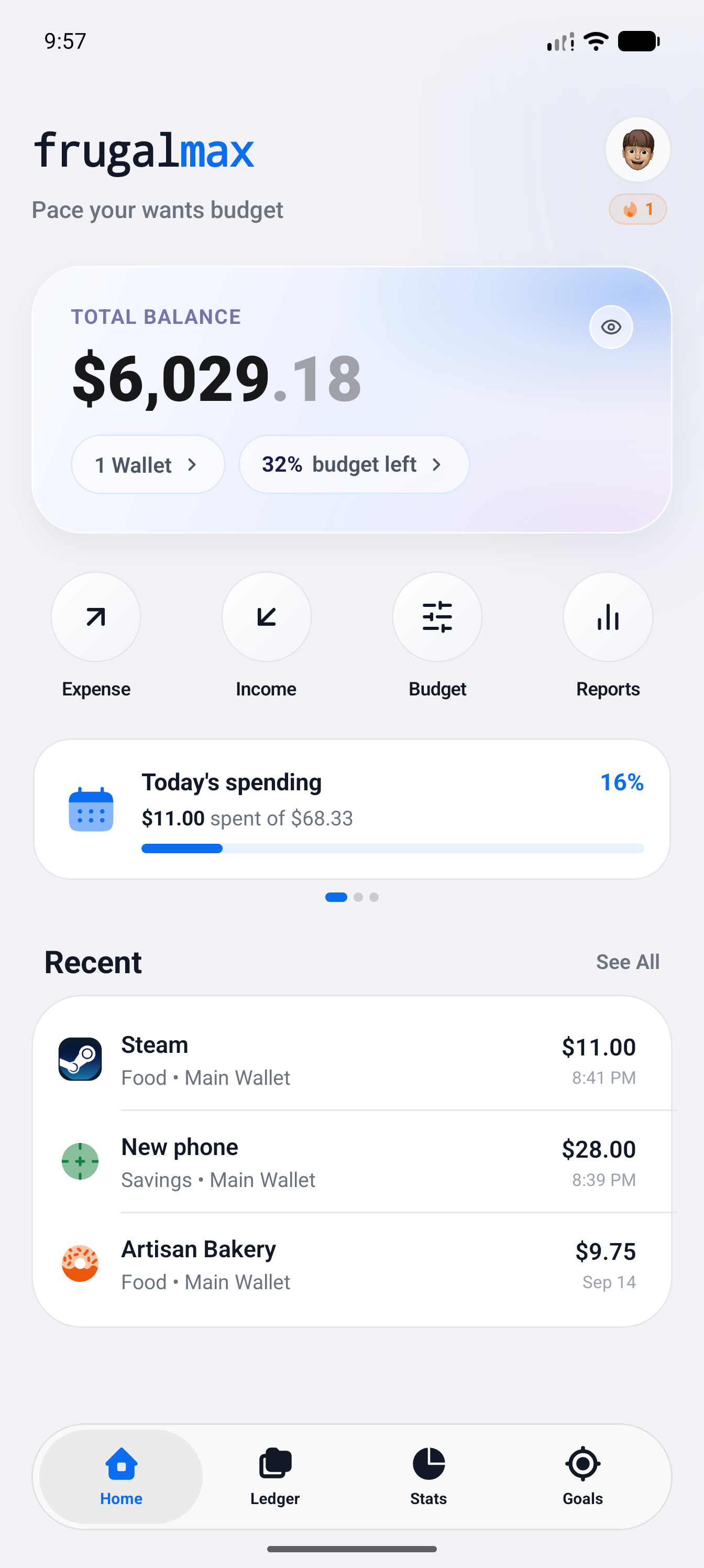
Home screen showing total balance, daily spending progress, and recent transactions.
-
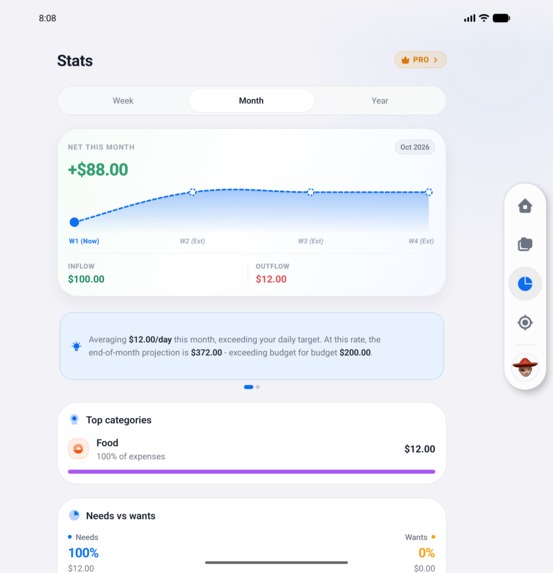
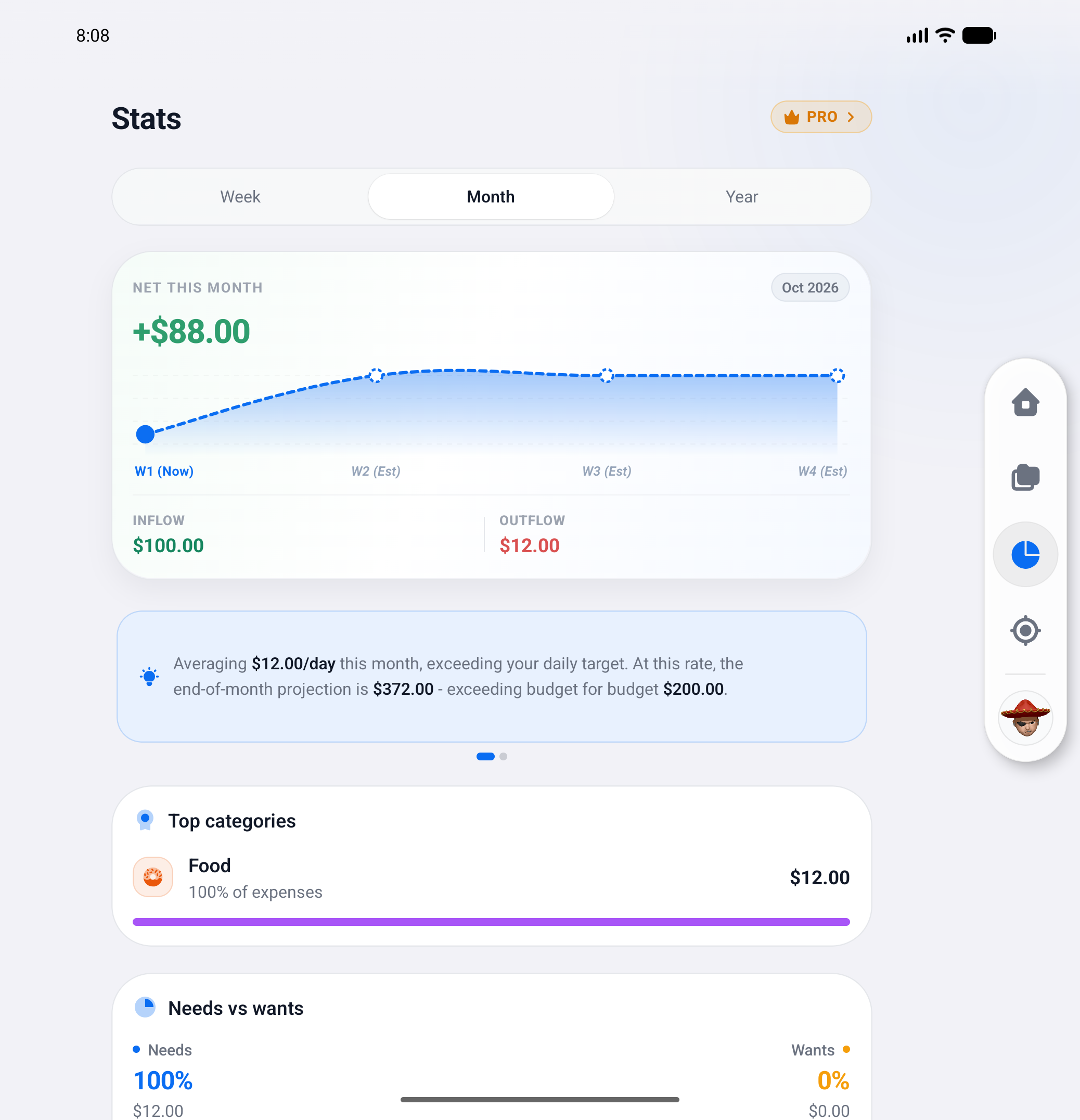
Stats 2-pane view on foldable: monthly net, projection curve, inflow/outflow, top categories. Floating dock left/right set in Settings.
-
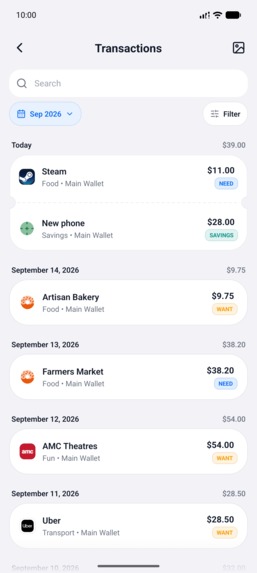
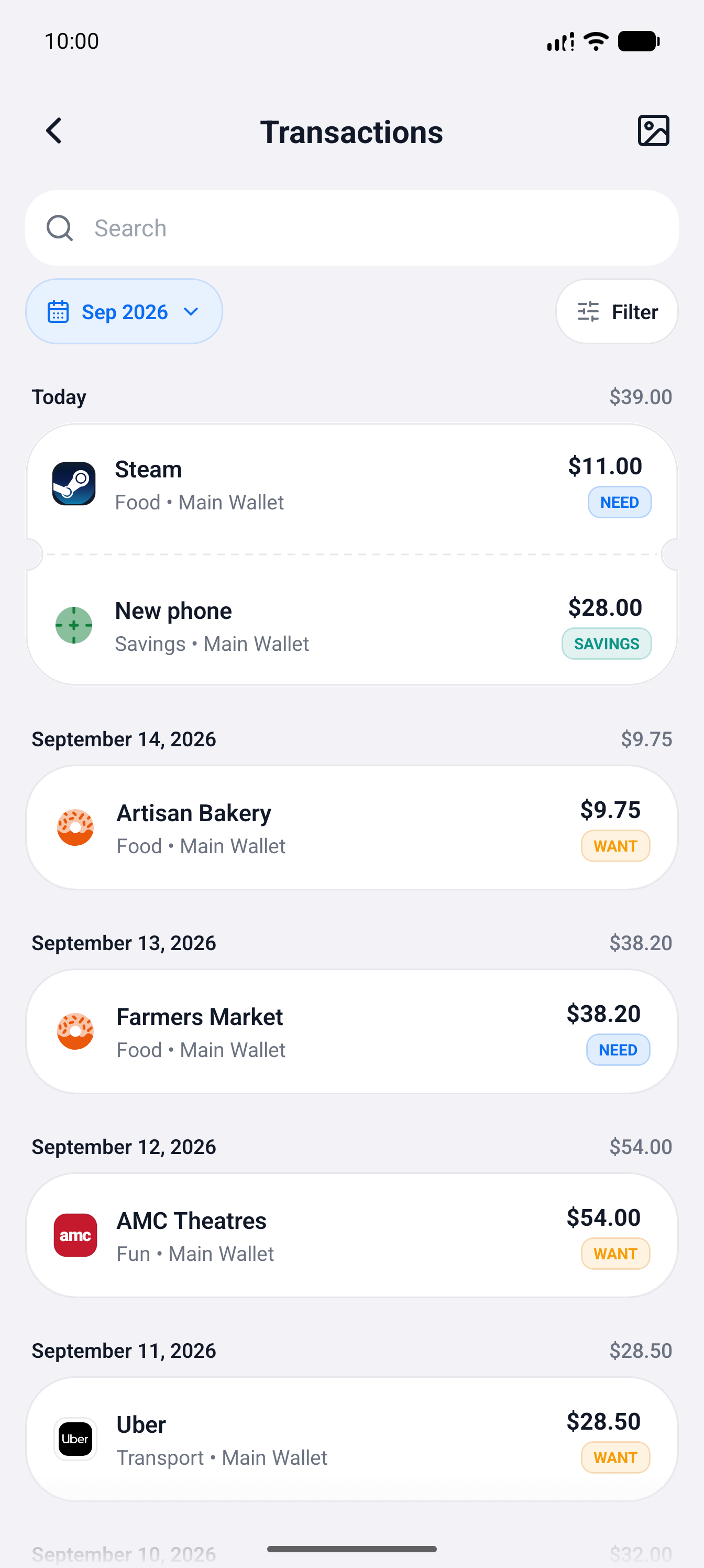
Transaction history grouped by date with merchant logos and Need or Want tags.
-
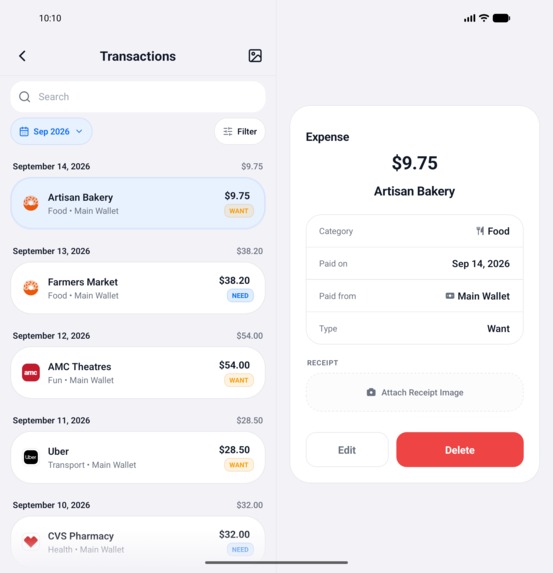
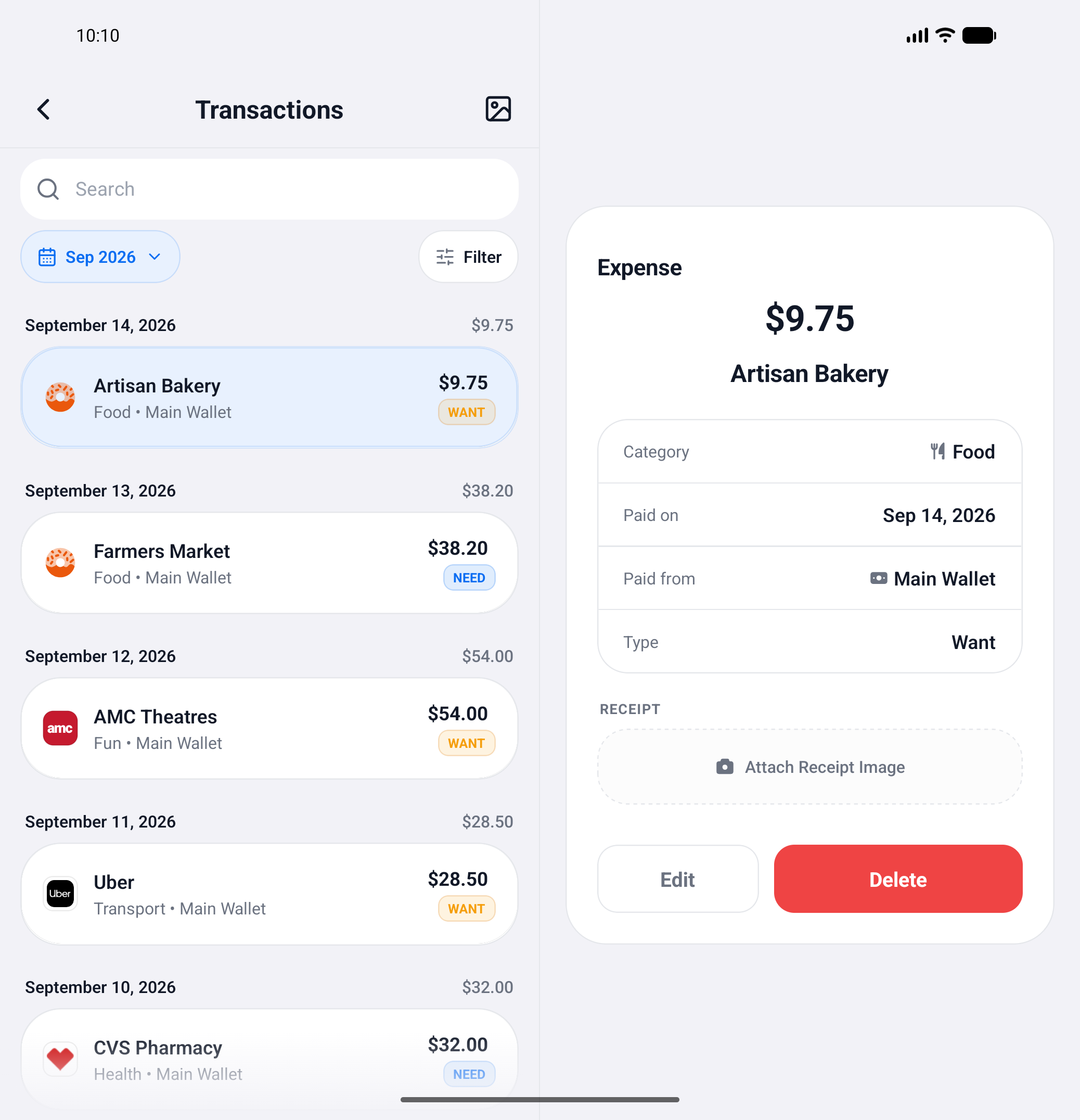
2-pane ledger on foldables: browse Need vs. Want expenses on the left, inspect receipts on the right.
-
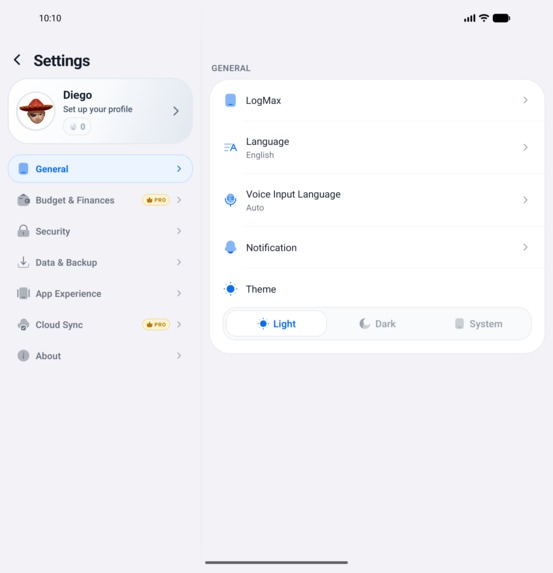
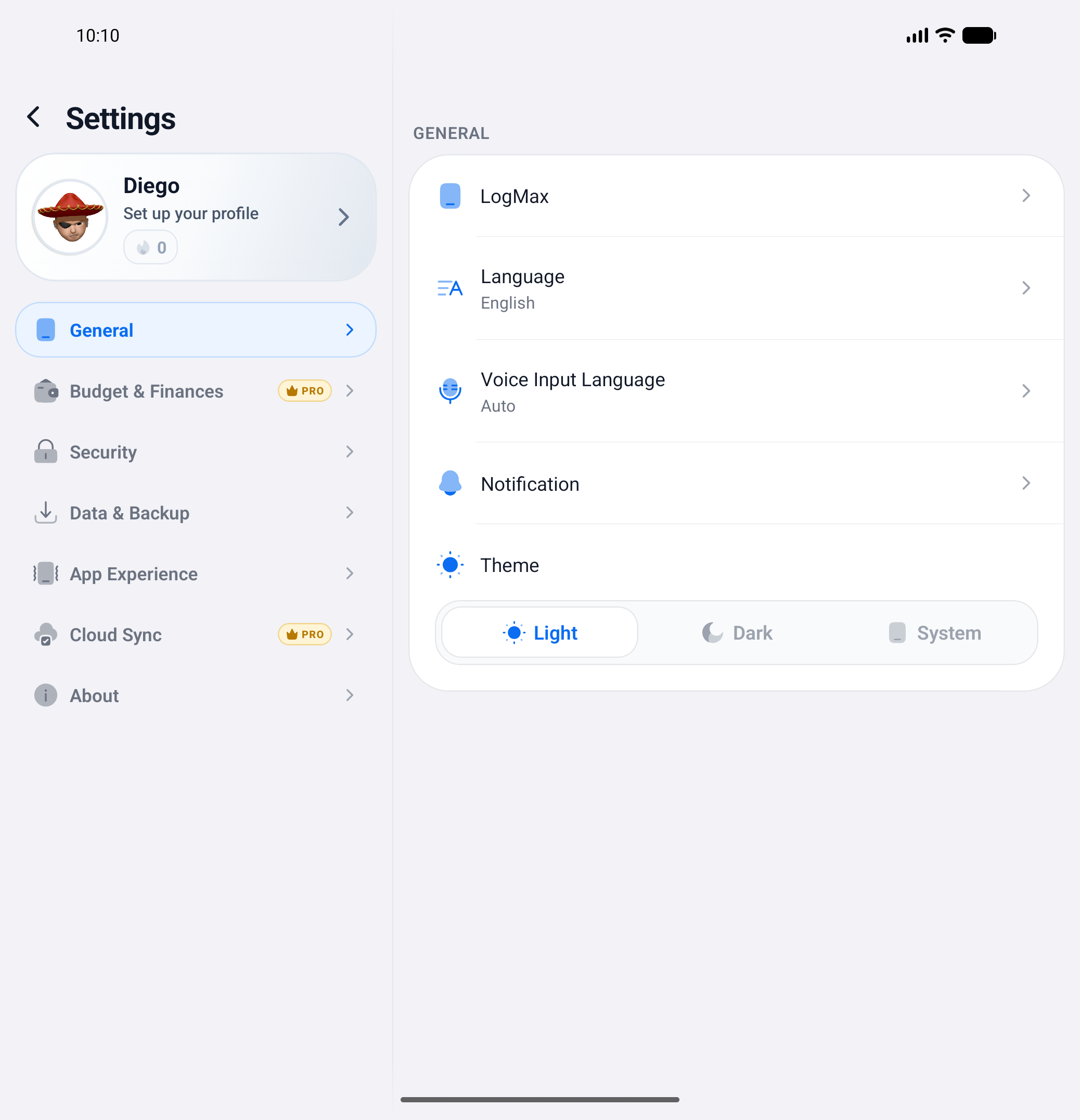
Two-Pane Settings: Navigate account streaks and adjust themes side by side without losing context.
-
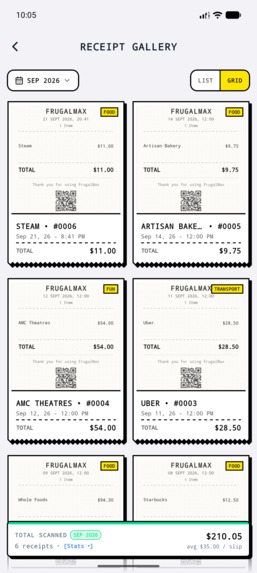
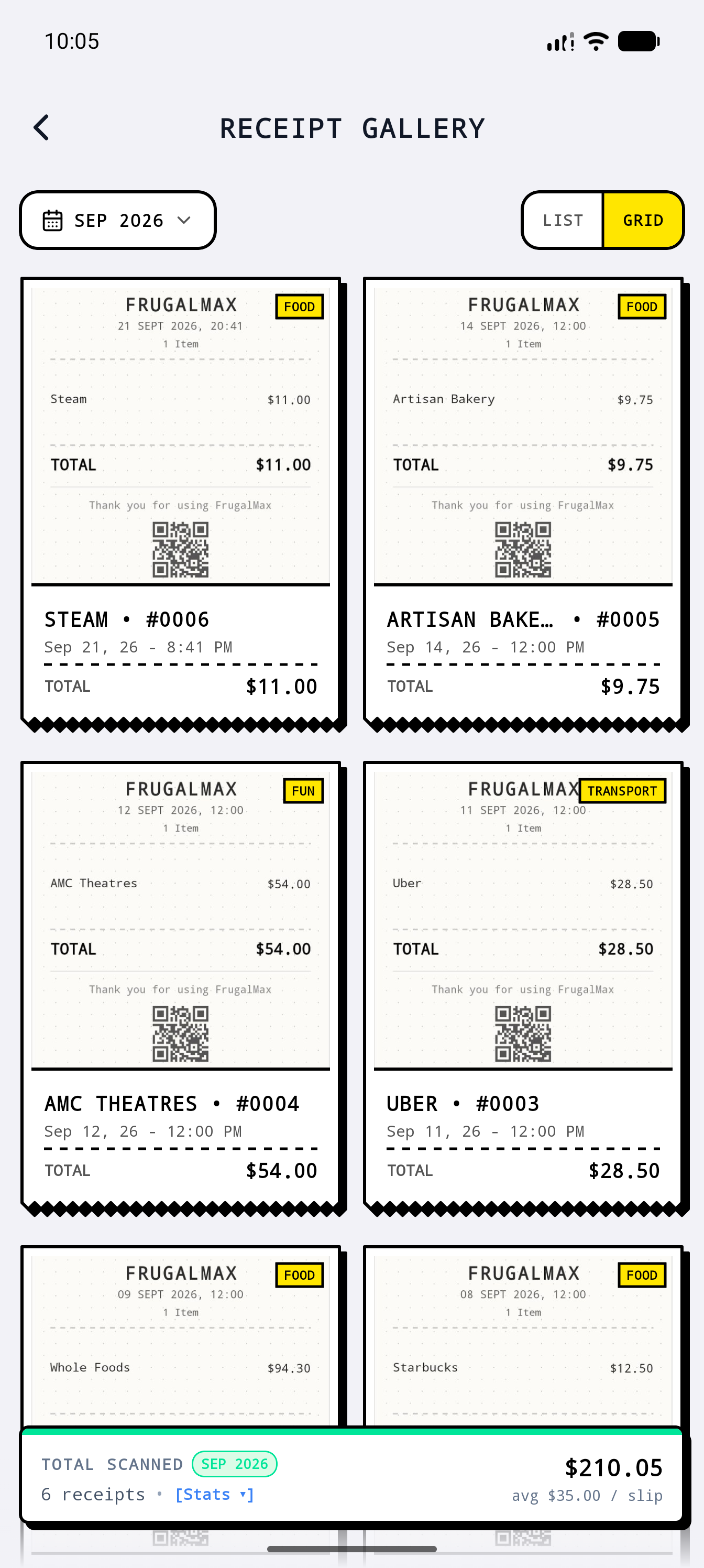
Receipt gallery showing paper-style receipts and neo brutalist style for each transaction with monthly scanned totals.
-
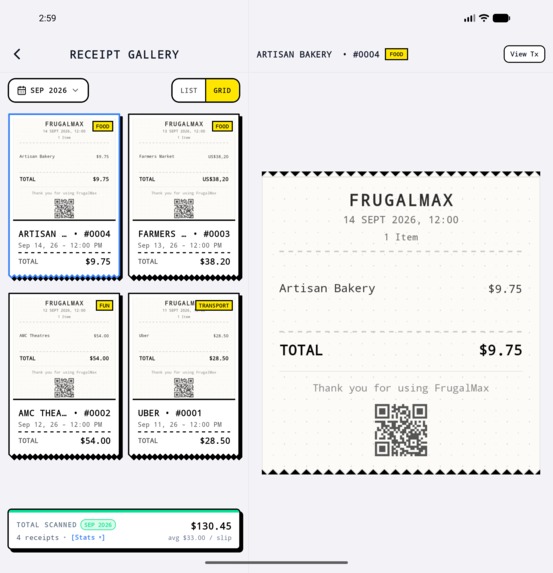
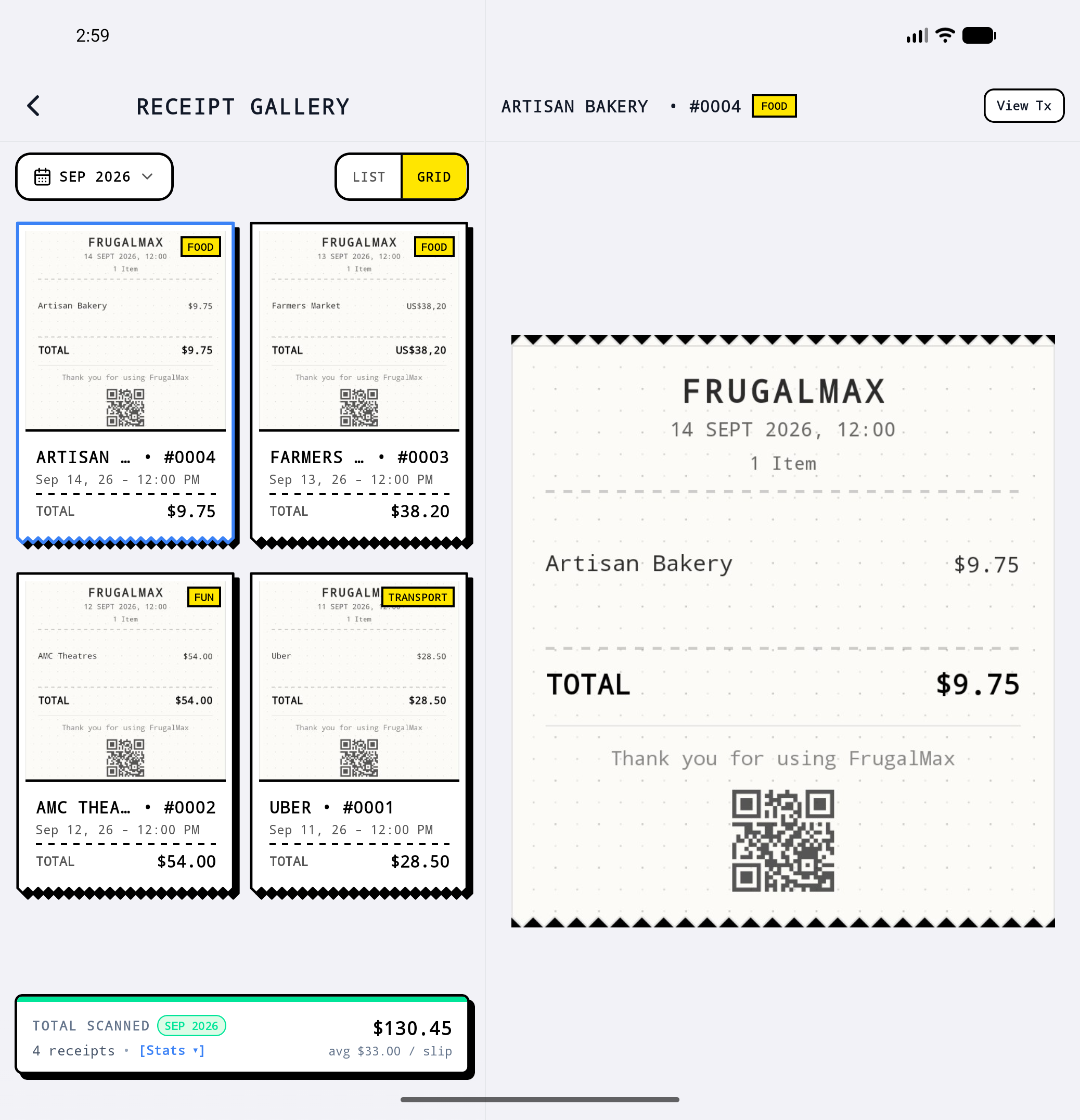
2-pane receipt gallery showing paper-style receipts in neo-brutalist styling with monthly scanned totals.
-
Frugalmax: The 3-second budget tracker for people who hate tracking. Designed for speed, privacy, and zero lag.
Inspiration
Spending happens in seconds. Tracking it usually does not.
I kept running into the same problem when I tried to keep up with my own expenses. The purchase was quick, but recording it afterward felt like another task.
Open the app. Wait for it to load. Enter the amount. Pick a category. Save.
That is enough friction to make expense tracking easy to skip.
I started thinking about what people already have immediately after a purchase. A paper receipt already contains the merchant, items, prices, and total. Instead of asking users to recreate that information manually, I wanted Frugalmax to turn the receipt itself into a fast way to capture an expense.
Bank-sync apps solve a different problem, but they can create a gap between spending and awareness. Transaction data is not always available immediately, refresh frequency varies by financial institution, and connection issues can leave information temporarily stale.
So I built Frugalmax around one simple constraint:
If recording an expense takes more than 3 seconds, there is too much friction.
From there, the idea expanded into multiple fast capture methods: 3-second quick logging, offline receipt scanning, barcode scanning, voice input, and email receipts.
The rest of the app exists to make those captured transactions useful, turning them into budgets, analytics, recurring expenses, savings tools, and the rest of the user's financial picture.
What it does
Frugalmax is an offline-first expense tracker built around fast capture.
Capture
- 3-Second Quick Log: An Android App Shortcut or system back-tap gesture opens a translucent quick-log card through a dedicated Kotlin
TrampolineActivity. You do not need to launch the full app just to record an expense. - Paper Receipts: On-device ML Kit OCR reads receipts completely offline. Custom spatial clustering groups text coordinates horizontally and validates receipt totals using
Subtotal + Tax = Total. - AI Receipt Scanning: A separate AI-powered receipt workflow handles more advanced receipt extraction.
- Barcode Scanning: A continuous scanner checks Open Food Facts and Open Prices with a register-style beep. ML Kit barcode detection is paired with an on-device OCR fallback for printed barcode numbers when glare or curved packaging makes stripe detection unreliable. Photo gallery import is also supported.
- Email Receipts: Digital merchant receipts can be forwarded to a private inbound address. Cloudflare Workers parse them and store the resulting data in R2.
- Voice Logging: A dedicated microphone button provides real-time waveform feedback and on-device natural-language extraction, such as
"Coffee $4 at Starbucks".
I did not want to force one input method for every purchase. The goal was to have several fast ways to record an expense when it happens.
Understand
- Dynamic Multi-Currency & Live FX: Supports 153 active ISO 4217 currencies, including currencies with 0, 2, and 3 minor units. Currency can be detected from device locale, while an offline-cached Cloudflare FX proxy provides exchange rates for foreign-price conversion. Transactions preserve both the original currency and amount and the converted base amount.
- Rolling Odometer Dashboard: The home screen balance uses a mechanical rolling-odometer animation that updates whenever transactions are recorded.
- Financial Runway & End-of-Month Sweep: Spending can be organized around the 50/30/20 rule for Needs, Wants, and Savings. A live runway indicator estimates how long liquid savings could sustain the current spending pace. The End-of-Month Sweep lets users move unspent budget surpluses into savings goals.
- Digital Thermal Receipts & Gallery: Scanned purchases, email bills, and manually generated slips are rendered as thermal-style receipts and organized in a dedicated receipt gallery.
- Home Screen Widget: Daily budget pacing is rendered directly from local SQLite without requiring a network request.
Plan and keep track
- Auto-Billing & Recurring Salary: Recurring expenses such as subscriptions, rent, gym memberships, and other bills can generate ledger entries automatically on their due dates. Recurring salary entries can also be configured, with optional Google Calendar synchronization through
expo-calendar. - Collaborative Shared Wallets: Two-person budgeting for couples or roommates with real-time partner synchronization. Only one partner needs Frugalmax Pro to sponsor the shared wallet.
- Streak Pet & Habit Protection: An animated Skia mascot evolves with daily logging streaks, with three monthly streak shields so an occasional missed day does not immediately reset progress.
- Foldable & Tablet Architecture: The interface adapts to a two-pane master-detail layout on foldables such as the Galaxy Z Fold and updates during live fold and unfold transitions.
Keep control of the data
- Local-First Storage & Smart Migration: Core financial data is stored in on-device SQLite, with optional cloud synchronization. Users can import bank statements with automatic column and currency detection or export complete AES-256 encrypted
.fmaxbackups without being locked into a platform.
How I built it
- Frontend & Navigation: React Native 0.81 and Expo SDK 54, using Expo Router v6 for file-based routing and deep linking.
- Translucent Native Windowing: A custom Kotlin
TrampolineActivityuses translucent window configuration and keyboard handling to launch the standalone quick-log experience without mounting the full application UI. - On-Device Vision, OCR & Barcodes: Google ML Kit runs locally on the device CPU. Custom spatial clustering groups bounding boxes on the same horizontal row, combined with Levenshtein fuzzy matching and Modulo-10 checksum validation for EAN-13, UPC-A, and EAN-8 barcodes.
- Currency & Serverless Pipeline: Cloudflare Workers handle exchange-rate caching across 150+ currencies and parse inbound email receipts into Cloudflare R2 object storage.
- Graphics, Physics & Haptics:
@shopify/react-native-skiapowers the streak mascot and paywall visuals, Reanimated drives rolling odometer digits, and native Android LRA effects provide tactile feedback. - Voice Recognition:
expo-speech-recognitionhandles streaming voice input and local intent extraction without relying on third-party speech APIs. - Local-First Storage & Cloud Sync: SQLite uses Write-Ahead Logging (WAL) and
busy_timeout=5000msfor reliable local state. Optional multi-device synchronization uses Firebase Firestore with distributed lease locks and atomic Compare-And-Set (CAS) operations to prevent conflicting writes and balance overwrites. - Monetization & Entitlements: RevenueCat (
react-native-purchases) manages Pro entitlements, including AI receipt scanning, shared partner wallets, cloud backup, and streak protection.
Challenges I ran into
- The Background Service vs. Anti-Friction Pivot: Early in development, I built an Android notification listener using
BIND_NOTIFICATION_LISTENER_SERVICEto automatically read bank SMS and e-wallet notifications. In practice, aggressive OEM battery management on devices such as Xiaomi, Oppo, and Samsung could terminate background services, and the approach required invasive system permissions. I removed it and moved to zero-permission instant entry through the quick-log shortcut, on-device OCR, and barcode scanning. - Cellular Drops & Distributed Concurrency: Unreliable cellular connections can drop persistent connections unexpectedly. I reconfigured Firestore synchronization to use enforced long-polling and built an atomic lease-lock protocol so concurrent writes from offline partners would not produce conflicting updates or overwrite balances.
- Android Task Management & Soft-Input Behavior: Launching a dedicated translucent activity directly from a launcher shortcut or hardware gesture without mounting the main application shell required careful tuning of task affinities, independent React roots, and soft-input window behavior to avoid keyboard stutter.
- On-Device Receipt Math Verification: Cloud OCR is convenient, but it adds network dependency and moves receipt data outside the device. Reconstructing itemized lines locally from raw ML Kit coordinate blocks required custom spatial line matching and an internal arithmetic check (
Subtotal + Tax = Total) to filter unrelated numbers and false positives. - Mid-Flight Foldable Transitions: Switching between a single-column layout and a two-pane master-detail layout during an active fold event required preserving active forms and draft transaction inputs without unnecessary unmounts or resets.
Accomplishments I'm proud of
- The Instant Kotlin Quick-Log: Built a lightweight standalone Android quick-entry module that mounts directly into its own React root and can save transactions without opening the full application UI.
- Local Receipt & Barcode Processing: Built on-device vision pipelines for receipt and retail barcode processing, including OCR fallback logic for difficult packaging conditions.
- Single-Sponsor Collaborative Wallets: Built a two-player budgeting flow where only one partner needs Pro, with a 7-day countdown protection mechanism and atomic Firestore locks.
- Inbound Email Receipt Pipeline: Built a dedicated Cloudflare Worker and R2 pipeline that converts forwarded HTML receipts into structured transaction slips.
- Deterministic Multi-Device Sync: Designed a lease-locked synchronization model to handle conflicting writes and intermittent connectivity.
- Responsive 2-Pane Tablet/Foldable UI: Built an adaptive master-detail interface designed for larger screens rather than simply stretching a phone layout.
- Tactile UI & Animation Polish: Engineered custom micro-interactions including a realistic page-flipping book transition with paper sound effects during onboarding, native Android LRA tactile ticks (
EFFECT_TICK,EFFECT_CLICK), Reanimated mechanical rolling odometer numbers, Skia shaders, and animated vector SVG checkmark draws on transaction saves. - AES-256 Encrypted Backups: Added
.fmaxdata portability so users can retain and move their financial records independently of the platform.
What I learned
Building local-first took more work up front, but the performance difference was obvious. Instant queries, minimal loading states, and reliable offline operation make a big difference in an app people use every day.
I also learned that reducing friction is usually not about adding more features. It is about removing unnecessary steps from the things users do repeatedly.
The 3-second constraint ended up affecting more than the quick-log screen. It influenced how I approached OCR, barcode scanning, voice input, offline storage, navigation, and even the decision to remove the notification-listener architecture entirely.
Navigating Google Play's 14-day closed testing and an extended production review also taught me a lot about real-world app releases. Passing human audits, tuning permissions, and handling review timelines under a competition deadline reinforced that shipping software is as much about platform compliance, store policy, and patience as it is about writing code.
What's next for Frugalmax
- iOS App Store Release: The app is built with Expo and Continuous Native Generation (CNG), keeping the core codebase cross-platform and ready for iOS review.
- Wear OS Tile: One-tap quick logging from smartwatches for transit, coffee runs, and other small purchases.
- iOS Live Activities: Real-time daily budget gauges on the Lock Screen and Dynamic Island.
- Subscription Price-Hike Detection: An audit engine that monitors recurring bills and notifies users about unexpected renewal price increases.
- Multi-Member Shared Wallets: Expanding beyond two-person wallets to support roommates, groups, and custom expense allocations.
Built With
- admob
- android
- expo.io
- firebase
- firestore
- google-mlkit
- kotlin
- react-native
- react-native-reanimated
- revenuecat
- skia
- speech-recognition
- sqlite
- typescript

Log in or sign up for Devpost to join the conversation.