-
-
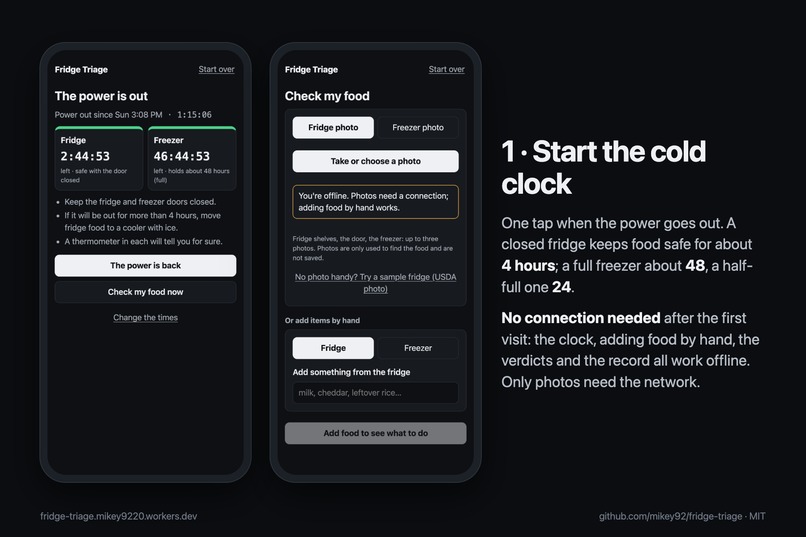
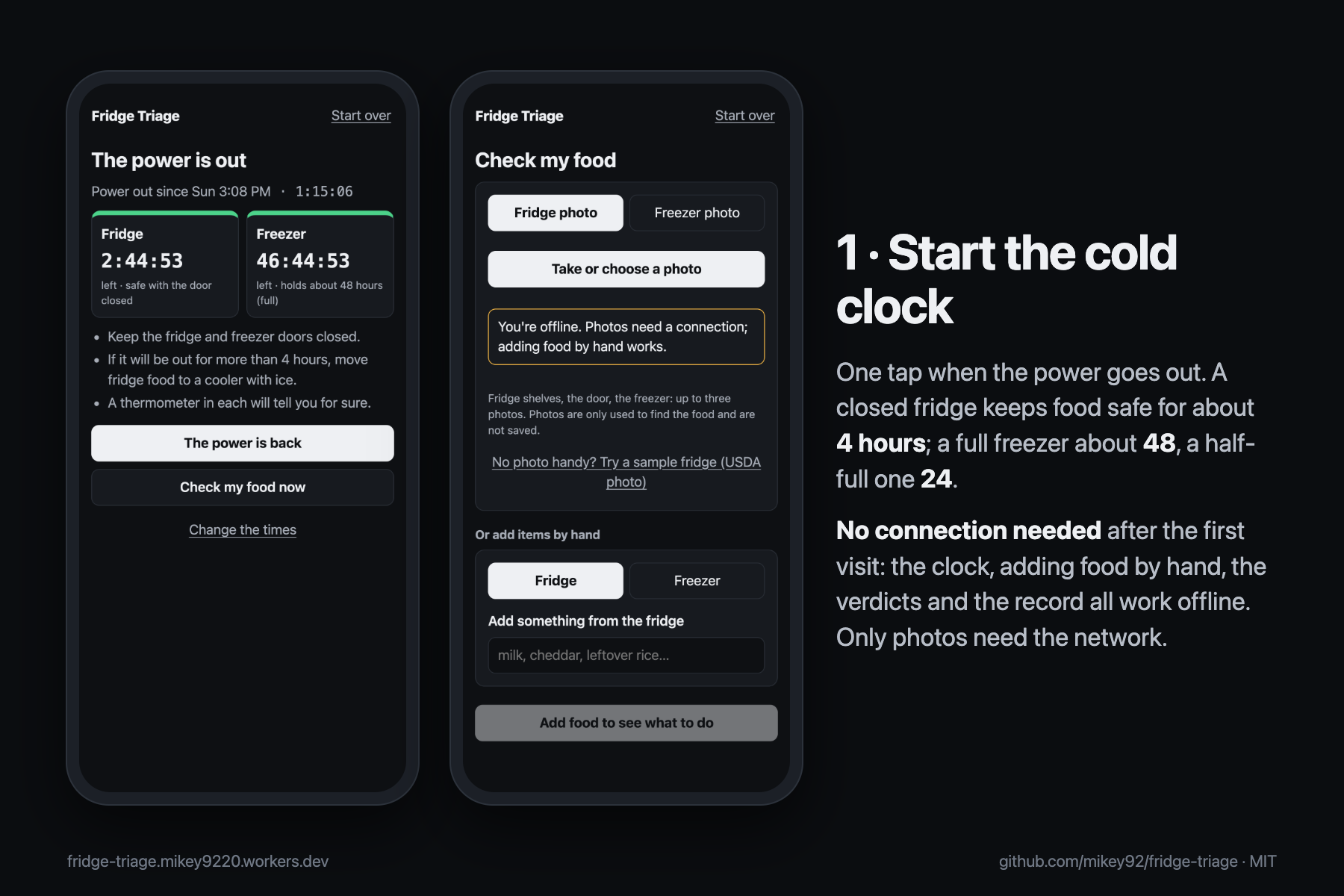
1. The cold clock: about 4 hours for a closed fridge, 24 or 48 for the freezer. It opens with no connection.
-
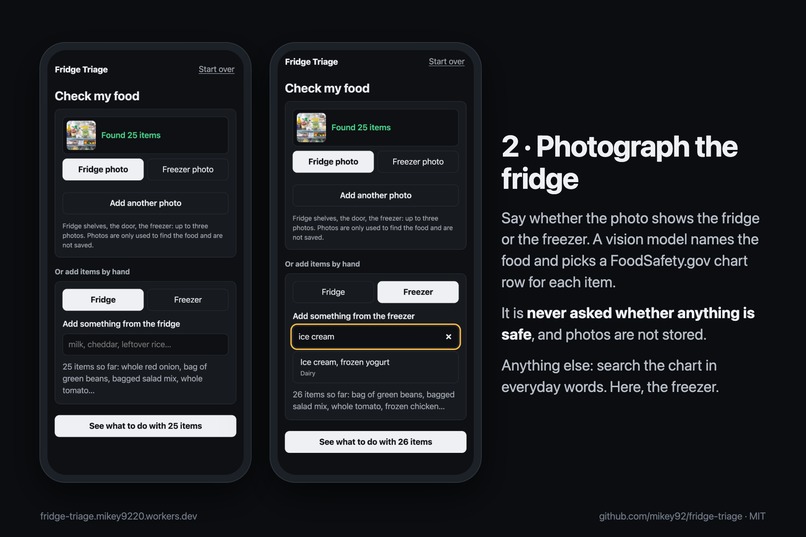
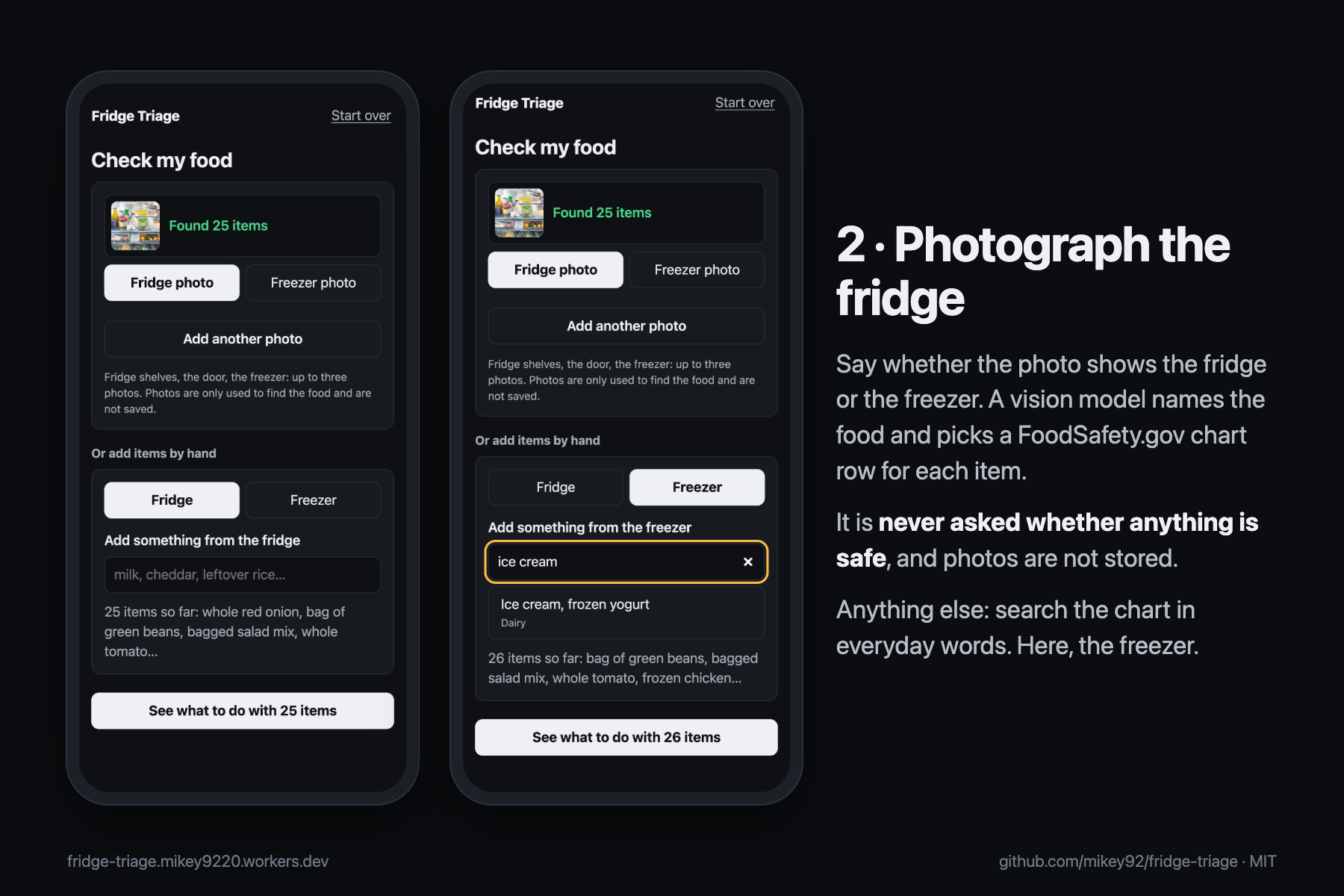
2. Say fridge or freezer and take a photo: the AI names the food and picks a chart row. Add anything else by hand.
-
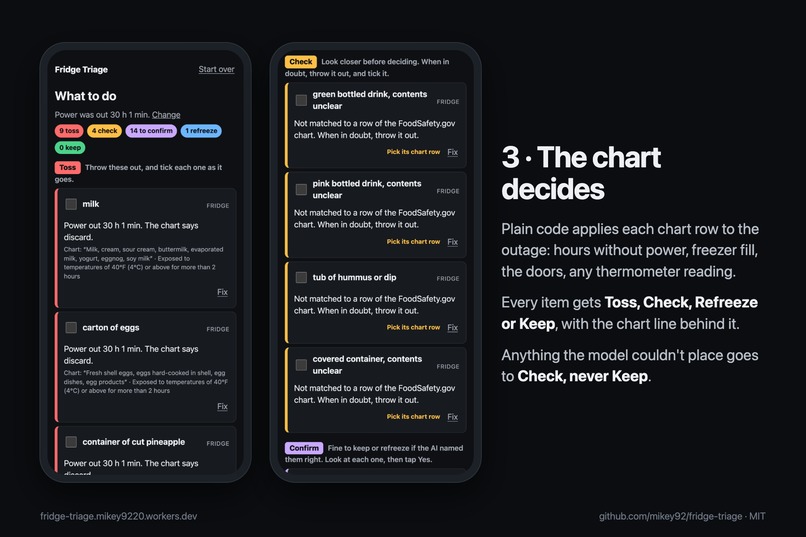
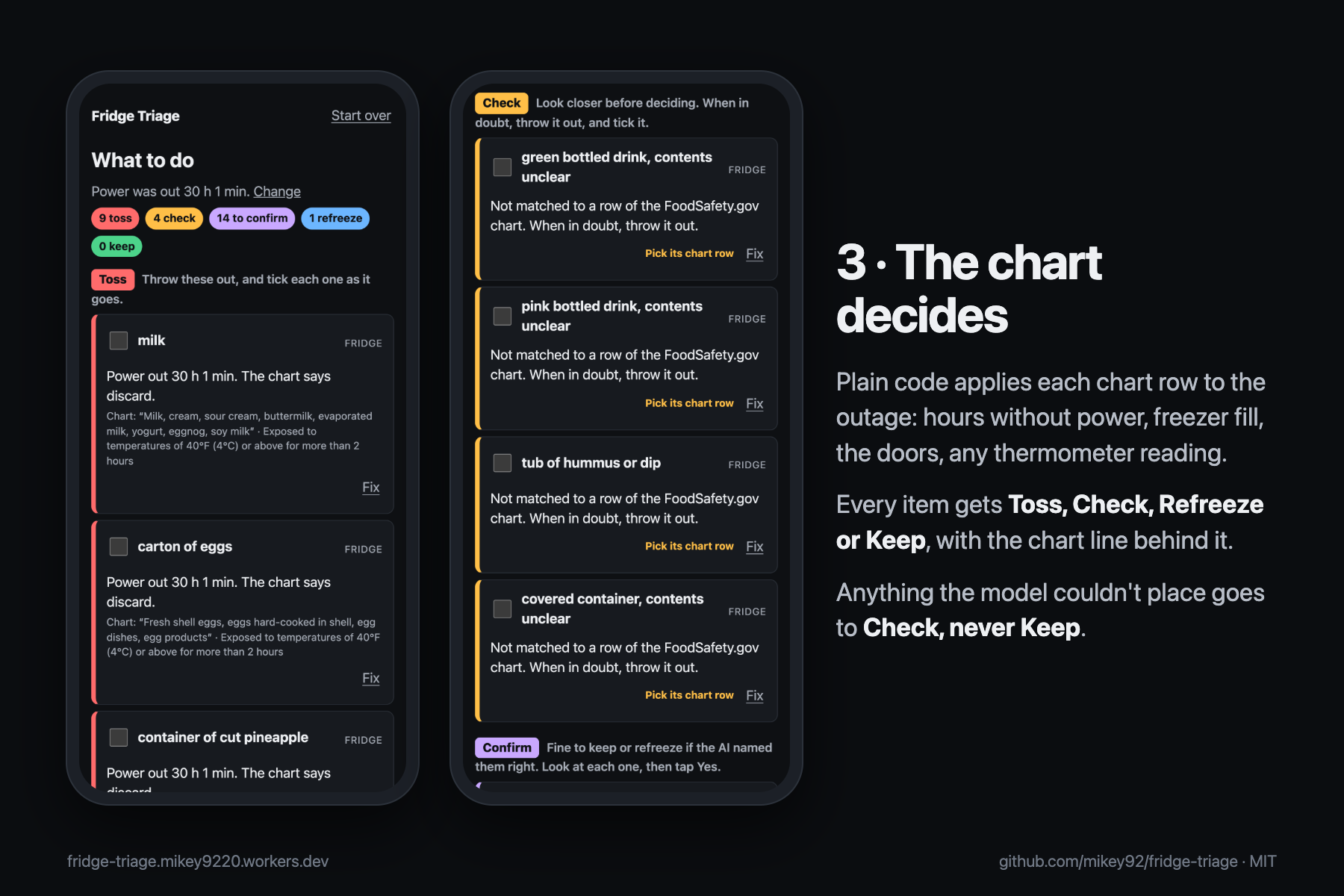
3. Plain code applies the FoodSafety.gov chart: Toss, Check, Refreeze or Keep, each with its chart line.
-
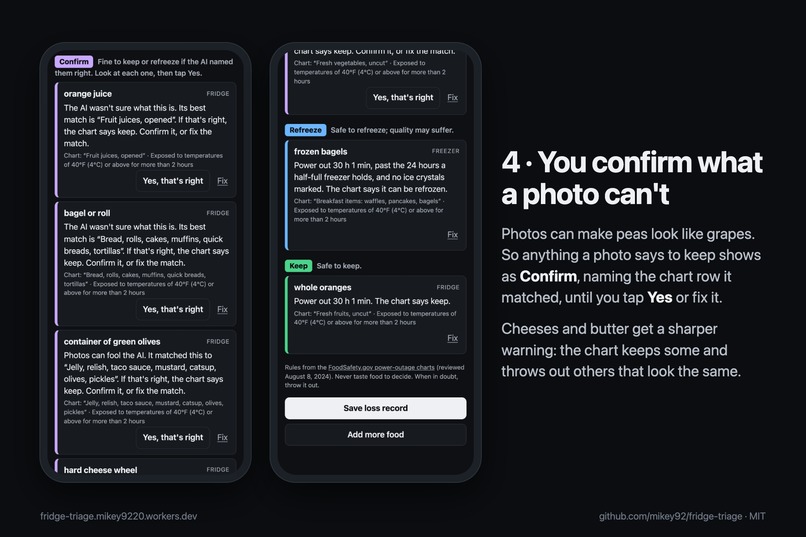
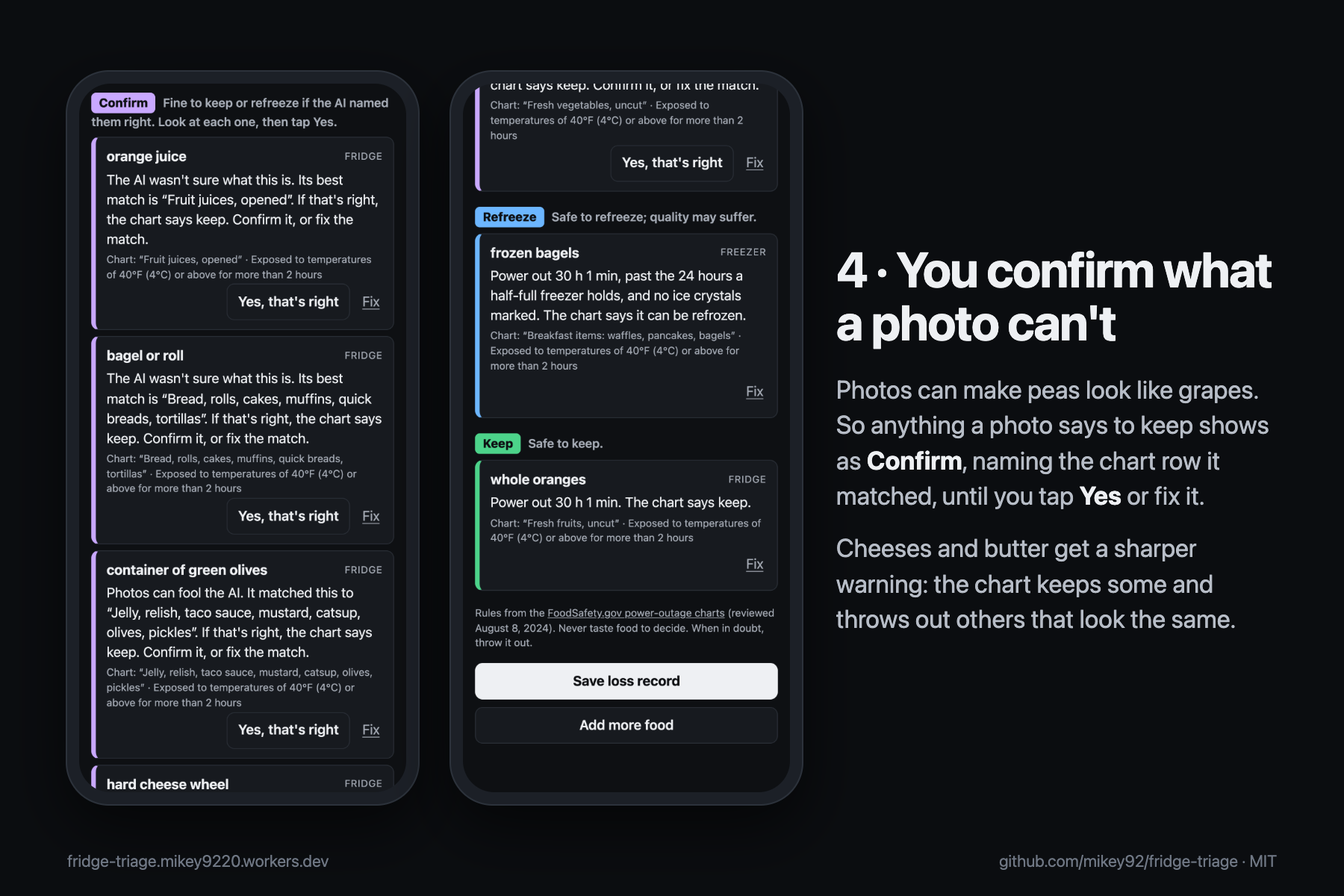
4. Photos can make peas look like grapes, so nothing from a photo is kept until you confirm the chart row it matched.
-
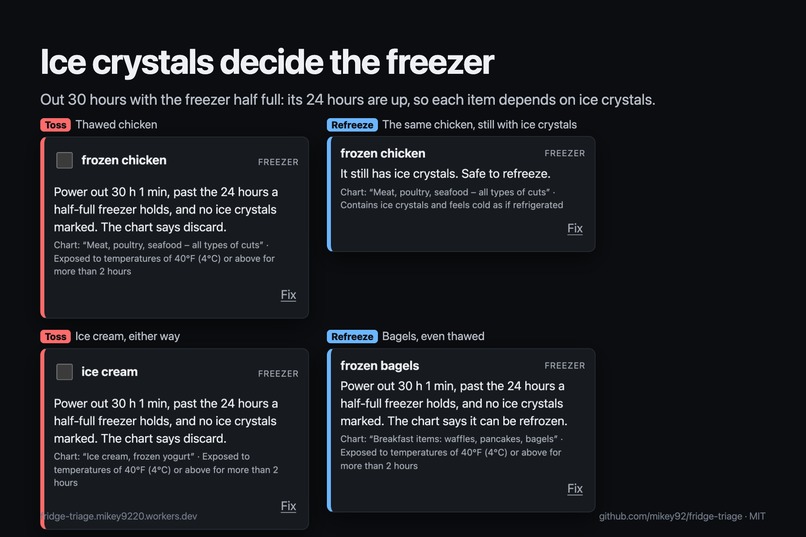
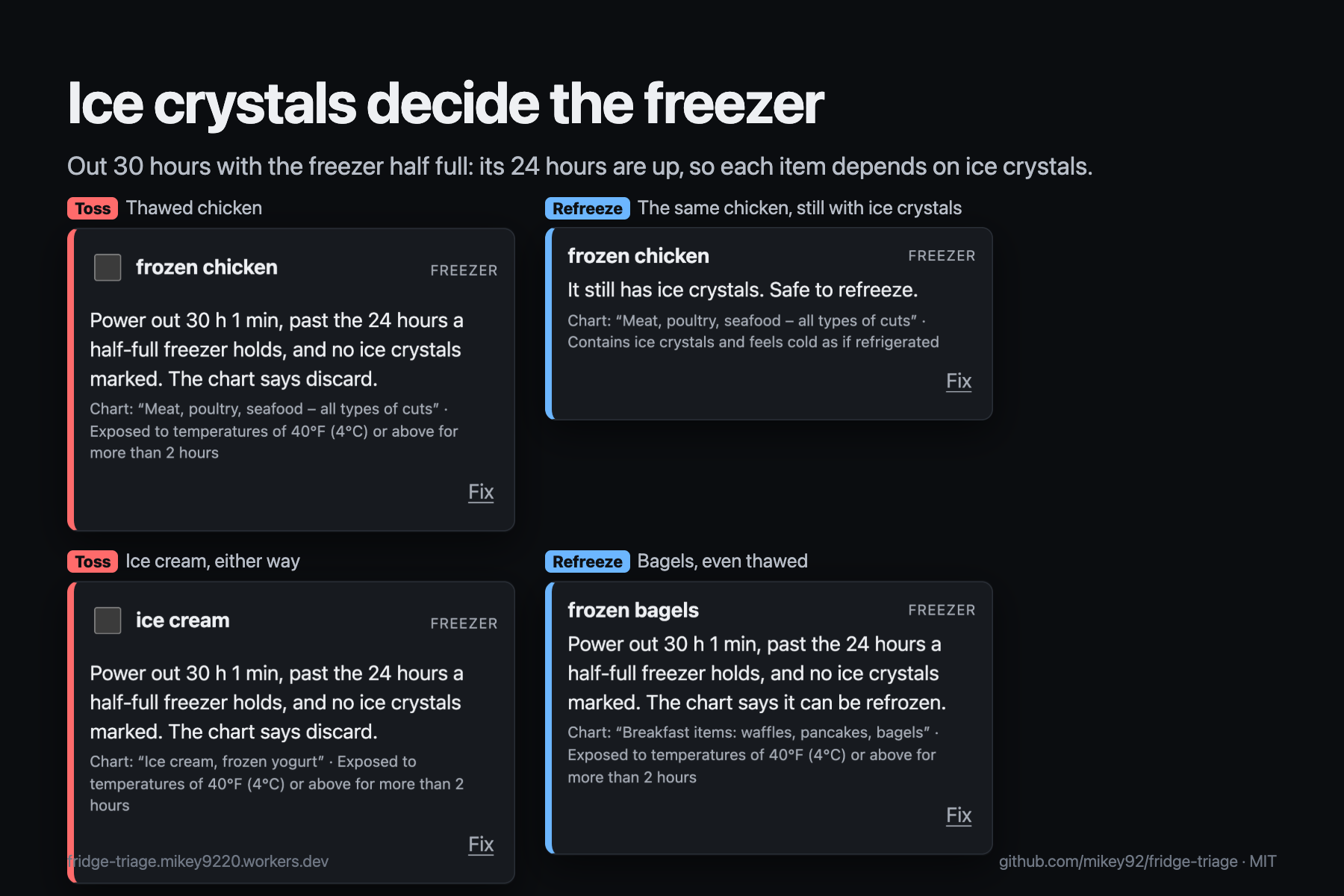
Past the freezer's 24 hours, ice crystals decide: thawed chicken goes, chicken with ice crystals refreezes.
-
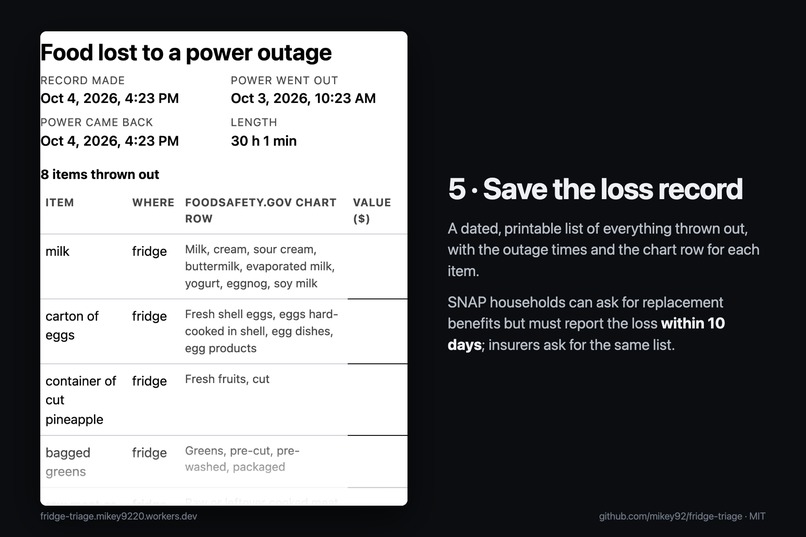
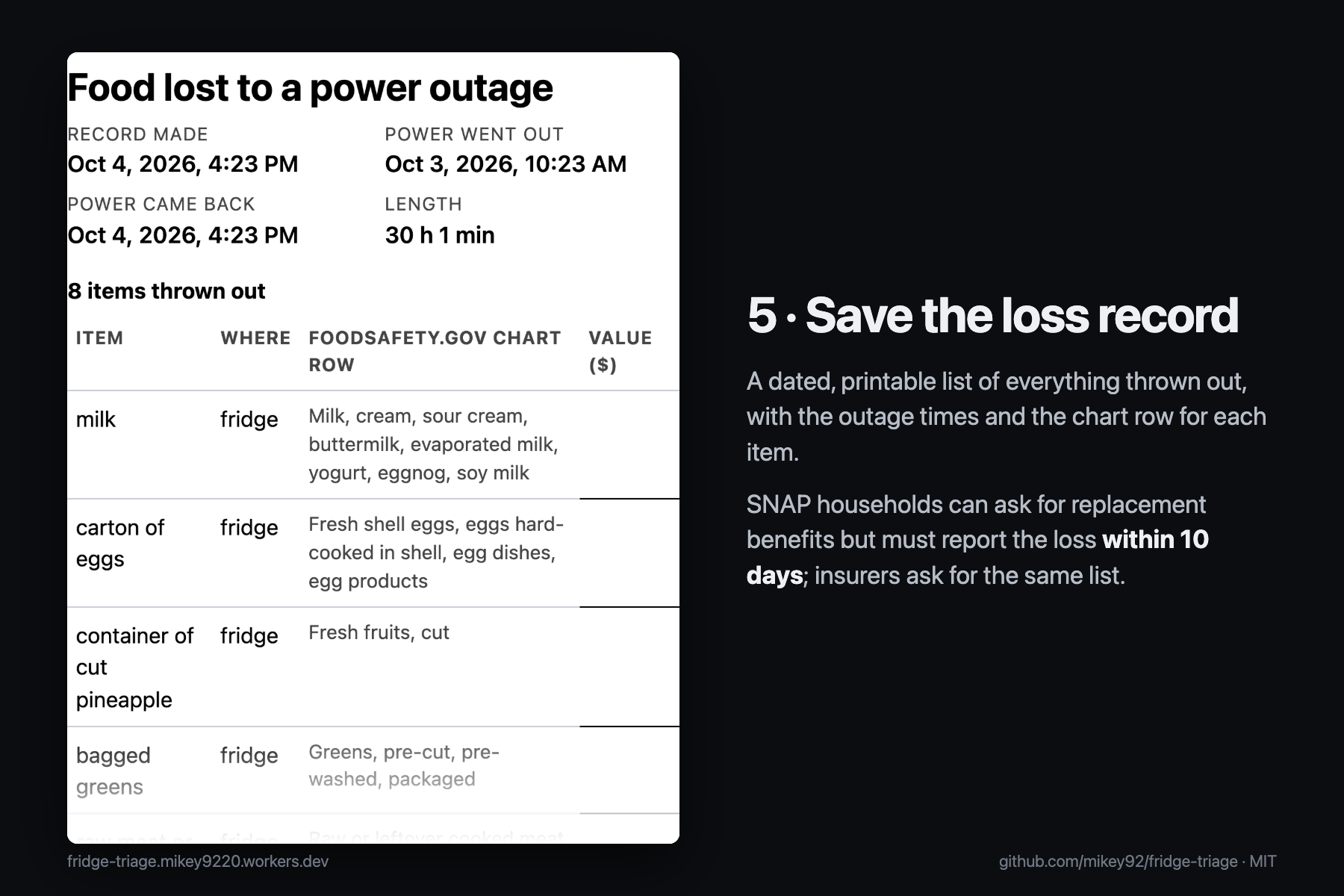
5. A dated, printable loss record for a SNAP replacement request or an insurance claim.
-
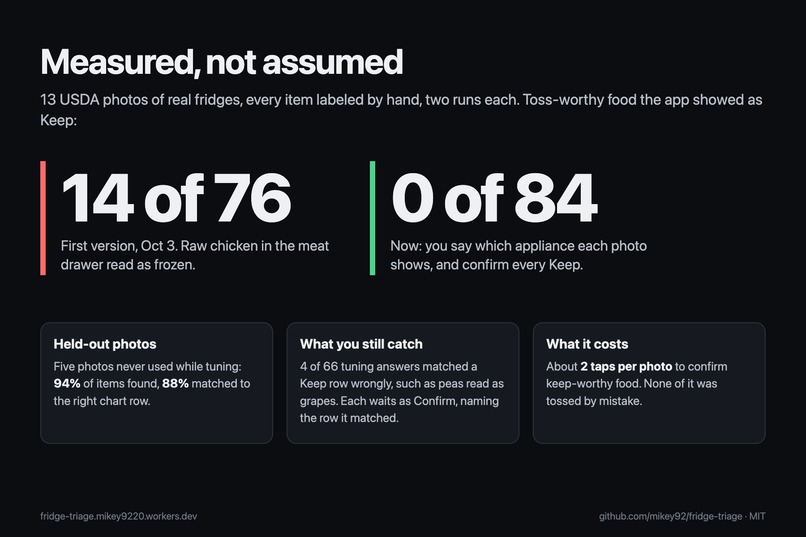
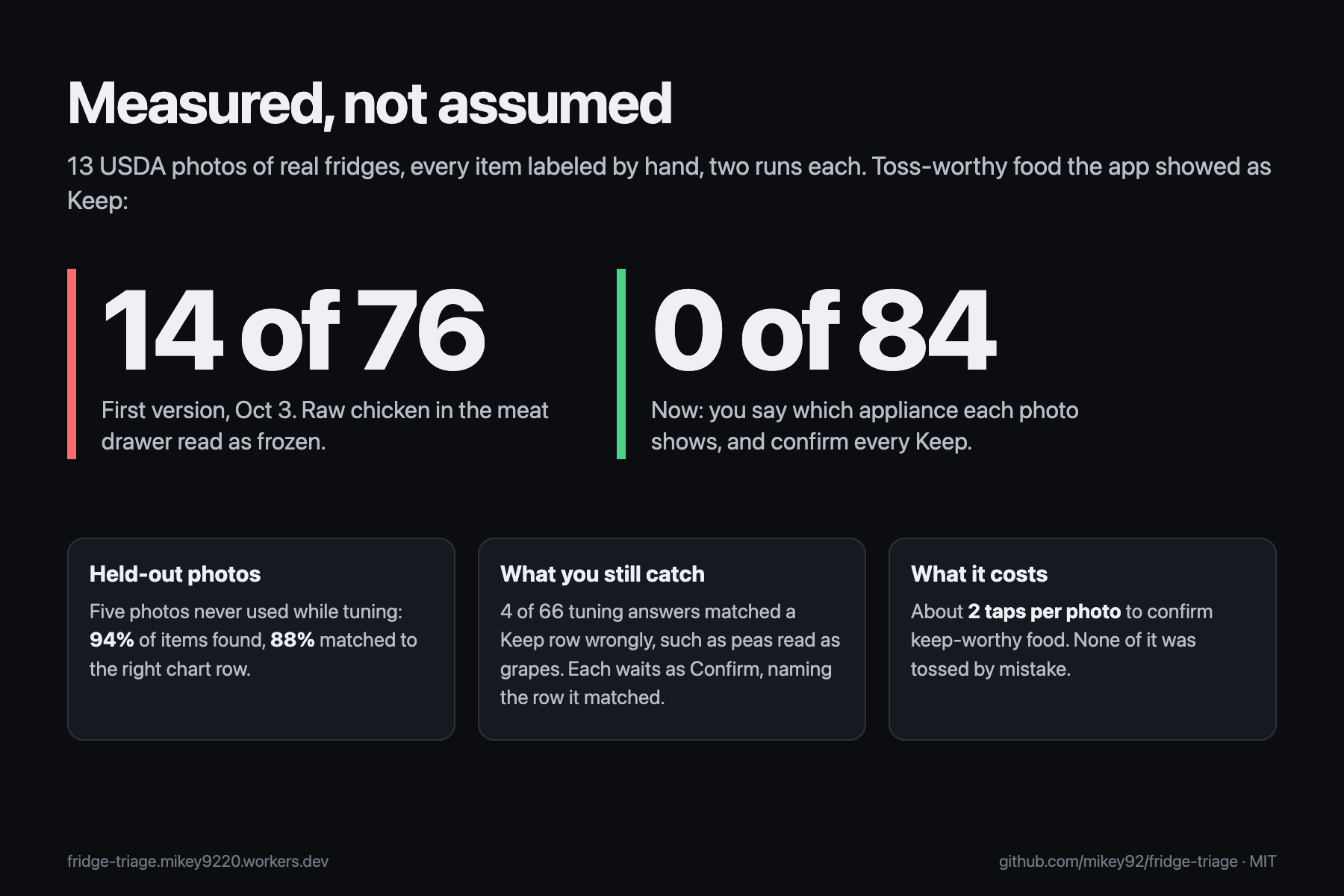
Measured on 13 hand-labeled USDA fridge photos: toss-worthy food shown as Keep fell from 14 of 76 to 0 of 84.
-
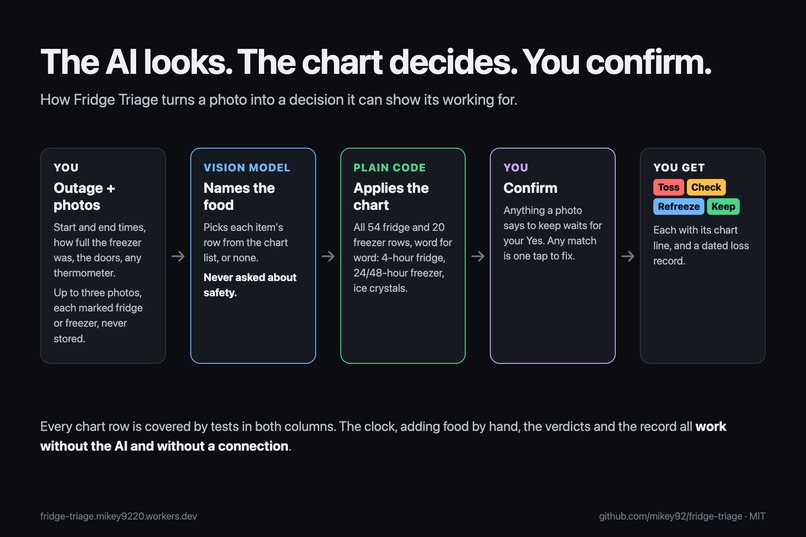
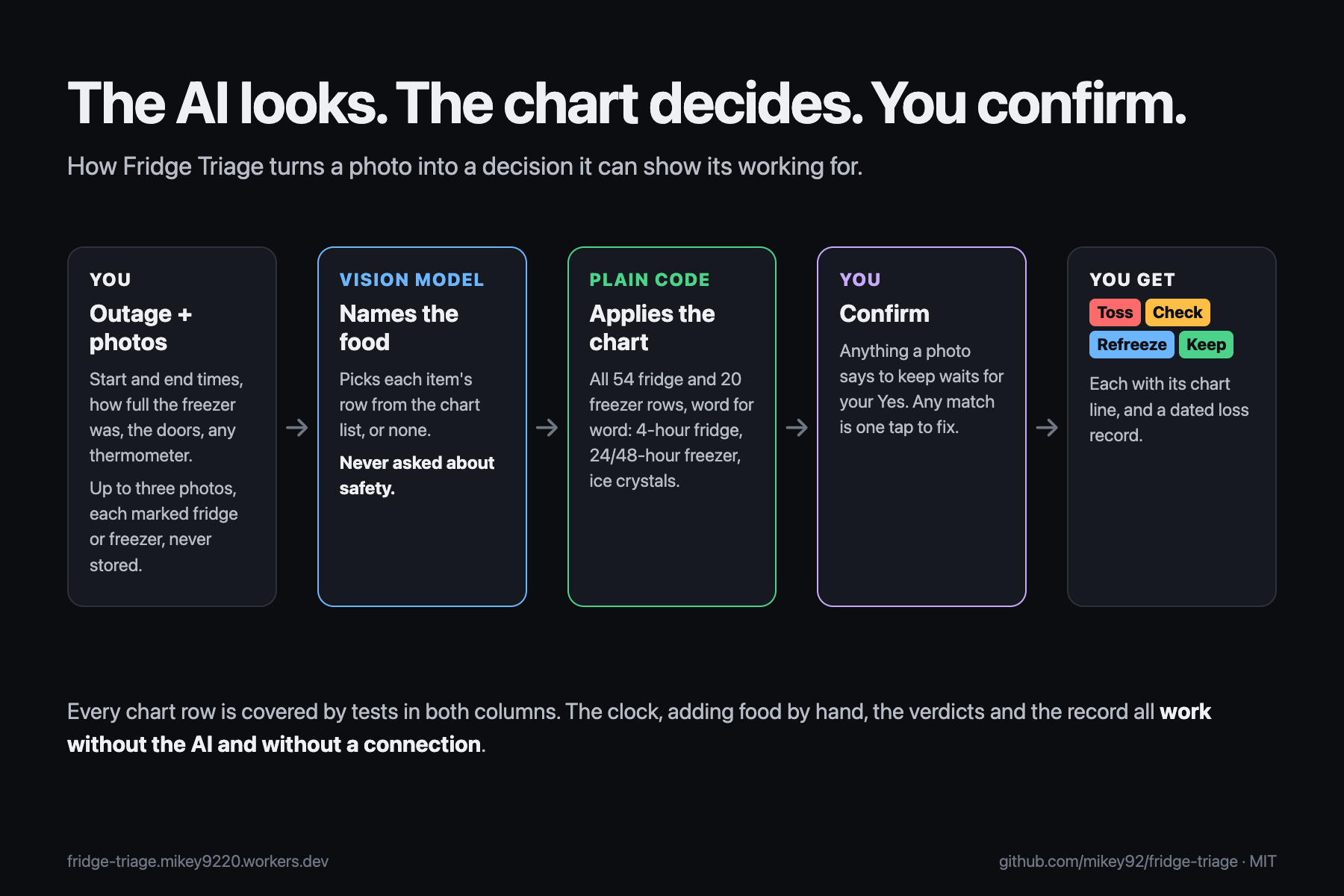
The AI looks, the chart decides, you confirm. Everything but reading photos works offline and without the AI.
Inspiration
In 2024, U.S. electricity customers averaged 11 hours without power, nearly twice the yearly average of the decade before (EIA). When the power comes back, everyone asks the same question about the fridge: is this still good?
The official answer already exists. FoodSafety.gov publishes two charts, one for refrigerated food and one for frozen food, and two rules of thumb: a closed fridge keeps food safe for about 4 hours, a full freezer about 48 (24 if half full). After that it depends on the food. Above 40°F for more than 2 hours, shredded cheese goes but a block of cheddar stays; cut melon goes but a whole one stays. Few people read a long table item by item with the fridge door open, so they go by smell (which USDA says never to do), throw everything out, or keep the wrong things.
What it does
Fridge Triage turns those charts into a check you can do on your phone in a few minutes.
- Start the cold clock. When the power goes out, tap "The power is out". The app counts down the fridge's 4 hours and the freezer's 24 or 48, and keeps the outage on the phone. It works with no connection after the first visit, because the outage is exactly when the Wi-Fi is down.
- Photograph the fridge. When the power is back, add up to three photos and say whether each shows the fridge or the freezer. A vision model lists the food it can see and matches each item to a row of the FoodSafety.gov charts, noting "cut" or "opened" when it can tell. It is never asked whether anything is safe, and photos are not stored. Anything else can be added by searching the chart in everyday words.
- The chart decides. Plain code applies each item's chart row to the outage: how long the power was out, how full the freezer was, whether the doors stayed closed, and any thermometer reading. Every item gets Toss, Check, Refreeze or Keep, with the chart row and the condition that applied. Anything the model couldn't place goes to Check.
- You confirm what a photo can't. A photo never keeps food on its own. Anything the AI matched to a row the chart would keep or refreeze shows as Confirm, naming the chart row it matched ("It matched this to “Fresh fruits, uncut”"), until you tap Yes, that's right or fix it. Photos can make peas look like grapes, and the chart keeps some cheeses while throwing out others that look the same.
- Fix in one tap. Change an item's row, mark it cut or whole, opened or sealed, move it to the freezer, or record ice crystals. The verdict updates at once.
- Save the loss record. A dated, printable list of everything marked Toss, plus anything under Check you ticked as thrown out, with the outage times and the chart row for each item. SNAP households can ask their state to replace food lost in an outage but must report it within 10 days; insurers ask for the same list.
The clock, adding food by hand, the verdicts and the record all work without the AI and without a connection. Only reading photos needs the network.
Who it's for
Anyone whose power has just come back after a storm, a heat wave or a planned shutoff, standing in front of a fridge that is no longer cold, and especially families for whom a fridge of food is real money. The app is built for that moment: dark by default for reading by flashlight, large type, big tap targets, usable with a screen reader or a keyboard alone, no account, nothing to install, and it opens offline.
How we built it
- Planning first, with the Devpost Learn Skill Pack in Claude Code, from an empty folder. The planning skills produced
scope.md(the kernel, "the AI only looks; the chart decides", and an explicit cut list),prd.mdandspec.mdbefore any code.5-buildthen worked throughchecklist.mdin six slices, each with a mechanical check and its own commit, followed by a final review, an app map, and three recorded revisions after the first submission. All of it is in the repo'sdevpost/folder. - The chart as data.
src/chart.tsholds all 74 rows of both charts word for word (54 refrigerated, 20 frozen). Where the chart lists a food only as opened, the app adds a partner row for the sealed version, labeled "not a chart row": six say Check (keep it only if it was sold unrefrigerated), and three keep, because the chart already keeps the opened version (fruit juice, canned fruit, vinegar-based dressing).src/rules.tsturns a row and the outage into a verdict: the 4-hour fridge rule, the freezer's 24/48-hour hold (counted only with the doors closed and a known fill), ice crystals, and the chart's own exceptions such as the 50°F / 8-hour rule for opened mayonnaise. A thermometer reading can only make a call stricter. - One narrow AI call. A Cloudflare Worker endpoint receives photos already resized on the phone and sends them, with the list of chart rows and the appliance the person chose, to a vision model under a strict JSON schema. The answer is checked: unknown rows become "not matched", a row from the other chart moves to its partner, and calls are rate limited per visitor.
- Offline. A service worker keeps the app on the phone; a script loads the live site, cuts the network, reloads it and runs the hand-entry journey.
- Measured.
eval/holds 13 public-domain USDA photos of real fridges, every item labeled by hand, two recognizer runs per photo, and a scorer that runs each answer through the app's own rules. Eight photos were used while changing the prompt; five were held out. A script re-scores the first submitted version from its own commit, so the before and after numbers use the same yardstick. - Tests. Vitest covers every chart row, the clock, storage and the recognizer's answer checks (63 tests). Three Playwright tests run the whole journey with the recognizer stubbed, including the confirm step, the loss record, and a photo still being read when the person moves on.
- Accessibility. axe-core on 10 screens in dark and light mode (no violations), Lighthouse on the live site (100 for accessibility, performance, best practices and SEO), a keyboard-only journey script, and a real VoiceOver run driven by its own keys. VoiceOver found a countdown re-read every second, a photo result that was never announced, item names read twice, and focus lost when the button under it disappeared; all fixed.
- React 19, Vite and TypeScript on Cloudflare Workers (free plan).
Challenges we ran into
- Keeping the AI out of the decision. The obvious design asks a model "is this still safe?", and that answer can't be checked. Here the model only names the food and picks a row from a fixed list; code applies the chart.
- Measuring showed the first version was unsafe. On the labeled photos it told people to keep 14 of 76 foods the chart says to throw out. The biggest cause: raw chicken and bacon in a meat drawer looked frozen to the model, so a half-full freezer's 24 hours applied. It also kept guesses it had marked unsure, and read a cheese tray with Monterey Jack as hard cheese. Now the person says which appliance each photo shows, and every Keep from a photo waits for their Yes: 0 of 84.
- Peas look like grapes. Even with a better prompt, the model sometimes matched a container of peas to "grapes" or "green olives", and said it was sure. That is why the confirm step covers every Keep, not only the unsure ones: the person sees "container of grapes" and the peas in front of them.
- A second review found gaps in our own rules. Independent reviews of the code found that the cold clock ignored opened doors while the verdicts didn't, that the confirm text named the AI's guess instead of the chart row it matched ("cut pineapple" matched to an uncut row would have read fine), and that the 6-hour rule for frozen vegetables didn't apply when there was a thermometer reading. Each is fixed and has a test.
- The chart is subtler than it looks. A half-full freezer holds 24 hours only with the door closed; less than half full has no stated hold, so the app asks the person to check each item for ice crystals instead of guessing.
Accomplishments that we're proud of
- Every verdict traces back to a line of the official chart, and every chart line is covered by a test.
- Toss-worthy food shown as Keep went from 14 of 76 to 0 of 84 on hand-labeled photos. On the five held-out photos, recognition found 94% of the items and matched 88% to the right chart row.
- It opens during the outage itself, with no connection.
- If the model is down, you add food by hand and get the same verdicts.
What we learned
Where to let a model decide and where a fixed table must. Recognizing food is a good job for AI; safety calls are not. And measure before you trust: the first version looked right in the demo and still kept raw chicken.
What's next for Fridge Triage
- Freezer photos in the evaluation set, and more fridges in dim, cluttered phone shots.
- An estimated replacement value per item for SNAP or insurance forms.
- Notifications when the cold clock crosses 4, 24 or 48 hours.
- Spanish and other languages.
Sources and credits
- Rules: FoodSafety.gov, Food Safety During Power Outage (U.S. government work, reviewed August 8, 2024). Fridge Triage is not affiliated with USDA or FoodSafety.gov and is not medical advice. When in doubt, throw it out.
- Photos: USDA FSIS photos by Lance Cheung, "Food Safety - Cut Waste in Refrigerators" (June 2020), public domain, via Wikimedia Commons.
- Outage figure: U.S. Energy Information Administration, Today in Energy (December 1, 2025). SNAP replacement: 7 CFR 274.6.
- No pre-existing code: the project was started from an empty folder during the submission period, using open-source libraries (React, Vite, Vitest, Playwright, Wrangler). Video narration: Kokoro, an open-weight text-to-speech model (Apache-2.0).
Built With
- claude-code
- cloudflare-workers
- openai
- playwright
- react
- service-worker
- typescript
- vite
- vitest

Log in or sign up for Devpost to join the conversation.