Inspiration
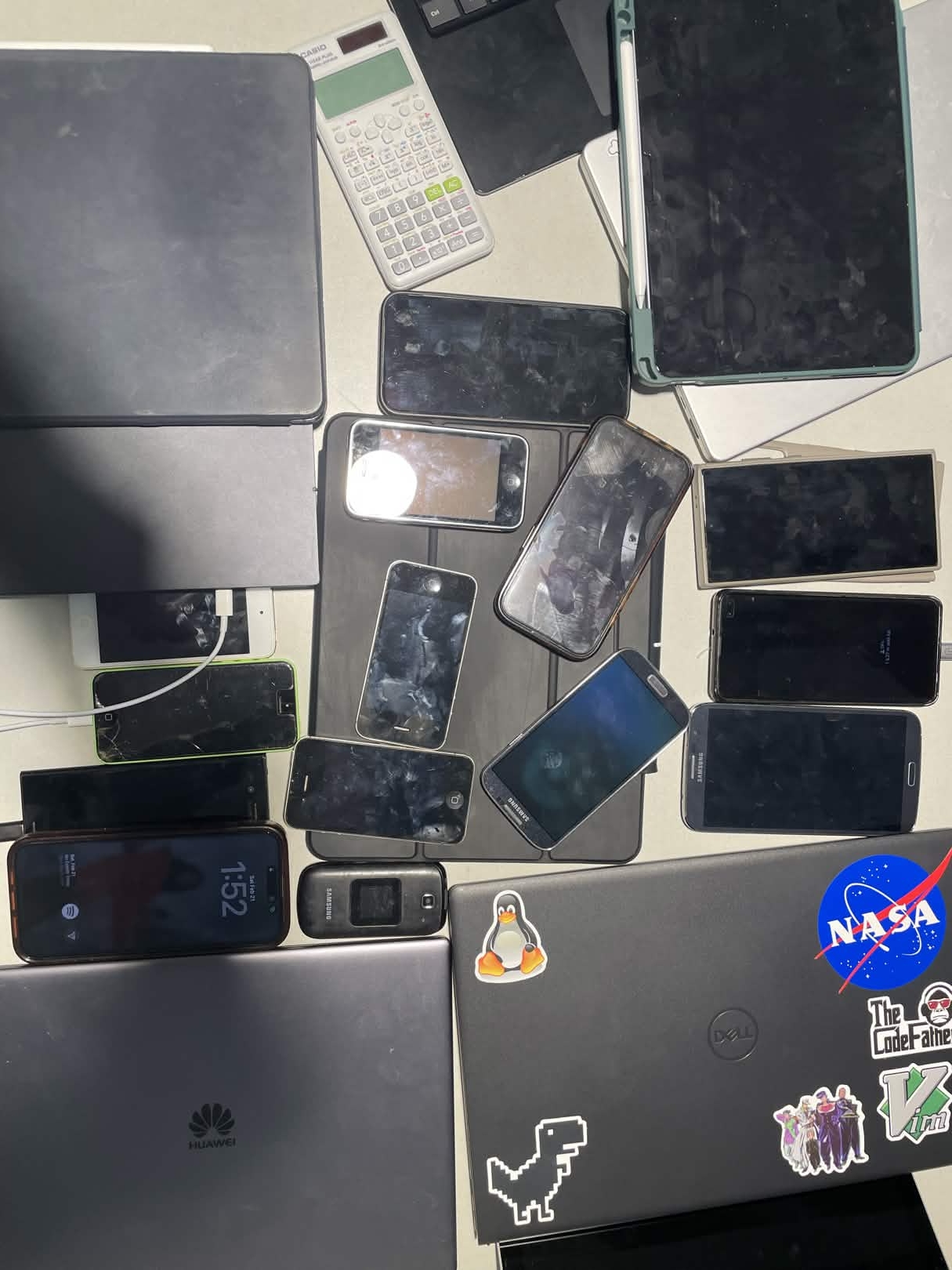
Our project started with a simple question: can old phones and low-power devices be turned into a useful compute cluster instead of becoming e-waste?
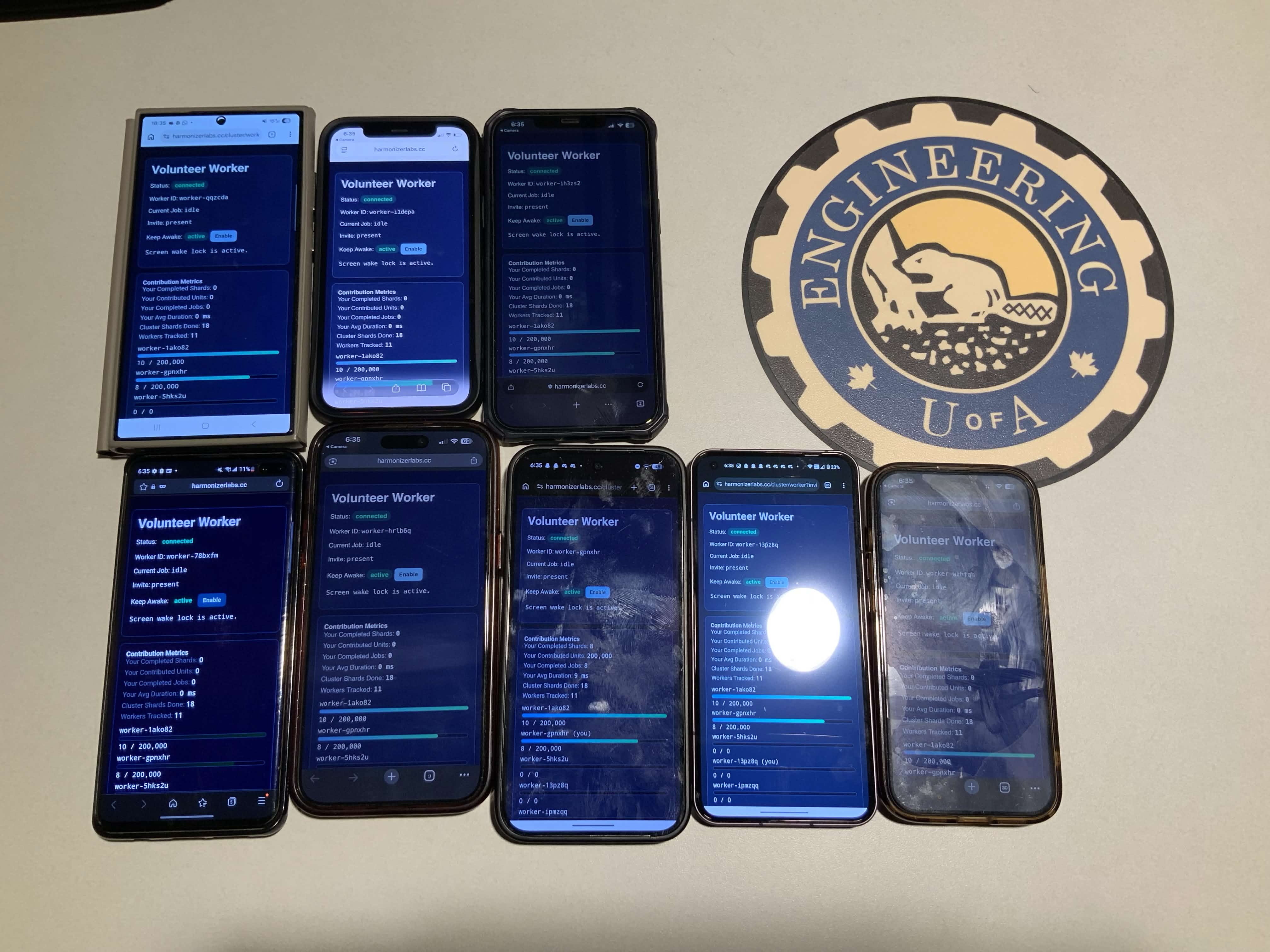
A lot of distributed computing projects assume dedicated servers, GPUs, or native software installs. We wanted to test a different idea: a browser-native compute cluster where workers can join from almost any device (phones, tablets, laptops) by opening a URL.
The motivation was both technical and practical:
- reduce hardware waste by reusing old devices,
- make distributed computing easier to access,
- and prove that even heterogeneous consumer devices can coordinate on real workloads.
What We Built
We built a browser-based Beowulf-style cluster with a central “Brain” (server) and multiple browser workers.
Core features
- Client dashboard to submit jobs and monitor cluster activity
- Worker page that joins the cluster through an invite link
- Signed job execution so workers only run trusted tasks
- Sharded execution for parallel workloads
- Reducers (
SUM,COLLECT, etc.) to merge shard results - Live metrics for worker contributions and throughput
- Ray tracing demo with progressive image updates
- Worker invite UX improvements (short URLs, QR codes, phrase-based links)
This lets us run the same JavaScript workload:
- on a single machine (baseline),
- or across many devices in parallel (cluster mode).
How We Built It
Architecture
The system has three main parts:
Brain (Node.js server)
- Accepts jobs from the client
- Splits parallel jobs into shards
- Dispatches shards to workers
- Collects results and reduces them into a final output
- Tracks worker capabilities (threads, memory, network, battery, etc.)
Workers (browser tabs)
- Connect over WebSocket
- Verify signed assignments
- Execute JavaScript in isolated execution workers
- Report results, logs, and metrics back to the Brain
Client UI
- Submits signed JS jobs
- Configures sharding and reducers
- Shows job status/results
- Visualizes worker contribution and raytrace progress
Parallel programming model
To make scripts portable between a PC and the cluster, we used a standard injected interface:
globalThis.__BRAIN__
A script can read shard context (like units or shard ID) from this object. That means the same script can run:
- as a single local job, or
- as many parallel shards across the cluster.
For Monte Carlo Pi, each shard computes local hits/samples, and the Brain combines them with a SUM reducer
What We Learned
This project taught us a lot about real-world distributed systems, especially on unreliable devices.
1. Parallelism is not “free”
We learned that distributing work only helps when:
- the task is shardable,
- shard size is chosen well,
- and network / scheduling overhead stays small.
If shards are too tiny, the cluster spends more time coordinating than computing.
2. Heterogeneous devices need adaptive scheduling
Phones and laptops do not behave the same:
- different CPU core counts,
- different browser limits,
- battery saver mode,
- network variability,
- thermal throttling.
We improved the scheduler to use worker capability-based slot sizing and smarter load balancing.
3. Browser execution is powerful, but constrained
Running in the browser made deployment incredibly easy, but introduced limits:
- WebSocket proxy behavior (disconnect loops on some phones)
- browser background throttling
- wake lock issues on mobile
- per-tab execution limits
- serialization overhead for results
4. Operational reliability matters as much as code
A lot of time went into deployment/debugging:
- nginx route conflicts
- DNS mismatches
- TLS vhost selection issues
- service restart behavior
- key rotation / token invalidation bugs
This was a great lesson that systems projects are not just algorithms; they are also operations.
Challenges We Faced
Challenge 1: Secure distributed execution
We needed workers to execute user-submitted JS, but only if it was authorized.
We solved this with signed task envelopes so workers verify assignments before running them.
Challenge 2: Making worker onboarding easy
Raw invite tokens were difficult to type/share manually.
We added:
- QR codes,
- short URLs,
- phrase-based invite formats, so devices can join quickly without copy/paste pain.
Challenge 3: Sharding + reduction UX
Users can easily create invalid shard/reducer combinations.
We added:
- safer defaults,
- auto-mode behavior,
- reducer hints/tooltips,
- and better error messages (especially for numeric sum fields).
Challenge 4: Mobile reliability
Some mobile browsers disconnected repeatedly (e.g., WebSocket code 1005).
We added reconnect logic, improved keepalive behavior, and mobile-aware execution limits.
Challenge 5: Visual demos at cluster scale
Ray tracing was exciting but also stressful for the VPS and workers.
We had to improve:
- stop/pause behavior,
- shard planning,
- result streaming,
- and load limits to avoid overloading the system.
Results and Evaluation
We benchmarked the same workloads locally vs. on the cluster to study the tradeoff between:
- raw compute throughput
- and distributed coordination overhead
A useful metric is speedup:
S = Single/Cluster
Where we got 44 seconds / 144 seoncds to get a 2.5x faster computation on our cluster vs our 13th gen intel machine
Our results showed:
- For embarrassingly parallel tasks (Monte Carlo, fractals, parameter sweeps), the cluster can provide meaningful speedup.
- For very small shards or high-frequency jobs, overhead becomes dominant.
- Different devices contribute unevenly, which verified our adaptive scheduling through the brain.
Even when the cluster is not strictly faster than a powerful desktop, it demonstrates something important:
- usable compute can be reclaimed from devices that would otherwise sit idle. -we can reclaim x% of an expensive computers computing capabilities with what is otherwise e-waste
Why This Project Matters
This project is a proof-of-concept for accessible distributed computing with reclaimed hardware.
It shows that:
- old devices still have practical compute value,
- browser-native infrastructure can lower the barrier to participation,
- and distributed systems concepts (sharding, reducers, scheduling, fault tolerance) can be explored with everyday hardware.
In other words, this is both a systems experiment and an e-waste reclamation argument.
Future Work
If we continue this project, the next steps would be:
- Better adaptive load balancing using live worker throughput history
- Stronger fault tolerance / shard retry strategies
- Smarter autosharding based on runtime feedback
- More built-in reducers and task templates
- GPU/WebGL/WebGPU worker support (where available)
- Better multi-threaded execution inside workers (Web Workers + SharedArrayBuffer where possible)
- More polished visual demos (ray tracing scenes, fractal streaming, simulation dashboards)
- Deeper hardware acess, storage and nas/cloud capabilities, further streching these old devices
Final Reflection
The biggest takeaway from this project is that building a distributed system is not just about splitting work. It is about coordination, reliability, security, and developer/user ergonomics.
We started with the idea of turning e-waste into compute power. We ended up building a real browser-based cluster platform that forced us to solve problems across:
- networking,
- systems design,
- web security,
- UI/UX,
- and deployment.
That made it one of the most technically complete and educational projects we have worked on.
Built With
- digitalocean
- javascript
- networking
- node.js
- parallelism
- vps
- web-app


Log in or sign up for Devpost to join the conversation.