-
-
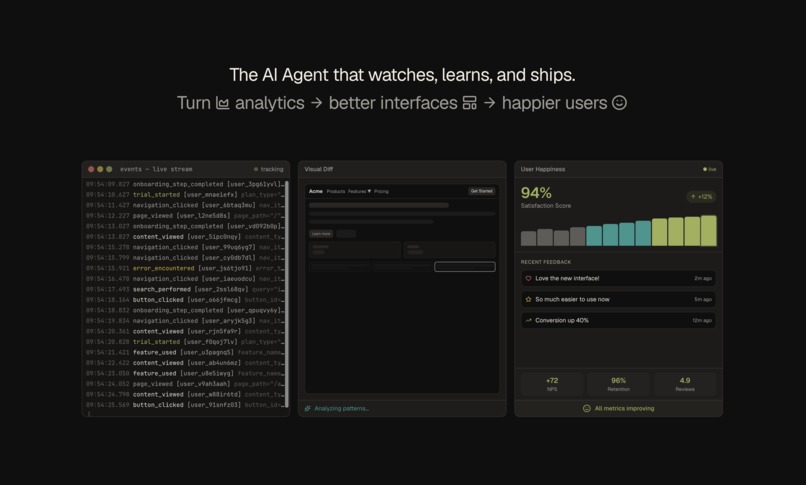
Hero section
Inspiration
We've all experienced it: you're using an app, something feels off, and suddenly you're rage-clicking a dropdown that won't cooperate or staring at a button that's impossible to find. You don't file a bug report—you just leave.
Users don't tell you what's broken. They just leave.
As developers who've built products, we've sat through painful analytics reviews asking "why did 67% of users drop off here?" The data shows what happened, but never why—and certainly not what to do about it. Real UX research that answers these questions costs \$10K+ and takes weeks. By the time you have insights, you've already lost thousands of users.
The Amplitude challenge asked us to build "self-improving products"—and we realized the biggest gap isn't in collecting behavioral data. It's in translating that data into action. What if an AI could watch every user session, detect the exact moments of frustration, and not just report problems but actually fix them?
That's when Frictionless was born: an AI UX researcher that turns behavioral chaos into adaptive, self-healing interfaces.
What it does
Frictionless is an AI-powered UX agent that creates a continuous data → insights → action loop:
1. Capture Everything
We instrument your app with behavioral tracking that goes far beyond page views:
- Rage clicks (6+ rapid clicks indicating frustration)
- Dead clicks (clicks on non-interactive elements)
- Hover hesitation (3.8s+ hover = user confusion)
- Scroll depth & velocity (engagement patterns)
- Form friction (field re-entries, abandonment points)
- Error recovery patterns (what users try after failures)
2. AI Pattern Detection
Our AI analyzes behavioral streams to surface insights no human would catch:
- "34% of users rage-click the filter dropdown before abandoning"
- "Power users spend 6.2s hovering over pricing before converting"
- "Mobile users miss the CTA because it's below fold at their viewport"
3. Behavioral Clustering
Users aren't monolithic. Frictionless identifies distinct behavioral personas:
| Persona | Behavioral Signals | Optimal Experience |
|---|---|---|
| Power Users | Keyboard shortcuts, bulk actions, < 50ms decision time | Compact UI, advanced features exposed |
| Explorers | Help searches, tooltip hovers, methodical navigation | Guided onboarding, progressive disclosure |
| At-Risk Users | Rage clicks, support button hovers, session drops | Simplified UI, proactive assistance |
4. Generative UI Fixes
The AI doesn't just identify problems—it proposes specific code changes:
// AI: Detected 31% drop-off on filter interaction
// Recommendation: Replace multi-step dropdown with inline filter chips
<FilterChips
  options={filterOptions}
  onChange={handleFilter}
  showCount={true}  // AI: Users want result counts
/>
5. Automated A/B Testing
Frictionless generates experiment variants, runs A/B tests with real traffic, and automatically deploys winners:
$$\text{Statistical Significance} = 1 - \frac{1}{1 + e^{-z}} \quad \text{where } z = \frac{\bar{X}_B - \bar{X}_A}{\sqrt{\frac{\sigma_A^2}{n_A} + \frac{\sigma_B^2}{n_B}}}$$
When variant B achieves 95% confidence with +58% conversion lift, it auto-deploys. The product literally improves itself.
How we built it
Architecture
┌─────────────────┐    ┌──────────────────┐    ┌─────────────────┐
│  Test Website   │───▶│   Event Stream   │───▶│   AI Analysis   │
│  (Next.js)      │    │   (rrweb + SDK)  │    │   (LLM + RAG)   │
└─────────────────┘    └──────────────────┘    └─────────────────┘
                                                        │
┌─────────────────┐    ┌──────────────────┐            ▼
│   Dashboard     │◀───│   Session Replay │◀───┌─────────────────┐
│  (React + RRV7) │    │   (rrweb-player) │    │  UI Generator   │
└─────────────────┘    └──────────────────┘    │  (Code Diffs)   │
                                                └─────────────────┘
Tech Stack
| Layer | Technology |
|---|---|
| Monorepo | Turborepo + pnpm workspaces |
| Frontend | React 19, React Router v7, Tailwind CSS v4 |
| Session Recording | rrweb (DOM serialization + event capture) |
| Replay | rrweb-player with synchronized event timeline |
| Analytics | Amplitude SDK with Session Replay plugin |
| A/B Testing | Amplitude Experiment client |
| Animations | Framer Motion (motion/react) |
| Charts | Recharts for metrics visualization |
| UI Components | Radix UI primitives |
Event Schema
We designed our event taxonomy to mirror real Amplitude implementations:
// Behavioral signals
interface FrictionEvent {
  event_type: 'rage_click' | 'dead_click' | 'hover_hesitation' | 'form_abandon';
  element_selector: string;
  frustration_score: number;  // 0-100 derived from behavioral patterns
  session_context: {
    time_on_page: number;
    scroll_depth_pct: number;
    previous_actions: string[];
  };
}

// Conversion events
interface ConversionEvent {
  event_type: 'checkout_started' | 'purchase_completed';
  properties: {
    plan_type: string;
    revenue: number;
    friction_points_encountered: string[];  // Links behavior → conversion
  };
}
MCP Integration (Model Context Protocol)
We conceptualized an agent architecture using MCP servers:
- amplitude-mcp: Query funnels, cohorts, and behavioral patterns
- github-mcp: Create PRs with generated UI fixes
- sandbox-mcp: Test generated code in isolation before deployment
Challenges we ran into
1. The "Why" Problem
Analytics tools tell you what happened (67% dropped off at step 3) but not why. We had to build behavioral heuristics that could infer intent:
// Detecting frustration isn't trivial
const isFrustrated = (events: Event[]) => {
  const rageClicks = events.filter(e =>
    e.type === 'click' &&
    e.clickCount >= 6 &&
    e.timeWindow < 2000  // 6+ clicks in 2s
  );

  const deadClicks = events.filter(e =>
    e.type === 'click' &&
    !e.targetIsInteractive
  );

  // Combine signals with weighted scoring
  return (rageClicks.length * 0.4) + (deadClicks.length * 0.3) +
         (hoverHesitations.length * 0.3) > threshold;
};
2. Session Recording Size
rrweb recordings can get massive (10MB+ for a 5-minute session). We implemented incremental snapshots and compression:
// Checkpoint every 50 events to bound replay complexity
if (this.events.length % 50 === 0) {
  this.events.push({
    type: EventType.IncrementalSnapshot,
    data: { ... }
  });
}
3. Generating Actionable Code
It's one thing to say "the button is hard to find." It's another to generate a valid React component that fixes it. We had to balance AI creativity with code correctness through structured prompts and validation.
4. 48-Hour Time Crunch
Building a full-stack platform with session replay, AI analysis, code generation, AND A/B testing in a hackathon is... ambitious. We scoped aggressively:
- Simulated the full event pipeline with realistic mock data
- Built demo components that show the concept working
- Focused on the most impressive demo moments
Accomplishments that we're proud of
The Complete Loop: We didn't just build analytics OR AI OR code generation—we built all three and connected them into a coherent self-improving system.
Behavioral Persona Engine: Our clustering algorithm that identifies Power Users vs. Explorers vs. At-Risk users from behavioral signals alone feels like genuine product insight.
Visual Diff Demo: The before/after UI comparison with AI annotations is genuinely satisfying. Seeing a messy nav become a clean mega-menu based on rage-click data makes the value immediately tangible.
Professional Polish: Despite the time constraints, the dashboard UI, animations, and demo flow feel like a real product, not a hackathon prototype.
Actually Useful: We'd genuinely use this. The "watch users, understand pain, fix automatically" loop solves a problem we've personally experienced building products.
What we learned
Technical Learnings
- rrweb is powerful but complex: DOM serialization for replay requires careful handling of iframes, shadow DOM, and dynamic content
- Behavioral signals require calibration: What counts as a "rage click" varies by context (forms vs. games vs. dashboards)
- React 19 + Suspense boundaries: The new concurrent features made our streaming event UI much smoother
Product Learnings
- Analytics without action is useless: The insight-to-action gap is where most analytics tools fail
- Users cluster behaviorally, not demographically: A "power user" isn't defined by subscription tier—it's defined by keyboard shortcut usage and decision velocity
- The best UX research is invisible: Frictionless should feel like the product magically got better, not like users are being studied
Process Learnings
- Demo-driven development works for hackathons: Building the demo slides first clarified exactly what features we needed
- Scope ruthlessly: We cut real AI API calls for simulated responses because the concept mattered more than live inference
- Sleep is optional but coffee is mandatory ☕
What's next for Frictionless
Immediate Roadmap
- Production AI Pipeline: Replace simulated analysis with live LLM calls using Claude/GPT-4 with our behavioral data as context
- Real Amplitude Integration: Connect to Amplitude's API for live event ingestion and cohort export
- GitHub PR Generation: Auto-create pull requests with generated UI fixes, including screenshots and behavioral justification
- Browser Extension: One-click instrumentation for any website, not just apps we control
Bigger Vision
Frictionless could become the AI product team member that every company needs but few can afford:
- Design reviews: "Based on 10,000 sessions, here's what users actually do vs. what we expected"
- Prioritization: "Fix the filter dropdown first—it causes 4x more friction than the checkout flow"
- Continuous optimization: Products that literally improve overnight based on yesterday's behavioral data
The Amplitude thesis is that products should be self-improving through the data → insights → action loop. Frictionless makes that loop automatic.
"The best interface is one that learns from its failures faster than users experience them."
Built With
- amplitude
- react
- typescript

Log in or sign up for Devpost to join the conversation.