-
-
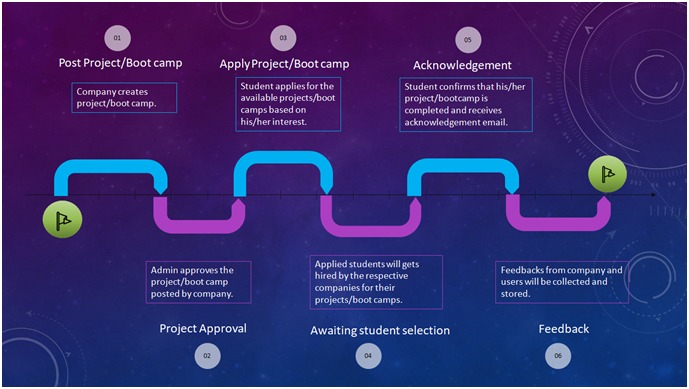
Process Flow
-
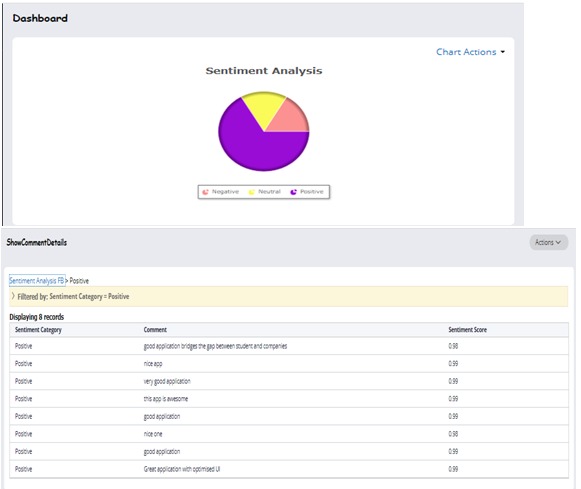
Sentiment Analysis
-
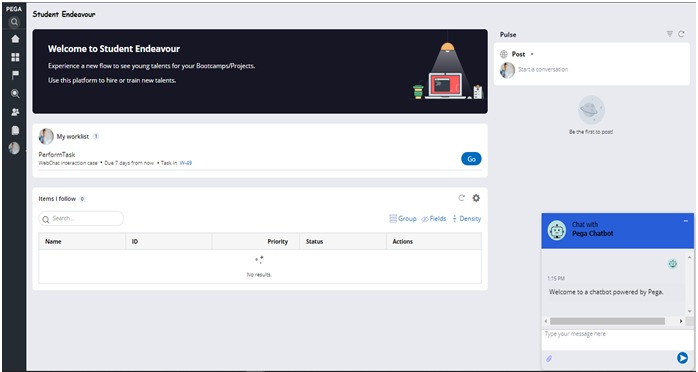
Chatbot
-
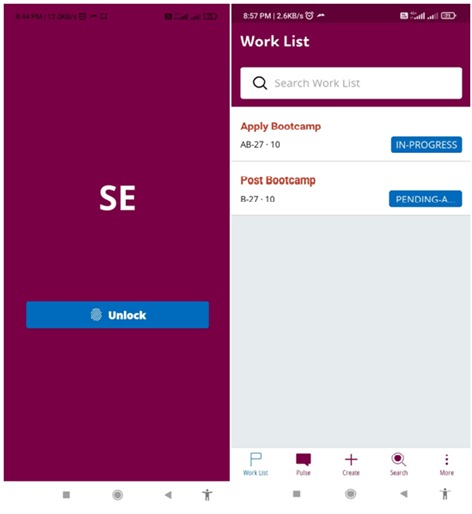
Mobile App
-
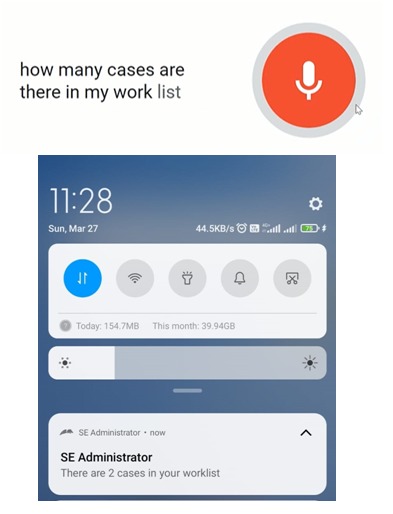
Google Voice Assistant
1 Introduction
1.1 Need
In today’s modern world the unemployment rate increases. Many students who completed their degree are not getting jobs or internships. Student Endeavour application helps in reducing unemployment rate by offering project/intern opportunities posted by various organizations around the world. It helps students to get their dream job along with hands on experience.
1.2 Business Idea
Student Endeavour helps students to find vast amount of remote opportunities and also help companies discover new solution for their problems. It also provides short term, remote tasks to students so that they can quickly obtain relevant experience they need to apply for full time internships in the future.
1.3 Objectives
• Student Endeavour is a student remote job platform that enables companies to hire students for internships or remote jobs.
• Efficient and faster coordination between students and companies.
2 High Level Process Flow
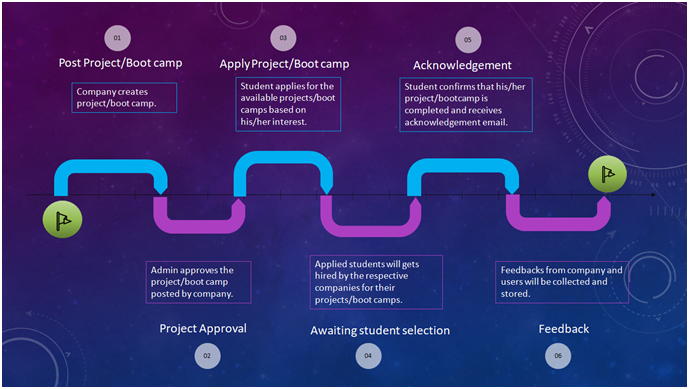
Student Endeavour consists of 4 case types. First a company/organization will post the project or boot camp by creating the case which will be shown to all the students upon admin approval. Next the student who is seeking project opportunity will apply for the available project or boot camp. Student will notified through email once he/she hired. Once the project or boot camp is completed an acknowledgement email send to student post company approval. Finally the process ends with company and student feedback.
Process steps from Posting the Project/Bootcamp to feedback are as mentioned below.
1. Post Project/Bootcamp: Company user would log in to the application and would provide required details such as Project type, Reward, Project Description, Position type, etc.
2. Admin Approval: Application Admin reviews the Project details and approve/reject it.
3. Apply Project/Bootcamp: Student applies for project/bootcamp posted by different companies.
4. Awaiting Student Selection: Applied students will get hired by the respective companies for their projects/boot camps.
5. Acknowledgement: After the completion of project/bootcamp student acknowledged that the project/bootcamp is completed and company will approve the acknowledgement.
6. Feedback: Finally, feedback will be collected from student and company.
3 High Level Design
3.1 Key Factors Influencing Design
1. Flexibility and Extensibility: Student Endeavour platform has ability to add/modify/remove functionality without damaging the current system. As the platform is using Dynamic Class Referencing, new flows can be added to system.
2. Maintainability and Readability: It is easy to maintain, as it is based on low code based Pega Platform. Extensive documentation has been done to enhance the readability of the platform.
3. Performance and Efficiency: Response time for Student Endeavour is kept in light while designing the platform. Data pages with limited database browsing are used to reduce the response time.
4. Scalability: Student Endeavour is hosted on Cloud making it highly scalable. It would respond to user actions in an acceptable amount of time, even if load increases.
5. Availability, Robustness, Fault Tolerance and Reliability: It is built as per Pega recommendations and adheres to Pega Guardrails.
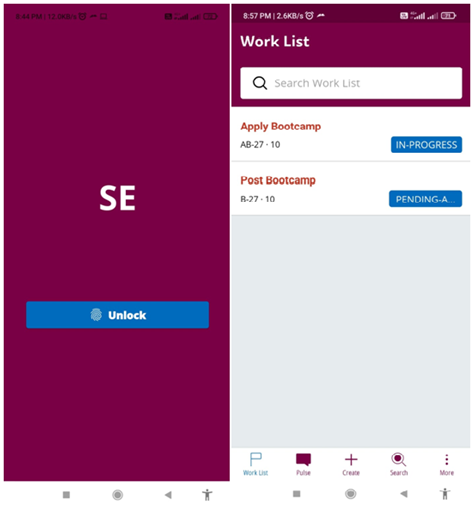
6. Usability and Accessibility: For ease of use and enhancing the user friendliness, Mobile app has been built on Student Endeavour platform. Email Notifications further enhance the user convenience
3.2 Class Structure and Case Design
1.TCS-FW-StudentE-Work-PostProject: This is the parent class for Projects. This class holds the information regarding project cases.
2. TCS-FW-StudentE-Work-PostBootcamp: This is the parent class for Bootcamp. This class holds the information regarding bootcamp cases.
3. TCS-FW-StudentE-Work-ApplyProject: This is the parent class for projects applied by the students. This class holds the information regarding projects applied.
4. TCS-FW-StudentE-Work-ApplyBootcamp: This is the parent class for bootcamps applied by the students. This class holds the information regarding bootcamps applied.
5. TCS-FW-StudentE-Work-CompanyRegistration: This is the parent class for company registration. This class holds the information regarding company registration cases.
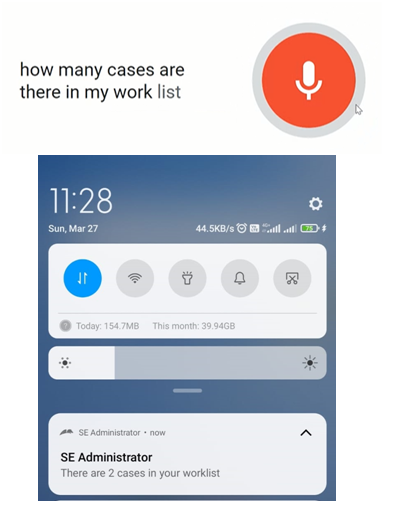
6. TCS-FW-StudentE-Work-EndeavourBot: This class holds the information regarding push notifications triggered through voice assistant.
3.3 Data Model
1. Project Information: This data type stores the details about projects.
2. Bootcamp Information: This data type stores the details of bootcamps.
3. Questions Project: This data type stores the details of project questions.
4. Questions Bootcamp: This data type stores the details of bootcamp questions.
5. Company Feedback: This data type stores the details of company feedback.
6. Student Feedback: This data type stores the details of student feedback.
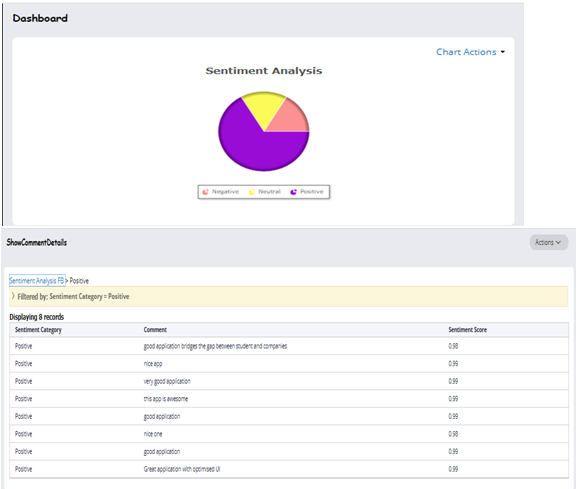
7. FB Sentiment Analysis: This data type stores the comments added by the users in Facebook.
3.4 Solution Overview

• The Student Endeavour platform is convenient and accessible to users through 2 different channels.
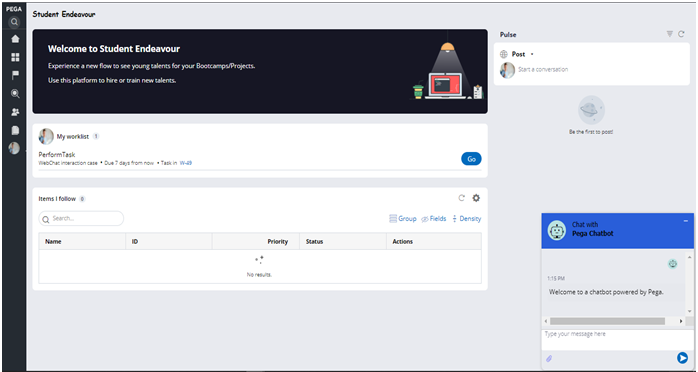
• Features including Facebook post, sentiment analysis, voice assistant, chatbot and push notifications have been implemented.
3.5 Process Flow

3.6 Actors, Access Groups & Roles
- Student
- Company
- Admin
4 Key Features
4.1 Mobile App

4.2 Facebook Post

4.3 Sentiment Analysis


4.4 Case Management

4.5 Chatbot

4.6 Push Notifications

4.7 Email Notifications

4.8 Voice Assistant


4.9 Feedback and best performers


PEGA Express
We used Pega’s design-focused methodology (Pega Express) to build our application STUDENT ENDEAVOUR. Pega Express includes the following phases
• Discover Phase
• Prepare Phase
• Adopt Phase
• Build Phase

Discover Phase: During Discover Phase, we focus on understanding our desired business outcomes, prioritizing which Microjourneys, We think the Discover phase is important because it helps us focus on our desired business outcomes. Pega Express promotes speed to value. Rather than delivering a software solution in one high-risk release, and we decided to deliver one or two micro journeys in each deployment. It is designed to accelerate the transformation journey. We start the process by applying design thinking principles to the end to end customer journeys, breaking them into smaller pieces called Microjourneys, then focusing on what outcomes to deliver first.
During the Discover phase, we utilized the three core elements-Microjourneys, Personas/channels, Data and integrations and we harnessed the power of Pega low-code platforms such as App Studio. We used the design thinking approach to successfully generate ideas and creatively solve problems throughout the project lifecycle.
Working Methodology: We divided our project into time-boxed development cycles called sprints. We had 2 Sprints in our project. (1 Sprint = 3 weeks) We decided to use scrum method to develop our project which defines specific roles, responsibilities, events, artefacts, and processes. We maintained our backlog in the form of user stories and we designed which the flow needs to be get executed. Everyone in the team used PEGA Cloud (8.7) provided by the PEGA team and we used Agile Workbench to capture these user stories. Everyone in the team can access and review as it is available on the Pega.
Agree on Outcomes We started to design a solution with the end customer in mind, ensuring we clearly understand the outcomes, then rapidly configure a low-code application. We start with framing the opportunity; we work with you to understand your digital transformation opportunities and make recommendations. Then we decided to focus on the opportunity. If a problem is ill defined and/or complex, we decided to go with the best practice that is to run a Design Sprint or for smaller problem spaces, run shorter Ideation workshops to innovate solutions to the opportunity/problem during the Discover Phase.
Defining our Minimum Lovable Product Microjourney A micro journey is a part of the overall customer journey that achieves all or a subset of the required business outcomes. 1. Created customized portals for Students, company and admin. 2. Data Types for Bootcamp Information, Project Information etc..
At the very first step after the micro journey, we released an interim release in Our Website and tested it Project Readiness We have conducted team meeting in regular interval of time and discovered the ideas and implemented in regular interval of time. With a small group of users. MLP sizing After capturing the three pillars-Microjourneys, Personas/channels, Data and integrations we thought of estimating and sizing our MLP so that we can plan and act accordingly for that we used the Estimator function in App studio to estimate the sizing of MLP.
Prepare Phase: The Project took after the design phase where we got a clear idea to design and implement the project which would we ready to the server to the end-user, Where we understood the vision of our project, desired outcomes and plan, run shorter ideation sessions to innovate new experiences for end-user. We began to understand the Microjourney from the initial MLP. We used the Directly Capture Objectives (DCO) discipline to capture outcomes and user stories directly into Pega. During the Prepare phase, we have defined the enterprise architecture and create our Stages and Steps model for each case type, within Pega. We have used what we have learned about the solution in preparation for DCO sessions. The objective during Prepare DCO sessions is to draft our MLP1 case types, personas and draft data objects.
Design Phase: A Design Sprint is a five-day design thinking process for answering critical business questions through design, prototyping and testing ideas with customers. Design Thinking techniques helps us to: -Quickly frame a problem space and identify opportunities -Ideate and innovate solution approaches -Select the best approach to pursue -Prototype and test a solution.


Build Approach: Each sprint will start with Sprint Planning on day 1 of your sprint. This requires some preparation to ensure that you have a list of user stories in your Product During Backlog Sprint Planning the team have reviewed the stories and understand the dependencies for build activities. We have decided that the sizing needs to be adjusted; each story should be small enough to be delivered in one sprint. During this phase, we leveraged the low code approach which helped us to develop the application quick and in a simple manner. For the UX management, we used the Cosmos design system which provided us with a seamless user experience with reusable UI components that enrich the look and feel of the application.
Adoption Phase: During the Adopt phase, we ensured that we get the most out of your solution deployment as we implement. We used the Pega platform provided tools to help and determine the health of the application, the Application Quality Dashboard, which provides a snapshot of the guardrail score and automated test coverage.




Log in or sign up for Devpost to join the conversation.