Frankslist
Project Description
You work, you eat, you sleep - and that's about it... your life is boring. That's why we made Frankslist! Frankslist is the one stop web application for finding your dream hobby. Create an account, search for hobbies based on your unique lifestyle, and save your favorites! If you have a hobby you would like to share with the community, you can create a new page for that hobby!
Frankslist is optimized for web and mobile with full Back-End CRUD functionality. This project utilizes Mongoose, React, Express, and Node.
Team Links
Team Expectations Document
Kanban Board
Color Pallete
Wireframe
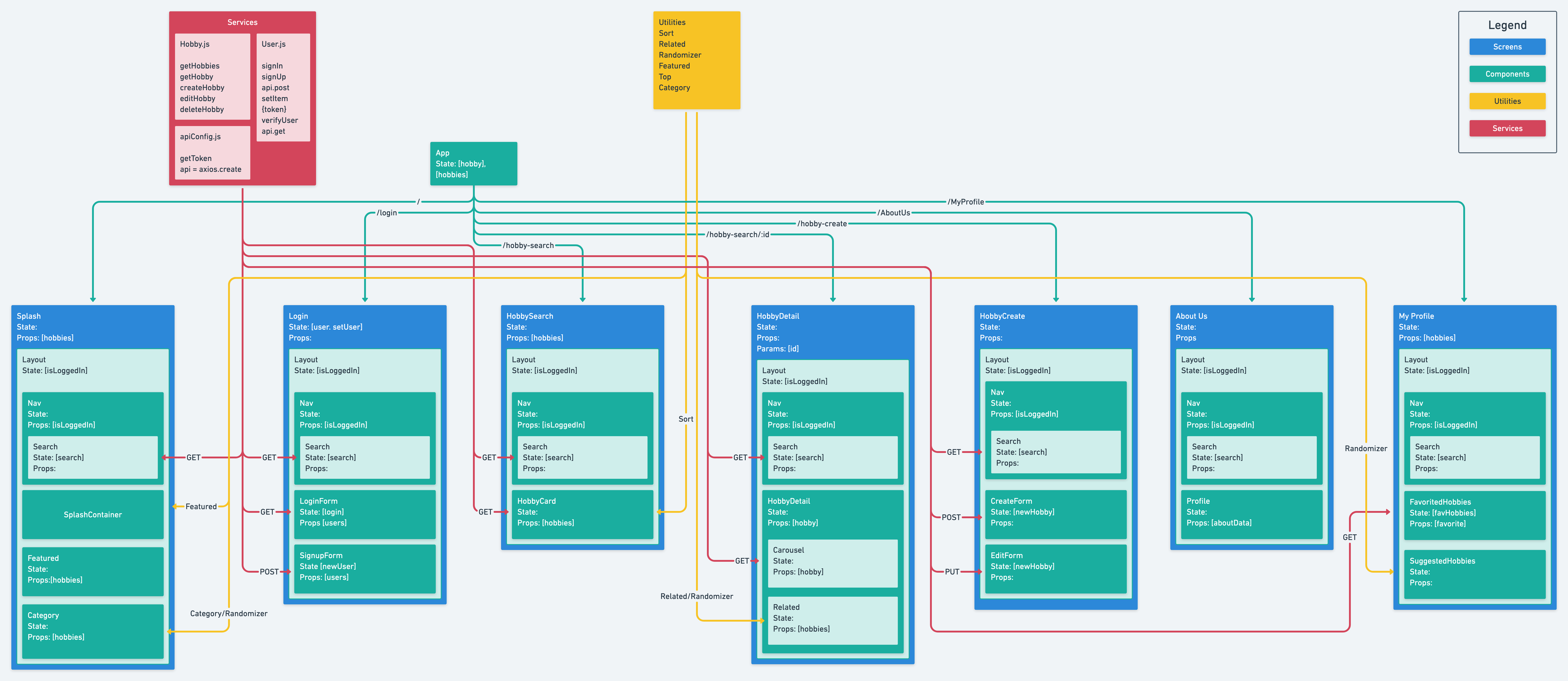
Component Hierarchy
Deployed Site
Wireframes
Desktop

Mobile

Component Hierarchy
Schema
const Hobby = new Schema(
  {
    name: { type: String, required: true },
    img_url: { type: String, required: true },
    description: { type: String, required: true },
    price: {
      low: { type: Number, required: true },
      high: { type: Number, required: true },
    },
    rating: { type: Number, required: false },
    indoors: { type: Boolean, required: true },
    risk: { type: Number, required: true },
    featured: { type: Boolean, required: false },
  },
  { timestamps: true }
);

const User = new Schema(
  {
    username: {
      type: String,
      required: true,
    },
    email: { type: String, required: true },
    password_digest: { type: String, required: true, select: false },
  },
  { timestamps: true }
)
MVP Goals
Planning
- [x] Have a thoroughly documented Team Expectations Google document
- [x] Have a thoroughly developed, beautiful README.md file
- [x] Take time for each team member to discuss where they feel strongest and weakest, in terms of coding ability
- [x] Create a Whimsical document to convey the data flow with component hierarchy included.
- [x] Create a detailed Figma wireframe.
Client (Front-End)
- [x] Have a working, interactive React app, built using npx create-react-app client
- [x] Have at least 6 separate, rendered components in an organized and understandable React file structure.
- [x] Utilize functional and class React components appropriately.
- [x] Use only React for DOM Manipulation.
- [x] Consume data from your API, and render that data in your components.
- [x] Utilize React Router, for client-side routing.
- [x] Have user authentication.
- [x] Have a home screen, listing screen, and detail screen.
Server (Back-End)
- [x] Have working generic controller actions for full-CRUD using Express, Mongoose, and MongoDB.
- [x] Utilize user authentication.
Styling
- [x] Be styled with CSS.
- [x] Use flexbox (display: flex) or CSS Grid.
- [x] Implement responsive design on 2 screen sizes (including desktop) using a media query (mobile).
Linting
- [x] Indent properly.
- [x] Utilize high-quality, semantic variable names.
- [x] Follow camelCase and kebab-case conventions.
- [x] Remove unnecessary boilerplate React files and code.
- [x] Remove all console.log()s and commented out code (functional notes/comments are okay).
Deployment
- [x] Deploy the fully functional front-end via Netlify.
- [x] Deploy the back-end via Heroku.
- [x] Deploy the MongoDB database on MongoDB Atlas.
Procedural
- [x] Have frequent commits from every team member dating back to the very beginning of the project. These commits should total to or exceed 50.
- [x] Use effective and safe branching and merging processes.
Project Schedule
| Day | Deliverable | Status |
|---|---|---|
| Wed Nov 10 | Team Expectation Approval / Project Idea Brainstorming | Complete |
| Thu Nov 11 | Figma Wireframe / Whimsical Component Heiarchy | Complete |
| Fri Nov 12 | Project Approvals / Start Back-End | Complete |
| Sat Nov 13 | Complete | |
| Sun Nov 14 | Start Back-End | Complete |
| Mon Nov 15 | Back-End Complete / Front-End Boilerplate Complete | Complete |
| Tue Nov 16 | Complete | |
| Wed Nov 17 | Complete | |
| Thu Nov 18 | Complete | |
| Fri Nov 19 | MVP Done (Full CRUD Front-End) | Complete |
| Sat Nov 20 | Netlify Deployment | Complete |
| Sun Nov 21 | Practice Presentation | Complete |
| Mon Nov 22 | Presentation | Complete |
Code Samples
Code Sample: Dynamic Overlay
The following code is from our style.css file for the profile page. This styling makes it so when the mouse hovers over the hobby card, a dark overlay covers the card and the title transitions down. It looks very clean and professional.
.content .content-overlay {
  background: rgba(0, 0, 0, 0.7);
  position: absolute;
  height: 200px;
  width: 300px;
  left: 0;
  top: 0;
  bottom: 0;
  right: 0;
  opacity: 0;
  -webkit-transition: all 0.4s ease-in-out 0s;
  -moz-transition: all 0.4s ease-in-out 0s;
  transition: all 0.4s ease-in-out 0s;
  border-radius: 10px;
}
/* Black dropdown background */

.content:hover .content-overlay {
  opacity: 1;
}

/* black opacity of dropdown */

.hover__text {
  position: absolute;
  text-align: center;
  padding-left: 1em;
  padding-right: 1em;
  width: 100%;
  top: 50%;
  left: 50%;
  opacity: 0;
  -webkit-transform: translate(-50%, -50%);
  transform: translate(-50%, -50%);
  -webkit-transition: all 0.3s ease-in-out 0s;
  -moz-transition: all 0.3s ease-in-out;
  transition: all 0.3s ease-in-out;
}

/* text properties */

.content:hover .hover__text {
  top: 50%;
  left: 50%;
  opacity: 1;
}

/* text centering and opacity */

.hover__text h3 {
  color: #fff;
  font-weight: 500;
  letter-spacing: 0.15em;
  margin-bottom: 0.5em;
}

/* text coloring */

.fadeIn__top {
  top: 20%;
}

.hr {
  display: none;
}
Code Sample: Related (JS)
The following code was used as a utility on the front end to get a random three related hobbies from a list of hobbies. The "related" function filters through the hobbies based on the "risk" integer and "indoor" boolean. It also filters out the inputted hobby based on name. The function then calls the randomizer function to pull three random hobbies from the new related list. These functions were used in a few places in our app.
const randomizer = (n, arr) => {
  const random = [];
  for (let i = n; i > 0; i--) {
    let randInd = Math.floor(Math.random() * arr.length);
    random.push(arr[randInd])
    arr.splice(randInd, 1)
  }
  return random
}

const related = (hobbyDetail, hobbies) => {
  let related = hobbies.filter((hobby) => {
    return (
      ( hobby.indoors === hobbyDetail.indoors ||
      Math.floor(hobby.risk) === Math.floor(hobbyDetail.risk) ) &&
      hobby.name !== hobbyDetail.name
    )
  })
  console.log(related)
  related = randomizer(3, related)
  return related
}
Code Sample: Modals (React.js)
The following is a stripped down code sample from our about page, which uses a modal to pop up extra information about the developers when you click on thier picture. The createPortal function makes a separate body that is on top of the existing body, allowing the user to view extra information without feeling like they have left the page. To make the modal functional, you have to set it as a component in the parent component, and make a state that toggles the visibility (isVisible in this case). The button shown below as well as the developer image toggle visibility.
import { createPortal } from "react-dom";

const AboutModal = ({ setIsVisible, isVisible }) => {
  return isVisible ? createPortal(
    <button className="modal-container__button" onClick={() => setIsVisible(!isVisible)} >Close</button>
    document.body,
  ) : null
}
Lessons Learned about Communication and Working on a Team
Ian
Working with this group - as far as team dynamic and sharing burden goes - was a really smooth process. Figuring out the process of pushing and pulling changes from github was a different story. Although github is a powerful tool for collaboration, it takes a lot of coordination and attention to detail. I ended up losing commits and having to redo work a number of times becasue I did some pull request wrong. It is important to keep track of where your local repository is in relation to the remote, as well as development and main branches. Push work to your personal branch before pulling from the development, and run npm i every time you pull a new version of the development branch.
Other than the lessons I learned from github, I saw how powerful collaboration can be. Our team completed a project that no individual team member would have been able to complete within the time given. And personally, I saw features of our website built that I would have never even thought of on my own. Truly, Frankslist is the product of a team that is greater than the sum of its parts.
Vince
Working in a team was definitely a very different experience in comparison to working alone. Work was split up and there was always someone there to bounce ideas off of which definitely helped with the creative thinking process. I must say that I enjoyed this process a lot. I will admit though, it was a headache dealing with merge conflicts and git issues. Sometimes we would spend an hour just dealing with a single issue and frustratingly try different git commands from stackoverflow. Definitely by going through these issues though has helped me become 100 times more confident in using git commands and now understand the importance of git commits... If you ever mess things up beyond repair... you can always git reflog then git reset.
Working in a team overall though was great! Everyone in my team did work, showed up when they were supposed to, and communicated effectively. I was able to learn new things along the way and feel that I have grown as a developer through this process.
Ricky
Overall, I think working in a group was a great experience. Being able to pick the mind of your teammates and learn things from a peer perspective was a new and exciting way to learn. The problems didn't seem as big with people ready and willing to work it out as a team. I think we all can agree getting in sync with our github was difficult at times, but we overcame it and got on track to create this product. Great experience and I enjoyed the entire process, even the rough parts.
Paul
I would say that working on this project as a group has taught me more than any previous project I've ever done. Being able to plan, code, troubleshoot, debug, and deploy as a team was a great experience; often when working by myself, keeping everything in mind can be a bit overwhelming, but when working in a group where each memeber has a specific goal in mind keeps things fresh and allows you to really hone in on what you are working on and polish it up nicely.
Github merge issues were definitely a challenge, understanding why some errors happen and getting branches up to date before pushing were all part of the learning process. I am now much more familiar with how to work in a team environment using github and feel pretty confident on how to troubleshoot github issues when merging.
Overall, the experience of working with my team on this project was one I would absolutely do again and wish we all could work at the same company in the future (or make our own ) so I could always have this type of high level teamwork. We had no bumps in the road in terms of task delegation or a clashing of personalities; each of us shared the role of leading when it came to different ideas and how to implement them and am very grateful to have worked with such a great team.
Marquel
I learned that a lot while working in this group. I learned a lot of useful ways of styling css, and I have learned how to flow while working with a group of more than 3 people. I learned you can have learn, work, and have fun all at the same time. I have definitely improved a lot, but I think the biggest lesson learned is that they're is still room for improvement. And with the help of those around me, I'm sure to grow every time.
