Inspiration
We fill out dozens of Google Forms a year: internships, scholarships, clubs. The moment we hit submit, our answers are gone unless the form owner enabled a receipt. The next application asks the same questions and we're left guessing what we wrote. AI can write code, but it can't decide what's worth remembering, so we built something where the human makes those calls.
What it does
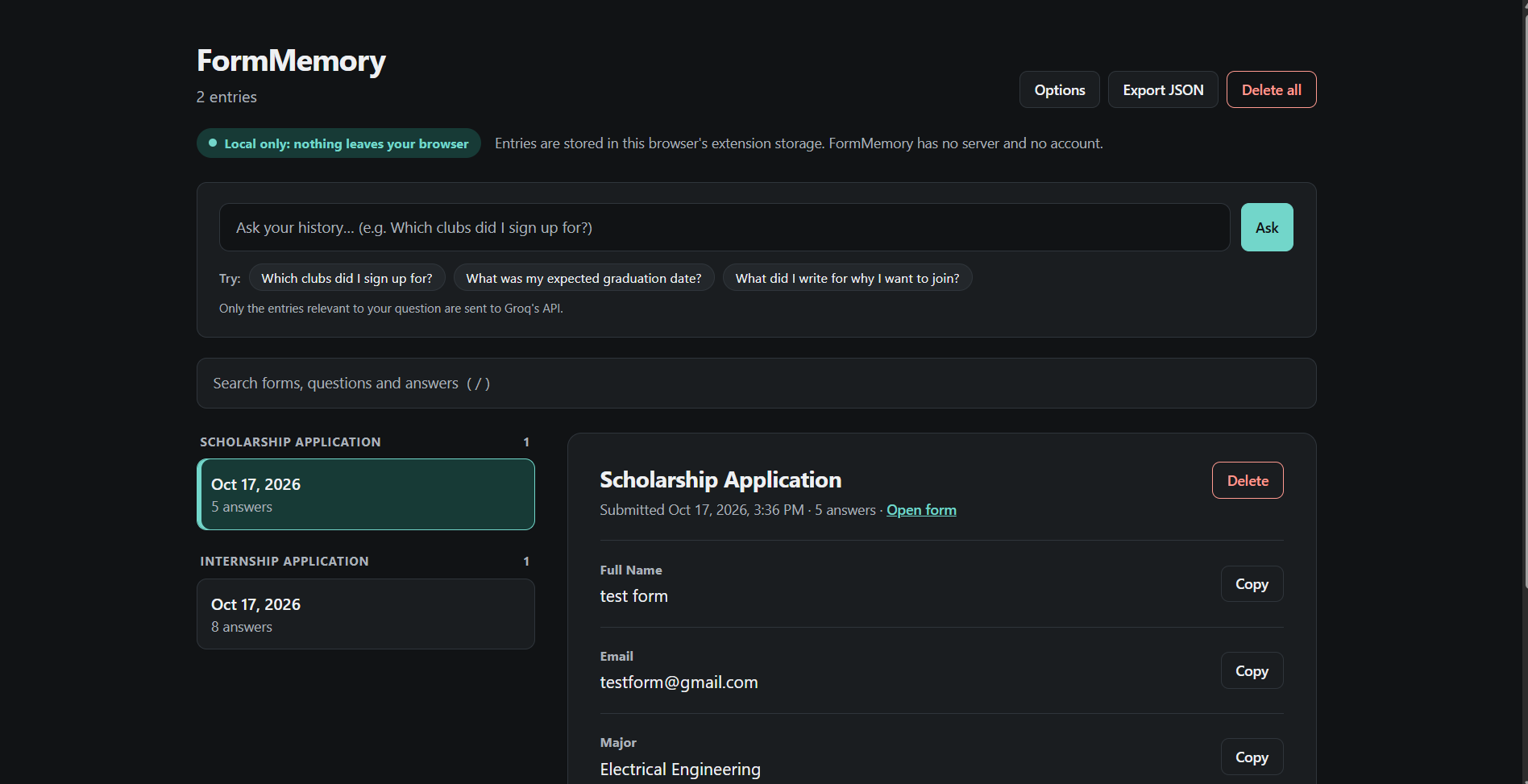
FormMemory is a local-first Chrome extension that saves what you type into Google Forms as you fill them out.
- Captures short answer, paragraph, multiple choice, checkbox, and dropdown questions, including multi-page forms
- Saves one entry per submission (form title, link, time, every question and answer) in your browser
- A clean two-column history page with instant keyword search, per-answer copy, delete, and JSON export
- "Ask your history": ask a natural-language question like "What did I put for expected graduation on the scholarship form?" and Gemini answers from your own entries with clickable links to the sources
- Suggested answers when you open a new form, shown as small chips where you click Use or Dismiss
Taste and judgment: our boundaries
- Passwords, ID numbers, card numbers, and similar sensitive fields are never stored (shown as "[hidden]")
- Everything is saved locally in chrome.storage.local. There is no backend and no account. Only the few entries relevant to a question are sent to the Gemini API when you ask
- AI proposes, you decide. Nothing is ever auto-filled or auto-submitted without your click
How we built it
Manifest V3 Chrome extension in plain JavaScript, HTML, and CSS with no build step. A content script on Google Forms pages uses a debounced MutationObserver to track answers live and a submit listener to save the entry. The history page, search, and Gemini Ask feature run from the extension itself. We built it in about three hours using Google's Antigravity IDE with AI agents working in parallel, while we set the product rules and privacy decisions.
Challenges we ran into
Google Forms has a messy DOM with no stable class names, and multi-page forms can lose answers between pages. Detecting a real submit, and deciding what must never be saved, took the most thought. We also hit model usage limits mid-build and switched models to keep going.
Accomplishments that we're proud of
A working end-to-end loop in one afternoon: fill a form, see it saved, then ask a question and get a sourced answer. We're also proud that the privacy boundaries are part of the product, not an afterthought.
What we learned
AI agents are fast at writing code, but the valuable decisions were human ones: what to capture, what to refuse, and who stays in control.
What's next
- Glasser org snapshots: on-demand company context for each entry, cached so you never pay twice, with the price shown before every call
- Smarter suggestions for more question types
- Optional sync, only with explicit consent
Note: FormMemory captures answers from the moment you install it. It can't recover forms you submitted in the past.
Built With
- chrome-extension-(manifest-v3)
- chrome.storage
- css
- gemini-api
- github
- google-antigravity
- html
- javascript

Log in or sign up for Devpost to join the conversation.