Inspiration
Paper forms still decide whether a child gets enrolled, a family receives food help, or a caregiver can prove what a household needs. The hardest part is often not the answer. It is the wording. A family reading Spanish, or anyone reading dense bureaucratic English, can understand what they know and still not understand what the form is asking.
FormBridge started from a simple question. What if a paper form could carry its own plain-language explanation, bilingual help, validation rules and signing summary in one small file that works even when internet access is unreliable?
What it does
FormBridge is an offline-capable browser tool that turns a JSON form definition into a guided form-filling workflow.
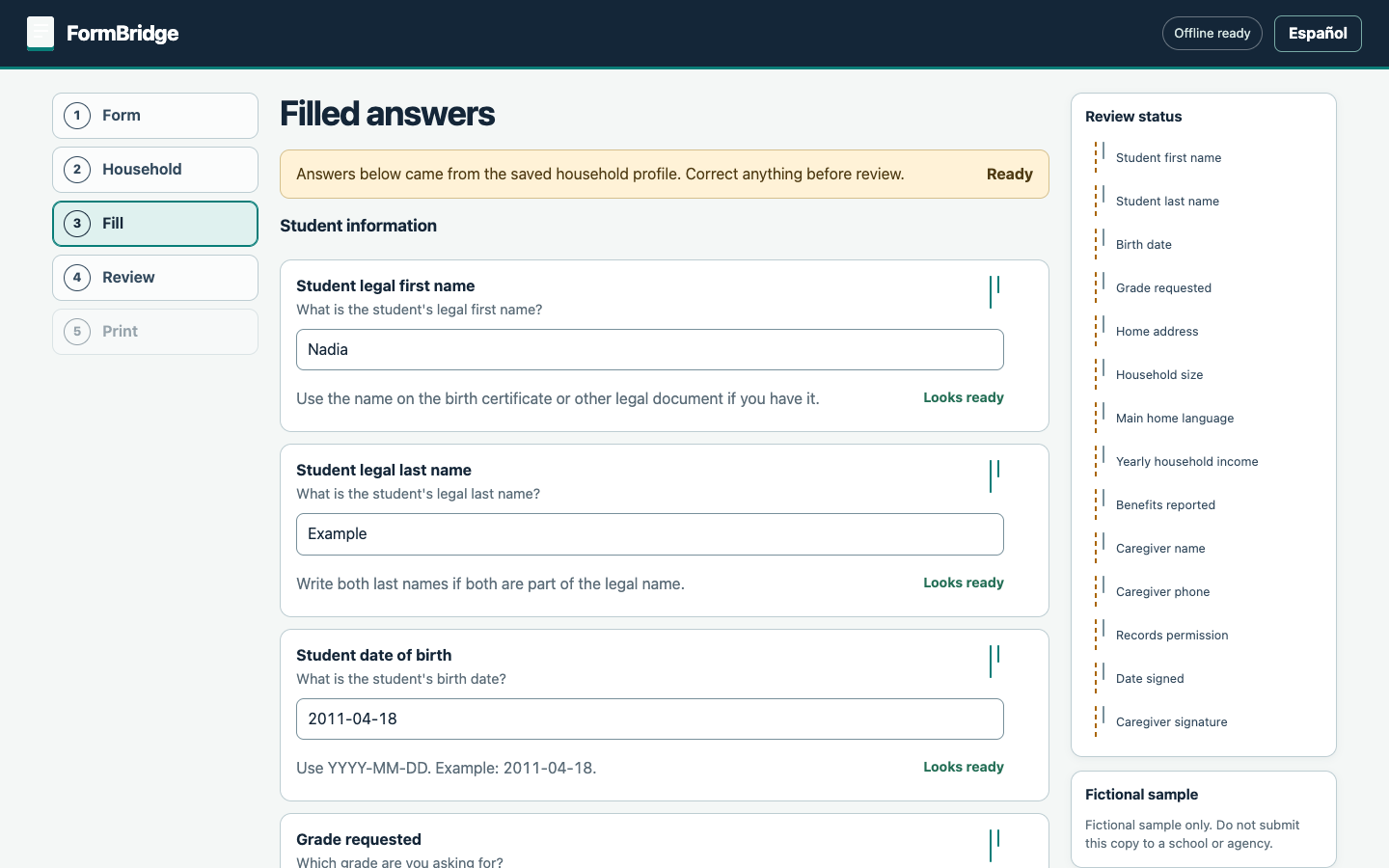
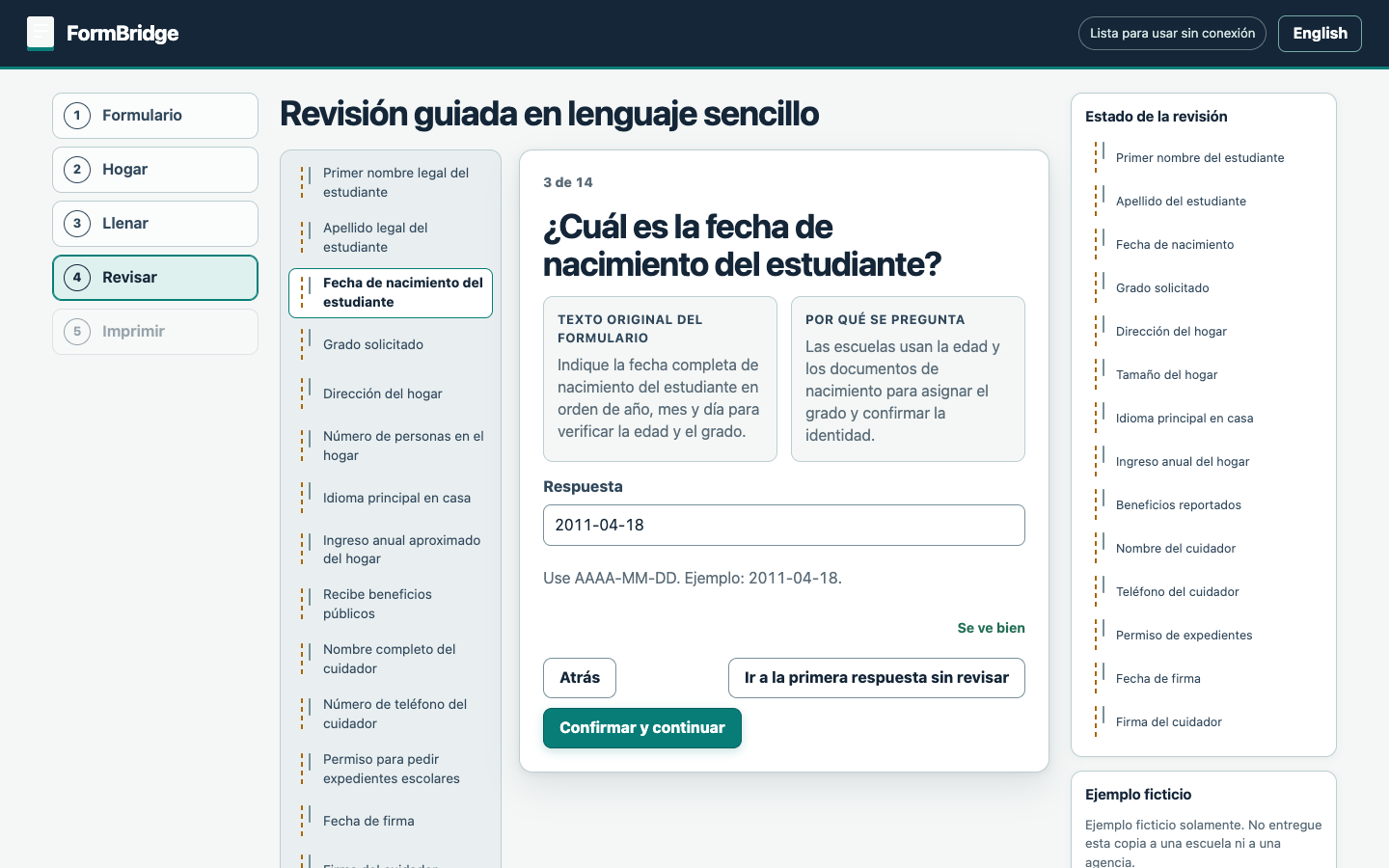
It loads a form definition containing the original questions, plain-language rewrites, reasons the questions are asked, bilingual labels and validation rules. It fills supported answers once from a saved household profile. It then walks the user through every answer in plain English or Spanish, explains why the question exists, and lets the user fix the answer before printing.
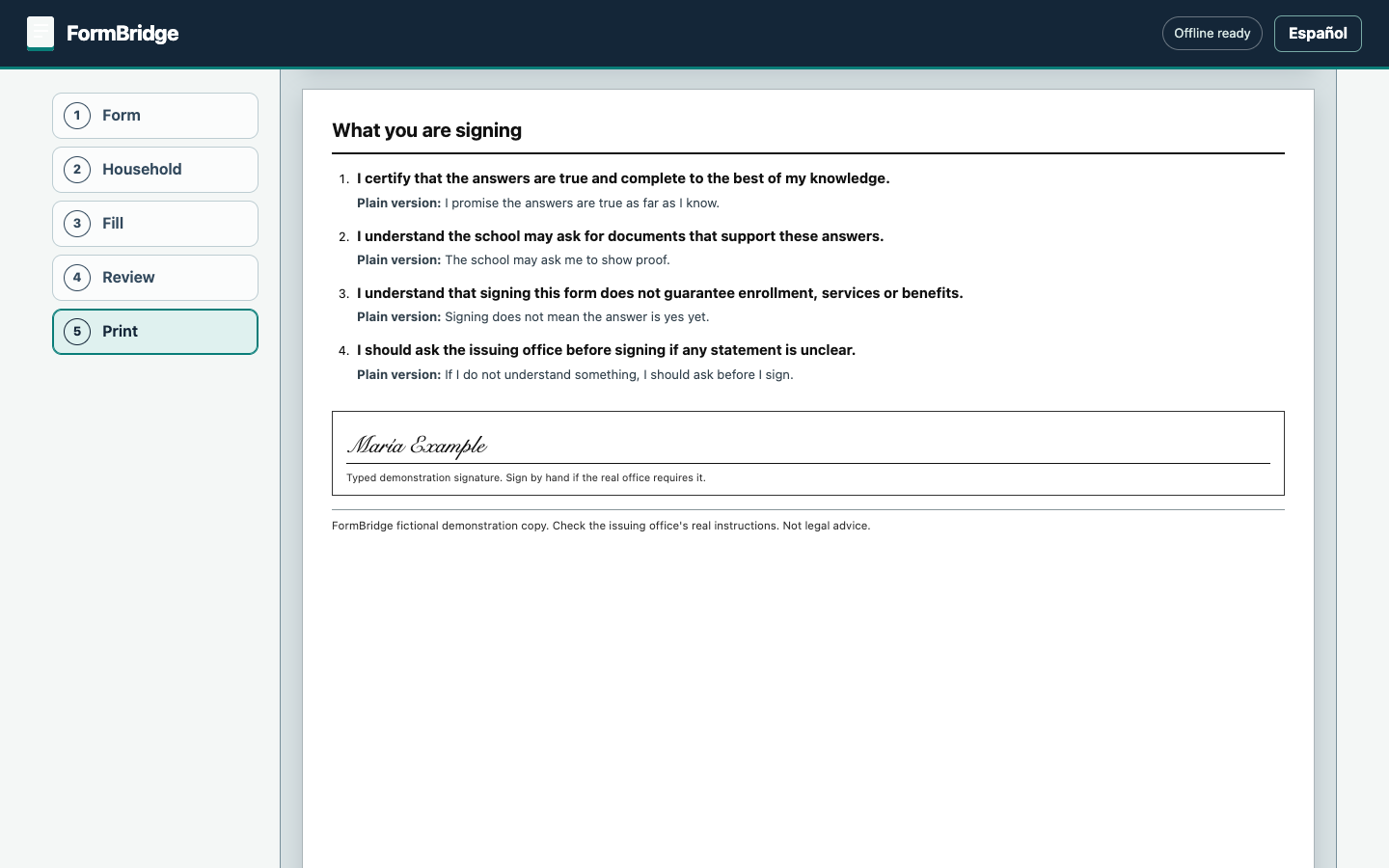
The print output has two parts. The first is a clean filled copy. The second is a one-page "what you're signing" summary that pairs each formal statement with a plain-language version.
The bundled demonstration uses a clearly fictional school enrollment form and fictional household profile. No real family data is included.
How we built it
FormBridge is a dependency-free static web app written with HTML, CSS and browser JavaScript modules. Node 22 runs the local server and test harness, but the product itself has no backend.
The shared form engine handles:
- Form-definition validation and rejection of malformed JSON
- Text, date, currency, yes/no, select and signature field types
- Specific bilingual validation messages
- Household-profile filling through dotted profile keys
- Guided review-state transitions
- Deterministic reading-level grading with a syllable and word heuristic
- English and Spanish print payload generation
A service worker caches the static assets after the first visit so the same browser can reopen the tool offline. The household profile is stored only in browser local storage.
The project includes deterministic node --test coverage and a real headless-Chrome browser check. Three 1440 by 900 screenshots were captured from the running app. The demo video was recorded from the local app with headless Chrome and locally synthesized narration.
Challenges
The main challenge was separating real help from false certainty. A readability score can flag hard wording, but it cannot prove that a question is understandable or legally correct. A typed demonstration signature can show the workflow, but a real office may require a handwritten signature. A currency value can be validated, but the app cannot decide whether a household qualifies for anything.
The interface also had to correct errors without making the user feel blamed. Instead of a red error wall, FormBridge validates one answer at a time and keeps the original question, plain rewrite, reason and editable answer together.
The print workflow was another challenge. A screen-friendly review is not automatically a good paper document, so the print output has its own layout and a separate signing-summary page.
Accomplishments
- Built a working offline-capable bilingual prototype with no backend
- Implemented six field types with deterministic validation
- Created a fictional but realistic school-enrollment-style form definition in English and Spanish
- Added guided review that shows original wording, plain wording, why the question is asked and an editable answer
- Added deterministic reading-level flags with author-supplied rewrites
- Produced a clean filled print copy and a separate signing-summary page
- Covered the form engine with deterministic tests and verified the real browser workflow in headless Chrome
- Kept the demonstration fictional and honest instead of inventing pilot results or agency partnerships
What we learned
Plain language is product infrastructure, not just nicer copy. It has to be part of the data model, the validation flow and the print output from the beginning.
A readability heuristic is useful only when its limits are visible. It can point to a sentence worth rewriting, but it cannot certify comprehension. Similarly, offline support is meaningful only when the first-visit requirement and browser-cache limits are explained honestly.
What's next
FormBridge could become more useful with:
- A visual form-definition editor for school staff and community organizations
- Import and export of reusable household-profile fields with stronger local encryption choices
- More field types, including repeating household members and document checklists
- Human-reviewed Spanish rewrite workflows
- Accessibility testing with screen-reader users and families who complete real paper forms
- A public library of openly licensed, plainly marked example form definitions
Built with
- HTML
- CSS
- Browser JavaScript modules
- Node 22 and
node --test - Headless Chrome for verification and capture
- Service workers for offline caching
- Local browser storage for the household profile
- Local voice synthesis for the demo narration
AI disclosure
AI coding assistants were used during development. Local voice synthesis was used for the demonstration narration. The project does not use AI at runtime. Reading-level flags are deterministic heuristics, and plain-language rewrites are supplied by the form author rather than generated live.
Source
The full source, tests and demo assets are at https://github.com/draarivpatel-ui/formbridge (MIT), and the live app is https://aariv.me/formbridge/.
Built With
- accessibility
- education
