-
-

Logo
-
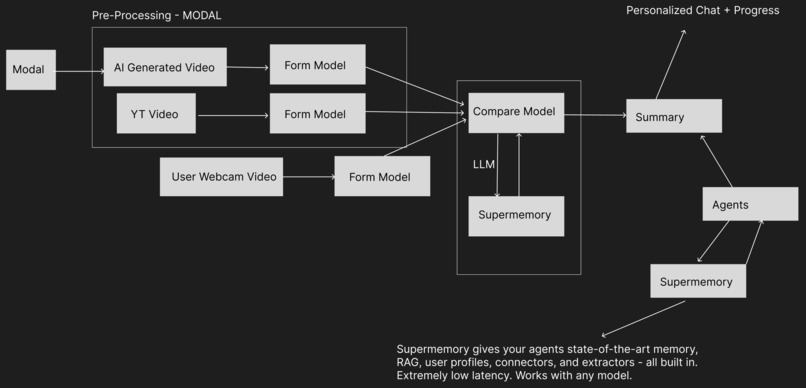
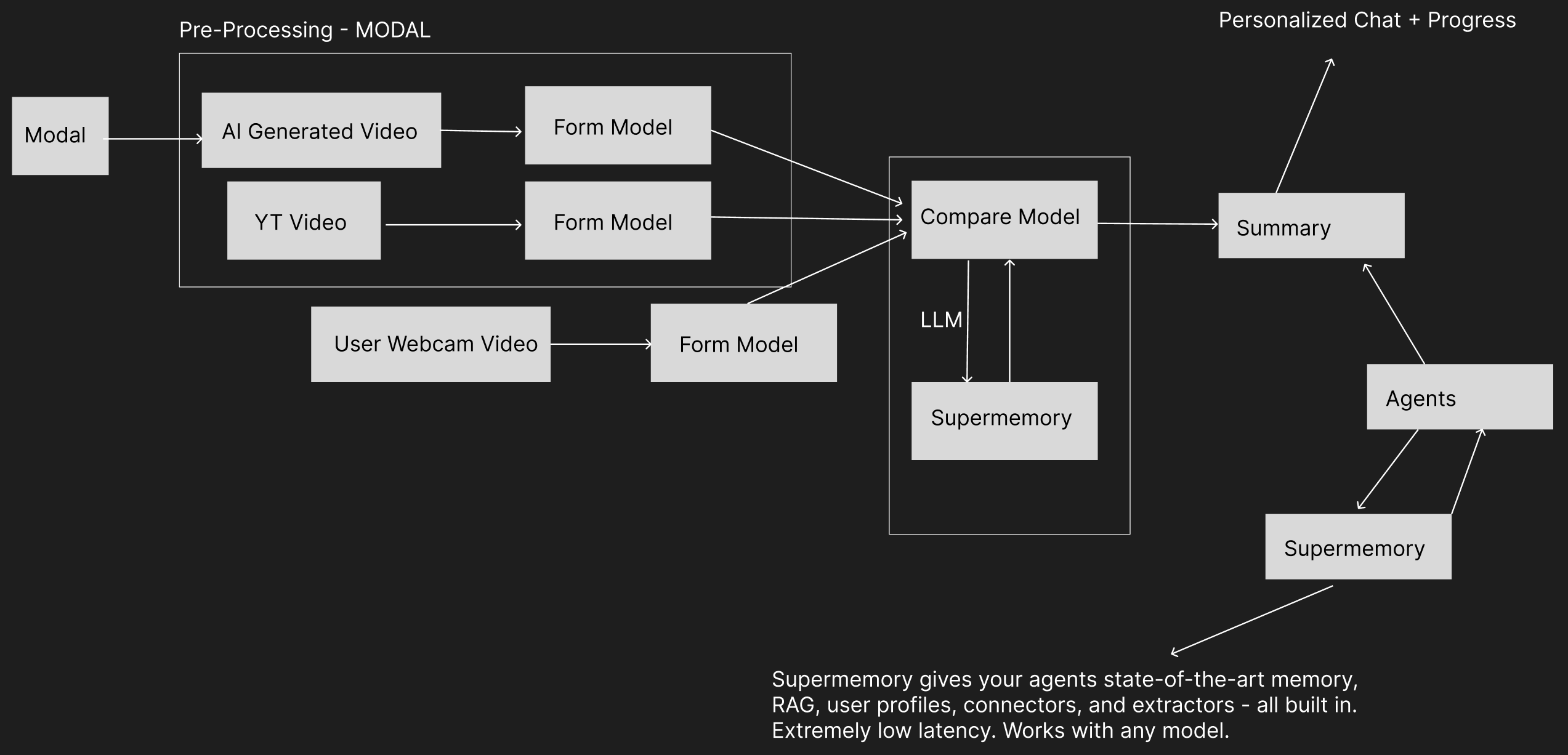
App Flowchart

AlignAI — Your AI Form Coach for PT & Workouts
AlignAI is a web app that helps you follow along to physical therapy (PT) and exercise videos with real-time pose comparison, voice coaching, and AI-generated reference videos. We built it so anyone recovering from injury, or just learning good workout form, can get instant feedback without a trainer in the room.
💡 Inspiration
One of our team members has dealt with a sports injury in the past and has to follow along to PT videos at home. Pausing, rewinding, and guessing whether their form matched the demo was frustrating and sometimes risky. We realized that countless people are in the same boat: rehabbing after injury, doing home workouts, or learning exercises from YouTube without anyone to correct their form.
That recovery journey, and the many similar stories we kept hearing, inspired us to build AlignAI. We wanted to bring the experience of “someone watching and correcting you” to the browser: compare your live webcam pose to a reference video, get a form score, hear voice coaching when you drift, and over time build a memory of your progress so the coach gets smarter.
🛠 What We Built
Core experience
- Exercise Workout tab: Search exercises (e.g. “overhead press”, “goblet squat”) via the YMove Exercise API, pick a demo video, and compare your webcam feed to it in real time. No YouTube downloads—videos load instantly.
- AI Generated Video tab: Describe a workout in plain English (e.g. “person doing a bodyweight squat”). Our pipeline on Modal uses Perplexity to research the exercise and craft a video prompt, then Grok (xAI) to generate an 10 second reference clip. You get a reference video without hunting for one.
- Pose comparison: Your pose is compared frame-by-frame to the reference using landmark alignment (DTW-style matching), joint angles, and exercise-specific weights. We surface a match score (0–100%) and highlight which body regions need work.
- Voice coaching: When your form dips, you get spoken cues (“Bring your elbow closer to your body”) via ElevenLabs TTS or browser synthesis. With OpenAI and Supermemory enabled, tips are contextual and informed by form guides and your past workouts.
- Rep counting: We detect when your form drops below a threshold and recovers, so we can count reps and include them in workout summaries.
- FormAI Coach (chatbot): A floating coach that knows your workout history (via Supermemory), shows progress charts (form score and reps over time), and can generate a PT Report to share with a physical therapist when progress declines or form scores drop.
Tech stack (high level)
| Layer | Tech |
|---|---|
| Frontend | React, MediaPipe Pose in WebAssembly (in-browser, no backend needed for basic pose) |
| Backend | FastAPI (Python), rate limiting, CORS |
| Pose | MediaPipe 33-landmark format; optional YOLOv8-pose on Modal (GPU) for fast reference preprocessing |
| Compare | DTW-style alignment, per-joint and per-limb scoring, exercise-specific weights |
| AI video | Modal: Perplexity (research + prompt) → xAI Grok (text-to-video) → store on Modal Volume → SSE progress + download |
| Coaching | OpenAI (GPT-4o-mini) for tips; Supermemory for RAG (form guides + user context); ElevenLabs TTS |
| Exercise data | YMove API; Supermemory container for form cues and ExRx.net-style content |
So in short: we built a React + FastAPI app, with pose in the browser (WASM) and optional Modal for heavy lifting (video generation and GPU pose preprocessing), and Supermemory so the coach can use an exercise knowledge base and your history.
📐 How We Built It (a bit more detail)
Pose in the browser
We use MediaPipe Pose Landmarker (WASM) so the user’s skeleton runs entirely in the browser. That keeps latency low and avoids sending raw video to the server.Reference pose extraction
For the reference video (YouTube proxy, YMove, or AI-generated), we sample frames and run pose detection. Locally we use MediaPipe (CPU); on Modal we use YOLOv8-pose on a T4 GPU for much faster preprocessing. The backend (or Modal) returns a sequence of frames with landmarks in the same 33-point format.Comparison and scoring
We align user and reference pose sequences in time (DTW-style), then compute per-frame scores from joint positions and angles. The overall form score is a weighted combination (e.g. we can emphasize legs for squats, arms for presses). Conceptually, we’re measuring how close your pose is to the reference in a normalized pose space—e.g. a score in ([0, 1]) where [ \text{score} \propto \exp\bigl(-\lambda \cdot d(\mathbf{p}{\text{user}}, \mathbf{p}{\text{ref}})\bigr) ] with (d) a pose distance (joint angles + positions) and (\lambda) a sensitivity parameter. We align in time (DTW) so we compare the right phase of the rep and compute spatial similarity of key joints and limbs.
We expose per-limb scores so the coach can say things like “your left arm is lagging” instead of a generic “adjust your arm.”
AI video pipeline (Modal)
User types a description → Perplexity (Sonar) does quick research and outputs a single text-to-video prompt (static camera, full body, plain background, 8–10 s). That prompt is sent to xAI’s Grok video API. We poll until the video is ready, store it on a Modal Volume, and stream progress to the frontend via Server-Sent Events (SSE). The frontend then fetches the video and uses it like any other reference.Coaching and memory
When the user has OpenAI and Supermemory configured:- We seed Supermemory with exercise form guides (ExRx.net URLs + short form cues) via
seed_supermemory_exercises.py. - For each exercise, we add the exercise name and video context to Supermemory for better retrieval.
- When generating a tip, we retrieve relevant form cues and (optionally) the user’s past workout summaries from Supermemory, then call the LLM to produce a short, actionable sentence. So the coach can say “keep knees over toes” for squats and “remember last time your lower back rounded” for deadlifts.
- After a workout, we save a summary and key feedback to the user’s context in Supermemory so future sessions can reference progress and recurring issues.
- We seed Supermemory with exercise form guides (ExRx.net URLs + short form cues) via
PT Report
The FormAI Coach uses progress data (form score and reps over time). When the user asks for a PT report (or when we detect declining progress), we generate a structured summary (history, trends, areas of concern) that they can copy and share with a physical therapist.
🧠 What We Learned
- Modal: We learned to structure serverless workloads (video generation, GPU pose preprocessing) as Modal apps with Secrets, Volumes, and web endpoints. Understanding cold starts, timeouts, and how to stream progress (SSE) back to the client took some iteration.
- Supermemory: We learned how to use Supermemory as a RAG backend: creating containers, adding URLs and text (form cues), and querying with user + exercise context so the LLM gets both general form knowledge and the user’s history. The “user context” pattern (saving workout summaries) made the coach feel much more personalized.
- Pose comparison: Turning raw landmarks into a single “form score” and per-limb feedback required experimenting with normalization, weighting, and thresholds. We also learned where MediaPipe is enough and where YOLOv8-pose on GPU was worth the Modal setup.
- Video UX: Streaming AI video generation (SSE), handling long-running jobs, and keeping the UI responsive (play/pause, seek, volume, speed) for both YouTube-proxied and AI-generated references required careful state and ref handling in React.
🚧 Challenges We Faced
Modal and Supermemory learning curve
Neither of us had used Modal or Supermemory before. With Modal, we had to get comfortable with the decorator-based API, Secrets, Volumes, and deploying web endpoints. With Supermemory, we had to figure out the right way to structure containers (e.g. one for “exercise knowledge” and user-specific context), what to index (URLs vs. inline form cues), and how to pass that into the LLM so tips were specific and not generic.Keeping the pipeline simple and robust
The AI video path has several steps (Perplexity → prompt → Grok → poll → store → SSE). Making the prompt strict enough for Grok (static camera, full body, no text) while still getting usable clips took trial and error. We also had to handle failures and timeouts so the frontend could show clear errors instead of hanging.Pose alignment and scoring
Different exercises have different “important” joints and phases. Making the comparison fair across exercises (and not overly sensitive to camera angle or body proportions) required tuning weights and thresholds. We’re still iterating on edge cases (e.g. partial occlusion, side view vs. front view).Integrating many services
FormAI ties together: frontend (React, MediaPipe WASM), FastAPI, YMove, Modal (video + preprocess), OpenAI, Supermemory, ElevenLabs. Managing API keys, env vars, and optional features (e.g. “works without Modal but with limited AI video”) was a real challenge. We used a single.envand feature flags so the app degrades gracefully when keys or endpoints are missing.
🔮 What’s Next
We’d like to add more exercise-specific scoring presets, better handling of side-view and partial visibility, and optional “PT plan” templates (e.g. “post-ACL protocol”) that suggest exercises and track adherence. We also want to make the PT Report even more useful for clinicians (e.g. export as PDF or shareable link).
Try It
- Backend:
./run-backend.sh(orpython pose_server.pywith a venv andrequirements.txt). - Frontend:
./run-frontend.sh(ornpm run devinfrontend/). - Open http://localhost:8000, allow webcam, and try the Exercise Workout tab (YMove) or the AI Generated Video tab (needs Modal + Perplexity/xAI keys).
- For voice and smart coaching, set
OPENAI_API_KEYand optionallySUPERMEMORY_API_KEY+ELEVENLABS_API_KEYin.env.
Thanks for reading—and here’s to better form and safer recovery. 🏋️♂️


Log in or sign up for Devpost to join the conversation.