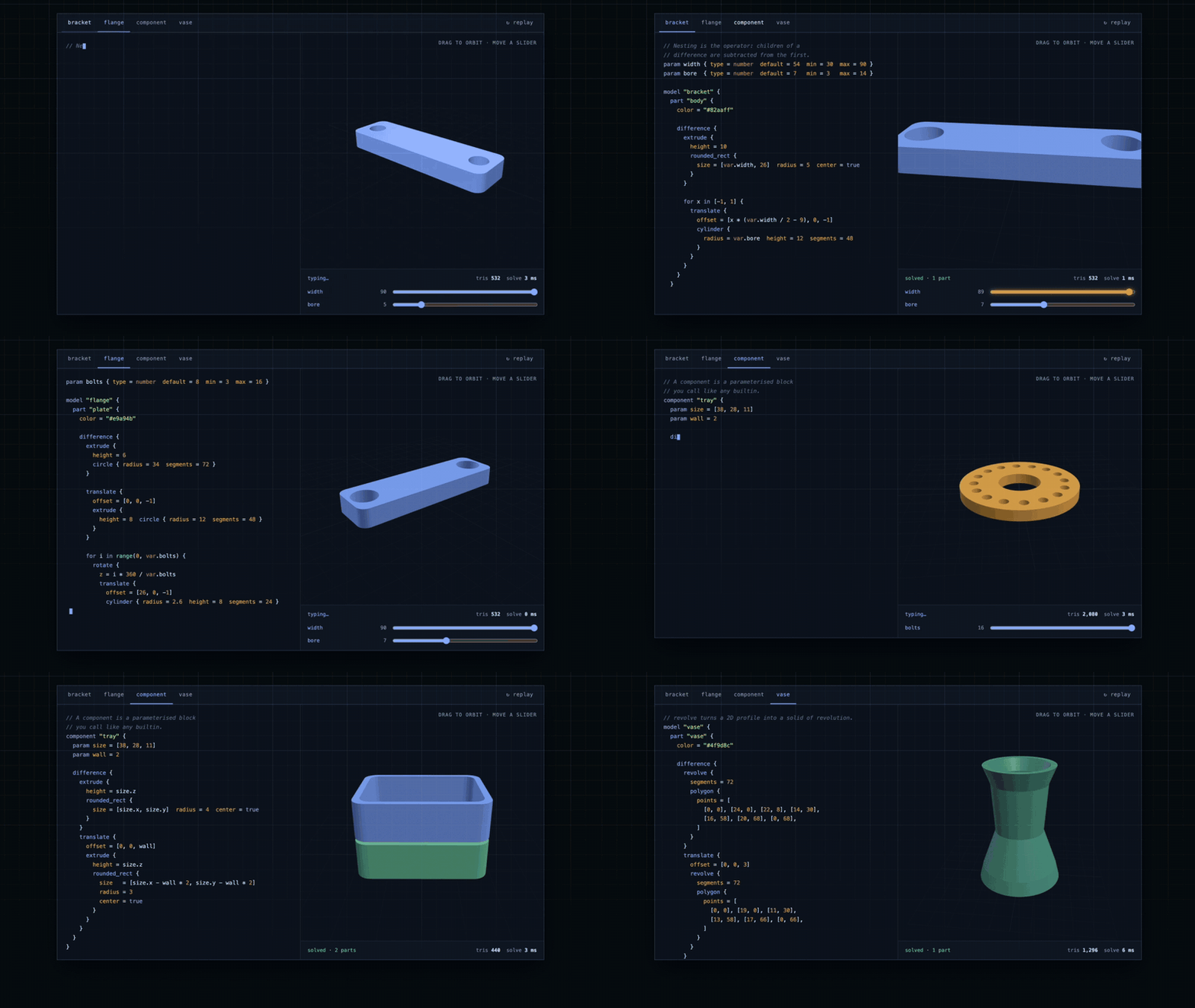



forma-dsl - Geometry as Code
Build 3D models the way you build software: with readable code, reusable components, and version control.
Written by developers, written by agents, and proved by the same geometry kernel either way.
What if 3D models were just another part of your codebase?
Most 3D modeling tools are built around visual editors and specialized file formats. They work well for designing things, but integrating them into software development workflows isn't always straightforward.
As developers, we're used to working differently. We write code, track changes with Git, reuse components, run tests, and automate repetitive tasks.
I wanted to bring that same approach to 3D modeling.
That's where forma-dsl comes in.
It's an open-source JavaScript library and declarative language for creating parametric 3D geometry.
Instead of storing the logic of a model inside a CAD application, you describe it in a readable .forma file using parameters, components, operations, and constraints.
Two things make it different from the languages that already do this.
The first is underneath: a document compiles to a tree of immutable, content-addressed geometry nodes, and the evaluator that builds that tree never touches the geometry kernel. That separation is what makes editing cheap, and it's what the live editor is built on.
The second is who writes it. The language ships with an MCP server, so an AI agent can author a .forma file and have the result solved and measured before it answers - not generated and hoped for. A model that guesses a block that doesn't exist is told every block that does.
Because the model is defined as text, you can work with it much like any other source file:
- Read it to understand how a model is constructed.
- Track changes with Git and review them in pull requests.
- Reuse components across different models.
- Change parameters to generate variations of a design.
- Test and validate models as part of automated workflows.
- Generate and export geometry directly from code.
- Build it from a terminal or a CI job, with no browser and no build step.
- Work with AI agents using the same language and model definitions.
The goal is simple: make 3D geometry easier to work with in software projects.
Who is forma-dsl for?
forma-dsl isn't intended to replace traditional CAD software. It's for developers who want to create, manipulate, or generate 3D geometry inside their own applications.
There are several ways you might use it.
Web applications
Add interactive 3D modeling to a browser-based application.
You could build a product configurator, an interactive design tool, or an application that generates geometry based on user input.
forma-dsl uses JavaScript, WebAssembly, and WebGL, so it fits naturally into modern web development.
Parametric product configurators
Imagine building an application where users can change the dimensions of a product and immediately see the resulting 3D model.
Instead of maintaining separate models for every possible configuration, you define the geometry once and expose the parameters you want users to control.
The same definitions can be reused and maintained as part of your application's source code.
Automation and engineering tools
Sometimes you don't need a graphical editor at all.
You might want to generate hundreds of model variations, run geometry evaluations, or automatically export STL files.
The forma-dsl-cli package covers that case directly, so a .forma file can sit in a Makefile or a CI job like any other source file.
AI-powered modeling
Through the companion forma-dsl-mcp package, AI agents can work directly with the modeling language - discovering the available features, writing .forma files, evaluating the resulting geometry, and exporting STL.
Rather than asking an AI to generate arbitrary modeling code and hoping it works, you give it a defined language and a geometry engine that evaluates what it wrote. More on that further down.
Custom developer tools
If you're building a specialized application that needs 3D geometry, you probably don't want to spend months developing a modeling language, parser, and geometry engine before working on your actual product.
forma-dsl gives you those building blocks so you can focus on the application itself.
A library first, with an editor to explore it
One thing I wanted to get right was keeping the modeling engine independent of any particular interface.
The core of forma-dsl is a reusable JavaScript library published on npm.
You can use it in a browser application, call it from the command line, connect it to an automated workflow, integrate it into your own editor, or make it available to an AI agent.
There's also an interactive editor where you can experiment with the language and see the resulting geometry.
The editor isn't a separate implementation. It uses the same published library that's available for developers to integrate into their own projects.
So what you see in the editor is also what you can build on.
Underneath: an evaluator, a cache, and a kernel
This is the part I'd want a compiler person to read.
A .forma document goes through four stages, and each one has a job:
source --> lexer --> parser --> evaluator --> geometry nodes --> Manifold (WASM) --> mesh
                                    |               |
                                  params       digest cache
The interesting decision is the boundary between the last two.
The evaluator is pure. It resolves parameters, runs the loops and conditionals, expands components, and produces a tree of immutable geometry nodes. It never calls the geometry kernel. It is fast, and it can be run without a kernel at all - which is how the editor reads a document's parameters before anything has been solved.
Geometry nodes are content-addressed. Every node carries a 128-bit digest of its own content and its children's. Two structurally identical subtrees are therefore not merely equal, they are the same node.
That has a consequence worth measuring. Here is an 8x8 grid of the same component:
component "stud" { cylinder { radius = 2.4  height = 1.8  segments = 48 } }

model "plate" {
  part "body" {
    for i in range(8) { for j in range(8) {
      translate { offset = [i * 8, j * 8, 0]  stud { } }
    } }
  }
}
64 studs, 129 nodes in the tree - and 63 cache hits. The cylinder is solved once. The other 63 are the same digest, so the kernel is never asked a second time.
The same mechanism is what makes the live editor feel immediate. When you drag a parameter, the document is re-evaluated from scratch - that part is cheap - and only the subtrees whose content actually changed are handed back to the kernel. Everything the edit didn't touch is still in the cache under the same digest.
It also means a render reports what it did:
6 nodes, 6 solved, 0 cached, 9 ms     <- first render
6 nodes, 4 solved, 1 cached, 2 ms     <- after moving a parameter
(One run on a laptop; the milliseconds move, the solved and cached counts don't.)
Solving geometry is where the time goes. Knowing precisely which subtrees need re-solving is most of what makes a parametric model interactive rather than a render button.
Running it from the command line
Not every use of a modeling language happens in a browser.
If a .forma file is going to live in a repository alongside the code that uses it, then building it should look like building anything else in that repository.
forma-dsl-cli is the same engine with no interface around it:
npx forma-dsl-cli render riser.forma -p height=32 -o riser.stl
Three commands cover the work:
forma rendersolves a document and writes a binary STL.forma paramslists the inputs a document declares, as a table or as JSON.forma modelsnames the models it contains.
A few decisions that make it usable from a script rather than only from a keyboard.
Only what you asked for goes to stdout. The STL under -o -, and the listings. The summary and every diagnostic go to stderr, so a pipe stays clean:
forma render riser.forma --segments 64 -o - > riser.stl
Three exit codes, because a script has to tell them apart. 0 worked, 1 the document did not build, 2 the invocation was wrong. "The model is broken" and "you called it wrong" are different problems and shouldn't look the same.
Failures print where a tool can find them. The position comes first, then the source with a caret under the column:
riser.forma:7:7: rounded_rect: unknown attribute "corner_radius" - rounded_rect reads "center", "radius", "segments", "size"
5 |     extrude {
6 |       height = var.height
7 |       rounded_rect { size = [40, 20]  corner_radius = 4 }
  |       ^
8 |     }
9 |   }
That format is the one editors and CI annotations already know how to read. And where a name is wrong, the message lists the names that are right, which is the difference between a mistake you can fix and one you have to go and look up.
The document can describe itself. forma params --json returns each input with its type, default and range, which is what lets a build script generate every variation without being told in advance what they are:
for h in 8 20 40; do
  forma render riser.forma -p "height=$h" -o "build/riser-$h.stl"
done
The CLI doesn't know the language. Every block it accepts, every error it reports and every solid it produces comes from the same published library the editor and the MCP server use, so a feature added to the language is available from the terminal without the CLI being told about it.
Working with AI through MCP
Most "AI writes CAD" demos hand a model a prompt and hope the code runs. The interesting question is what happens when it doesn't.
forma-dsl answers that by refusing to separate authoring from verification. forma-dsl-mcp runs the real geometry kernel, so a document an agent writes is built before the agent is answered - and what comes back is a table of every part with its bounding box, volume, triangle count and genus. "Is this the size I asked for, and is it actually a solid?" is settled before the work is handed over.
So an agent can:
- Explore the supported language features.
- Generate and modify
.formadocuments. - Evaluate geometry using the actual engine.
- Export models as STL files.
A document that doesn't render is refused rather than written. A part that silently solved to nothing is called out by name. And where the model guesses a block or an attribute that doesn't exist, the refusal names every one that does.
The server's description of the language can't drift from the language, either. It merges the library's own block and function registries into its prose at load time, and a test asserts that any disagreement between the two is empty. A block added to the language is one the agent can use without anyone updating a document.
What I like about this approach is that the output isn't locked inside an AI conversation.
It's a normal file that can be reviewed, edited, committed to Git, and processed by the same tools you already use.
AI can help create the model, but the model itself stays understandable and under your control - and none of it is a requirement. The core library works on its own, whether you write the .forma file yourself, generate it programmatically, or use the editor.
Keeping the project honest
Building a language and a geometry engine is one part of the work. Keeping a language implementation, an editor, a CLI, an MCP server, examples and a manual all telling the same story is another - and it's the part that quietly rots.
So the rule across this repository is that nothing restates the vocabulary. Everything reads it from the library's own registries, and a test holds it there:
- Syntax highlighting is generated, not transcribed. The editor's, the landing page's and the manual's highlighters all colour from the same
BLOCKSandFUNCTIONStables the evaluator dispatches on. A block added to the language is highlighted without anyone updating a list. - So is the editor's autocomplete. It offers every block, function, constant and type name from those registries, plus the components and parameters the open document declares - and a test asserts that no name in a registry is missing from what the editor offers.
- The MCP server's catalogue cannot drift. It merges the registries into its own prose at load time and exposes any disagreement as
catalogueDrift, which a test asserts is empty. - Every example on the site renders. The editor's documents and the landing page's demos are solved by tests, so nothing shown being typed is a document the language can no longer build. Even the terminal transcript on the landing page is checked: the triangle count it claims comes from rendering that document, and the error it shows is compared against the message the evaluator really raises.
- The manual has no dead links. The build resolves all 244 internal links across 29 pages and fails rather than publishing a broken one.
- Every workspace depends on the published entry point, never on the library's sources. An export the editor or the CLI needs and the package doesn't have fails in this repository rather than in someone's install.
Underneath that: 352 tests, coverage thresholds that live in the script rather than in CI so no pipeline step can quietly lower them, Sonar analysis on every pull request, and a maintenance agent that reviews and merges dependency updates on its own.
None of this is visible in a demo. It's the reason a feature added to the language next month won't leave five other places claiming something that stopped being true.
Open source and built to be integrated
forma-dsl, forma-dsl-cli and forma-dsl-mcp are all available on npm under the MIT License.
You can run the library locally, integrate it into an existing JavaScript application, or use it as a foundation for your own modeling tools.
There's no requirement to use a hosted CAD platform or a particular editor.
I started forma-dsl around a simple idea: 3D geometry should be something developers can work with directly, not just something they load and display.
If a model can be described in a readable language, it becomes much easier to generate, modify, reuse, test, and automate.
What I didn't expect at the start was how much the second audience would matter. A language that is precise enough to be compiled, and a kernel that can answer "did that actually build, and how big is it?", turn out to be exactly what an AI agent needs in order to be useful at this rather than merely plausible.
A model written by a person and a model written by an agent go through the same parser, the same evaluator and the same kernel, and come out as the same readable file. That's the part I think is worth building on.
What's in the box
| Package | What it is |
|---|---|
| forma-dsl | The language, its evaluator and the geometry kernel binding. One runtime dependency |
| forma-dsl-cli | The forma command: solve a document to STL in a build, with no browser |
| forma-dsl-mcp | An MCP server that knows the language, solves what it writes, and measures the result |
29 blocks, 27 functions, a 29-page reference manual, and a browser editor running the same kernel.
Explore the project
Live Demo · Try the Editor · Documentation
GitHub · Core Library on npm · Command Line on npm · MCP Server on npm
Built With
- 3d-modeling
- cad
- computer-graphics
- dsl
- javascript
- language-design
- mcp
- three.js
- typescript
- webassembly
- webgl


Log in or sign up for Devpost to join the conversation.