Forge Quest Project Story
Inspiration
The primary inspiration for this project was the "Build your first app" tutorial. The idea of developing a Forge app that integrates seamlessly with Atlassian products, particularly Confluence, was genuinely captivating. Starting with the foundational "Hello World" app served as an excellent introduction to the core concepts of the Forge platform. Additionally, the possibility of earning a "swag prize" provided a fun and motivating boost.
What it does
Originally a simple "Hello World" app, this Forge project has evolved into a personalized informational tool within a Confluence space. Upon installation and loading, it:
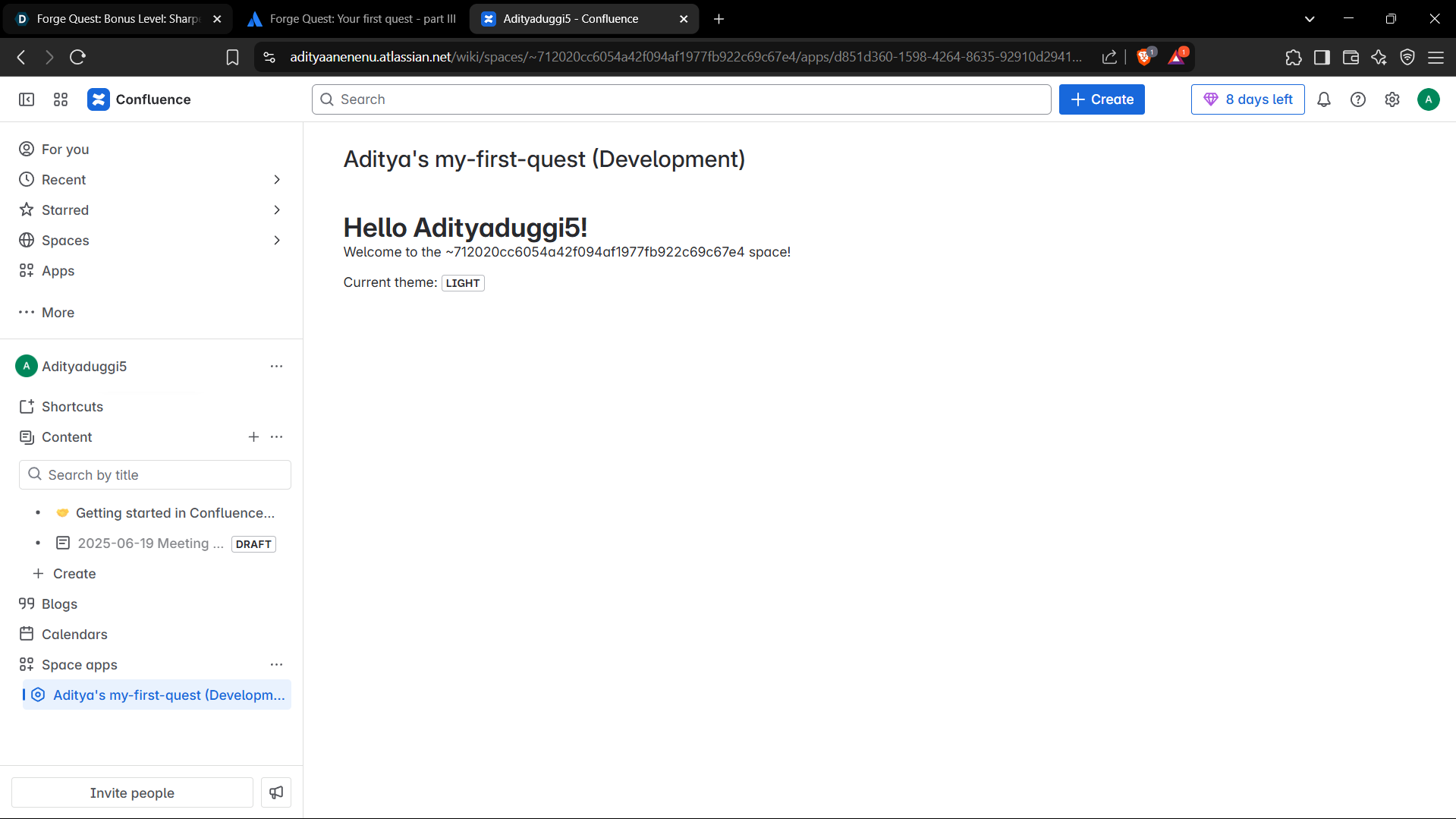
- Displays a personalized greeting, "Hello {User Name}!", by dynamically fetching the current user's public name using the Confluence REST API.
- Provides a contextual message, "Welcome to the {Space Key} space!", based on the Confluence space it's loaded within, retrieved via a backend resolver.
- Shows the current UI theme (e.g., dark or light) of the Confluence instance using the frontend context and displays it using the UI Kit Lozenge component.
How we built it
We followed the official tutorial meticulously, progressing through several development stages:
- Scaffolding: Used
forge createto generate a new app based on theconfluence-space-pageUI Kit template. - Manifest Configuration: Modified
manifest.ymlto customize the app’s title, define its modules, and set the runtime environment. - Frontend Development: Built the UI in
src/frontend/index.jsxusing Forge’s UI Kit components (Text, Heading, Lozenge) with React'suseStateanduseEffect. - Backend Logic: Wrote serverless functions in
src/resolvers/index.jsto handle backend logic and provide data to the frontend via resolvers. - API Integration: Leveraged the
@forge/bridgepackage for:invoketo connect frontend and backend.view.getContext()to access the frontend context.requestConfluenceto call the Confluence REST API.
- Deployment & Installation: Used
forge deployto push code andforge install(or--upgrade) to install the app. - Rapid Iteration: Used
forge tunnelfor live development and quick feedback. - Permission Management: Applied
forge lint --fixto automatically add needed API scopes likeread:user:confluencetomanifest.yml.
Challenges we ran into
Although the tutorial was clear, a few hurdles required problem-solving:
- Asynchronous Flow: Understanding React's
useEffecttiming with Forge'sinvokeandrequestConfluencewas tricky and required precise data-loading strategies. - Debugging Layers: Differentiating between frontend logs (browser console) and backend logs (Forge tunnel) took some getting used to.
- Permission Handling: Learning when and why new permissions were needed, and remembering to re-install with
--upgradeafter updating the manifest. - CLI Sequence: Understanding the correct sequence of
deployandinstallcommands to ensure smooth updates.
Accomplishments that we're proud of
Some key achievements include:
- Successfully fetching and displaying the current user's name using the Confluence REST API.
- Seamlessly connecting frontend UI with backend logic using resolvers and the
invokemethod. - Creating a UI that feels native to Confluence using Forge's UI Kit.
- Gaining fluency with the Forge CLI, especially
forge tunnelfor efficient iteration andforge lint --fixfor managing permissions. - Overcoming permission-related deployment issues with a better understanding of Forge’s security model.
What we learned
This project offered a deep understanding of the Forge development ecosystem:
- Full lifecycle of a Forge app—from creation to deployment and maintenance.
- Using serverless functions via resolvers for backend logic.
- Securely interacting with Atlassian product APIs through the Forge Bridge.
- The central importance of
manifest.ymlin configuration. - Debugging strategies across frontend and backend.
- Rapid development using tools like
forge tunnel. - Best practices around permission management in cloud app development.
What's next for Forge Quest
Future plans for expanding Forge Quest include:
- Adding More Features: Interact with other Confluence features like content creation or profile management.
- Exploring UI Kit Further: Try out more UI Kit components for richer interactions.
- Data Persistence: Use Forge's Storage API to persist app-specific data.
- Cross-Product Integration: Extend functionality to support multiple Atlassian products (e.g., Jira + Confluence).
- Real-World Use Case: Address an actual problem or need within a Confluence space.
- Better UX: Add robust error handling and more user-friendly feedback in the UI.
Built With
- api
- atlassian
- cli
- cloud
- confluence
- developer
- forge
- forge/bridge
- git
- javascript
- jsx
- kit
- react
- resolvers
- rest
- ui


Log in or sign up for Devpost to join the conversation.