Inspiration
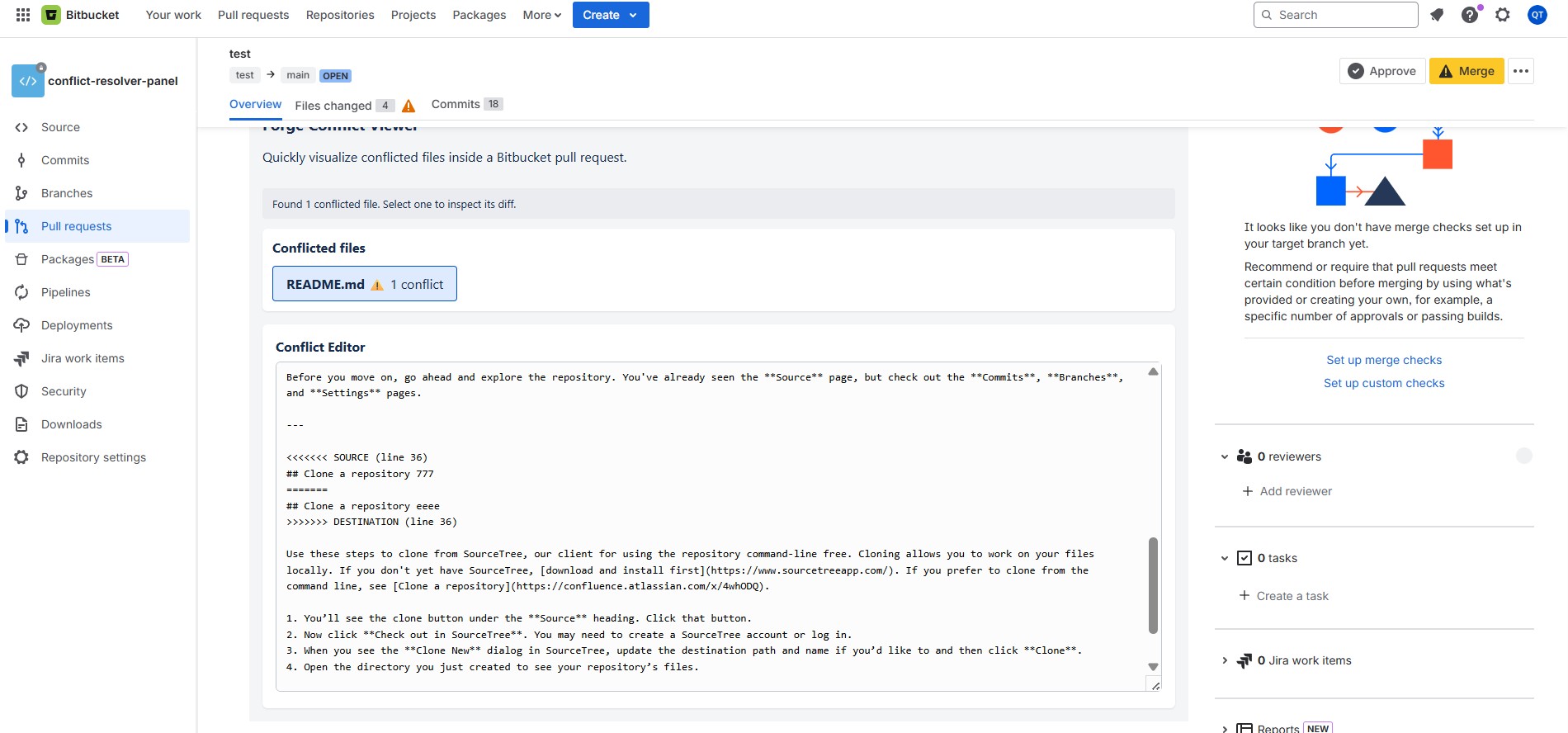
When reviewing pull requests on Bitbucket, quickly understanding which files have conflicts and where those conflicts occur can be time-consuming. Forge Conflict Viewer helps developers instantly visualize conflicted files and their content directly within the PR interface.
What it does
- Lists all conflicted files in a Bitbucket pull request
- Displays the number of conflicts per file
- Allows selecting individual files to view conflict content with
<<<<<<<,=======,>>>>>>>markers in a read-only editor - Automatically resizes panels based on content for better readability
How we built it
- Backend: Built with Atlassian Forge (Node.js) using
@forge/apiand@forge/resolverto interact with Bitbucket REST API:- Fetches pull request information
- Retrieves diffstat and file diffs
- Downloads file content from source/destination commits to reconstruct conflict regions
- Frontend: Forge Custom UI (vanilla HTML/CSS/JavaScript) communicating with backend via Forge Bridge
Challenges we ran into
Originally, the goal was to let developers resolve simple conflicts directly inside the Bitbucket pull request UI — merge the destination branch into the source, show real Git conflict markers, edit them, and commit the resolved result. In practice, we hit a hard limitation: the Bitbucket Cloud API does not allow creating a merge commit when conflicts exist, and any attempt to “simulate” this flow from the app side would only create extra commits instead of a true merge-based resolution. Because of this, we intentionally scoped the project down to a read‑only conflict viewer that focuses on giving developers a fast, accurate picture of what is conflicting so they can resolve it properly elsewhere (locally or using Bitbucket’s own tools).
- Bitbucket API doesn't allow merging when conflicts exist, so we designed the app as a pure "conflict viewer" rather than attempting automatic resolution,


Log in or sign up for Devpost to join the conversation.