Forensics Triage Tool
Repo: https://github.com/takshp2024-sys/forensics-triage-tool
A cross-platform live-response tool for rapid incident triage: collects volatile system state (processes, network connections, scheduled tasks, environment variables, recently modified files), hashes discovered binaries, and optionally checks them against VirusTotal — all while maintaining a full, timestamped chain-of-custody audit log of every action it takes.
Built as a companion to SIEM-lite: SIEM-lite detects that something suspicious happened; this tool is what an analyst would run on the affected host next.
Why chain-of-custody matters here
Most student forensics scripts just dump psutil.process_iter() into a JSON
file and call it done. The part that actually reflects real incident-response
practice is being able to answer: what did this tool touch, when, and did it
succeed? — independent of whether the underlying collection worked.
Every action is logged to reports/audit_log.jsonl before it runs, then
updated with completed or failed after, with a full timestamp on each line.
See sample_output/sample_audit_log.jsonl
for what that looks like on a real run.
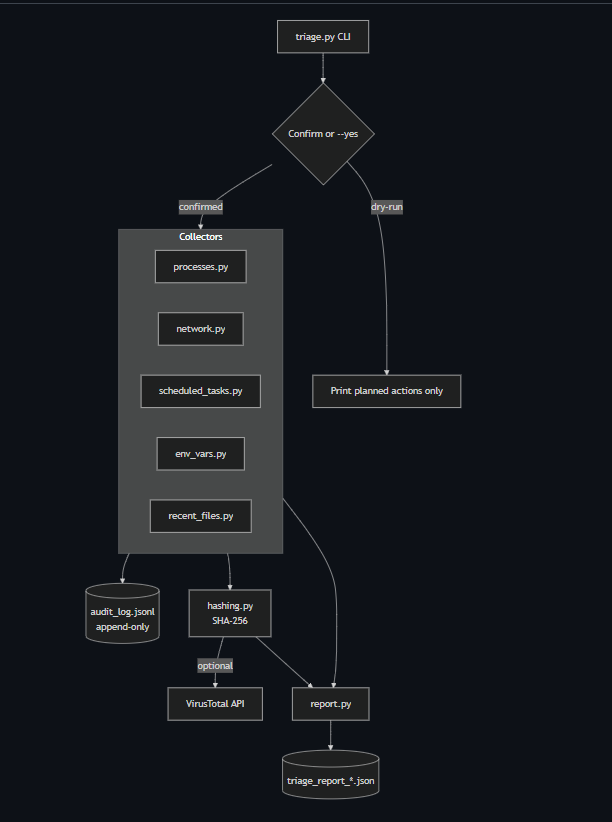
Architecture
flowchart TD
    CLI[triage.py CLI] --> Confirm{Confirm or --yes}
    Confirm -->|dry-run| Preview[Print planned actions only]
    Confirm -->|confirmed| Collectors

    subgraph Collectors
        P[processes.py]
        N[network.py]
        T[scheduled_tasks.py]
        E[env_vars.py]
        F[recent_files.py]
    end

    Collectors --> Audit[(audit_log.jsonl<br/>append-only)]
    Collectors --> Hash[hashing.py<br/>SHA-256]
    Hash -->|optional| VT[VirusTotal API]
    Collectors --> Report[report.py]
    Hash --> Report
    Report --> JSON[(triage_report_*.json)]
Safety & forensic-soundness design
- Read-only. The tool never writes to, modifies, or executes anything on the target system except its own output report and audit log.
--dry-runshows exactly what would be collected without touching anything.- Explicit confirmation is required before a real run (skip with
--yesfor scripted/automated use). - No hardcoded secrets. The VirusTotal API key is read from the
VT_API_KEYenvironment variable via.env(see.env.example) — never logged, never written into the report. - Access-denied is reported, not hidden. If a section can't be fully collected due to missing privileges, the report says so explicitly rather than silently returning an incomplete list that looks complete.
Quickstart
git clone <this-repo>
cd forensics-triage-tool
pip install -r requirements.txt
cp .env.example .env    # optional — only needed for VirusTotal lookups
Preview what a full run would collect (touches nothing):
python triage.py --full --dry-run
Run a full triage sweep:
python triage.py --full --hash
Run specific sections only:
python triage.py --processes --network
Full sweep with VirusTotal checks (requires VT_API_KEY in .env):
python triage.py --full --hash --vt-lookup
Run as Administrator (Windows) or with
sudo(Linux/macOS) for full process and network visibility. The tool still runs without elevation, but flags any sections it couldn't fully access.
Output lands in ./reports/:
triage_report_<hostname>_<timestamp>.json— the full structured reportaudit_log.jsonl— append-only chain-of-custody log (shared across runs)
CLI reference
| Flag | Description |
|---|---|
--full |
Collect all sections |
--processes |
Running processes only |
--network |
Open network connections only |
--tasks |
Scheduled tasks / cron jobs only |
--env |
Environment variables only |
--files |
Recently modified files only |
--hash |
SHA-256 hash all discovered process executables |
--vt-lookup |
Check hashes against VirusTotal (needs VT_API_KEY) |
--hours N |
Lookback window for recent-file collection (default: 48) |
--output DIR |
Output directory (default: ./reports) |
--dry-run |
Show planned actions, collect nothing |
--yes |
Skip the confirmation prompt |
Sample output
See sample_output/ for a full example report and matching
audit log — sanitized synthetic data showing what a flagged finding looks like
(a process running from C:\Users\Public with an active connection to an
external IP, hash-matched against VirusTotal with 41/72 engines flagging it
malicious).
Project structure
forensics-triage-tool/
├── triage.py                    # CLI entrypoint
├── triage/
│   ├── audit.py                 # chain-of-custody logging
│   ├── hashing.py                # SHA-256 + VirusTotal lookup
│   ├── report.py                 # report assembly + output
│   └── collectors/
│       ├── processes.py
│       ├── network.py
│       ├── scheduled_tasks.py
│       ├── env_vars.py
│       └── recent_files.py
├── sample_output/
│   ├── sample_triage_report.json
│   └── sample_audit_log.jsonl
├── .env.example
└── requirements.txt
Limitations & what I'd add next
- No memory acquisition. This is a live-response triage tool, not a full memory forensics suite — it doesn't capture a memory image (that's the domain of tools like Volatility, which operate on a separate memory dump).
- VirusTotal free-tier rate limits (4 req/min) mean a large binary set takes a while to fully check — the tool throttles deliberately rather than hitting the limit and failing silently.
- Recent-file scan is directory-scoped, not a full disk crawl, by design — a full crawl would be slow and noisy; the target directories are chosen because they're common dropper/staging locations.
- Given more time: signed/verified report output (hash the report itself and timestamp it) to make tampering with the evidence file after the fact detectable — a natural next step toward real chain-of-custody rigor.
Author
Taksh — Computer Science Honours, York University · GitHub
Built With
- api-integration
- cli
- cross-platform
- cybersecurity
- data
- digital-forensics
- hashing
- incident-response
- logging
- psutil
- python
- sha-256
- threat-intelligence
- virustotal

Log in or sign up for Devpost to join the conversation.