-
-
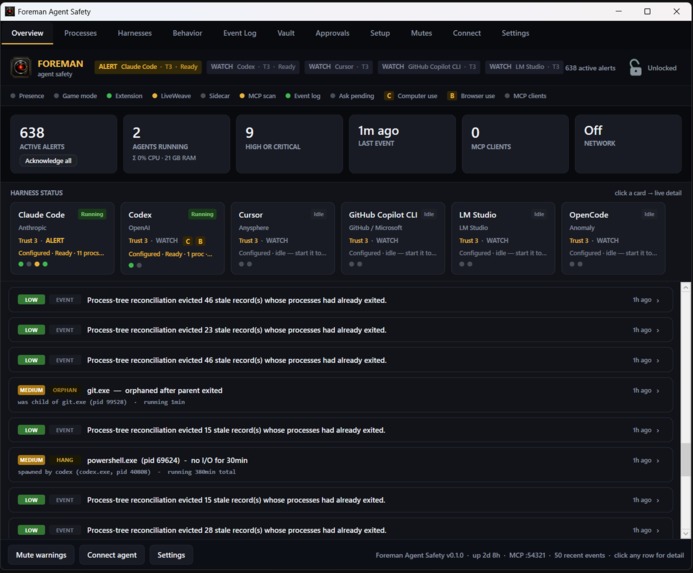
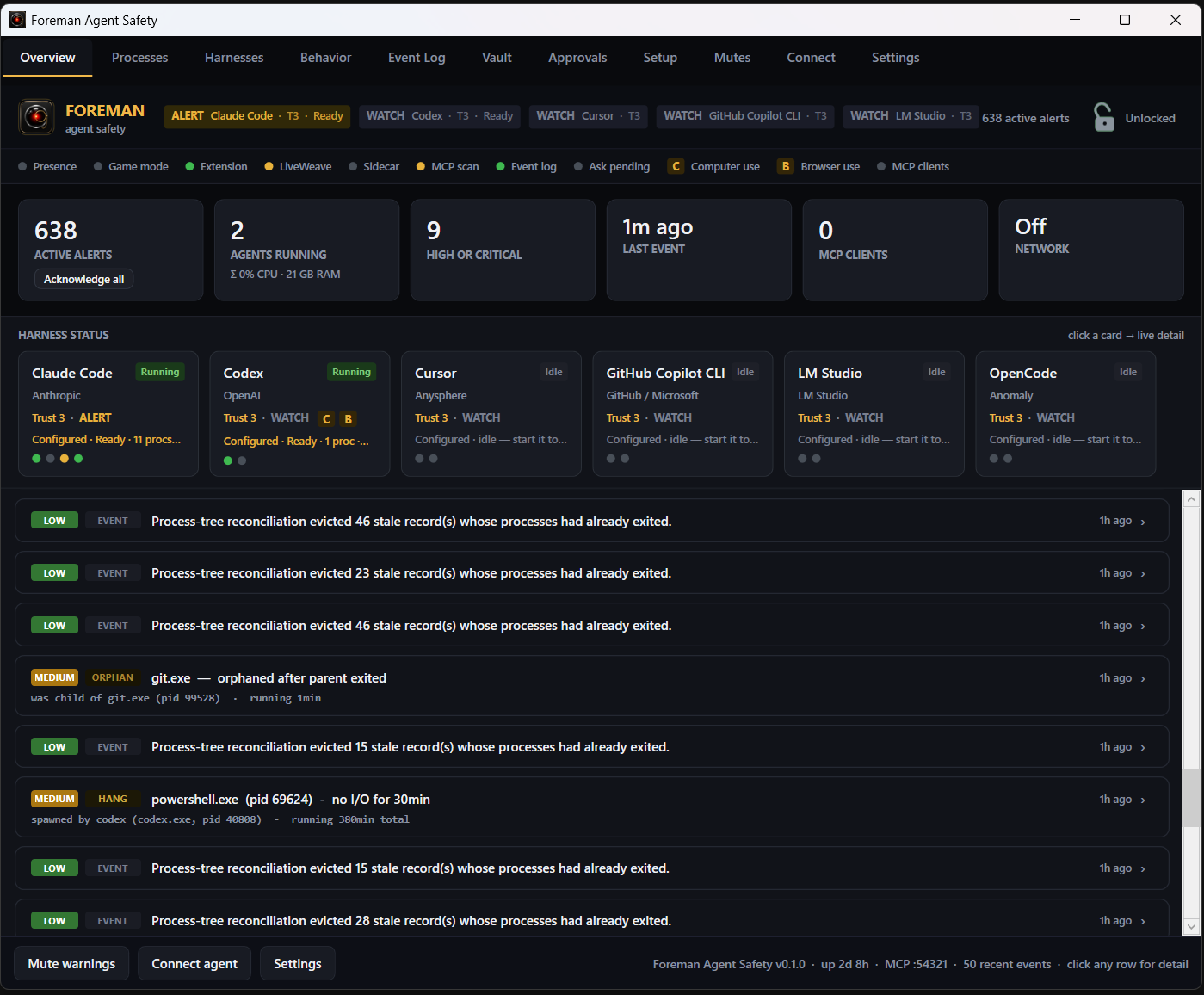
Foreman dashboard — live harness, process, alert and system status
-
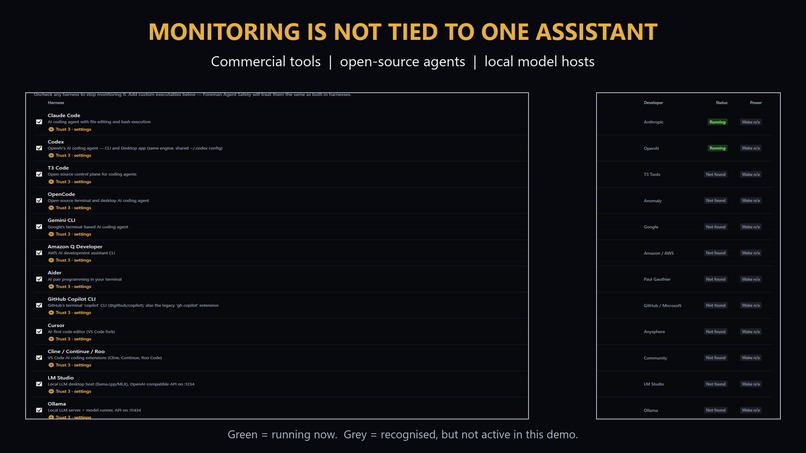
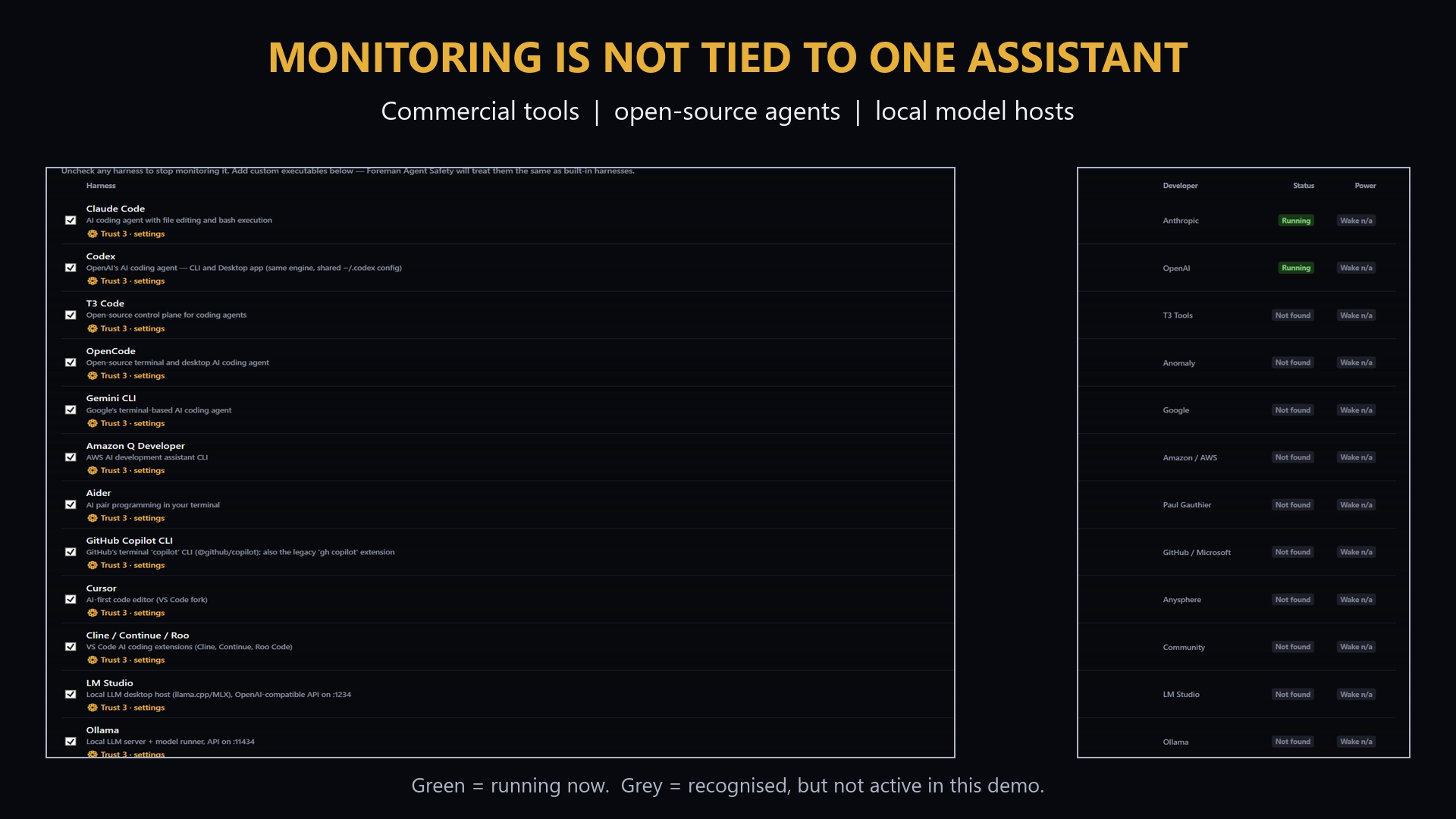
Multi-harness monitoring across commercial, open-source and local agents
-
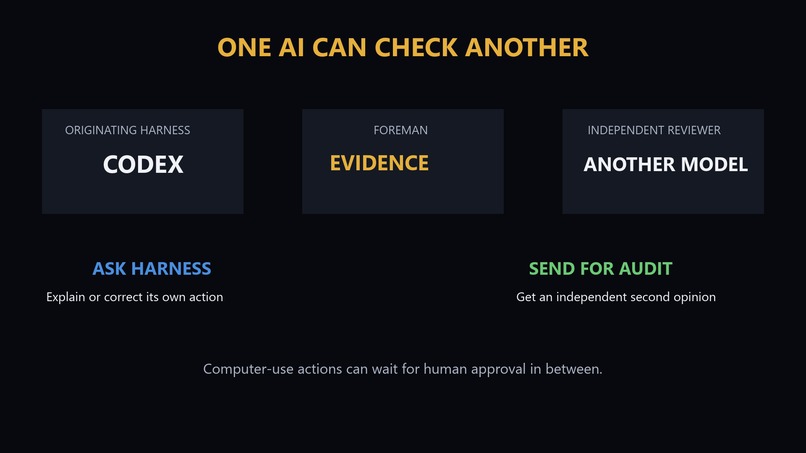
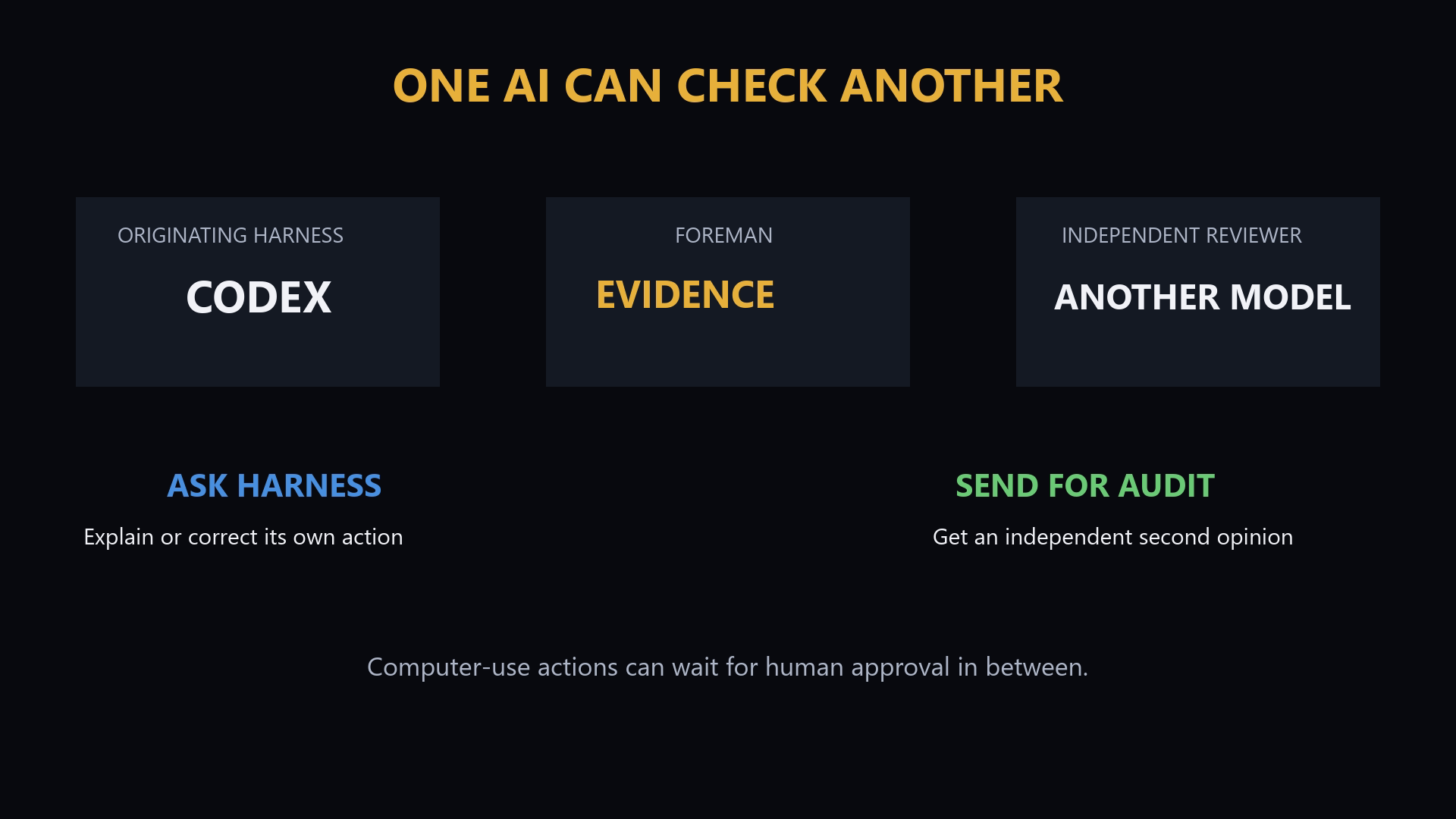
Ask Harness for an explanation, or send the evidence to an independent AI reviewer
-
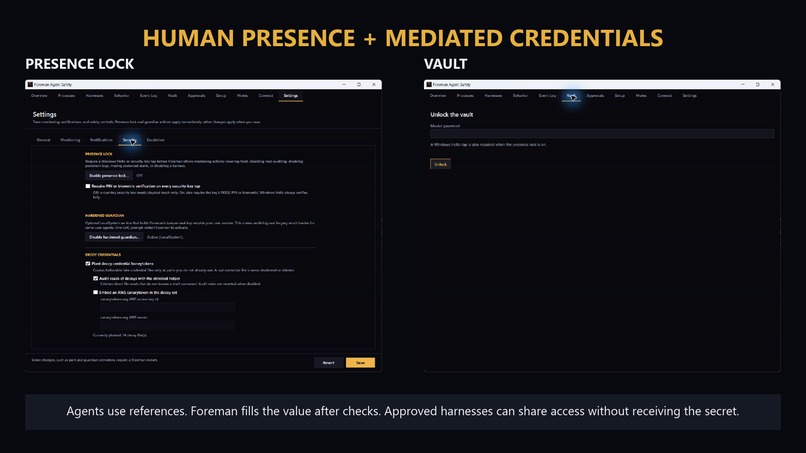
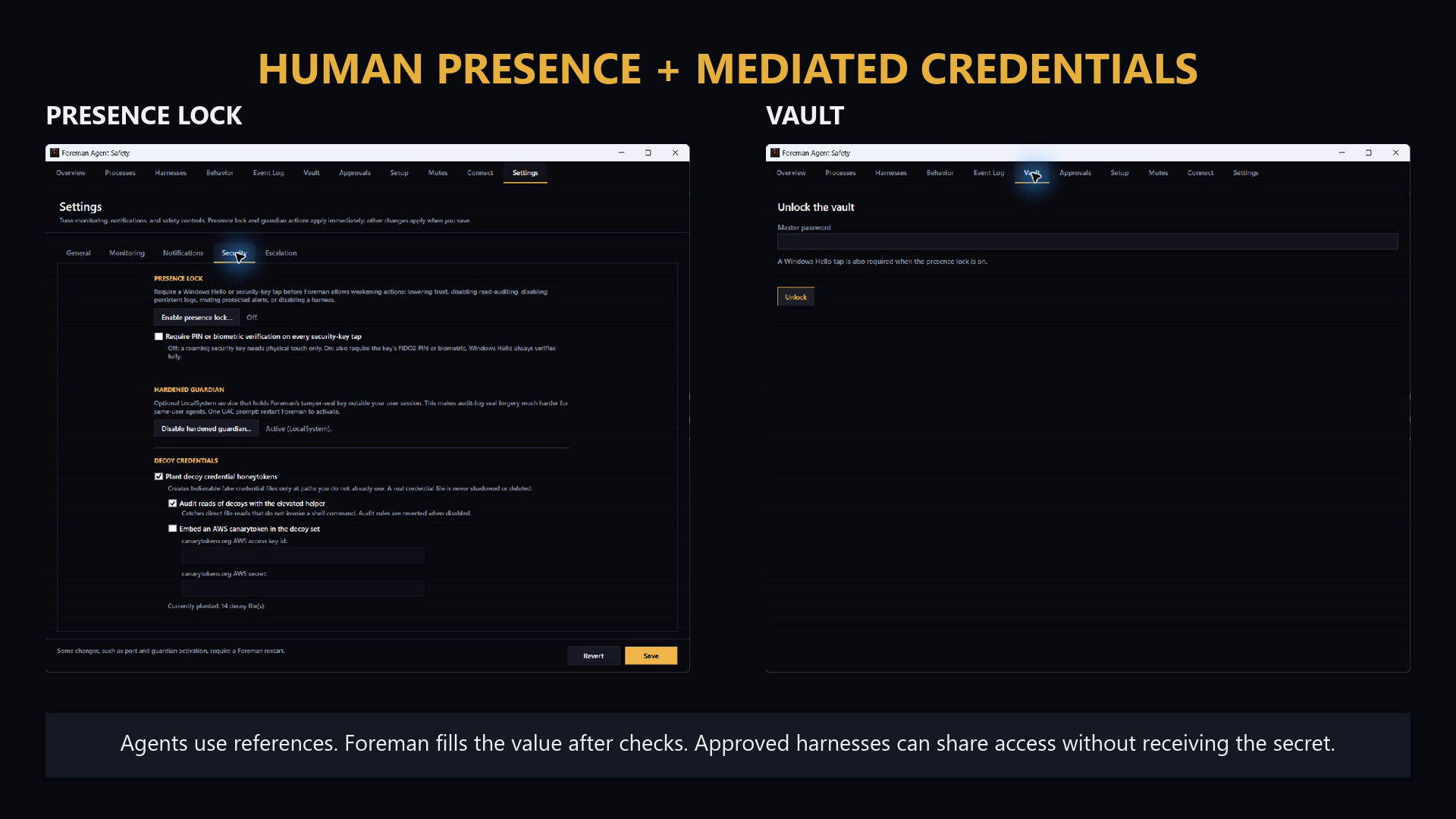
Presence Lock and Vault keep sensitive actions and credentials behind human checks
-
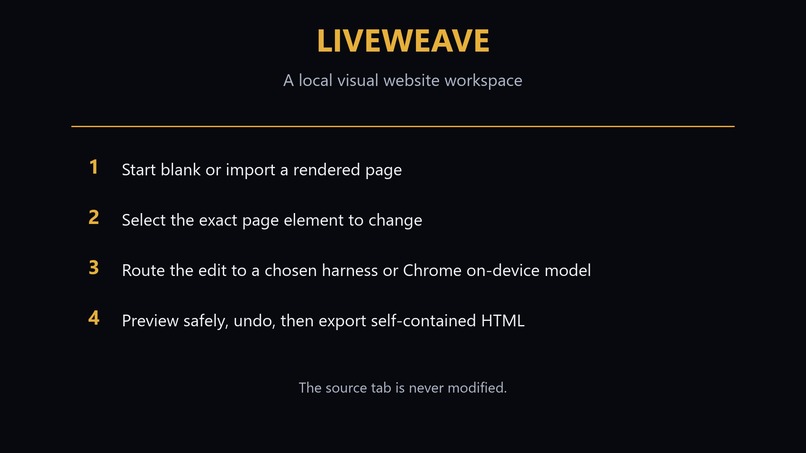
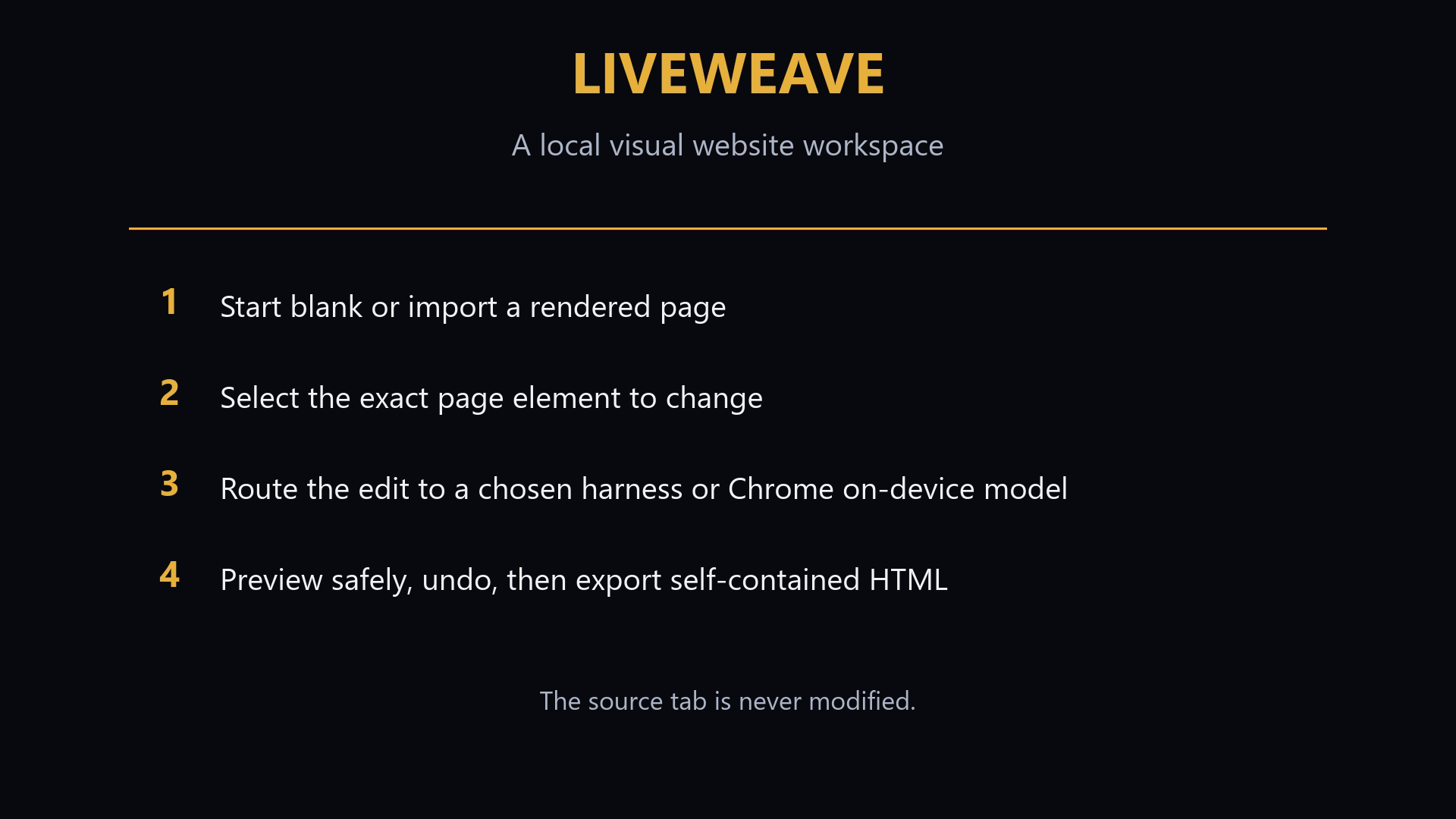
LiveWeave routes visual website edits to a chosen harness or Chrome’s on-device model
-
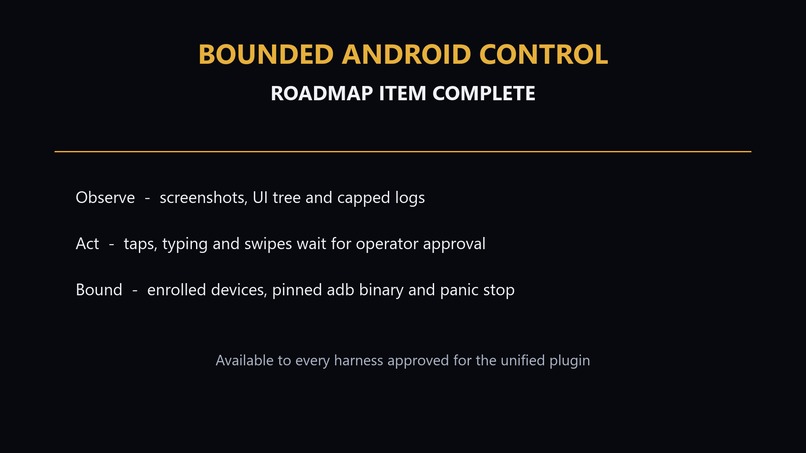
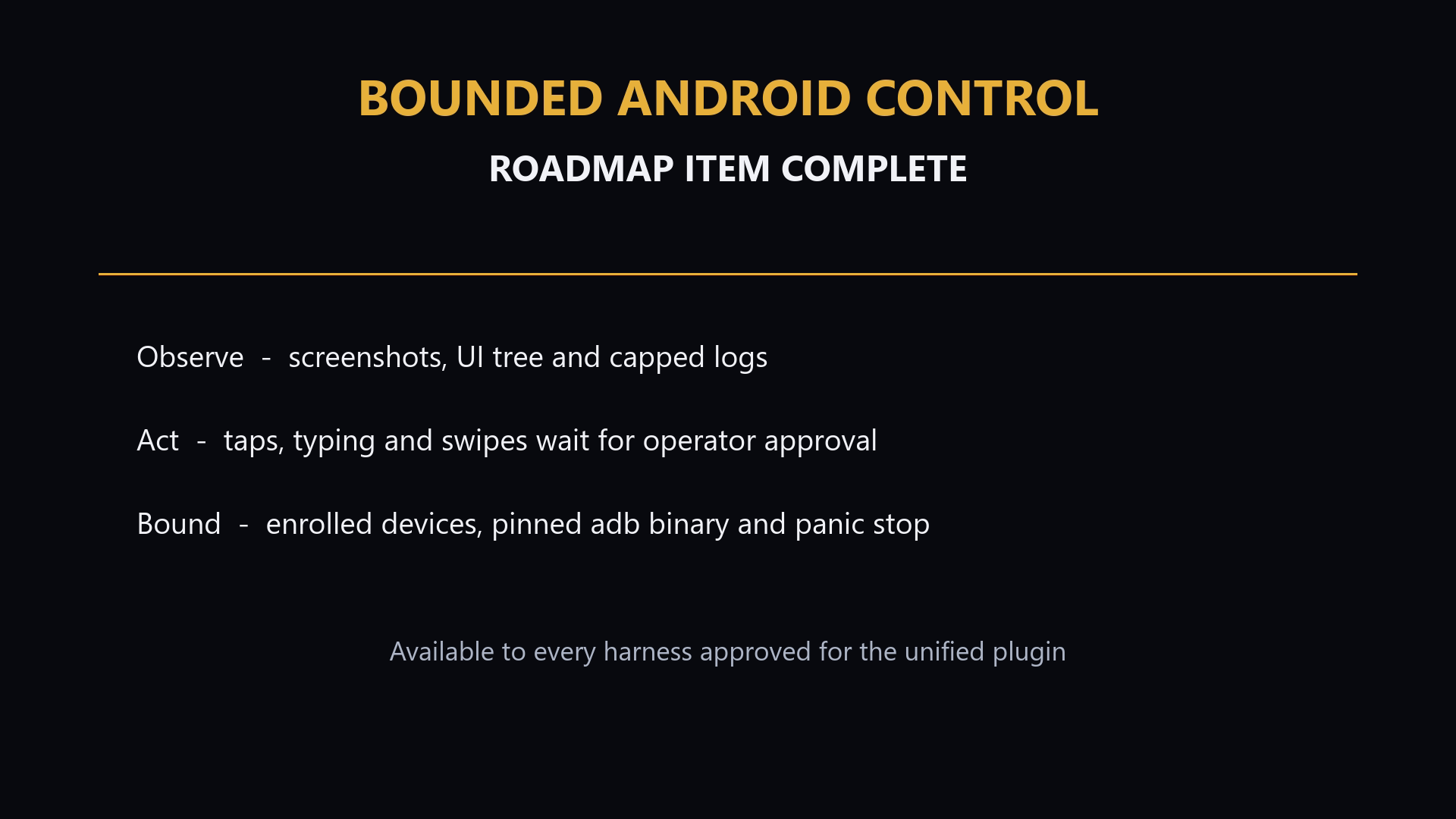
Bounded Android/ADB control: enrolled devices, pinned binary and approval-held input
Inspiration
I was an early adopter of vibe coding at home, in several different forms. I prefer first-party coding-agent tools, or “harnesses”, and I think the future will involve people using several of them at once. They should feel safe doing that on their own Windows machines.
In my experience, traditional antivirus software sometimes blocks fairly ordinary agent activity—often generic PowerShell commands—without explaining the wider context. At the same time, other unsettling behaviour can be difficult to reconstruct because there is no useful record connecting an action to the agent responsible for it.
I regularly bounce between several models while working on the same project. Modern agentic development can get messy: processes hang, helper tools get orphaned, configurations change, and an agent sometimes makes a choice that deserves a closer look. Supervising all of that becomes another job in itself.
That led me to a question: what if I had a local flight recorder and supervision layer that could attribute activity to each agent—and let me use one AI to audit another cleanly?
That was the beginning of Foreman.
I soon realised that the same supervision model could extend beyond terminal commands. Foreman now applies it to mediated computer and browser use, an opt-in bounded Android/ADB bridge, and agent-driven website building through LiveWeave. I believe this represents an emerging—and probably inevitable—class of software: a shared local safety layer between increasingly capable agents and the person operating them.
I started with Windows because I think it needs particular attention in this space. People should be able to experiment and build applications at home without first having to become security experts. I would eventually like to bring the same ideas to Linux and macOS.
What it does
Foreman Agent Safety is a local Windows control room for AI coding agents. It watches agents such as Codex, Claude Code, and Cursor while they work, attributes their activity, detects concerning behaviour, and gives the operator practical ways to investigate or respond.
Live agent and process monitoring
Foreman identifies supported AI harnesses and follows the process trees they create, including shells, build tools, scripts, and helper processes.
Its dashboard shows which agents are running, what they have spawned, and whether those processes are active, hanging, or orphaned. This makes it easier to identify an abandoned build, a stuck hook, or a helper process that remained alive after its agent finished.
Processes are attributed back to the harness that launched them, even when several agents are being used during the same development session. Foreman is designed to preserve seamless switching between harnesses while maintaining useful attribution.
Foreman can monitor process I/O and, through an optional elevated ETW sidecar, display per-process network activity. Developers can use built-in profiles for supported agents or add custom executable names for other harnesses.
Risk detection and behavioural escalation
Foreman examines agent activity for explainable risk signals, including:
- Destructive file or system commands
- Credential and secret access
- Privilege escalation
- Download-and-execute behaviour
- Windows persistence or defence-evasion techniques
- Suspicious PowerShell and shell patterns
- Hung, abandoned, or unexpectedly long-running commands
- Attempts to interfere with other harnesses or safety controls
Rather than treating every unusual command as an emergency, Foreman accumulates behaviour per harness and escalates through Watch → Alert → Alarm → Emergency.
This helps distinguish a single explainable development command from a developing pattern of risky behaviour. It also allows the operator to see whether one agent is repeatedly approaching or crossing safety boundaries.
The detection rules are intended to remain inspectable and understandable. Foreman shows why something was flagged instead of presenting an unexplained AI-generated risk score.
Ask the agent—or ask another agent
When Foreman raises an alert, the operator has two main response paths.
Ask Harness sends the evidence back to the responsible agent and asks it to explain what happened, whether the action was expected, and what corrective action it took. The agent’s reply becomes part of the event history.
Send for Audit routes the same evidence to a different connected agent or configured model for an independent assessment. This provides a practical way to use one AI to review another without relying entirely on the judgement of the agent that caused the alert.
Foreman can also perform optional scheduled audits so that a second harness periodically reviews another agent’s recent activity, rather than waiting for the operator to notice a problem.
These controls are deliberately scoped. An agent cannot acknowledge its own high- or critical-severity alerts, approve its own held actions, or terminate an unrelated harness. Serious decisions remain with the operator.
MCP and agent supply-chain monitoring
Foreman inventories MCP servers configured across supported harnesses and alerts when a server is added or changed. This makes otherwise quiet modifications to an agent’s tool supply chain visible.
An optional scanner can inspect HTTP and SSE MCP tool descriptions for prompt-injection, credential-harvesting, or data-exfiltration language. The scan is disabled by default, and Foreman does not launch unknown stdio servers merely to inspect them.
Foreman can also scan a repository’s agent configuration for risky behaviour before the repository is opened in an agent.
The scanner looks for potentially dangerous auto-run hooks, always-applied agent rules, folder-open tasks, obfuscated setup scripts, suspicious droppers, and prompt-injection patterns in files such as AGENTS.md, CLAUDE.md, editor configuration, and agent settings.
This is intended to address a growing supply-chain problem: opening or trusting a repository can alter how an agent behaves before the developer has inspected the repository themselves.
A safety loop agents can participate in
Foreman runs its own authenticated local MCP server. Connected agents can:
- Check Foreman’s overall status
- Inspect their own behaviour and permission profile
- Pre-flight a suspicious command before executing it
- Receive and answer Ask Harness requests
- Report task boundaries and remaining context
- Inspect recent events relevant to their work
- Request an independent harness review
- Retrieve safe integration instructions
- Ask Foreman to terminate a process within their own attributed harness tree
Access is protected using per-install and per-harness bearer tokens. Tokens are scoped so that connecting an agent does not automatically grant it operator authority or access to unrelated harnesses.
Foreman provides one-click connection flows for major supported harnesses, saves configuration backups before making changes, and can start automatically with Windows so monitoring is active before the first agent session begins.
The integration also supports task announcements, safety prompts, review hand-offs, and context-usage reporting, making Foreman part of the agent workflow rather than a completely separate dashboard that the operator has to remember to check.
Operator visibility and evidence
The Windows dashboard provides an overview of active agents, alerts, connected MCP clients, process trees, configured MCP servers, and current behaviour levels.
Foreman maintains a searchable and exportable local event log so incidents can be reviewed after the fact rather than disappearing with a terminal session.
Event records include append-order and monotonic timing information. This helps preserve the real sequence of events even when the system clock changes or several events receive similar timestamps.
Obvious secrets are masked before command evidence is placed into prompts or copied for review. This reduces the chance that asking another agent to investigate an alert will unnecessarily expose a credential contained in a command line.
Optional self-protection
Foreman includes an optional Hardened Guardian service that protects the integrity of its own settings and event records. It is disabled by default and requires an explicit operator action to enable.
The Guardian maintains a system-protected signing key and can produce tamper-evident seals for Foreman’s local state.
Signed releases can authenticate Foreman by publisher. Until commercial signing is available, development builds use an explicitly labelled executable path and SHA-256 identity pin. This provides a useful development boundary without pretending that an unsigned build has publisher-authenticated trust.
The design can transition from path-and-hash trust to publisher trust once signed releases become available, allowing future updates from the same verified publisher without repeatedly pinning each executable.
The Guardian does not turn Foreman into a system-wide sandbox, and it does not give connected agents unrestricted elevated access. Its purpose is to protect Foreman’s own integrity—not to claim complete control over everything running under the Windows user account.
Mediated computer and browser actions
Foreman also includes an experimental mediation path for computer and browser actions.
It can restrict which harness is allowed to drive actions, hold sensitive actions for operator approval, keep shared attention pinned to a particular browser tab, and halt mediated actions through an operator-controlled panic state.
The harness that submitted a held action cannot approve that action itself. Resuming after an operator panic stop also requires the operator; an agent cannot simply re-enable itself over MCP.
This mediation model is intended to make computer use more accountable without exposing a raw, unrestricted automation bridge to every connected agent.
Foreman’s experimental LiveWeave browser extension applies the same idea to agent-driven website building. An authorised agent can generate and apply HTML or CSS through a local browser extension, while Foreman retains driver selection, command status, and the surrounding supervision path.
Foreman now includes an opt-in, bounded Android/ADB bridge inside the same audited cu_* broker. It accepts only structured device inventory, screenshot, UI-tree and capped log actions, plus tap, type, swipe and key actions that are always held for operator approval. The operator chooses and enrols both adb.exe and allowed device serials; Foreman seals the executable's SHA-256 identity, rechecks device state, caps output and time, and honours the global panic stop. Approved harnesses share this unified path without receiving raw adb shell access.
Local and privacy-conscious by design
Foreman has no hosted account system, cloud backend, or product telemetry. Monitoring data, settings, tokens, and event history remain on the user’s machine.
The optional MCP tool-description scan is the main feature that may contact configured third-party MCP servers, and it is disabled by default.
Foreman is not presented as an impenetrable sandbox. A process running with the same Windows user permissions can still affect that user’s files and applications.
Foreman’s purpose is to make agent activity visible, attributable, explainable, and reviewable—and to ensure that the most consequential decisions remain with the human operator.
How I built it
Foreman is built as a .NET 10 Windows application with a WPF dashboard, process-monitoring components, a local MCP server, shared security and detection libraries, browser-extension integrations, and an optional hardened Windows service.
Codex has been part of Foreman’s development from the beginning.
I have used it to explore product ideas, examine Windows security boundaries, challenge architectural assumptions, plan features, review implementations, generate tests, investigate failures, improve documentation, and conduct repeated functional and adversarial audits.
Many of Foreman’s strongest technical ideas emerged from that back-and-forth. Sometimes Codex implemented a change directly. In other cases, it identified a weakness, proposed an architecture, or developed a threat model that I later adapted and implemented across another session.
That development process is not always represented perfectly by one commit. Git records where code landed, but it does not capture every investigation, rejected approach, security discussion, or design decision that led to the final implementation. The Codex session history provides an additional record of that collaboration.
I remained responsible for the product direction and final decisions. I decided which risks mattered, how much authority Foreman should have, where operator presence should be required, which suggestions to reject, and whether an implementation actually matched the intended safety boundary.
During Build Week, I specifically used Codex with GPT-5.6 as both an engineering collaborator and an adversarial reviewer. Codex and I worked through a repository-wide functional and red-team audit, identified trust-boundary and reliability weaknesses, and converted those findings into implementation changes and regression tests.
The process was iterative:
- Inspect a component and define its claimed security boundary.
- Consider how a compromised, confused, or simply overconfident harness might interact with it.
- Develop a concrete attack or failure scenario.
- Implement a narrowly scoped fix.
- Add tests for the failure mode.
- Verify that the fix did not break ordinary multi-harness development.
This was particularly useful because Codex could examine Foreman from two perspectives: as a productive agent that benefits from Foreman’s tools, and as a potentially compromised harness looking for ways to bypass them.
Some of the most important decisions remained human decisions—especially where Foreman should inform, where it should intervene, where it should require operator presence, and where giving a safety tool more authority would create a new risk of its own.
What I built during OpenAI Build Week
Foreman existed as an open-source alpha before Build Week. Codex had already contributed significantly to its design and development, but I am not presenting that earlier work as newly built during the competition.
For transparency, the repository baseline immediately before the Build Week submission period was commit 76aede6.
After the submission period began, I used Codex with GPT-5.6 to conduct a fresh repository-wide functional and adversarial audit and implement the resulting hardening work. The initial hardening integration is represented by commit 06c0fdc, which changed 49 files with 1,765 additions and 228 removals. During the same submission period, commit b16bd71 added the bounded Android/ADB bridge and its application, broker, settings and regression-test integration.
The Build Week extension included:
- Stronger Guardian client authentication
- A safe path-and-hash trust model for unsigned development builds
- A transition path to publisher trust for future signed releases
- Release-payload layout and version validation
- Stronger release signing and provenance checks
- Event-log integrity and temporal-ordering improvements
- Scheduled independent audit tracking
- Safer agent-configuration and repository scanning
- MCP and session-boundary hardening
- Crash-handling and diagnostic improvements
- Additional regression and transport-security tests
- Documentation of the resulting trust boundaries and limitations
- A bounded Android/ADB bridge with explicit device enrolment, pinned executable identity, observe-only actions, approval-held input, output limits, per-harness driver policy, panic-stop handling, and regression tests
The commit is an integration boundary rather than a complete transcript of the work. Some implementation decisions originated in Codex audit and planning conversations, were tested through intermediate working-tree changes, and were then consolidated into the final commit.
For the Build Week submission, the relevant post-start GPT-5.6 Codex sessions and dated repository history provide the evidence for that work. Earlier Codex sessions explain how Foreman evolved, but only the eligible submission-period work is being presented for Build Week judging.
Challenges I ran into
One challenge was distinguishing genuinely dangerous behaviour from unusual but legitimate development activity.
Agent workflows regularly involve shells, build tools, downloads, package managers, scripts, and configuration changes. Simplistic detection would produce constant false alarms, while rules that were too permissive would miss the behaviour Foreman exists to surface.
Another challenge was attribution. Developers can switch seamlessly between harnesses, while those harnesses spawn overlapping trees of shells and helper processes. Foreman needed to preserve that flexibility while still attributing activity to the correct agent.
Seamless harness switching is a feature, not something I wanted to prevent. The challenge was building an attribution and permissions model that continued to make sense when several capable agents were active at once.
The hardest security question was how to protect Foreman’s optional elevated Guardian component without a commercial signing certificate.
An elevated service must not trust a caller merely because it has the right executable name or happens to run under the same user account. Development builds now use an explicitly labelled path-and-hash trust model, while the design can transition to verified publisher trust when signed releases become available.
I also had to ensure that the safety mechanism did not become a dangerous control plane itself.
A tool that can inspect agents, hold browser actions, access alerts, or request process termination needs strict boundaries of its own. Connected agents cannot silence high-severity alerts, approve their own held actions, resume themselves after an operator panic stop, or terminate unrelated harnesses.
Another ongoing challenge is being honest about the boundary. Foreman can provide monitoring, evidence, scoped mediation, and self-protection, but it cannot turn an arbitrary same-user Windows process into harmless software. It was important to make the product useful without overstating what it guarantees.
Accomplishments that I’m proud of
I am particularly proud that Foreman provides a complete safety feedback loop rather than simply displaying warnings.
It can detect an event, attribute it to a harness, preserve the evidence, ask that harness for an explanation, and route the situation to an independent reviewer when necessary.
I am proud that the agents themselves can participate constructively in that loop. They can pre-flight questionable commands, receive safety prompts, explain their actions, report corrective work, and ask another harness for review—without being granted the authority to approve their own serious actions.
I am also proud that Foreman states its limitations clearly. It does not claim to make arbitrary local software harmless. Instead, it provides practical visibility, behavioural escalation, operator controls, independent review, and tamper-evident records while keeping everyday development usable.
Most importantly, I use Foreman every day.
It works quietly across the different agents I use and gives me peace of mind when I am experimenting with wacky, hacky projects on my main Windows machine. When a prompt produces unexpected or alarming behaviour, I can see what is happening and ask another trusted AI to perform an adversarial review.
It has also become useful in less dramatic situations. Seeing a hung process, an abandoned build, a changed MCP configuration, or an unexpected helper process early can save time, tokens, CPU use, and frustration.
Seeing Foreman become something I genuinely rely on—not just a prototype—is probably the accomplishment I am proudest of.
Honestly, I am super proud of it.
What I learned
The biggest lesson was that useful agent safety is not only about blocking actions. It is about establishing identity, attribution, evidence, and proportionate human involvement.
I learned that every security boundary needs to be testable, including the boundaries of the security tool itself.
A feature is not secure merely because its intended workflow looks safe. It has to be considered from the perspective of a compromised caller, an incorrectly configured machine, an interrupted update, an unsigned development build, and an operator who may not understand every technical detail.
I also learned that UX is part of safety. If alerts are noisy, confusing, or disruptive, people will eventually ignore them. A safety tool has to explain what happened, preserve normal workflows, and apply friction in proportion to the risk.
Using an AI coding agent to red-team tooling designed to supervise AI coding agents was especially valuable.
Codex could examine the system as a cooperative development partner, then change perspective and ask how a malicious or confused harness might exploit the same mechanism. That made it possible to find weaknesses that were not obvious when thinking only about the expected path.
I also learned that the collaboration between a developer and Codex is larger than the code it directly writes.
Some of the most valuable contributions were questions, threat models, alternative designs, and connections between components. Those ideas shaped later implementation even when they did not appear as a single clearly attributable block in a commit.
At the same time, this reinforced the importance of human judgement. Codex can generate many plausible approaches quickly, but someone still needs to decide which problem is worth solving, which authority should never be delegated, and whether a technically impressive solution is actually safe or useful.
What’s next for Foreman Agent Safety for Windows
I hope a community forms around Foreman.
My immediate priorities are broader real-world testing, tuning false positives, improving installation and release trust, and completing the code-signing path.
I also want to expand first-class support for additional harnesses, improve independent audit routing, and continue developing mediated browser and desktop actions with explicit approval and panic controls.
The computer-use model needs further adversarial testing, particularly around shared attention, credential handling, driver selection, action approval, and ensuring that a submitting harness cannot approve or conceal its own actions.
I want to continue improving Foreman’s quality-of-life features as well: clearer setup health, better notifications, easier release installation, more useful explanations, safer configuration repair, and smoother switching between multiple harnesses.
Longer term, I would like to bring Foreman’s core supervision model to Linux and macOS. Android/ADB is now implemented as an opt-in bounded bridge. Next I want broader real-device testing, clearer enrolment and device-state diagnostics, and continued adversarial testing of approval, panic and multi-harness routing.
I believe shared standards and open-source, platform-specific safety components could reduce duplicated work across AI companies while making capabilities such as computer use more consistent, inspectable, and accountable.
Continual functional and adversarial auditing is difficult for one independent developer without the support of a major company. I keep working on it because I believe this kind of infrastructure will become necessary as coding agents grow more capable.
The long-term goal is to make Foreman a practical shared safety layer for people who use multiple powerful agents—not by preventing those agents from doing useful work, but by making their actions visible, attributable, explainable, and reviewable.


Log in or sign up for Devpost to join the conversation.