-
-

Travelero Logo
-
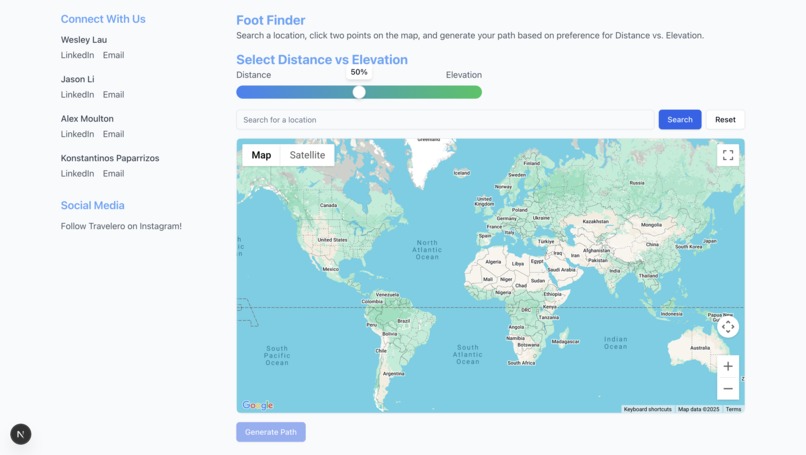
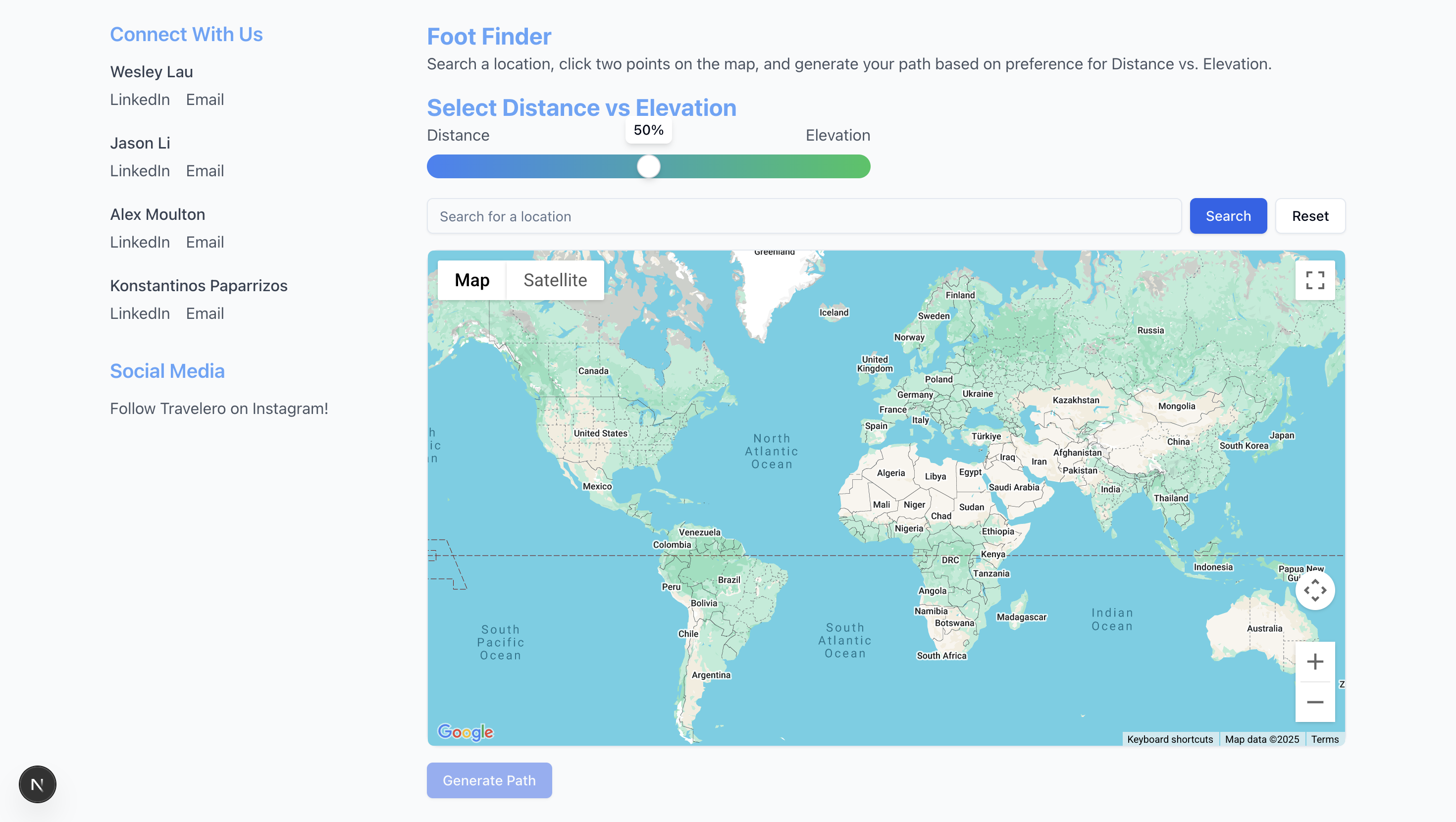
Foot Finder Web Page

Inspiration
Navigation is an extremely common task in which traditional map services purely prioritize distance/time minimization between two points. This makes it hard for mobility-impaired individuals or wheelchair users, especially to reliably follow online navigation services. To solve this, Travelero generates paths based on user preference where users can prioritize the shortest distance to their location, the least variation in elevation to their location, or a mix of both.
What it does
As students at UMD, we naturally find ourselves on cross-campus hikes along unpleasantly steep terrain. We tell ourselves that surely, there is a better way to get from point A to point B– one that doesn’t require the endurance of a mountain goat.
Travelero Foot Finder works to provide that golden path. It is a pedestrian navigation web app that solves the complications of traversing hilly urban landscapes by selecting the path of “least undesirable variation in elevation” from a set of paths suggested by the Google Maps API. Travelero Foot Finder allows users to search for a specific location on a user-friendly GUI map of Earth. Use the continuous “Distance – Elevation” slider to smoothly transition between minimizing distance traveled versus minimizing elevation change along a path. Select two locations on the map to place markers, and click “Generate Path” to run our Google assisted algorithm, which takes the user’s slider position into consideration and generates a path.
How we built it
We employed the Google Maps API to display and retrieve map data for backend use, such as distances, paths, and elevations. Our path generation began with Google’s recommended paths, then applied weights based on variations in elevation along them. Specifically, we split each path into nodes and edges, then measured the changes in elevation between each consecutive node. We applied weights to amplify any positive changes in altitude, and solely radical negative changes in altitude (more than 45 degrees steep), according to the user-set slider value. Sometimes, Google will suggest the shortest path even if it is steep or hilly, but after running Google’s paths through our weighting process, we retrieve the path of least unfavorable variation in elevation. We used GitHub, Git, and VS Code to work on code as a group. We used React and TypeScript to build the frontend and a combination of JavaScript, Python, and Flask to build the backend. We also used terpai.umd.edu in order to generate ideas for specific features that we may have wanted to include, such as our personal media links and utilization for our concept. When we were at a stand-still in terms of technical knowledge, or needed a frame of code to get us on our feet, Google Gemini helped bring some of our ideas to life.
Challenges we ran into
The very first challenge was determining what pathfinding algorithm to use. If a user selects two points anywhere, there are infinitely many paths to take between them. To reduce the number of paths we needed to consider, we looked at graph-based methods, where we would discretize a region on Earth as a grid of points, then only consider step-wise movements between each gridpoint to get from point A to point B. The first graph-based pathfinding algorithm we considered was Dijkstra’s– until we realized the Google Maps API already has a strong A* pathfinding algorithm built in. We stuck with that, then decided to modify the suggested paths based on variations of elevation along them. Beginning this project, we wanted an all-encompassing pedestrian pathfinding algorithm that would show a combination of fast and non-steep paths between any two walkable places within a reasonable distance. We found difficulties in avoiding physically impossible paths, like walking through locked buildings and off cliffs, so we ended up sticking to Google-given paths. In the future, we hope to expand our algorithm to assess paths over areas untouched by Google, like grassy hills or desert terrain without human-made walkways. Perhaps we will call this product Bigfoot, referring to footpaths in the same thick woods that are home to the mythical creature. The final 10 percent of work proved to be 90 percent of the challenge, as we tried to fix errors like previously generated paths not erasing when we clicked the “clear map” button, or tried to connect the data from two different components (the slider and the map) to the backend in a single function call. We’ve never worked with the Google Maps API, and much of React was unfamiliar to us.
Accomplishments that we're proud of
During the event, we learned many new things about the inner workings of Google Maps and how to share data between web Elements for frontend-backend communication. Our research and hands-on experience leave us feeling a little more comfortable building a similar project in the future. Seeing the pathfinding algorithm work in real time inspired us to push forward! We were also able to strengthen our bonds, as the development of the team really showed throughout the project. Lots of ideas were shared, lots of helping each other within the team, and lots of considerations for everyone's strengths and weaknesses brought everyone closer together. In each and every step that we completed, the entire team felt like winners. We all celebrated each small accomplishment and felt pride that we were able to achieve what we had hoped.
What we learned
The team generally lacked experience in creating webpages, but we were all able to make great progress in learning new skills related to problem solving and app development. Additionally, as a team coding project, we also improved our ability to coordinate in a team environment using Git. We learned how to quickly adapt to foreign APIs and utilize pre-existing tools towards our specific goal, from terpai.umd.edu and Gemini, to Google Maps, to Flask and React.
What's next for Travelero
There are lots of different possible optimizations and additional features we could add to better cater to broader audiences, like those seeking scenic walking paths, or those who wish to cross roadless natural territories unmarked by Google’s pathfinding algorithm. With more time and experience in React and CSS, we would like to provide the most user-friendly and visually appealing service possible through extensive testing and revision.
—---------- Generally, we had a good experience with the technology. There were some minor issues that we were unable to explain or completely figure out, but overall, everything worked about as expected, if not better. The connection was a little slow at times (we spent the majority of the 36 hours at the venue in the Reckord Armory) Yes, we used the Google Maps API to retrieve map data relating to elevations at different points and distances between points. We also used Google Maps pathing to find crosswalks and walkways that we could use for our generated paths.
Built With
- flask
- google-maps
- javscript
- next.js
- python
- tailwind
- typescript
- vscode


Log in or sign up for Devpost to join the conversation.