-
-
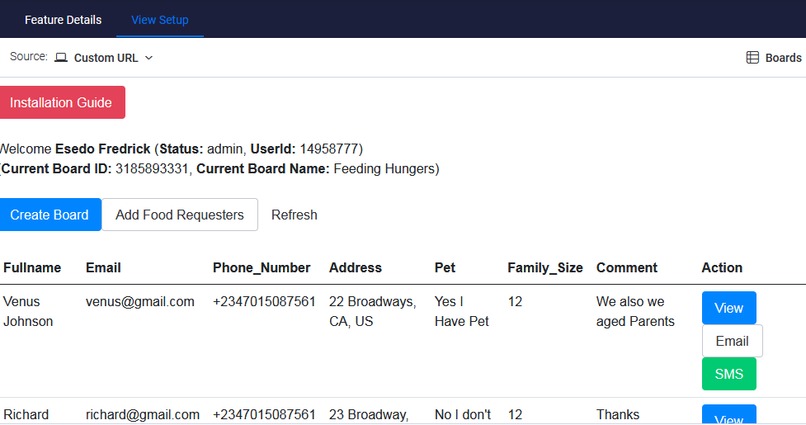
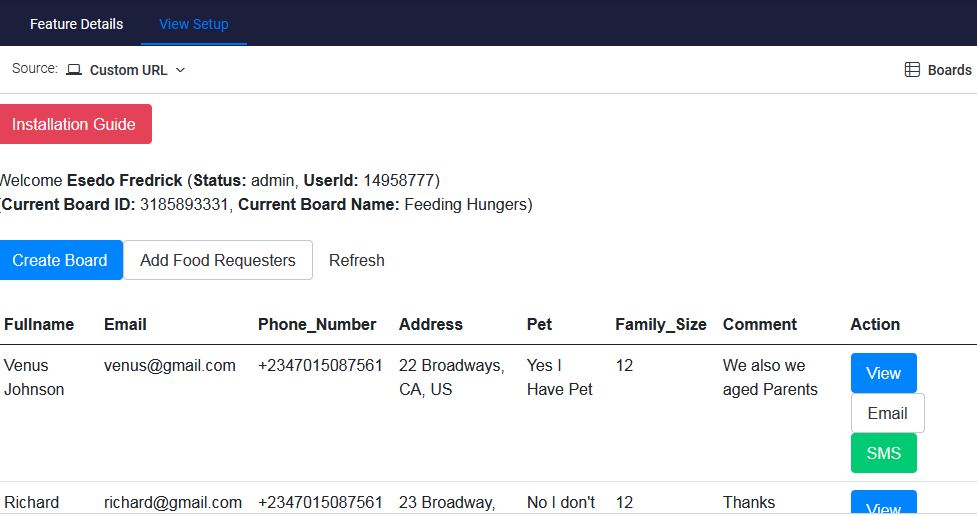
Application Dashboard
-
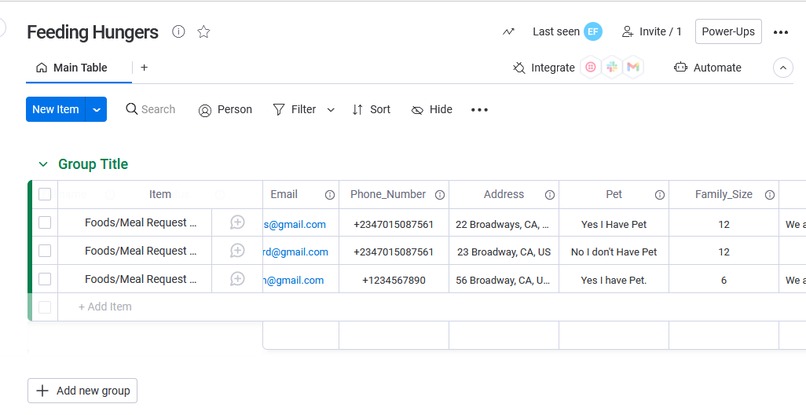
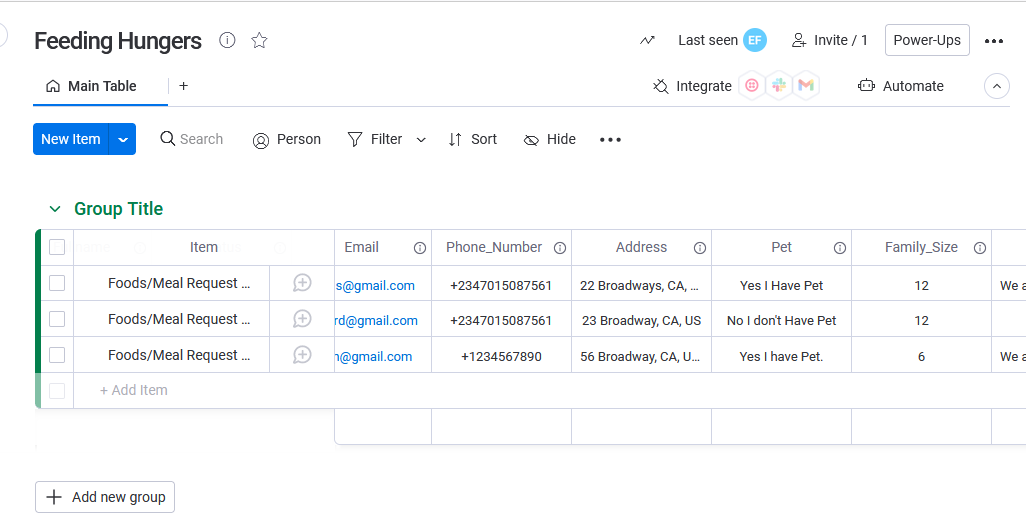
Monday Dashboard
-
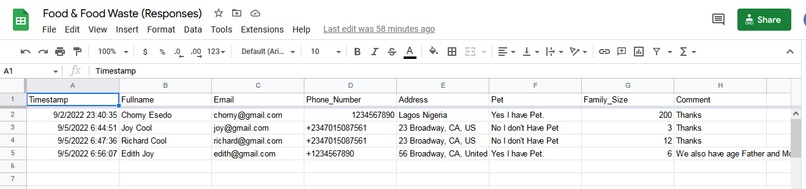
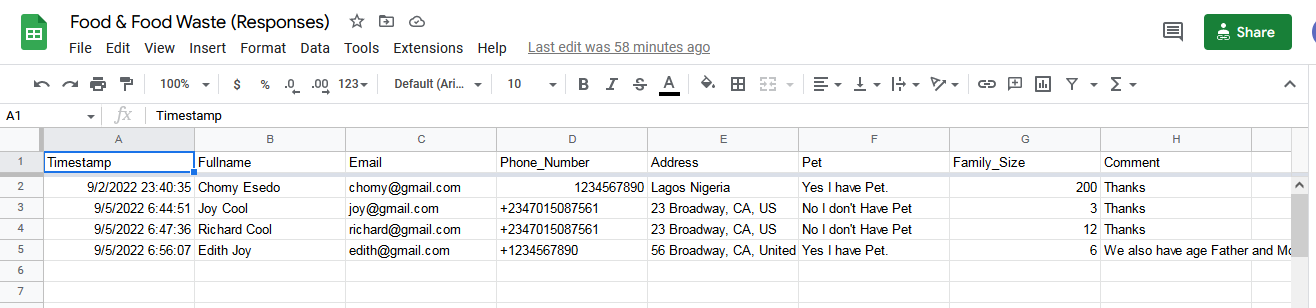
Application Google SpreadSheet
-
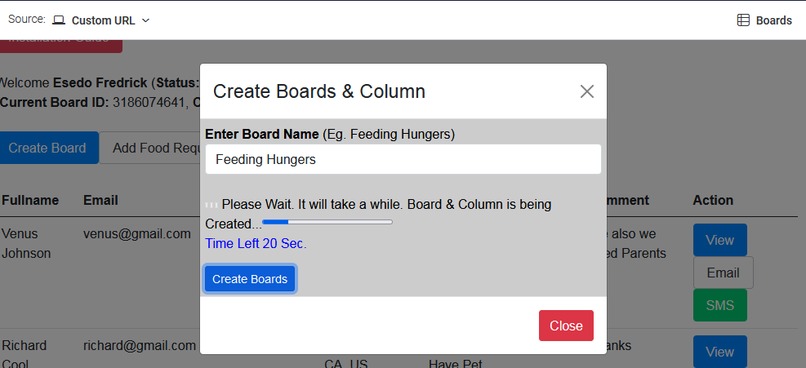
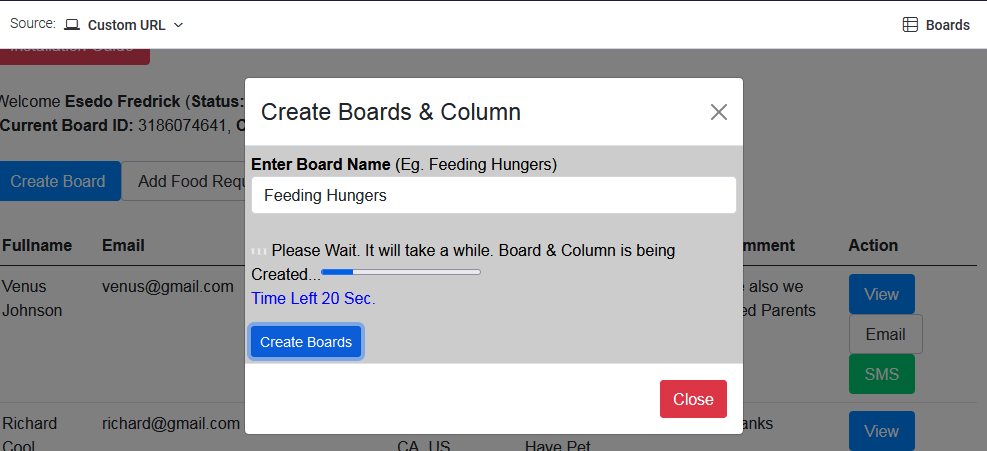
Board Creation System
-
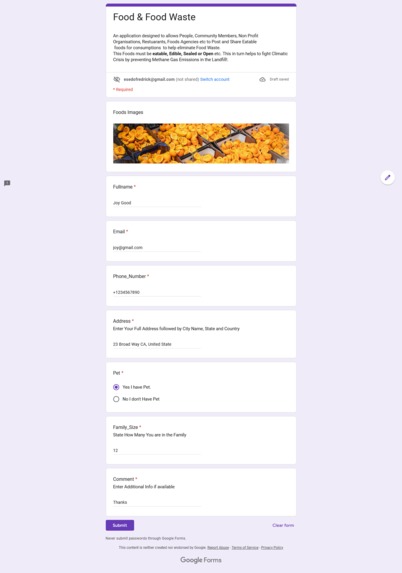
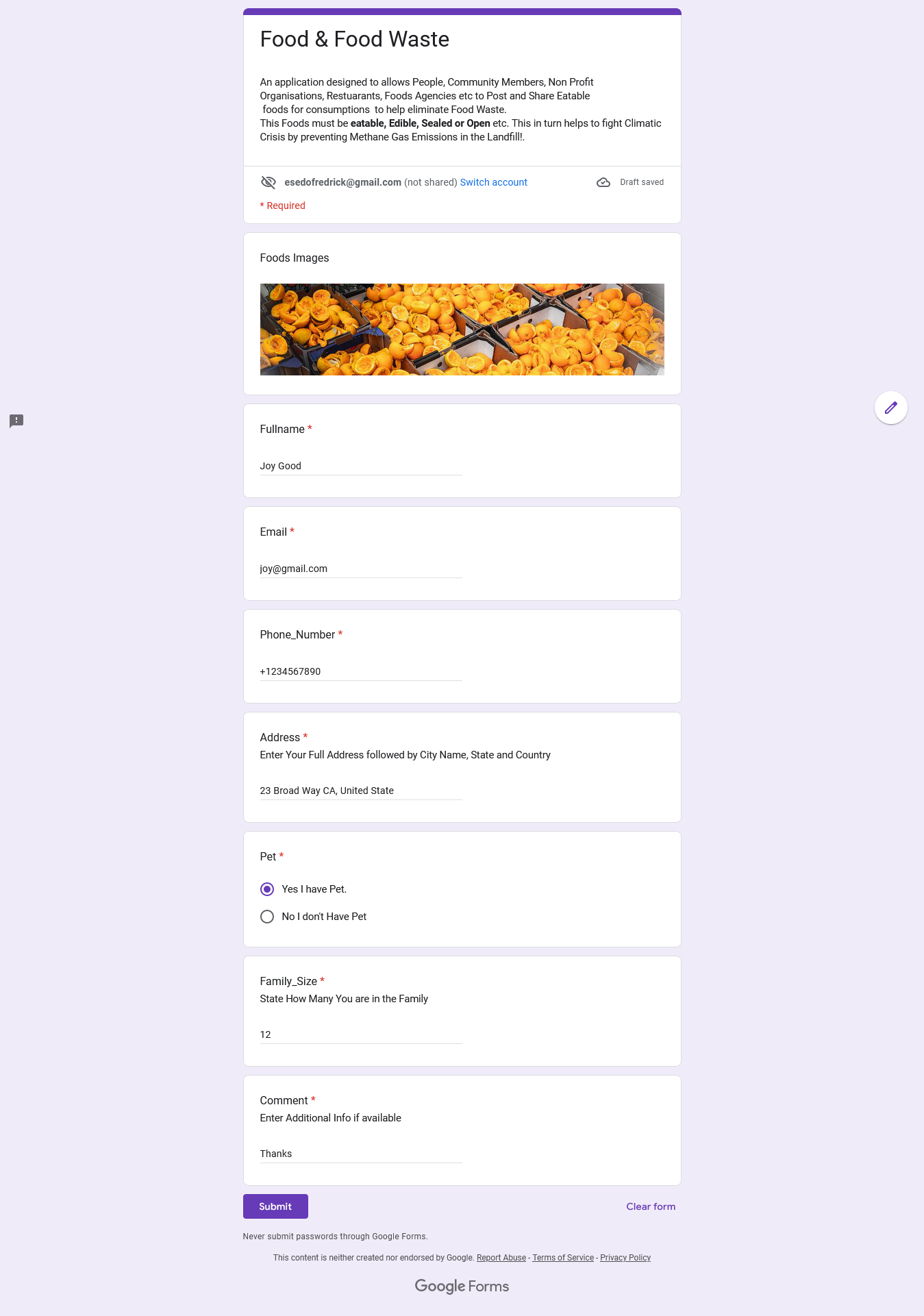
Google Form Application
-
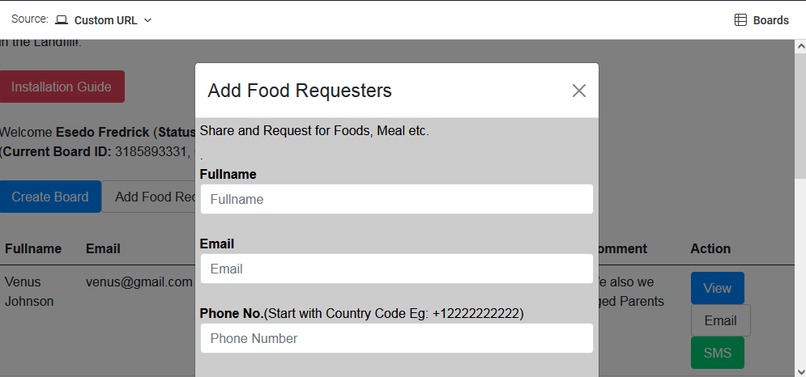
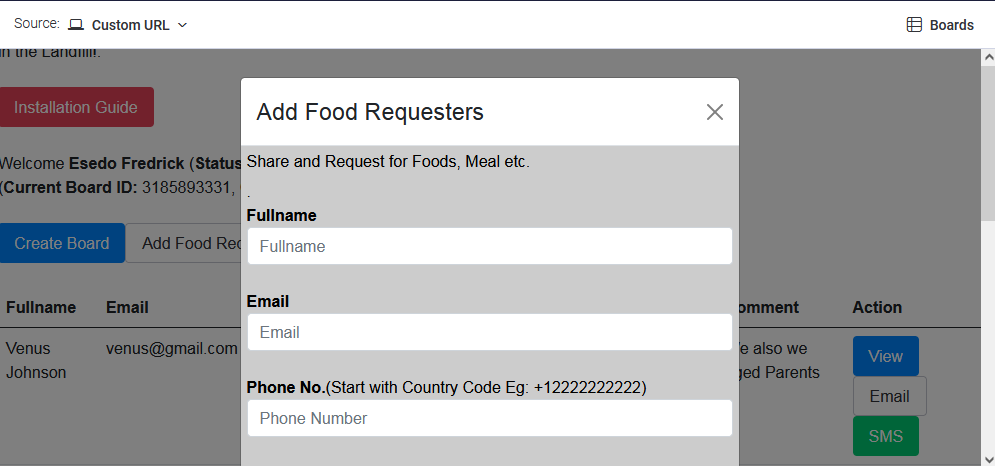
Food Requesters Form
Inspiration
Stop wasting Food. Be Humanitarian. Use your excess food to feed the Hungry. About 1 Billion Population of the World are hungry. Help save our climate by preventing food from going to the landfill and rots, which in turn will produces methane—a greenhouse gas that is even more potent than carbon dioxide(CO2).
Food Waste is one of the biggest issues that causes Climatic Change. its is the largest emitter of Green House Gases.
According to worldwildlife.org, usda.gov and many more Source: https://www.worldwildlife.org/stories/fight-climate-change-by-preventing-food-waste
An estimated one-third of all the food produced in the world goes to waste. That’s equal to about 1.3 billion tons of fruits, vegetables, meat, dairy, seafood, and grains etc. that either never leave the farm, get lost or spoiled during distribution, or are thrown away in hotels, grocery stores, restaurants, schools, or home kitchens. It could be enough calories to feed every undernourished person on the planet.
According to further Scientific Research, when we waste food, we also waste all the energy and water it takes to grow, harvest, transport, and package it. And if food goes to the landfill and rots, it produces methane—a greenhouse gas even more potent than carbon dioxide. About 6%-8% of all human-caused greenhouse gas emissions could be reduced if we stop wasting food.
Some other Scientific sources stated that about 40-45% of foods produced worldwide is never completely consumed and this results in over $1 Trillion of Food Waste which weighs over 1.2 Billion Tonnes. About 30% of World Fresh Water is also used to farm food Products which is never consumed and this results in Water Waste also.
For instance in United State, UK and most part of the Europe, the Food waste is about 1.29% of the Total GDP each respectively.
However, in the World over 1 Billion People are hungry and can hardly feed. What if all this wasted foods in United State, United Kingdom and Most Part of the Europe could be used to Feed them(The Hungry People). This Foods must be eatable, Edible, Sealed or Open etc.
Issues:
Consequently, a lots of Individuals, Communities, Humanitarian Teams, NGOs, Hotels, Grocery Stores, Restaurants, Schools etc. who has been of help in fighting Climatic Change by using the excess eatable/edible foods to feed the Hungry rather than allowing the foods to rot in the landfills has a serious challenges on getting to the most Hungry People, families and the needy who need the food
Realistically, most of the Needy and Foods Requesters form/application submissions, processing, arrangements, and communications are done manually on Paper or over an email which sometime creates monotony in their work tasks.
We develop this applications using Monday.com SDK, Monday.Com Storage API, Google Tech.(Google Forms), Email Server and SMS etc. to help Humanitarians Individuals, Communities, Humanitarian Teams, NGOs, Hotels, Grocery Stores, Restaurants, etc. to easily connect, manage and share excess foods with those People, various Communities and the needy who the Meal.
By Providing an application coded with Google forms, Email Server, SMS Text Messages etc. and by integrating it on top of Monday.com Network, it makes sharing and distribution of excess food between the Needy and various Humanitarian Teams an easy task.
By Sharing Excess Foods with the Needy,the Hungry, you are helping in reducing and preventing food waste and thereby help to increase food security, foster productivity and economic efficiency, promote resource and energy conservation, and address climate change, which in turn, could also decrease climate change-related shocks to the supply chain and all possible Methane gas emissions in the land fills
What it does
On the Part of Humanitarian Teams, NGO's, Humanitarian People and Communities
1.) The Humanitarian Teams will First Create Board From the Applications. This will automatically create Columns on the Boards. All submitted data are stored on Monday.com Boards/Items
2.) The Humanitarian Teams has an option of Adding The Hungry and the Need who needs foods or requesting for foods directly from the applications.
3.) To Connect to all the Hungry People, the Needy Communities who needs help on feeding, The Humanitarian Teams has to create a Google Form which will be integrated into their Accounts on Monday.com for the Purpose of Collecting data from the Hungry and the Needy who needs help.
I will show you how to create and Google Form via Google Appscript on top of the Application Running on Monday without Learning a Single Code
The Humanitarian Teams can Shared and embed there The Need Food/Meal Request Google Form links on Various Websites, Social Networks like Facebook, Instagram, Whatsapp etc., Any Person with their respective Google Form Links can Submit their data and get connected with the Humanitarian Teams via Email and SMS in real-time.
4.)Each time People, the Hungry, the Needy request for a food/Meal, A Notification is sent to the Humanitarian Teams Admin on Monday.com Board.
5.) The Humanitarian Teams can View, Review and access all the information shared by the Needy People.
6.) A Humanitarian Teams can also communicate and exchange information with People and various needy Communities via Email Messages Campaign and via SMS Text Messages leveraging SMS API Gateways.
On the Part of the Hungry, The Needy Etc.
1.) The Needy submits his/her data on Google Form published by each respective Humanitarian Teams. The Google Form takes parameters like the Users Fullname, Email Address, Phone Numbers, Address, Pet, Family_Size, Comment etc.
2.) Humanitarian Teams get Notified directly on Monday.com Board each time a the Hungry or the Needy post a request for food/Meal.
3.) The Needy and the Humanitarian Teams get connected and exchange via Email and SMS Text Messages
How We built it.
1.)
Technologies used includes Monday.com SDK, Monday.com API, Moday.com Storage API, Google Form, Google App-Script Coding, PhpMailer and SMS API Gateways. PHP at Back end and Reactjs on Monday.com Front-end
2.) It uses Monday.com SDK to connect and save all processed data on Monday Board/Items. It Uses Monday Persistant Storage API to Store Board ID's. This ensures that the created board data are available to all Members of the Account.
No Users Information or Data whatsoever are stored on our own end. All Data are saved on your Boards/Items on Monday.com
3.) We Used Google Form and our Coded Google App-Script Codes to allow Humanitarian Teams to easily connect and collects data from the Hungry and the Needy Communities without learning a Single Code.
4.) We Used SMS API to allow Humanitarian Teams to send and recieve SMS messages campaign within the application to registered Hungry and the Needy Communites.
5.) We used PhpMailer to allow Humanitarian Teams to send and receive email messages to and from all Registered Hungry and the Needy Communites.
How to Integrate Google Form with The App on Monday.com
Please Watch this Demo Video on how to Create a sample Google Form and connect it to your app for all our application to work on your Monday.com dashboard.
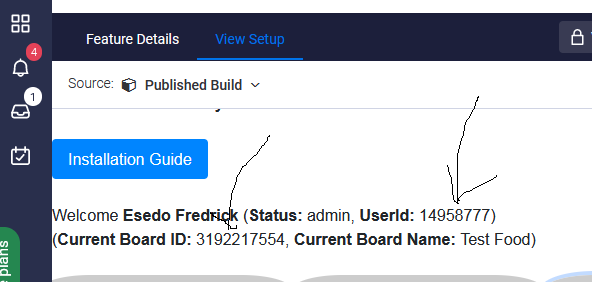
First, After installing the App on Monday.com Board, You will need to Create a Board there and get Your:
A.) Current Board ID
B.)Admin Or Member Userid
as can be seen here
 https://fredjarsoft.com/screen1.png
C.) Goto your Account and get your Monday Access Token
Once You are ready with the above 3 Parameters
1.) Visit https://docs.google.com/forms to create your Google Form.
and select a blank form
2.) On the Google Form, Ensure that you create your form exactly with this Form Parameters. Its is case sensitive so ensure to use capital letter or small letter as we used it in the Form Parameters. Eg Fullname and fullname are not the same
See Our Sample Google Form here:
https://docs.google.com/forms/d/e/1FAIpQLSf29uK6ARaOkEr1_XzBBYSpQ_an87xR255XBZzjAQw2SUk1_w/viewform
This Google Form Parameters must be exact and no typo errors. its case sensitive and it includes :
1.) Fullname
2.) Email
3.) Phone_Number
4.) Address
5.) Pet
6.) Family_Size
7.) Comment
Please ensure there is No Typo Error on the Google Form Parameters and its case sensitive
3.) Once Google Form is created, Click on Responses on the Google Form. Then Click on tiny green image icon to create spreadsheet. Select Create New Spreadsheet and proceed.
4.) On Spreadsheet, goto Extension then click on App Script.
It will take you to App Script Page. then click code.gs there on the left top and delete this function code already there. something like function myFunction() { }
then open via notepad or any text editor and copy our code Code.gs from our Code files we submitted to you and paste it there, Then Edit and enter this 3 Parameters you First obtained above where appropriates in the CODE.gs
I.) Board ID
II.)Userid
III.) Monday Access Token
then click on save button there on top of the spreadsheet page. This will save the code on your Google Form Server.
5.)Its is time to create Triggers to ensure that Google Form will work with Monday.com. Still on Google App Script Page then click on small clock icon that is closed to text Libraries and Tiggers button will appear. click it. then Click Add Trigger button at the bottom of the Page.
On Trigger Form that appears, leave everything parameters there the way it is but only ensure that you change select event type parameter from on open to on form submit and then click save as it can be seen in the screenshot below.
 https://fredjarsoft.com/screen2.png
. It will require you to authorize Google to verify the form via your email address. when prompt with Google hasn’t verified this app, click on Advance button it will show your Google Email Address. click Go to Project (unsafe) since it is you. Then allow Google to verify your app by clicking Allow and your Triggers will be created automatically.
on the Google App Script Page, you can see the Triggers you created. You are done. You can then test and share your Google Form to Users to submit their information's and data and have it send to your accounts on Monday.com Boards
Challenges we ran into
Creating Items Pagination via Dynamic Load More content on top of Monday SDK/API is not easy. Am grateful we succeed in building a paginated data on top of Monday Boards/Items.
Accomplishments that we're proud of
Building a Low Code application that to allows People, Communities, Non Profit Organisation's, Foods Agencies to Share Eatable foods to help eliminate Food Waste Powered by Monday SDK, Google Form, Email & SMS Messages
What we learned
We are New to Monday.com Programming Environments. I will say its easy to integrate our applications on top of Monday SDK and Persistent Data Storage API.
What's next for Food Waste
1.) Custom Form Fields: This options will allow you to add more custom fields to the application Dashboard.
2.) Ability to customized your SMS Gateways of Choice using some Gateways like Twilio SMS API and many others etc.
3.) Ability to use Customized Email Services like Gmail Server, Yahoo Mail Server, Sendgrid etc.
4.) A calendar System for booking and Rescheduling Appointments with your Users
5.) Integrated Search Engine System.
6.) Multi-colored Vibe Designed following Monday designed rules and regulations and many more.

Log in or sign up for Devpost to join the conversation.