-
FoodLog Live Logo
-
FoodLog Live Architectural Diagram
Inspiration
Food logging has been stuck in the spreadsheet era. Search a database, pick an entry, estimate a portion, repeat. It reduces one of the most shared human experiences - eating together - into a solo data-entry chore. Most people quit within two weeks.
We didn't want to build a better calorie counter. We wanted to build a live food log - something that captures meals as they happen, sees what you see, hears what you say, and works whether you're eating alone or with your whole family.
Gemini's native audio model made this possible for the first time. A single model that processes camera frames and voice simultaneously, in real-time, and calls structured tools to log what you're eating. No typing, no searching, no after-the-fact data entry. Just point, talk, eat.
What it does
FoodLog is a multimodal food logging app powered by a Gemini Live agent called Chef.
The core flow:
- Sign in with Google, tap the capture button, and point your camera at your meal
- Describe what you're eating in natural speech - "That's a chicken Caesar salad with extra parmesan"
- Chef sees the food through your camera and hears your description simultaneously
- When Chef has enough context, it calls the
log_food_eventtool to create a structured food entry with identified items, meal type, estimated nutrition, and optional location - The food event appears in your Track Log with a summary, nutrition card, and timestamp
- Events persist in Firestore, scoped to your authenticated account
Five ADK tools:
log_food_event- log a meal from what the agent sees and hearsget_daily_summary- answer "What did I eat today?" from Firestore dataedit_food_event- voice corrections ("remove the fries", "replace white rice with brown")lookup_nutrition- USDA FoodData Central lookup for grounded calorie/macro datalookup_location- Google Places nearby search for restaurant identification
Two distinct personas:
- Chef Dee - direct capture, protein-focused kitchen commander. Fast, one question max.
- Chef Jay - guided capture, curious sous chef. Step-by-step, asks about prep methods.
Beyond the basics:
- Interruption handling - speak over Chef mid-response and the system cancels server-side generation, then resumes listening
- Session context - today's meal history is injected at session start so Chef knows what you've already eaten
- Nutritional coaching - a one-liner insight after every logged meal
- Image-only nudge - if you point the camera with no audio for 5 seconds, Chef prompts you
- Text input + quick action chips - type during live sessions or tap quick actions
- Voice-only capture - works without a camera
- Offline capture - if the server is unreachable, audio and camera frames are bundled locally and batch-processed when connectivity returns
- Adaptive image throttle - camera frame rate adjusts based on network latency (1-5s between frames with backoff/recovery)
- Content safety - a regex-based content safety filter runs on all Gemini responses before they reach the user, backed by Gemini's built-in safety settings
How we built it
Architecture: Thin Client, Smart Backend
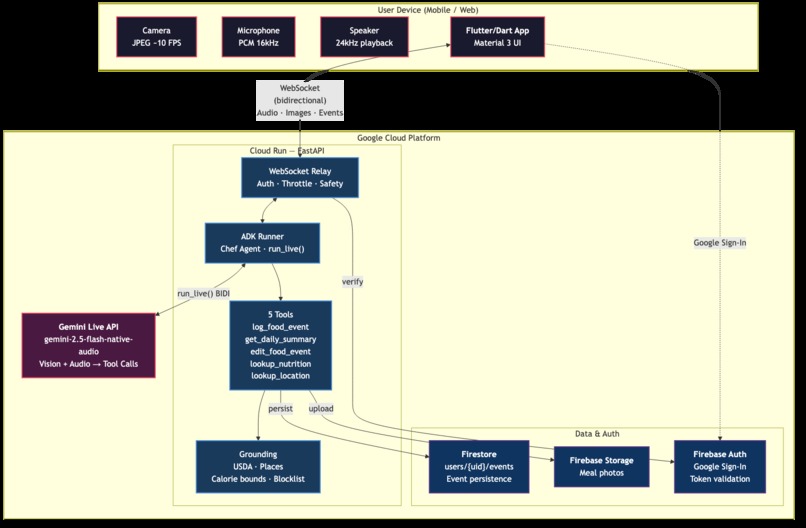
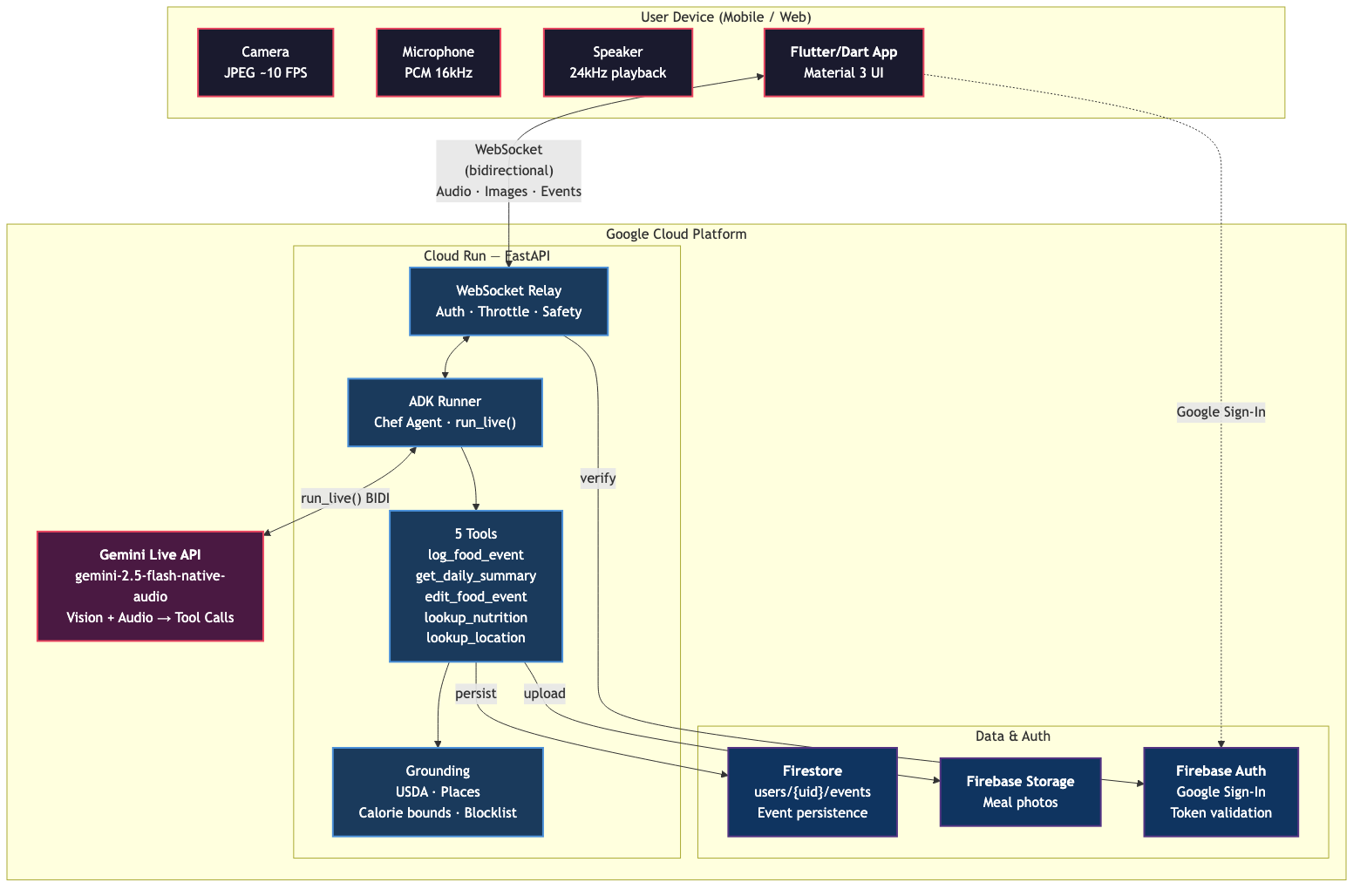
FoodLog follows a strict separation: the client is "eyes and ears" (camera, microphone, speaker, UI), and all intelligence lives on the server.
Flutter/Dart App (iOS / Web)
    <-> WebSocket (bidirectional)
Cloud Run - FastAPI + ADK Agent ("Chef")
    <-> run_live() streaming
Gemini 2.5 Flash Native Audio
    -> 5 function tool calls
    -> Firestore persistence
    -> USDA + Places grounding
Client - Built with Flutter/Dart for iOS and web. Five screens: Launch (Google Sign-In), Capture (live session with camera + audio streaming), Track Log (event feed), Event Detail (nutrition card + image preview), and Settings. The capture orchestrator manages the full session lifecycle: session creation, WebSocket relay connection, camera/audio streaming, timer, and cleanup. 599 Flutter tests.
Backend - A FastAPI server on Cloud Run with a WebSocket relay that bridges the client to Gemini via Google ADK's Runner.run_live(). The relay handles auth verification, frame size guards, session timeouts, rate limiting, content safety filtering, and structured telemetry. Five function tools are registered with the ADK Agent, producing structured FoodEvent objects with grounding from USDA and Google Places.
Persistence - Firestore with user-scoped collections (users/{uid}/events/{event_id}). Firebase Auth with Google Sign-In provides token verification on all HTTP and WebSocket endpoints. Security rules restrict data access to the authenticated user.
Key Technical Decisions:
| Decision | Choice | Why |
|---|---|---|
| Agent framework | Google ADK | Native run_live() for bidirectional Gemini streaming; function tool auto-schema |
| Model | gemini-2.5-flash-native-audio-preview-12-2025 |
Simultaneous vision + native audio in one model |
| Client framework | Flutter/Dart | Cross-platform (iOS + web) with platform camera/mic APIs |
| ASGI server | Uvicorn | Stable WebSocket support for streaming on Cloud Run |
| Testing approach | Protocol-based fakes | Every external dependency has a Protocol seam; fakes over mocks |
| Type checker | ty (Rust) | Zero # type: ignore in source; fast feedback |
Infrastructure as Code:
The entire GCP environment is provisioned and deployed via scripts - no manual console clicks required. A multi-stage Dockerfile builds a minimal production image running as a non-root user. The GitHub Actions CI/CD pipeline (deploy-backend.yml) automates the full release cycle: build Docker image with BuildKit caching, push to Artifact Registry, deploy to Cloud Run, deploy Firestore security rules, and run automated smoke tests (health check, auth enforcement, CORS validation, Swagger lockdown). Eleven infrastructure scripts (scripts/) provision the full environment from scratch: service account creation with minimal IAM roles, log-based metrics and uptime checks, daily Firestore backups with 30-day GCS lifecycle policies, container vulnerability scanning, Cloud Armor WAF rules, API key restrictions, and Secret Manager validation. A complete self-hosting guide (docs/self-hosting.md) takes a reader from git clone to a running instance on their own GCP project.
Testing & Quality:
We enforced strict quality gates from day one:
- 1,357 backend tests across 3,052 statements with 100% line coverage enforced - no exceptions, no pragmas
- 599 Flutter tests covering all screens, capture orchestrator, and service layers
- Zero
# type: ignorein source code - Protocol-based fakes instead of
unittest.mock- every external service (Firestore, Firebase Auth, Gemini, USDA, Places) has a Protocol interface with a test double - Pre-push hooks run the full quality gate; CI mirrors the same checks
Google Cloud Services Used:
| Service | How it's used |
|---|---|
| Cloud Run | Hosts the FastAPI + ADK agent backend. WebSocket relay for Gemini Live streaming. |
| Firestore | User-scoped event persistence (users/{uid}/events). Composite index for created_at descending. Security rules enforce authenticated access. |
| Firebase Auth | Google Sign-In on the client. Server-side token verification via firebase_admin SDK. All endpoints require valid tokens. |
| Firebase Storage | Meal photo uploads from capture sessions. |
| Gemini Live API | Real-time bidirectional audio + vision streaming via ADK run_live(). Native audio model for voice interaction. Function calling for structured food event creation. |
| Secret Manager | Stores gemini-api-key and firebase-client-config for Cloud Run deployment. |
| Artifact Registry | Docker image storage for the foodlog-api container. |
| Cloud Trace | Distributed tracing via OpenTelemetry exporter for request-level latency visibility. |
Challenges we ran into
Bidirectional streaming is hard. The WebSocket relay between the Flutter client and Gemini Live needs to handle concurrent send/receive loops, client interruptions, session timeouts, and graceful cleanup - all asynchronously. Getting the asyncio.TaskGroup lifecycle right (cancel upstream on downstream error, re-raise exceptions properly) took significant iteration.
Audio format negotiation. Gemini's native audio model is particular about input format. We had to add audio configuration negotiation, minimum frame size validation, and MIME type constants to prevent silent audio processing failures.
Offline resilience. When the server is unreachable during a capture, we needed a clean fallback: save audio + camera frames + metadata as a local bundle, then batch-process through Gemini's generate_content() API when connectivity returns. The BundleWriter -> BundleReader -> SyncService -> GeminiBatchClient pipeline handles this.
100% coverage with Protocol fakes. Maintaining 100% line coverage without mocks required designing every external integration as a Protocol interface from the start. This paid off in test reliability (no flaky mock assertions) but demanded discipline - every new feature needs its fake.
Grounding LLM outputs. Gemini occasionally hallucinates implausible nutrition data - negative calories, macro values that exceed total calories, or wildly long food names. We added domain-level sanity checks (calorie bounds, macro cross-checks, item count limits, name length validation) that catch and reject these before they reach the user.
Accomplishments that we're proud of
The capture experience feels magical. Point, talk, done. Chef's voice persona is warm and concise - it confirms what it sees without repeating back the full item list.
1,956 tests (1,357 backend + 599 Flutter) with 100% backend coverage enforced and zero type safety escapes. Mutation testing revealed 19 test gaps that had survived despite full coverage, and all were fixed.
Clean architecture with Protocol-based seams everywhere. Swapping Firestore for local JSON, or Firebase Auth for a test double, is a one-line change. No import-time side effects, no global state.
Fully automated cloud deployment. A single
scripts/deploy-backend.sh productioncommand builds, deploys, and health-checks the entire backend. Eleven infrastructure scripts provision the full GCP environment from scratch, and a complete self-hosting guide takes anyone fromgit cloneto a running instance on their own GCP project.Content safety wired end-to-end. Gemini responses pass through both the model's built-in safety settings and a regex-based content filter before reaching the user.
Grounding validation on every tool call. Domain-level sanity checks reject implausible outputs - negative calories, absurd macro values, excessive item counts, and overlong names. The model can hallucinate; the pipeline catches it.
What we learned
ADK's
run_live()is powerful but opaque. The streaming event model requires careful handling of partial responses, tool call lifecycles, and turn completion signals. Documentation is sparse for the live streaming path.Protocol-based testing scales. What started as architectural purism became a productivity multiplier. Adding the offline capture pipeline went fast because every seam was already testable.
Gemini's multimodal understanding is genuinely impressive. The model correctly identifies foods from camera frames even with poor lighting, partial views, and overlapping items. Combined with the user's verbal description, accuracy is high.
Cloud Run + WebSocket works well for real-time agent sessions, but you need to handle connection lifecycle carefully (timeouts, reconnection, session state).
What's next for FoodLog Live
The Food Feed
Calorie counting is the starting point, not the destination. The real vision is the Food Feed - a social, real-time food experience built on shared Gemini Live sessions.
Shared Meals - A family sits down for dinner. Each person opens FoodLog and joins the same shared session. Chef sees the table from multiple camera angles simultaneously - Dad's POV of the pasta, Mom's close-up of the salad, the kid's view of their plate. Chef correlates all perspectives, identifies what each person is eating, and logs individual food events for everyone. One meal, multiple viewpoints, personalized nutrition. The data model already supports this: every FoodEvent has a shared_session_id and guests field designed for multi-user capture sessions.
Live Cooking Shows - A chef streams a cooking session. Followers watch the Food Feed in real-time and see Chef's running commentary: identifying ingredients as they're added, estimating nutrition for the finished dish, logging recipe steps. Think "watch party" for food content. Viewers get structured food data from content they're already watching - no manual entry.
Smarter Agent
- Meal pattern recognition - Chef learns your habits ("You usually have oatmeal on weekdays") and pre-fills likely items, reducing the conversation to a quick confirmation
- Dietary goal tracking - Set a protein target or calorie budget and Chef coaches in real-time ("You're 30g short on protein today - this chicken bowl will get you there")
- Allergy and restriction awareness - Chef flags ingredients that conflict with stored dietary restrictions before logging
- Multi-turn recipe capture - Follow along as you cook, logging ingredients step by step, and produce a complete recipe card with nutrition at the end
- Restaurant menu integration - When Chef identifies a restaurant via Google Places, pull the menu and cross-reference what the camera sees with known dishes for more accurate nutrition
Platform Expansion
- Android build - Flutter supports Android natively; iOS and web are working, Android packaging is next
- Wearable companion - A Wear OS / watchOS app that handles voice-only capture from your wrist when pulling out your phone isn't practical
- Smart display mode - A kitchen counter view (Nest Hub, tablet) that passively watches meal prep and logs what you're cooking hands-free
Data and Insights
- Daily and weekly summaries - Aggregate nutrition across meals to show trends, streaks, and macro balance over time
- USDA enrichment during live captures - The USDA FoodData Central integration is wired for batch processing; enriching live sessions would further improve accuracy
- Export and interoperability - Export food logs to Apple Health, Google Fit, or CSV for use with dietitians and health apps
- Photo timeline - A visual gallery of every meal, searchable by date, restaurant, food item, or nutrition range
Social Features
- Meal sharing - Share a food event card to social media or messaging apps with photo, items, and nutrition summary
- Household accounts - A family plan where one subscription covers multiple users who can see each other's shared meals
- Dietitian collaboration - A read-only view that lets a registered dietitian review your food log and leave feedback directly in the app

Log in or sign up for Devpost to join the conversation.