-
-
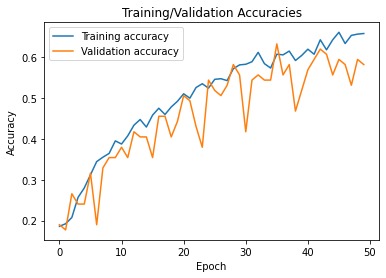
Accuracy Plot
-
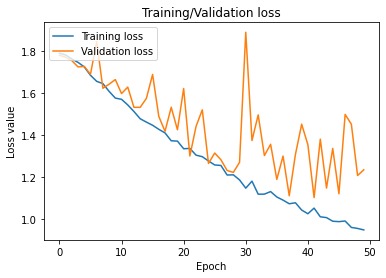
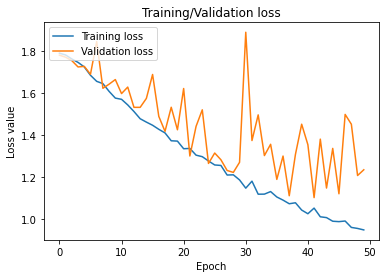
Loss Plot
-
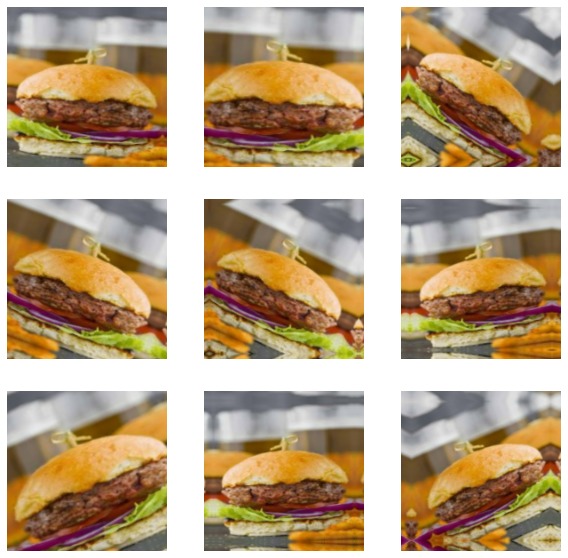
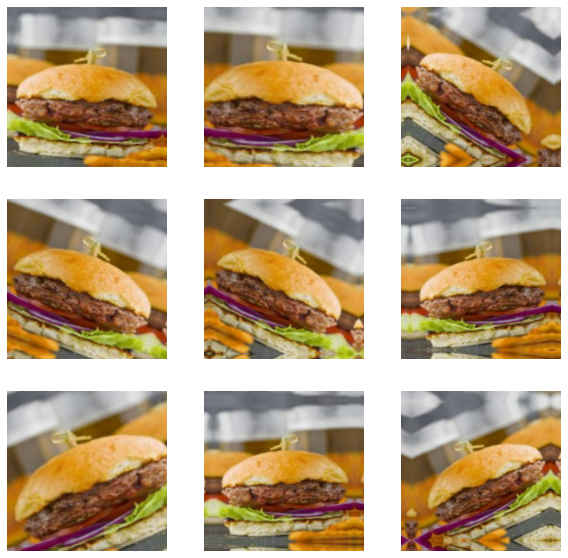
Data Augmentation Sample
Inspiration
Continuous Glucose Monitors (CGMs) constantly measure and report a person's blood sugar levels. When blood sugar levels are too high or too low, a CGM's receiver sends an alarm. Too much or too little insulin can cause problems. Therefore, accurately knowing when the next insulin injection is needed (or is not needed) is critical. Thus, having accurate data to determine when the next injection is needed is also critical. Not only is the blood sugar level used to determine the alarm, but also information about food intake and the nutritional information/makeup of that food. This data is currently entered manually by the patient. This leaves a lot of room for input error as well as a lot of hassle. Thus, automating this process using machine learning, big data techniques, and image analysis could potentially provide more accurate solutions to this issue and cut time for the user.
What it does
Web App that takes a user image (.jpg) of a food item (as of now only spaghetti, hamburgers, hot dogs, grilled cheese, chicken nuggets, and french fries) and returns the name of that food item. The end goal is to connect what I have created to the USDA FoodData database and return nutritional data to the user. This could provide faster and more accurate estimates of blood sugar levels for the user.
Note: Due to lack of memory, compute power, time, and money, what I have created is a proof of concept of a low-cost highly representational data collection method and model for food image analysis. At the moment the model is only trained to classify images of 6 foods but could easily scale to 10,000.
How I built it
First, I used Selenium to search for and download images from Google Images given a number of images per category and a list of search terms. Afterwards I did a quick visual scan and deleted a few images that were either of packaging or had multiple items in them (i.e. burgers AND fries). Then, I split the images into training, validation, and testing folders. Next, I augmented the data (Rotated, zoomed, flipped, resized) and converted it to a format readable by a neural network. Then I defined, trained, and saved the convolutional neural network. I went through a few iterations of tuning hyperparameters to increase accuracy before saving the final model. Then I created a function to resize an input image and preprocess it before calling the predict function. From the NN output (6 probabilities, one for each category), I used the folder names and index number to output the category name of the category with the highest probability.
Challenges I ran into
While food image data sets are available on kaggle and other sources, none can be leveraged for commercial use. Thus, creating a data collection method using Google Images that was representative of user images (which will likely be blurrier, darker, angled, etc. compared to more professional photos included in Google Images) was my first main challenge. Next, I was unable to achieve an accuracy rate of more than around 50-60% most likely due to the lack of data I had collected. There are only about 150 images per category. However, 50-60% is still well above a random guess baseline and a good start for alleviating time on part of the user. Lastly, I wanted to create a basic web app with flask but that was beyond my scope for the weekend.
Unsolved Bugs: CallFetchImage2.py is returning slightly more images then I specify but the printed response I have for bug-checking is returning the correct amount of responses. Additionally, the search term “pizza” makes it crash.
Accomplishments that I’m proud of
Doing so much with so little time :)
What I learned
A lot more about Python! (R is my go-to language)
How to scrape data
Folder structures
Practiced my AI skills
Learned a lot about Flask that I hope to use in the near future
What's next for Food Image Recognition Web App
Collect more data for more categories. Augment data more to make it more representational of user data (i.e. darken photos, decrease quality). Add K-fold validation. Tune hyperparameters of the model more, look into transfer learning solutions. Add script to ensure deduplication of data collected as the data is shuffled before splitting into training, validation, and testing sets and duplicates will degrade the model accuracy. Get rid of hardcoded variables such as the list of categories to search for which will need to be updated. Move everything to Google Cloud or AWS for increased storage and compute power. Connect to USDA FoodData API to retrieve nutrient information based on the classification output. Create the Web App.


Log in or sign up for Devpost to join the conversation.