-
-

Thumbnail
-
Overview

Formula One Track Optimization & Analysis
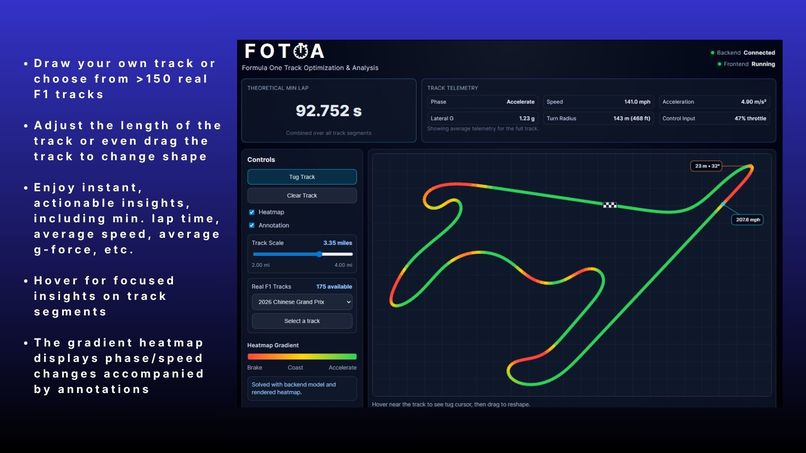
FOTOA is an interactive F1 lap-time simulator. You can draw a custom circuit or select a real F1 track from FastF1 telemetry, then compute a theoretical minimum lap time with segment-level telemetry data, actionable insights, and heatmap overlays.
🚀 Setup & Installation
Prerequisites
- Node.js 18+
- Python 3.10+
Backend Setup (run from backend/)
cd backend

# optional but recommended
python -m venv ..\cqvenv
..\cqvenv\Scripts\activate

pip install fastapi uvicorn numpy pydantic fastf1 python-multipart

uvicorn main:app --reload --host 0.0.0.0 --port 8000
Frontend Setup (run from frontend/)
cd frontend
npm install
npm run dev
Optional env file in frontend/.env:
VITE_API_BASE_URL=http://localhost:8000
Verify
- Backend health:
http://localhost:8000/health - Frontend dev server: shown by Vite in terminal (default
http://localhost:5173) (i also added widgets in the top right of the webpage)
💡 Inspiration
This was a CodeQuantum submission. This year's theme was Formula One. Applying for the Data Science and General tracks, I wanted to create a novel, technically rigorous solution. I specifically honed in on F1 lap performance. There is so much data behind the sport, but also so much math behind making predictions. Each track and lap is a combination of track geometry, vehicle limits, and driver control transitions (accelerate/coast/brake). FOTOA was built to make those tradeoffs visual, interactive, and easy to understand, not just numerical.
⚙️ What it does
| Capability | Description |
|---|---|
| Track drawing | Draw closed-loop tracks directly on canvas with overlap validation |
| Track selection | Load real F1 circuits from FastF1 telemetry (X,Y) |
| Auto scale | Pull approximate track length from telemetry and apply miles scale |
| Lap solver | Compute theoretical minimum lap time with forward/backward speed passes |
| Heatmap | Render continuous accelerate/coast/brake intensity on the track line |
| Telemetry | Show speed, accel, lateral G, curvature, and control demand |
| Annotations | Mark top-speed zone and sharpest turn with compact callouts |
🛠️ How I built it
- Frontend: React + Vite, canvas-based editor, real-time drag/tug interaction, telemetry cards, and UI controls.
- Backend: Python + FastAPI with
/api/trackroutes for solve/catalog/extract. - Track data: FastF1 session telemetry for real circuits, cached on disk for faster repeat loads.
- Solver core:
- Track preprocessing, resampling, and smoothing
- Curvature-based cornering speed limits
- Forward acceleration pass + backward braking pass
- Segment-time integration + heatmap/control profile generation
🚧 Challenges I ran into
- FastF1 cold loads were SUPER slow; I solved it by caching data and pre-warming.
- Mapping telemetry-derived segments to smooth canvas rendering without visual misalignment.
- Balancing solver realism vs optimism through parameter calibration (I was overly optimistic).
- Keeping drag/tug interaction smooth while preserving valid non-self-intersecting loops (for every kind of user ;) ).
🏆 Accomplishments I am proud of
- Built a full end-to-end loop as a solo in 8 hours: select/draw track → solve → heatmap → telemetry.
- Added real-track ingestion from FastF1 instead of static/demo geometry.
- Worked with data and topics in a field I was not previously familiar with
- Implemented runtime UX polish: notifications, annotations, and persistent telemetry summaries.
- Calibrated solver constants to produce more plausible lap-time estimates.
📚 What I learned
- Telemetry preprocessing quality strongly affects solver quality.
- A fast-feeling product needs a cache strategy as much as an algorithm strategy.
- Canvas interaction design (draw/drag/hover states) is key for trust and usability.
- Physics-inspired constraints need practical calibration against known laps.
🚀 What’s next for FOTOA
- Per-track calibration profiles (circuit-specific realism tuning).
- Expose solver realism presets in the UI.
- Add export/import of custom tracks and solver runs.
- Improve annotation set (e.g., longest full-throttle section, max braking zone).
- Even though I solved the loading and caching problem with the FastF1 data, I would like to make it more robust.
📡 API Overview
POST /api/track/solve
Input: normalized points, canvas size, closed loop flag, track scale in miles.
Returns:
minTimeSecondssegments[]withfrom,to,speed,acceleration,curvature,lateralG,heat,phase,seconds
GET /api/track/catalog
Returns available real F1 tracks generated from FastF1 event schedules.
POST /api/track/extract
Input:
{ "trackId": "2025_r19_race" }
Returns:
- normalized
points[] trackLengthMiles(when available)
📁 Repo Structure
CQ_hacks/
├── README.md
├── README_Template.md
├── .gitignore
├── backend/
│   ├── main.py
│   ├── api/
│   │   ├── solve_track.py
│   │   └── extract_track.py
│   ├── solver/
│   │   ├── types.py
│   │   ├── utils.py
│   │   ├── forward_pass.py
│   │   ├── backward_pass.py
│   │   └── optimizer.py
│   ├── .fastf1_cache/
│   └── .track_points_cache/
└── frontend/
    ├── index.html
    ├── package.json
    ├── src/
    │   ├── App.jsx
    │   ├── main.jsx
    │   ├── styles.css
    │   ├── components/
    │   ├── assets/
    │   └── utils/
    └── dist/   # generated by npm run build
Built With
- fastapi
- fastf1
- javascript
- node.js
- numpy
- python
- react
- uvicorn
- vite


Log in or sign up for Devpost to join the conversation.