-
-

FocusForge : Focus + Precision - track a session, keep intent, and resume work instantly.
-
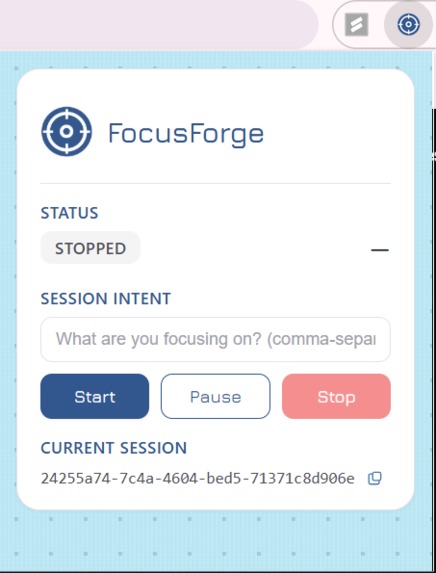
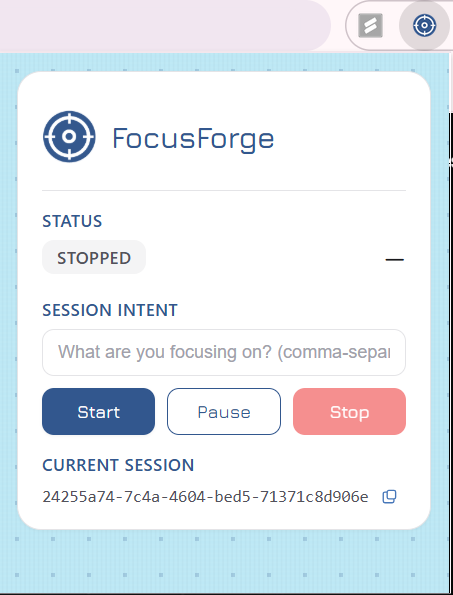
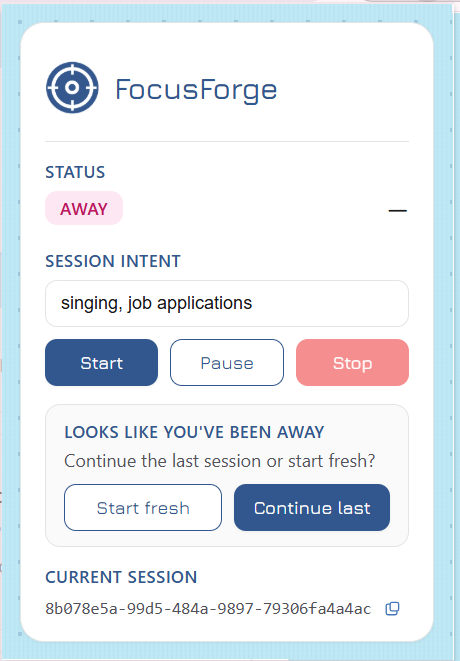
Extension popup: set session intent, start/pause/stop tracking, and get the session ID for your live focus trace.
-
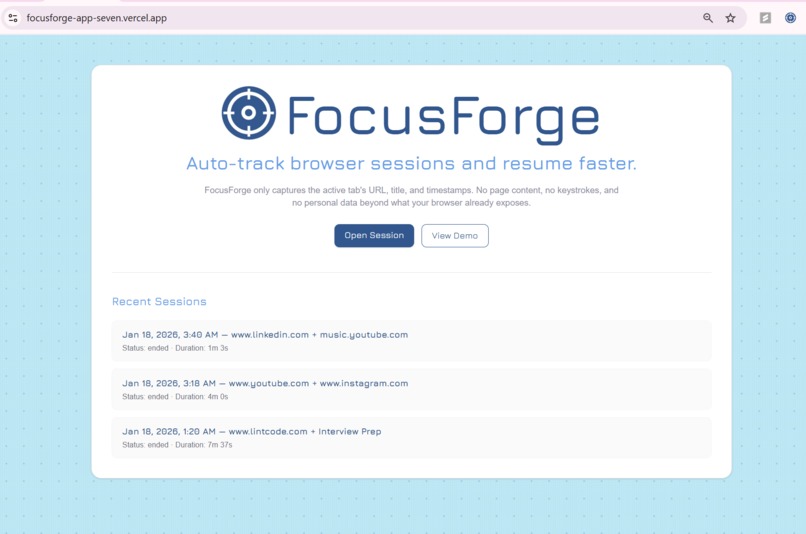
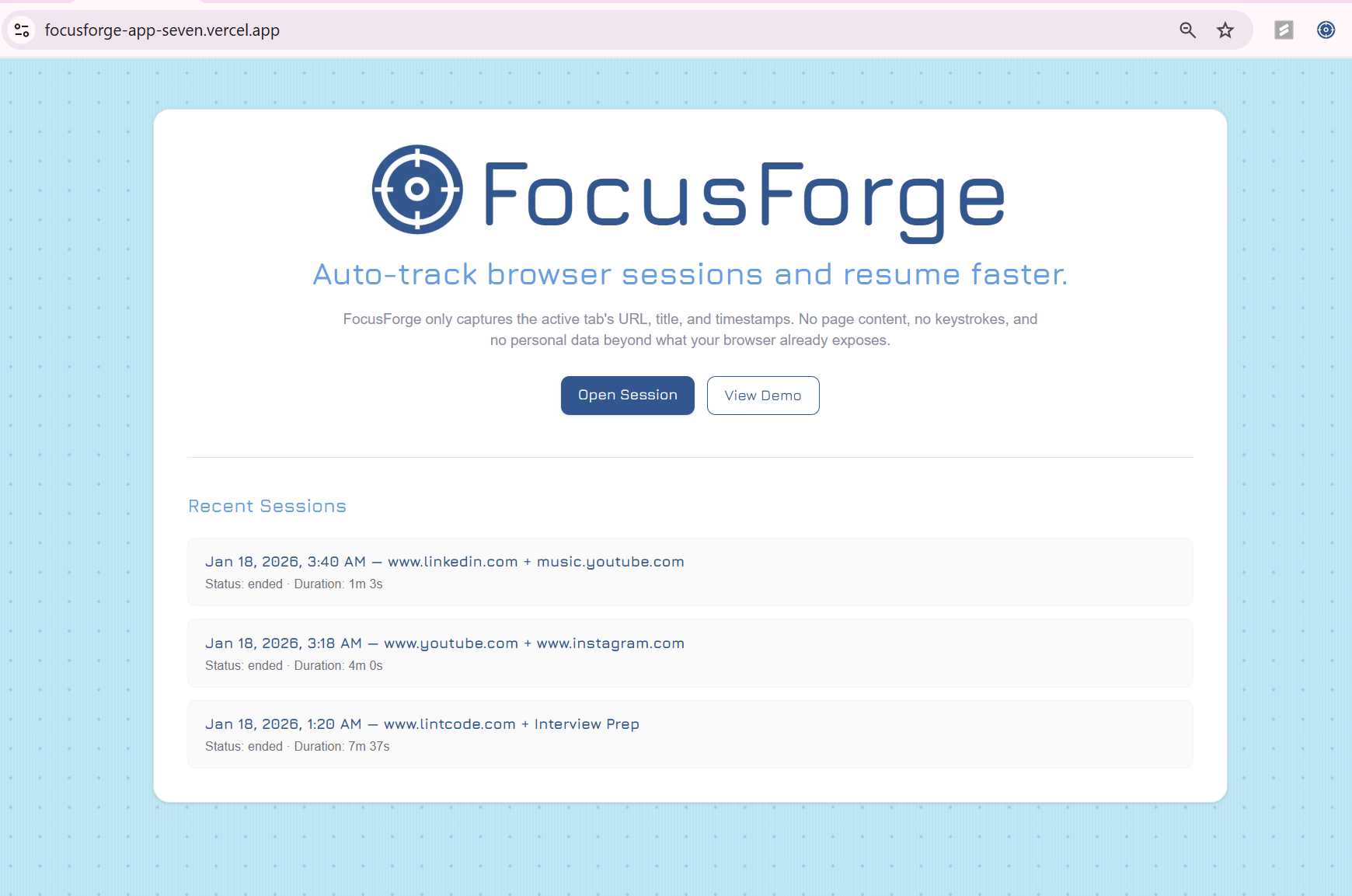
Dashboard: start or open a focus session, then view recent sessions, auto-captured URL/title traces for fast resume + Opennote export.
-
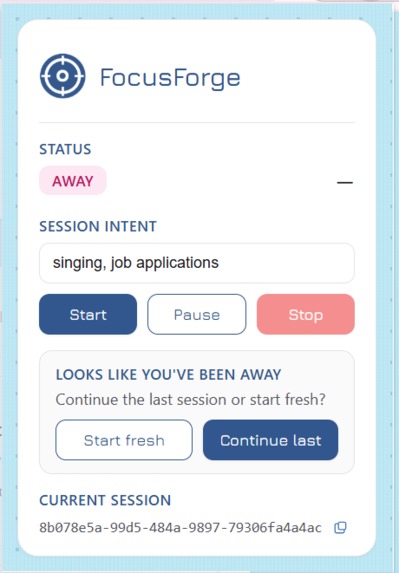
-
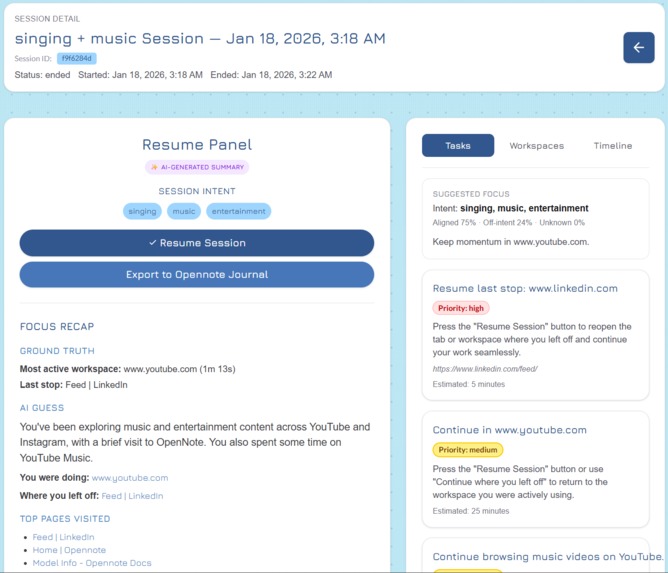
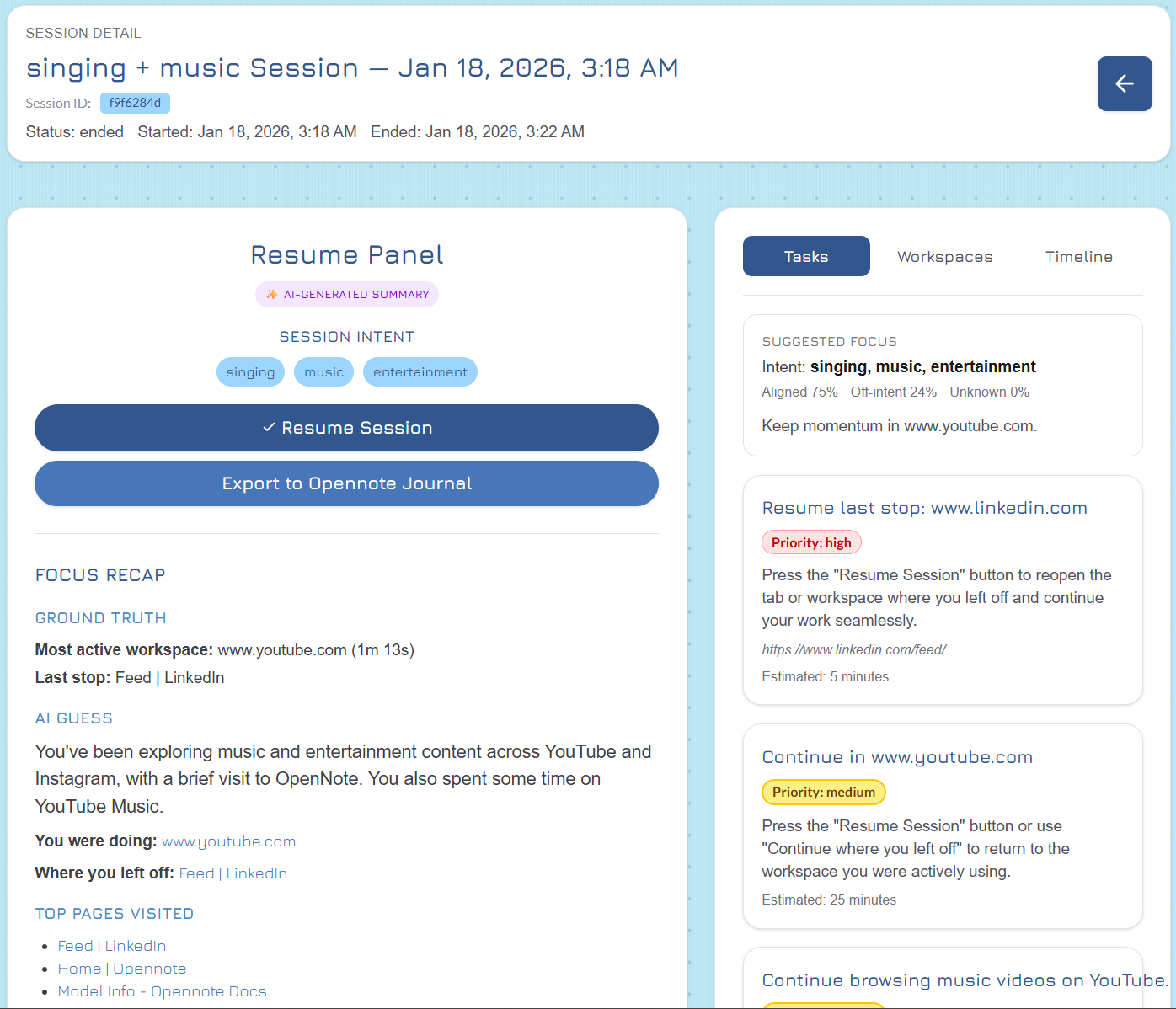
Session Resume: FocusForge turns your browsing trace into a restart-ready recap-last stop, workspaces, next actions and exports to Opennote.
-
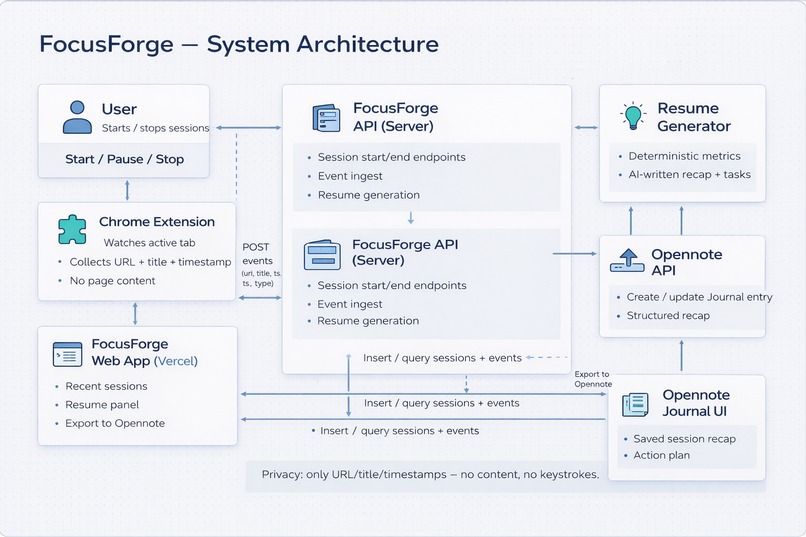
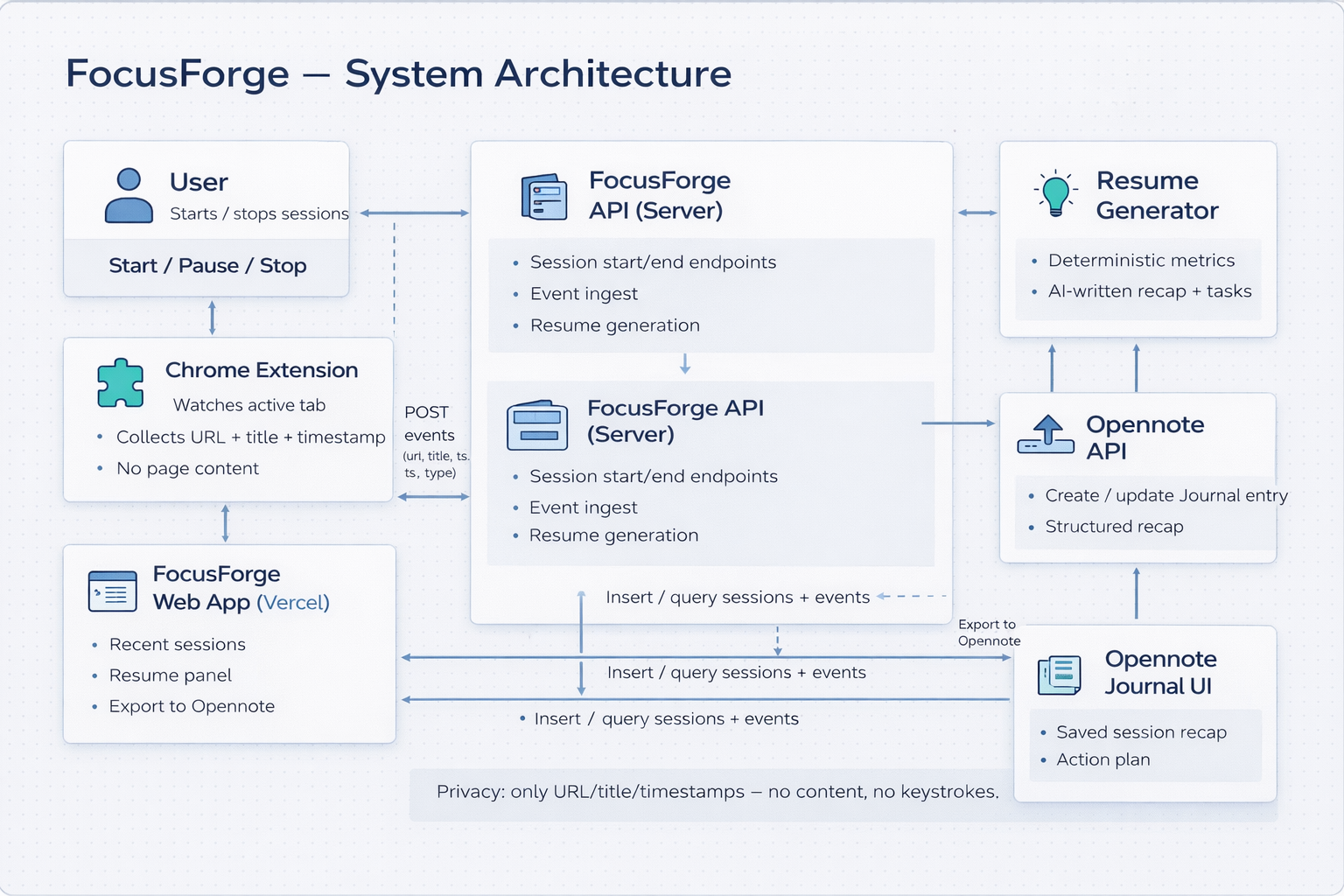
Architecture: Extension logs URL/title/timestamps→API→Supabase. Resume generator creates recap+tasks. Web app shows it+exports to Opennote
-
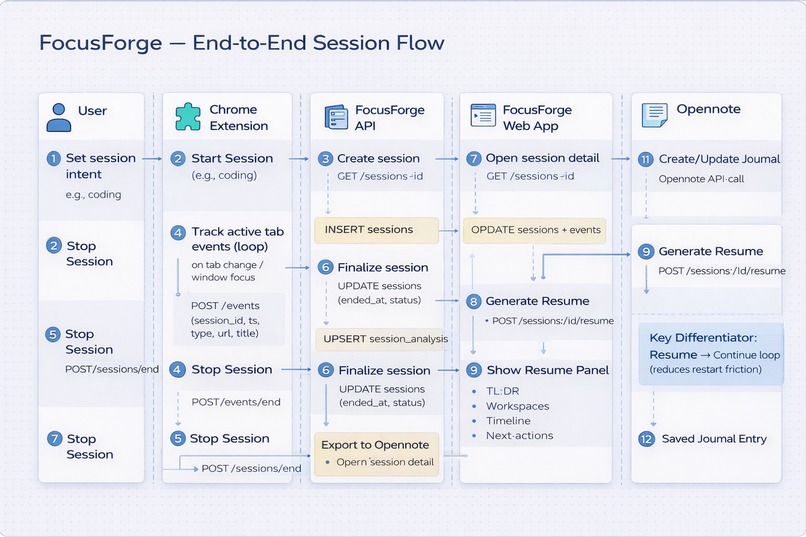
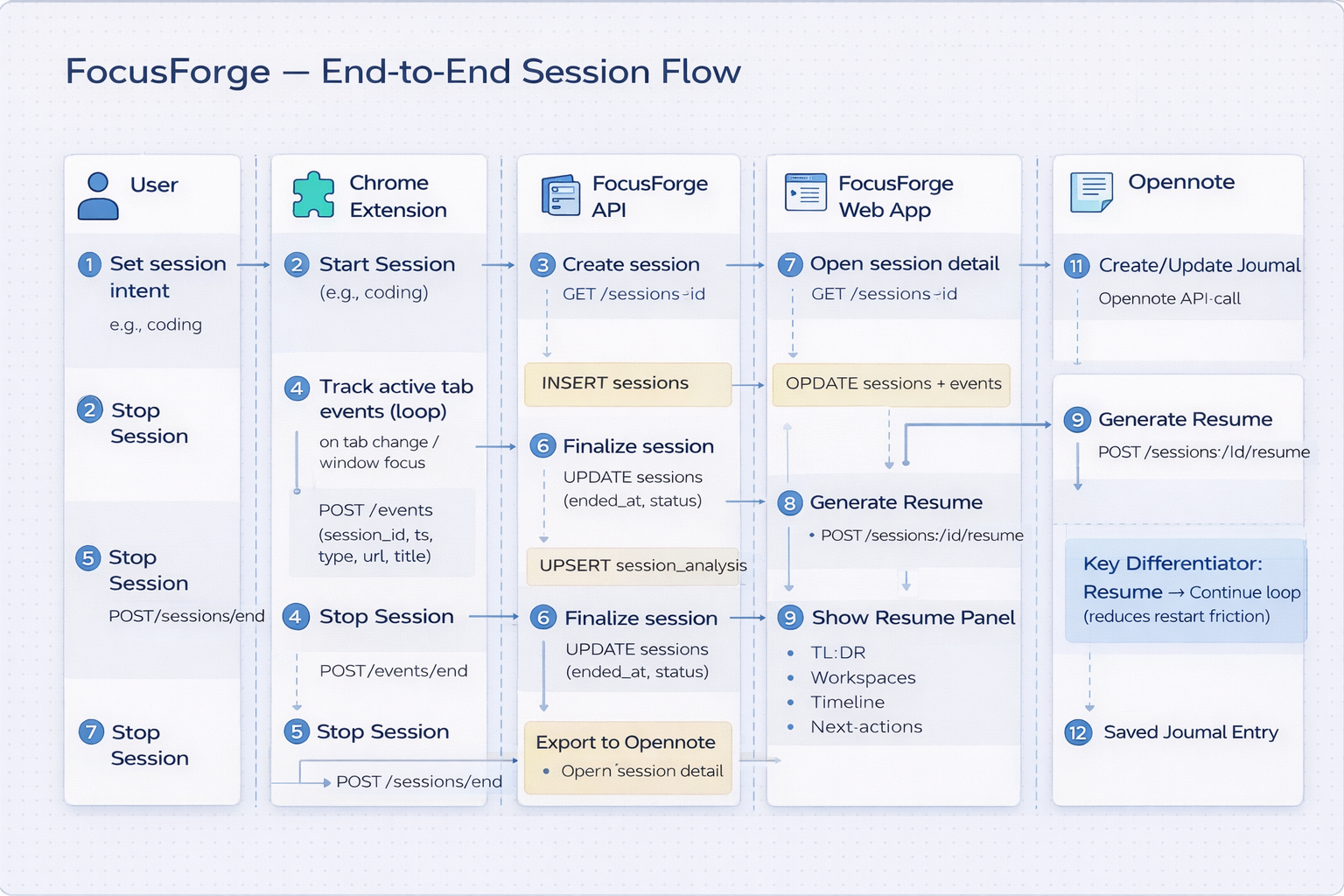
End-to-end flow: Start in extension→log tab events→store in Supabase → generate resume + tasks → view in web app → export recap to Opennote

Inspiration
We built FocusForge because we kept running into the same problem: real work on Chrome turns into dozens of tabs across docs, videos, code, tickets, and references. After a break—or even the next day—you don’t just forget which tab to open. You forget the context: what mattered, where you left off, and what to do next. Reconstructing that mental state wastes time and kills momentum.
For a student, it’s the classic spiral: you’re researching for an assignment, watching one “helpful” video, cross-checking notes, opening a reference paper, and suddenly your browser is a wall of tabs. You step away for dinner, come back, and spend the first 10 minutes just trying to remember what you were even doing—while the deadline is still the same.
For a working professional, it’s even worse. Work is never one thing at a time: Slack pings, meetings, tickets, dashboards, internal docs, PR reviews, and random “quick checks” that hijack your flow. You might be productive for an hour, but later you can’t answer the simplest question: What did I actually make progress on, and what’s the next step?
And for everyone—students, employees, creators—Chrome becomes a messy memory dump. You keep tabs open because you’re afraid you’ll lose something important. You close them and regret it later. Either way, your brain ends up doing the work a tool should do: rebuilding context from scratch every time you restart.
We wanted a way to “pause life” and then resume instantly—so instead of re-orienting yourself manually, you can come back and immediately see what mattered, what you touched, and what to do next.
What it does
FocusForge helps you resume faster when you’ve lost track.
You start a focus session from our Chrome extension, and FocusForge tracks your browsing activity in a privacy-safe way—only URL, page title, and timestamps (no page content, no keystrokes). When you stop the session, FocusForge generates a Session Resume that brings your context back in seconds:
Last Stop: the exact page you ended on, so you can jump back immediately
Workspaces: where you actually spent time (top sites/domains), so you know what mattered
Timeline: a clean trace of what you touched and when, so the session is reconstructable
AI Resume + Next Steps: a grounded recap and actionable steps to continue without rethinking
You can create multiple sessions so each workflow—coding, job search, studying, creative work, admin tasks—stays separated and easy to pick back up later.
To make the session truly persistent, you can also export the full resume to an Opennote Journal, turning each session into a searchable, organized note you can revisit anytime.
How we built it
e designed FocusForge as a simple loop: capture → store → summarize → resume → export.
Chrome Extension (tracking layer) Starts/stops focus sessions and logs tab activity in real time (URL, title, timestamps). This is how we capture “what happened” without reading page content.
Backend API (session controller) Receives session + event logs, handles session lifecycle (start/stop/idle), and exposes endpoints to fetch recent sessions and session details for the UI.
Supabase (Postgres database) Stores session metadata and the event timeline (sessions + session_events + analysis output). This makes sessions persistent, searchable, and demo-stable.
AI Summary (Gemini) Converts the session trace into a grounded “Session Resume” and next-step suggestions—based on captured URLs/titles, not page content.
Web App UI (Figma → implementation) A dashboard for recent sessions and a Resume Panel that surfaces the most important context quickly (last stop, workspaces, timeline, recap).
Opennote API Integration Exports the final Session Resume into an Opennote Journal so the recap becomes a clean, persistent note you can revisit and build on.
Challenges we ran into
Integrating Opennote cleanly and formatting exports so they look polished and useful.
Keeping scope focused: avoiding feature bloat and staying centered on “resume where you left off.”
Demo stability: making sure sessions/events/summaries don’t break with edge cases under time pressure.
Defining “focus” without being invasive: We wanted meaningful insights while staying privacy-safe (no page content/keystrokes), so we had to make summaries and intent alignment work using only URLs/titles/timestamps.
Reliable session boundaries: Handling real-life behavior like idle time, laptop sleep, and accidental “leave session running” cases without corrupting the timeline or breaking demo flow.
Consistency across components: Keeping the extension, backend, database, and web UI in sync so session IDs, events, and summaries always match—even when users refresh or restart.
Making AI outputs trustworthy: Preventing “hallucinated” summaries and ensuring the recap stays grounded in what actually happened during the session.
Turning raw events into useful structure: Converting messy tab-switch logs into “workspaces,” time breakdowns, and a readable timeline that feels instantly understandable.
Last-minute polish without breaking core: Improving UI/UX while avoiding risky refactors that could destabilize tracking or exports right before demo.
Accomplishments that we're proud of
- Izzy: I'm proud of the hover effects I added to the buttons to make using the interface more fun. I also added the graphs to the Resume Panel which I think helps the user look over their stats more.
- Nikitha: I'm proud of building apps in html/css/js to working with APIs and implementing a supabase backend to persist session, event, and analysis data for a chrome extension MVP.
- Sakshi - Im proud of building the project skeleton + backend pipeline (sessions/events → Supabase) so the core loop is stable and demo-ready. I Implemented session lifecycle logic (start/stop + inactivity handling) to match real user behavior without corrupting timelines. I also Integrated Opennote export, turning each Session Resume into a clean, structured journal entry you can revisit later and kept the system reliable under demo pressure by prioritizing stability and edge-case handling over risky last-minute features.
What we learned
- Nikitha: As a first-time hacker, I learned a lot of things. I learned how to build and ship a product under time constraints. I learned how to turn a prototype into a stable, demo-ready backend and gained experience in designing a reliable database schema. I also learned how to use a modern backend platform instead of building everything from scratch by using supabase as a managed backend and connecting frontend to backend through APIs.
- Sakshi - I learned how to design an event-based session model (sessions + session_events + analysis) so raw tab pings can later be reconstructed into a timeline/workspaces without losing integrity. I also learned that productivity apps live or die on session boundaries—handling inactivity, laptop sleep, and accidental long-running sessions needs clear rules + consistent behavior across all endpoints. I learned how to build integration-safe exports: converting internal JSON into a clean, structured Opennote journal template that stays readable and doesn’t break when fields are missing.
What's next for FocusForge
- Better AI summaries
- UX improvements
- Build a personalized intent model: App stores and learns the user's definition of focus and their repeated workflows
- Add automatic task extraction and execution tracking: Detects todos, schedules them and check for completion in the next session
- Cross-device continuity: You stop on laptop, resume on phone with the same context and "next step". Personalized intent model: learn each user’s definition of “focus” over time (their common workflows + what they consider distraction) and adapt alignment scoring accordingly.
- Smarter “Resume Session”: restore a full workspace (top tabs/domains) instead of only the last stop, so users can truly continue in one click.
- Action tracking across sessions: extract next actions, let users mark them done, and show “carried-over tasks” when they resume later.
- Better Opennote integration: auto-journal on session end + daily/weekly rollups inside Opennote (sessions grouped, searchable, and reviewable).
Built With
- chrome-extension-(mv3)
- css
- gemini
- html
- javascript
- next.js-(react)
- python
- supabase
- tailwind-css
- typescript
- vercel


Log in or sign up for Devpost to join the conversation.