-
-
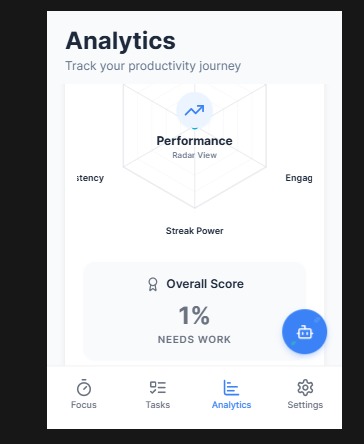
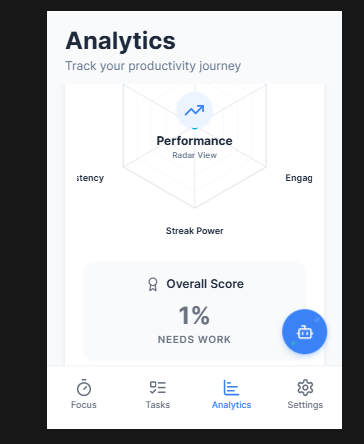
analytic page
-
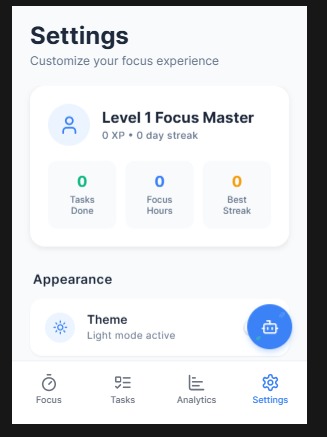
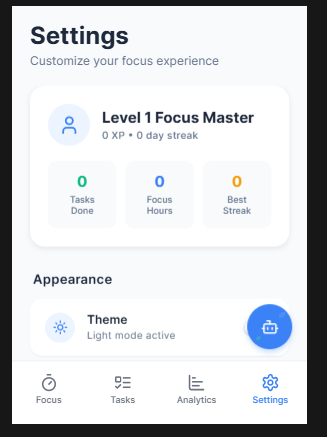
setting page
-
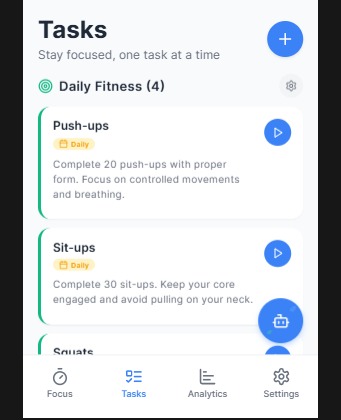
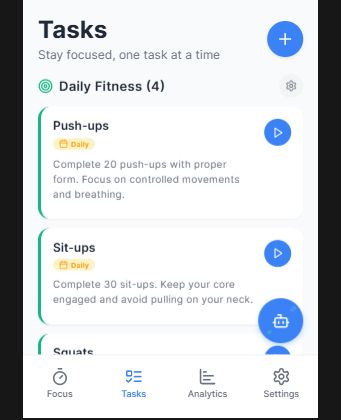
task page
-

icon
-
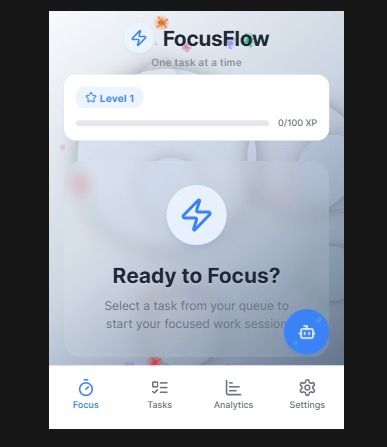
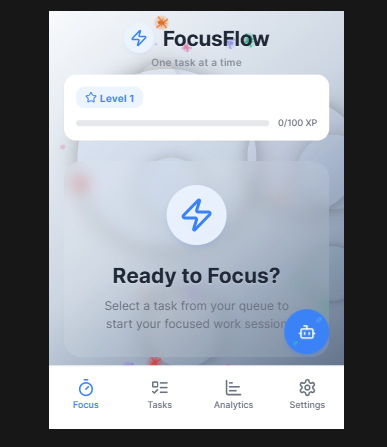
focus page

Inspiration
The inspiration for FocusFlow stemmed from a common challenge in today's fast-paced world: maintaining focus and motivation amidst constant distractions. We observed that many individuals struggle with procrastination, task management, and sustaining productive habits over time. We wanted to create an application that not only helps users manage their tasks but also gamifies the process of productivity, making it more engaging and rewarding. The goal was to build a tool that fosters consistent focus, celebrates small victories, and provides insightful feedback on one's productivity journey.
What it does
FocusFlow is a cross-platform productivity application designed to help users master their attention and elevate their output. Its core features include:
- Focus Timer: A customizable Pomodoro-style timer that guides users through focused work sessions and breaks, promoting deep work and preventing burnout.
- Task Management: Users can create and manage both custom tasks and pre-defined daily fitness tasks, helping them stay organized and track their progress.
- Gamified Progression: The app incorporates a leveling system, experience points (XP), and streaks to motivate users and reward their consistent efforts.
- Analytics Dashboard: A comprehensive analytics section provides visual insights into completed tasks, focus time, streaks, and overall performance using interactive charts.
- AI Chatbot: An integrated AI assistant offers productivity tips, motivation, and guidance on task management, acting as a personal coach within the app.
- Dynamic Backgrounds: Visually engaging animated backgrounds (sparkles, falling stars, floating particles) adapt to the user's activity, enhancing the immersive experience.
How we built it
FocusFlow was built using the Expo framework, leveraging expo-router for a robust and intuitive navigation structure, primarily utilizing a tab-based layout for primary navigation. -Frontend: The user interface was developed with React Native, ensuring a consistent experience across web, iOS, and Android. All styling was meticulously crafted using StyleSheet.create to achieve a beautiful and non-generic design. -State Management: Application state, including tasks, user progress (level, XP, streak), and settings, is managed centrally using React's useReducer hook within an AppContext. Data persistence across sessions is handled via AsyncStorage. -Timer Logic: The core focus timer functionality was implemented with useEffect and setInterval, carefully managing the timer's state (running, paused, reset) and updating user metrics upon task completion. -Data Visualization: react-native-chart-kit was integrated to render interactive line and bar charts for productivity analytics. A custom RadarChart component was developed to provide a multi-dimensional view of user performance metrics. -Dynamic Visuals: The SparklingBackground component was custom-built using React Native's Animated API and expo-linear-gradient to create a captivating and responsive visual experience with multiple layers of animated elements. -Cross-Platform Compatibility: To ensure seamless functionality across web and native platforms, custom "WebSafe" components (WebSafeView, WebSafeTouchableOpacity, WebSafeScrollView, WebSafePressable) were created to filter out React Native-specific props that cause warnings or issues on the web. -Typography: Fonts were integrated using @expo-google-fonts, specifically Inter, to maintain a clean and modern aesthetic throughout the application. -Icons: lucide-react-native was used for all icons, providing a consistent and high-quality icon set.
Challenges we ran into
Developing FocusFlow presented several interesting challenges: -Cross-Platform Parity: Ensuring a consistent and performant experience across web, iOS, and Android was a significant hurdle. Native-only APIs required web-compatible alternatives or Platform.select() implementations. The custom "WebSafe" components were crucial in addressing warnings and ensuring smooth rendering on the web. -Complex Animations: Implementing the multi-layered SparklingBackground with synchronized and looping animations for sparkles, falling stars, floating particles, and ambient orbs pushed the boundaries of the Animated API. Achieving the desired visual fluidity and performance required extensive fine-tuning. -State Management Complexity: Managing the intricate interplay between the timer, active tasks, user progression (XP, level, streak), and daily task resets within a single useReducer setup, while ensuring data persistence and correct daily logic, proved challenging. -Chart Customization: While react-native-chart-kit provided a good foundation, customizing the charts to match the app's aesthetic and integrating them with dynamic data required careful configuration and styling. Building the RadarChart from scratch with react-native-svg and Animated was particularly complex. -User Experience Design: Crafting a user interface that is both functional and aesthetically pleasing, with thoughtful micro-interactions and a non-cookie-cutter feel, demanded meticulous attention to detail in styling and component design.
Accomplishments that we're proud of
We are particularly proud of: -Seamless Cross-Platform Experience: Successfully delivering a single codebase that provides a rich and consistent user experience across web, iOS, and Android. -Engaging Visuals: The dynamic SparklingBackground and the custom RadarChart significantly enhance the app's visual appeal and user engagement, moving beyond typical productivity app aesthetics. -Robust State Management: The well-structured AppContext and useReducer implementation ensure reliable data persistence, accurate user progression, and smooth daily resets. -Gamified Productivity: The integration of XP, leveling, and streaks effectively motivates users and transforms mundane tasks into a rewarding journey. -Integrated AI Assistant: Providing an in-app AI chatbot for productivity tips adds significant value and personalized support for users.
What we learned
Through the development of FocusFlow, we gained valuable insights into: -Advanced React Native Animation: A deeper understanding of the Animated API, including Animated.loop, Animated.parallel, Animated.sequence, and interpolation, for creating complex and performant animations. -Cross-Platform Development Best Practices: The importance of platform-specific code, web-safe component wrappers, and careful consideration of API compatibility when building for multiple environments with Expo. -Optimized State Management: How to effectively structure and manage complex application state using useReducer and AsyncStorage for a scalable and maintainable codebase. -Custom Component Development: The power of react-native-svg for building highly customized and animated data visualization components from the ground up. -UI/UX Detail: The impact of subtle visual cues, animations, and thoughtful design choices on overall user experience and engagement.
What's next for FocusFlow
For the future of FocusFlow, we envision several enhancements: -Advanced Task Features: Implementing recurring tasks, subtasks, and more flexible task categorization. -Cloud Synchronization: Integrating with a backend service like Supabase to enable multi-device synchronization and user authentication, allowing users to access their data from anywhere. -Enhanced AI Coaching: Expanding the AI chatbot's capabilities to offer more personalized productivity plans, proactive suggestions, and deeper analytical insights. -Community Features: Exploring features like shared goals, leaderboards, and collaborative task management to foster a supportive community. -Monetization: Introducing premium features or subscription tiers using RevenueCat for in-app purchases, offering advanced analytics or exclusive themes. -Notifications: Implementing local and push notifications for timely reminders and motivational nudges.


Log in or sign up for Devpost to join the conversation.