-
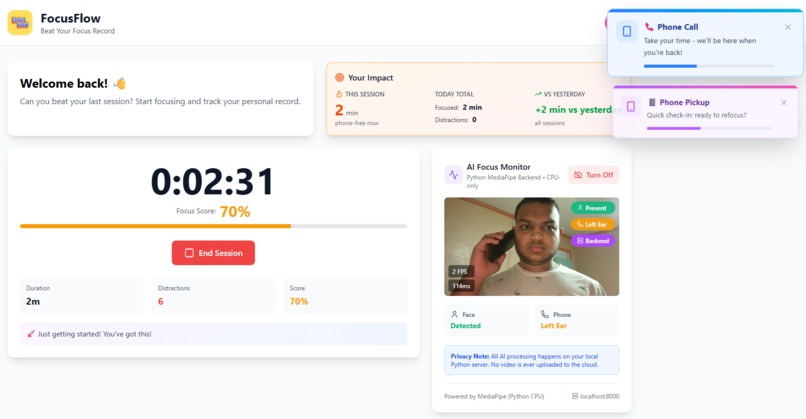
phone detected (notifies students)
-
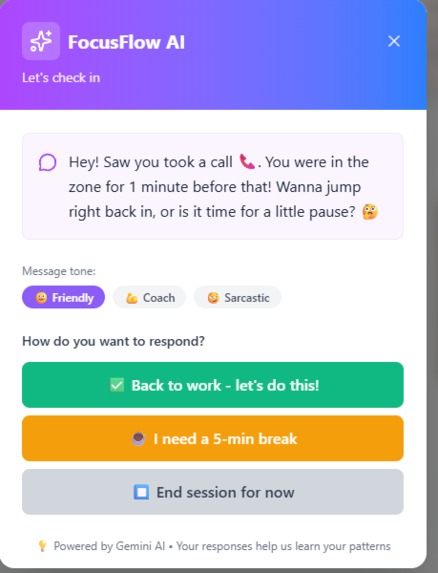
ai detected phone (intervention modal, can choose ai tone)
-
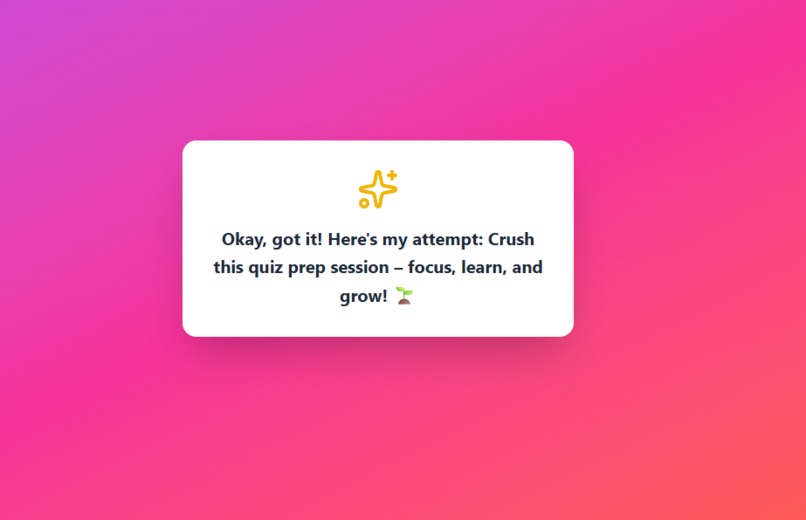
ai motivates students when session started
-
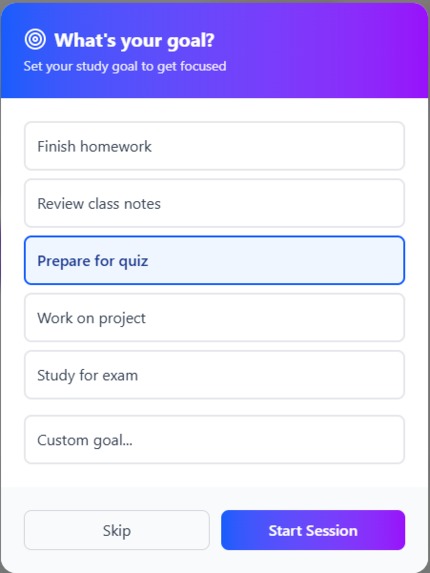
starting session (ai asks goal of sesison)
-
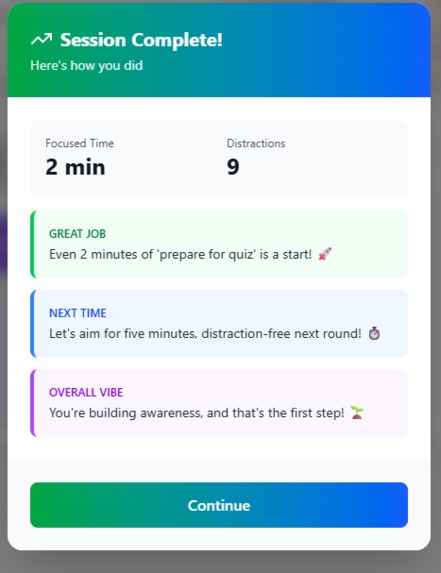
Session completed (ai review)


💡 Inspiration
I kept failing my study sessions. Like, every single time I'd sit down to study, my phone would somehow end up in my hand 10 minutes later. I'd be scrolling Instagram, checking Discord, replying to texts... and before I knew it, an hour was gone.
I tried all the usual tricks - putting my phone in another room, using forest apps, even gave my friend my phone. Nothing worked long-term. Then I realized: what if my webcam could just... catch me in the act? Like having a study buddy who calls you out when you're slacking.
That's how FocusFlow was born.
🎯 What it does
FocusFlow uses your webcam + AI to detect when you pick up your phone during study sessions. When it catches you distracted, it gives you a friendly nudge to get back to work (powered by Google's Gemini AI).
Core features:
- Camera AI detection - Uses MediaPipe to detect phone pickups in real-time
- AI coaching - Gemini gives you personalized warm-ups before sessions and reflections after
- Focus tracking - Real-time focus scores based on distraction count
- Session history - Track your study time and see your progress
Everything is privacy-first - the camera processing happens locally on your machine (Python backend), nothing gets uploaded to the cloud.
🛠️ How I built it
Tech Stack:
- Frontend: React + Vite + Tailwind CSS
- Backend: Python FastAPI + MediaPipe
- Database: Supabase (PostgreSQL)
- AI: Google Gemini 2.0 Flash
- Deployment: Vercel (frontend) + Render (backend)
The Architecture:
Camera Detection (Python Backend)
- Uses MediaPipe Pose Detection to track body keypoints
- Detects phone near face/ears based on hand position relative to head
- Runs entirely on CPU (no GPU needed)
- Sends detection results to frontend via FastAPI
Frontend (React)
- Captures webcam frames every 500ms
- Sends frames to backend for analysis
- Displays real-time detection overlays
- Manages session state and distraction logging
Database (Supabase)
- Stores user profiles with first/last name
- Tracks sessions (start time, end time, focus score)
- Logs distraction events with timestamps
- Row-level security for privacy
AI Coaching (Gemini)
- Generates personalized warm-up messages before sessions
- Creates reflections after sessions based on performance
- Provides encouraging interventions during distractions
🚧 Challenges I ran into
1. Phone Detection Accuracy
The hardest part was making phone detection actually work. Initially, I tried using TensorFlow.js in the browser, but it was super laggy and kept crashing. After hours of debugging WebGL issues, I decided to scrap it and build a Python backend instead.
The MediaPipe object detector can identify "cell phone" objects, but that wasn't enough - I needed to know if the phone was near the user's face. My solution:
- Track face landmarks (nose, ears, eyes)
- Track wrist positions from pose detection
- Calculate distance between phone center and face landmarks
- If phone within 140px of ear + wrist raised = "phone near ear"
It took a lot of trial and error with different distance thresholds to get it feeling natural.
2. User Profile Names Not Saving
For some reason, when users signed up with their first/last name, it would show up in the console but wouldn't save to the database. After 2 hours of debugging, I found the issue:
The Supabase trigger that creates user profiles was running BEFORE the profile had first_name/last_name columns. I had to:
- Add the columns to the database schema
- Update the trigger to read from user metadata
- Pass names as metadata during signup
- Fix RLS policies to allow the trigger to insert data
Total facepalm moment when I realized the columns just didn't exist yet.
3. FPS Counter Showing 0
The camera feed had an FPS overlay that kept showing "0 FPS" even though detections were working. Turns out I was calling setStats() twice in the same function, causing a race condition. Fixed by combining both calls into one update.
4. Real-time Performance
Getting smooth 20-30 FPS on CPU-only processing was tough. Had to optimize:
- Reduced frame resolution to 640x480
- Used EfficientDet Lite0 (lightest model)
- Implemented frame skipping (500ms interval instead of every frame)
- Added temporal smoothing to prevent flickering
📚 What I learned
Technical Skills:
- How to use MediaPipe for real-time pose/object detection
- Building a Python FastAPI backend from scratch
- Managing WebRTC video streams in React
- Implementing RLS policies in PostgreSQL
- Working with Google's Gemini API for AI chat
Soft Skills:
- When to pivot (ditching TensorFlow.js for Python backend)
- Debugging systematically (console.log is your best friend)
- Time management (spent too long on TensorFlow.js, should've switched earlier)
- Reading error messages carefully (that RLS policy error saved me hours)
Biggest Lesson: Don't over-engineer. My first attempt had fancy pose analysis, multiple ML models, complex state management. The version that actually works is way simpler - just phone detection + face tracking. Simple wins.
🚀 What's next for FocusFlow
If I keep working on this, I want to add:
- Better detection models - Currently using EfficientDet Lite0, could upgrade to Lite2 for better accuracy
- Desktop app detection - Track if user switches to YouTube/Twitter tabs
- Social features - Study sessions with friends, see who focuses longest
- Mobile app - React Native version for phone-based studying
- Posture tracking - Alert when slouching (I have the keypoints already!)
But honestly? Right now I'm just happy it works. If even one person uses this to actually finish their homework, I'll call it a success.
🙏 Acknowledgments
Huge thanks to:
- Student HackPad for organizing this awesome event
- Supabase for the generous free tier (saved my broke student wallet)
- Google for Gemini API access
- MediaPipe team for making ML accessible on CPU
- Stack Overflow for debugging my dumb mistakes at 3am
Built with ☕, ❤️, and determination over 48 hours.
Built With
- fastapi
- google-gemini-ai
- javascript
- mediapipe
- numpy
- postgresql
- python
- react
- render
- supabase
- tailwind-css
- vercel
- vite

Log in or sign up for Devpost to join the conversation.