-
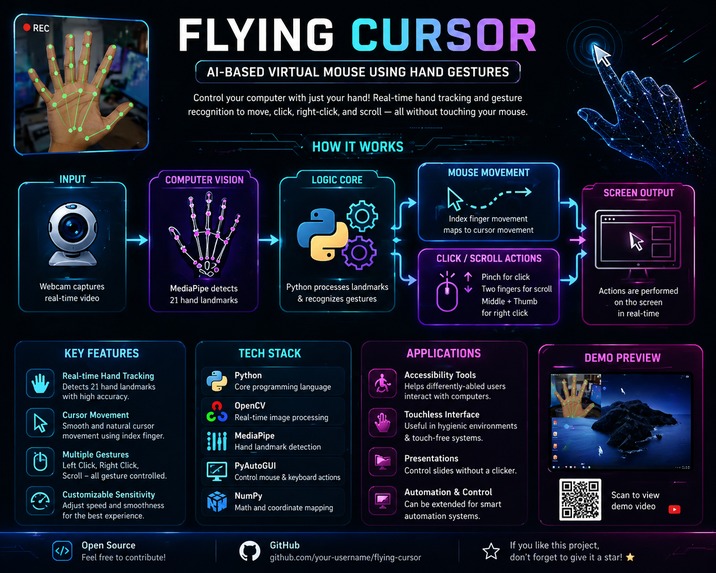
This is poster of whole project
Inspiration
We’ve all had those moments where our hands hurt after a long day of clicking, or where standard mice just feel clunky and restrictive. Beyond simple everyday convenience, physical mice and trackpads can present real accessibility hurdles for people with mobility challenges.
We asked ourselves: Why depend on extra hardware when almost every laptop already has a built-in camera? That simple question sparked Flying Cursor—an effort to turn natural hand gestures into precise, touchless device control using nothing more than a standard webcam.
What it does
Flying Cursor replaces physical mouse actions with simple, intuitive hand movements:
- Smooth Tracking: Point with your index finger to glide the cursor across the screen naturally.
- Clicking & Dragging: Pinch your thumb and index finger together to left-click, double-click, or drag items around.
- Vertical Scrolling: Gesture with your fingers to scroll through long articles, feeds, or code seamlessly.
- Custom Control: Simple posture changes let you trigger quick actions like switching tabs or adjusting sound.
How we built it
- Computer Vision Core: We used Python and MediaPipe to track 21 key hand landmarks in real time with high accuracy.
- Video Feed: OpenCV captures the live webcam stream and handles essential image processing like mirroring and scaling.
- OS Interactivity: PyAutoGUI translates hand position coordinates and recognized gestures into actual mouse events across the system.
- Smoothing Out Movement: To keep the cursor from shaking, we applied exponential moving average filtering to smooth out tiny hand jitter while keeping latency almost imperceptible.
Challenges we ran into
Getting a virtual cursor to feel as responsive as a physical mouse was trickier than expected:
- The "Jitter" Problem: Natural hand tremors translated into shaky cursor movements. Finding the exact sweet spot between smooth tracking and instant responsiveness took a lot of mathematical fine-tuning.
- Lighting & Backdrops: Uneven room lighting or noisy backgrounds occasionally threw off landmark detection. We had to carefully adjust confidence thresholds to keep tracking stable anywhere.
- False Triggers: Early on, normal hand repositioning was triggering unwanted clicks. We solved this by defining exact distance thresholds between fingers to make sure only intentional pinches counted as clicks.
Accomplishments that we're proud of
- Building a system that responds in real time without annoying delay or lag.
- Keeping the tech 100% software-based—no specialized sensors, depth cameras, or wearable hardware required.
- Getting drag-and-drop mechanics to feel natural and intuitive on the very first try.
What we learned
- Hands-on techniques for optimizing real-time computer vision pipelines without maxing out CPU usage.
- Applied signal processing to turn raw, noisy tracking data into clean UI movement.
- Practical insights into human-computer interaction (HCI) and accessible design.
What's next for Flying Cursor
- Eye-Tracking Assistance: Combining eye gaze tracking with hand gestures to make targeting small buttons even faster.
- Desktop App Packaging: Wrapping the tool into a clean background utility for macOS, Windows, and Linux.
- Voice Integration: Adding voice commands to create a completely hands-free desktop experience.


Log in or sign up for Devpost to join the conversation.