-
-
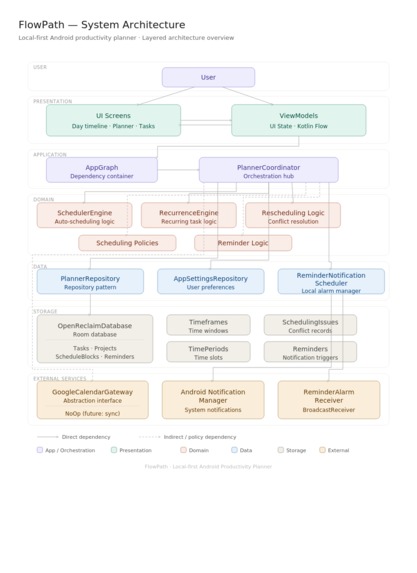
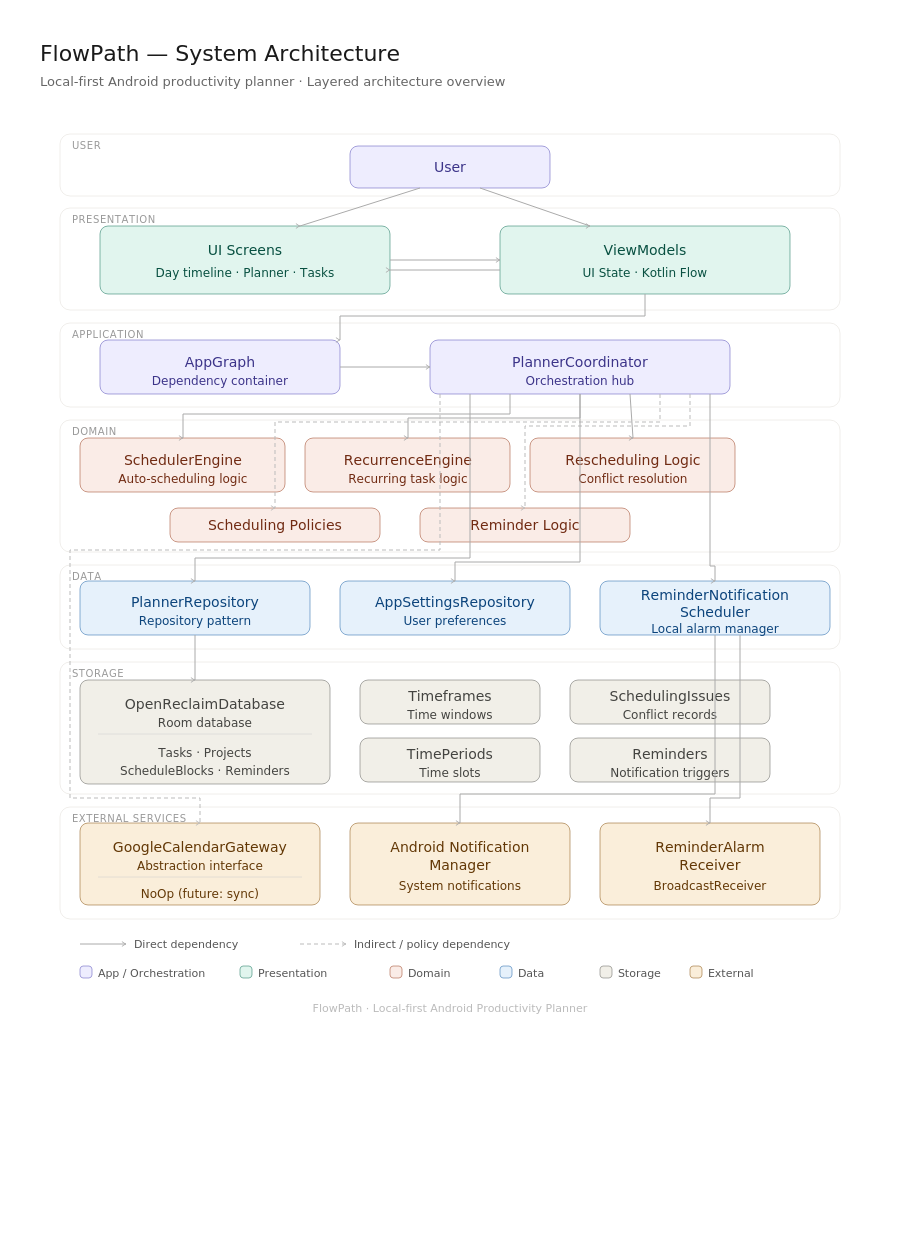
System architecture diagram
Inspiration
It started with a Sunday night ritual we all recognized: opening Google Calendar, staring at a half-finished week, and manually dragging blocks around for twenty minutes before doing any actual work. One teammate had a recurring 11pm habit, re-shuffling the next day's tasks after a shift ran long, only to watch sleep quietly become the time that absorbed whatever didn't fit. To-do apps weren't the problem; they're great at capturing what. The real friction was when and very tool we'd tried still made us do that part by hand. We wanted a planner that treated scheduling as a problem to be solved automatically, not a chore to be repeated every time life shifted.
What it does
Flowpath is a local-first Android planner with a custom Kotlin scheduling engine. You give it instructions such as duration, deadline, priority, preferred time window and it places them into your day automatically, working around existing commitments and a hard-protected sleep window. Lock a meeting in, mark a shift as running late, and the engine rebuilds the rest of your day around it instantly.
How we built it
The app is split into two modules: app/, the Jetpack Compose + Material 3 Android frontend, and engine/, a pure Kotlin scheduling library usable independently via CLI. Room/SQLite handles local storage, Coroutines and Flow drive reactive updates across the timeline, planner, and reminders tabs.
Challenges we ran into
Our first prototype opened on a 7-day Sleep Schedule setup form before showing any value and mentor feedback in week one called this out directly: configuration before payoff is exactly what makes planning tools get abandoned. We restructured the app around the timeline as the default screen, made detailed sleep configuration optional rather than mandatory, and kept the full setup as a roadmap item instead of a launch requirement. Getting the rebuild logic right, splitting tasks across shortened windows without ever touching the sleep block, was the other major engineering challenge.
What we learned
The hardest part of building an "automatic" tool isn't the automation, it's resisting the urge to make users configure everything before they see why it's worth it.

Log in or sign up for Devpost to join the conversation.