-
-
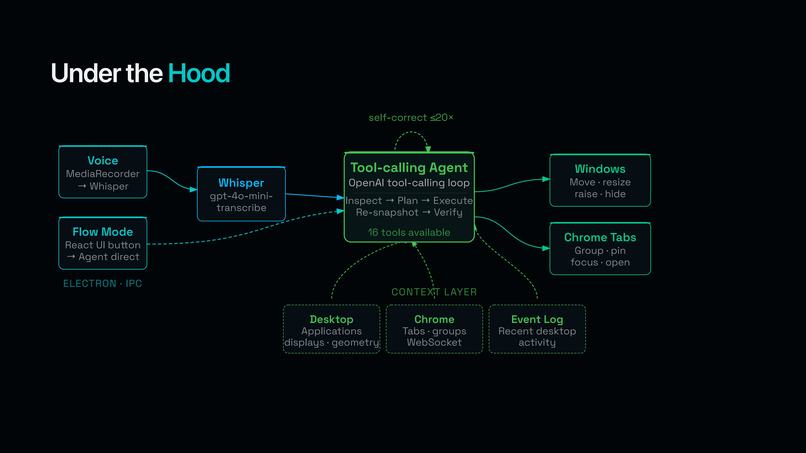
Data Flow and Inner Workings of FlowOS
-
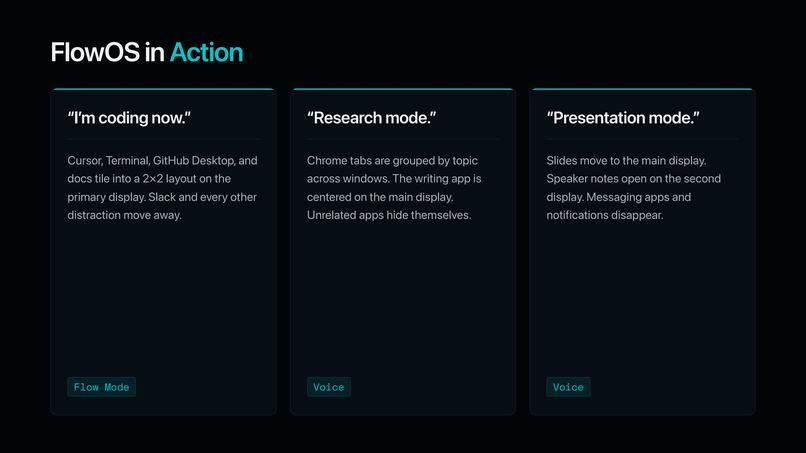
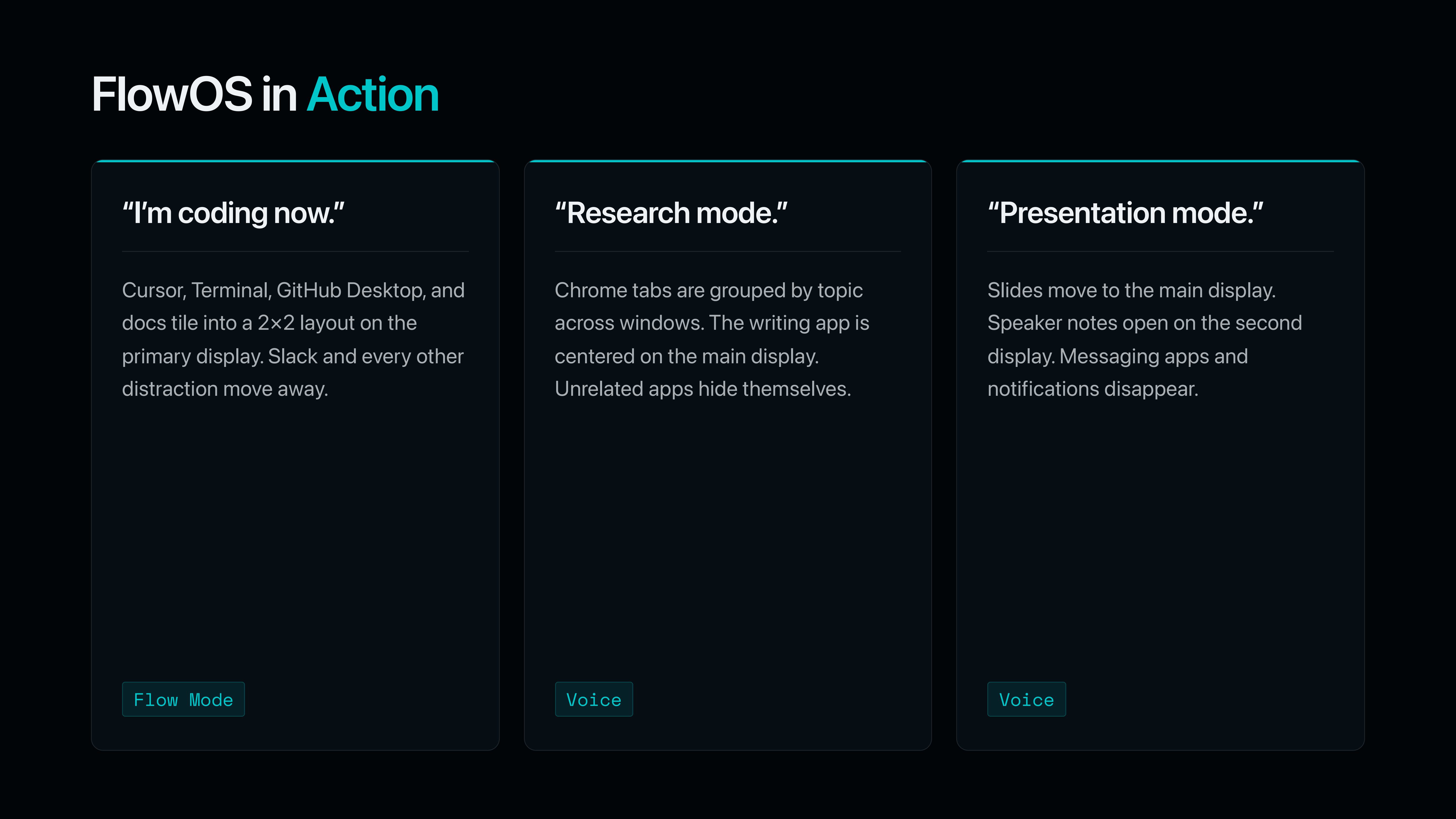
Example Voice Commands for Desktop/App Reorganization with FlowOS
-
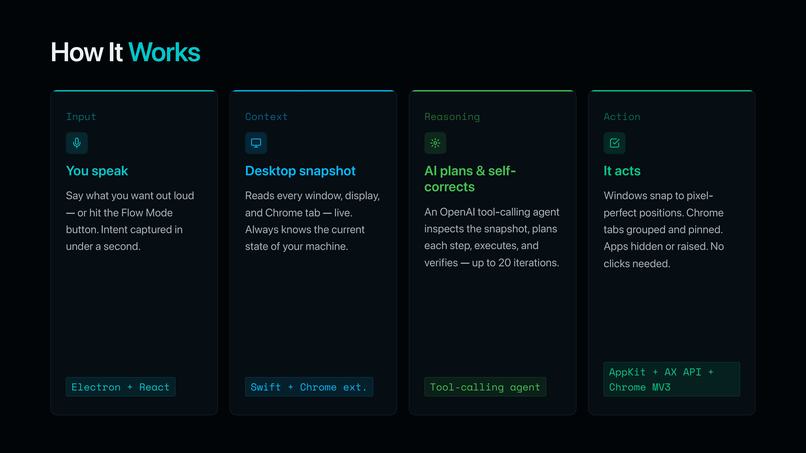
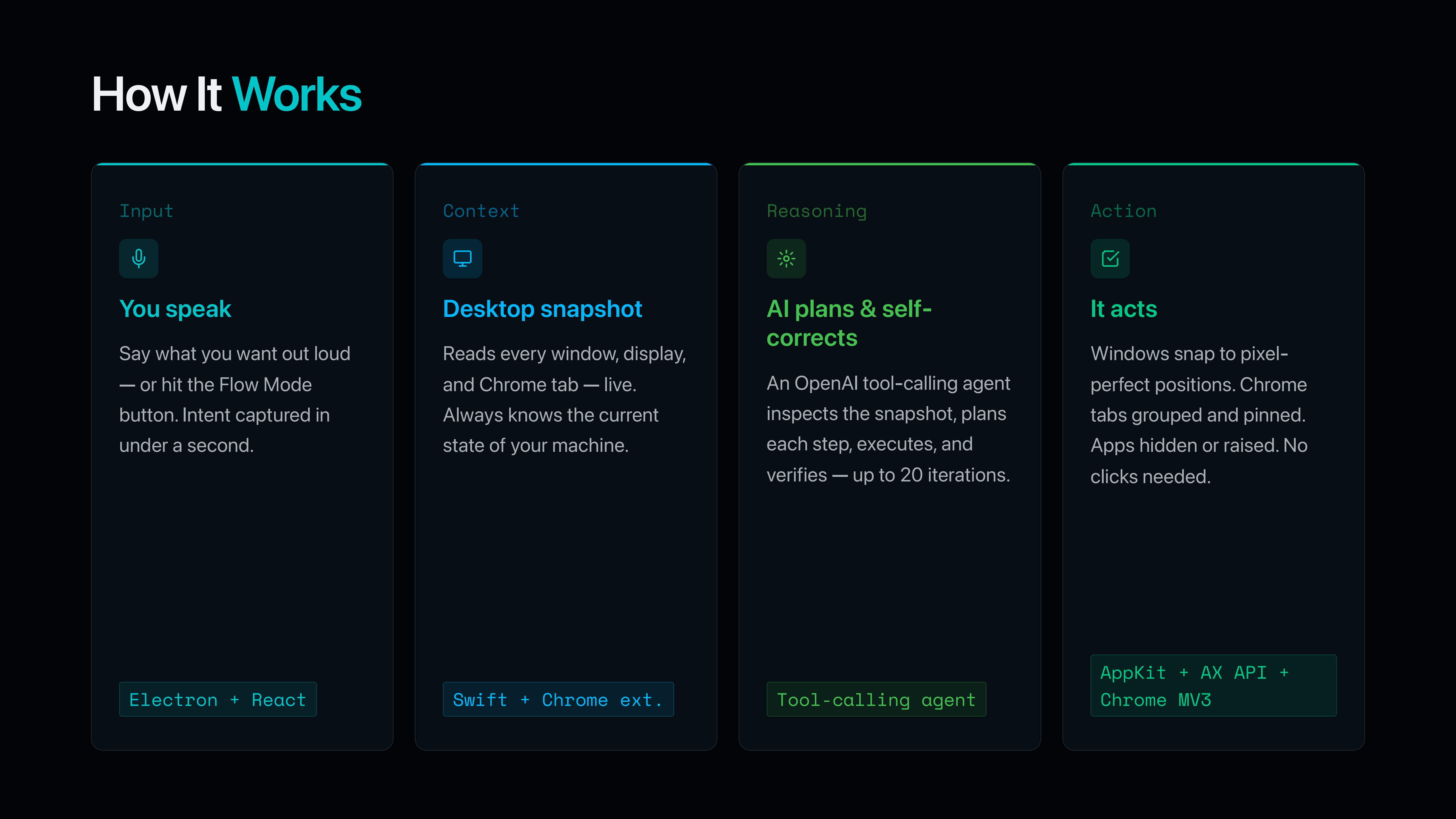
Step by Step Overview of FlowOS
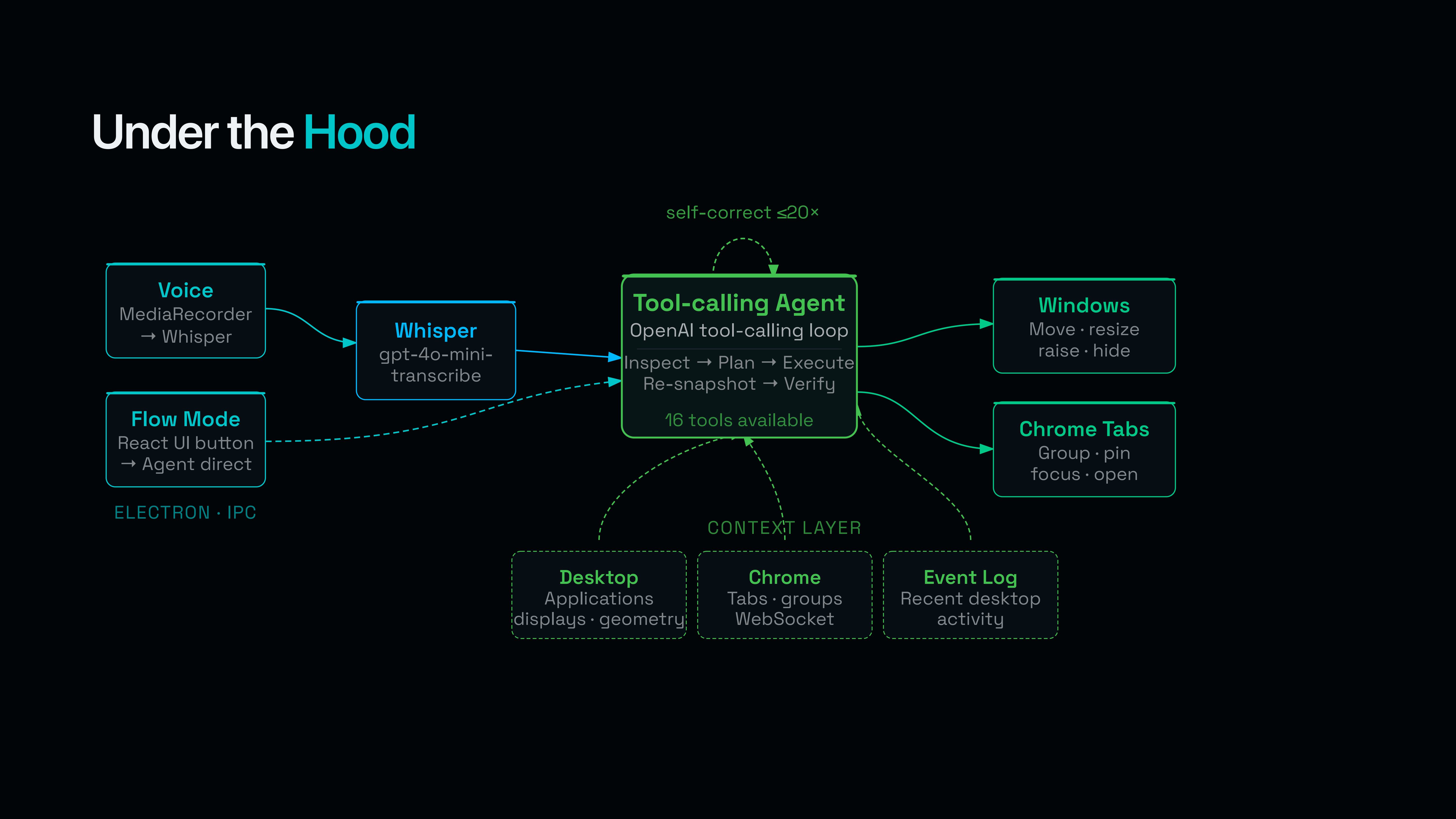
FlowOS
Inspiration
A typical workday looks like this: 12 windows spread across 2 displays, 30+ ungrouped Chrome tabs, an IDE buried under Slack, a terminal you can't find, an AI assistant that has no idea what you're actually working on, a bunch of other apps you forgot to close.
The OS knows where every window is. The AI knows what you're trying to do. They just don't talk to each other. FlowOS is the bridge between them, and it's at your fingertips to take action and start intelligently organizing your desktop, displays, apps, and tabs based on your on-demand requests.
What it does
FlowOS is a voice-first agentic control plane for macOS that lives as a small icon in your menu bar.
Click the icon and a dropdown appears: Start Tracking, Enter Flow State (which expands into Coding Mode / Research Mode / Auto), and Toggle Mic. Or skip the click entirely: hit ⌘⇧K from anywhere on macOS, speak your command, then hit ⌘⇧K again to send it. While you're talking, the floating control window pops next to the menu-bar icon and glows red. Keyboard → voice → keyboard. That's the whole interaction.
An OpenAI tool-calling agent rearranges your windows, displays, and Chrome tabs around the task you're about to start. Every action is reversible — nothing closed, nothing quit, nothing lost.
Things you can actually say to it:
- "Put me in Coding Mode." → splits Cursor and GitHub Desktop side-by-side on the primary display (filling the visible rect, menu bar and Dock excluded), moves every Chrome window to the secondary display sized to fit, minimizes Slack / Discord / Mail.
- "Move my Chrome to my second display and group all my tabs by category." → relocates Chrome to display 2 at full visible-rect size, then takes 30+ ungrouped tabs across multiple Chrome windows and topic-groups them ("Entertainment", "School", "Hackathon", "Social Media") without closing or losing one.
- "Open 5 tabs to help me learn dynamic programming, the STAR method, and hashmap YouTube videos." → opens five new tabs in a fresh Chrome window and groups them by topic.
- "Split screen my two most recently used applications." → reads the rolling 50-event tracking buffer, picks the two most recent
app.activatedevents, and tiles those windows on the focused display via the deterministicsplit_two_windowstool. - "Bring back Slack on the iPad." → unhides Slack and moves it to the connected Sidecar display, sized to that display's visible rect.
Three one-click Flow Modes under the menu-bar dropdown, each routed to its own system prompt over a shared base:
- Coding Mode — primary display: split between an IDE and a coding helper (GitHub Desktop, Codex, Terminal). Display 2: every Chrome window. Everything else: minimized.
- Research Mode — primary display: split between Chrome and a writing companion (Apple Notes, Bear, Obsidian). Display 2: a grounding app (Spotify, Apple Music) sized to fill it, but only if it's already running. Distractors minimized.
- Auto — requires tracking. Reads the rolling 50-event summary, infers whether your recent activity is coding-heavy or research-heavy, picks the right playbook, and runs it.
The floating renderer window mirrors the menu bar — Coding | Research as a 2-up grid, Auto Flow and Start Tracking stacked underneath, the mic button up top with a ⌘⇧K to toggle from anywhere hint — for power users who'd rather have it on screen.
Every voice command and every Flow run also produces a live context pack — every open app, every window's frame, every connected display's geometry, the last 50 native events, and the full Chrome tab/window/group state — that we can hand to coding agents (Cursor, Claude, Codex) so they stop starting cold with your development workflows and accelerate them instead.
How we built it
A four-process system held together by a single tool-calling loop, surfaced through one menu-bar tray icon and one global hotkey.
Electron main (TypeScript, Node.js) — the orchestrator. Owns the menu-bar Tray + Menu (Start Tracking / Enter Flow State → Coding / Research / Auto / Toggle Mic), registers the ⌘⇧K global shortcut, runs the OpenAI agent loop (up to 20 iterations of GPT-4o / GPT-4.1 / GPT-5 function calling), dispatches each tool_use to the right backend, captures snapshots before every run, and pre-injects three live context blocks into the prompt: the system snapshot, the Chrome snapshot, and the rolling tracking summary.
Swift native helper (Swift 5, AppKit, Accessibility API) — the muscle. A standalone binary that speaks JSON-RPC over stdio to Electron and uses AXUIElement, kAXPositionAttribute, kAXSizeAttribute, kAXRaiseAction, NSScreen, and CoreGraphics to actually move windows. Reports every display's visibleX/visibleY/visibleWidth/visibleHeight in macOS's global coordinate space — which is what makes Sidecar / iPad / external 4K all "just work."
React + Vite renderer — the floating control window that mirrors the menu bar and visualizes recording state. Voice button (MediaRecorder → IPC → OpenAI Whisper, since webkitSpeechRecognition returns "network error" inside Electron), Flow Mode buttons (Coding | Research grid + Auto Flow + Start Tracking), live status, last-run summary. The window auto-shows next to the menu-bar icon when ⌘⇧K starts recording and auto-hides when the command goes out — so it stays out of the way until you need it.
Chrome extension (Manifest V3) — the browser hands. chrome.tabs, chrome.tabGroups, chrome.windows talking to Electron over a local WebSocket on ws://localhost:7331. Streams a fresh tab/window/group snapshot continuously.
The brain is OpenAI tool calling with a 17-tool surface: get_system_snapshot, move_window, resize_window, set_frame, split_two_windows, raise_window, minimize_window, restore_window, activate_app, hide_app, unhide_app, get_chrome_snapshot, focus_chrome_tab, group_chrome_tabs, ungroup_chrome_tabs, pin_chrome_tab, open_chrome_tab. We deliberately don't expose tab close, app quit, or any destructive verb — safety lives in the schema, not the prompt.
A few decisions worth calling out:
split_two_windowsis deterministic, not LLM math. The agent passes a display rect and twowindowIds; Electron computes left/right cells server-side (with optional gap and margin) and applies them as a single atomicwindow.setFrameper window. No drift, no off-by-pixel, no "it tiled to the wrong monitor."- The system prompt re-snapshots aggressively. After ~5 mutating tool calls, before any verification step, and after any
display.changedevent, the prompt instructs the model to re-callget_system_snapshotso it never plans against stale state. - Voice and Flow Mode share one agent loop. Same orchestrator class, same 17-tool surface, same context pack. The only thing that differs is the initial prompt.
- Tracking is a 50-event ring buffer, in-memory, prepend-on-record, never reset between voice calls. Both voice commands and Flow runs pull a fresh
getSummary()on every invocation, so the agent always sees the freshest 50 events. - Auto has a hard tracking gate with a native macOS dialog. If you press Auto without tracking on, the orchestrator returns an
errorCode: "tracking-required"early-exit, the main process pops adialog.showMessageBox, and no OpenAI call is wasted. - One global hotkey, one consistent recording UI. ⌘⇧K is registered via Electron
globalShortcut, which dispatches the sametoggle-micIPC action the menu bar uses. The renderer reacts to listening state by positioning itself next to the menu-bar icon, glowing red, and pulsing — so the recording cue is the same whether you triggered it from the hotkey or the floating window.
Challenges we ran into
Multi-display geometry is a swamp. macOS uses one global coordinate space across every display, and (0,0) is wherever your primary display's top-left happens to be. A window at (x: -2560, y: 0) is on the left external monitor; the same coords on someone else's setup is off-screen. We had to teach the prompt explicitly: use the target display's visibleX/visibleY/visibleWidth/visibleHeight, never assume (0,0), compute cellW = visibleWidth/C and cellH = visibleHeight/R per-display. Sidecar made it worse — its visible rect comes back with different scale factors than the host display.
The LLM kept hallucinating tool calls as text. Early runs: the model would output {"name": "split_two_windows", "arguments": {...}} as a literal text block instead of issuing a real tool call. Fix: a tight system prompt ("never invent tool names or fields") plus extremely verb-rich tool descriptions ("Place exactly two windows side by side…", "Call this BEFORE any Chrome tab manipulation…") that nudge the model into the function-calling path on the first turn.
Whisper in Electron. The browser-native webkitSpeechRecognition returns "network error" inside Electron because Google's speech endpoint isn't accessible from the renderer's origin. We rebuilt the voice path on MediaRecorder → IPC → OpenAI Whisper, which also let us drop transcription latency materially.
Defining "flow state" concretely. We turned a fluffy concept into measurable signals: count of focused-app context switches per minute, ratio of visible-to-hidden windows on the primary display, whether IDE / terminal / browser are co-located, and whether your tab list is grouped or flat. Those signals drive what each Flow Mode actually does.
Trust. FlowOS rearranges your entire desktop in seconds. We made every action reversible (hide instead of quit, group instead of delete, move instead of close, never touch a Chrome tab) and built Auto mode to refuse to run if it doesn't have tracking data — better to ask for consent than guess.
Accomplishments that we're proud of
- The agent is genuinely flexible. Because the brain is a real OpenAI tool-calling loop with a 17-tool surface (not a hardcoded list of macros), you're not limited to the example commands above — anything you can describe in English that decomposes into "snapshot → arrange windows → group/open Chrome tabs" works. "Move the smaller of my Chrome windows to my left monitor and tile the rest of my screen with my IDE and terminal." "Take everything except Cursor and minimize it." "Open three tabs about CRDTs and pin the docs one." It just plans and executes — no per-command code path required.
- The menu-bar UX nails it. One icon, one dropdown, three Flow Modes, a mic toggle, one global hotkey (⌘⇧K). No window to alt-tab to, no app to quit. FlowOS is in the menu bar where it belongs.
- The interaction loop is one motion. Press ⌘⇧K, speak, press ⌘⇧K again — done. The floating window glows red right next to the menu-bar icon while you're talking so there's never a "wait, is it recording?" moment, and your hands never leave the keyboard.
- End-to-end reliability. "Put me in coding mode" → 3 seconds later your IDE and GitHub Desktop are split-screen on your main display, every Chrome window has been relocated to your second monitor sized to its visible rect, and Slack / Discord / Mail are minimized. No glitches, no half-applied layouts.
- Deterministic two-window splits.
split_two_windowsis one of the most-called tools in the agent loop and it never drifts — every call writes both windows' frames atomically and the result is pixel-identical across runs. - Multi-display, including Sidecar. External 4K, internal Retina, iPad-as-Sidecar — all reported with correct
visibleX/Y/Width/Heightand all tileable. The agent has zero special-case logic per display type. - Real-time tab orchestration. 30+ ungrouped Chrome tabs get topic-grouped across multiple Chrome windows in a single Flow Mode run without losing a single tab.
- Auto mode. A general flow state that infers your intent from the last 50 native events and picks the right playbook, with a hard gate (and a native macOS dialog) when tracking isn't on.
What we learned
The model isn't the product. Reliable execution is. GPT-5 is great at planning a window layout. It's terrible at applying one when the math drifts by 2 pixels per call across a 4-window tile. Moving geometry math into Electron (split_two_windows) was good for reliability.
Agentic UX is a context pipeline. The agent only feels smart if it has fresh, structured state on every iteration. We pre-inject the desktop/system snapshot, Chrome snapshot, and rolling tracking summary on every invocation, and we tell the model exactly when to re-fetch. Without that, the agent plans against stale state and the user sees half-applied layouts.
Surface matters. Putting FlowOS in the menu bar (instead of yet another floating window), wiring a single global hotkey (⌘⇧K), and giving recording one unambiguous visual state made the difference between "thing I forget to open" and "thing I reach for ten times a day." The renderer window is still there for power use, but the menu bar + hotkey is where the product lives.
Constrain the tool surface aggressively. We don't expose close_tab, quit_app, or any destructive verb. The agent can hide, minimize, group, ungroup, and move — that's it. Removing destructive verbs from the schema is more reliable than adding "don't be destructive" to the prompt.
What's next for FlowOS
- Layout memory and session replay. Save a Flow run as a named layout, replay it later. "Put me back where I was on Friday."
- On-device inference. We've started integration testing with
llama.cpp, Ollama, and Zetic so the planning model can run locally — lower latency, no API spend, and your desktop state never leaves your machine. - Richer context packs for AI coding agents. Cursor, Claude, Codex — feed them the structured FlowOS snapshot (open files, focused window, recent terminal commands, error logs, current Chrome tabs) so they stop starting cold.
- Cross-platform. A Windows path via
node-window-manageris on the roadmap. The agent loop, tool surface, and Chrome extension are already platform-agnostic — only the native helper is macOS-specific. - Learned per-user defaults. Watch which layouts you adjust manually after a Flow run and bias future runs toward what you actually wanted.


Log in or sign up for Devpost to join the conversation.