Inspiration
Questions where asked about what decisions students often delay or overthink often? What habits do students struggle to build and maintain? What study/work tasks feel too complicated or disorganized? What do students need clarity on when planning for school or goals? Why do students procrastinate even when deadlines are near? This is one of the major problems faced by students like me . The real challenge isn’t finding tasks—it’s choosing what to do first, staying consistent, and not getting overwhelmed.
What it does
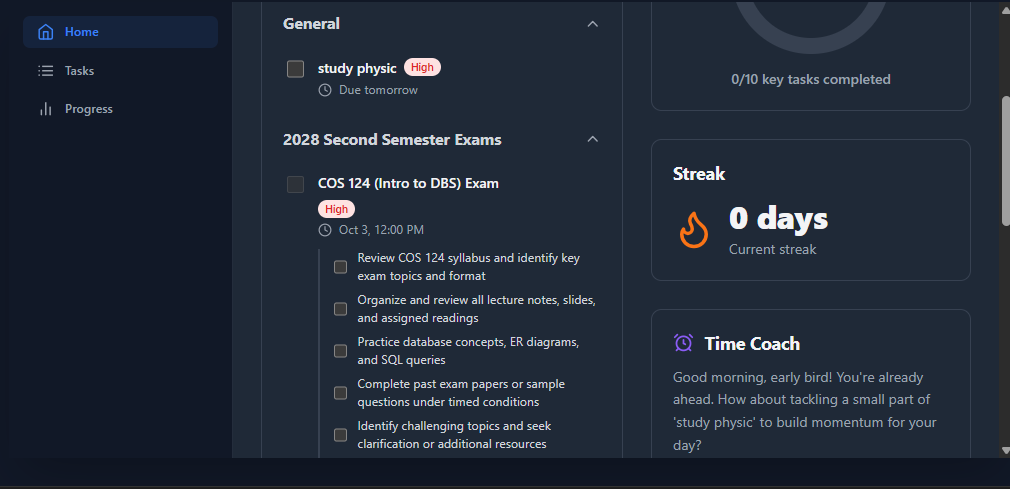
That’s why I built FlowMate, a lightweight web app designed for students by a student, powered by Google’s Gemini AI. FlowMate transforms snapshots of timetables, tasks, or typed to-dos into prioritized tasks in seconds. It reads what you upload, understands deadlines, and delivers a clear “top action” so you don’t waste another minute. Smart Prioritization Engine Uses AI to analyze your tasks by urgency, deadlines, and personal energy levels. Recommends what to focus on right now . Adaptive Time Coach suggests the best task for each moment of the day based on your activity patterns. Detects procrastination or idle time and gently nudges you back on track. Consistency Tracker (Streaks). Builds long-term motivation through daily progress streaks.Encourages you to stay active on your key goals Visual Progress Dashboard: your daily and weekly progress at a glance and motivational feedback reinforce momentum. Calendar & Reminder Integration.Syncs with Google Calendar, Apple Reminders, or your school planner. Automatically imports deadlines and events to keep your AI plan up to date. Emotion-Aware Nudges Learns your motivation patterns and provides encouragement or rest prompts. Adapts tone and recommendations to your mood and productivity cycles. Break an ambiguous task into simpler step-by-step tasks
How we built it
Frontend Architecture & Technology We chose a modern, lightweight, and robust tech stack for the frontend: React & TypeScript: React's component-based architecture was perfect for building a modular and maintainable UI. We used TypeScript from the start to ensure type safety, which is crucial for preventing common bugs and making the code easier to refactor as the application grows. State Management: For an application of this scope, we kept state management simple and centralized within the main App.tsx component using React Hooks (useState, useEffect, useCallback). This avoids the overhead of larger state management libraries and keeps data flow predictable. Styling with Tailwind CSS: We used Tailwind CSS for its utility-first approach. This allowed us to rapidly build a custom, responsive design directly within our JSX, ensuring visual consistency and making styling highly maintainable. The dark-first theme was a conscious UI/UX choice to provide a comfortable experience in various lighting conditions. No-Build-Step Setup: We deliberately avoided a complex build setup (like Webpack or Vite). By using an importmap in index.html, we can import React and the @google/genai SDK directly from a CDN. This makes the project incredibly simple to run—you just open the HTML file in a browser. Offline-First with localStorage: All user data (tasks, folders, streaks) is saved to the browser's localStorage. This ensures the app is fully functional offline and that the user's data persists between sessions, providing a reliable and seamless experience.
- The AI Engine: Harnessing the Gemini API The "magic" of FlowMate comes from its deep integration with the Gemini API. We didn't just use it for one feature; we embedded it into the core user experience through several specialized services in geminiService.ts. Structured Output with JSON Mode: This was the most critical decision. For almost every API call, we instruct Gemini to return its response in JSON format by providing a responseSchema. This is a game-changer because it gives us predictable, structured data that we can directly use in the application without any fragile string parsing. It makes the integration robust and reliable. Here’s how we used it for key features: AI Prioritization (getPrioritizedTasks): We send the user's task list along with the current date. The prompt instructs Gemini to act as a world-class productivity coach, re-evaluating each task's urgency based on its deadline. It then returns a fully sorted list of tasks and a single, actionable recommendation for what the user should focus on right now. Smart Task Extraction (extractTasksFrom...): This showcases Gemini's multi-modal capabilities. A user can upload an image of a schedule or a plain text file. We send this data to the model with a prompt asking it to parse the content, identify actionable items, calculate real deadlines based on the current date (e.g., turn "next Wednesday" into an ISO string), infer urgency, and even suggest a relevant folder name. Task Breakdown (breakDownTask): When a user feels a task is too big, they can click a button. We send the task name (e.g., "Write research paper") to Gemini and ask it to break it down into a JSON array of small, actionable sub-tasks, which are then added directly to the task in the UI. Weekly Blueprint (getWeeklyInsights): At the end of the week, we send a snapshot of recently completed and overdue tasks. The prompt asks Gemini to analyze this data for patterns—like when the user is most productive or what kind of tasks they procrastinate on—and generate a summary with personalized, actionable tips for the week ahead.
Challenges we ran into
Managing Asynchronous Operations and UI State: The Challenge: Key features like prioritization, task breakdown, and blueprint generation are asynchronous and can take a few seconds. We had to prevent the UI from feeling frozen or unresponsive while ensuring the user always knew what was happening. Our Solution: We implemented granular loading states for each specific action (e.g., isLoading, isUploading, isBreakingDownTask). This allowed us to disable buttons, show spinners on specific elements, and provide contextual feedback without locking up the entire interface. It was a constant balance between providing immediate feedback and waiting for the "source of truth" from the AI.
Accomplishments that we're proud of
Creating a Proactive and Context-Aware Assistant: We're proud that FlowMate isn't just a passive tool; it's a proactive partner. Features like the Time Coach—which provides gentle nudges based on user inactivity or the time of day—and the Weekly Productivity Blueprint showcase this best. These features required us to think beyond simple task management and design prompts that allow the AI to perform genuine analysis. The blueprint, for example, analyzes patterns in completed and overdue tasks to provide personalized, actionable advice. This elevates the app from a digital to-do list to an intelligent assistant that helps users genuinely improve their habits over time.
What we learned
The Real Value is in Proactive Assistance: We learned that an intelligent app should do more than just respond to commands. The most impactful features were those that anticipated user needs, like the Weekly Productivity Blueprint which analyzes past behavior to offer future advice, or the Time Coach which provides context-aware nudges. The key lesson was to design prompts and features that actively analyze the user's data to provide value they didn't even know to ask for.
AI tool disclose:
Platform: google AI for developer. AI used: Gemini AI 2.5pro.
What's next for FlowMate
Calendar Sync: Two-way synchronization with Google Calendar. PDF Processing: Allow users to upload PDFs (like syllabi) for task extraction. Advanced Analytics: Deeper insights into productivity patterns over longer periods. Gamification: Introduce badges and achievements for reaching milestones.
Built With
- gemini
- react
- tailwindcss
- typescript

Log in or sign up for Devpost to join the conversation.