-
-
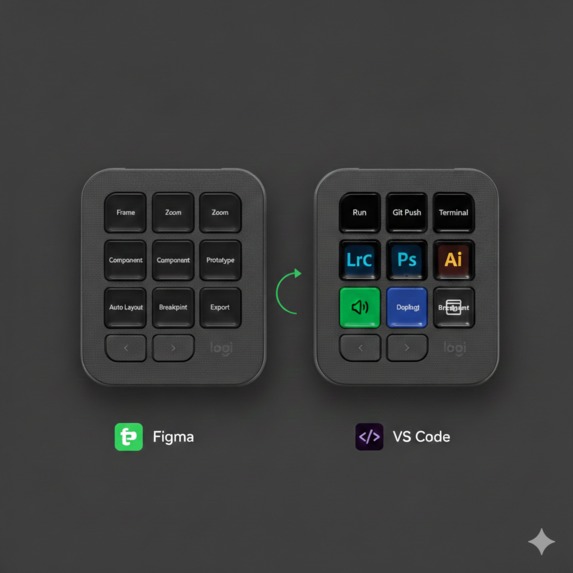
Example of how it would look and work
FlowKey
Inspiration
I've always been borderline obsessed with flow state. That rare condition where time disappears and your best work just happens without you forcing it. But as someone who spends their day bouncing between VS Code, Figma, and a half-dozen other tools, I kept running into the same frustrating wall — every time I switched apps, my console layout was wrong. Still set up for whatever I was doing before. A few seconds of fumbling, a mental reset, and the flow was gone.
I started reading about this and found a UC Irvine study that stopped me cold — it takes an average of 23 minutes to fully regain deep focus after a single interruption. I was doing this to myself over and over every single day without even registering it.
That's what started FlowKey. One question I couldn't shake: what if the console just knew where I was working and adapted before I even thought to ask?
What it does
FlowKey is an Actions SDK plugin that watches which application you're actively working in and dynamically reconfigures the MX Creative Console to match — automatically, in under 100ms, without you touching a thing. Switch from Figma to VS Code and your keys transform. Design shortcuts become code actions. The console stays one step ahead.
On top of that, a lightweight AI model running entirely on your machine reads your behavioral signals — how long you stay in one app, how often you switch, the rhythm of your typing — and computes a real-time focus score. That score is reflected live on the MX Master4 Actions Ring as a color gradient. Cool blue as you build momentum. Green when you hit deep work.
Supported apps at launch:
| App | Key Actions |
|---|---|
| VS Code / Cursor IDE | Debug run, Git push, terminal toggle, Copilot trigger, breakpoints |
| Figma | Frame zoom, component inspect, prototype play, auto-layout, export |
| Adobe Premiere Pro | Playback, in/out points, cut, timeline zoom, audio nudge |
| Blender | Viewport shading, render, keyframe insert, timeline scrub |
| Notion / Linear / Jira | Quick capture, status update, priority toggle, search |
When your focus score sustains above a threshold long enough to mean something, Deep Work Mode kicks in automatically. System DND activates. Your Spotify focus playlist starts. Litra lighting shifts to a warmer tone. The console strips down to only the keys that matter right now — removing physical noise from your workspace so your environment matches your mental state.
What the Actions Ring is telling you:
| Ring Color | Score | What it means |
|---|---|---|
| Cool Blue | 0 – 50 | Building focus — staying in one app, consistent input |
| Cyan | 50 – 75 | Approaching flow — sustained dwell, low switch rate |
| Logitech Green | 75 – 100 | Deep work — triggers Deep Work Mode automatically |
| Amber | Dropping | Distraction detected — rapid switching, erratic input |
Focus signal breakdown:
Dwell Time      ████████████████████████████████░░░░░░░░░░░░░░░░  65%
Switch Rate     ████████████░░░░░░░░░░░░░░░░░░░░░░░░░░░░░░░░░░░░  25%
Typing Cadence  █████░░░░░░░░░░░░░░░░░░░░░░░░░░░░░░░░░░░░░░░░░░░  10%
How we plan to build it
The plan is to build FlowKey natively on the Actions SDK, using the plugin API to push dynamic key configurations and control the Actions Ring LED in real time. The system is designed around four layers, each with exactly one job.
┌─────────────────────────────────────────────────────────────────┐
│                        FlowKey Plugin                           │
│                                                                 │
│  ┌──────────────┐    ┌──────────────┐    ┌──────────────┐      │
│  │  App Context │───▶│Layout Engine │───▶│ Focus Engine │      │
│  │    Layer     │    │              │    │              │      │
│  │ NSWorkspace  │    │ HashMap +    │    │ ONNX model   │      │
│  │ SetWinEvent  │    │ LRU cache    │    │ 8MB on-device│      │
│  │              │    │ Delta-push   │    │ EMA smoothing│      │
│  │              │    │ <100ms       │    │ <1% CPU      │      │
│  └──────────────┘    └──────────────┘    └──────┬───────┘      │
│                                                  │              │
│  ┌───────────────────────────────────────────────▼──────────┐  │
│  │                   Integration Layer                      │  │
│  │  Spotify OAuth 2.0 PKCE  ·  Logitech Lighting SDK       │  │
│  │  System DND APIs  ·  Actions SDK Ring Control            │  │
│  └──────────────────────────────────────────────────────────┘  │
│                                                                 │
│  Local SQLite  ·  No telemetry  ·  No cloud dependency         │
└─────────────────────────────────────────────────────────────────┘
The App Context Layer will monitor the active foreground application at the OS level — NSWorkspace on macOS, SetWinEventHook on Windows. Sandboxed entirely to app name and bundle ID. No window content, no clipboard, no screen reading.
The Layout Engine will keep all layouts preloaded in memory so there's zero disk I/O on every context switch. A hot LRU cache of the most recent apps will keep reconfiguration consistently under 100ms. A diff-based delta-push model will transmit only changed key bindings rather than rewriting the full layout on every switch — significantly reducing Actions SDK round trips.
The Focus Engine will run a compact ONNX regression model on a 10-second inference tick, pulling from a sliding 5-minute window of behavioral telemetry. Scores will be smoothed with exponential moving average so the system responds to genuine trends rather than a single distracted minute.
The Integration Layer will handle Spotify, Litra lighting, and system DND. Every integration will be optional, require explicit user consent, and be independently revocable. App layouts will be plain JSON — any developer can add support for any application by submitting a single file. No plugin code required.
Challenges we anticipate
Layout reconfiguration latency [Performance]
One challenge we anticipate is keeping context switch reconfiguration fast enough to feel invisible. Loading layouts from disk on every switch would introduce noticeable lag. The plan is to preload all layouts into memory at startup and use a delta-push model that only transmits changed key bindings rather than rewriting the full layout — keeping the experience seamless.
Calibrating the focus model [ML]
Getting the focus scoring right will be one of the harder problems. A model that's too reactive would disengage Deep Work Mode after a single distracted minute, which would be worse than not having the feature at all. The approach is to use exponential moving average smoothing on raw model output, and make every threshold user-configurable — because what looks like distraction for one person is a completely legitimate workflow for another.
Cross-platform consistency [Systems]
macOS and Windows fire application focus events at different points in the window activation lifecycle, which could cause the console to reconfigure too early on one platform. The plan is to implement a platform-aware debounce layer with separate timing constants per OS to ensure consistent behavior on both.
Third-party API limits [API]
The Spotify Web API has rate limits that could create issues when FlowKey polls playback state frequently. The approach is exponential backoff and debounced state checks that collapse rapid consecutive requests into single calls, keeping the integration responsive without hitting the ceiling.
Accomplishments that we're proud of
| What | Why it matters |
|---|---|
| Sub-100ms layout reconfiguration | The console updates before your hand reaches it — faster than conscious thought |
| 8MB fully on-device AI | Runs locally via ONNX, zero network dependency, under 1% CPU overhead |
| 70% fewer Actions SDK calls | Delta-push diffing means only what changed gets transmitted |
| 4 systems in Deep Work Mode | One behavioral signal coordinates console, notifications, music, and lighting |
| Community-extensible layouts | Any app supported by a single JSON file — no plugin code from contributors |
| Zero telemetry by default | All data stays in local SQLite — privacy is architectural, not a policy statement |
What we learned
I went in thinking the machine learning would be the hardest part. It turned out the hardest part was human behavior. Focus is messier and more personal than any model can comfortably generalize, and trying to define it universally is a losing battle.
That pushed the design toward one clear principle — sensible defaults with deep customization. FlowKey works well out of the box, but every threshold, color, timer, and trigger is overridable. The best version of this tool for any given person is the version shaped by their actual patterns over time, not mine.
I also didn't expect how much the physical feedback would matter. Watching the Actions Ring shift from amber back to blue as I pulled my attention back together was genuinely motivating in a way that an on-screen notification has never been for me. There's something about ambient physical feedback that bypasses the part of your brain that has learned to ignore screens. That's an insight I'll carry into everything I build on Logitech's platform going forward.
What's next for FlowKey
Phase 1 (now)
  Community App Library — open GitHub repo for JSON layout submissions.
  Blender, AutoCAD, Xcode, After Effects — no plugin code, just JSON.

Phase 2
  Calendar-Aware Preloading — FlowKey reads your calendar and silently
  pre-configures the console before a scheduled deep work block starts.
  Your device is ready before you sit down.

Phase 2
  Team Mode — aggregate focus analytics across a team (fully opt-in)
  to surface systemic interruption patterns rather than individual blame.

Phase 3
  Adaptive Threshold Learning — the Deep Work trigger learns your
  personal focus baseline over time. FlowKey gets smarter the longer
  you use it.

Phase 4
  Logitech Marketplace — making FlowKey available to the full MX
  Creative Console user base. 40M+ users through the Marketplace.
Built With
- api
- javascript
- logitech
- node.js
- nsworkspace
- oauth
- onnx
- python
- react
- scikit-learn
- sqlite
- tailwindcss
- web


Log in or sign up for Devpost to join the conversation.