-
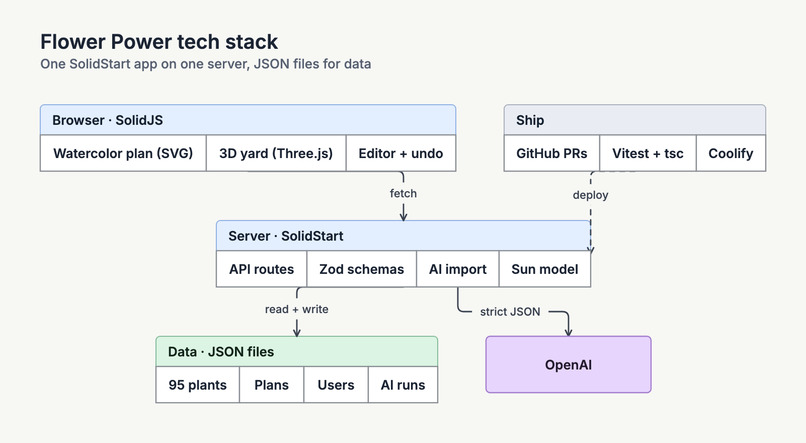
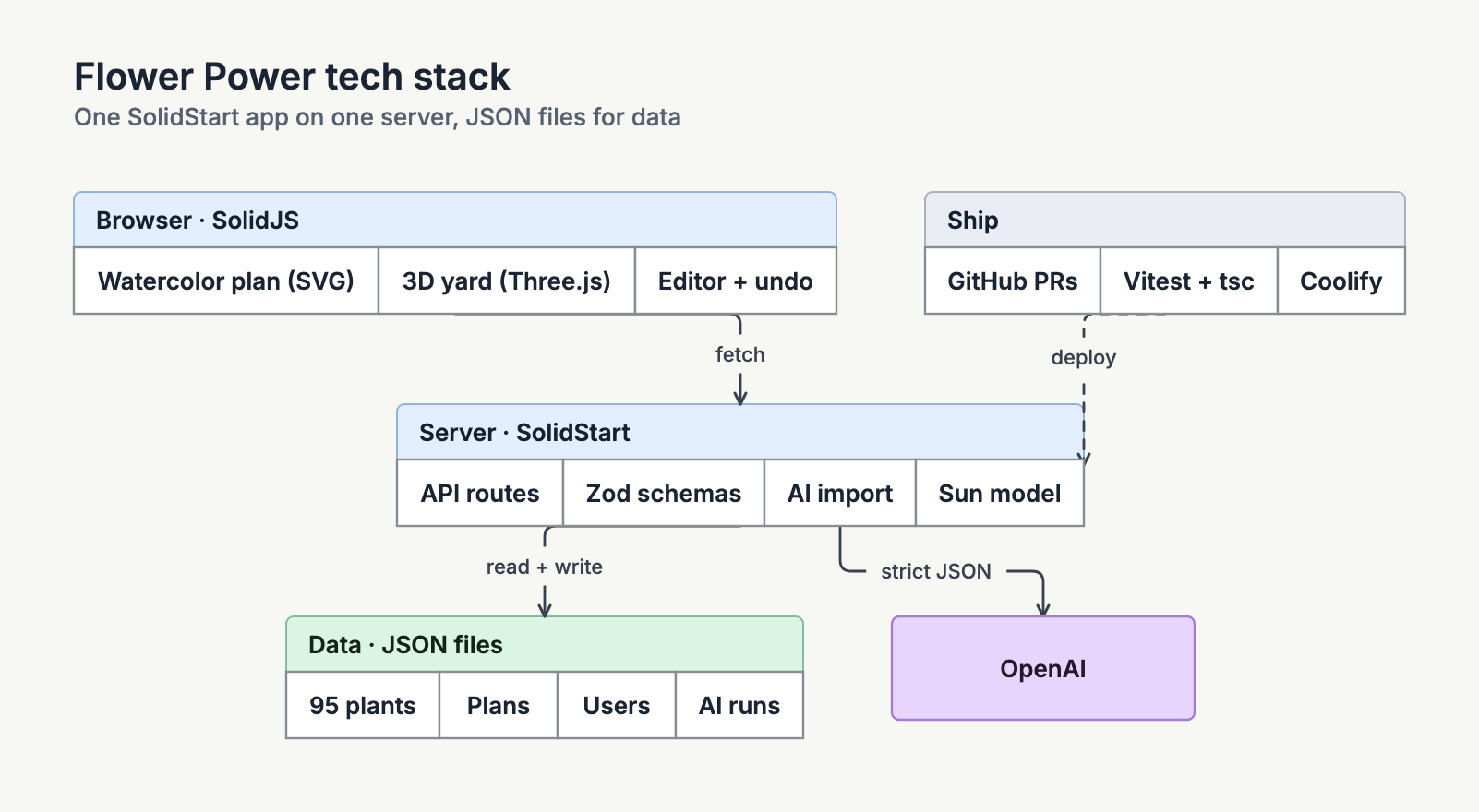
Tech stack: one SolidStart app on one server, JSON files for data
-
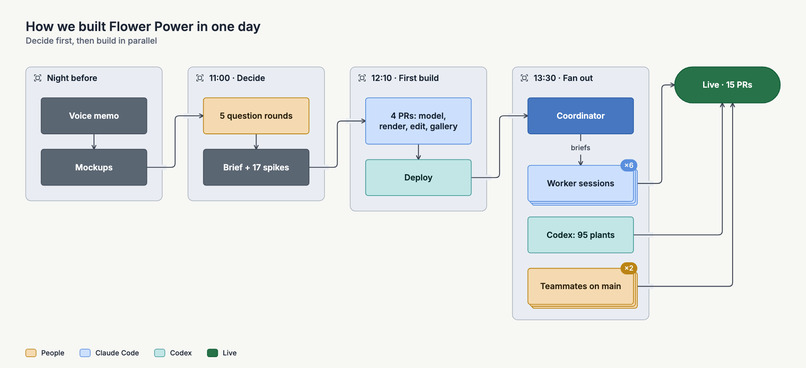
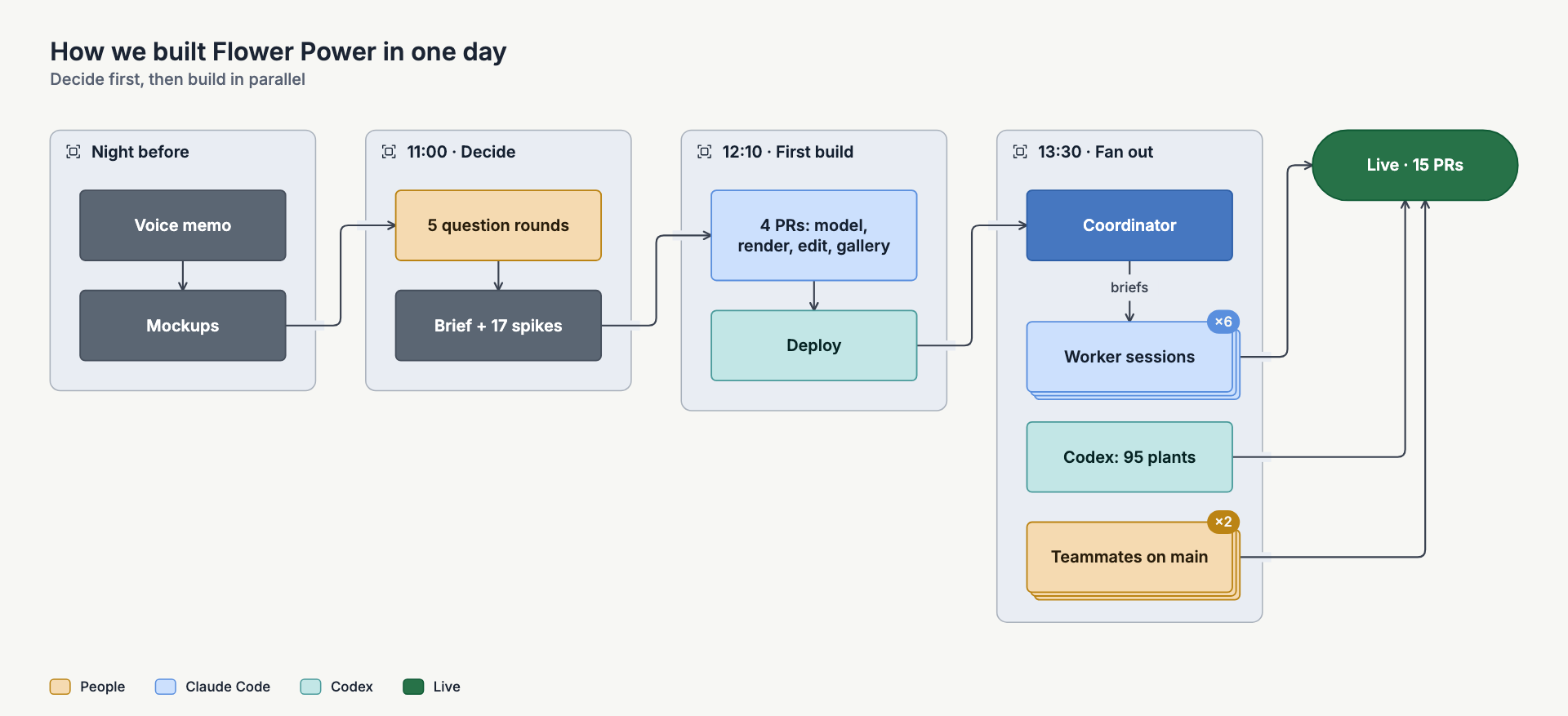
How we built it in one day: decide first, then build in parallel
-
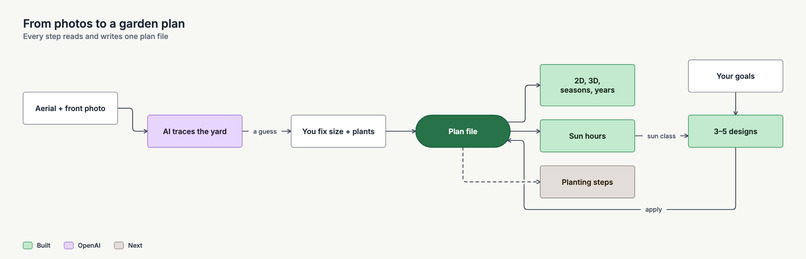
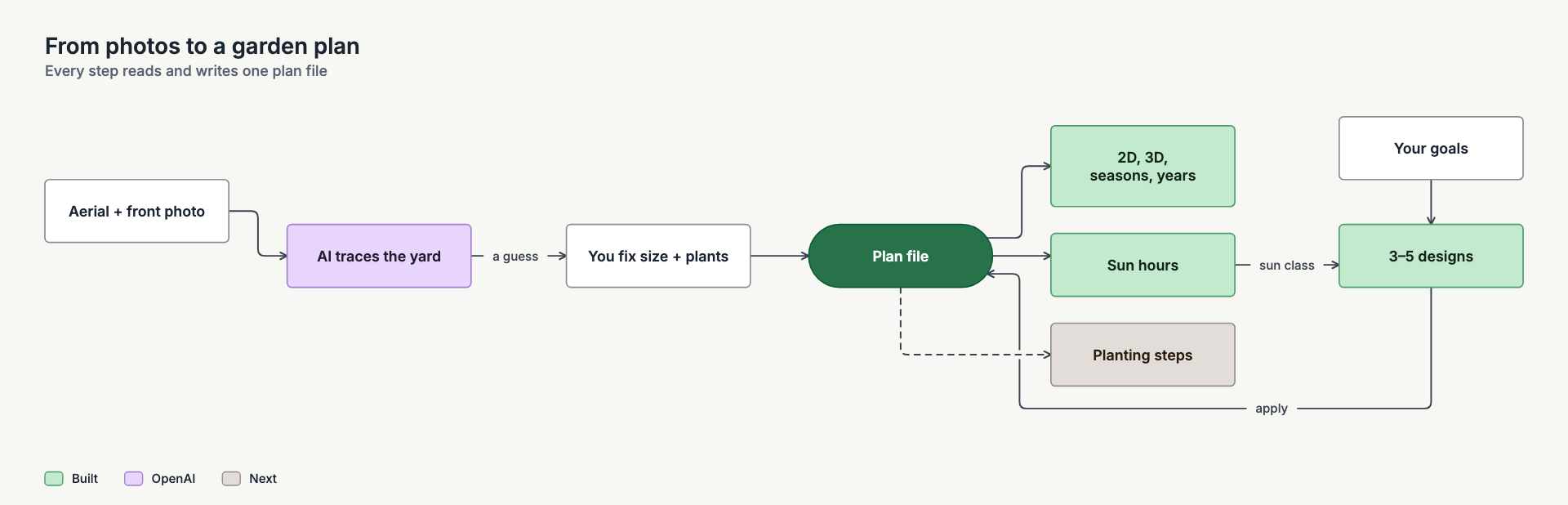
From photos to a garden plan: every step reads and writes one plan file
-
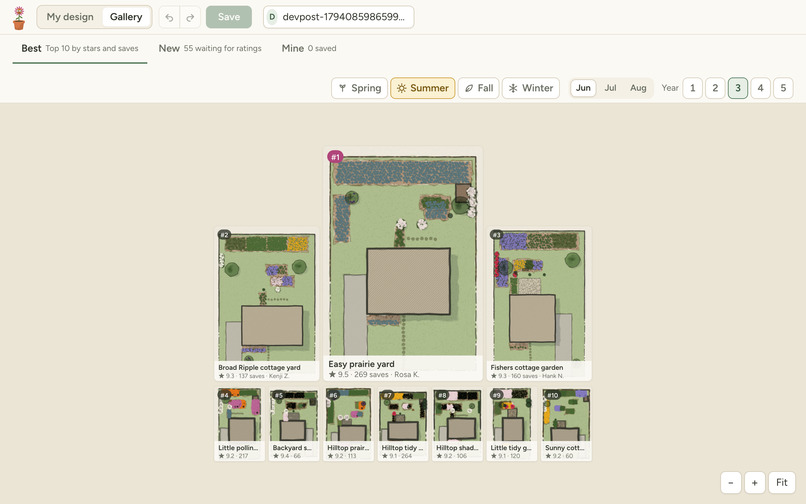
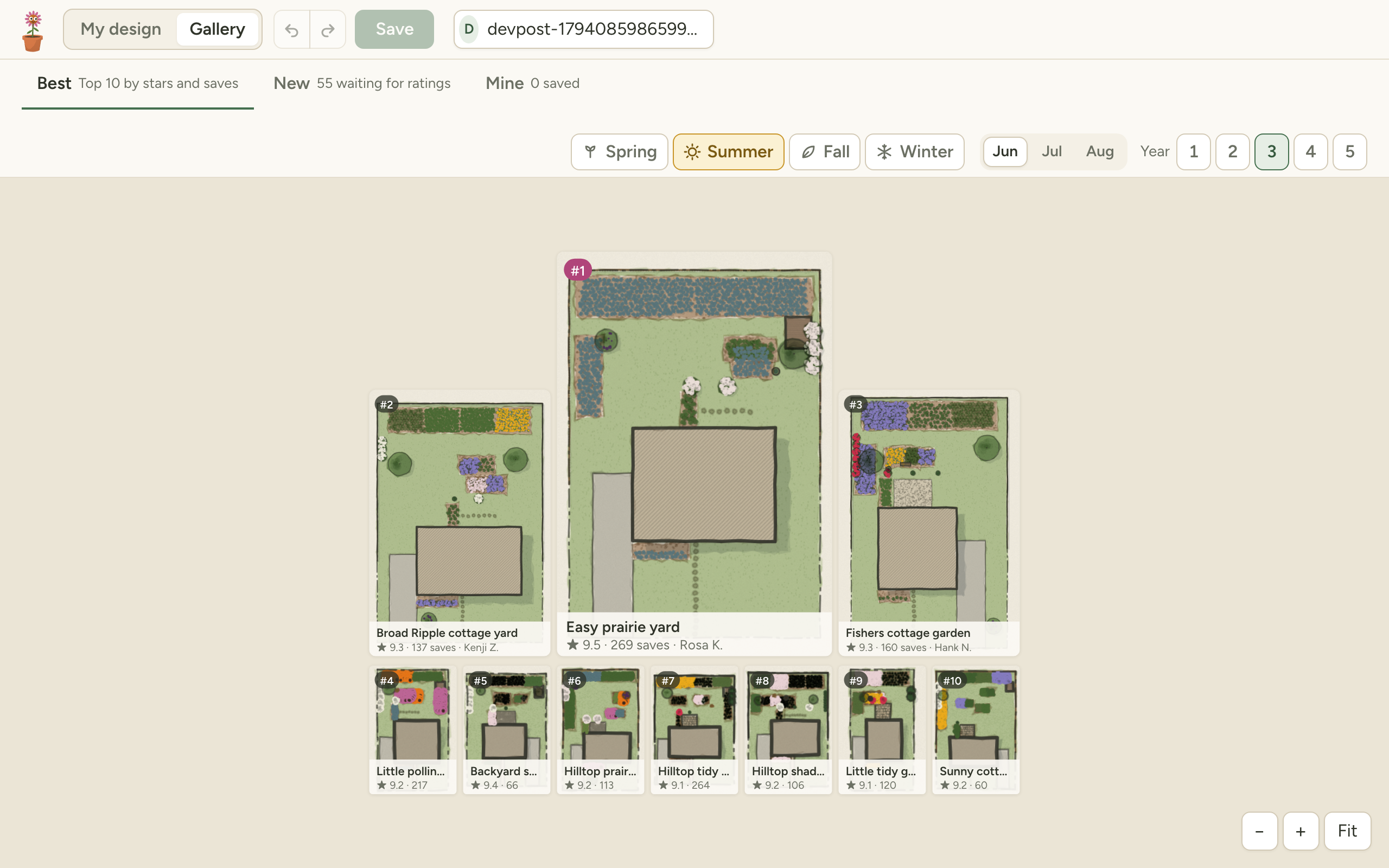
The gallery's top 10 gardens. The community here is sample data until the server backs it
-
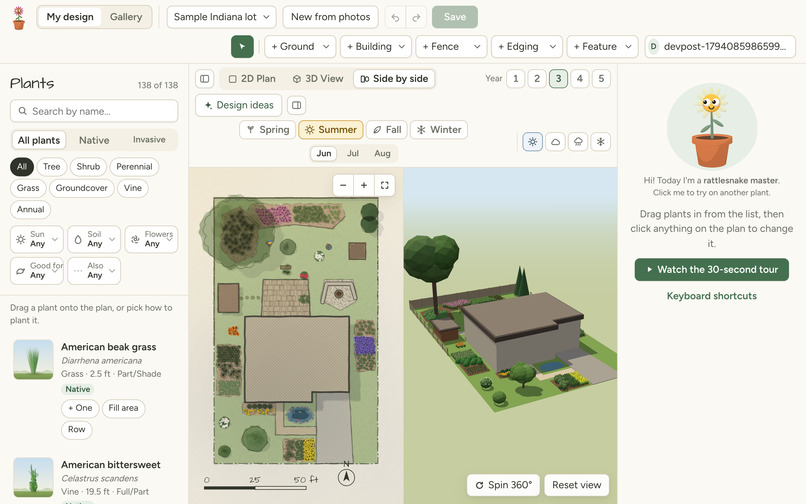
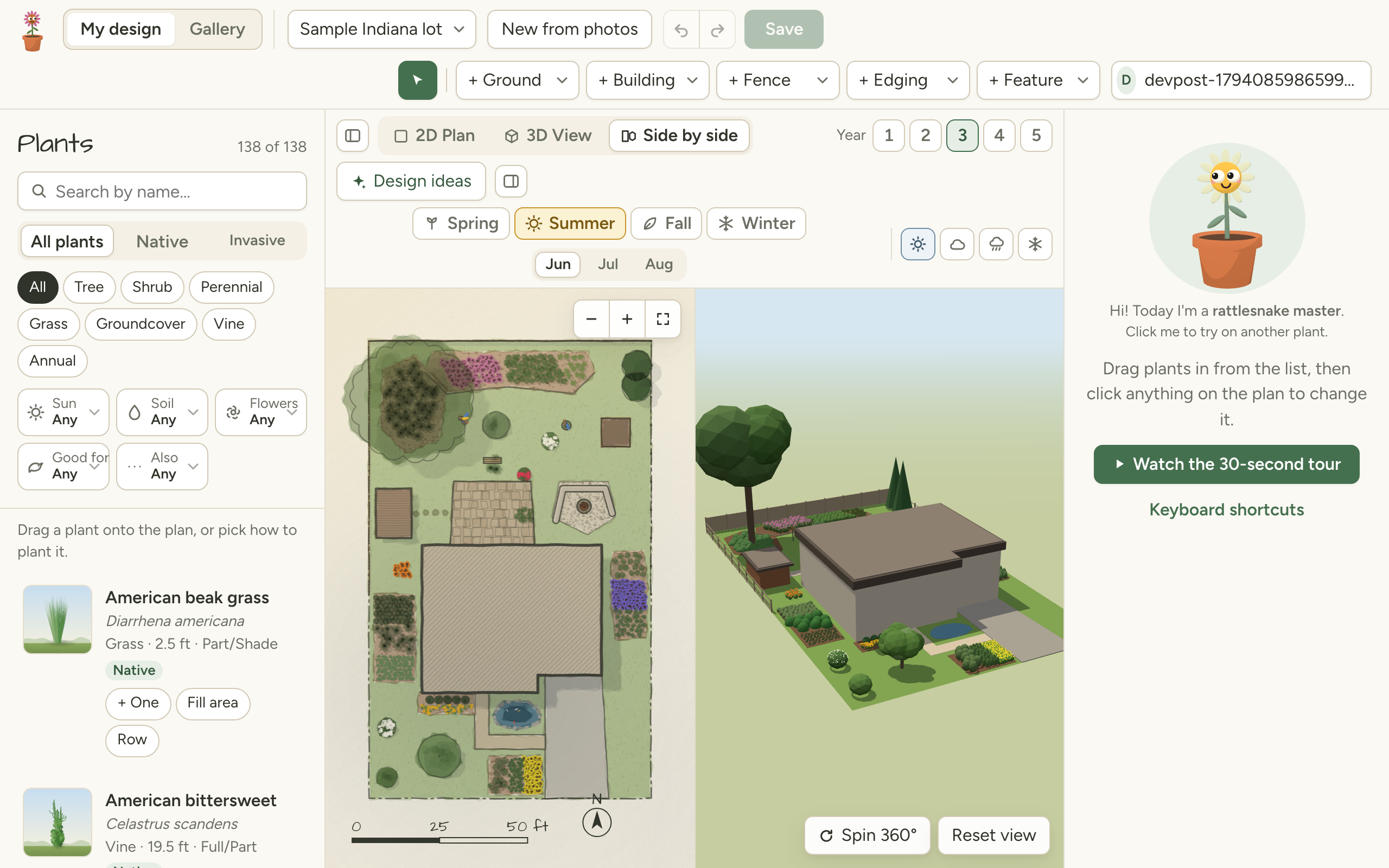
The watercolor plan and the 3D yard side by side, both drawn from the same plan file
-
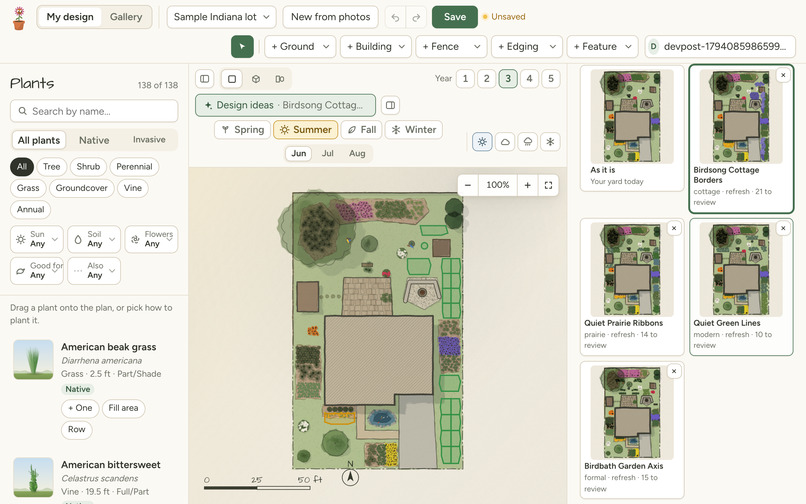
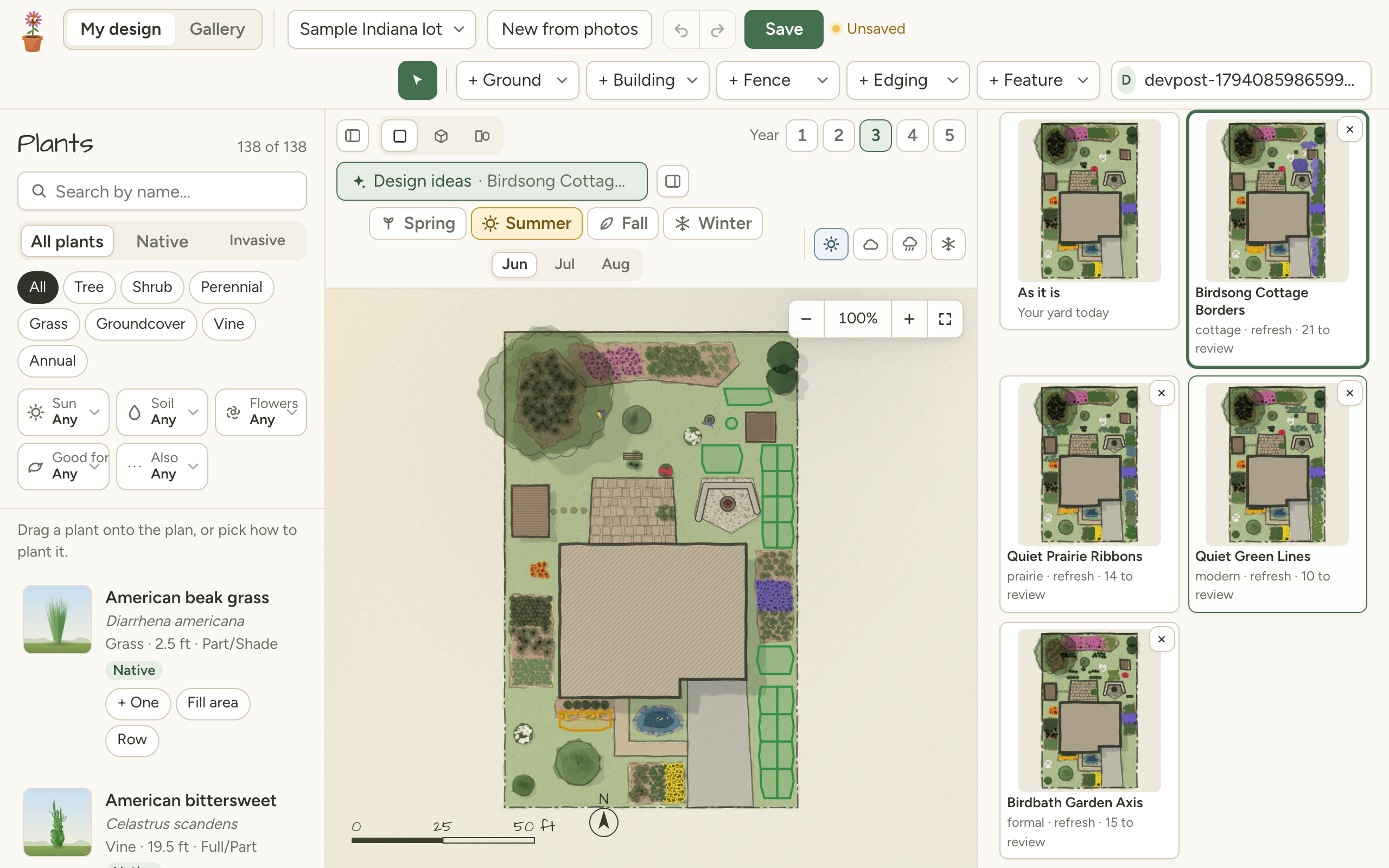
Design ideas for "calm" and "songbirds": four real AI designs, each a list of changes you accept or reject
Inspiration
A garden changes after you plant it. A bed that looks full in June is bare in January, and the little maple you put by the fence is shading half the yard in five years. That's expensive to find out after you plant.
We wanted a planner where you start from your own house, not a blank grid. Take a few photos, get a top-down plan of the yard you already have, then try changes and watch them through the seasons and the next five years. We kept it to Indiana so the plant list and the sun math stay small enough to get right.
What it does
- Start from photos. Drop a top-down aerial and a photo of the front of the house on one page, and pick which image is the aerial. The AI traces the house, lot, beds, fences and trees, and guesses which plants are already there. You fix one number (how wide the house is) and everything rescales to match.
- Check the guesses. Plants the AI guessed get a dashed outline. Confirm each one or swap it for a close match from the library.
- Edit the plan. The plan is drawn as a watercolor, like a landscape architect's sketch. Place one plant, draw a row, fill an area, draw beds and paths, move and resize things, undo.
- See it change. Move between seasons and years 1 to 5. Trees go bare in winter, shrubs fill in, and snow covers the yard in December and January. Shadows follow the real sun for the month. Zoom in to see plant names.
- Walk the yard in 3D. The same plan with textured ground, real tree and shrub shapes, a hip roof, and your weather. Jump to Overview, From above or Eye level, and point at a plant to see its name.
- Know where the sun is. A sun model works out hours of direct sun for every 2 ft square of the lot, from the house, fences and trees. Each spot comes out full sun, part sun or shade.
- Get design ideas. Say what you want (calm, songbirds, safe for kids) and pick a dial: Light touch, Refresh or Redo. The app reviews the yard as it is, then draws 3 to 5 designs in different styles, such as cottage, prairie and modern. Each design is a list of changes on your plan. Accept or reject each change, or draw a box to rework just one bed.
- Browse the gallery. Best shows the top 10 gardens, New lets you rate recent ones, and Mine holds your designs with a Public switch. A public garden shows the design you picked, never the address or the aerial photo.
- 253 Indiana plants, filterable by type, sun and bloom color. The 15 invasive ones are flagged so you know what to pull, not plant.
- Accounts. Register with an email and password, and you only see your own plans. A share link shows the design you picked, so a partner sees the same plan you do. To try it, log in as
[email protected]/flowerdemo. That account resets to the sample lot each time you log in.
How we built it
We started at about 11 AM with an empty repo. The idea came from a nine-minute voice memo the night before, plus a few concept mockups.
Questions before code. The first hour went into five rounds of questions with Claude Code, using a planning skill we keep in the repo. We talked through each round out loud and dictated the answers. That gave us an intent brief, a shape for the first version, and 17 open questions to check with small spikes. The big calls happened there: whole yard, not one bed. Start from your own house. Sun and shade are central. Indiana only for now.
One data shape. Then ten more questions on the 2D plan, and the first build went in as a stack of four PRs: the property and plant data model, the watercolor renderer, the editor, and the plant gallery. Everything reads one Property file, checked by a Zod schema. The editor, the 2D plan, the 3D view, the sun model and the AI all use that one shape, so nothing gets translated between them.
Fan the work out. By early afternoon one Claude Code session ran as the coordinator. It wrote briefs and started six worker sessions, each in its own git worktree with the files it owned spelled out: photo import, an eval loop for that import, import in the editor, the sun model, the design engine, and accounts. Codex grew the plant library from 25 to 95 plants and fixed the deploy, and later added 100 more natives. At the same time two teammates worked straight on main: Meghaj built the first version of the JSON database and then the public gallery, and Shakila built the zoomable editor, the 3D yard view, the time cards, the plant illustrations and the landing page. The workers rebased onto their changes as they landed.
Evals for the AI import. The photo import sends the images to OpenAI (gpt-6.1-terra) with a strict JSON schema. The model traces shapes on a 0–1000 grid and code turns that into feet, so the model never does unit math. We pulled 12 real listings in 46220, added 10 harder cases (off-center aerials, other zoom levels, no photos), and ran each one 3 times, scoring scale error, house overlap and lot size. A dev page draws every run in the real renderer, so you can see a bad import, not just read a score.
Stack: TypeScript, SolidJS, SolidStart, Three.js, Zod, Vitest, pnpm. Data is plain JSON files. It deploys to one server with Coolify at flower-power.apps.byroni.us.
How we kept it trustworthy
- Tests where it would break. 311 tests in 11 files, and all of them pass on
main. They cover every plant and property file, unknown plant references, mature plant spacing, that a rescale is one undo step and keeps every point over the same aerial pixel, the sun math, and that one user cannot read another user's plan (and a forged cookie gets a 401). - Agent work went through PRs. 30 merged PRs today, each with a description and screenshots. Each worker ran
pnpm typecheckandpnpm testand checked the change in a browser before handing it back. Teammates committed straight tomain, and the workers rebased onto it. - The AI output gets checked. The import result has to pass the schema. The design engine drops any AI change that breaks a rule and tells you which ideas it left out. The rules: library plants only, nothing on the house or paths, tree spacing, no patios unless you ask, kid- and pet-safe plants when you say so, and sun from the sun model. It passes 8 of 8 eval cases.
- Real addresses stay out of the repo. Listing photos, aerials and saved AI runs are gitignored. The test lots from real addresses were deleted after each check. The public gallery leaves out the address and the aerial.
- Secrets stay out too. The OpenAI key lives in a gitignored
.env.AI_FAKE=1replays saved AI runs, so UI work and tests make no paid calls.
Challenges we ran into
- Scale from one photo is hard. The model guesses scale from cars and street widths. The median error is about 5%, but the worst runs miss by about 35%, and three prompt changes in a row didn't fix it. So the person fixes one size after the import. Getting the aerial from the address at a known scale would remove that error, and that's the next fix.
- The aerial alone finds the yard but not the garden. With just the aerial, the house and lot come out right (house overlap 0.93), but it found no beds in 14 of 18 runs. Adding one front photo brought passing runs from 4 of 18 to 14 of 18. Now we ask for both.
- Parallel work collides. Seven sessions and two people touched the same app in one afternoon. Most of the merge pain landed in one CSS file. One merge dropped a closing brace and broke every style in the app. The browser check caught it, not the tests.
Accomplishments that we're proud of
- A real yard goes from photos to an editable watercolor plan, and you can see whether the AI got it right.
- The eval loop told us something useful: the import passes 53 of 66 runs (80%). That's short of our 90% target, and we know where it fails.
- The sun model is fast enough to rerun on every edit (about 20 ms for a 100 × 200 ft lot), and turning the plan moves the shadows the right way.
- Three people and a set of agent sessions merged 30 PRs in one afternoon.
What we learned
The time we spent on questions up front paid off. When the agents went off on their own, the decisions they needed were already written down. When a worker hit a choice we hadn't made, like whether a rescale should keep edits you already made, it flagged it instead of guessing quietly.
Agent output needs something you can look at. A pass rate on a dev page, a screenshot in a PR, a test that fails. "It's done" from the agent wasn't enough, and the CSS break showed why.
What's next for Flower Power
- Fetch the aerial from the address at a known scale, so the scale guess goes away.
- Back the gallery with the server. Today its community is sample data and ratings live in your browser.
- Turn a design into a step-by-step plan: what to plant when, and how to care for it.
- Put it in front of a homeowner and see if they make a better planting decision with it. That's the test that matters.
Built With
- solidjs
- three.js
- typescript
