-
-
flow-head
-
flow-vr
-
flow-hand
-
flow-airtouch
FLOW — Where Motion Meets Reality
An immersive VR platform that transforms any Android phone into a motion-aware, gesture-driven VR experience — no controllers, no expensive hardware, no compromise.
🌟 Inspiration
Most immersive VR experiences today sit behind a $500 paywall.
We asked a simple question: what if the device already in your pocket was enough?
Every modern Android phone ships with a gyroscope, a high-resolution camera, and a GPU capable of real-time video decoding. The hardware for VR has been democratized for years — the software to unlock it, less so.
FLOW started as an experiment: could we build a fully immersive, motion-aware VR experience in Flutter — cross-platform, accessible, and deployable to any Android device — without native engines, without Unity, and without asking users to buy anything beyond a ₹500 cardboard headset?
The answer turned out to be yes.
🎯 What It Does
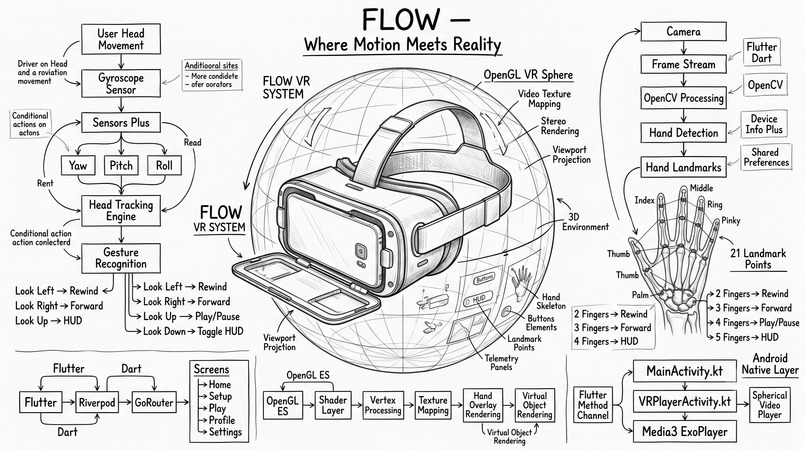
FLOW is a Flutter-based immersive VR companion app with six interconnected capabilities:
1. 360° Stereoscopic Video Playback
The app renders video in Side-by-Side (SBS) format — splitting the screen into two eye panes with a slight stereo offset, creating the depth illusion required for VR lenses.
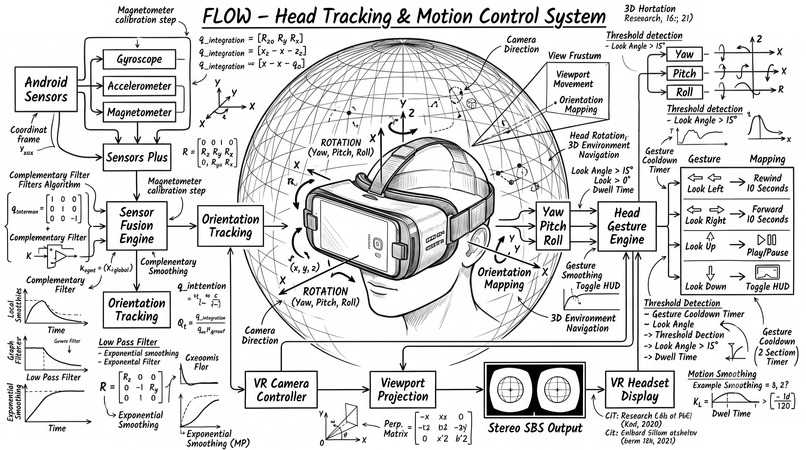
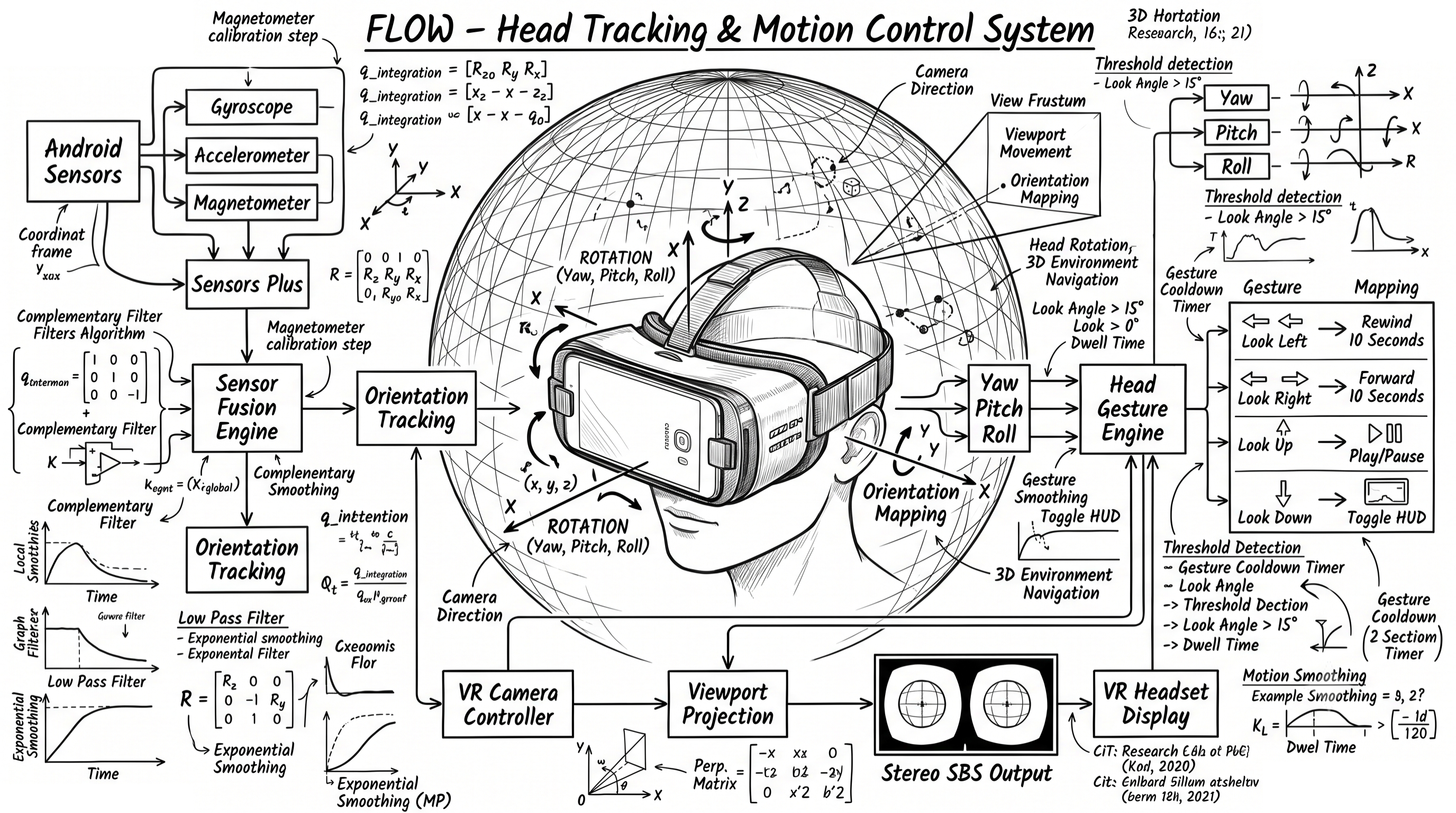
2. Real-Time Gyroscope Head Tracking
Using the device's rotation sensor stream, FLOW continuously maps the user's head orientation to the virtual viewport. Looking left, right, up, or down moves the camera inside the immersive scene.
The orientation is tracked across two channels:
$$ \theta_{view} = \theta_{view} + \omega \cdot \Delta t \cdot \alpha_{view} $$
$$ \theta_{control} = \theta_{control} + \omega \cdot \Delta t \cdot \alpha_{control} $$
Where $\omega$ is the gyroscope angular velocity, $\Delta t$ is the frame delta, and $\alpha_{view}$, $\alpha_{control}$ are separate damping coefficients — one for smooth viewport movement, one for precise gesture detection.
3. Head Gesture Controls
Sustained head movements beyond a threshold trigger actions — no touch required:
| Gesture | Action |
|---|---|
| Hold Left | ⏪ Rewind 10s |
| Hold Right | ⏩ Forward 10s |
| Hold Up | ⏯ Play / Pause |
| Hold Down | 📊 Toggle HUD |
Gesture detection uses neutral gating to avoid false triggers — a gesture only arms after the head returns near neutral, preventing continuous misfires during natural head movement.
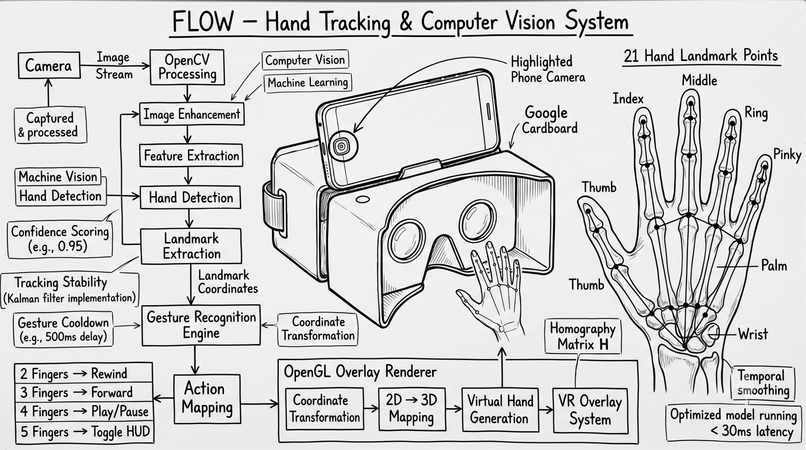
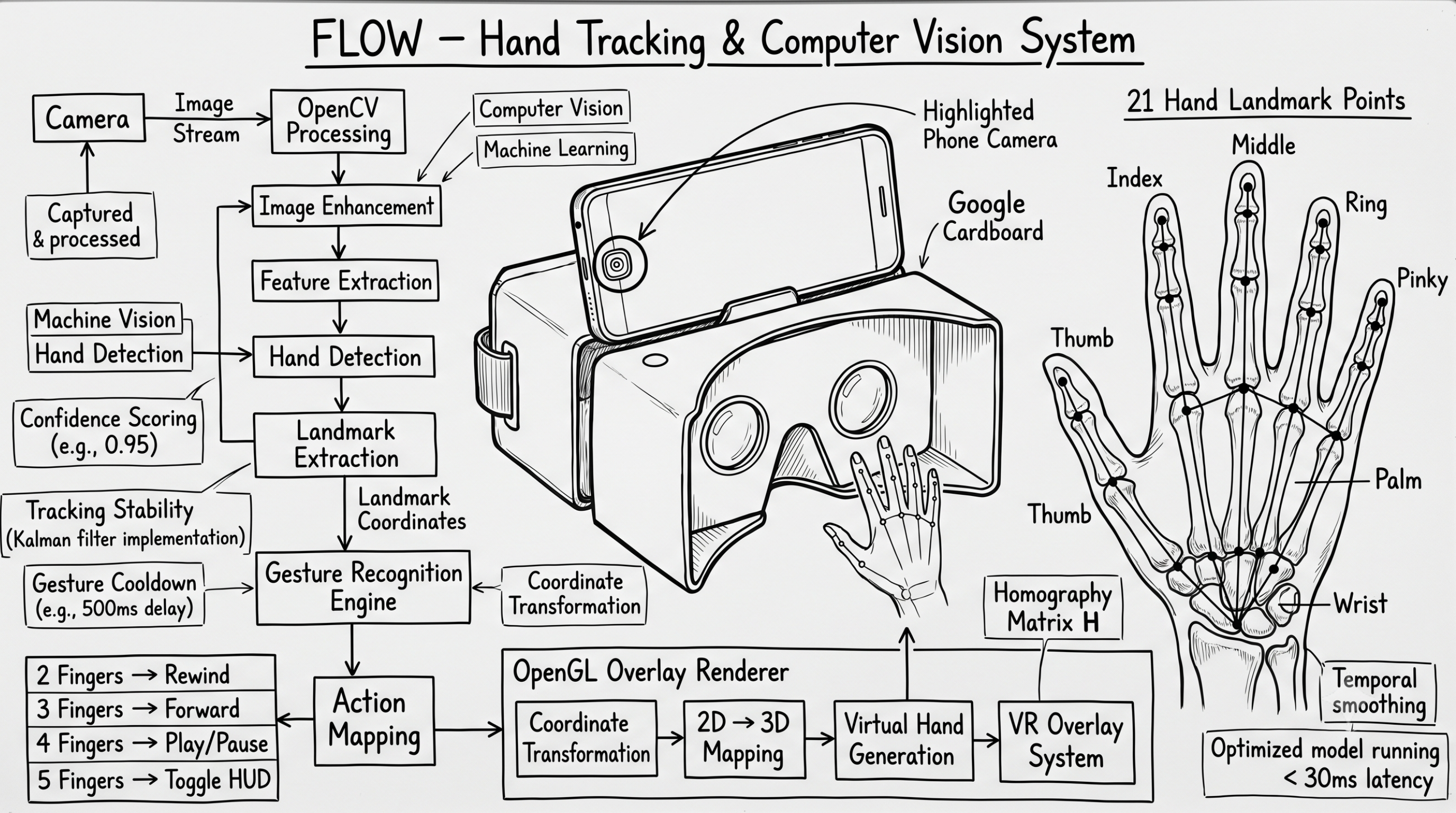
4. Live Hand Landmark Detection & Overlay
Using the device's back camera and a MediaPipe-based HandDetector, FLOW detects 21 hand landmarks per frame in real time. These landmarks are then painted as a glowing skeletal overlay directly on top of the VR video — for both SBS eyes simultaneously.
The landmark coordinate transformation from camera space to SBS overlay space:
$$ x_{overlay} = x_{norm} \cdot W_{eye} + \text{eyeOffset} $$
$$ y_{overlay} = y_{norm} \cdot H_{screen} $$
Where $x_{norm}, y_{norm} \in [0, 1]$ are the normalized MediaPipe outputs, $W_{eye}$ is the half-screen width for each eye pane, and $\text{eyeOffset}$ is $0$ for the left eye and $W_{eye}$ for the right.
5. Finger Gesture Controls
Stable finger count detection triggers playback actions — no wrist movement needed, no controller emulation:
| Fingers Extended | Action |
|---|---|
| ✌️ 2 | ⏪ Rewind 10s |
| 🤟 3 | ⏩ Forward 10s |
| 🖐 4 | ⏯ Play / Pause |
| 🖐 5 | 📊 Toggle HUD |
Stability is enforced via a frame cooldown — the same finger count must persist across $N$ consecutive frames before the action fires, preventing accidental triggers during hand movement.
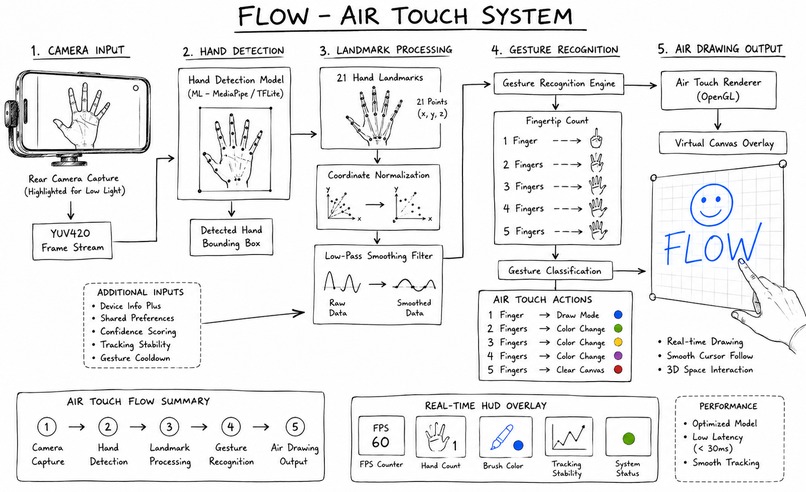
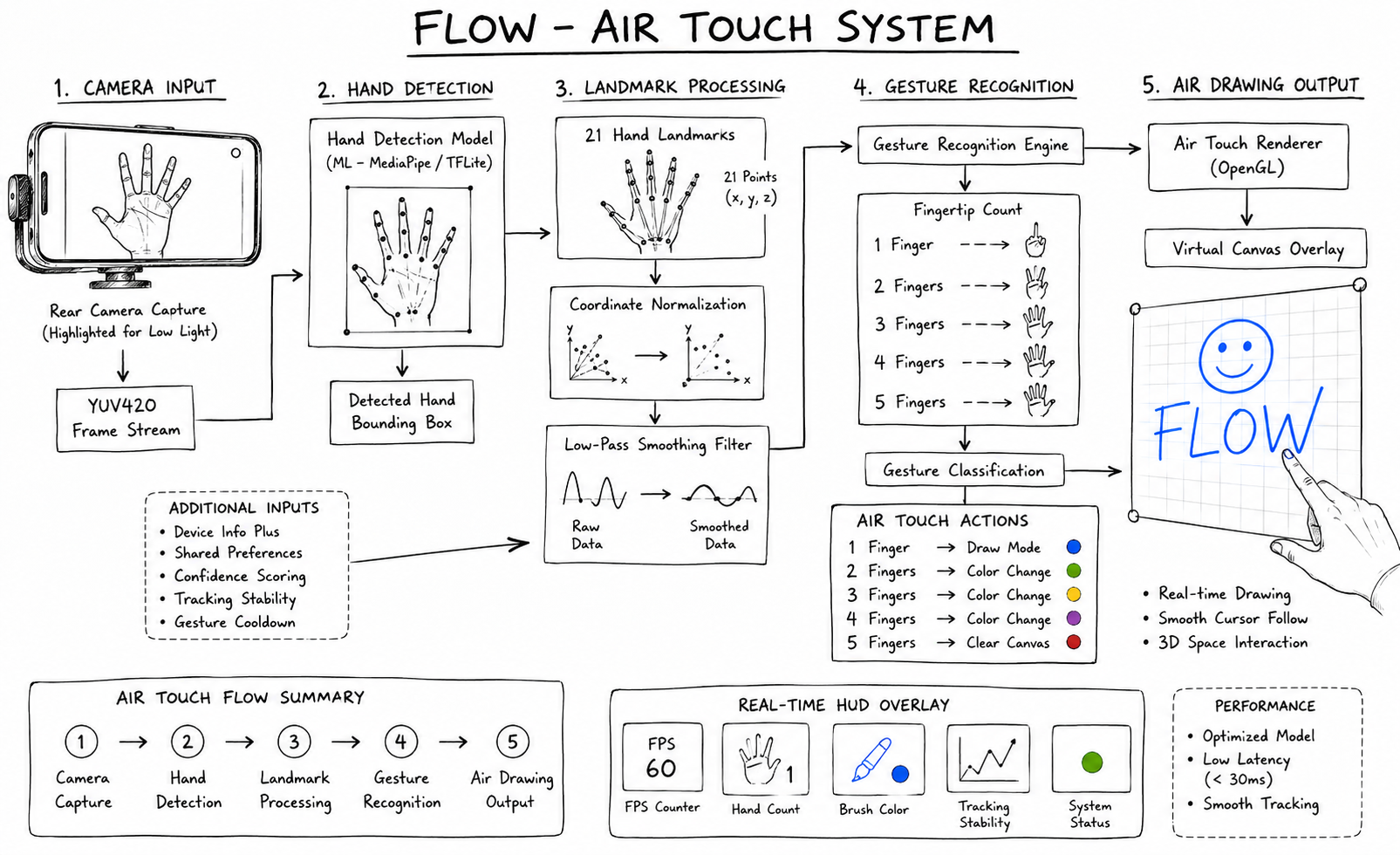
6. Air Touch — Spatial Drawing Without a Touchscreen
Air Touch turns the front camera into a drawing tablet that floats in mid-air. A live HandLandmarker stream feeds a low-resolution YUV420 frame pipeline, and the index fingertip becomes a cursor that draws directly onto an on-screen canvas — no touch input anywhere in the pipeline.
Finger poses are classified geometrically, not through a pre-trained gesture classifier — distances between the fingertip, the corresponding lower joint, and the wrist decide whether a finger reads as "extended":
$$ \text{extended}_i = \begin{cases} 1 & \text{if } \lVert T_i - W \rVert > \lVert J_i - W \rVert + \epsilon \ 0 & \text{otherwise} \end{cases} $$
Where $T_i$ is the fingertip landmark, $J_i$ is its lower joint landmark, $W$ is the wrist landmark, and $\epsilon$ is a small margin that prevents flicker at the boundary.
| Gesture | Action |
|---|---|
| ☝️ 1 Finger | ✏️ Draw stroke |
| ✌️🤟🖐 2 / 3 / 4 Fingers (held) | 🎨 Cycle brush color |
| 🖐 5 Fingers (held > 500ms) | 🧹 Clear canvas |
Cursor jitter is suppressed with an exponential low-pass filter applied to the fingertip position every frame:
$$ \text{cursor}t = \beta \cdot \text{cursor}{t-1} + (1 - \beta) \cdot \text{landmark}_t $$
The device's physical orientation is queried every frame and used to re-map raw landmark coordinates dynamically, so a stroke stays accurate even if the user rotates the phone mid-drawing. Two CustomPainters — one for the skeletal hand wireframe, one for the accumulated strokes — run inside a RepaintBoundary each frame, alongside a live HUD showing FPS, hand count, and the active brush color.
🛠 How We Built It
Architecture
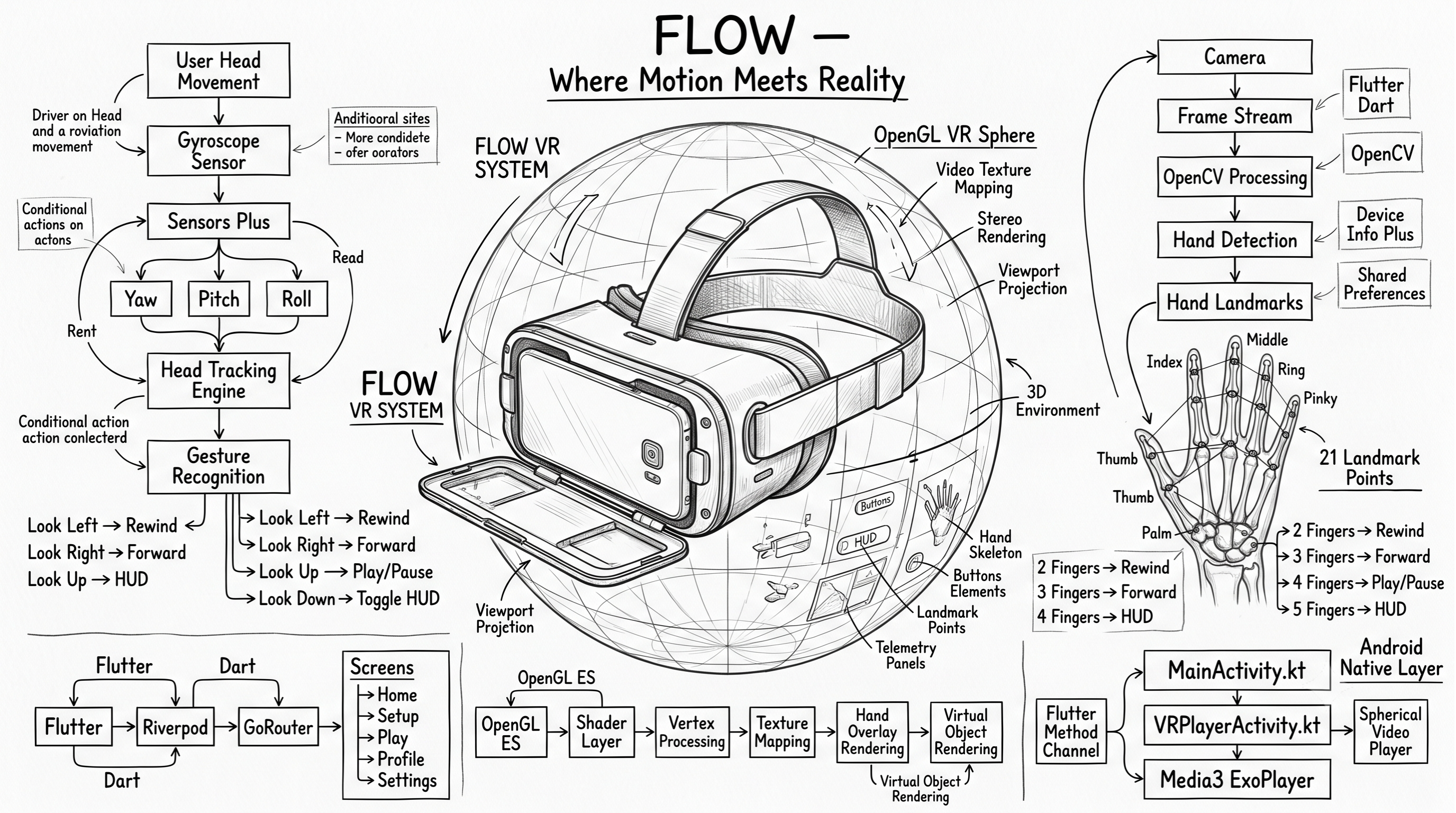
FLOW follows a clean feature-first Flutter architecture with Riverpod for state management and GoRouter for declarative navigation.
main.dart  →  Pilot Gate  →  ShellScreen (Bottom Nav)
                                ├── Home
                                ├── Setup
                                ├── Play  →  VrImmersiveScreen
                                ├── Profile
                                └── Settings
Core Engine — VrImmersiveScreen
The immersive engine is a single Flutter screen compositing four independent layers:
Layer 4 (top)  :  HUD overlay (_HudCard)
Layer 3        :  Hand landmark overlay (_VrHandOverlayPainter)
Layer 2        :  Gyroscope viewport transform
Layer 1 (base) :  SBS video panes (Row → Expanded → _VrEyeView)
Each layer runs on its own stream — video frames, gyroscope events, and camera frames are processed independently and composed at render time, preventing any single pipeline from blocking the others.
Viewport Mathematics
The SBS eye view tiles the video horizontally and maps orientation to pixel offsets:
$$ \text{offsetX} = -\psi_{view} \cdot k_{yaw} + \text{eyeShift} $$
$$ \text{offsetY} = -\phi_{view} \cdot k_{pitch} $$
Where $\psi_{view}$ is yaw, $\phi_{view}$ is pitch, $k_{yaw}$ and $k_{pitch}$ are sensitivity constants, and $\text{eyeShift}$ is $\pm\delta$ for left/right eye stereo separation.
Hand Rotation Fallback Strategy
Camera frame orientation varies across Android devices. FLOW implements an adaptive rotation strategy:
- First attempt: explicit rotation pass (device-reported orientation)
- Fallback: no-rotation pass
- Confidence comparison: if detection confidence of pass 2 > pass 1, switch
_handRotationModepermanently for the session
This allows the detector to self-calibrate per device without manual configuration.
Air Touch Pipeline
Air Touch runs as an independent screen (air_touch_screen.dart) with its own camera stream, kept deliberately separate from the immersive VR engine:
- Frame source: low-resolution YUV420 stream from
CameraController.startImageStream, prioritizing the rear camera with a front-camera fallback — resolution is kept low specifically to hold detection latency down - Orientation correction:
_effectiveDeviceOrientation()re-maps raw landmark X/Y on every frame against the device's current physical orientation, so a stroke doesn't invert or jump if the phone is rotated mid-draw - Pose classification: distance-based heuristics over the index, thumb, and pinky landmarks relative to the wrist — see the gesture formula above — chosen deliberately over a trained classifier to keep the feature fully on-device and dependency-free
- Rendering:
_HandLandmarksPainterand_AirTouchPainterboth run per-frame inside aRepaintBoundary, isolating their repaint cost from the rest of the widget tree
Native Android Bridge
A MethodChannel (com.vr.player/vr_channel) bridges Flutter to Kotlin for three operations:
launchVR(videoUri)— starts the optional nativeVRPlayerActivitywith Media3 spherical renderingcheckVideoAccess(uri)— validates local media URI accessibilitycheckHeadTrackingSupport()— queries AndroidSensorManagerforTYPE_ROTATION_VECTORavailability withTYPE_GAME_ROTATION_VECTORfallback
Tech Stack
| Layer | Technology |
|---|---|
| Framework | Flutter (Dart) |
| State Management | Riverpod |
| Navigation | GoRouter |
| Video Playback | video_player (Flutter) + Media3 ExoPlayer (native) |
| Head Tracking | sensors_plus (gyroscope stream) |
| Hand Detection | camera + hand_detection (MediaPipe) |
| Overlay Rendering | Flutter CustomPainter |
| Persistence | SharedPreferences |
| Native Bridge | Android MethodChannel (Kotlin) |
| Pilot Security | device_info_plus (ANDROID_ID whitelist) |
🚧 Challenges We Ran Into
1. Camera Frame Orientation Inconsistency
MediaPipe expects frames in a specific orientation. Android devices report camera rotation differently across manufacturers — some rotate 90°, some 270°, some not at all. The adaptive dual-pass rotation strategy was built specifically to handle this without per-device configuration.
2. Compositing Hand Overlays on SBS Video
The hand overlay CustomPainter needed to draw the same skeletal landmarks twice — once for the left eye pane, once for the right — with the correct horizontal offset applied to each. Getting the coordinate math right across different screen sizes required careful normalization of MediaPipe's $[0,1]$ output space to actual pixel coordinates per eye.
3. Gesture Cooldown Tuning
Both head gestures and finger gestures required independent cooldown and stability systems. Too sensitive — every head movement triggers a command. Too sluggish — the interaction feels broken. The final values were tuned empirically across multiple device sessions.
4. Dual Stream Performance
Running video decoding, gyroscope processing, and camera frame analysis simultaneously on a mid-range Android device is genuinely demanding. The key insight was keeping all three streams fully independent — no shared thread, no blocking call — so each degrades gracefully under load without crashing the others.
5. Classifying Gestures Without a Trained Model
Air Touch needed to tell apart "drawing," "color select," and "clear canvas" poses without shipping a separate ML classifier. Geometric distance heuristics worked, but tuning the margin $\epsilon$ to be reliable across different hand sizes and camera distances — without misfiring during natural finger movement — took several rounds of empirical adjustment, the same way the gesture cooldowns did.
🏆 Accomplishments
- Built a fully functional immersive VR engine in Flutter — no native OpenGL, no Unity, no game engine
- Real-time hand landmark overlay inside a SBS VR environment on a standard Android phone
- Dual interaction modalities (head + hand) operating simultaneously without interference
- Adaptive camera rotation fallback that self-calibrates per device
- Complete pilot deployment system with expiration gating and device-level authorization
- Clean separation between Flutter immersive path and optional native spherical rendering path
- A fully touchscreen-free spatial drawing feature (Air Touch) driven entirely by geometric hand-pose classification, with no pre-trained model dependency
📚 What We Learned
- Flutter's
CustomPainteris genuinely capable of real-time overlay compositing at 60fps when kept stateless - Gyroscope data requires careful damping — raw values are too noisy for smooth VR viewport movement
- MediaPipe's normalized coordinate output is elegant, but the coordinate transform to any specific render target requires precision
- Pilot-phase security doesn't need a backend — device ID whitelisting with expiration gating covers most controlled deployment scenarios completely offline
- Simple geometric heuristics can outperform a trained classifier for small, well-defined gesture sets — and they're far easier to debug live, since every threshold is human-readable
🔭 What's Next
- Barrel distortion shader — simulate lens optics more accurately for headsets with strong curvature
- Equirectangular 360 metadata handling — detect mono/stereo/top-bottom/SBS formats from video metadata automatically
- Runtime calibration panel — per-device sliders for hand overlay offset, scale, and smoothing
- Adaptive sensitivity profiles — headset-model-aware head movement sensitivity presets
- Performance telemetry HUD — frame rate, detector latency, and video decode overhead panel for diagnostics
- Trained gesture classifier for Air Touch — an optional lightweight on-device model to complement the geometric heuristics for more complex brush gestures
- Full public release — the waitlist is open at flowvr.vercel.app
🔗 Links
| 🌐 Waitlist | flowvr.vercel.app |
| 📦 Platform | Android |
| 🛠 Built With | Flutter, Kotlin, MediaPipe, Riverpod, GoRouter, sensors_plus, ExoPlayer |
FLOW — Where Motion Meets Reality.
Built With
- android-sensormanager-(type-rotation-vector)-tools-android-studio
- camera
- camerax
- custompainter-(hand-overlay-rendering)
- device-info-plus-platforms-android-ui-&-design-custom-flutter-themedata
- exoplayer-(media3)
- flutter-sdk
- gorouter
- kotlin-frameworks-&-libraries-riverpod
- languages-flutter-(dart)
- mediapipe
- permission-handler
- riverpod-statenotifier-native-integration-android-methodchannel
- sensors-plus
- space-grotesk-(google-fonts)-state-&-storage-sharedpreferences
- video-player
- vs-code

Log in or sign up for Devpost to join the conversation.