🚀 Project Story — Intelligent Medical Workflow & Animated Flow System
📌 About the Project
💡 Inspiration
The inspiration for this project came from real-world healthcare inefficiencies, where patients often struggle to clearly describe symptoms, and doctors face delays in retrieving medical history and making informed decisions. I was particularly inspired by the idea of automating medical triage using AI while keeping the process transparent and explainable through an animated workflow.
I also wanted to explore how AI-driven decision systems (like similarity search and symptom analysis) could be visually represented so that even non-technical users (patients, doctors, stakeholders) could see how their data flows and is processed.
🏗️ What I Built
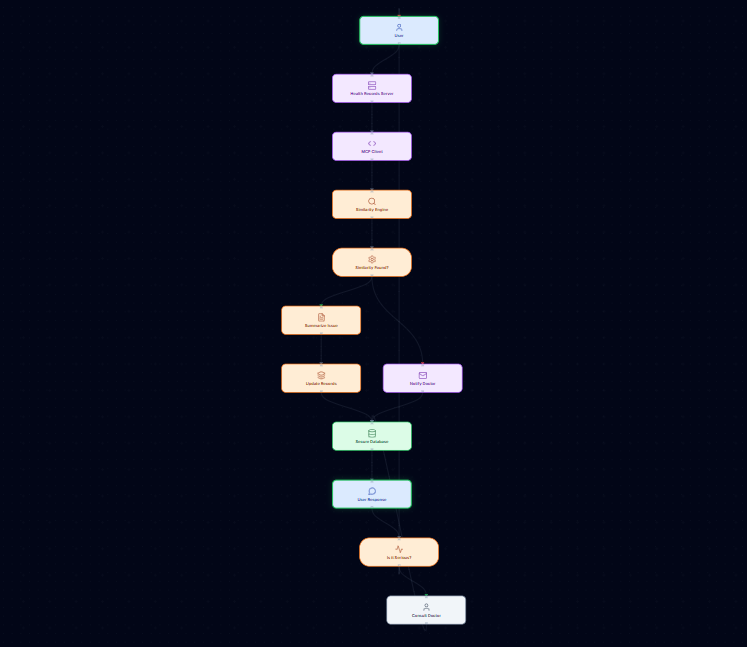
I built an AI-powered medical workflow system with an animated flow diagram, where:
- A User Query (symptoms) moves step-by-step through the system.
- The system retrieves past health records.
- An AI-based Similarity Search Engine analyzes symptoms and matches them with possible diseases.
Based on the result:
- If a match is found → medical records are summarized and updated.
- If no match is found → a doctor is notified.
The system then responds to the user and checks seriousness.
If serious → the user is directed to consult a doctor.
If not serious → the user can continue querying (feedback loop).
A key feature was the moving animated box (token) that visually represents the “User Query” traveling through each step of the workflow.
🛠️ How I Built It
🔹 Architecture
The core pipeline follows this logical structure:
User → Health Records → MCP Client → Similarity Engine → Decision → Database → Response → User
🔹 Technologies Used
- Frontend: React + Diagram Visualization (D3 / React Flow style logic)
- AI Layer: Similarity Search Model (symptoms → disease matching)
- Backend Logic: Step-by-step workflow engine
- Database: Secure medical record storage
- Animation System: Edge-based token movement (not node teleporting)
🔹 Animation Logic (Core Idea)
Instead of jumping between nodes, I used edge-based interpolation:
[ P(t) = (1 - t) \cdot P_{start} + t \cdot P_{end}, \quad t \in [0,1] ]
This ensured smooth movement of the “User Query” box along each arrow.
📚 What I Learned
Through this project, I learned:
- How to design clear system workflows that both machines and humans can understand.
How to prevent common animation bugs like:
- Node teleporting
- Overlapping components
- Unwanted looping
How AI similarity search can be integrated into decision-making systems.
The importance of visual explainability in AI-driven applications, especially in healthcare.
⚠️ Challenges Faced
Some major challenges included:
🔹 1) Animation Bug — Token Jumping Back
At first, the moving box kept jumping back to the first node instead of following the flow. I solved this by:
- Locking movement to edges instead of nodes
- Using a sequential step list
- Disabling auto layout during animation
🔹 2) Complex Workflow Layout
The medical flow had many branches (YES/NO decisions), which caused overlapping lines and messy visuals. I fixed this by:
- Using a top-to-bottom layout
- Increasing node spacing
- Using curved edges instead of straight lines
🔹 3) Loop Handling
The final feedback loop (User Query → System → User Query) initially broke the animation. I handled this by explicitly allowing only one controlled loop at the final step.
🎯 Outcome
The final system successfully:
✔ Visually explains AI decision-making ✔ Shows step-by-step processing of user symptoms ✔ Provides a clean, professional animated workflow ✔ Bridges AI + Healthcare + Explainability
Built With
- ai
- amazon-web-services
- and
- animated
- animation
- apis
- at
- backend
- bezier
- canvas
- cloud
- component-based
- css
- curves
- custom
- d3-style
- data
- database
- decision
- deployment
- design
- diagrams
- edge-based
- embedding-based
- encrypted
- engine
- external
- fastapi
- flask
- flow
- for
- frontend
- inference
- integrated
- interactive
- ivr
- lambda
- layer
- layout
- lines
- logic)
- medical
- ml
- model
- modules
- netlify
- node.js
- planned
- platform
- postgresql
- processing
- production
- production):
- react
- react.js
- records)
- reference
- rendering
- rest
- rest)
- retrieval
- run
- s3
- search
- secure
- security
- services
- similarity
- simulation
- smooth
- sms)
- step-by-step
- storage
- styling
- svg
- system
- tailwind
- token
- twilio
- ui
- vector
- vercel
- visualization

Log in or sign up for Devpost to join the conversation.