-
-
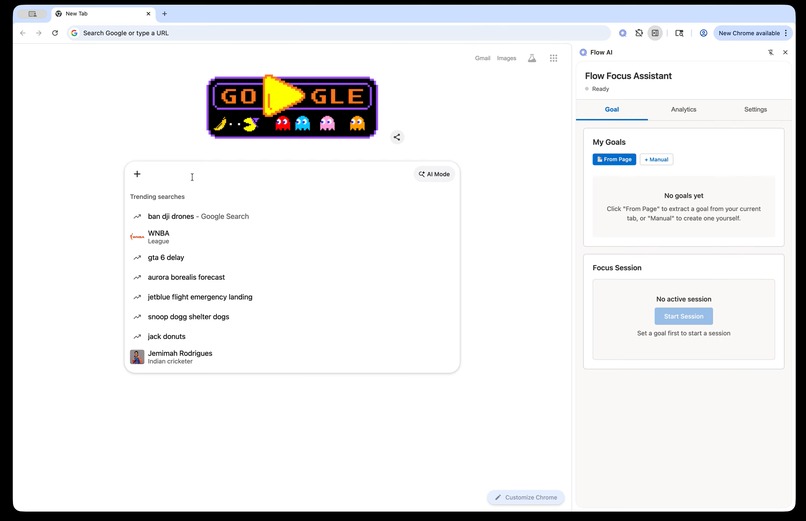
Landing/Goal Setting
-
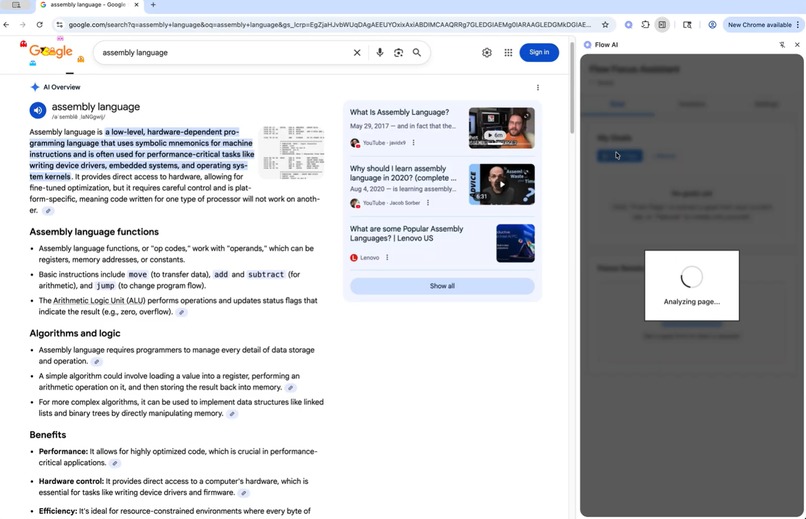
Task Analyzing
-

Task Activity & Tracking
-
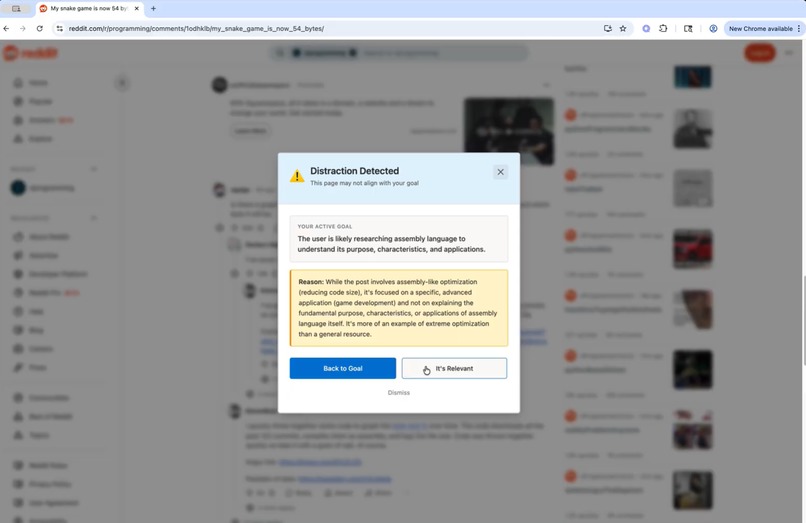
Distraction Detection
-
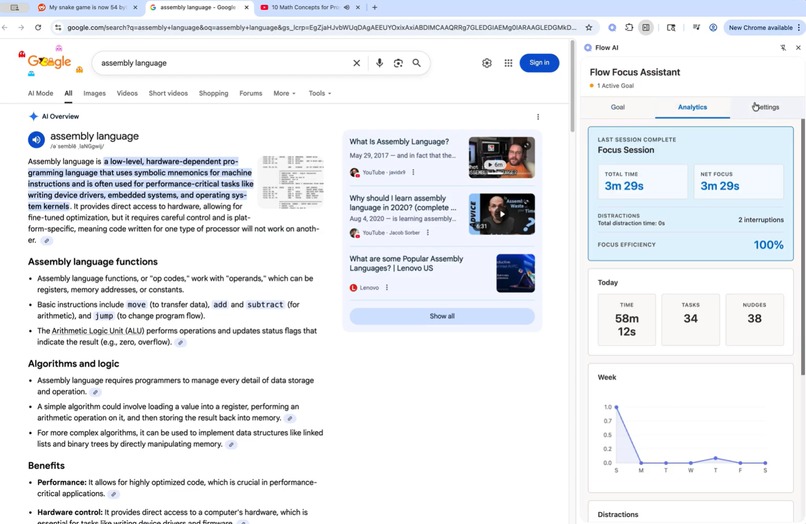
Daily & Weekly Analytics
-
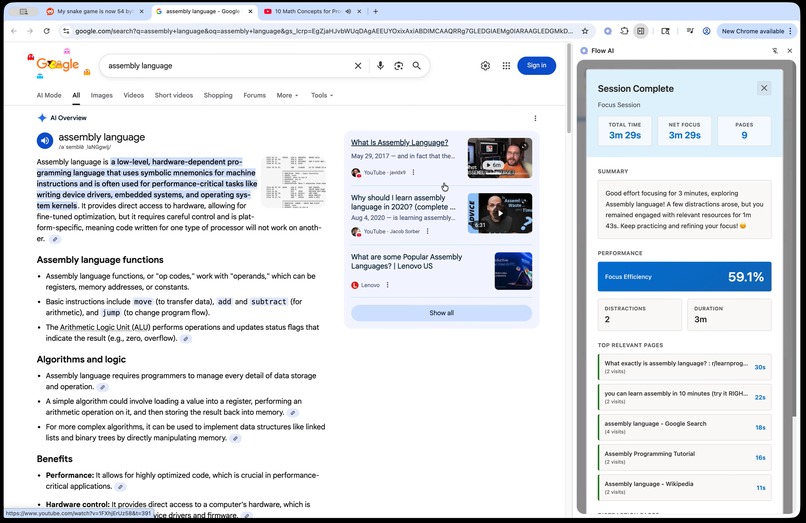
End of Session Report
-
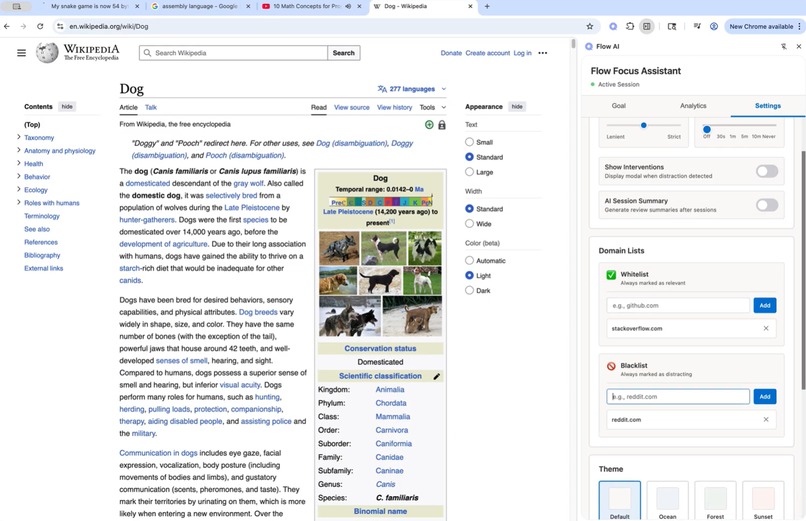
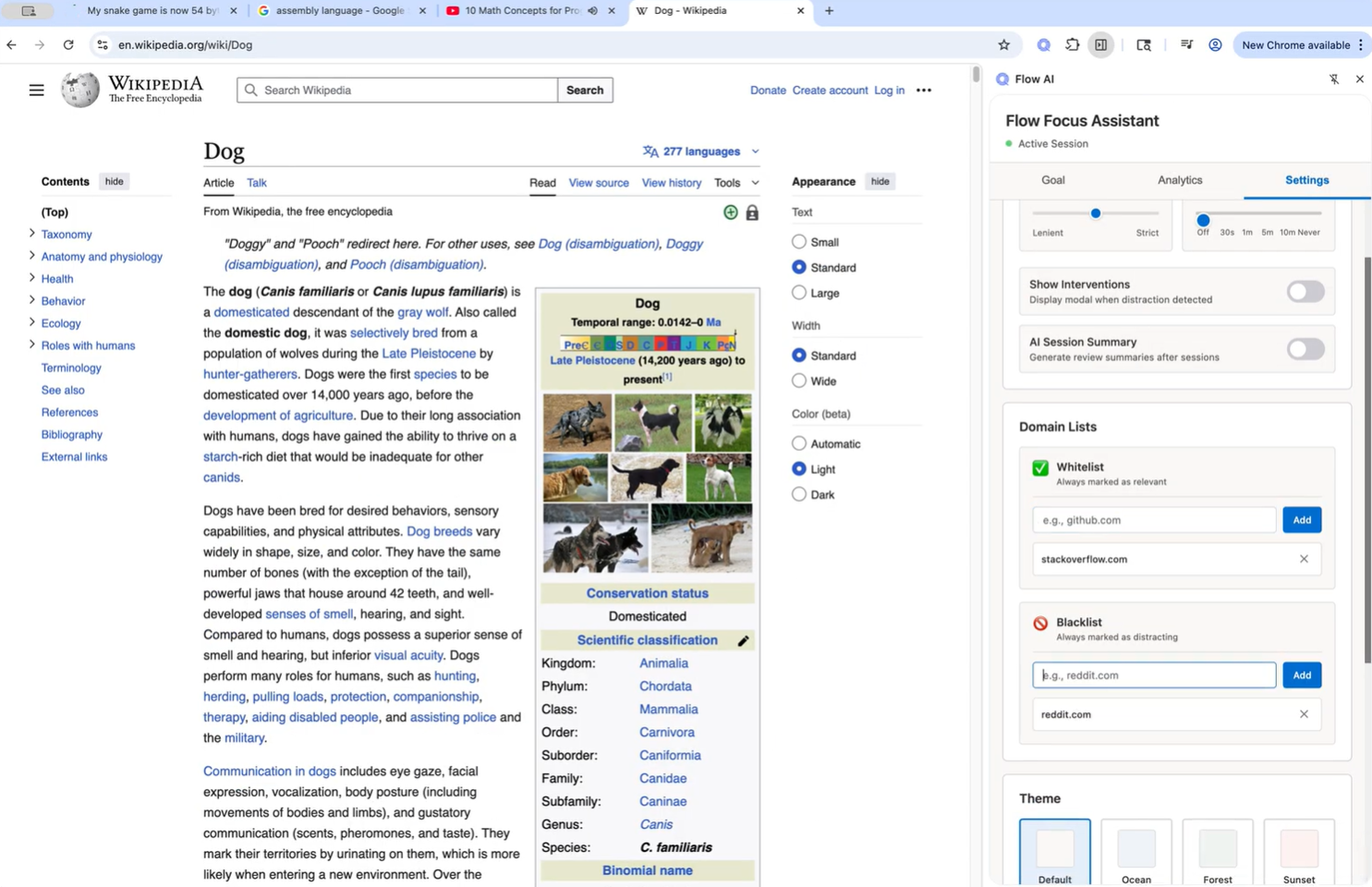
Settings
Inspiration
We created Flow AI out of a shared frustration we faced as busy graduate students and working professionals — the endless battle to stay focused while managing applications, deadlines, and personal projects. Our tabs multiplied, our attention fragmented, and existing focus tools felt too rigid and self-punishing, forcing users to manually block distractions and police their own behavior. This is not an individual problem. Research from PassiveSecrets (2024) shows that 79% of U.S. workers can’t go a full hour without being distracted, and 59% lose focus within 30 minutes. According to WorkJoy’s research summary, it takes an average of 23 minutes and 15 seconds to refocus after each interruption — meaning even short distractions have a lasting cognitive cost. Meanwhile, Apollo Technical reports that people are interrupted every three minutes on average while working. While distraction is a common problem, today’s productivity tools treat focus like a self-discipline problem, not a cognitive design problem. We wanted something smarter and more empathetic, a tool that understands why users visit certain sites, what they’re trying to achieve, and how to gently guide them back to focus without adding extra mental stress.
What it does
Flow AI is a Chrome extension that helps users maintain deep focus and productive flow while working or studying online. It automatically detects when a user is distracted, such as switching to unrelated tabs or becoming idle, and provides intelligent, context-aware nudges to bring attention back to the task. Users can set goals, track focus sessions, and view real-time productivity metrics like time on task, number of distractions, and goal completion progress.
The extension’s lightweight sidebar dashboard displays focus insights, session summaries, and motivational reminders, while adaptive AI suggestions encourage healthy breaks and mindful work habits. Built with a minimalist Google-style interface, Flow AI blends seamlessly into the browser, turning everyday browsing into structured, measurable deep-work sessions.
Key features:
- Onboarding & Account Link — Users start by connecting their Google account and setting up their name and workspace preferences.
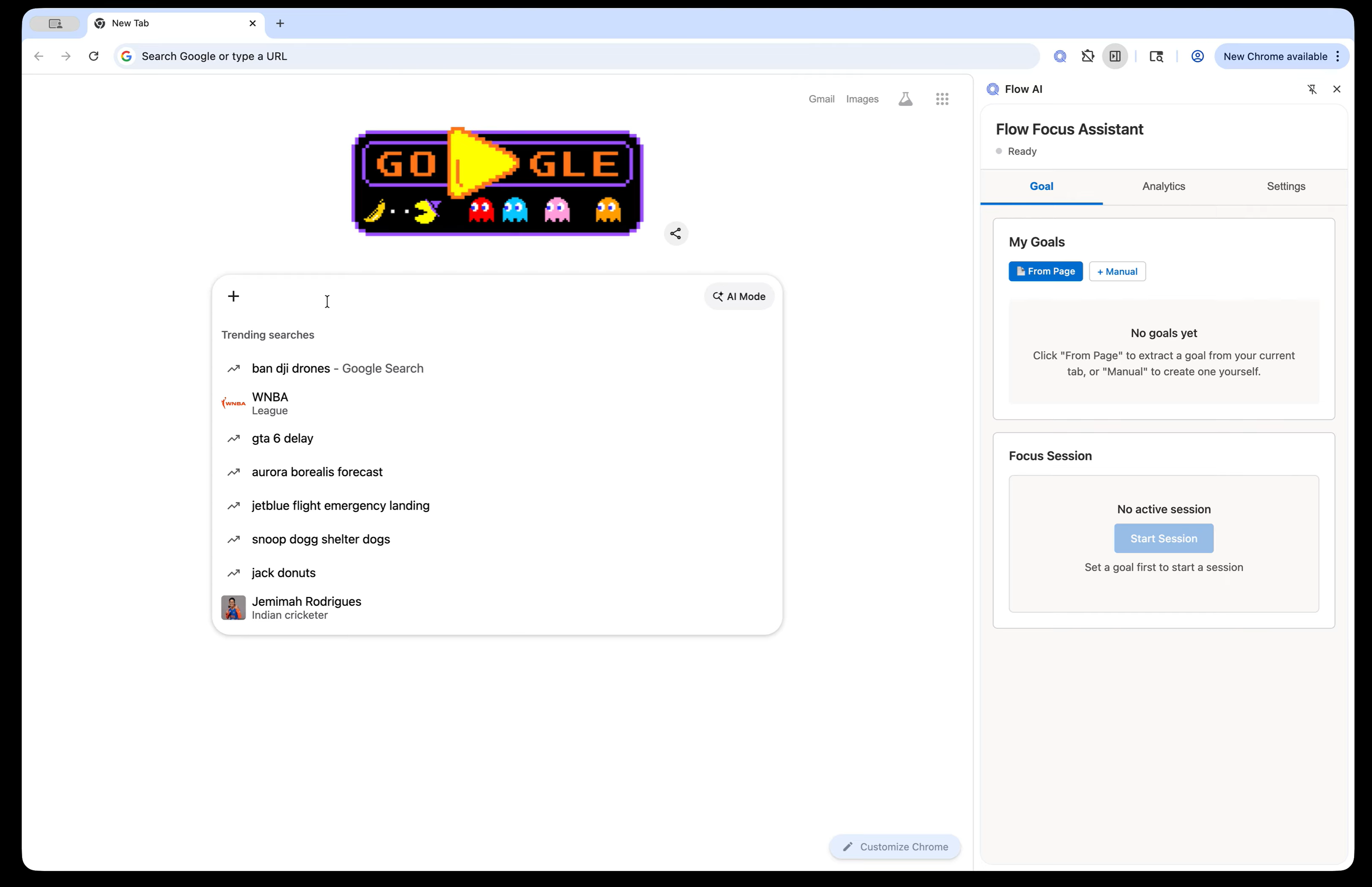
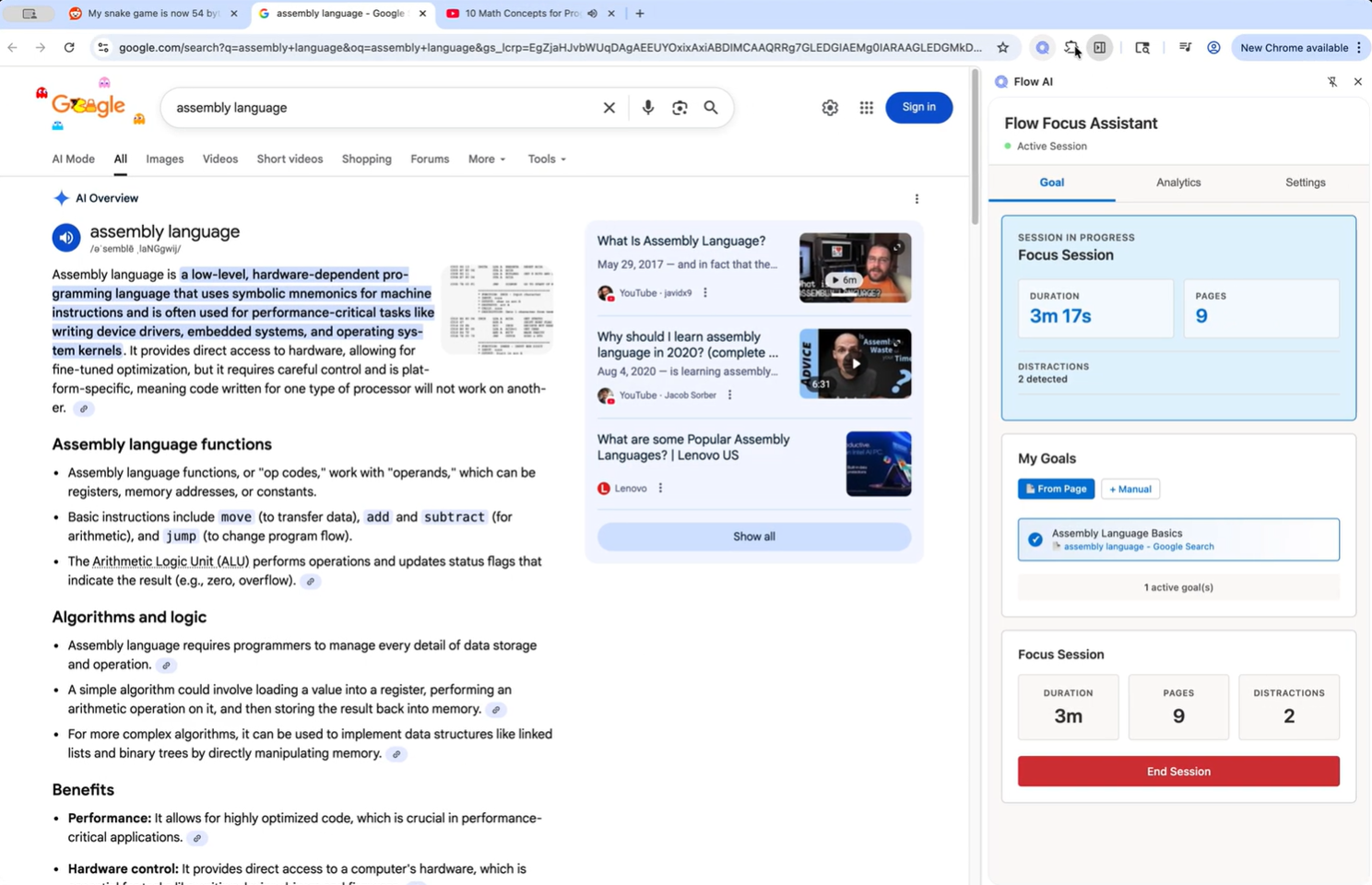
- Task Management Board — Create, search, and select tasks, or let Flow AI automatically suggest a focus goal based on the current webpage’s content.
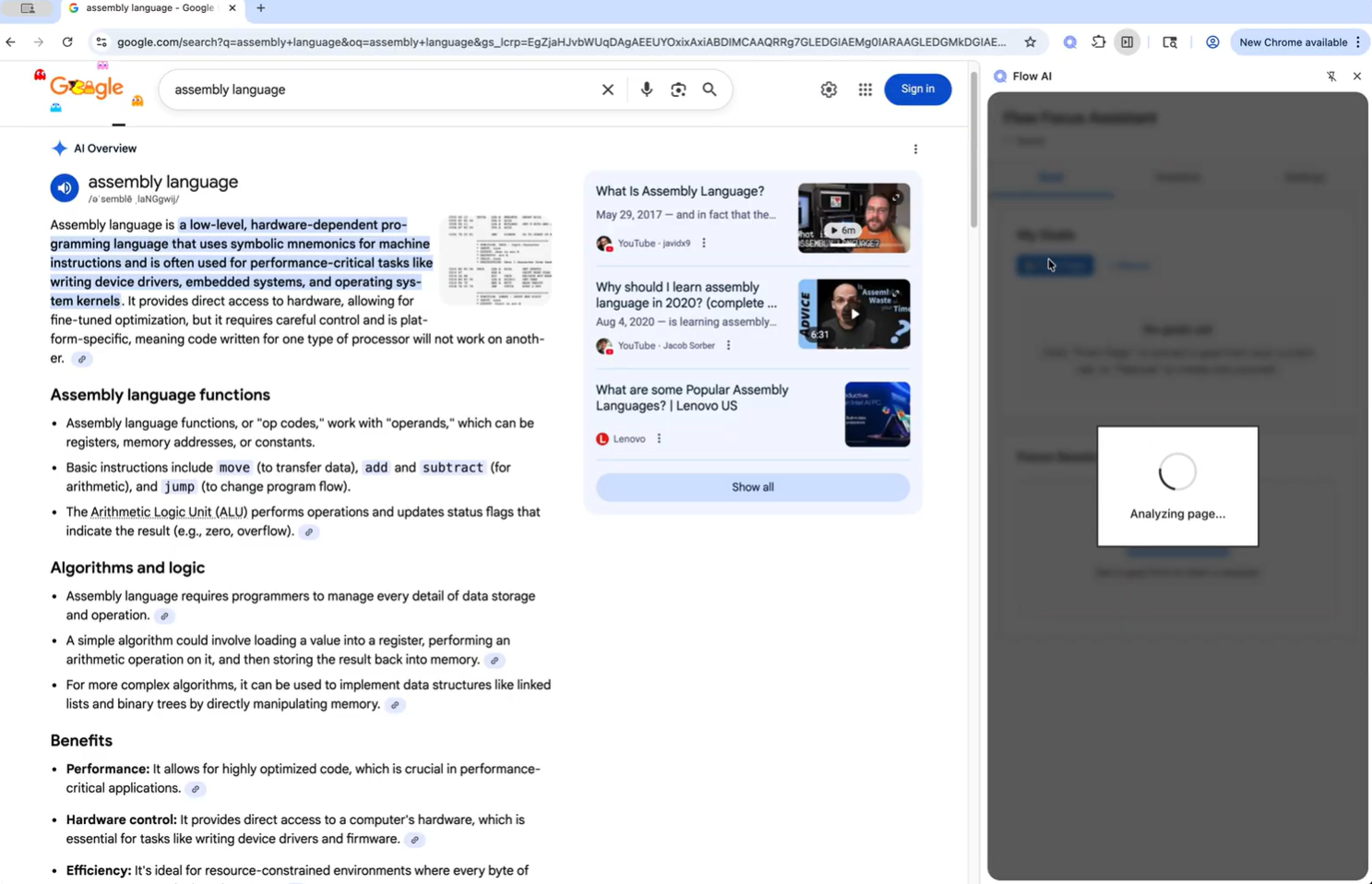
- AI-Powered Task Suggestion — When the user visits a new site, Flow AI analyzes the page’s content to detect the purpose and pops up a goal for the user to confirm and start a focusing session.
- Focus Mode — Once the user starts the task in focus mode, the interface collapses into the side panel with the current task and a timer. This keeps users aware of their focus session without clutter.
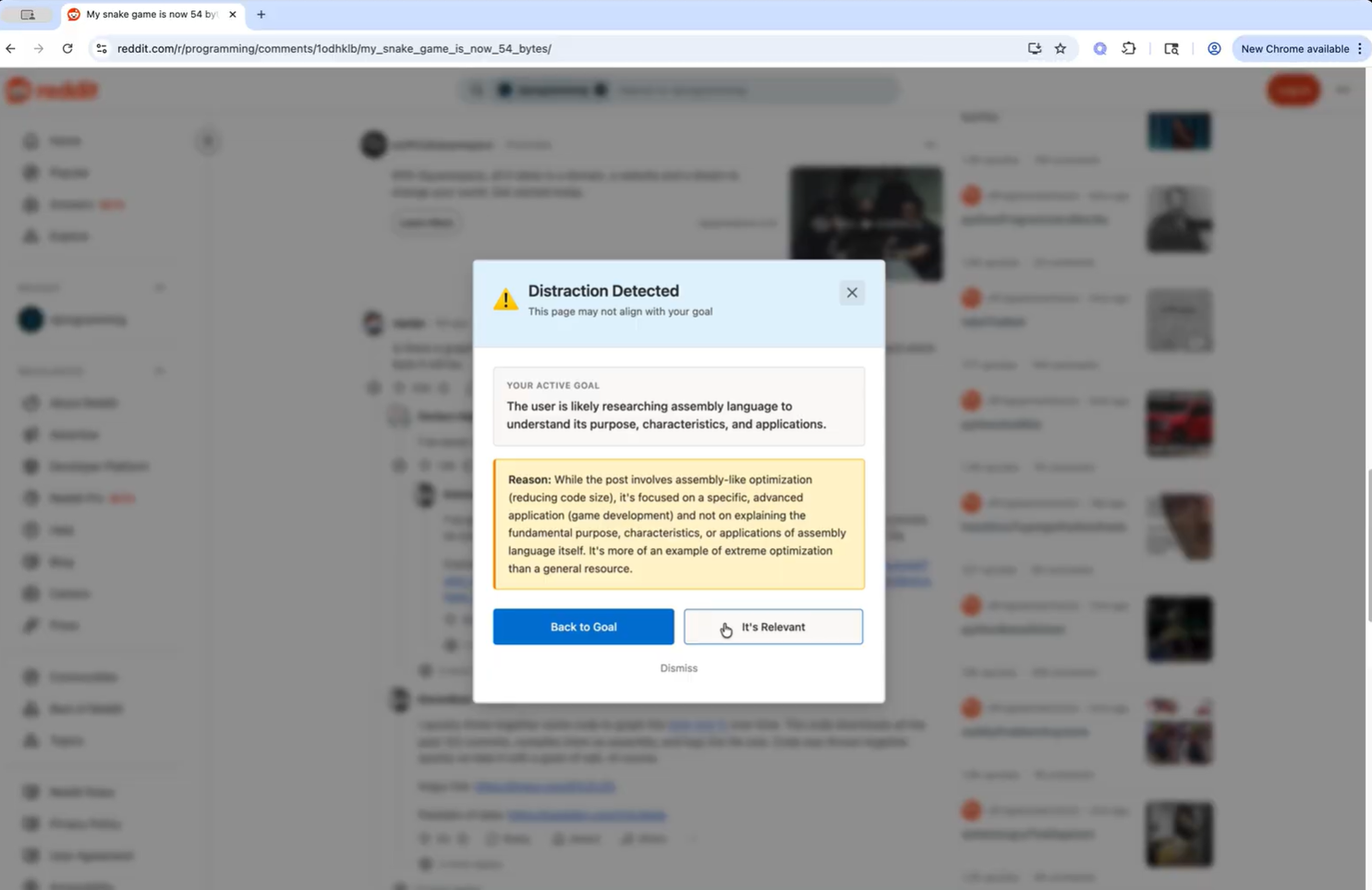
- Smart Distraction Detection — Every 30–60 seconds, Flow AI checks whether the current page still matches the user’s goal. If it detects drift, it triggers a Smart Nudge — options for the user to return to their task and even block out the distracting site directly.
- Adaptive Nudge Tone — Depending on distraction type (learning detour / fatigue / pure distraction), Flow AI adjusts tone and phrasing — e.g., “Looks like you’ve been on YouTube for a while — want a quick stretch?”
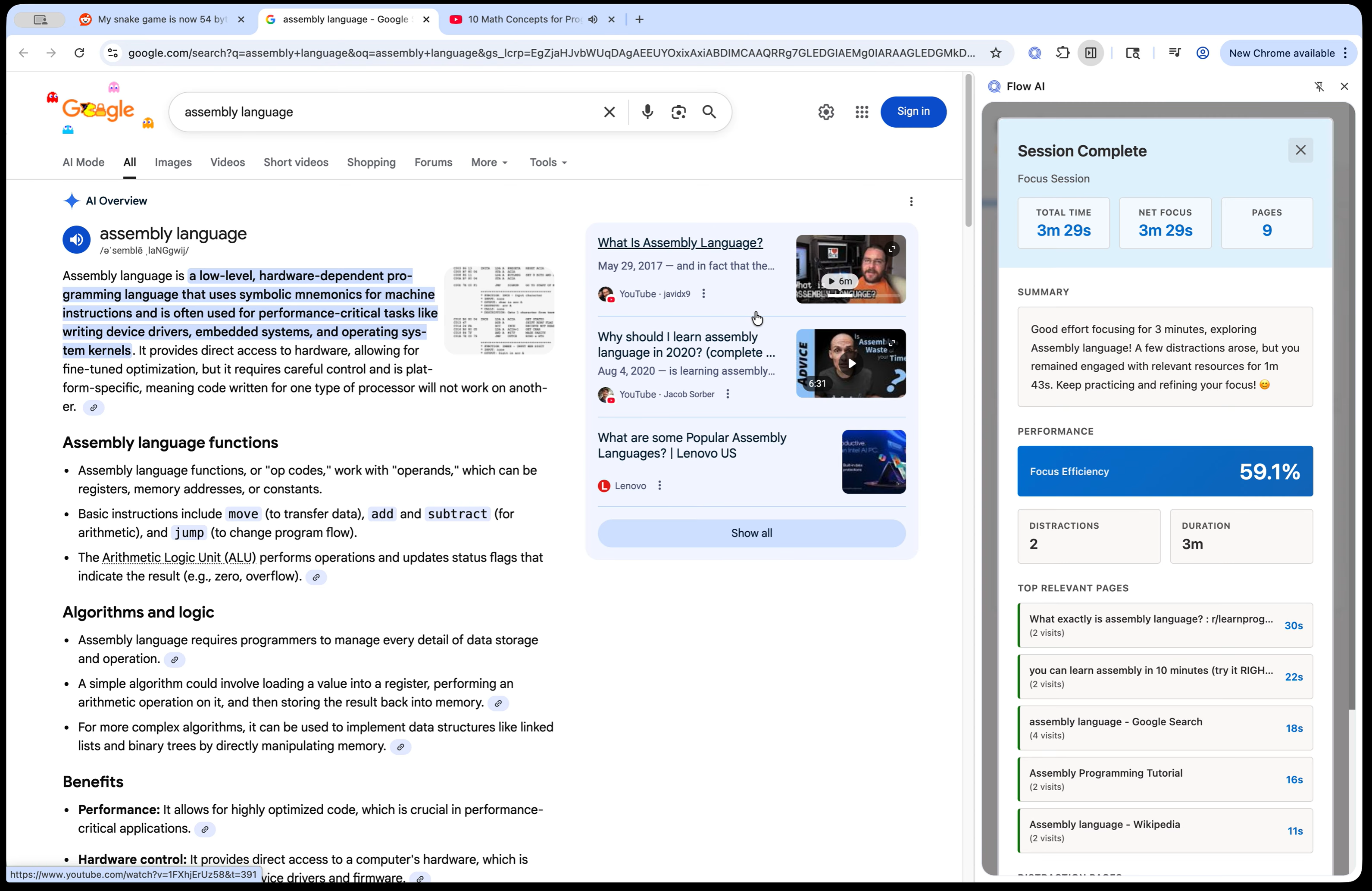
- Reflection & Summary — At the end of each focus session, the app auto-generates a reflection card summarizing what went well, challenges, and a next-step suggestion.
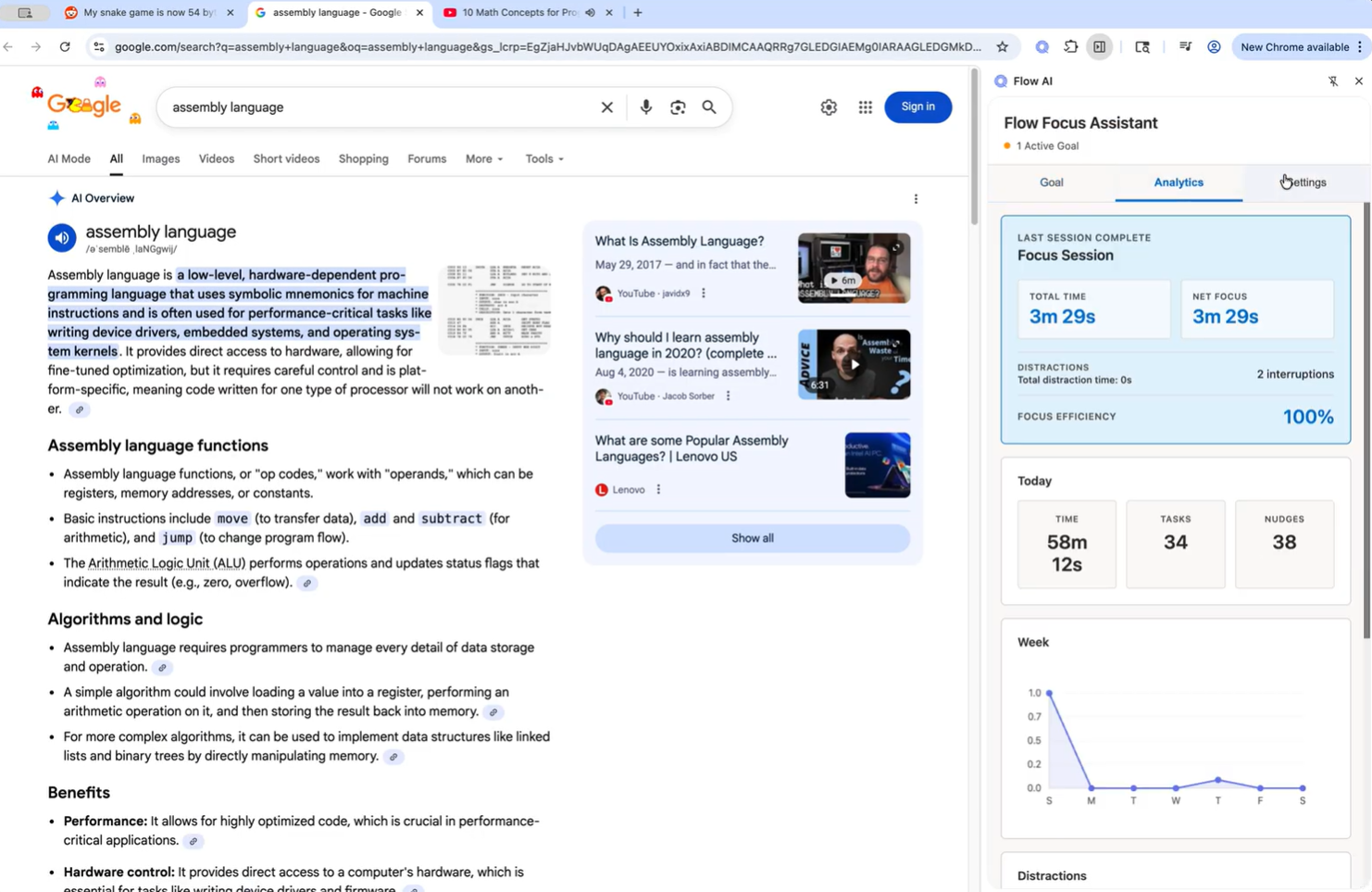
- Analytics Dashboard — Tracks daily and weekly productivity metrics: number of tasks completed, total focus time, distraction count, and average session length.
- Settings & Personalization — Users can pre set blocked domains, choose interface themes, and log out safely.
How we built it
We developed Flow AI as a Chrome extension using Manifest V3 with a side-panel interface structured into three tabs — Goal, Analytics, and Settings. The UI is built with clean Material Design principles, featuring minimal cards and dynamic state updates. Our integration combines asynchronous event handling for timer control, Chrome storage for task management, and AI-driven text analysis for relevance detection. We iterated through multiple low-fidelity and high-fidelity prototypes in Figma, refining user flow and feedback timing to keep the experience lightweight, private, and responsive.
Challenges we ran into
One of our biggest challenges was balancing AI autonomy with user control. ensuring reminders felt supportive rather than intrusive. The most difficult technical issue came from API latency and content-recognition accuracy. During testing, the AI model sometimes required several seconds to analyze active webpages, disrupting the “real-time” feel we wanted. This lag occurred because the Summarizer API extracted large, dynamic DOM content before the Prompt API could evaluate relevance, often leading to partial or mismatched summaries.
We also struggled with asynchronous communication between the content script, background service worker, and side-panel UI. Under Chrome’s Manifest, these elements run on separate threads, and synchronizing AI responses without UI lag requires careful debugging.
On the design side, crafting natural, human-like nudges proved challenging. Early prototypes sounded too robotic or repetitive, reducing user trust. Finally, we optimized local performance through refined prompt engineering, caching, and selective model triggers to maintain responsiveness. Through these challenges, we learned that making “intelligent” interactions feel seamless requires more than model accuracy. It demands precise timing, empathetic design, and rigorous engineering discipline.
Accomplishments that we're proud of
- Built a fully functional AI-powered Chrome extension prototype with a clean, production-ready design.
- Developed real-time distraction detection using relevance scoring and asynchronous events.
- Created adaptive AI nudges that dynamically adjust tone based on user focus behavior.
- Designed a calming, Google-inspired interface that is friendly and mindful.
- Achieved smooth performance and strong privacy protection while integrating AI locally.
We’re proud that Flow AI turned our shared frustration with scattered attention into a working solution that embodies our original vision, a focus tool that feels understanding, not judgmental. From the start, we wanted to build something that could interpret context instead of just controlling behavior, and we achieved that by combining UX empathy, cognitive-science insights, and lightweight AI inference directly in the browser.
Technically, we succeeded in building a complete system that runs locally in Chrome: it can interpret web content, detect distraction, generate natural language feedback, and visualize focus progress, all without invading privacy or breaking the user’s flow. Design-wise, we created an interface that reflects our values: calm, adaptive, and intuitive to use. The three-tab layout (Goal, Analytics, Settings) organizes information simply while keeping users in track of themselves, and features like Smart Nudges and AI Reflection Cards make the experience personal and supportive.
More importantly, Flow AI proved that AI can enhance self-regulation instead of enforcing it. Watching the tool help users regain focus with gentle guidance, rather than stress, confirmed that empathy and intelligence can coexist in design. That alignment between our vision of mindful productivity and the actual product experience is what we’re most proud of.
What we learned
It was our first time building an AI-powered product from the ground up, and we quickly learned that empathy is as important as engineering when designing technology to support focus. It’s not enough to enforce discipline. Tools must recognize users’ cognitive and emotional rhythms to truly help them stay engaged.
We also gained a deep appreciation for the limitations and trade-offs of built-in AI models. While the APIs provided powerful summarization and intent recognition, they struggled with latency, context precision, and edge-case behaviors. Learning to design around these constraints, through careful prompt optimization, caching, and interface timing, taught us how to balance intelligence with usability.
Collaborating across design and engineering disciplines strengthened our understanding of how to align functionality, performance, and emotional tone in a single product. We learned that great AI design isn’t about complexity, but about creating an experience that feels seamless, human, and trustworthy, even when working within clear technical limits.
What's next for Flow AI — Intelligent Chrome Extension for Focus
Next, we plan to extend Flow AI with adaptive learning capabilities, allowing it to tailor nudge styles, focus durations, and goal recommendations to each user’s behavior. Upcoming features include:
- Enhanced visual analytics and trend insights for personal and team productivity.
- Cross-device sync for seamless experience across Chrome profiles.
- Real-time AI responsiveness through optimized content parsing and local caching.
- Gamified focus streaks and motivational feedback loops for sustained engagement. Our long-term vision is to make Flow AI more than a productivity app and to transform it into a digital companion for mindful, sustainable work and study.
Built With
- css
- html
- javascript
- prompt
- promptapi
- summarizer
- summarizerapi
- writer-api


Log in or sign up for Devpost to join the conversation.