Florish: Building a Money Coach for Busy Mums
Inspiration
The idea for Florish came directly from Rebecca Louise's brief for this contest. She noticed something: mums are time poor, often stressed about money, and overwhelmed by financial apps that demand too much. You don't need to be a mum to recognize the problem: getting better at managing your finances is hard, and most apps expect more time and effort than real life allows.
They want two things:
- Practical help saving money day to day: where to shop, how to batch cook, which bills to cut
- Simple guidance on growing their money: investing feels intimidating and jargon heavy
Most finance apps miss the mark for this audience. They either require bank linking (which feels invasive), demand hours of budgeting (which busy mums don't have), or talk down to users with complicated terminology.
I wanted to build something different: an app that gives value in under a minute, respects privacy, and feels like a supportive friend rather than a strict accountant.
What I Built
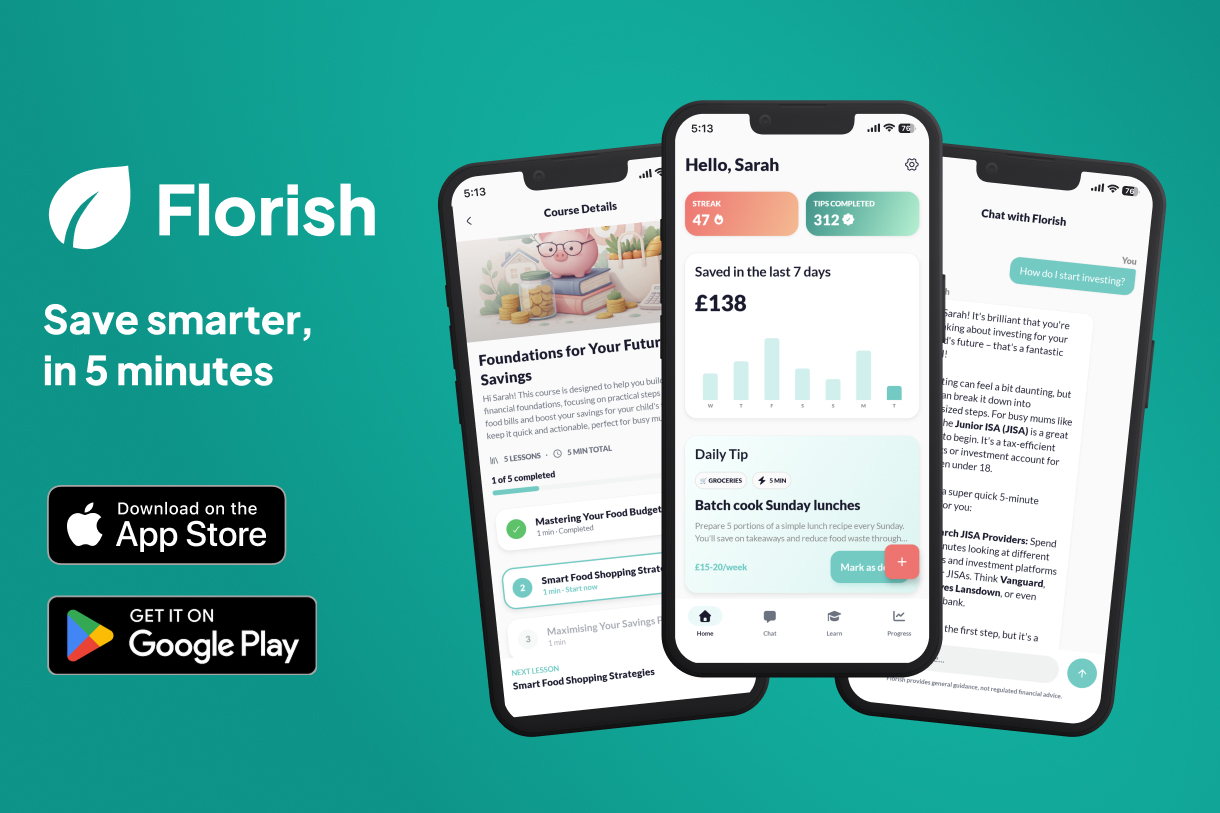
Florish is an AI powered money coach with four core features:
Daily Tips: One actionable money saving tip per day, matched to the user's family situation. Each tip shows the potential savings and time required. Users mark tips as done and log what they saved.
AI Chat: A conversational coach that answers any money question in plain English. "What's a cheap dinner for 4 tonight?" or "Should I get an ISA?" No jargon, just clear guidance.
Savings Tracking: Users log savings with one tap. A streak system and weekly chart make progress visible and motivating.
Investing Lessons: Short courses explaining ISAs, pensions, index funds, and more. Learn in 2 to 3 minute chunks.
The key differentiator: no bank access needed. This removes the biggest trust barrier for the target audience.
For this contest, I chose to submit the Android version. However, since Florish is built with Kotlin Multiplatform, the iOS version is also fully functional and ready for release.
How I Built It
Tech Stack
Backend:
- Node.js with Express
- MongoDB for data storage
- Firebase Authentication (Google Sign In)
- RevenueCat for subscription management
- Gemini API for AI chat and content generation
- ChatGPT for AI generated images
Mobile:
- Kotlin Multiplatform (KMP) for shared business logic on both iOS and Android
- Compose Multiplatform for the UI on both iOS and Android
- Material 3 design system
Content Generation:
- AI generated tips, courses, and lesson content personalised to user profiles
- AI generated course illustrations using a consistent visual style
Architecture Decisions
I chose to generate tips and courses with AI based on each user's onboarding data (family size, money priorities, savings goals, time available, experience level). This means every user gets content relevant to their situation rather than generic advice.
The savings system tracks "money not spent" rather than "money set aside." When a user follows a money saving tip, they log the estimated savings. This approach matches how busy people actually think about saving.
RevenueCat handles the subscription logic cleanly. I implemented a hard paywall with a 7 day free trial, offering monthly (£5.99) and annual (£39.99) plans.
Challenges
The "Empty App" Problem
A new user opens the app and has no savings history, no streak, no progress. How do you make that feel engaging rather than depressing?
My solution: a first day checklist card that gives users three quick wins (complete a tip, log a saving, chat with the coach). It gamifies the onboarding without being annoying, and disappears once complete.
Defining "Save"
Early on I had to decide what "saving" means in Florish. Is it money set aside in a savings account? Or money you didn't spend?
I chose the latter. When a user follows a tip like "switch to own brand pasta," they didn't move money anywhere. They just spent less. Tracking spending reduction is lower friction and builds awareness that motivates actual saving later.
AI Content Quality
Generating tips with AI is easy. Generating good tips that are UK specific, actionable, and appropriately scoped to the user's situation is harder.
I spent significant time on prompt engineering to ensure tips mention UK shops and services, have realistic savings estimates, and match the user's experience level. A beginner shouldn't get tips about complex pension strategies.
Balancing Features vs. Polish
With limited time, I had to prioritise.
Features I cut for MVP:
- Savings goals
- Achievements and badges
- Bank account linking
- Client side caching (data loads fresh from API on every screen)
Features I kept because they're core to the value proposition:
- Daily tips with savings logging
- AI chat
- Progress tracking
- Investing courses
What I Learned
Start with the audience, not the features. Rebecca's brief was clear about who this is for and what they need. Every decision flowed from "does this help a busy mum save money in under a minute?"
AI generated content needs careful prompting. Without it, AI gives generic advice. The personalisation layer (family size, priorities, goals, etc.) is what makes the tips feel relevant.
Subscription pricing is psychology. I experimented with weekly vs. monthly pricing. Weekly felt aggressive for a money saving app because the maths was too obviously unfavourable. Monthly plus annual with a clear savings percentage felt honest.
Empty states matter more than you think. The first time user experience can make or break retention. A checklist that guides action is worth more than a feature packed screen that overwhelms.
What's Next
If I continue developing Florish beyond this contest:
- Add notifications for daily tip reminders
- Expand course library beyond investing basics
- Build a receipt scanning feature for automatic savings detection
- Add more categories and UK specific content (benefits, council tax, childcare vouchers)
- Client side caching for faster app loads
But for now, the MVP delivers on the core promise: helping busy mums save money, one quick tip at a time.


Log in or sign up for Devpost to join the conversation.