-
-
Float: an AI procurement agent that won't pay the supplier until PayPal confirms the customer has paid you.
-
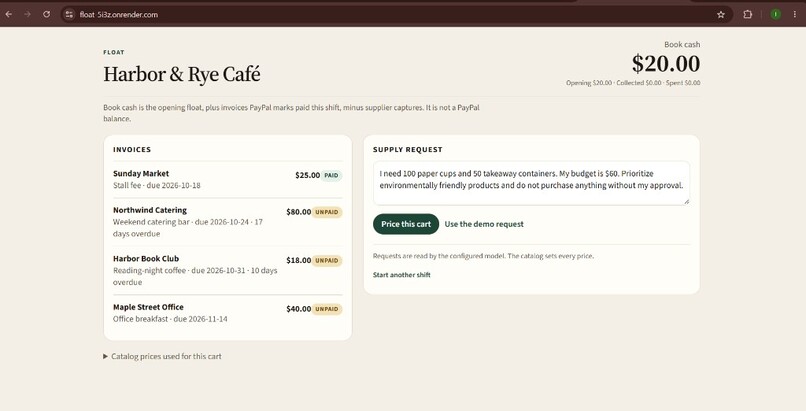
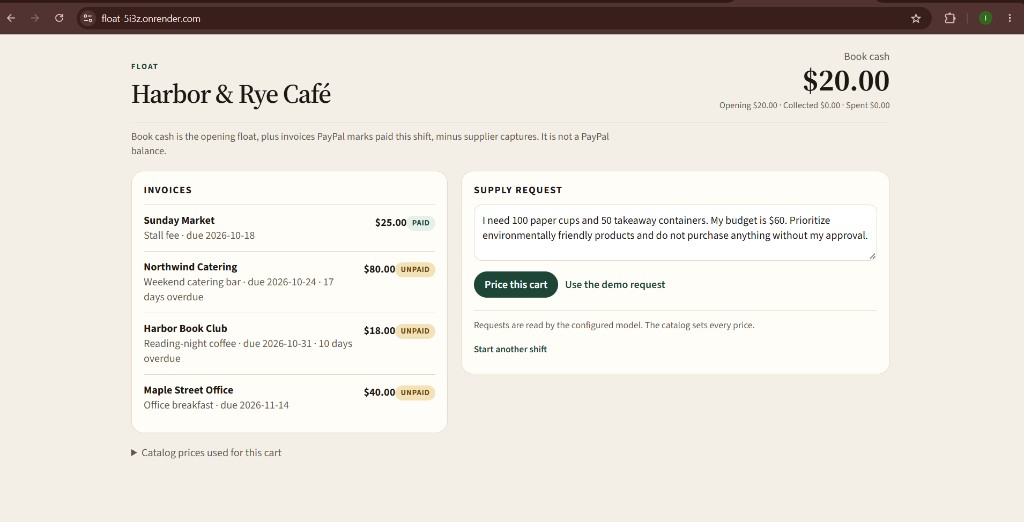
The café opens with $20.00 book cash. The owner types a supply order in plain English; Northwind's $80 invoice is still unpaid.
-
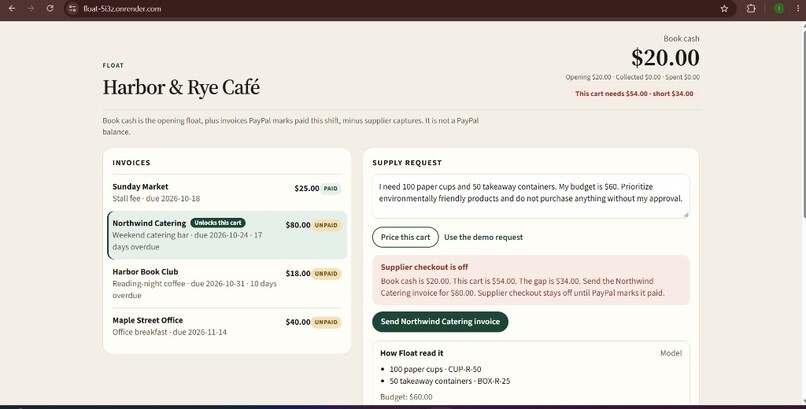
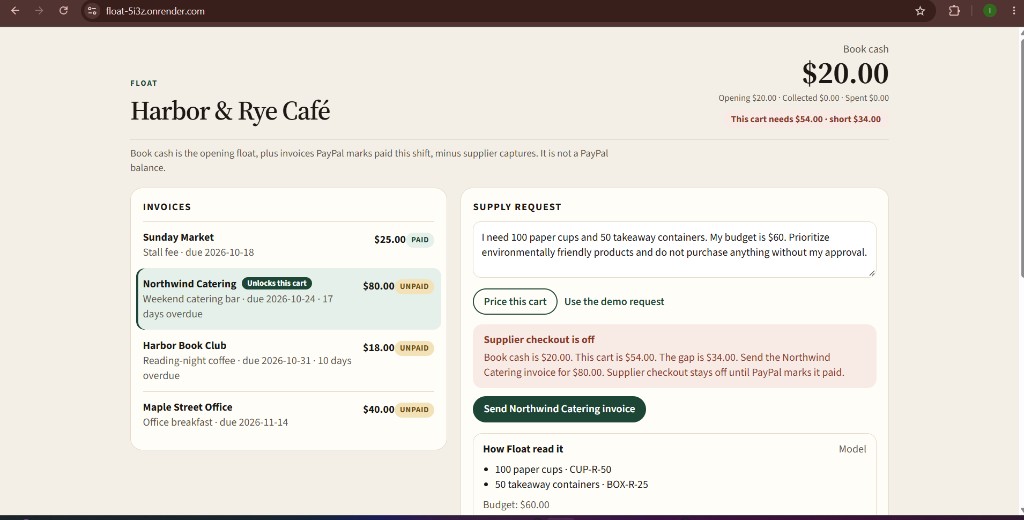
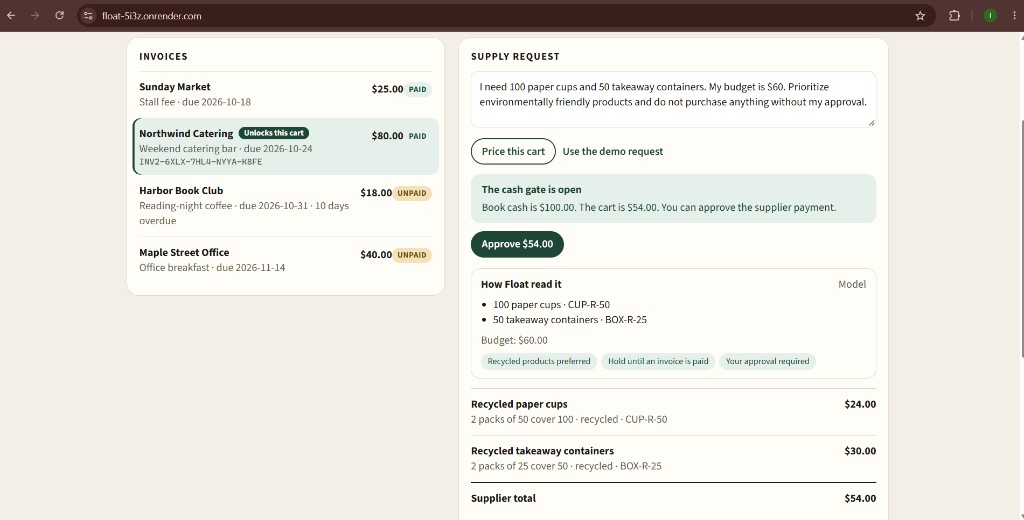
Gemini reads the order and the catalog prices it at $54.00. Book cash is $34 short, so supplier checkout stays blocked.
-
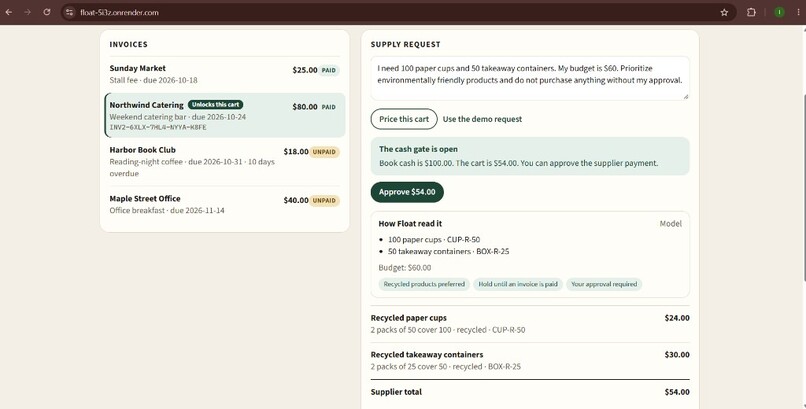
PayPal confirms the Northwind invoice is paid. Book cash rises to $100.00 and the owner can now approve the $54.00 cart.
-
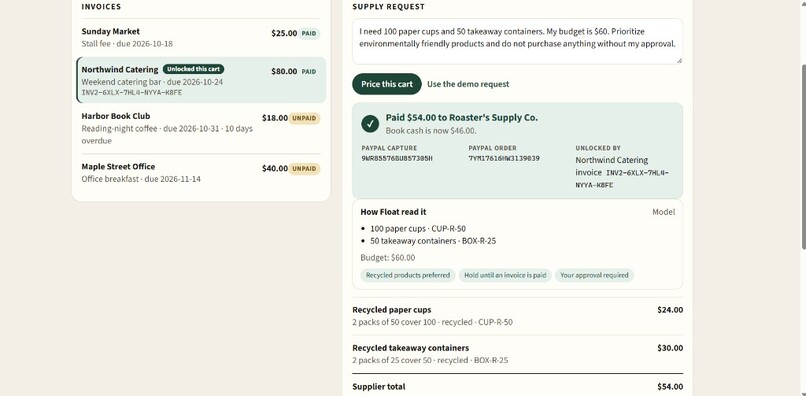
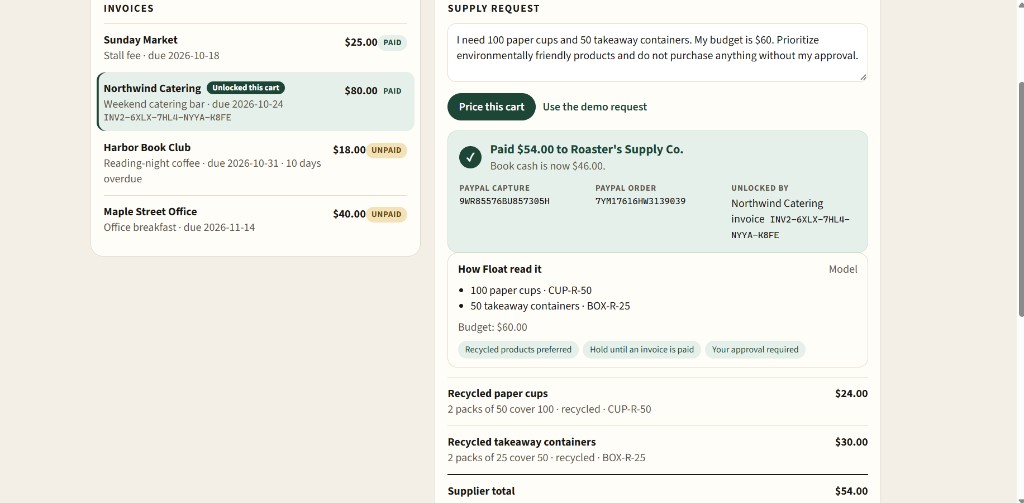
PayPal captures $54.00 to the supplier. The receipt shows the capture ID, the order ID and the invoice that unlocked it.
Inspiration
A small café often has to pay for cups, containers and coffee before its catering client pays last weekend's invoice. The money is coming. It just isn't here yet.
Most AI purchasing assistants would happily build that cart, stay under budget, and send the supplier payment on a day the till can't cover it. We realised the missing piece wasn't a smarter product suggestion. It was a simple rule: outgoing cash should wait for incoming cash. That rule became Float.
Don't pay the supplier until the customer pays you.
What it does
The owner types a supply order in plain English, for example:
"I need 100 paper cups and 50 takeaway containers. My budget is \$60. Prioritise eco-friendly products and don't buy anything without my approval."
Float then:
- Reads the request with Gemini and matches it to the café's catalog.
- Prices every line itself from the catalog. The AI never sets a price.
- Checks book cash. If the cart costs more than the café has, supplier checkout is blocked.
- Finds the unpaid customer invoice that covers the gap, and sends it through PayPal Invoicing.
- Waits until PayPal confirms the invoice is paid, checking about every four seconds.
- Asks the owner to approve that exact total, and only then captures the supplier payment through PayPal Orders.
- Shows a receipt with the PayPal capture ID, the order ID, and the invoice that unlocked the purchase.
Book cash is defined as:
$$ \text{Book cash} = \text{Opening float} + \sum \text{invoices paid this shift} - \sum \text{supplier captures} $$
In our demo: \( 20 + 80 - 54 = 46 \) dollars.
How we built it
- Frontend: React 19 and Vite, a single page served by the backend.
- Backend: FastAPI (Python), with SQLite storing shifts, invoices, carts and an audit trail.
- AI: Gemini 2.5 Flash through an OpenAI-compatible API in JSON mode. It turns one sentence into a small structured object: products, quantities, budget, eco preference, and whether the owner wants to approve first.
- Payments: two separate PayPal Sandbox REST apps, making real sandbox API calls:
- the café app uses Invoicing v2 to create, send and check customer invoices;
- the supplier app uses Orders v2 to create and capture the supplier payment.
Our core design principle:
The model reads the request. The server decides the money.
| Decision | Who makes it |
|---|---|
| What products and quantities were asked for | The AI, then re-checked by the server |
| Prices and cart total | The catalog only |
| Budget | The number the owner typed. It wins if the AI read it differently |
| Approve, pay, capture, mark as paid | Never the AI. Each is a separate server action |
Challenges we ran into
- Stopping the AI from touching money. A fluent answer is not a reason to move money. We had to make sure that nothing the model returns, such as a price, an approval or an "invoice paid" flag, can ever change a payment.
- Ambiguous requests. A phrase like "10 bags" could mean several products. Instead of guessing, Float asks which one the owner means. If a cart goes over budget, it is marked over budget rather than having items silently removed.
- Two PayPal accounts that must stay separate. Customer money and supplier money run through two different sandbox business apps, each with its own login. Keeping the flows apart, and testing them with two browser profiles, took careful setup.
- Trusting PayPal's status, and only PayPal's. We accept an invoice as paid only when PayPal itself reports
PAIDorMARKED_AS_PAID. If PayPal is unreachable, Float returns a clean error and never marks anything as paid. - Small real-world surprises. PayPal reminder emails don't reliably keep custom notes, so we put the "this invoice unlocks your supply order" note on the invoice itself. A stale email address left in the terminal kept overriding our
.envfile until we fixed how settings load. On free hosting, the database resets when the server restarts.
Accomplishments that we're proud of
- A complete, real payment loop. Invoice sent, customer pays, cart unlocks, owner approves, supplier is paid, all through real PayPal Sandbox API calls rather than a mock widget.
- An AI that can't be tricked into spending. Our tests feed Float hostile model output with fake prices, fake approvals and fake paid statuses. In every case no order is created, nothing is captured, and book cash stays the same.
- The cash gate is checked at every step. Float re-checks it on approval, on order creation and on capture, so a blocked cart can't sneak through by calling a route directly.
- Every payment can be traced. Each receipt shows the PayPal capture ID, the order ID and the exact invoice that unlocked it, and each cart keeps an audit trail of every check.
- Honest when things fail. If the AI call fails, Float says so on screen and uses a simple fallback reader, instead of pretending the model ran.
What we learned
- The safest AI design is a narrow one. Gemini is excellent at understanding "100 paper cups, eco-friendly, \$60 budget." Prices, cash checks and payments belong in plain, testable code.
- Payments need a single source of truth. Relying only on PayPal's own status, and never on what the app or the AI assumes, made the whole flow simpler and safer.
- Real APIs teach what docs don't. Sandbox accounts, OAuth tokens, invoice recipients and email behaviour all had small surprises that only showed up when we ran the full flow end to end.
What's next for Float
- A separate ledger for each business, plus a database that survives restarts
- Importing real receivables instead of demo invoices
- More than one supplier per order
- Moving from the PayPal Sandbox to live mode once the flow is proven
