-
-
Logo
-
Architecture diagram
Inspiration
Don't you hate it when you start filming something interesting, only to see someone else with a better camera, at a better spot, filming the same thing? What if you those around you could all work together to create an amazing video, cutting from one person to another to create a professional-looking multi-perspective recording.
The end result can be seen in this juggling video: [https://www.youtube.com/watch?v=sKFR3EwoeVU]
What it does
Users
Flipcam is a camera recording app for your phone. When you start recording, you automatically start a new Flipcam session, or join your nearest Flipcam session if an active one exists. As you record, from time to time, your phone will flash a little red light. That means you are live for the next few seconds! So get close to the action.
Once you and all those around you have stopped recording, in addition to your personal recording, you will be given a link to download an automatically-edited version of the recording... pulling in shots from those who filmed around you, showing the footage from all different angles.
Event organisers
In a future version of the app, event organisers can get in on the action too. You can set a camera feed that can join in with Flipcam sessions, so that users splice their own videos with professional footage. By mixing user content with your professional footage into a unique video, the user can share a video they have a true sense of ownership over, while you can maximise the message of your brand by including key footage that users love.
TV Broadcasters
When an event of interest happens, be it news, sport, or other, broadcasters can set up their own flipcam session. Users contribute content and get to see their footage broadcast live.
How we built it
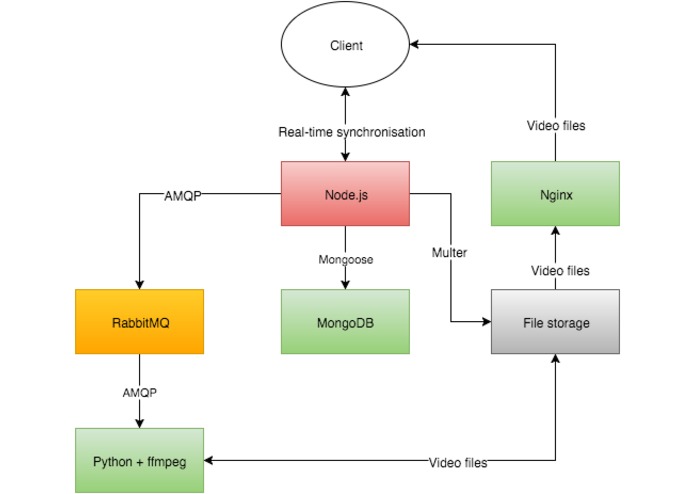
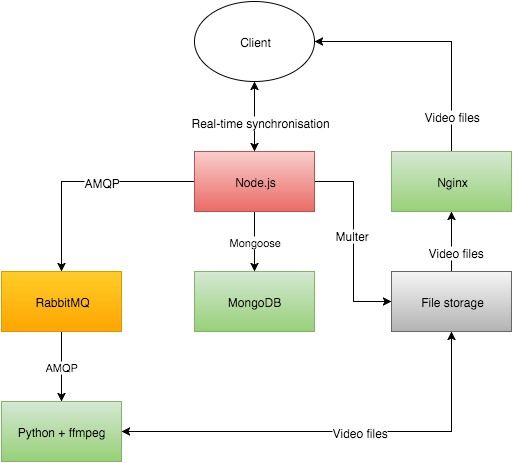
The Flipcam app is an iOS app. The backend was written as a RESTful API in Node.js with a MongoDB database.
The app works on the basis of Flipcam sessions. Multiple users contribute to a session. Each user will regularly request control of the session. As long as they have control, the footage they're recording at that time will be in the final edited video. Countdown timers will inform users of when they are about to gain and lose control. A flashing red dot shows them when they currently have control. Encouraging them to get unique footage.
Currently, this is provided on a fixed-time basis, with a round-robin distribution. In future versions of the app, determining when to cut to which camera could be determined with image processing algorithms or machine learning approaches.
Users can join or leave a session at any time. When all users stop recording, a job is dispatched to a queue from Node.js to RabbitMQ, specifying the files and the various segment start and end times. A python script grabs jobs from the queue and runs several ffmpeg functions to edit the video according to the instructions provided.
Once the final video has been generated, a notification is dispatched through rabbitmq. The node.js server then updates the mongodb records and allows the user to download the file.
Challenges we ran into
A big challenge with cutting between videos uploaded by different users is synchronising the video sources, so that cuts don't overlap or skip. This is particularly important for the audio in a recording.
Luckily, we found that the device timestamp on iOS is fairly accurate, owing to the fact the the clock is synchronised with GPS. It was then a case of correcting for the discrepancies in starting times between users.
A big challenge was running the entire system locally. Using AWS and Parse would have simplified the process, but we didn't want to rely on the internet. So we had to deploy our full stack on each of our machines.
Accomplishments that we're proud of
The biggest success for us was witnessing a cut that was perfectly synchronised, and managing to reproduce it consistently.
It was also amazing to see how three of us independently worked on three aspects of the service: the app, the API and the image processing... and through writing up spec documents, managed to make everything work with suprisingly minimal integration time.
What we learned
Getting Node.js playing nicely with Mongodb through Mongoose is harder than we thought. Asynchronous coding isn't always your friend.
What's next for Flipcam
- Deployment on the app store.
- A more advanced method for determining cut points, using image processing algorithms and machine learning.
- Allowing fixed cameras managed by event organisers to join a session.
- Allowing broadcasters to manage and share Flipcam sessions.


Log in or sign up for Devpost to join the conversation.