-
-
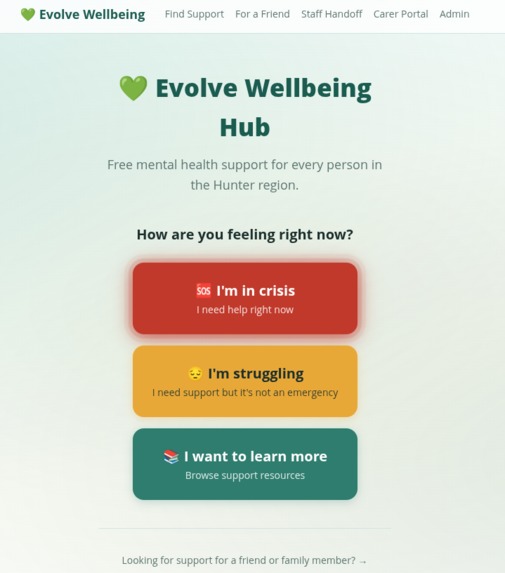
Help me
-
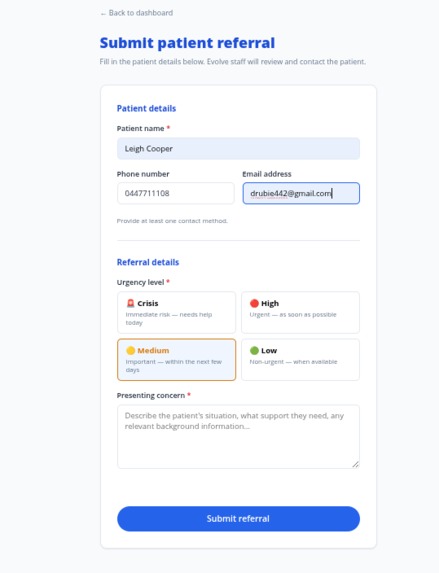
carer referral
-
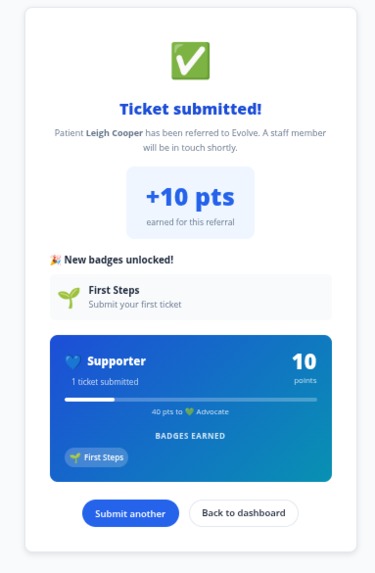
gamification
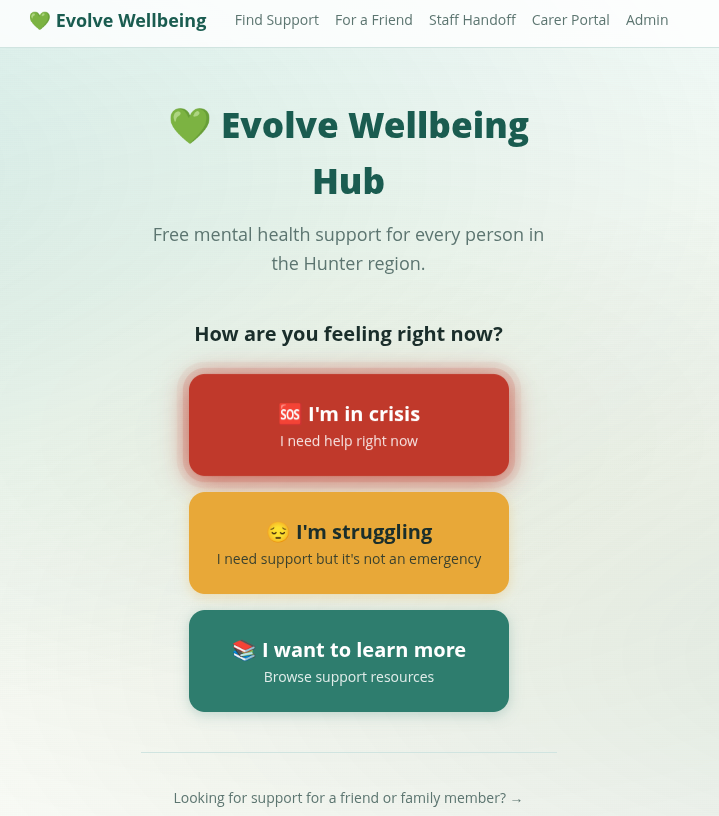
Evolve Mental Health & Wellbeing Hub — Product Summary
Overview
Evolve connects vulnerable people to support services instantly — via wearables, QR codes or carers — triaging needs and booking the right service automatically, so help arrives faster.
Business Challenges
Patients present to Emergency wards when in crisis but LMNSPN would prefer they had resources at hand to avoid falling back on the emergency room. Each unnecessary ED presentation represents both a cost and a missed opportunity for earlier intervention.
LMNSPN has limited outreach and needs to increase its presence in the community. Awareness of the service remains low, particularly among people who have not previously engaged with the mental health system.
LMNSPN is under-referred by health professionals. Carers, GPs, nurses, and other clinicians presenting patients in crisis do not routinely consider LMNSPN as a referral destination — either because it is not front of mind or because the referral process adds friction to already-busy workflows.
Some patients cannot self-refer. People in acute distress, older adults unfamiliar with technology, and those without reliable internet access cannot navigate a web form or make a phone call unassisted. Any solution must accommodate people being helped by a third party or using a physical mechanism like a QR code or NFC tag.
Use Cases
Use Case 1 — Patient in Crisis
"I need help right now."
A person arrives at the landing page — most likely via a QR code on a fridge magnet, hospital card, or community poster — and taps I'm in crisis.
The app immediately surfaces:
- 000 — Emergency Services (large tap-to-call button)
- 13 11 14 — Lifeline 24/7 crisis line (tap to call)
- Safe Haven, Hamilton East — 22 Stewart Avenue, Hamilton East NSW (Fri–Sun 4pm–9pm) — tap for directions
- Safe Space Charlestown — 3 Hilltop Arcade, 228 Pacific Highway (Mon & Tue 5:30pm–9:30pm) — tap for directions
These contacts stay visible throughout the entire flow. No navigation away from the page is required — the information is right there.
From this screen the patient can also tap Find more support to enter the triage wizard with urgency pre-set to "I need help today", which scores and filters services for immediate availability. No data is collected and no account is required.
Use Case 2 — Patient Who Is Struggling
"I'm not in crisis, but I'm not OK."
A person taps I'm struggling and is guided through a short, plain-language 4-step wizard:
- Who is this for? — Myself / Someone I care about
- What's going on? — Multi-select concern tiles: 😰 Anxiety, 😤 Stress, 😔 Low mood, 😶 Loneliness, 💔 Relationships, 🕊️ Grief & loss, 🆘 Crisis, ❓ Not sure
- Age group — Young child (0–5) through Older adult (65+)
- Region — Newcastle, Lake Macquarie, or Maitland/Cessnock
The app scores every service in the Hunter region database against the patient's answers — matching on concern category, age eligibility, and region — and returns a ranked list of recommendations. Services are labelled with their typical wait time (most results target within 48 hours). Each result card shows the service name, what it offers, address, phone number, availability hours, and a tap-to-call or tap-for-directions button.
If the patient selects crisis as a concern at any point during the wizard, the crisis banner is immediately shown inline without navigating away.
Use Case 3 — Patient Browsing All Services
"I want to explore what's available."
A person taps I want to learn more and lands on the full resource browser. Every Hunter region service is listed and can be filtered by:
- Concern — Anxiety, Stress, Loneliness, Relationships, Grief, Crisis, Youth, Aged Care
- Age group — Young child through Older adult
- Service type — In-person, Phone, Online, Community
Crisis services are visually highlighted and always appear at the top of the list. Each card shows availability hours, a description, contact details, and direct tap-to-call or website links. The list is printable for offline distribution to patients who don't have a smartphone.
Use Case 4 — Returning Patient: Auto-Booking via QR Code or NFC
"I've already been through the system. I want to book quickly."
For patients who have previously been registered with a service provider, Evolve issues a unique QR code (or NFC tag) tied to their patient profile. The profile pre-stores their name, service provider, and service category — no re-entry of details is needed.
When the patient scans their QR code with a phone camera:
- The phone's browser opens the Evolve referral endpoint
- A booking is created instantly in the system
- A styled confirmation screen is shown with:
- Patient name
- Service name and category
- Booking date and time
- A message that a staff member will follow up to confirm
This same endpoint accepts programmatic POST requests from wearable devices and NFC-enabled physical objects (brochures, desk placards, hospital wristbands), returning structured JSON for device-side processing.
Staff can review all incoming auto-bookings in the Auto-Bookings section of the staff portal, confirm or cancel them, and filter by status (pending / confirmed / cancelled).
Use Case 5 — Checking In for a Friend
"I'm worried about someone else."
A person who is concerned about a friend or family member — but isn't seeking help for themselves — can use the For a Friend pathway. They answer a few questions based on observable behaviours (e.g. they seem withdrawn, I'm worried about their safety) rather than clinical language. The results are the same scored service recommendations, but framed for sharing — a resource card that can be sent directly via SMS or WhatsApp to the person who needs it, removing the barrier of self-referral.
Use Case 6 — Hospital or Clinic Warm Handoff
"My patient needs support but I don't have time to find it for them."
The Warm Handoff tool at /handoff is designed for ED and ward staff working on a tablet or desktop. A staff member selects one or more concern categories from a simple grid, optionally enters the patient's mobile number, and the system surfaces a personalised resource card. The patient receives the information in the moment — no app install, no account, no follow-up required from the staff member.
This directly addresses the gap where LMNSPN is under-referred at the point of hospital discharge.
Use Case 7 — Carer Referral with Gamification
"I refer patients regularly and want to track my referrals."
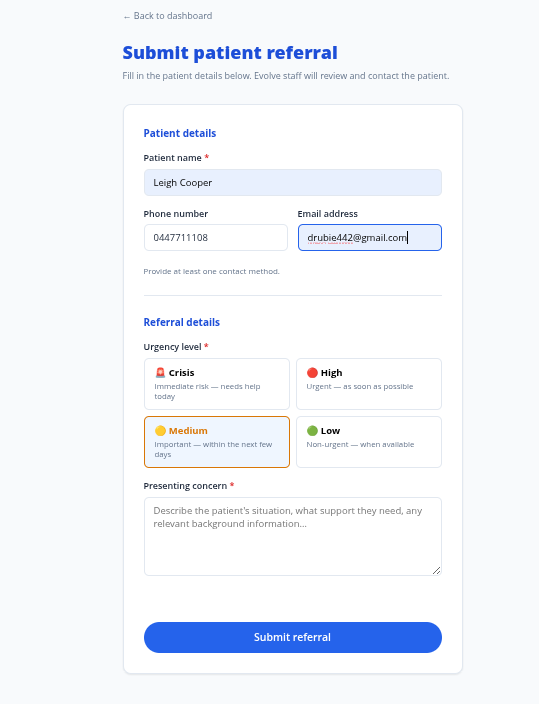
Carers — GPs, nurses, social workers, police, community workers — can register on the staff portal and submit structured referral tickets on behalf of patients. Each ticket captures the patient's name, contact details, the presenting concern, and urgency level.
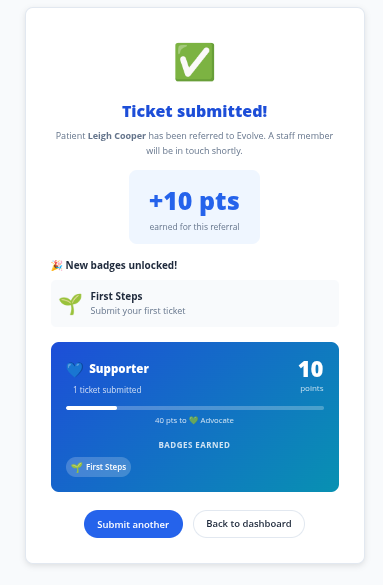
To encourage ongoing engagement, the portal includes a gamification system:
| Level | Badge |
|---|---|
| Supporter | First Steps |
| Advocate | Helping Hand |
| Champion | Dedicated Advocate |
| Expert | Community Champion / Crisis Responder |
Carers earn points and progress through levels for every referral submitted. This is designed to increase referral rates from professionals who may not currently consider LMNSPN as a primary referral destination.
Use Case 8 — Community Partner Referral Channels
"Our pharmacy / school / GP clinic wants to drive patients to mental health support."
Partner organisations (banks, pharmacies, GPs, schools) can be issued a unique branded QR code that links to a co-branded version of the landing page. The partner's name and welcome message appear alongside Evolve branding. Scan events are recorded per partner code, giving LMNSPN visibility into which channels are driving the most engagement and informing future outreach investment.
Use Case 9 — Accessible Modes for Specific Audiences
The landing page and triage wizard adapt automatically based on the context the QR code was distributed in:
| Mode | Triggered by | Behaviour |
|---|---|---|
| Default | Standard QR | Balanced layout, standard text size |
| Youth | School or youth service QR (?mode=youth) |
Emoji-led, informal language, parent/guardian pathway available |
| Elder | Aged care facility QR (?mode=elder) |
Very large text, phone-number-first, single tap to call, minimal steps |
| CALD | Community organisation QR (?mode=cald) |
Language selector prominent on first load |
A school distributing QR codes on student ID cards links automatically to youth mode. An aged care facility's poster links to elder mode. No configuration is needed by the end user.
Staff Portal — Internal Tools
Accessible at /staff, the portal provides Evolve Hub staff with tools to manage all inbound activity across every channel.
Ticket Queue (/staff/dashboard)
- View all open referral tickets submitted by carers and via the handoff tool
- Claim, progress, and close tickets with status notes at each step
- Filter by urgency and organisation
Auto-Bookings (/staff/bookings)
- Review all bookings created via QR code and NFC scans
- Stat summary: total bookings, pending count, confirmed count
- Confirm or cancel individual bookings inline
- Filter by status: all / pending / confirmed / cancelled
Patient Registry (/staff/patients)
- View all pre-registered patients eligible for auto-booking
- Search by name
- Copy a patient's GUID or full referral URL to generate or re-issue their QR code
Technology
| Layer | Detail |
|---|---|
| Public app | React 18 + Vite, React Router v7, port 5173 in dev |
| Staff portal | React 18 + Vite, served at /staff, port 5174 in dev |
| Server | Node.js 20, Express, port 3001 |
| Auth | JWT (jsonwebtoken + bcryptjs), token stored in localStorage |
| Data | In-memory Maps — no database dependency, designed for demo/prototype |
| QR codes | qrcode.react v4; SVG output, downloadable |
| Deployment | Docker multi-stage build → Azure Container Apps |
| Production URL | https://evolve-app.delightfulpebble-5e64afb1.australiaeast.azurecontainerapps.io/ |
Seed login
Staff access: [email protected] / evolve2024
Wearable & QR Auto-Referral API (/api/refer)
A zero-friction referral pathway for patients who have been pre-registered by a clinician — for example, hospital discharge patients given a wearable device or a personalised QR code card.
How it works
Each patient is assigned a unique GUID at registration. That GUID is embedded in a QR code or wearable. When the patient scans the QR code (or the device calls home), a booking is automatically created against their pre-assigned support service — no app, no login, no form to fill in.
Endpoints
| Method | Path | Auth | Description |
|---|---|---|---|
GET / POST |
/api/refer/:guid |
Public | Triggered by QR scan or wearable. Looks up patient by GUID, creates a booking with their assigned service. |
GET |
/api/refer/patients |
Staff | List all pre-registered patients and their assigned services. |
GET |
/api/refer/bookings |
Staff | List all auto-created bookings. Filterable by status. |
GET |
/api/refer/bookings/:id |
Staff | Single booking detail. |
PATCH |
/api/refer/bookings/:id/status |
Staff | Update booking status: pending → confirmed or cancelled. |
GET is supported on the referral endpoint so that scanning a QR code in a mobile browser triggers the booking directly, without needing a dedicated app.
Patient Registry
Each patient record holds: name, date of birth, phone, email, assigned service ID, and clinical notes. Six patients are seeded for demonstration.
Staff Portal — new pages
- Auto-Bookings — review all inbound auto-referral bookings, confirm or cancel each one
- Patient Registry — search registered patients, copy their GUID or referral URL for use on printed cards or wearables
Deployment
Hosted on Azure Container Apps — a single Docker container serving both the public app and the carer/staff portal.
Live URL: https://evolve-app.delightfulpebble-5e64afb1.australiaeast.azurecontainerapps.io
Short URL: https://shorturl.at/LMcsj

Log in or sign up for Devpost to join the conversation.