-
-
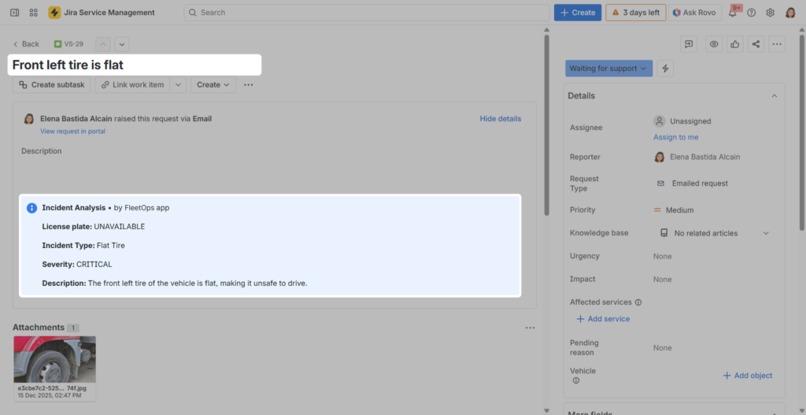
FleetOps analysis
-
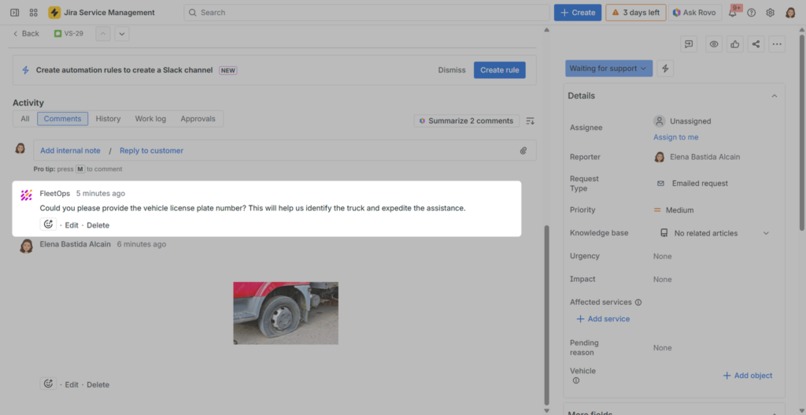
FleetOps user asking for the license plate number
-
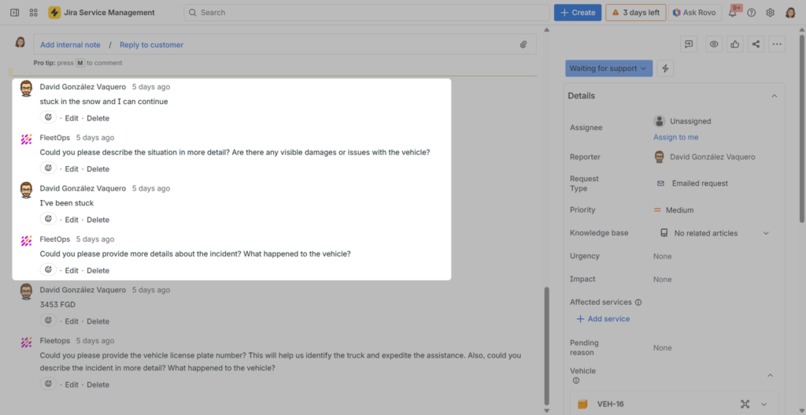
FleetOps user asking for more information
-
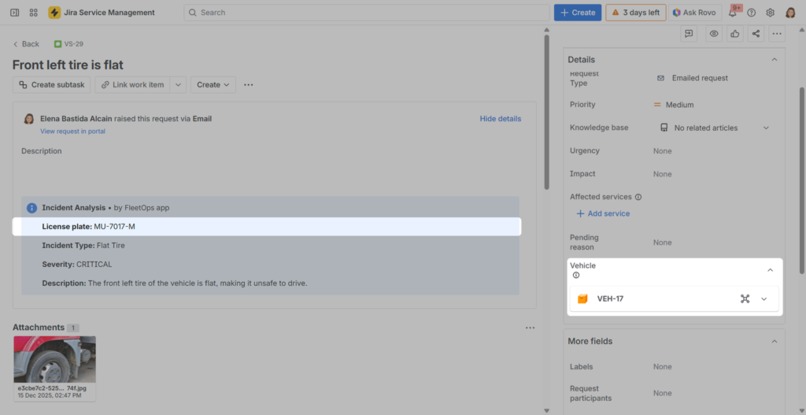
Updated information and linked asset
-
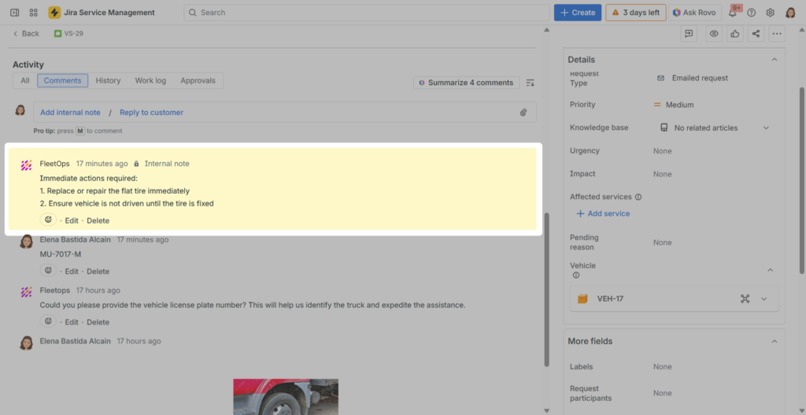
FleetOps recommendations
-
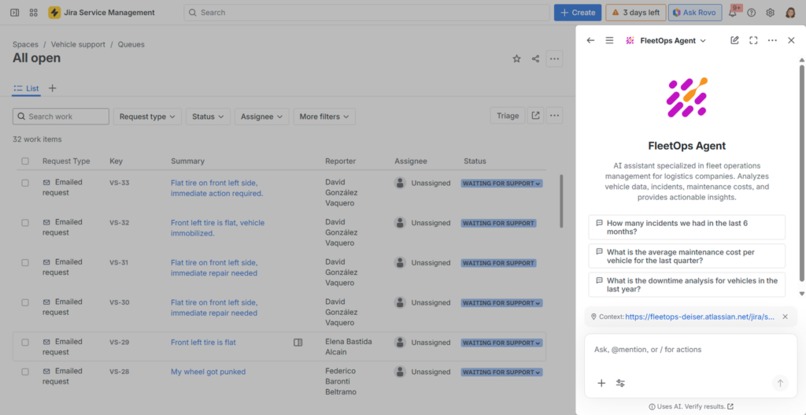
FleetOps Agent
-
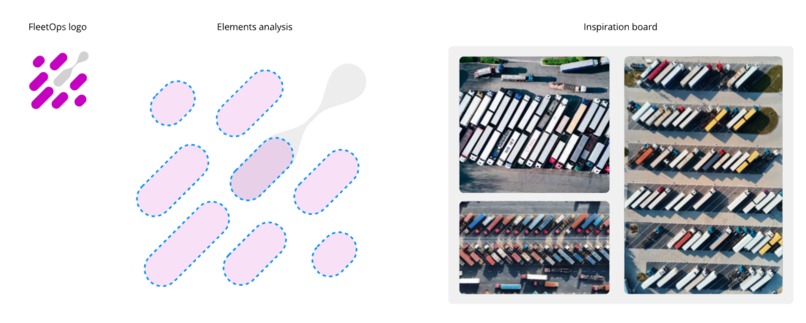
FleetOps logo inspiration
Inspiration
FleetOps is a logistics-industry solution built on the power of the Atlassian platform, leveraging Workitems, Assets, and Rovo. We have enhanced workflows with the intelligence required to understand day-to-day issues faced by drivers, simplifying the creation of route-related incidents and supporting fleet managers in incident management and fleet tracking.
What it does
Once FleetOps is installed and whenever someone reports an incident in any Jira Service Management project, FleetOps will analyze the work item and help employees manage them more quickly and efficiently.
What can I see in the FleetOps analysis?
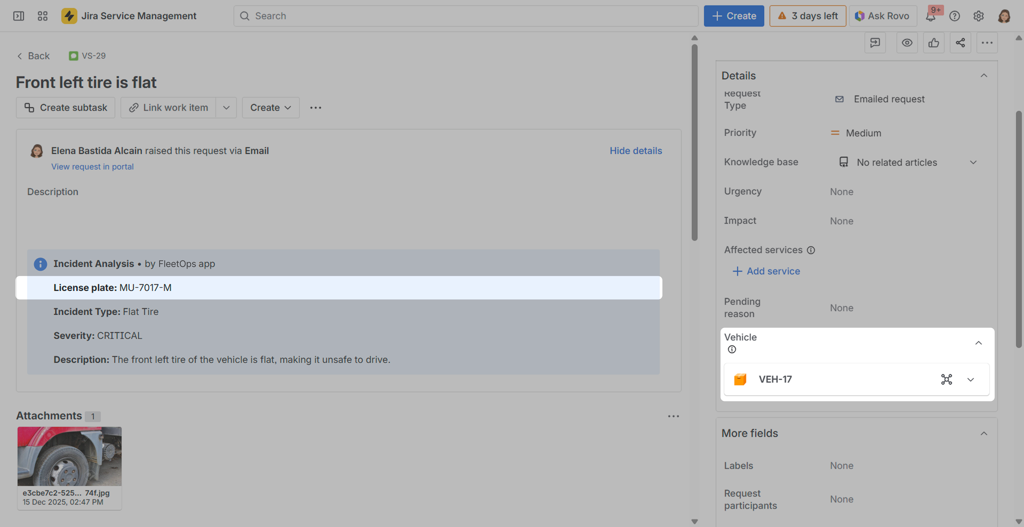
Access to a work item in a Jira Service Management Project and you will see the following info in the description:
Thanks to AI technology, FleetOps analyzes the attached image. It doesn't matter if nothing else has been written in the ticket; by analyzing the image, it describes the situation, updates the subject, clasifies the incident and evaluates the criticality of it.
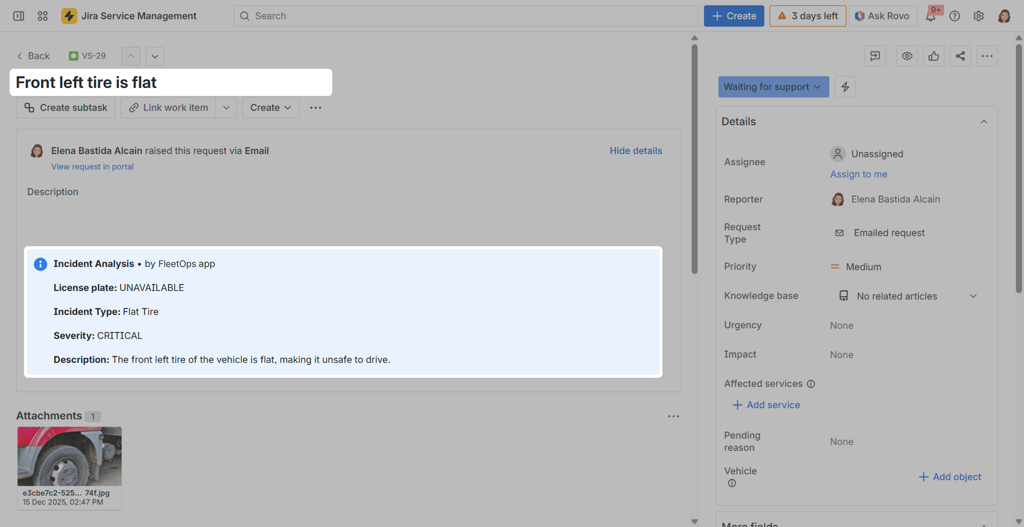
Additionally, when analyzing the image, it searches for the vehicle's license plate. If it does not find it, it sends an automatic message to the ticket assignee requesting the license plate.
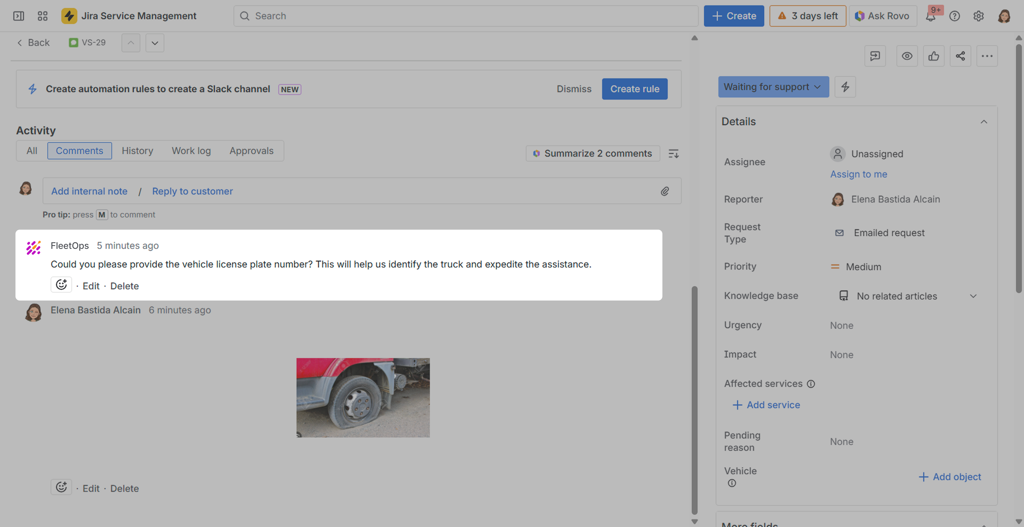
The same happens if the image is not clear enough to understand the incident problem. FleetOps itself is responsible for contacting the assigned person to ask for more information.
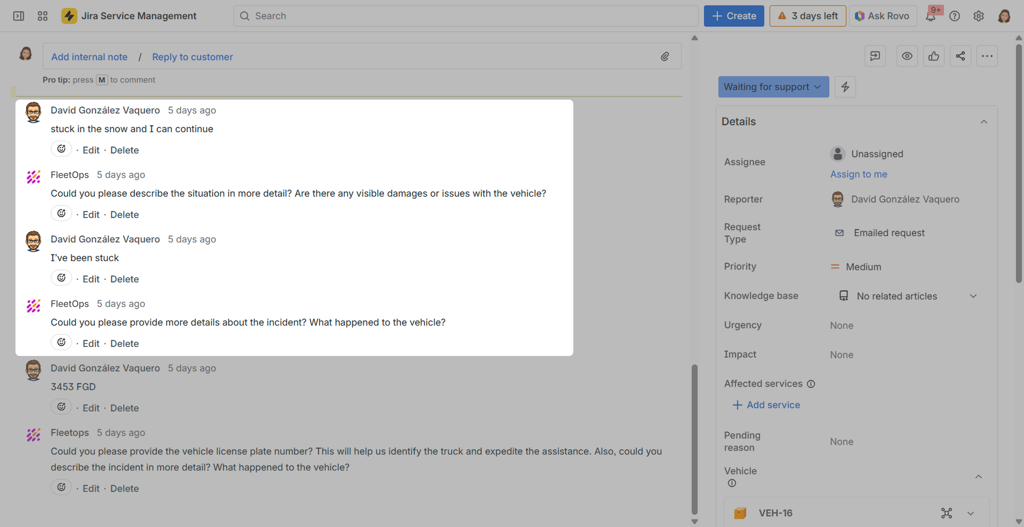
Once we have all the necessary information, FleetOps updates its report and associates the work item with the asset corresponding to the vehicle involved in the incident. If no existing asset is found, it creates a new one.
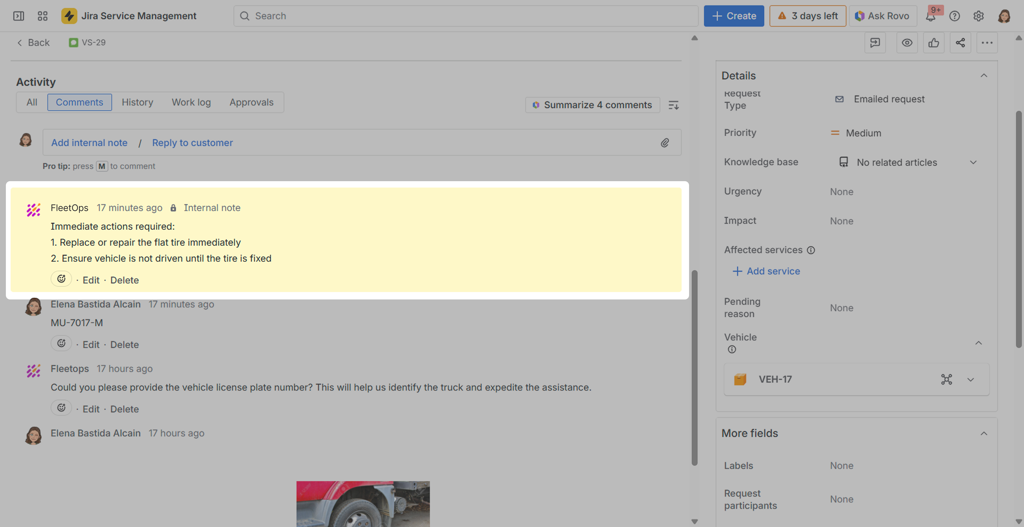
Finally, add an internal comment with recommendations for the person managing the incident.
Unlock Insights from Your Fleet Incidents
FleetOps includes a Rovo agent to extract more value from the data. Open Rovo and select the FleetOps agent to proceed.
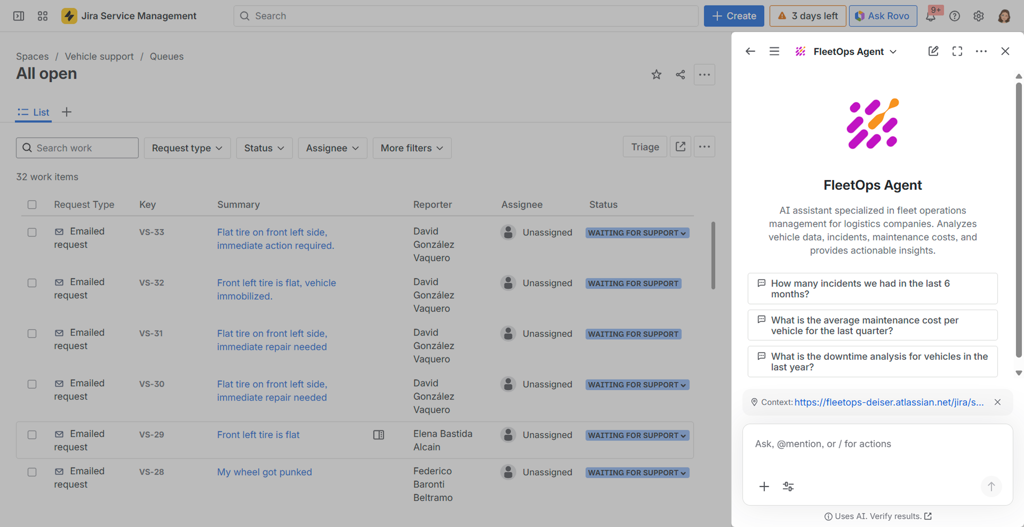
Select one of the questions shown in the chat or ask anything about incidents. Those are some example os questions that can be done:
- “Which vehicle brands have had the most issues over the past year?”
- “How many incidents has the vehicle with license plate XXX had in the last 6 months?”
- “What is the total repair cost for vans compared to trucks this quarter?”
- “Which models frequently experience the same type of failure?”
- “What is the average resolution time for an engine failure?”
- “Which vehicles have been out of service the longest due to repairs?”
- “How much have we spent on maintaining vehicle YYY this year?”
- “Which drivers have reported the most issues?”
- “Has the number of failures increased in recent months?”
- “Which vehicles currently have unresolved incidents?”
- “Which type of asset experiences the most issues?”
How to install & configure it
We have created a step-by-step tutorial that explains in detail how to install and configure FleetOps.
Our focus has been on automatically creating as much as possible so that teams can start enjoying the benefits of FleetOps as quickly as possible and in the most transparent way for end users.
For more details about this part of the process, you can find the tutorial here: FleetOps installation & configuration guide.
How we built it
Discovery
We used Jira Product Discovery together with the RICE framework to select the idea we would present at Codegeist.
Our first step was to review our existing backlog of ideas and identify those that best aligned with the Codegeist competition rules. One of the main Codegeist categories focuses on specialized industries, and we had been exploring opportunities to build something tailored to a specific industry for some time. This made the competition a perfect fit for our concept and helped us narrow down the most suitable idea to develop.
Development
FleetOps has been developed on Atlassian Forge as a fully native cloud app, using TypeScript 5.9 as the main programming language. The frontend is built with Forge UI Kit 2 to ensure a seamless user experience inside Jira, while the backend relies on Forge Functions and Resolvers to efficiently handle business logic and integrations.
We followed Clean Architecture principles with a hexagonal pattern that clearly separates responsibilities.
For the AI layer, FleetOps combines OpenAI GPT‑4o Vision capabilities with an Atlassian Rovo Agent, enabling advanced reasoning over both text and visual content. Data is persisted using the Forge Storage API, Jira Assets, and Entity Properties, which allows us to model domain entities and relationships in a way that is both flexible and aligned with Jira’s native data structures. Asynchronous workloads are managed through Forge Events Queue, improving performance and responsiveness for long‑running operations.
Quality has been a core focus throughout development. We use Jest as our main testing framework and maintain 85% test coverage, which helps us ensure stability, reduce regressions, and confidently iterate on new features.
Testing
Testing was carried out continuously throughout the development process, as we fine‑tuned our agent at every stage to offer the best possible results to our customers. We executed extensive test scenarios to maximize accuracy, taking into account that we do not have the ability to make a Rovo agent fully deterministic.
Challenges we ran into
Automating Assets schemas and sample data
One of the first challenges we faced was creating a complete and realistic Assets setup during installation. To facilitate demos and testing, FleetOps needed to automatically provision an entire object schema for fleet management, including multiple object types (Truck, Van, Trailer), custom attributes (Brand, Model, License Plate, Status, etc.), and more than 50 sample vehicles with realistic data.
All of this had to be executed automatically during the lifecycle:installed event, which led us to rely on asynchronous processing with Forge Queues to avoid blocking the installation and to orchestrate background creation of all the required data.
Automating the link between Assets and Jira work items
A second challenge was linking Assets with Jira custom fields in an automated way. One of FleetOps key features is the automatic association between the vehicle (Asset) and the work item (ticket): searching for the vehicle by license plate using AQL, creating the asset if it does not exist based on image extraction, creating an “Asset” custom field in the JSM project, and updating the ticket to link it with the corresponding asset.
While we can programmatically create custom fields, we discovered that it is not currently possible via API to configure a field as Asset Object and bind it to a specific Object Type. This limitation forces administrators to complete this configuration manually in Jira settings after installation, adding friction to the initial user experience.
Designing a reliable prompt for image analysis
Another major challenge was refining the prompt for the OpenAI Vision API so that we could reliably extract all the information we needed in a single call. Our use case required extracting license plates from images (sometimes blurry or at difficult angles), analyzing vehicle condition, identifying the incident type, and generating summaries in the user’s language, all while optimizing cost and performance.
We iterated through several prompt versions: from a generic description that produced inconsistent, unstructured outputs, to a more specific but still free‑form prompt that was hard to parse. The turning point came when we enforced a strict JSON response format with a well‑defined schema, explicit enums for fields like incident type and severity, clear fallbacks for license plate detection, and explicit instructions for language detection and alignment, which significantly improved reliability and downstream processing.
Teaching Rovo agent to speak AQL
We also had to teach FleetOps Rovo Agent how to understand and generate AQL queries to answer complex questions about the fleet, such as Show all Mercedes that are in maintenance. Rovo does not natively know AQL syntax nor our Assets schema, so we designed a rich agent prompt that includes AQL syntax examples, the full object schema structure (object types and attributes), and clear guidance on how to choose actions and construct queries.
By explicitly listing the available actions, providing realistic query patterns, and describing how to respond with insights and charts, we enabled the agent to reliably translate natural language questions into valid AQL. Additionally, we implemented basic AQL validation to prevent malformed or potentially unsafe queries, which improved robustness and user trust in the agent’s responses.
Accomplishments that we're proud of
Performance
We are particularly proud of the performance optimizations achieved in FleetOps. Despite orchestrating multiple integrations (Assets, Rovo, OpenAI, Jira Service Management), the app responds quickly and handles image analysis, asset lookups, and ticket updates with minimal latency.
This allows fleet managers and support teams to work in real time without feeling the overhead of complex AI and CMDB operations running behind the scenes.
Deep Jira Assets API expertise
Throughout the project, we have built strong expertise around the Jira Assets API and how to model fleet management scenarios within it. We successfully automated schema creation, object type configuration, and sample data provisioning, taking full advantage of Assets’ flexibility while respecting its constraints.
This knowledge has been crucial to delivering a solution that feels native to Jira and can be easily extended to different fleet structures and business needs.
Rovo agent delivering crucial insights
Another key accomplishment is how the Rovo agent surfaces crucial insights for customers in a natural, conversational way. Instead of forcing users to navigate complex filters or reports, FleetOps enables them to ask questions such as Which vehicles are costing me the most in maintenance? or Show me all trucks currently in maintenance by brand, and get immediate, actionable answers.
This significantly reduces time to insight and democratizes access to fleet intelligence across the organization.
Chart generation inside the Rovo agent
Finally, we are proud of the chart generation capabilities integrated directly into the Rovo agent. Beyond returning raw data, the agent automatically creates visualizations that highlight trends, distributions, and key KPIs (for example, maintenance incidents by brand or status).
This turns Rovo responses into interactive, visually rich insights that help stakeholders quickly understand the state of their fleet and make better, data‑driven decisions.
What we learned
Assets as a foundation for industry‑specific schemas
We learned how Jira Assets can effectively support the definition of schemas tailored to specific industries. In the case of fleet management, Assets allowed us to model vehicles, attributes, and relationships in a structured, flexible way that closely matches real‑world operations.
This experience confirmed that Assets is a solid foundation not only for IT CMDB use cases, but also for vertical solutions in domains such as transportation, logistics, and other asset‑intensive industries.
OpenAI Vision: powerful but costly
We also confirmed that the OpenAI GPT‑4o Vision API is extremely powerful for tasks such as license plate OCR and visual incident analysis, but it must be used carefully due to cost considerations.
Prompt design plays a critical role: by consolidating all required outputs into a single, well‑structured prompt and response format, we were able to reduce token usage and minimize the number of calls needed, achieving a better balance between accuracy, latency, and operating cost.
The importance of detailed Rovo prompts
Finally, we learned that Rovo Agents require very detailed and carefully crafted prompts to be truly effective in production.
It is essential to invest time in iterative testing, refinement, and edge‑case handling before going live, ensuring that the agent understands the domain, uses the right actions, and consistently returns reliable, helpful responses.
What's next for FleetOps | Smart incident reporting for fleet operations
In the short term, we plan to explore Forge LLM as soon as it provides support for image analysis. This will allow us to reduce our dependency on the external OpenAI API and move more of the intelligence layer closer to the Atlassian ecosystem.
Using Forge LLM will also allow FleetOps to qualify as a Runs on Atlassian application, which is highly relevant for future customers. This ensures that the solution operates entirely within Atlassian’s cloud infrastructure, increasing trust in its security, compliance, and reliability.
We also want to improve how FleetOps integrates with Jira Assets. Specifically, we intend to request and leverage new Atlassian APIs that allow configuring Asset Object fields more flexibly, and to streamline the overall installation experience so that new customers can get value from the app with minimal setup effort.
On the intelligence side, we will extend the metrics available through the Rovo Agent, incorporating indicators such as total maintenance cost per vehicle, predictions of upcoming failures using machine learning models, and performance comparisons between different brands. These enhancements will feed into a dedicated analytics dashboard, giving customers a global view of their fleet KPIs in a single place.
Bonus track
Why is the logo designed this way?
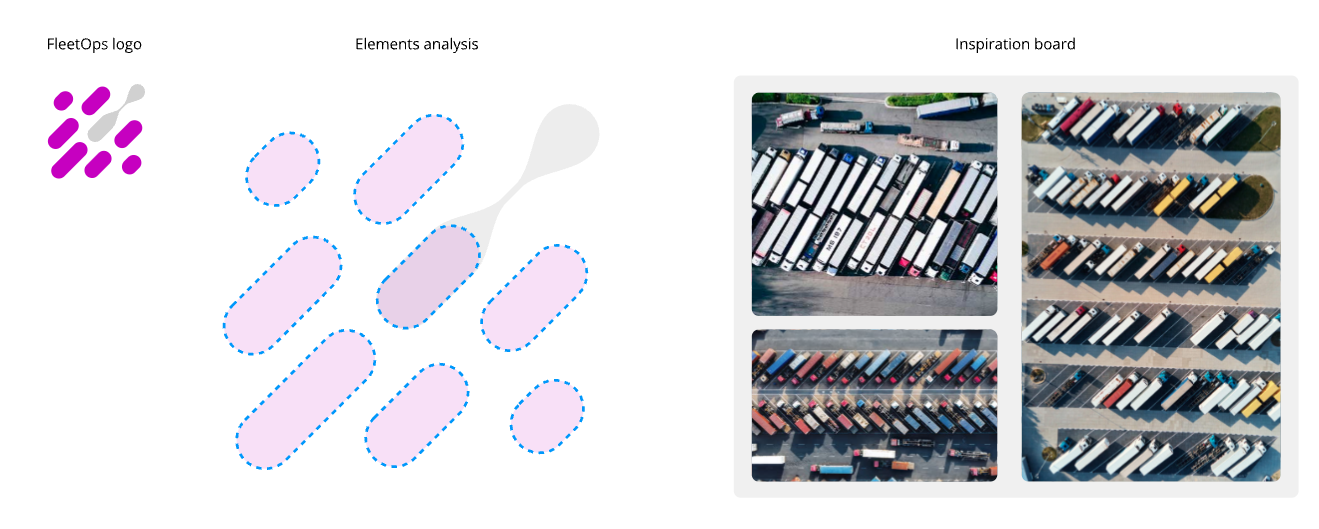 The logo is built around two core elements: bars and a circle. The bars represent trucks seen from an aerial perspective and are arranged diagonally to convey movement, direction, and operational flow, while their shared color reinforces the idea of a unified system in line with Gestalt principles. The circle symbolizes an incident within the fleet, inspired by organic, virus-like forms, and is highlighted in yellow to draw attention and create contrast, applying the figure–ground principle. Its visual connection to one of the bars indicates that the issue is identified and linked to a specific vehicle, which is also highlighted in yellow to represent its temporary impact. The consistent use of rounded shapes across all elements communicates clarity, approachability, and trust, reflecting smooth workflows and efficient, intuitive incident management.
Read more
The logo is built around two core elements: bars and a circle. The bars represent trucks seen from an aerial perspective and are arranged diagonally to convey movement, direction, and operational flow, while their shared color reinforces the idea of a unified system in line with Gestalt principles. The circle symbolizes an incident within the fleet, inspired by organic, virus-like forms, and is highlighted in yellow to draw attention and create contrast, applying the figure–ground principle. Its visual connection to one of the bars indicates that the issue is identified and linked to a specific vehicle, which is also highlighted in yellow to represent its temporary impact. The consistent use of rounded shapes across all elements communicates clarity, approachability, and trust, reflecting smooth workflows and efficient, intuitive incident management.
Read more
Built With
- assets
- forge
- ia
- jira
- ocr
- rovo
- rovo-agent
- typescript



Log in or sign up for Devpost to join the conversation.