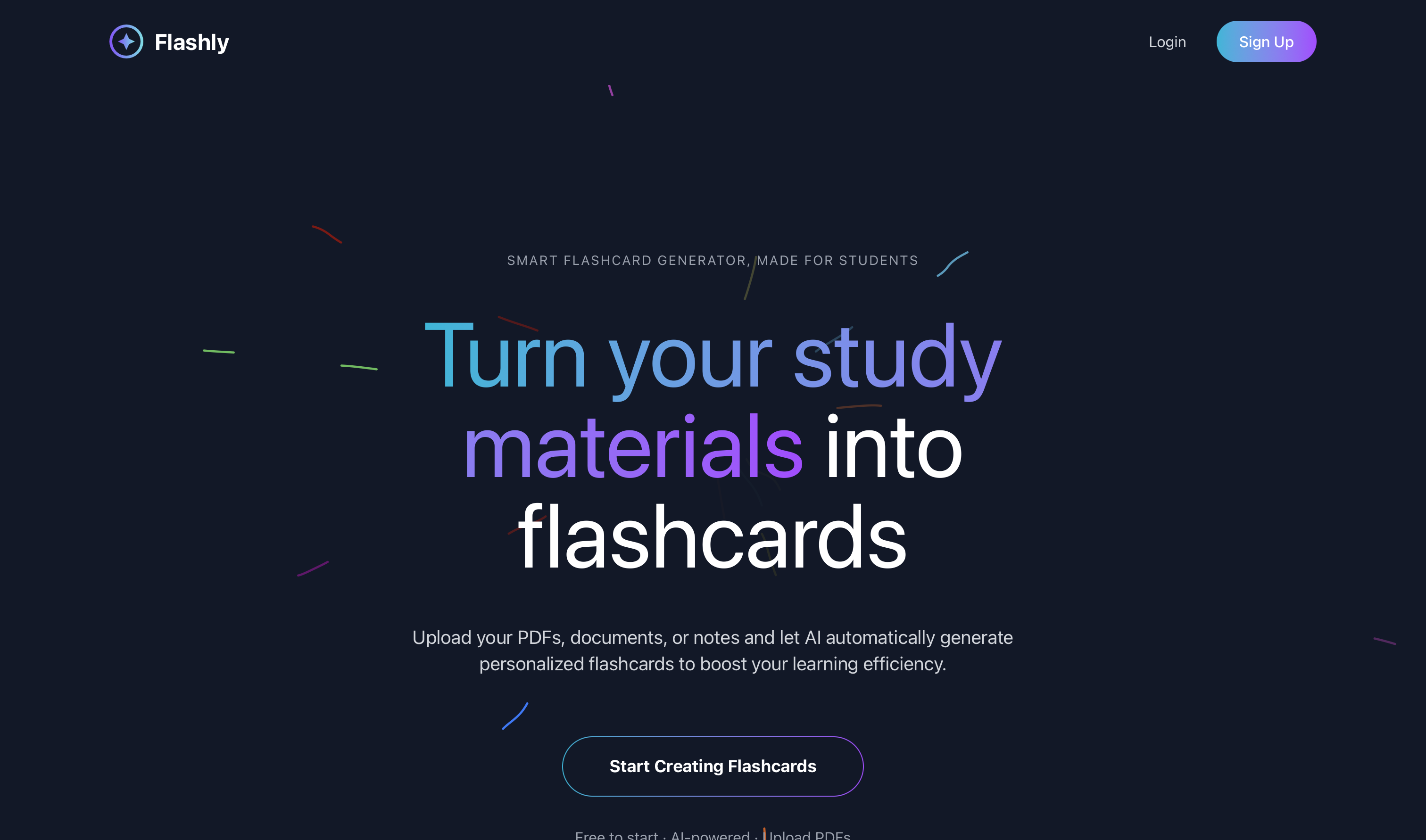
🎯 Flashly
AI-Powered Flashcard Learning Platform
🚀 Live Demo | 📖 Documentation | 🛠️ Setup Guide
Flashly is a modern web application that helps students create, manage, and study with flashcards. Featuring AI-powered content generation from documents using Google's Gemini AI, intuitive study interfaces, and comprehensive flashcard management.
Try it now: https://flashly-rftw.vercel.app/
✨ Features
- 🔐 User Authentication - Secure JWT-based authentication with OAuth support
- 📚 Study Set Management - Create, edit, and organize study sets with descriptions
- 🃏 Flashcard CRUD - Full create, read, update, delete operations for flashcards
- 🤖 AI Generation - Generate flashcards from uploaded documents (PDF, DOC, DOCX, TXT)
- 📱 Responsive Design - Mobile-first design that works on all devices
- 🎨 Modern UI - Dark theme with cyan-purple gradient accents
- 🔍 Preview System - Review and edit AI-generated flashcards before saving
- 📊 Progress Tracking - Track your learning progress and study history
🌐 Live Application
Production URL: https://flashly-rftw.vercel.app/
Demo Features Available:
- ✅ Create account or sign in with GitHub/Google OAuth
- ✅ Upload PDF documents for AI flashcard generation
- ✅ Create and manage custom study sets
- ✅ Interactive flashcard study modes
- ✅ Dark theme responsive design
🛠️ Tech Stack
Frontend
- React 19 - Latest React with hooks and functional components
- React Router DOM - Client-side routing and navigation
- Tailwind CSS 4 - Utility-first CSS framework with latest features
- Framer Motion - Smooth animations and transitions
- Radix UI - Accessible UI components (Avatar, Dropdown, etc.)
- Lucide React - Modern icon library
- React Toastify - Toast notifications for user feedback
- Vite - Fast build tool and development server
Backend
- Python 3.13 - Latest Python runtime
- Flask - Lightweight web framework
- Flask-SQLAlchemy - ORM for database operations
- Flask-CORS - Cross-Origin Resource Sharing support
- Flask-JWT-Extended - JWT token authentication
- Flask-Migrate - Database migrations
- UV Package Manager - Fast Python package management
- Werkzeug - WSGI utility library for password hashing
Database
- PostgreSQL - Primary production database
- SQLAlchemy - Database toolkit and ORM
- UUID Primary Keys - Secure, unique identifiers
- Relationship Management - User ↔ StudySets ↔ Flashcards
AI Integration
- Google Gemini AI - Advanced AI for content generation
- PyMuPDF - PDF text extraction
- File Processing - Support for PDF, DOC, DOCX, TXT formats
- Content Analysis - Intelligent question-answer pair generation
Deployment
- Frontend: Vercel - Serverless deployment with automatic builds
- Backend: Render - Cloud application hosting
- Database: PostgreSQL on Render
- CDN: Vercel Edge Network for global performance
📁 Project Structure
flashly/
├── backend/
│   ├── app/
│   │   ├── __init__.py           # Flask app initialization
│   │   ├── models/               # Database models
│   │   │   ├── user_model.py
│   │   │   ├── studyset_model.py
│   │   │   └── flashcard_model.py
│   │   ├── routes/               # API endpoints
│   │   │   ├── auth_routes.py
│   │   │   ├── studyset_routes.py
│   │   │   └── flashcard_routes.py
│   │   └── controllers/          # Business logic
│   ├── migrations/               # Database migrations
│   ├── utils/
│   │   └── flashly_bot.py       # AI processing class
│   ├── .env                     # Environment variables
│   ├── .env.production          # Production environment
│   ├── config.py                # Application configuration
│   ├── gunicorn.conf.py         # Production server configuration
│   ├── pyproject.toml           # UV dependencies
│   ├── uv.lock                  # UV lock file
│   └── run.py                   # Application entry point
├── frontend/
│   ├── src/
│   │   ├── components/           # Reusable UI components
│   │   │   ├── ui/              # Radix UI components
│   │   │   ├── Navbar.jsx
│   │   │   ├── Features.jsx
│   │   │   ├── Hero.jsx
│   │   │   ├── Footer.jsx
│   │   │   ├── LoginForm.jsx
│   │   │   └── RegisterForm.jsx
│   │   ├── pages/               # Page components
│   │   │   ├── LandingPage.jsx
│   │   │   ├── LoginPage.jsx
│   │   │   ├── RegisterPage.jsx
│   │   │   ├── DashboardPage.jsx
│   │   │   ├── StudySetPage.jsx
│   │   │   ├── AddStudySetPage.jsx
│   │   │   ├── EditStudySetPage.jsx
│   │   │   ├── AddFlashcardPage.jsx
│   │   │   ├── EditFlashcardPage.jsx
│   │   │   ├── GeneratePage.jsx
│   │   │   ├── PreviewGeneratedStudySetPage.jsx
│   │   │   └── NotFoundPage.jsx
│   │   ├── layouts/             # Layout components
│   │   ├── assets/
│   │   │   └── img/            # Images and icons
│   │   ├── lib/                # Utility functions
│   │   └── App.jsx             # Main application component
│   ├── utils/
│   │   └── ProtectedRoutes.jsx # Route protection
│   ├── public/
│   ├── package.json            # Node dependencies
│   ├── components.json         # Shadcn/UI config
│   ├── tailwind.config.js      # Tailwind configuration
│   ├── vercel.json             # Vercel deployment config
│   └── vite.config.js          # Vite configuration
├── .gitignore
└── README.md
🚀 Getting Started
Quick Start - Try the Live Demo
- Visit the live application: https://flashly-rftw.vercel.app/
- Create an account or sign in with GitHub/Google
- Upload a PDF to generate AI flashcards
- Study with your flashcards using the interactive interface
Local Development Setup
Prerequisites
- Node.js 18+ and npm
- Python 3.13+
- UV Package Manager (recommended)
- PostgreSQL (for production)
- Google Gemini API Key (for AI features)
Backend Setup
- Navigate to backend directory
cd backend
- Install UV package manager
curl -LsSf https://astral.sh/uv/install.sh | sh
- Install dependencies
uv sync
- Set up environment variables
   cp .env.example .env
   # Edit .env with your configuration
- Initialize database
   uv run flask db init
   uv run flask db migrate -m "Initial migration"
   uv run flask db upgrade
- Run the backend server
bash
uv run python run.py
Frontend Setup
- Navigate to frontend directory
cd frontend
- Install dependencies
npm install
- Set up environment variables
   # Create .env file with backend URL
   echo "VITE_BACKEND_URL=http://localhost:5000" > .env
- Start development server
bash
npm run dev
Environment Variables
Backend .env file:
# Database Configuration
DATABASE_URL=postgresql://username:password@localhost:5432/flashly

# JWT Configuration
JWT_SECRET_KEY=your-super-secret-jwt-key-here
JWT_ACCESS_TOKEN_EXPIRES=3600

# Google Gemini AI
GEMINI_API_KEY=your-gemini-api-key-here

# Flask Configuration
FLASK_ENV=development
FLASK_DEBUG=True
SECRET_KEY=your-flask-secret-key

# File Upload Configuration
MAX_CONTENT_LENGTH=16777216  # 16MB
UPLOAD_FOLDER=uploads/

# CORS Configuration
FRONTEND_URL=http://localhost:5173
Frontend .env file:
# Backend API URL
VITE_BACKEND_URL=http://localhost:5000
📊 Database Schema
Users Table
CREATE TABLE users (
    id UUID PRIMARY KEY DEFAULT gen_random_uuid(),
    username VARCHAR(80) UNIQUE NOT NULL,
    email VARCHAR(120) UNIQUE NOT NULL,
    password_hash VARCHAR(255) NOT NULL,
    created_at TIMESTAMP DEFAULT CURRENT_TIMESTAMP,
    updated_at TIMESTAMP DEFAULT CURRENT_TIMESTAMP
);
StudySets Table
CREATE TABLE studysets (
    id UUID PRIMARY KEY DEFAULT gen_random_uuid(),
    user_id UUID REFERENCES users(id) ON DELETE CASCADE,
    title VARCHAR(200) NOT NULL,
    description TEXT,
    is_ai_generated BOOLEAN DEFAULT FALSE,
    source_file_name VARCHAR(255),
    created_at TIMESTAMP DEFAULT CURRENT_TIMESTAMP,
    updated_at TIMESTAMP DEFAULT CURRENT_TIMESTAMP
);
Flashcards Table
CREATE TABLE flashcards (
    id UUID PRIMARY KEY DEFAULT gen_random_uuid(),
    user_id UUID REFERENCES users(id) ON DELETE CASCADE,
    studyset_id UUID REFERENCES studysets(id) ON DELETE CASCADE,
    question TEXT NOT NULL,
    answer TEXT NOT NULL,
    created_at TIMESTAMP DEFAULT CURRENT_TIMESTAMP,
    updated_at TIMESTAMP DEFAULT CURRENT_TIMESTAMP
);
🔄 API Endpoints
Authentication
POST /api/auth/register- User registrationPOST /api/auth/login- User loginPOST /api/auth/logout- User logoutGET /api/auth/profile- Get current user profile
Study Sets
GET /api/studysets/- Get all user study setsPOST /api/studysets/- Create new study setGET /api/studysets/:id- Get specific study set with flashcardsPUT /api/studysets/:id- Update study setDELETE /api/studysets/:id- Delete study set
Flashcards
POST /api/studysets/:id/flashcards- Create flashcardsPUT /api/studysets/:id/flashcards- Bulk update flashcardsPOST /api/studysets/:id/flashcards/preview- Generate AI preview from filePOST /api/studysets/:id/flashcards/save-preview- Save preview flashcards
🎨 UI/UX Features
- Dark Theme - Modern dark color scheme with gray-900 background
- Gradient Accents - Cyan to purple gradient branding throughout
- Responsive Navigation - Collapsible mobile menu with smooth animations
- Form Validation - Real-time client and server-side validation
- Toast Notifications - User feedback with react-toastify
- Loading States - Skeleton loaders and progress indicators
- Protected Routes - JWT-based route protection
- Drag & Drop Upload - Intuitive file upload interface
🤖 AI Features
Document Processing
- Multi-format Support - PDF, DOC, DOCX, TXT files
- Text Extraction - Intelligent content parsing with PyMuPDF
- File Validation - Size limits (10MB) and type checking
AI Generation Workflow
- Upload Document - Drag & drop or click to upload
- AI Analysis - Gemini AI processes content and extracts key concepts
- Preview Generation - Generate flashcards with questions and answers
- Review & Edit - Modify generated content before saving
- Save to Database - Approved flashcards saved to user's collection
Smart Features
- Content Analysis - Identifies important concepts and terms
- Question Variety - Generates different types of questions
- Context Awareness - Maintains subject context across flashcards
- Batch Processing - Handle multiple flashcards efficiently
🚀 Deployment
The application is deployed using modern cloud platforms:
Production Deployment
- Frontend: Deployed on Vercel with automatic builds from GitHub
- Backend: Deployed on Render with PostgreSQL database
- Live URL: https://flashly-rftw.vercel.app/
Deploy Your Own Instance
Frontend (Vercel)
- Fork the repository
- Connect to Vercel
- Set environment variables:
VITE_BACKEND_URL=your-backend-url - Deploy automatically
Backend (Render/Railway/Heroku)
- Set environment variables
- Configure start command:
bash gunicorn -c gunicorn.conf.py -b 0.0.0.0:$PORT run:app - Set up PostgreSQL database
- Run migrations on first deploy
🛡️ Security Features
- JWT Authentication - Secure token-based authentication
- OAuth Integration - GitHub and Google OAuth support
- Password Hashing - Werkzeug-based password hashing
- Input Validation - Comprehensive request validation
- CORS Protection - Configurable cross-origin policies
- File Upload Security - Type and size validation
- Protected Routes - Frontend route protection
- Environment Security - Secure handling of API keys and secrets
📱 Mobile Support
- Responsive Design - Mobile-first approach with Tailwind CSS
- Touch Interactions - Optimized for mobile interactions
- Collapsible Navigation - Mobile-friendly navigation menu
- Form Optimization - Mobile-optimized form inputs
- Performance - Optimized for mobile networks
🧪 Testing
Backend Testing
# Run tests
uv run pytest

# Run with coverage
uv run pytest --cov=app
Frontend Testing
# Run tests
npm test

# Run with coverage
npm run test:coverage
🔧 Development Tools
- UV Package Manager - Fast Python dependency management
- Flask-Migrate - Database schema migrations
- Vite - Fast frontend build tool
- ESLint - JavaScript linting
- Tailwind CSS - Utility-first styling
- Radix UI - Accessible component library
🤝 Contributing
- Fork the repository
- Create a feature branch (
git checkout -b feature/amazing-feature) - Commit your changes (
git commit -m 'Add amazing feature') - Push to the branch (
git push origin feature/amazing-feature) - Open a Pull Request
📄 License
This project is licensed under the MIT License - see the LICENSE file for details.
🙏 Acknowledgments
- React Team - For the amazing React framework
- Flask Team - For the lightweight and powerful Flask framework
- Google - For the Gemini AI API
- Tailwind CSS - For the utility-first CSS framework
- Radix UI - For accessible component primitives
- Lucide - For the beautiful icon library
- UV Team - For the fast Python package manager
- Vercel - For seamless frontend deployment
- Render - For reliable backend hosting
Built with ❤️ for students worldwide
Transform your learning with AI-powered flashcards! 🎓✨
Built With
- css
- flask
- html
- javascript
- neon
- postgresql
- python
- react
- render
- tailwind
- vercel

Log in or sign up for Devpost to join the conversation.