Flare-CLI
Debug Faster. Fix Smarter


AI-powered log triage and voice assistant for AWS. Flare pulls CloudWatch logs, identifies anomalous sections using Cordon, generates a root cause analysis with Amazon Nova, and optionally calls the on-call engineer to walk them through it by phone.
Built on three Amazon Nova foundation models: Nova Embeddings for semantic anomaly detection, Nova 2 Lite for reasoning, and Nova 2 Sonic for speech-to-speech voice conversation.
Key Features
- Semantic Log Reduction: Uses Cordon and Nova Embeddings to dynamically compress logs based on anomalous behavior, fitting even massive log streams into token budgets without losing context.
- Root Cause Analysis (RCA): Automatically analyzes anomalous logs via Nova 2 Lite to produce actionable reports (severity, root cause, and next steps) sent immediately to Slack, PagerDuty, or Email.
- Predictive Pre-Fetch: Anticipates the metrics and logs an engineer will likely ask about during an incident, querying CloudWatch in parallel and caching the results to ensure instant answers.
- Interactive Voice Assistant: Calls the on-call engineer using Amazon Connect, delivers the RCA briefing via Nova 2 Sonic speech-to-speech, and seamlessly handles follow-up investigation questions using a retrieve-then-reason pattern.
- Flexible Triggers: Can be triggered by CloudWatch Alarms (reactive triage), EventBridge Schedules (routine monitoring), or Subscription Filters (real-time stream filtering for keywords like ERROR/FATAL).
System Architecture

Amazon Nova Model Usage
- Nova Multimodal Embeddings (
amazon.nova-2-multimodal-embeddings-v1:0): Semantic log anomaly detection via Cordon. - Nova 2 Lite (
us.amazon.nova-2-lite-v1:0): Text reasoning (RCA, pre-fetch planning, follow-up answers). - Nova 2 Sonic (
amazon.nova-2-sonic-v1:0): Real-time speech-to-speech conversation (no separate TTS engine used).
Project Structure & Module Map
flare-CLI/
├── demo/                    # End-to-end sandbox infrastructure (VPC, RDS, ECS Fargate)
├── docs/                    # Detailed documentation and architectural diagrams
├── src/                     # Core application source code
│   └── flare/
│       ├── prompts/         # System prompts for Nova foundation models
│       │   ├── prefetch.txt     # Predictive query planning prompt
│       │   ├── reasoning.txt    # Retrieve-then-reason system prompt
│       │   ├── triage.txt       # RCA generation prompt
│       │   └── voice_system.txt # Lex/Nova Sonic persona definition
│       ├── analyzer.py      # Cordon integration for log reduction
│       ├── budget.py        # Token budget planner (fair-share allocation)
│       ├── caller.py        # Amazon Connect outbound call trigger
│       ├── config.py        # Configuration from environment variables
│       ├── events.py        # Parses alarm/schedule/subscription triggers
│       ├── handler.py       # Orchestrates the full pipeline (Base Stack entry point)
│       ├── logs.py          # Fetches and resolves CloudWatch Log groups
│       ├── notifier.py      # SNS notification publishing
│       ├── prefetch.py      # Predictive pre-fetch (plan + execute + cache)
│       ├── store.py         # DynamoDB incident storage (put/get/update cache)
│       ├── tools.py         # CloudWatch query tools (metrics, logs, status)
│       ├── triage.py        # Nova 2 Lite RCA generation
│       └── voice_handler.py # Voice Lambda handlers (Voice Stack entry point)
├── tests/                   # Unit tests mocking AWS services via `moto`
├── Dockerfile               # Container definition for the Lambda functions
├── Makefile                 # CLI commands for deployment and teardown
├── pyproject.toml           # Python dependencies and metadata
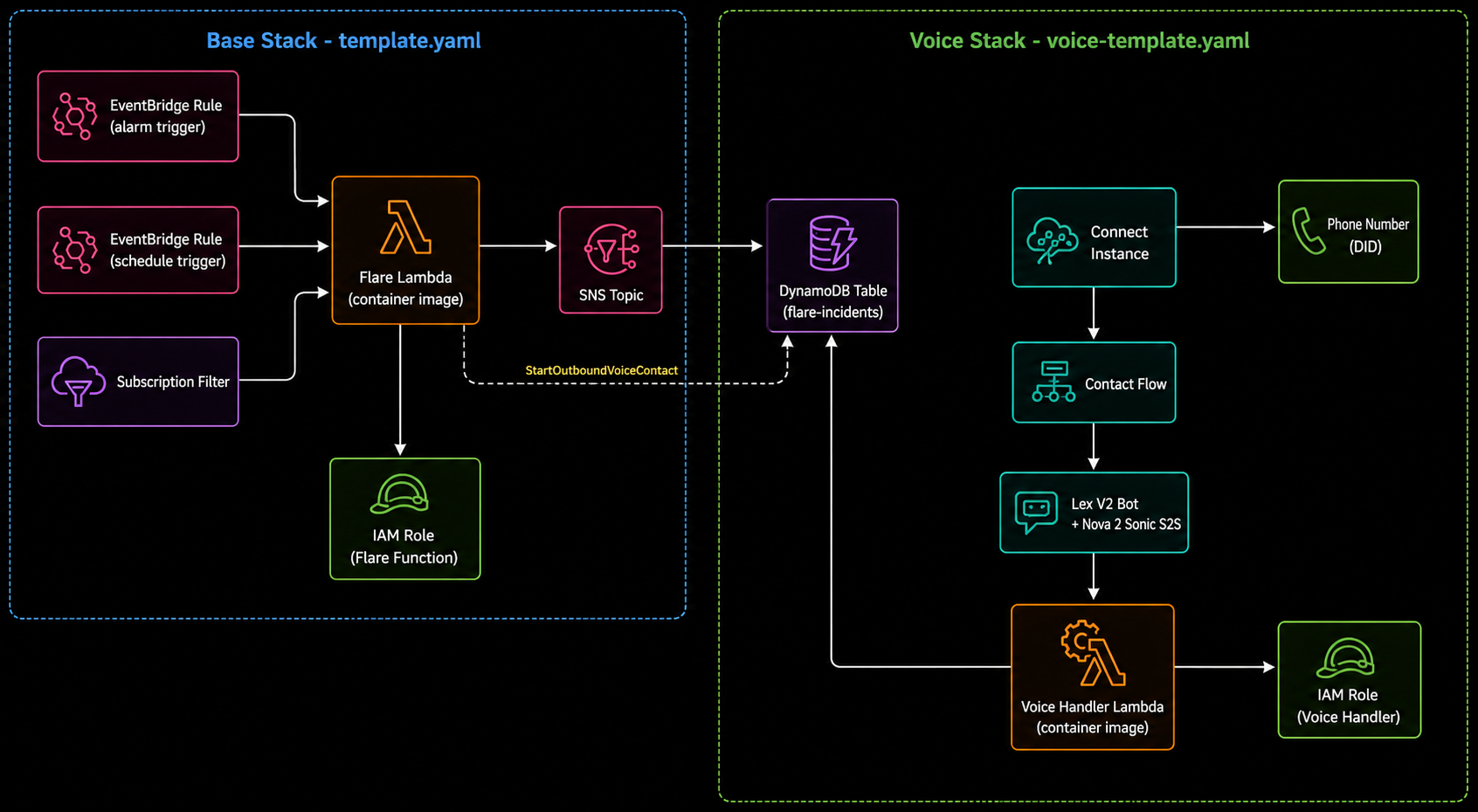
├── template.yaml            # AWS SAM template for the Base Stack
└── voice-template.yaml      # AWS SAM template for the Voice Stack
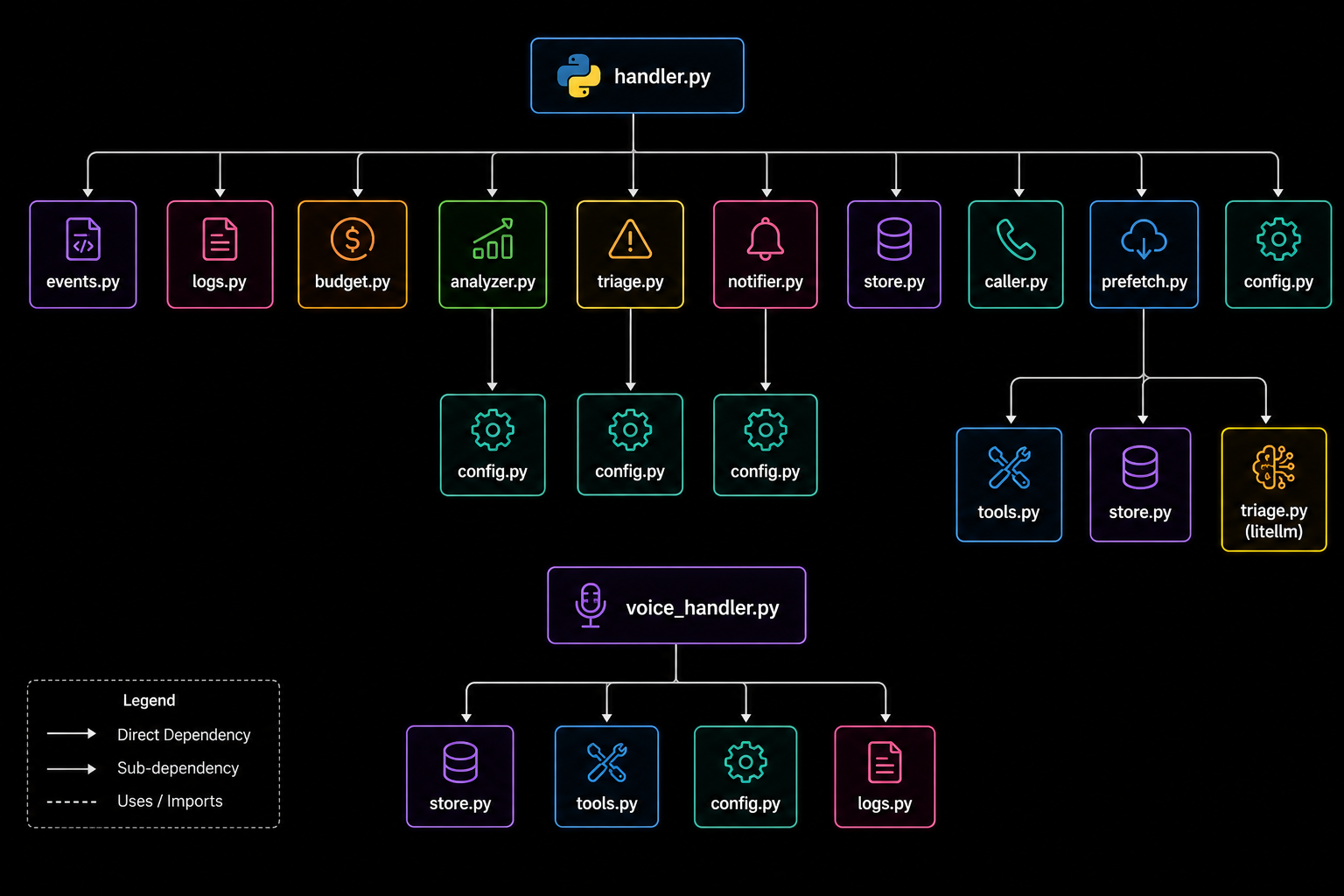
The handler.py is the entry point. It calls modules left-to-right through the pipeline. The voice_handler.py is a separate Lambda entry point, called by Amazon Connect and Lex.
Workflow & Data Flow
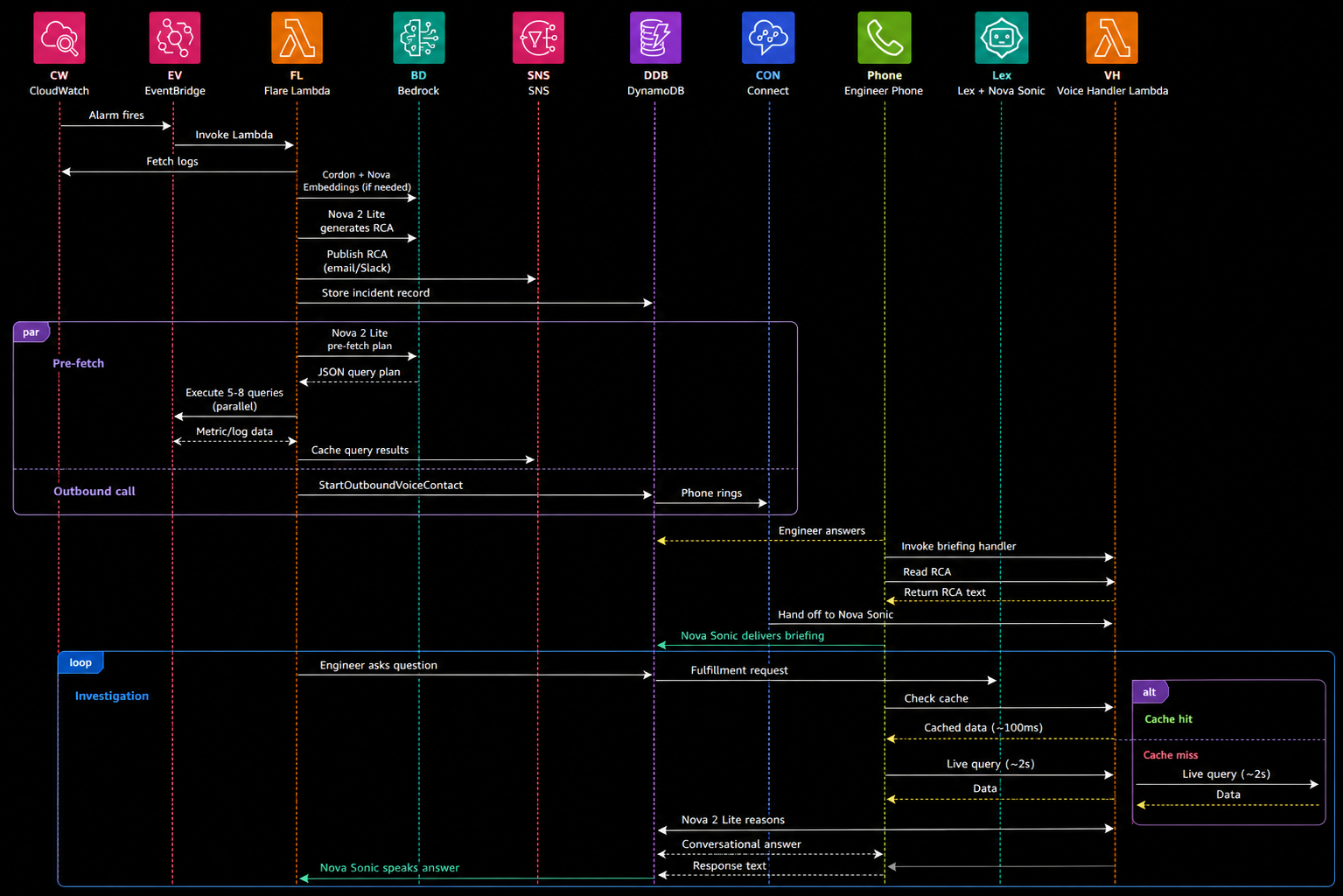
A full end-to-end incident—from an alarm firing to the first answered voice question—takes approximately 45 seconds.
The Three Pipelines
Flare operates across three distinct pipelines that work in sequence:
Pipeline 1: Log Analysis
Turns raw CloudWatch logs into a structured root cause analysis.
- How Cordon works: When logs exceed the token budget, Cordon uses a sliding window approach. Each window is embedded using Nova Multimodal Embeddings, then scored for anomaly using k-nearest-neighbor density estimation. Windows with low density (semantically unusual) are flagged as anomalous.
- Token budget planner: For multiple log groups, budget is allocated via greedy fair-share. Small groups keep full logs; remaining budget is distributed proportionally.
Pipeline 2: Predictive Pre-Fetch
Anticipates what the engineer will ask and caches the answers before they pick up the phone.
- Timeline: Nova Lite returns a pre-fetch plan in ~3s. CloudWatch queries execute in parallel and complete in 5-8s. By the time the engineer answers the phone (15-30s), the investigation data is already cached in DynamoDB.
- Pre-fetch prompt: Nova 2 Lite receives the RCA and returns a structured JSON object listing specific CloudWatch metrics, log queries, and resource status checks it recommends to query.
Pipeline 3: Voice Conversation
Delivers the RCA by phone and supports interactive investigation.
- Retrieve-then-reason: The fulfillment Lambda pulls relevant data (cache or live) and passes the engineer's question, the data, and the full RCA context to Nova 2 Lite for a conversational answer. It never provides canned responses.
- FallbackIntent: Questions not matching a Lex intent are routed to a FallbackIntent which sends all cached data to Nova Lite to figure out what's relevant.
Timing Sequence
System Design (AWS Infrastructure)
Detailed Setup Guide
Prerequisites
- AWS account with Amazon Bedrock access enabled for Amazon Nova models (Embeddings, Lite, Sonic) in
us-east-1orus-west-2. - AWS CLI installed and configured (
aws configure). - Docker or Podman.
- CloudWatch Log Groups you want to monitor must already exist.
Configuration Parameters (Environment Variables)
All configuration is via CloudFormation parameters, which become Lambda environment variables.
| Parameter | Default | Description |
|---|---|---|
ImageUri |
required | ECR container image URI (see make setup-image) |
LogGroupPatterns |
required | Log groups or prefix patterns (e.g., /aws/lambda/*,/my-app/api) |
NotificationEmail |
required | Email for SNS alerts |
EnableSchedule |
false |
Run periodic scheduled scans |
ScheduleExpression |
rate(1 hour) |
EventBridge schedule expression |
EnableAlarmTrigger |
false |
Trigger on CloudWatch Alarm state changes |
AlarmNamePrefix |
"" |
Only react to alarms matching this prefix |
EnableSubscription |
false |
Attach a CloudWatch Logs subscription filter |
SubscriptionLogGroup |
first in list | Which log group to attach the subscription filter to |
SubscriptionFilterPattern |
?ERROR ?FATAL ?CRITICAL |
Filter pattern for subscription trigger |
LookbackMinutes |
30 |
Minutes of logs to pull when triggered |
TokenBudget |
0 (auto) |
Max input tokens; 0 = model context window |
CordonWindowSize |
4 |
Lines per Cordon analysis window |
CordonKNeighbors |
5 |
k-NN neighbors for anomaly scoring |
BedrockRegion |
us-east-1 |
AWS region for Bedrock API calls |
1. Copy the Image to ECR
Lambda requires container images to be stored in ECR. This pulls the image from GHCR and pushes it to your AWS account.
make setup-image REGION=us-east-1
This prints the IMAGE_URI to use in the subsequent deploy commands.
2. Deploy the Base Stack
Deploy with at least one trigger enabled. No triggers are enabled by default. You must explicitly enable at least one.
make deploy \
  IMAGE_URI=<your-ecr-uri> \
  [email protected] \
  LOG_GROUP_PATTERNS="/aws/lambda/*" \
  ENABLE_ALARM=true \
  ALARM_NAME_PREFIX=prod-
After deploying, confirm the SNS subscription via your email inbox.
3. Log Group Patterns Convention
The LogGroupPatterns parameter accepts exact names and prefix patterns (trailing *):
| Service | Log group pattern Example |
|---|---|
| Lambda | /aws/lambda/<function-name> |
| ECS | /aws/ecs/<cluster-name>/<service-name> |
| RDS | /aws/rds/instance/<instance-id>/<log-type> |
| API Gateway | /aws/apigateway/<api-id>/<stage> |
| VPC Flow Logs | /aws/vpc/flowlogs |
4. Notifications & Tuning
- Slack: Add an SNS subscription for your Slack webhook via the AWS CLI or Console pointing to the deployed SNS Topic.
- PagerDuty: Use PagerDuty's native AWS SNS integration endpoint.
- Token Budget: Set
--parameter-overrides TokenBudget=100000(e.g., 100K tokens max). Cordon dynamically reduces logs to the most anomalous sections when they exceed the budget. - Cordon Parameters:
CordonWindowSize(default 4 lines) andCordonKNeighbors(default 5).
5. Deploy the Voice Pipeline (Optional)
The Voice Pipeline adds Amazon Connect, Lex V2, and Nova 2 Sonic. Deploy the voice stack separately if needed:
make deploy-voice \
  IMAGE_URI=<your-ecr-uri> \
  ONCALL_PHONE="+15551234567" \
  LOG_GROUP_PATTERNS="/aws/lambda/*"
Note: Or deploy both at once using make deploy-all with all base and voice environment variables.
6. Verify & Test Voice
Check the voice stack outputs:
aws cloudformation describe-stacks --stack-name flare-voice --query 'Stacks[0].Outputs' --output table
Verify Nova Sonic is actively configured on the Lex Bot:
aws lexv2-models describe-bot-locale --bot-id <FlareBotId> --bot-version <latest-version> --locale-id en_US --region us-east-1 --query 'unifiedSpeechSettings'
7. Teardown
make teardown-voice  # removes voice stack only
make teardown        # removes base stack only
make teardown-all    # removes both voice and base stacks completely
Error Handling & Troubleshooting
The system is designed so that every failure path still results in the engineer receiving the RCA via email/Slack if voice fails.
| Failure | Impact | Fallback |
|---|---|---|
| Nova Sonic unavailable / Lex error | Voice conversation fails | Contact flow disconnects. SNS notification already sent as fallback. |
| Connect call fails (no answer) | Engineer not reached by phone | SNS email/Slack is the primary channel; voice is supplementary. |
| Fulfillment Lambda timeout (8s) | One question unanswered | Catches exception, returns "I ran into an issue, try asking again." |
| DynamoDB read failure | No RCA for briefing | Briefing Lambda returns generic "incident detected, check your email" message. |
| Pre-fetch fails | No cached data | Fulfillment Lambda falls back to live CloudWatch queries with 5-second timeout. |
| Nova 2 Lite reasoning fails | Raw data instead of analysis | Catches exception, returns a basic data summary rather than LLM-generated answer. |
| Cordon / embeddings fail | No log reduction | Falls back to truncating logs to fit token budget. RCA still generated from partial data. |
Common Setup Errors:
- "CREATE_FAILED on FlareConnectInstance": Connect instance creation is heavily rate-limited per account. Wait and retry or reuse an existing instance by appending
CONNECT_INSTANCE_ID=<id>. - "CREATE_FAILED on FlarePhoneNumber": DID phone number availability varies by region. Try deploying the Voice Stack in a different region.
Infrastructure & Security Details
- Read-only operations: The voice pipeline only reads CloudWatch metrics, logs, and resource status. No remediation actions are taken. This is framed as an intentional safety feature.
- IAM least-privilege: The Flare Lambda role has strict write access to DynamoDB and Connect outbound calls only. The Voice Handler role has strictly read access. Neither role can modify infrastructure.
- Data retention: Incident records in DynamoDB have a strict 7-day TTL. No long-term storage of log data or conversation transcripts is kept.
DynamoDB Cache Schema
Table: flare-incidents-{stack-name}
Primary Key: incident_id (String, UUID)

Attributes:
  rca              String    Full RCA text from Nova 2 Lite
  alarm_name       String    CloudWatch alarm name
  log_groups       List      Log group names from config
  trigger_type     String    alarm | subscription | schedule
  timestamp        String    ISO 8601
  ttl              Number    Epoch seconds (7-day expiry)
  prefetch_status  String    pending | complete | failed
  cached_data      String    JSON blob containing:
    metrics[]        query_key, namespace, metric_name, dimensions, datapoints
    logs[]           query_key, log_group, filter_pattern, event_count, sample_lines
    status[]         query_key, resource_type, resource_id, health, details
Each cached item includes a query_key, a human-readable label used for fuzzy matching against the engineer's question.
Prompt Engineering
Flare relies on highly tuned system prompts (src/flare/prompts/) to orchestrate the AI agents:
triage.txt: Guides Nova 2 Lite to generate the Root Cause Analysis (RCA). It handles both full and reduced logs, adjusts its tone based on the trigger type (alarm vs. schedule), and enforces a strict structured output along with a conversational "Spoken Summary" that spells out acronyms (e.g., "us-east-1" to "U S east 1") for the voice call.prefetch.txt: Instructs the LLM to act as an investigator predicting the engineer's next steps. It outputs a rigid JSON schema specifying exact CloudWatch metrics, log queries, and read-onlyboto3resource lookups to execute in parallel.reasoning.txt: Used during the live voice call for the retrieve-then-reason step. It enforces short, spoken-word sentences (under 15 words), prevents the use of markdown formatting or lists, forbids yes/no questions, and teaches the AI to keep the conversation naturally open-ended.voice_system.txt: Defines the overarching persona for the Lex V2 / Nova 2 Sonic bot. It establishes Flare as a read-only, conversational triage assistant that calmly briefs the engineer during high-stress situations.
Development
Setup
pip install -e ".[dev]"
pre-commit install
Unit Tests
pytest
All tests run locally with zero AWS cost using moto and unittest.mock.
Lint and Type Check
make lint
Demo Infrastructure
The demo/ directory contains infrastructure for end-to-end testing with a real ECS service and RDS database. It allows you to safely simulate a network partition by revoking security group access, triggering the alarm, and executing Flare in real-time.
make deploy-demo      # deploys VPC, RDS, ECS Fargate service
make break-demo       # revokes RDS security group (simulates network partition & triggers alarm)
make fix-demo         # restores RDS security group
make teardown-demo    # removes all demo resources
Inspiration
On-call shifts are stressful. When a PagerDuty alert goes off at 3 AM, an engineer's first 5-10 minutes are spent groggily scrolling through massive CloudWatch log streams, trying to locate the actual error amidst gigabytes of noise, and querying metrics to understand the blast radius. We wanted to build an AI agent that doesn't just send a generic alert, but actively begins the investigation before the engineer even wakes up. We were inspired by the idea of an "AI SRE" that reads the logs, finds the needle in the haystack using semantic search, figures out what happened, and then calls you on the phone to brief you on the incident—ready to answer follow-up questions in real-time.
What it does
Flare is an AI-powered log triage and voice assistant for AWS. When an alarm fires or a bad log pattern is detected, Flare kicks into gear:
- It pulls the relevant logs and compresses them using semantic anomaly detection (Cordon + Nova Embeddings) to fit within token limits without losing context.
- It uses Amazon Nova 2 Lite to generate a structured Root Cause Analysis (RCA) and sends it to your team via Slack, PagerDuty, or Email.
- In parallel, it predicts what metrics or logs the engineer will want to see next and "pre-fetches" them into a DynamoDB cache.
- Finally, it uses Amazon Connect and Nova 2 Sonic to call the on-call engineer by phone, delivering the RCA briefing verbally, and allowing the engineer to ask follow-up questions about the system state directly to the AI, which answers using a retrieve-then-reason pipeline.
How we built it
We built Flare entirely serverless on AWS. The core logic runs on AWS Lambda, triggered by EventBridge or CloudWatch.
- We used Amazon Nova Foundation Models via Bedrock as the brains of the operation: Nova Multimodal Embeddings (to find anomalies in logs), Nova 2 Lite (for rapid reasoning, RCA generation, and query planning), and Nova 2 Sonic (for the real-time speech-to-speech voice interaction).
- We leveraged the open-source Cordon library to perform semantic log reduction.
- For the voice component, we deployed an Amazon Connect instance linked to a Lex V2 Bot. The bot uses a custom Fulfillment Lambda that accesses our DynamoDB cache of pre-fetched CloudWatch data, allowing the bot to answer engineering questions interactively.
- Everything is codified using AWS SAM / CloudFormation templates, and tested using
motofor local AWS mocking.
Challenges we ran into
- Context Window Limits vs. Massive Logs: AWS logs can easily exceed hundreds of thousands of tokens during a major outage. Feeding raw logs into an LLM wasn't viable. We overcame this by integrating Cordon to semantically compress logs, extracting only the anomalous windows using density estimation.
- Speed & Latency for Voice: When you answer a phone call, you expect an immediate response. Waiting 15 seconds for an LLM to query CloudWatch while on the phone was unacceptable. We solved this with our "Predictive Pre-Fetch" pipeline: the AI guesses what you'll ask and caches the CloudWatch data while the phone is still ringing, bringing response times down to under a second.
- Conversational Guardrails: LLMs love to output Markdown, bulleted lists, and long paragraphs. We had to heavily engineer our
reasoning.txtprompts to force Nova 2 Lite to speak in short, punchy sentences (under 15 words) suitable for a stressed on-call engineer, explicitly banning lists and "yes/no" follow-up questions.
Accomplishments that we're proud of
- Successfully orchestrating three different specialized Amazon Nova models in a single automated pipeline.
- Reducing end-to-end incident triage time from an alarm firing to the engineer getting a spoken RCA on their phone to just 45 seconds.
- Designing the Predictive Pre-Fetch system—it feels like magic when the AI already knows the CPU utilization metric before you even ask for it on the call.
- Ensuring the entire platform is strictly read-only, making it incredibly safe to deploy in production environments without fear of the AI accidentally mutating infrastructure.
What we learned
- Prompt engineering for voice (speech-to-speech) is fundamentally different from text-based chatbots. You must meticulously train the model on pacing, brevity, and spoken-word formatting (e.g., spelling out acronyms like "API" or "AWS").
- Semantic log reduction (using embeddings instead of just regex filtering) is incredibly powerful for identifying subtle, cascading failures that traditional keyword alerts miss.
What's next for Flare
- Multi-Cloud Support: Extending log ingestion and metric querying beyond CloudWatch to support Datadog, Splunk, and GCP Operations.
- Auto-Remediation Suggestions: While Flare is strictly read-only right now, we plan to add a feature where Flare can propose AWS CLI commands or Terraform changes to fix the root cause, requiring only a one-click human approval to execute.
- Interactive Runbooks: Allowing teams to upload their internal standard operating procedures (SOPs) into a knowledge base (using Knowledge Bases for Amazon Bedrock) so Flare can directly quote internal documentation during the voice call.


Log in or sign up for Devpost to join the conversation.